
Mitarbeiter-WiFi Captive Portal: Onboarding und Authentifizierung von Mitarbeitern
Eine umfassende technische Referenz für IT-Verantwortliche zur Konzeption und Bereitstellung von Mitarbeiter-WiFi Captive Portals. Dieser Leitfaden behandelt EAP-TLS-Authentifizierung, BYOD-Onboarding, VLAN-Segmentierung und Bandbreitenmanagement zur Steigerung der betrieblichen Effizienz und Minimierung von Sicherheitsrisiken.
Diesen Leitfaden anhören
Podcast-Transkript ansehen
Teil unserer Kernserie: Captive Portal Guide →
Executive Summary
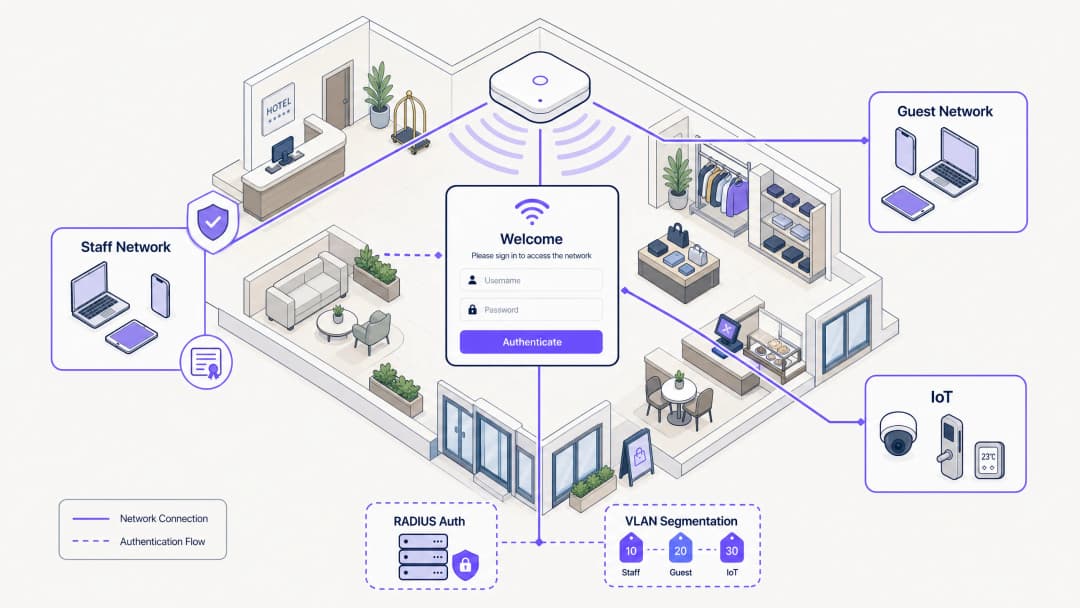
Für IT-Manager und Netzwerkarchitekten im Gastgewerbe, im Einzelhandel und in großen öffentlichen Einrichtungen stellt die Verwaltung des Netzwerkzugriffs für Mitarbeitergeräte eine erhebliche Sicherheits- und Betriebsherausforderung dar. Die Verwendung gemeinsam genutzter Pre-Shared Keys (PSK) ist grundlegend unsicher. Sie führt zu einem hohen Betriebsaufwand, da ehemalige Mitarbeiter und nicht verwaltete Geräte unbegrenzt Zugriff auf das Netzwerk behalten. Dieser Leitfaden beschreibt einen praktischen und sicheren Ansatz für das Onboarding von Mitarbeiter-WiFi über einen Captive Portal-Prozess, der in Ihren Identity Provider integriert ist. Mit dieser Architektur leiten Sie nicht verwaltete BYOD-Geräte sicher in ein 802.1X-Netzwerk um. Sie setzen Nutzungsrichtlinien durch und gewährleisten Compliance – ganz ohne aufwendige MDM-Registrierung (Mobile Device Management). Für Standorte, die bereits Gäste-WiFi und WiFi-Analysen nutzen, bietet die Erweiterung des sicheren Onboardings auf Mitarbeitergeräte eine einheitliche und leistungsstarke Netzwerkmanagement-Strategie.
Diesen Leitfaden anhören
Technische Details
Die Grundlage für ein sicheres Mitarbeiter-Onboarding ist der Übergang von herkömmlichen Authentifizierungsmethoden zu EAP-TLS (Extensible Authentication Protocol-Transport Layer Security). EAP-TLS ist der Branchenstandard für die sichere WiFi-Authentifizierung und basiert auf digitalen Zertifikaten anstelle von Passwörtern. Die Herausforderung bei Mitarbeiternetzwerken – insbesondere in BYOD-Umgebungen – besteht darin, diese Zertifikate auf nicht verwaltete Geräte zu verteilen.
Self-Service-Onboarding-Prozess
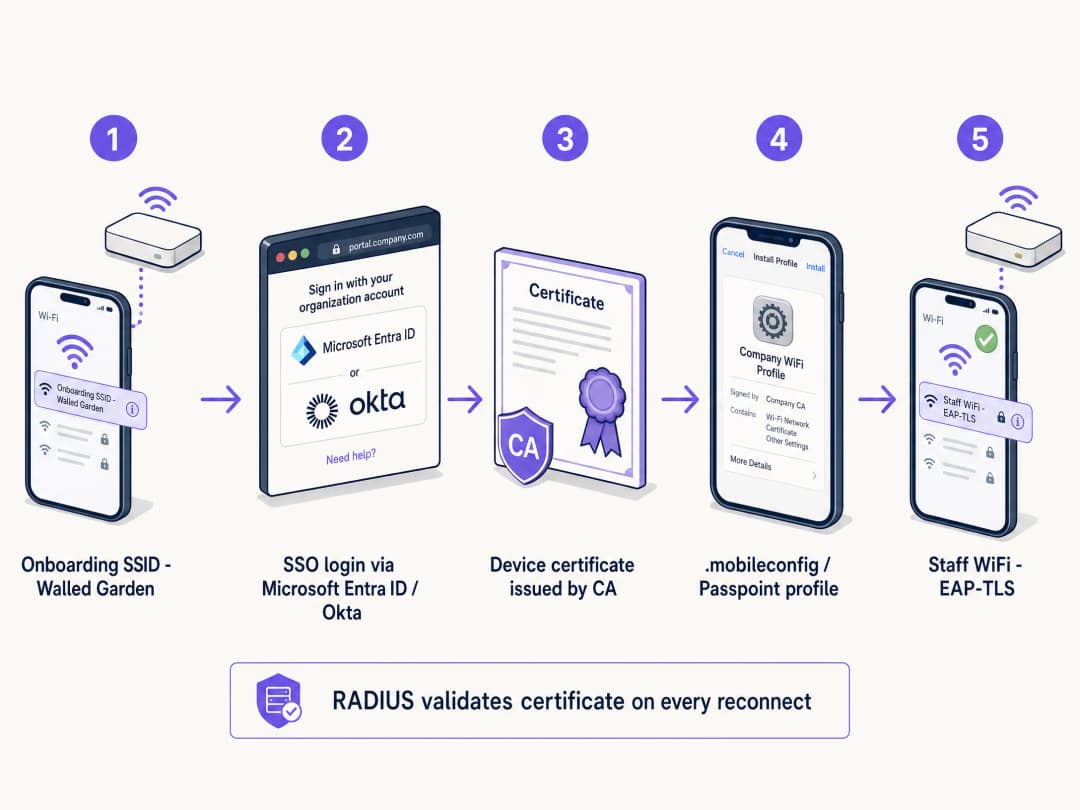
Um dies zu ermöglichen, richten Standorte ein Self-Service-Onboarding-Portal ein. Dieser Prozess folgt einem strukturierten Ablauf, um eine sichere Zertifikatsbereitstellung zu gewährleisten:
- Erstverbindung: Der Benutzer verbindet sein persönliches Gerät mit einer dedizierten, offenen Bereitstellungs-SSID. Dieses Netzwerk fungiert als Walled Garden. Es beschränkt den Zugriff auf das Onboarding-Portal und den Identity Provider (IdP).
- Authentifizierung: Der Benutzer wird zum Captive Portal weitergeleitet und authentifiziert sich dort mit seinen Unternehmensdaten. Dies erfolgt über eine SAML- oder SCIM-Integration mit IdPs wie Microsoft Entra ID, Okta oder Google Workspace.
- Zertifikatserstellung: Nach erfolgreicher Authentifizierung wird ein eindeutiges, gerätespezifisches Client-Zertifikat generiert.
- Profilinstallation: Ein Konfigurationsprofil wird auf das Gerät übertragen. Dieses Profil enthält das Client-Zertifikat, das Root-CA-Zertifikat und die Netzwerkeinstellungen für die sichere 802.1X-SSID.
- Sichere Verbindung: Das Gerät trennt automatisch die Verbindung zur Bereitstellungs-SSID und verbindet sich über das neu installierte Zertifikat mit der sicheren Unternehmens-SSID für die EAP-TLS-Authentifizierung.
Warum gemeinsam genutzte PSKs in Mitarbeiternetzwerken versagen
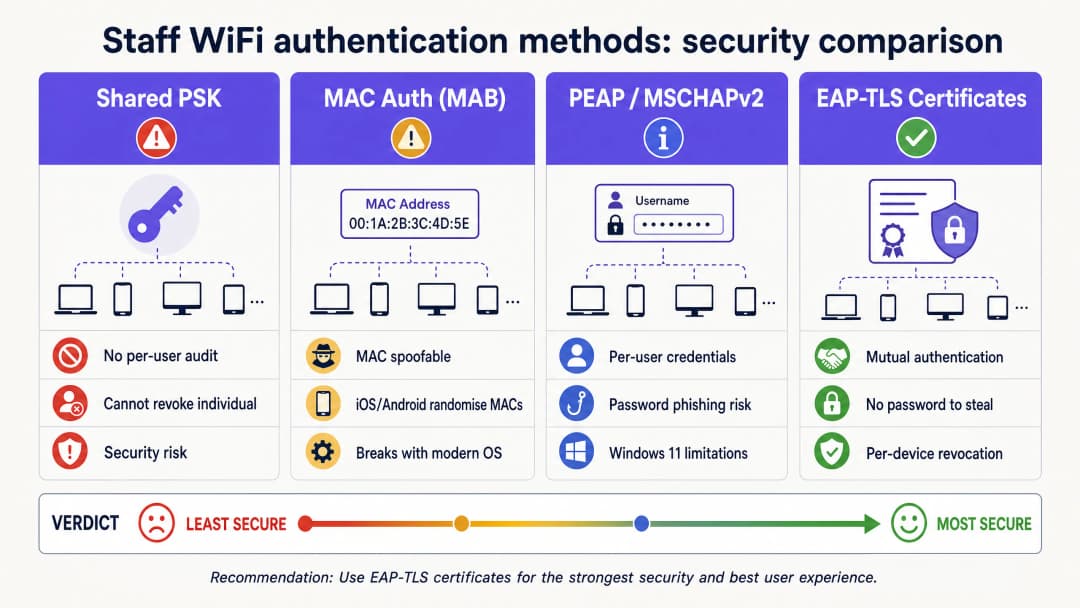
In der Vergangenheit verließen sich Standorte beim Mitarbeiterzugriff auf Pre-Shared Keys (PSKs). Dieser Ansatz ist in modernen Unternehmensumgebungen grundlegend fehlerhaft. Einmal geteilte PSKs stellen ein Sicherheitsrisiko dar. Sie bieten keine persönliche Zuordbarkeit. Geht ein Gerät verloren oder verlässt ein Mitarbeiter das Unternehmen, muss das Passwort für das gesamte Netzwerk geändert werden. In einem Hotel mit 200 Zimmern und 80 Mitarbeitern wurde das gemeinsame Passwort wahrscheinlich bereits mit rund 80 Personen, deren Partnern und mindestens drei ehemaligen Mitarbeitern geteilt. Das ist kein sicheres Netzwerk, sondern eine offene Tür.
Haben Sie Fragen zu Ihrem spezifischen Setup?
Unser Team arbeitet mit Standortbetreibern, IT-Managern und Netzwerktechnikern an über 80.000 Standorten zusammen. Buchen Sie ein 20-minütiges Gespräch und wir zeigen Ihnen, wie andere diese Herausforderungen gelöst haben.
Implementierungsleitfaden
Die Bereitstellung eines sicheren Mitarbeiter-WiFi Captive Portals erfordert eine sorgfältige Planung und Ausführung. Befolgen Sie diese Schritte für eine erfolgreiche Einführung in Hotels, im Einzelhandel oder in Stadien.
Schritt 1: Zugriffsrichtlinien und Segmentierung definieren
Bevor Sie die technische Infrastruktur einrichten, definieren Sie klar, worauf Mitarbeitergeräte zugreifen dürfen. BYOD-Geräte sind nicht verwaltet. Sie haben keine Kontrolle über Betriebssystem-Updates, den Antiviren-Status oder installierte Apps. Daher müssen sie als nicht vertrauenswürdig eingestuft werden.
Platzieren Sie Mitarbeitergeräte in einem dedizierten VLAN. Dieses VLAN sollte Internetzugang bieten und den Zugriff auf bestimmte interne Anwendungen beschränken, die für die jeweilige Rolle erforderlich sind – wie Web-Schnittstellen für Kassensysteme im Einzelhandel oder Housekeeping-Apps im Gastgewerbe. Platzieren Sie BYOD-Geräte niemals im selben VLAN wie Unternehmensserver oder verwaltete Geräte. Weitere Informationen zur Absicherung von Back-of-House-Netzwerken finden Sie in unserem Leitfaden Mitarbeiter-WiFi-Richtlinien im Einzelhandel: Schutz des Back-of-House-Netzwerks oder in der portugiesischen Version Políticas de WiFi para Colaboradores no Retalho: Proteger as Redes Back-of-House.
Schritt 2: RADIUS-Server und IdP-Integration konfigurieren
Ihr RADIUS-Server ist das Herzstück des 802.1X-Authentifizierungsprozesses. Er muss so konfiguriert sein, dass er EAP-TLS unterstützt und in Ihren Identity Provider integriert ist.
Verbinden Sie Ihren RADIUS-Server über SAML oder LDAP mit Ihrem IdP. Dies stellt sicher, dass sich nur aktive Mitarbeiter authentifizieren und Zertifikate erhalten können. Wenn ein Mitarbeiter in Microsoft Entra ID oder Okta deaktiviert wird, akzeptiert der RADIUS-Server beim nächsten Verbindungsversuch dessen Anmeldedaten oder Zertifikat nicht mehr. Richten Sie eine interne CA ein oder nutzen Sie eine in der Cloud gehostete PKI, um Client-Zertifikate auszustellen. Der RADIUS-Server muss dieser CA vertrauen.
Schritt 3: Onboarding-Portal gestalten und AUP durchsetzen
Das Onboarding-Portal ist der erste Berührungspunkt des Benutzers mit dem System. Es muss intuitiv gestaltet und klar gebrandet sein. Bieten Sie auf den Portalseiten Schritt-für-Schritt-Anleitungen. Benutzer müssen genau wissen, worauf sie klicken müssen und was als Nächstes passiert.
Das Captive Portal ist der ideale Ort, um die Zustimmung zu den Nutzungsrichtlinien (Acceptable Use Policy, AUP) einzufordern. Bevor Mitarbeiter Zugriff auf das Netzwerk erhalten, zeigt das Portal die Richtlinie an und verlangt eine ausdrückliche Bestätigung. Dies erstellt ein zeitgestempeltes, prüfbares Protokoll der Richtlinienakzeptanz, was für die Einhaltung von GDPR und PCI-DSS von entscheidender Bedeutung ist.
Best Practices
Um eine sichere und einfach zu verwaltende Bereitstellung zu gewährleisten, befolgen Sie diese Best Practices der Branche.
Kurzlebige Zertifikate implementieren
Da BYOD-Geräte nicht verwaltet werden, ist das Risiko kompromittierter Geräte im Netzwerk höher. Minimieren Sie dieses Risiko durch die Ausstellung kurzlebiger Zertifikate. Statt Zertifikate mit einer Gültigkeit von drei Jahren auszustellen, nutzen Sie eine Laufzeit von 90 Tagen. Nach Ablauf des Zertifikats müssen sich Benutzer erneut über das Onboarding-Portal authentifizieren. Dies bereinigt das Netzwerk automatisch von inaktiven Geräten und stellt sicher, dass nur aktive Mitarbeiter Zugriff behalten.
Passpoint (Hotspot 2.0) nutzen
Nutzen Sie Passpoint für ein nahtloses Onboarding-Erlebnis, insbesondere auf Android-Geräten. Passpoint ermöglicht es Geräten, sichere Netzwerke automatisch zu erkennen und zu authentifizieren. Nach der Ersteinrichtung müssen Benutzer keine SSID manuell auswählen oder mit einem Captive Portal interagieren. Dies reduziert Hürden erheblich und verbessert das Benutzererlebnis.
Bandbreitenmanagement mit Purple Shield
In Umgebungen mit hoher Mitarbeiterdichte ist der Kampf um Bandbreite im Mitarbeiternetzwerk eine echte betriebliche Herausforderung. Purple Shield arbeitet auf DNS-Ebene und blockiert Werbeinhalte, Tracking-Skripte und Malware-Domains, bevor sie das Gerät erreichen. Dadurch lässt sich das gesamte Download-Datenvolumen im Netzwerk um bis zu 40 % reduzieren. Für Mitarbeitergeräte bedeutet dies schnellere Ladezeiten, geringeren Akkuverbrauch und mehr verfügbare Bandbreite für geschäftskritischen Datenverkehr.
Fehlerbehebung und Risikominimierung
Selbst bei einem gut konzipierten System können Probleme auftreten. Das Verständnis häufiger Fehlerquellen ist entscheidend für eine schnelle Behebung.
Walled-Garden-Konfiguration
Die Bereitstellungs-SSID muss streng kontrolliert werden. Ist der Walled Garden zu weit gefasst, bleiben Benutzer möglicherweise einfach mit dem Bereitstellungsnetzwerk verbunden, um auf das Internet zuzugreifen, und umgehen so den sicheren Onboarding-Prozess. Stellen Sie sicher, dass die Bereitstellungs-SSID nur den Zugriff auf das Onboarding-Portal, die IdP-Authentifizierungsendpunkte und die erforderlichen Zertifikats-Download-Server erlaubt. Jeder andere Datenverkehr muss blockiert werden.
Android-Fragmentierung
Apple iOS-Geräte verarbeiten Konfigurationsprofile sehr einheitlich. Android hingegen ist stark fragmentiert. Verschiedene Hersteller und Betriebssystemversionen handhaben WiFi-Profile und die Zertifikatsinstallation unterschiedlich. Um dieses Problem zu lösen, stellen Sie sicher, dass Ihre Onboarding-Lösung klare, betriebssystemspezifische Anweisungen bietet, und nutzen Sie nach Möglichkeit Passpoint.
ROI und geschäftliche Auswirkungen
Die Implementierung eines sicheren Mitarbeiter-WiFi Captive Portals bietet einen erheblichen ROI durch verbesserte Sicherheit, geringeren IT-Aufwand und gesteigerte Mitarbeiterproduktivität.
Durch das Self-Service-Onboarding der Benutzer sinkt die Anzahl der IT-Support-Tickets im Zusammenhang mit WiFi-Passwörtern und Verbindungsproblemen drastisch. Der Wechsel von PSK zu EAP-TLS minimiert das Risiko unbefugter Netzwerkzugriffe und Datenpannen erheblich. Dies ist entscheidend für die Einhaltung von Standards wie PCI-DSS und GDPR. Mitarbeiter können ihre persönlichen Geräte schnell und sicher verbinden, um auf benötigte Tools zuzugreifen. Das steigert die Gesamteffizienz und Zufriedenheit in Branchen wie Einzelhandel, Gesundheitswesen, Gastgewerbe und Transportwesen.
Schlüsseldefinitionen
Captive Portal
Eine Webseite, die ein Benutzer eines öffentlich zugänglichen oder Unternehmensnetzwerks anzeigen und mit der er interagieren muss, bevor ihm Zugriff gewährt wird.
Wird in Mitarbeiternetzwerken als Gateway für die Identitätsprüfung, AUP-Akzeptanz und Zertifikatsbereitstellung verwendet.
EAP-TLS
Extensible Authentication Protocol-Transport Layer Security. Eine 802.1X-Authentifizierungsmethode, die digitale Zertifikate sowohl auf dem Client als auch auf dem Server verwendet.
Die sicherste WiFi-Authentifizierungsmethode, die Passwörter überflüssig macht und den Diebstahl von Anmeldedaten verhindert.
RADIUS
Remote Authentication Dial-In User Service. Ein Netzwerkprotokoll, das eine zentrale Verwaltung von Authentifizierung, Autorisierung und Accounting bietet.
Der zentrale Server, der Gerätezertifikate mit dem Identity Provider abgleicht, bevor er Netzwerkzugriff gewährt.
VLAN-Segmentierung
Die Praxis, ein physisches Netzwerk in mehrere logische Netzwerke aufzuteilen, um den Datenverkehr zu isolieren.
Unerlässlich, um nicht vertrauenswürdige BYOD-Mitarbeitergeräte von sensiblen Unternehmensservern und POS-Systemen zu trennen.
Passpoint (Hotspot 2.0)
Ein Branchenstandard, der ein nahtloses und sicheres WiFi-Onboarding und -Roaming ermöglicht, ohne dass nach der Ersteinrichtung eine manuelle SSID-Auswahl oder eine Interaktion mit dem Captive Portal erforderlich ist.
Verbessert das Benutzererlebnis beim Mitarbeiter-Onboarding, insbesondere auf Android-Geräten.
Walled Garden
Eine eingeschränkte Netzwerkumgebung, die den Benutzerzugriff auf bestimmte Webinhalte und -dienste kontrolliert.
Wird auf der Bereitstellungs-SSID verwendet, um sicherzustellen, dass Mitarbeiter nur auf das Onboarding-Portal und den IdP zugreifen können, wodurch ein Umgehen der Sicherheitskonfiguration verhindert wird.
SCIM
System for Cross-domain Identity Management. Ein offener Standard zur Automatisierung des Austauschs von Benutzeridentitätsinformationen zwischen Identitätsdomänen.
Ermöglicht die automatische Deaktivierung des Netzwerkzugriffs, wenn ein Mitarbeiter das Unternehmen verlässt und im IdP deaktiviert wird.
iPSK
Identity Pre-Shared Key. Eine Sicherheitsfunktion, die jedem einzelnen Benutzer oder Gerät ein eindeutiges WiFi-Passwort zuweist.
Wird als Alternative zu 802.1X für Headless-Geräte oder externe Dienstleister verwendet, die kein Zertifikat installieren können.
Ausgearbeitete Beispiele
Ein Hotel mit 200 Zimmern muss 80 Mitarbeitern aus Housekeeping und Haustechnik WiFi-Zugang gewähren, die ihre persönlichen Smartphones für den Zugriff auf das cloudbasierte Property Management System (PMS) nutzen. Das Hotel verwendet derzeit ein einziges WPA2-Passwort, das seit drei Jahren nicht geändert wurde. Wie sollte der IT-Manager dieses Netzwerk absichern, ohne MDM-Software für persönliche Geräte anzuschaffen?
- Erstellen Sie eine neue offene Bereitstellungs-SSID (z. B. „Hotel-Staff-Onboard“) mit einem strengen Walled Garden, der nur Zugriff auf das Captive Portal und Microsoft Entra ID erlaubt.
- Konfigurieren Sie ein Captive Portal, das einen SSO-Login über Entra ID erfordert und die Nutzungsrichtlinien (AUP) für Mitarbeiter anzeigt.
- Generieren Sie nach erfolgreichem Login und Akzeptieren der AUP ein gerätespezifisches EAP-TLS-Zertifikat mit einer Gültigkeit von 90 Tagen.
- Übertragen Sie das Konfigurationsprofil auf das Smartphone des Mitarbeiters, um automatisch eine Verbindung mit der sicheren 802.1X-SSID (z. B. „Hotel-Staff-Secure“) herzustellen.
- Konfigurieren Sie den RADIUS-Server so, dass verbundene Geräte einem dedizierten BYOD-VLAN zugewiesen werden, das nur zum Internet und zum Cloud-PMS routet und den Zugriff auf das VLAN der Unternehmensserver blockiert.
Eine große Einzelhandelskette leidet während des Black Friday unter schweren Verbindungsproblemen bei den Kassensystemen (POS), weil Mitarbeiter in den Pausen Videos auf ihren persönlichen Telefonen streamen, die mit dem Mitarbeiternetzwerk verbunden sind. Wie kann der Netzwerkarchitekt dies lösen, ohne persönliche Geräte zu verbieten?
- Implementieren Sie Purple Shield im Mitarbeiternetzwerk, um Werbeinhalte und Tracking-Skripte auf DNS-Ebene zu blockieren und so sofort bis zu 40 % der verschwendeten Bandbreite zurückzugewinnen.
- Implementieren Sie Quality of Service (QoS)-Richtlinien auf dem Wireless-Controller, um den Datenverkehr von POS- und Inventaranwendungen gegenüber allgemeinem Surfen im Internet und Videostreaming zu priorisieren.
- Wenden Sie ein Rate Limiting auf das BYOD-VLAN an, um die maximale Bandbreite für jedes einzelne persönliche Gerät zu begrenzen.
Übungsfragen
Q1. Ein Stadionbetriebsleiter möchte ein einziges WiFi-Passwort an alle 500 Event-Mitarbeiter an Spieltagen ausgeben, um es ihnen zu erleichtern, „schnell online zu gehen“. Was ist das primäre Sicherheitsrisiko dieses Ansatzes und was ist die empfohlene Alternative?
Hinweis: Bedenken Sie, was passiert, wenn ein Mitarbeiter an einem Spieltag nicht zum nächsten Event erscheint.
Musterlösung anzeigen
Das Hauptrisiko besteht darin, dass der Zugriff für einzelne Personen nicht entzogen werden kann. Wenn ein Mitarbeiter das Unternehmen verlässt, behält er das Passwort und hat somit unbegrenzten Zugriff auf das operative Netzwerk. Die empfohlene Alternative ist ein Onboarding-Ablauf über ein Captive Portal, der gerätespezifische EAP-TLS-Zertifikate ausstellt, die an die Identität des Mitarbeiters gebunden sind. So kann die IT den Zugriff pro Gerät oder automatisch bei Beendigung des Arbeitsverhältnisses entziehen.
Q2. Die Protokolle Ihres RADIUS-Servers zeigen, dass mehrere Android-Geräte den Prozess der Zertifikatsinstallation nach der Authentifizierung im Captive Portal nicht abschließen können. Was ist die wahrscheinlichste Ursache und wie kann dies behoben werden?
Hinweis: Berücksichtigen Sie die Unterschiede bei der Verarbeitung von Konfigurationsprofilen durch mobile Betriebssysteme.
Musterlösung anzeigen
Die wahrscheinlichste Ursache ist die Fragmentierung des Android-Betriebssystems, da verschiedene Hersteller die Zertifikatsinstallation unterschiedlich handhaben. Dies kann durch klare, betriebssystemspezifische Anweisungen im Captive Portal, die Nutzung einer dedizierten Onboarding-App oder den Einsatz von Passpoint (Hotspot 2.0) für ein nahtloseres und standardisiertes Onboarding-Erlebnis behoben werden.
Q3. Das IT-Team eines Krankenhauses entwirft ein BYOD-Netzwerk für Mitarbeiter. Es ist geplant, die BYOD-Geräte im selben VLAN wie die EHR-Server (elektronische Patientenakte) des Krankenhauses zu platzieren, damit die Mitarbeiter schnell auf Patientendaten zugreifen können. Ist dies ein sicheres Design? Warum oder warum nicht?
Hinweis: Berücksichtigen Sie das Vertrauensniveau von nicht verwalteten BYOD-Geräten.
Musterlösung anzeigen
Nein, das ist kein sicheres Design. BYOD-Geräte sind nicht verwaltet, was bedeutet, dass das IT-Team keinen Einfluss auf deren Sicherheitsstatus, Betriebssystem-Updates oder installierte Anwendungen hat. Sie müssen als nicht vertrauenswürdig eingestuft werden. Wenn sie im selben VLAN wie sensible EHR-Server platziert werden, entsteht ein erhebliches Risiko für laterale Bewegungen im Netzwerk. Die BYOD-Geräte sollten in einem dedizierten, segmentierten VLAN mit strengen Firewall-Regeln platziert werden, die den Zugriff nur auf die erforderlichen Web-Schnittstellen beschränken und niemals einen direkten Serverzugriff erlauben.
Weiterlesen in dieser Reihe
Ubiquiti UniFi Guest Portal leitet nicht weiter: Ursachen und Lösungen
Dieser Leitfaden grenzt einen Fehler bei der Weiterleitung des UniFi Guest Portals ein, indem er nacheinander den Guest-Status, die Weiterleitung, die Pre-Authorisation-Route und die Controller-Autorisierung prüft. Er bietet IT-Teams vor Ort eine bewährte Methode, um Verwirrung zwischen Guest-Netzwerk und Hotspot, externe Portal-Übergaben, aktuelle UniFi OS Kontoanforderungen und DNS-Isolierungstests zu adressieren.
Cisco Meraki Splashpage funktioniert nicht: Ein Flussdiagramm zur Fehlerbehebung
Diese praktische Day-Two-Anleitung isoliert, wo ein Cisco Meraki Splash-Flow fehlgeschlagen ist: Client-Autorisierung, Initiierung der HTTP-Weiterleitung, Erreichbarkeit des Walled Garden oder RADIUS-Anmeldung. Sie bietet IT-Teams vor Ort einen kontrollierten Nachweisweg, um Guest WiFi wiederherzustellen, ohne weitreichende Änderungen an einem Live-System vorzunehmen.
Enterprise Guest WiFi Einrichtungsleitfaden: VLAN Segmentierung, Sicherheit und Captive Portals
Dieser technische Leitfaden zeigt IT-Teams, wie sie Guest WiFi als kontrollierten Internetzugangsdienst unter Verwendung von VLAN Segmentierung, Firewall-Richtlinien und einem Captive Portal einrichten. Er erklärt zudem, wie die Registrierungsformulare und Onboarding-Steuerelemente von Purple eine angemessene Visitor Experience unterstützen, ohne die Sicherheitsgrenzen um Mitarbeiter-, Zahlungs- und Betriebssysteme zu schwächen.
Haben Sie Fragen zu Ihrem spezifischen Setup?
Unser Team arbeitet mit Standortbetreibern, IT-Managern und Netzwerktechnikern an über 80.000 Standorten zusammen. Buchen Sie ein 20-minütiges Gespräch und wir zeigen Ihnen, wie andere diese Herausforderungen gelöst haben.