
Was ist Cloud RADIUS? Ein umfassender Leitfaden zu RADIUS-as-a-Service
Dieser umfassende Leitfaden befasst sich mit Cloud RADIUS (RADIUS-as-a-Service) und erläutert dessen Architektur, EAP-Methoden und Implementierungsstrategien. Er bietet IT-Entscheidern praxisnahe Einblicke für die Migration von lokalen Servern zu einem skalierbaren, sicheren und konformen cloudbasierten Authentifizierungsmodell.
Diesen Leitfaden anhören
Podcast-Transkript ansehen
Teil unserer Kernserie: Enterprise WiFi Security Guide →

Executive Summary
Für moderne Unternehmensnetzwerke stellt die traditionelle RADIUS-Architektur (Remote Authentication Dial-In User Service) vor Ort einen erheblichen betrieblichen Engpass dar. Die Verwaltung physischer Server, das Patchen von Betriebssystemen, die Handhabung von Zertifizierungsstellen und die Konzeption von Redundanz über mehrere Standorte hinweg verbrauchen wertvolle IT-Ressourcen. Cloud RADIUS (oder RADIUS-as-a-Service) löst dieses Problem, indem es die IEEE 802.1X-Authentifizierungsschicht in eine verwaltete, hochverfügbare Cloud-Infrastruktur verlagert. Dieser Leitfaden bietet einen umfassenden technischen Überblick über Cloud RADIUS für IT-Manager, Netzwerkarchitekten und CTOs, die Bereitstellungsstrategien bewerten. Durch den Wechsel von investitionsintensiven, manuell gewarteten Systemen zu einem elastischen, global verteilten Modell können Unternehmen in den Bereichen Einzelhandel, Hotellerie und Transportwesen robuste Zugriffsrichtlinien durchsetzen, Compliance-Standards (wie PCI-DSS und GDPR) erfüllen und sich nahtlos in moderne Identitätsanbieter wie Microsoft Entra ID und Google Workspace integrieren.
Technischer Deep-Dive
Die Entwicklung der RADIUS-Architektur
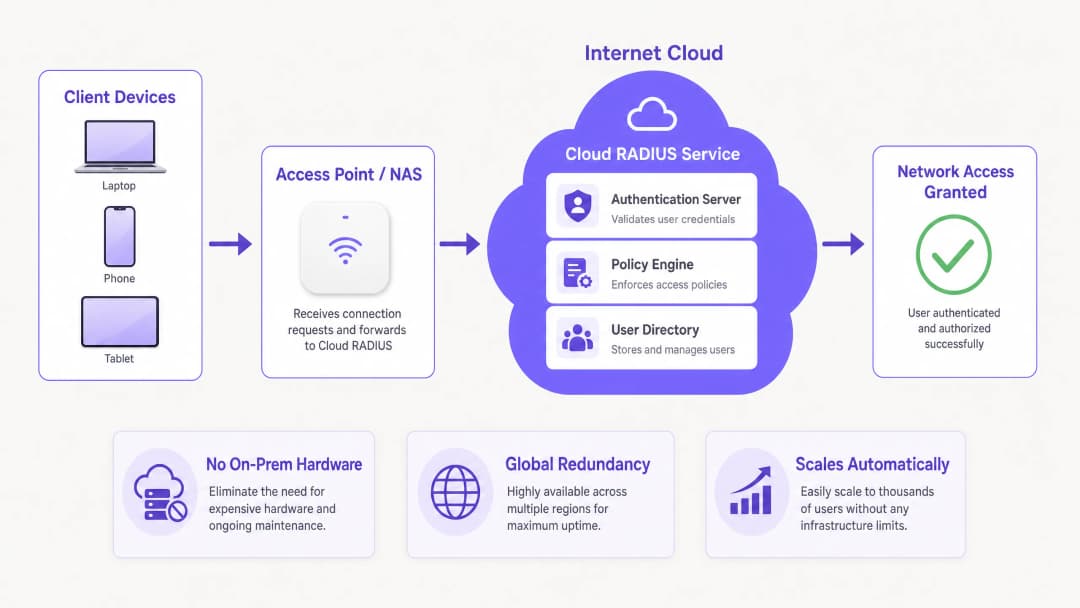
RADIUS, ursprünglich in RFC 2865 definiert, arbeitet nach einem Client-Server-Modell, bei dem ein Network Access Server (NAS) - wie ein WiFi-Zugangspunkt oder ein VPN-Konzentrator - Authentifizierungsanfragen an einen zentralen Server weiterleitet. In der Vergangenheit bedeutete dies die Bereitstellung von FreeRADIUS oder Microsoft Network Policy Server (NPS) auf dedizierter Hardware. Während dies für Einzelstandort-Bereitstellungen praktikabel ist, führt die Skalierung dieser Architektur über verteilte Umgebungen hinweg zu erheblichen Latenz- und Redundanzproblemen.
Cloud RADIUS abstrahiert die zugrunde liegende Infrastruktur. Authentifizierungsanfragen werden an global verteilte Cloud-Endpunkte geroutet, was Antwortzeiten von unter 100 Millisekunden selbst bei Spitzenlast gewährleistet. Diese Elastizität ist für Umgebungen mit hoher Dichte wie Stadien oder Konferenzzentren von entscheidender Bedeutung.
EAP-Methoden und Sicherheitsniveau
Die Wahl der EAP-Methode (Extensible Authentication Protocol) bestimmt maßgeblich Ihr Sicherheitsniveau:
- PEAP (Protected EAP): Baut einen MSCHAPv2-Tunnel innerhalb einer TLS-Sitzung auf. Obwohl PEAP weit verbreitet und einfach in Active Directory zu integrieren ist, ist es anfällig für den Diebstahl von Anmeldedaten über gefälschte Zugriffspunkte, wenn Client-Geräte nicht strikt so konfiguriert sind, dass sie das Serverzertifikat validieren.
- EAP-TLS: Der Goldstandard für Unternehmen. Es erfordert eine gegenseitige Zertifikatsauthentifizierung - sowohl der Server als auch der Client müssen gültige Zertifikate vorweisen. Dies eliminiert passwortbasierte Angriffe vollständig, erfordert jedoch eine robuste Public Key Infrastructure (PKI) und eine Mobile Device Management (MDM) Integration für die Zertifikatsverteilung.
- EAP-TTLS und EAP-FAST: Bieten Alternativen für Szenarien, die eine breite Client-Kompatibilität erfordern (einschließlich Legacy- oder Linux-Systemen) oder bei denen Protected Access Credentials (PACs) benötigt werden, um Zertifikatsvalidierungsabhängigkeiten zu umgehen.
WPA3 und OpenRoaming Integration
Moderne Bereitstellungen müssen WPA3-Enterprise berücksichtigen, das einen 192-Bit-Sicherheitsmodus für das höchste Sicherheitsniveau vorschreibt und spezifische Cipher-Suites erfordert. Darüber hinaus erleichtert Cloud RADIUS die Teilnahme an Föderations-Frameworks wie OpenRoaming. Beispielsweise agiert Purple als kostenloser Identitätsanbieter für OpenRoaming unter seiner Connect Lizenz, was eine nahtlose, sichere Authentifizierung in teilnehmenden Netzwerken weltweit ermöglicht.
Haben Sie Fragen zu Ihrem spezifischen Setup?
Unser Team arbeitet mit Standortbetreibern, IT-Managern und Netzwerktechnikern an über 80.000 Standorten zusammen. Buchen Sie ein 20-minütiges Gespräch und wir zeigen Ihnen, wie andere diese Herausforderungen gelöst haben.
Implementierungsleitfaden
Die Bereitstellung von Cloud RADIUS erfordert einen systematischen Ansatz, um Ausfallzeiten während des Übergangs zu vermeiden.
Schritt 1: Integration des Identitätsanbieters (IdP)
Ihre Cloud RADIUS Instanz muss mit Ihrem maßgeblichen Benutzerverzeichnis synchronisiert werden. Eine native SAML- oder SCIM-Bereitstellung mit Microsoft Entra ID, Google Workspace oder Okta ist manuellen LDAP-Proxys oder CSV-Importen vorzuziehen. Dies stellt sicher, dass beim Offboarding eines Mitarbeiters im HR-System dessen Netzwerkzugriff sofort widerrufen wird.
Schritt 2: Strategie für das Zertifikatsmanagement
Wenn Sie EAP-TLS bereitstellen, definieren Sie den Lebenszyklus Ihrer Zertifikate. Wählen Sie einen Cloud RADIUS Anbieter mit einer integrierten PKI oder einer nahtlosen Integration in Ihre bestehende Zertifizierungsstelle (CA). Automatisieren Sie die Ausstellung und den Widerruf von Zertifikaten über Ihre MDM-Plattform (wie Intune oder Jamf), um Authentifizierungsfehler durch abgelaufene Zertifikate zu verhindern.
Schritt 3: Konfiguration der Netzwerkgeräte
Konfigurieren Sie Ihre NAS-Geräte (Access Points, Switches) so, dass sie auf die primären und sekundären Cloud RADIUS IP-Adressen verweisen. Stellen Sie sicher, dass Shared Secrets kryptografisch komplex sind (mindestens 32 Zufallszeichen). Passen Sie die Failover-Timeout-Einstellungen an; ein Timeout von 3 bis 5 Sekunden ist optimal, um längere Authentifizierungsverzögerungen zu vermeiden, falls der primäre Knoten unerreichbar wird.
Schritt 4: Richtliniendefinition
Erstellen Sie Richtlinien auf SSID-Basis. Setzen Sie beispielsweise EAP-TLS für das Unternehmensnetzwerk durch, PEAP für ältere IoT-Geräte und isolieren Sie den Gastzugang. Beachten Sie, dass RADIUS bekannte Benutzer verarbeitet. Für Besucher sollten Sie eine dedizierte Guest WiFi Lösung mit einem Captive Portal bereitstellen, um First-Party-Daten zu erfassen, integriert in eine WiFi Analytics Plattform. Weitere Informationen zur Einbindung von Besuchern finden Sie unter How to Improve Guest Satisfaction: The Ultimate Guide.
Best Practices
- Strikte Server-Zertifikatsvalidierung erzwingen: Schieben Sie bei PEAP-Bereitstellungen Gruppenrichtlinien- oder MDM-Profile auf die Endgeräte, die Clients dazu zwingen, das RADIUS-Serverzertifikat zu validieren, und beschränken Sie das Vertrauen auf eine bestimmte Stamm-CA.
- Accounting- und Authentifizierungs-Traffic segmentieren: Stellen Sie sicher, dass RADIUS-Accounting-Daten aktiv überwacht und aufbewahrt werden. Dieser Audit-Trail ist für Compliance-Berichte (wie PCI-DSS und HIPAA) unerlässlich.
- Authentifizierungslatenz überwachen: Eine hohe Latenz weist oft auf suboptimales Routing oder Probleme bei der IdP-Synchronisierung hin. Verwenden Sie Monitoring-Tools, um die Zeit vom Access-Request- bis zum Access-Accept-Paket zu verfolgen.
- Signal- und Kanalplanung optimieren: Eine zuverlässige Authentifizierung hängt von einem stabilen Physical Layer ab. Lesen Sie Leitfäden wie Understanding RSSI and Signal Strength for Optimal Channel Planning, um sicherzustellen, dass Ihre RF-Umgebung nahtloses 802.1X-Roaming unterstützt.
Fehlerbehebung und Risikominderung
Selbst bei einem Managed Service kann eine Fehlkonfiguration zu Zugriffsausfällen führen. Typische Fehlerquellen sind:
- Ablauf von Zertifikaten: Die Hauptursache für EAP-TLS-Ausfälle. Abhilfe: Implementieren Sie automatisierte Warnmeldungen 30 Tage vor dem Ablauf von CA- oder Serverzertifikaten.
- Abweichung beim Shared Secret: Tritt typischerweise beim Hinzufügen neuer Access Points auf. Abhilfe: Standardisieren Sie Konfigurationsvorlagen in Ihrem Netzwerkmanagementsystem.
- NAT- und IP-Allowlisting-Probleme: Cloud RADIUS-Anbieter erfordern in der Regel ein NAS-IP-Allowlisting. Wenn Ihre Standorte dynamische IPs oder komplexe NAT-Konfigurationen verwenden, werden Authentifizierungsanfragen möglicherweise verworfen. Abhilfe: Verwenden Sie statische Egress-IPs oder weisen Sie bei Bedarf einen lokalen RADIUS-Proxy zu.
- Fehler bei der IdP-Synchronisierung: Wenn die Synchronisierung des Cloud-Verzeichnisses mit dem On-Premises AD fehlschlägt, können sich neue Benutzer nicht authentifizieren. Abhilfe: Überwachen Sie den Status der SCIM/LDAP-Connectoren proaktiv.
ROI und geschäftliche Auswirkungen
Der Übergang zu Cloud RADIUS liefert messbaren geschäftlichen Nutzen:
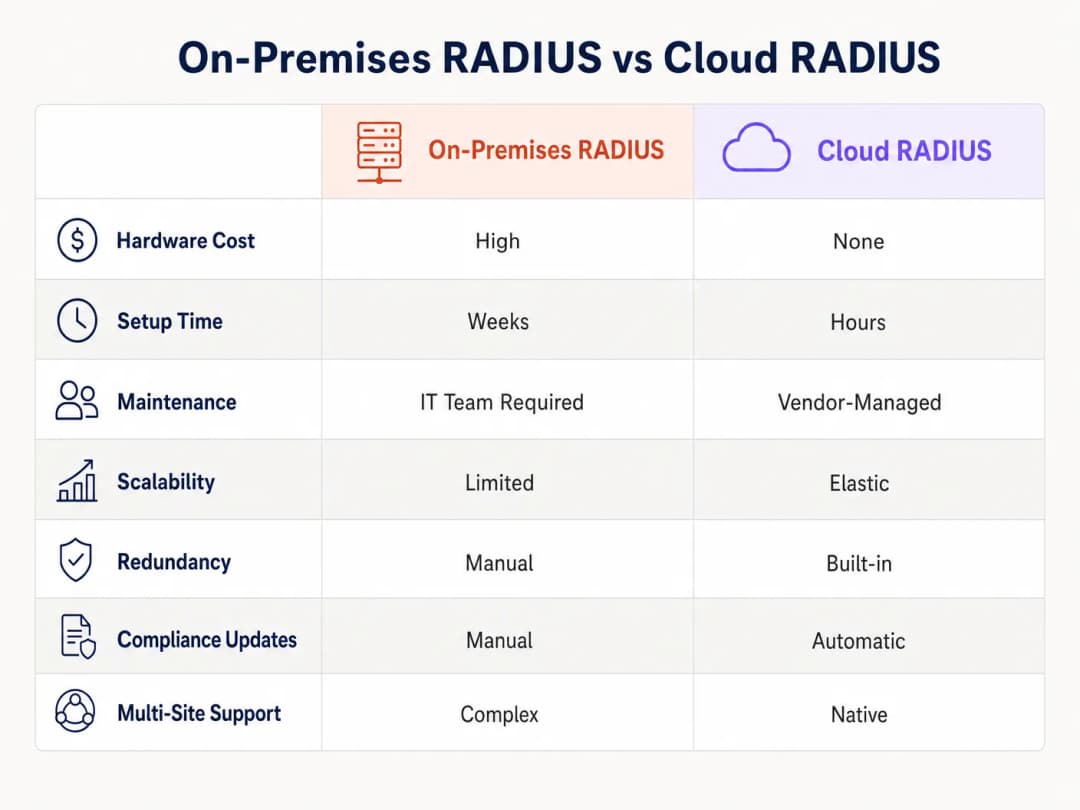
- Reduzierte Infrastruktur-Investitionsausgaben (Capex): Es müssen keine physischen RADIUS-Server mehr an jedem größeren Standort angeschafft, im Rack montiert und mit Strom versorgt werden.
- Geringerer betrieblicher Aufwand: IT-Teams verbringen keine Stunden mehr damit, Sicherheitslücken im Betriebssystem zu patchen oder den Server-Failover manuell zu verwalten. Vom Anbieter verwaltete Updates sorgen für kontinuierliche Compliance.
- Verbessertes Sicherheitsniveau: Der Übergang zu EAP-TLS über eine Cloud-PKI reduziert das Risiko von Anmeldedatendiebstahl und senkt so direkt die potenziellen Kosten einer Datenpanne.
- Agilität und Skalierbarkeit: Bei der Eröffnung einer neuen Einzelhandelsfiliale oder eines Hotels kann die Netzwerkauthentifizierung innerhalb von Minuten statt Wochen bereitgestellt werden. Praktische Rollout-Strategien finden Sie unter Einrichten von WiFi für Unternehmen: Ein Leitfaden für 2026.
Mit einer zentralisierten Zugriffskontrolle sichern Unternehmen nicht nur ihren Perimeter, sondern entlasten auch erfahrene Engineers, damit sich diese auf strategische, einflussreiche Projekte konzentrieren können, anstatt veraltete Legacy-Infrastrukturen zu warten.
Schlüsseldefinitionen
Cloud RADIUS
Ein verwalteter Dienst, der das Remote Authentication Dial-In User Service-Protokoll in einer hochverfügbaren Cloud-Umgebung bereitstellt, wodurch lokale Authentifizierungsserver überflüssig werden.
Wird von IT-Teams evaluiert, die Investitionskosten für Hardware und den betrieblichen Aufwand reduzieren und gleichzeitig einen sicheren 802.1X-Netzwerkzugriff aufrechterhalten möchten.
EAP-TLS (Extensible Authentication Protocol-Transport Layer Security)
Eine hochsichere Authentifizierungsmethode, bei der sowohl der Client als auch der Server digitale Zertifikate vorlegen müssen, um ihre Identität nachzuweisen.
Der empfohlene Standard für Unternehmensnetzwerke zur Verhinderung von passwortbasierten Angriffen, der PKI und MDM für die Bereitstellung erfordert.
NAS (Network Access Server)
Das Gerät - wie ein WiFi-Access-Point, Switch oder VPN-Konzentrator - das als RADIUS-Client fungiert und Benutzeranmeldedaten an den RADIUS-Server weiterleitet.
Netzwerktechniker müssen den NAS mit den korrekten RADIUS-Server-IPs und Shared Secrets konfigurieren, um die 802.1X-Authentifizierung zu ermöglichen.
Shared Secret
Eine kryptografische Textzeichenfolge, die nur dem NAS und dem RADIUS-Server bekannt ist. Sie wird verwendet, um RADIUS-Pakete zu verschlüsseln und die Authentizität des Absenders zu überprüfen.
Ein schwaches Shared Secret stellt ein erhebliches Sicherheitsrisiko dar; in Unternehmensumgebungen sollten lange, zufällig generierte Zeichenfolgen verwendet werden.
SCIM (System for Cross-domain Identity Management)
Ein offener Standard, der den Austausch von Benutzeridentitätsinformationen zwischen IT-Systemen oder Cloud-Anwendungen automatisiert.
Wird verwendet, um Benutzer automatisch im Cloud RADIUS-Verzeichnis bereitzustellen und zu entfernen, wenn Änderungen im primären HR- oder IT-Identitätssystem vorgenommen werden.
OpenRoaming
Ein von der Wireless Broadband Alliance entwickeltes Föderations-Framework, das es Benutzern ermöglicht, sich automatisch und sicher mit teilnehmenden WiFi-Netzwerken weltweit zu verbinden.
Cloud RADIUS-Anbieter, die OpenRoaming unterstützen (wie Purple), ermöglichen es Standorten, Besuchern eine nahtlose und sichere Verbindung ohne Captive Portals anzubieten.
Accounting Logs
Vom RADIUS-Server generierte Protokolle, die Details zu Benutzerverbindungsereignissen enthalten, einschließlich Startzeit, Endzeit, übertragenen Daten und zugewiesener IP-Adresse.
Kritisch für Sicherheitsaudits, Fehlerbehebung und den Nachweis der Konformität mit Frameworks wie PCI DSS und GDPR.
Change of Authorization (CoA)
Eine RADIUS-Funktion, die es dem Server ermöglicht, die aktive Sitzung eines Benutzers dynamisch zu ändern, z. B. durch Ändern des VLANs oder Trennen der Verbindung, ohne dass eine erneute Verbindung erforderlich ist.
Wird von Netzwerkadministratoren verwendet, um ein kompromittiertes Gerät sofort unter Quarantäne zu stellen oder neue Richtlinieneinschränkungen während der laufenden Sitzung anzuwenden.
Ausgearbeitete Beispiele
Ein Hotel mit 200 Zimmern nutzt derzeit ein lokales Microsoft NPS für die WiFi-Authentifizierung der Mitarbeiter über PEAP. Während der Haupt-Check-in-Zeiten kommt es zu Authentifizierungs-Timeouts. Das Hotel möchte auf Cloud RADIUS mit EAP-TLS migrieren, um die Sicherheit und Zuverlässigkeit zu erhöhen. Wie sollte der IT-Leiter diese Migration konzipieren?
- Bereitstellen eines Cloud RADIUS-Mandanten und Integration in das Microsoft Entra ID des Hotels via SCIM für ein automatisiertes Benutzer-Lebenszyklusmanagement. 2. Konfigurieren der integrierten PKI von Cloud RADIUS für die Ausstellung von Client-Zertifikaten. 3. Nutzung des vorhandenen MDM (z. B. Intune), um die Root-CA, Client-Zertifikate und ein neues, für EAP-TLS konfiguriertes WiFi-Profil auf alle Mitarbeitergeräte zu übertragen. 4. Konfigurieren der Access Points des Hotels so, dass sie auf die primären und sekundären IPs von Cloud RADIUS verweisen, unter Verwendung eines neuen, komplexen, 32-stelligen Shared Secrets. 5. Paralleler Betrieb des alten NPS und des neuen Cloud RADIUS auf unterschiedlichen SSIDs für eine zweiwöchige Übergangszeit vor der Außerbetriebnahme der lokalen Server.
Eine nationale Einzelhandelskette mit 500 Standorten muss die Compliance mit PCI-DSS für ihre Point-of-Sale (POS)-Terminals gewährleisten, die über WiFi verbunden sind. Sie migrieren zu Cloud RADIUS. Welche spezifischen Konfigurationen sind erforderlich, um die Compliance-Anforderungen zu erfüllen?
- Implementierung einer strikten Netzsegmentierung: POS-Terminals müssen sich an einer dedizierten, verborgenen SSID authentifizieren, die einem isolierten VLAN zugewiesen ist. 2. Erzwingen der EAP-TLS-Authentifizierung für alle POS-Geräte, um eine gegenseitige Authentifizierung sicherzustellen und zu verhindern, dass unbefugte Geräte dem POS-Netzwerk beitreten. 3. Konfigurieren des Cloud RADIUS-Dienstes so, dass alle Accounting-Protokolle (Access-Accept, Access-Reject, Verbindungsdauer) für mindestens ein Jahr aufbewahrt werden, wie von PCI-DSS vorgeschrieben. 4. Sicherstellen, dass die RADIUS Shared Secrets zwischen den Filial-APs und dem Cloud RADIUS-Dienst alle 90 Tage mithilfe eines automatisierten Skripts rotiert werden.
Übungsfragen
Q1. Ihre Organisation migriert von einem lokalen Active Directory zu Google Workspace. Sie verwenden derzeit PEAP-MSCHAPv2 für die WiFi-Authentifizierung. Warum ist das ein Problem und was ist die empfohlene Lösung?
Hinweis: Überlegen Sie, wie PEAP Anmeldedaten mit dem Verzeichnisprotokoll abgleicht.
Musterlösung anzeigen
PEAP-MSCHAPv2 basiert auf dem NT-Hash des Passworts eines Benutzers, den Google Workspace nativ weder speichert noch offenlegt. Die empfohlene Lösung ist die Migration zu EAP-TLS über einen Cloud RADIUS-Anbieter mit integrierter PKI. Der Cloud RADIUS-Dienst kann Benutzeridentitäten aus Google Workspace über SAML/SCIM synchronisieren und Geräte mithilfe von Client-Zertifikaten anstelle von Passwörtern authentifizieren.
Q2. Eine Zweigstelle berichtet, dass bei Benutzern beim Verbinden mit dem WiFi-Netzwerk Verzögerungen von 30 Sekunden auftreten, gefolgt von einer erfolgreichen Verbindung. Die primäre Cloud RADIUS-IP in dieser Region wird derzeit gewartet. Welcher Konfigurationsfehler verursacht diese Verzögerung?
Hinweis: Achten Sie auf die Kommunikation zwischen dem NAS und den RADIUS-Servern.
Musterlösung anzeigen
Im NAS (Access Point oder Switch) ist der Timeout-Wert für den RADIUS-Server zu hoch konfiguriert (z. B. 30 Sekunden). Das Gerät wartet auf die Antwort des primären Servers, bevor es ein Failover auf den sekundären Server durchführt. Der Timeout-Wert sollte auf 3 - 5 Sekunden reduziert werden, um ein schnelles Failover zu gewährleisten, ohne das Benutzererlebnis zu beeinträchtigen.
Q3. Sie stellen Cloud RADIUS für ein Krankenhaus bereit. Das Sicherheitsteam schreibt vor, dass sich nur firmeneigene Geräte mit dem internen Netzwerk verbinden dürfen, selbst wenn ein Mitarbeiter einen gültigen Benutzernamen und ein Passwort kennt. Wie setzen Sie dies durch?
Hinweis: Welche EAP-Methode überprüft die Identität des Geräts und nicht nur das Wissen des Benutzers?
Musterlösung anzeigen
Implementieren Sie EAP-TLS. Konfigurieren Sie die MDM-Lösung des Krankenhauses so, dass ein eindeutiges Client-Zertifikat nur auf registrierte, firmeneigene Geräte übertragen wird. Konfigurieren Sie die Cloud RADIUS-Richtlinie so, dass jede Authentifizierungsanfrage abgelehnt wird, die kein gültiges, von der vertrauenswürdigen internen PKI signiertes Zertifikat vorweist. Dadurch werden BYOD- oder nicht autorisierte Geräte unabhängig vom Passwortwissen effektiv blockiert.
Weiterlesen in dieser Reihe
Die Sicherheitsvorteile von RADIUS as a Service für hybride Belegschaften
Dieser technische Leitfaden erklärt, wie RADIUS as a Service den Netzwerkzugriff für hybride Belegschaften an verteilten Standorten sichert. Er behandelt die Architektur, die Sicherheitsvorteile und die Bereitstellungsschritte für den Ersatz von On-Premises-RADIUS-Infrastrukturen durch einen cloudverwalteten Authentifizierungsdienst. Für IT-Manager und Netzwerkarchitekten in Hotels, Einzelhandelsketten, Stadien und Organisationen des öffentlichen Sektors liefert dieser Leitfaden die notwendigen Argumente, um eine Migration zu Cloud-RADIUS in diesem Quartal zu bewerten und umzusetzen.
Integration von RADIUS as a Service mit Cloud-Verzeichnissen (Azure AD & Google Workspace)
Dieser technische Referenzleitfaden beschreibt detailliert, wie Sie RADIUS as a Service mit Cloud-Verzeichnissen – Microsoft Entra ID und Google Workspace – für die WiFi-Authentifizierung in Unternehmen integrieren. Er behandelt den architektonischen Wechsel von On-Premises-NPS zu Cloud-nativem RADIUS, die Bereitstellung der zertifikatsbasierten EAP-TLS-Authentifizierung sowie die bewährten Betriebsmethoden zur Absicherung des drahtlosen Zugangs in den Bereichen Gastgewerbe, Einzelhandel und im öffentlichen Sektor. Für IT-Manager und Netzwerkarchitekten, die bereits in Cloud-Identitäten investieren, schließt dieser Leitfaden die Lücke zwischen Verzeichnisverwaltung und physischer Netzwerksicherheit.
Wie Sie eine 802.1X-Authentifizierung mit Cloud RADIUS implementieren
Dieser technische Leitfaden bietet einen umfassenden Rahmen für die Implementierung der 802.1X-Authentifizierung mit Cloud RADIUS in verteilten Unternehmensstandorten. Er beschreibt die Architektur, die Auswahl der EAP-Methode, die Bereitstellungssequenzierung und die Strategien zur Risikominderung, die erforderlich sind, um den Netzwerkzugriff zu sichern und gleichzeitig den operativen Aufwand für eine On-Premises-Infrastruktur zu eliminieren.
Haben Sie Fragen zu Ihrem spezifischen Setup?
Unser Team arbeitet mit Standortbetreibern, IT-Managern und Netzwerktechnikern an über 80.000 Standorten zusammen. Buchen Sie ein 20-minütiges Gespräch und wir zeigen Ihnen, wie andere diese Herausforderungen gelöst haben.