
Die besten WiFi Access Points für Unternehmen und Homelabs
Dieser technische Leitfaden bewertet die besten WiFi Access Points für Unternehmen für die Jahre 2025 - 2026. Er behandelt WiFi 6E und WiFi 7 Hardware von Cisco, HPE Aruba, Ruckus, Juniper Mist und Ubiquiti für Bereitstellungen in hochfrequentierten Bereichen wie dem Gastgewerbe, dem Einzelhandel und öffentlichen Veranstaltungsorten. Der Leitfaden bietet direkt umsetzbare Architekturstrategien, Anbietervergleiche, Sicherheits-Frameworks und ROI-Kennzahlen für IT-Leiter, die drahtlose Netzwerke der nächsten Generation aufbauen. Die hardwareunabhängige Plattform von Purple für Gast-WiFi und Analysen wird durchgehend als Intelligence-Ebene dargestellt, die die Netzwerkinfrastruktur in ein wertvolles Asset für First-Party-Daten verwandelt.
Video overview
Diesen Leitfaden anhören
Podcast-Transkript ansehen
Teil unserer Kernserie: Gast-WiFi Leitfaden →
Executive Summary
Für CTOs und IT-Leiter, die hochdichte Umgebungen verwalten - von Stadiontribünen bis hin zu weitläufigen Krankenhauscampus - ist die Wahl des besten Access Points nicht mehr nur eine Frage des reinen Durchsatzes. Der Übergang zu WiFi 6E und dem aufstrebenden WiFi 7 Standard (IEEE 802.11be) hat die Landschaft der Unternehmensnetzwerke radikal verändert. Moderne Access Points müssen eine extreme Gerätedichte bewältigen, nahtloses Roaming unterstützen, sich in anspruchsvolle Analyseplattformen integrieren und strenge Sicherheitsprotokolle wie WPA3-Enterprise und 802.1X einhalten.
Diese Anleitung bietet eine fundierte technische Bewertung der führenden Enterprise-Access-Points von Cisco, HPE Aruba, Ruckus, Juniper Mist und Ubiquiti. Wir untersuchen architektonische Überlegungen, Multi-Link Operation (MLO) Funktionen, PoE++ Leistungsbudgets und praktische Implementierungsstrategien für das Facility Management. Darüber hinaus analysieren wir, wie die Integration dieser Hardwarelösungen mit einem intelligenten Guest WiFi Overlay die Netzwerkinfrastruktur von einem Fixkostenfaktor in eine umsatzgenerierende Ressource verwandeln kann.
Technischer Deep Dive: WiFi 6E vs. WiFi 7 Architektur
Der Markt für Enterprise-Wireless-Access-Points befindet sich derzeit an der Schnittstelle zwischen zwei führenden Standards: dem ausgereiften und weit verbreiteten WiFi 6E (IEEE 802.11ax im 6-GHz-Band) und dem schnell an Fahrt gewinnenden WiFi 7 (IEEE 802.11be). Die technischen Unterschiede zu verstehen, ist für Netzwerkarchitekten, die Hardware-Aktualisierungszyklen mit einem Horizont von 3 bis 5 Jahren planen, von entscheidender Bedeutung.
Multi-Link Operation (MLO) und Durchsatz
WiFi 7 führt die Multi-Link Operation (MLO) ein, einen Paradigmenwechsel in der Art und Weise, wie Client-Geräte mit Access Points interagieren. Im Gegensatz zu früheren Standards, bei denen sich ein Client mit einem einzelnen Band verbindet - 2.4 GHz, 5 GHz oder 6 GHz - ermöglicht MLO das gleichzeitige Senden und Empfangen über mehrere Bänder zur gleichen Zeit. Dies reduziert die Latenz erheblich und erhöht den aggregierten Durchsatz, was in Umgebungen mit hoher Dichte wie Kongresszentren und Sportarenen unerlässlich ist.
Darüber hinaus unterstützt WiFi 7 Kanalbandbreiten von 320 MHz im 6-GHz-Spektrum und 4K-QAM (Quadratur-Amplituden-Modulation). Dies bietet eine Steigerung der Spitzen-Datenraten um bis zu 20 % im Vergleich zur 1024-QAM-Modulation von WiFi 6. Es ist wichtig zu beachten, dass die 4K-QAM-Modulation ein sehr hohes Signal-Rausch-Verhältnis (SNR) erfordert, um zu funktionieren. In lauten Umgebungen mit hohen Interferenzen wird die Modulationsrate automatisch herabgestuft. Planen Sie Ihre Kapazitäten daher nicht auf Basis theoretischer Spitzen-Durchsatzwerte.
Vendor-Übersicht und Hardware-Spezifikationen
Beim Vergleich von erstklassiger Access-Point-Hardware bestimmen physische Antennen-Arrays, Funkarchitektur und Verarbeitungsleistung die tatsächliche Leistung in der Praxis weitaus stärker als nominelle Durchsatzdaten.

Die Cisco Catalyst 9136 Serie è ist ein Schwergewicht im WiFi 6E Bereich mit einer robusten 8x8 MIMO-Konfiguration auf dem 5-GHz-Band, was sie hervorragend für Hörsäle oder Auditorien mit hoher Dichte qualifiziert. Sie unterstützt den Tri-Band-Betrieb (2.4/5/6 GHz) und lässt sich nativ in das Cisco Catalyst Center (ehemals DNA Center) für das On-Premises-Management oder in Cisco Meraki für Cloud-gesteuerte Bereitstellungen integrieren. Sie erfordert den Standard 802.3bt (PoE++), um alle Funkmodule mit maximaler Leistung zu betreiben.
HPE Aruba Networking AP-735 ist eine hochmoderne WiFi 7 Option, die ein Tri-Radio 2x2 MIMO-System mit dualen 5 Gbps Ethernet-Uplink-Ports bietet. Die proprietäre Ultra Tri-Band (UTB) Filterung von Aruba ist äußerst effektiv bei der Minimierung von Interferenzen zwischen den 5 GHz- und 6 GHz-Bändern - ein häufiges Problem bei Bereitstellungen mit hoher Dichte. Der AP-735 wird über Aruba Central verwaltet, eine Cloud-native Plattform mit integrierter AIOps.
Ruckus R760 zeichnet sich in Umgebungen mit starken RF-Interferenzen aus. Der R760 (WiFi 6E) nutzt die proprietäre BeamFlex+ Antennentechnologie von Ruckus, die Signale dynamisch auf die Clients ausrichtet und Co-Kanal-Interferenzen abschwächt. Dies macht ihn oft zum besten Access Point für anspruchsvolle physische Umgebungen wie Lagerhallen, alte Hotels mit dicken Betonwänden oder Einrichtungen mit erheblichen Multipath-Reflektionen. Er unterstützt einen 10 GbE Uplink und wird über Ruckus One (Cloud) oder SmartZone (On-Premises) verwaltet.
Juniper Mist AP45 ist das Flaggschiff-Modell von Juniper, das durch künstliche Intelligenz gesteuert wird. Der AP45 (WiFi 6E) verfügt über ein dediziertes viertes Funkmodul für Sicherheits-Scans sowie ein Bluetooth Low Energy (BLE) Array für Indoor-Ortungsdienste, die sich nahtlos in die Cloud-Management-Plattform Mist AI integrieren lassen. Die AIOps-Engine bietet prädiktive Analysen, proaktive Anomalieerkennung und automatisierte Ursachenanalyse, was die mittlere Zeit bis zur Fehlerbehebung (MTTR) erheblich verkürzt.
Ubiquiti UniFi U7 Pro bietet WiFi 7 Funktionen zu einem äußerst wettbewerbsfähigen Preis und ist damit der beste Access Point für kostenbewusste Unternehmen oder anspruchsvolle Homelabs. Obwohl er nicht die Enterprise-Support-SLAs von Cisco oder Aruba bietet, machen sein 2.5 GbE Uplink und die umfassende 6 GHz-Unterstützung ihn sehr attraktiv für Implementierungen im Mittelstand, die von qualifizierten internen IT-Teams verwaltet werden.
Für eine detaillierte Analyse der Management-Paradigmen lesen Sie bitte unseren Leitfaden Vergleich zwischen Controller-basierten und Cloud-verwalteten Access Points.
Haben Sie Fragen zu Ihrem spezifischen Setup?
Unser Team arbeitet mit Standortbetreibern, IT-Managern und Netzwerktechnikern an über 80.000 Standorten zusammen. Buchen Sie ein 20-minütiges Gespräch und wir zeigen Ihnen, wie andere diese Herausforderungen gelöst haben.
Implementierungs-Leitfaden: Bereitstellung mit hoher Dichte
Die Installation von Enterprise-Access-Points erfordert eine sorgfältige Planung. Ein häufiger und kostspieliger Fehler ist der Ansatz "Mehr ist besser", der zu übermäßigen Co-Kanal-Interferenzen führt und eine schlechtere Netzwerkleistung zur Folge hat als eine korrekt konzipierte Installation mit weniger APs.
1. Kapazitätsplanung und Dichteberechnungen
Planen Sie nicht ausschließlich für die Abdeckung, sondern planen Sie für die Kapazität. Berechnen Sie in einer High-Density-Umgebung im Bereich Retail die erwartete Anzahl gleichzeitiger Geräte, wobei Sie von 2 - 3 Geräten pro Benutzer ausgehen.Als Faustregel gilt: Für Standard-Unternehmensinstallationen sollten Sie 30-50 aktive Clients pro Funkmodul anstreben. In Umgebungen mit hoher Dichte, die WiFi 6E/7 APs mit fortschrittlicher OFDMA-Planung nutzen, kann dieser Wert auf 75-100 Clients pro AP steigen, vorausgesetzt, die Uplink- und PoE-Budgets sind ausreichend. Validieren Sie diese Zahlen vor der Hardwarebestellung immer mit einer prädiktiven RF-Standortvermessung unter Verwendung von Tools wie Ekahau oder Hamina.
2. Upgrades der Netzwerkinfrastruktur
Die Installation von WiFi 7 Access Points auf einer veralteten Switching-Infrastruktur führt zu massiven Engpässen, die die Hardware-Investition völlig zunichte machen.
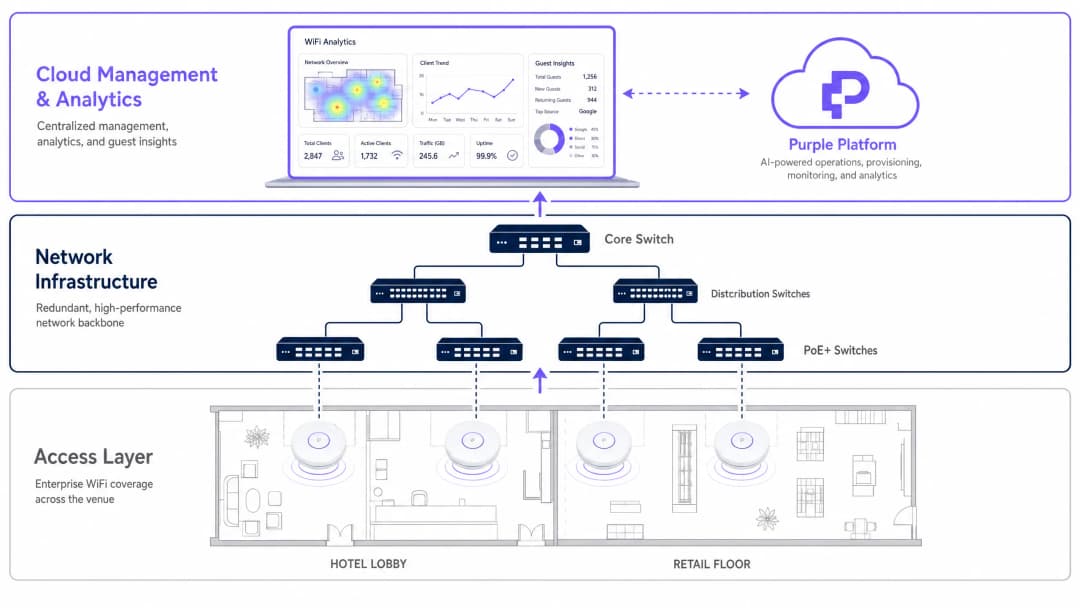
Access Points wie der Aruba AP-735 oder der Cisco 9136 erfordern Multi-Gigabit (mGig) Switches, die 2.5 Gbps, 5 Gbps oder 10 Gbps pro Port auf der Zugriffsebene unterstützen. Was die Stromversorgung betrifft, verbrauchen moderne Tri-Band APs erhebliche Wattzahlen. Stellen Sie sicher, dass Ihre Access Switches PoE++ unterstützen (802.3bt, das bis zu 60W Typ 3 oder 90W Typ 4 pro Port liefert). Der Betrieb dieser APs mit Standard-PoE+ (802.3at, maximal 30W) führt zur Deaktivierung von Funkmodulen, eingeschränkter CPU-Leistung und Warnmeldungen zum eingeschränkten Modus im Management-Dashboard.
3. Identitäts- und Zugriffsmanagement
Unternehmenssicherheit erfordert eine robuste Authentifizierung. WPA3-Enterprise mit IEEE 802.1X/RADIUS ist der Standard für firmeneigene Geräte und bietet Verschlüsselungsschlüssel pro Benutzer sowie eine zentrale Durchsetzung von Richtlinien. Der Gastzugang erfordert einen anderen Ansatz, der Sicherheit mit minimalem Aufwand in Einklang bringt.
Die Implementierung eines Captive Portal, das in eine Plattform für WiFi Analytics integriert ist, ermöglicht es Einrichtungen, sicheren Zugang anzubieten und gleichzeitig wertvolle First-Party-Daten für das Marketing zu erfassen. Für ein noch nahtloseres Erlebnis sollten Sie die Implementierung von OpenRoaming in Betracht ziehen. Wie in How a wi fi assistant Enables Passwordless Access in 2026 ausführlich beschrieben, fungiert Purple mit der Connect-Lizenz als kostenloser Identity Provider für OpenRoaming, sodass sich Geräte automatisch und sicher ohne manuelle Portal-Interaktion authentifizieren können.
In Branchen wie Transport und dem öffentlichen Sektor ist dieses reibungslose Authentifizierungsmodell besonders wertvoll, um den hohen Durchlauf von temporären Nutzern zu bewältigen.
Best Practices und Branchenstandards
RF Site Surveys: Führen Sie immer sowohl eine prädiktive Messung vor der Installation als auch eine aktive Validierungsmessung nach der Installation durch. Berücksichtigen Sie die Dämpfung durch Wände, Glas und menschliche Körper - eine Menschenmenge absorbiert erhebliche RF-Energie, weshalb ein Stadion, das bei einer leeren Standortvermessung eine gute Leistung zeigt, bei einer ausverkauften Veranstaltung katastrophal versagen kann.
Kanalplanung: Verwenden Sie in den 5 GHz- und 6 GHz-Bändern Kanalbreiten von 40 MHz oder 80 MHz für Unternehmensnetzwerke, um den Durchsatz mit der Kanalverfügbarkeit auszubalancieren. Vermeiden Sie Breiten von 160 MHz oder 320 MHz, es sei denn, Sie befinden sich in isolierten Umgebungen, da diese die Anzahl der überschneidungsfreien Kanäle stark einschränken und die Wahrscheinlichkeit von Gleichkanalstörungen erhöhen.
Compliance: Stellen Sie sicher, dass die Netzwerkarchitektur den relevanten Standards entspricht. Der PCI-DSS 4.0 Standard schreibt die Netzwerksegmentierung für jedes System vor, das Kartenzahlungen über WiFi verarbeitet. In Healthcare-Umgebungen erfordert HIPAA strenge Kontrollen bei der Datenübertragung. Die GDPR gilt für alle personenbezogenen Daten, die über WiFi Captive Portals für Gäste in allen Branchen erfasst werden.
Firmware-Management: Etablieren Sie einen strengen Rhythmus für das Einspielen von Firmware-Patches. Die Hersteller von Enterprise-APs veröffentlichen regelmäßig Sicherheits-Patches zur Behebung von Schwachstellen. Cloud-gesteuerte Plattformen (Aruba Central, Mist AI, Meraki) können diesen Prozess mit konfigurierbaren Wartungsfenstern automatisieren.
Fehlerbehebung und Risikominderung
Sticky Clients: Ein häufiges Problem, bei dem sich ein Gerät weigert, zu einem näher gelegenen Access Point zu wechseln, was die Gesamtleistung der Funkzelle beeinträchtigt. Beheben Sie das Problem durch die Implementierung der Standards IEEE 802.11k (Radio Resource Measurement) und IEEE 802.11v (BSS Transition Management), um Clients bei besseren Roaming-Entscheidungen zu unterstützen. Richten Sie obligatorische Mindestdatenraten auf jedem SSID ein, um die Trennung von Clients zu erzwingen, wenn das Signal unter einen nutzbaren Schwellenwert fällt, typischerweise 12 Mbps auf 5 GHz.
Asymmetrisches Routing: Der Access Point kann über eine größere Distanz senden, als das mobile Client-Gerät zurücksenden kann. Dies führt dazu, dass der Client die volle Signalstärke anzeigt, aber fast keinen Durchsatz erzielt. Die Lösung ist einfach: Betreiben Sie Access Points nicht mit maximaler Sendeleistung. Passen Sie die Sendeleistung (Tx-Power) des APs an die durchschnittliche Leistung mobiler Geräte an, typischerweise 12 - 15 dBm. Dies reduziert auch die Gleichkanalstörungen zwischen benachbarten APs. PoE-Budgetüberschreitung: Bei großen Installationen kann das PoE-Gesamtleistungsbudget eines Switch-Chassis leicht überschritten werden, selbst wenn das Budget der einzelnen Ports ausreichend erscheint. Berechnen Sie immer den Gesamtstromverbrauch aller angeschlossenen APs im Vergleich zum PoE-Gesamtleistungsbudget des Switches, nicht nur die Grenzwerte pro Port.
SSID-Wildwuchs: Jedes SSID erzeugt einen Management-Overhead (Beacon-Frames), der Sendezeit verbraucht. Beschränken Sie SSIDs auf maximal 3 - 4 pro AP. Konsolidieren Sie SSIDs für IoT, Unternehmen und Gäste, anstatt Netzwerke für einzelne Abteilungen zu erstellen.
ROI und geschäftliche Auswirkungen
Der Business Case für ein Upgrade auf die beste Hardware für Access Points geht weit über IT-Leistungsmetriken hinaus. In der Gastronomie- und Hotelbranche wird zuverlässiges WiFi konsistent als einer der wichtigsten Faktoren für die Gästezufriedenheit eingestuft. Ein Netzwerkausfall während einer wichtigen Konferenzveranstaltung kann sich direkt auf die Wiederbuchungsraten und den Ruf der Marke auswirken.
Durch die Integration einer fortschrittlichen Analyseplattform auf der Hardware können IT-Teams einen direkten ROI für das Unternehmen nachweisen. Das Netzwerk wird zu einem Werkzeug, um Fußgängerströme, Verweilzeiten, Spitzennutzungszeiten und Kundendemografien zu verstehen. Diese Daten fließen direkt in betriebliche Entscheidungen ein - von der Personalplanung bis hin zur Platzierung von Waren in Verkaufsstellen.
Eine praktische Anleitung zur Nutzung dieser Daten im Hotelbereich finden Sie unter How To Improve Guest Satisfaction: The Ultimate Playbook. Im öffentlichen Sektor ist eine robuste, inklusive drahtlose Infrastruktur zunehmend von zentraler Bedeutung für digitale Inklusionsstrategien, wie in Purple Appoints Iain Fox as VP Growth – Public Sector to Drive Digital Inclusion and Smart City Innovation hervorgehoben wird.
Zu den messbaren Ergebnissen einer gut durchgeführten WiFi-Implementierung in Unternehmen mit integrierten Analysen gehören typischerweise: eine Reduzierung der gästebezogenen Konnektivitätsbeschwerden um 15 - 25 %, eine Steigerung der Konversionsraten von Captive Portals um 30 - 40 % bei der Nutzung von Social Login im Vergleich zu reinen E-Mail-Formularen und ein nachweisbarer First-Party-Datenbestand, der die Abhängigkeit von Drittanbietern in einer Post-Cookie-Umgebung verringert.
Schlüsseldefinitionen
Multi-Link Operation (MLO)
Eine Wi-Fi 7 (802.11be)-Funktion, die es Geräten ermöglicht, gleichzeitig Daten über mehrere Frequenzbänder zu senden und zu empfangen - beispielsweise zeitgleich über 5 GHz und 6 GHz.
Entscheidend für die Reduzierung von Latenzzeiten und die Erhöhung des Durchsatzes in dichten Unternehmensumgebungen. Erfordert, dass sowohl der AP als auch das Client-Gerät Wi-Fi 7 unterstützen, um zu funktionieren.
4K-QAM (Quadraturamplitudenmodulation)
Ein in Wi-Fi 7 verwendetes Modulationsverfahren, das 12 Bit pro Symbol kodiert, verglichen mit dem 1024-QAM von Wi-Fi 6 (10 Bit pro Symbol), was einen um ca. 20% höheren Spitzendurchsatz liefert.
Erfordert ein sehr hohes Signal-Rausch-Verhältnis (SNR), um effektiv zu funktionieren. In lauten Umgebungen fällt der AP automatisch auf niedrigere Modulationsraten zurück. Planen Sie die Kapazität nicht auf der Grundlage von 4K-QAM-Spitzenwerten.
Spatial Streams (MIMO)
Die Multiple-Input Multiple-Output-Technologie nutzt mehrere Antennen, um unabhängige Datenströme gleichzeitig zu übertragen. Bezeichnet als 2x2, 4x4 oder 8x8 (Sende- x Empfangsantennen).
Mehr Spatial Streams ermöglichen es einem AP, mehr gleichzeitige Client-Verbindungen zu verarbeiten und einen höheren Gesamtdurchsatz bereitzustellen. Ein 8x8 AP wie der Cisco 9136 kann deutlich mehr gleichzeitige Clients bedienen als ein 2x2 AP.
802.3bt (PoE++)
Der Power over Ethernet-Standard, der bis zu 60W (Typ 3) oder 90W (Typ 4) Gleichstrom über verdrillte Ethernet-Kabel an angeschlossene Geräte liefern kann.
Zwingend erforderlich für die Stromversorgung moderner, leistungsstarker Tri-Band-Enterprise-Access-Points ohne Funktionseinbußen. Die Bereitstellung von Tri-Band-APs an Switches mit 802.3at (PoE+, 30W) führt zu Leistungseinbußen oder deaktivierten Funkeinheiten.
OpenRoaming
Ein Verbundstandard der Wi-Fi Alliance, der es Benutzern ermöglicht, sich automatisch und sicher mit teilnehmenden Gast-WiFi-Netzwerken zu verbinden, ohne Captive Portals oder manuelle Passworteingabe, unter Verwendung eines vorab bereitgestellten Berechtigungsprofils.
Purple fungiert als kostenloser Identitätsanbieter für OpenRoaming unter der Connect-Lizenz und ermöglicht es Veranstaltungsorten, eine nahtlose und sichere Gastauthentifizierung anzubieten. Besonders wertvoll in Verkehrsknotenpunkten und öffentlichen Bereichen mit einer hohen Anzahl von Laufkunden.
BSS Transition Management (802.11v)
Ein IEEE-Standard, der es der Netzwerkinfrastruktur ermöglicht, beratende Nachrichten an Client-Geräte zu senden und basierend auf Signalstärke und Auslastung einen besseren Access Point für die Verbindung zu empfehlen.
Wird von IT-Administratoren verwendet, um "Sticky Clients" zu reduzieren und ein Load Balancing im gesamten Wireless-Netzwerk zu gewährleisten. Arbeitet in Kombination mit 802.11k (Radio Resource Measurement), um Clients eine Kandidatenliste von APs bereitzustellen.
Co-Channel Interference (CCI)
Interferenz, die entsteht, wenn zwei oder mehr Access Points auf demselben Frequenzkanal arbeiten und sich in gegenseitiger Reichweite befinden, was sie dazu zwingt, abwechselnd über das CSMA/CA-Protokoll zu senden.
CCI ist die Hauptursache für Leistungseinbußen in überdimensionierten Unternehmensnetzwerken. Sie wird durch sorgfältige Kanalplanung, Reduzierung der Sendeleistung und Nutzung des breiteren 6-GHz-Bands, das mehr überlappungsfreie Kanäle bietet, minimiert.
OFDMA (Orthogonal Frequency-Division Multiple Access)
Eine in WiFi 6 eingeführte Mehrbenutzer-Version von OFDM, die einen Kanal in kleinere Ressourceneinheiten (Unterträger) aufteilt, sodass ein AP mit mehreren Clients gleichzeitig innerhalb eines einzigen Übertragungsfensters kommunizieren kann.
Verbessert die Effizienz in Umgebungen mit hoher Dichte und vielen kleinen Datenpaketübertragungen, wie IoT-Geräten oder mobilen Anwendungen, die häufig kurze Datenpakete senden, drastisch. Reduziert die Latenz und verbessert die Airtime-Effizienz.
BeamFlex+ (Ruckus Proprietary)
Die adaptive Antennentechnologie von Ruckus Networks, die dynamisch das optimale Antennendiagramm für jede einzelne Client-Übertragung auswählt und das Signal steuert, um das SNR zu maximieren und Interferenzen zu minimieren.
Besonders effektiv in anspruchsvollen RF-Umgebungen wie Lagern mit Metallregalen oder Veranstaltungsorten mit erheblichen Mehrwegreflexionen. Bietet in diesen Szenarien einen messbaren Leistungsvorteil gegenüber Standard-Rundstrahlantennen.
Ausgearbeitete Beispiele
Ein Luxushotel mit 400 Zimmern sieht sich mit massiven Beschwerden von Gästen über die WiFi Leistung in der Lobby und den Konferenzbereichen während der abendlichen Stoßzeiten konfrontiert. Die aktuelle Infrastruktur nutzt WiFi 5 (802.11ac) Access Points, die in den Fluren installiert sind. Der IT-Leiter benötigt eine vollständige Neugestaltung. Was ist der empfohlene Ansatz?
Schritt 1 - Wechsel von einem Abdeckungsmodell zu einem Kapazitätsmodell. Entfernen Sie APs aus den Fluren, da diese zu Problemen mit "Sticky Clients" führen, wenn sich Gäste zwischen den Zimmern und dem Flur bewegen. Ersetzen Sie diese durch APs mit Wandeinbauplatten in den Zimmern (z. B. Cisco 9105AXW oder Aruba AP-303H), um Mikrozellen zu schaffen, die den HF-Bereich in jedem Zimmer eingrenzen.
Schritt 2 - Installieren Sie in der hochfrequentierten Lobby und den Konferenzbereichen WiFi 6E oder WiFi 7 Access Points (z. B. Aruba AP-735 oder Cisco 9136) unter Verwendung von Richtantennen, falls die Deckenhöhe 8 Meter überschreitet. Planen Sie einen AP pro 75 - 100 Quadratmeter in der Lobby und einen AP pro 50 Teilnehmer in den Konferenzräumen ein.
Schritt 3 - Aktualisieren Sie die Edge-Switches, um mGig (2,5/5 Gbps) und PoE++ (802.3bt) zu unterstützen, um die neuen Tri-Band APs ohne Leistungsminderung mit Strom zu versorgen.
Schritt 4 - Implementieren Sie das Captive Portal für Gast-WiFi von Purple, um die Bandbreitenzuweisung pro Benutzer zu steuern, eine GDPR-konforme Datenerfassung durchzusetzen und Analysen über die Verweildauer von Konferenzteilnehmern sowie Wiederholungsbesuchsraten zu erfassen.
Schritt 5 - Aktivieren Sie 802.11k/v/r (Fast BSS Transition), um ein nahtloses Roaming zwischen den Lobby-APs und den Konferenzraum-APs ohne Verbindungsabbrüche zu gewährleisten.
Eine große Einzelhandelskette muss WiFi in 50 neuen Filialen gleichzeitig bereitstellen. Sie benötigt eine hohe Zuverlässigkeit für tragbare Inventarscanner und POS-Terminals (PCI-DSS Compliance ist zwingend erforderlich), möchte aber auch den Kunden Gast-WiFi anbieten, um First-Party-Marketingdaten zu erfassen. Das Budget ist begrenzt. Was ist die empfohlene Architektur?
Schritt 1 - Bereitstellung von Wi-Fi 6E-Access-Points der Mittelklasse (z. B. Juniper Mist AP45 oder Ruckus R560), um ein ausgewogenes Verhältnis zwischen Kosten und Leistung zu erzielen. Die AIOps-Funktionen der Mist AI-Plattform reduzieren den laufenden IT-Verwaltungsaufwand für alle 50 Standorte, was eine erhebliche Einsparung bei den Betriebskosten bedeutet.
Schritt 2 - Segmentierung des Netzwerks mithilfe von VLANs und separaten SSIDs: eine WPA3-Enterprise-SSID mit 802.1X-Authentifizierung für Unternehmensgeräte und POS-Terminals (isoliert auf einem dedizierten VLAN ohne Inter-VLAN-Routing zum Gastdatenverkehr) und eine separate offene SSID mit Client-Isolierung für Gäste.
Schritt 3 - Implementierung des Captive Portal von Purple für das Gästenetzwerk. Konfigurieren Sie das Portal so, dass für den Zugriff ein Social Login oder eine E-Mail-Adresse erforderlich ist, sodass das Marketing-Team eine eigene CRM-Datenbank aufbauen kann. Wenden Sie Bandbreitenbegrenzungen pro Client an (z. B. 10 Mbps Downstream / 5 Mbps Upstream), um zu verhindern, dass ein einzelner Benutzer den Uplink überlastet.
Schritt 4 - Nutzung der BLE-Funktionen der APs zur Verfolgung von Bestands-Scannern und zur Analyse der Laufwege von Einkäufern zur Verkaufsoptimierung.
Schritt 5 - Standardisierung der Konfigurationsvorlage über alle 50 Standorte hinweg unter Verwendung des Zero-Touch-Provisioning-Workflows von Mist AI, wodurch die Bereitstellungszeit pro Standort von Tagen auf Stunden verkürzt wird.
Übungsfragen
Q1. Sie planen das WiFi-Netzwerk für einen stark ausgelasteten Hörsaal einer Universität mit 300 Sitzplätzen. Sie möchten drei WiFi 6E Access Points bereitstellen. Was ist die wichtigste RF-Design-Überlegung, um Leistungseinbußen zu verhindern, und wie gehen Sie vor?
Hinweis: Berücksichtigen Sie, was passiert, wenn sich mehrere APs im selben physischen Raum befinden und wie sie sich die Airtime auf demselben Frequenzkanal teilen.
Musterlösung anzeigen
Die wichtigste Überlegung ist die Minimierung von Co-Channel Interference (CCI). Bei drei APs im selben physischen Raum müssen Sie sicherstellen, dass diese auf überlappungsfreien Kanälen konfiguriert sind - insbesondere im 5-GHz- und 6-GHz-Band. Im 6-GHz-Band gibt es bis zu 59 überlappungsfreie 20-MHz-Kanäle, was deutlich mehr Flexibilität bietet als im 5-GHz-Band. Zudem müssen Sie die Sendeleistung (Tx) jedes APs deutlich reduzieren, damit sich deren Zellgrößen nicht zu stark überlappen. Wenn sich zwei APs auf demselben Kanal deutlich hören können, verzögern sie Übertragungen über CSMA/CA, was die Kapazität von drei APs effektiv auf die eines einzigen APs reduziert. Eine weitere Überlegung ist die Verwendung von Richtantennen, die nach unten auf den Sitzbereich gerichtet sind, anstelle von Rundstrahlantennen, um die RF-Domäne innerhalb des Raums zu begrenzen.
Q2. Ein Kunde möchte sein Lager-WiFi aufrüsten, um neue fahrerlose Transportsysteme (AGVs) zu unterstützen, die eine Latenz von unter 50 ms und konsistentes Roaming erfordern. Das Lager verfügt über hohe Metallregale und starke Mehrweginterferenzen. Zur Kosteneinsparung wird die Ubiquiti UniFi U7 Pro in Betracht gezogen. Wie lauten Ihre Empfehlung und Begründung?
Hinweis: Prüfen Sie, ob die Antennentechnologie der Hardware für die spezifische RF-Umgebung geeignet ist, und berücksichtigen Sie die Roaming-Anforderungen der AGVs.
Musterlösung anzeigen
Obwohl der U7 Pro kostengünstig ist, ist er für diese Umgebung nicht die richtige Wahl. Metallregale verursachen erhebliche Mehrwegeinterferenzen, die Standard-Rundstrahlantennen nur schwer überwinden können. Ich empfehle den Ruckus R760 oder ein gleichwertiges Modell, insbesondere wegen seiner BeamFlex+ adaptiven Antennentechnologie, die Antennenmuster dynamisch anpasst, um Signale um physische Hindernisse herumzulenken und Mehrwegereflexionen zu minimieren. Implementieren Sie für die Roaming-Anforderungen der AGVs 802.11r (Fast BSS Transition), um Roaming-Umschaltungen unter 50 ms zwischen den APs zu ermöglichen - dies ist entscheidend für AGVs, die sich mit hoher Geschwindigkeit durch das Lager bewegen. Die Ruckus Plattform unterstützt außerdem 802.11k/v, um die AGV-Clients bei der Identifizierung des optimalen APs vor dem Initiieren eines Roams zu unterstützen.
Q3. Ihr Team hat neue Tri-Band WiFi 7 Access Points auf einem Unternehmenscampus installiert. Während der Pilotphase senden die 6 GHz-Funkmodule nicht und die APs melden im Cloud-Management-Dashboard einen "degradierten Modus". Die APs sind an bestehende PoE+ Switches angeschlossen. Was ist die Ursache und wie sieht der Lösungsweg aus?
Hinweis: Prüfen Sie die Anforderungen an die physische Infrastruktur für die Stromversorgung moderner, leistungsstarker Tri-Band Access Points.
Musterlösung anzeigen
Die Ursache ist eine unzureichende Power over Ethernet-Leistung. Die vorhandenen PoE+ Switches (802.3at) liefern maximal 30 W pro Port. Moderne Tri-Band WiFi 7 APs benötigen in der Regel 802.3bt (PoE++) - bis zu 60 W oder 90 W pro Port -, um alle drei Funkmodule gleichzeitig mit voller Kapazität zu betreiben. Wenn der AP eine unzureichende Stromversorgung erkennt, wechselt er automatisch in einen degradierten Modus und deaktiviert zuerst die stromintensivsten Komponenten, was in der Regel das 6 GHz-Funkmodul und den sekundären Ethernet-Port betrifft. Der Lösungsweg besteht darin, die Switches auf Access-Layer-Ebene durch 802.3bt-fähige Modelle zu ersetzen. Als Übergangsmaßnahme unterstützen einige APs einen Power-Injektor (Midspan), um die Leistung des PoE+ Switches zu ergänzen, dies ist jedoch keine skalierbare langfristige Lösung.
Q4. Ein Konferenzzentrum veranstaltet Events mit bis zu 2.000 gleichzeitigen Teilnehmern in einer einzigen Halle. Bei einer kürzlich durchgeführten Veranstaltung funktionierte das WiFi während des Aufbaus gut, verschlechterte sich jedoch drastisch, als sich die Halle füllte. Die HF-Ausmessung (Site Survey) wurde in der leeren Halle durchgeführt. Was ist schiefgelaufen und wie verhindern Sie dies bei zukünftigen Bereitstellungen?
Hinweis: Berücksichtigen Sie, wie sich die physische Umgebung zwischen einer leeren und einer vollen Halle verändert und welche Auswirkungen dies auf die HF-Ausbreitung hat.
Musterlösung anzeigen
Das Problem besteht darin, dass menschliche Körper HF-Energie erheblich absorbieren - insbesondere bei den Frequenzen 5 GHz und 6 GHz. Eine mit 2.000 Menschen gefüllte Halle schafft eine völlig andere HF-Umgebung als eine leere Halle. Die vorausschauende Ausmessung (Predictive Site Survey), die in der leeren Halle durchgeführt wurde, hat diese Dämpfung nicht berücksichtigt. Dies führt dazu, dass APs, die in der leeren Halle eine ausreichende Abdeckung zu haben schienen, nun eine verringerte effektive Reichweite haben, was zu höheren Client-Zahlen pro AP, erhöhten Retry-Rates und einem verringerten Durchsatz führt. Zur Vermeidung ist Folgendes erforderlich: (1) Durchführung einer Ausmessung unter Last, wenn die Halle voll oder nahezu ausgelastet ist, oder Verwendung von Simulationstools, die die Dämpfung durch den menschlichen Körper modellieren; (2) Erhöhung der AP-Dichte über das hinaus, was die Ausmessung in der leeren Halle nahelegt; (3) Installation von APs in geringeren Höhen (z. B. Montage unter Sitzen oder unter Balkonen), um den Abstand zwischen AP und Client zu verringern und so die Körperdämpfung auszugleichen.
Weiterlesen in dieser Reihe
Was ist ein WLC (Wireless LAN Controller) und wird er heute noch benötigt?
Dieser umfassende Leitfaden untersucht die Entwicklung von Wireless LAN Controllern (WLCs) und bietet einen technischen Rahmen zur Bestimmung der richtigen Architektur für das Jahr 2026. Er behandelt traditionelle Hardware-, cloud-verwaltete und controllerlose Modelle und detailliert deren Auswirkungen auf Compliance, Skalierbarkeit und das Gäste-Erlebnis.
Power over Ethernet (PoE) für Access Points: Ein Leitfaden für die Implementierung
Dieser Leitfaden bietet Infrastrukturtechnikern, Netzwerkarchitekten und IT-Entscheidungsträgern eine definitive technische Referenz für die Bereitstellung von Power over Ethernet (PoE) Access Points in Unternehmensumgebungen wie Hotels, Einzelhandelsflächen, Stadien und öffentlichen Einrichtungen. Er deckt die IEEE-Standards von 802.3af bis 802.3bt, die Berechnung des Leistungsbudgets, Verkabelungsanforderungen, VLAN-Segmentierung und Sicherheitskonformität ab, ergänzt durch konkrete Implementierungsszenarien und messbare ROI-Benchmarks. Das Verständnis der PoE-Architektur ist die Grundlage für jede Bereitstellung von [Guest WiFi](/guest-wifi) oder [WiFi Analytics](/guest-wifi-marketing-analytics-platform), da die Zuverlässigkeit der physischen Ebene direkt die Qualität der Datenerfassung, das Benutzererlebnis und die betriebliche Betriebszeit bestimmt.
Mesh-Netzwerk vs. Access Points: Was ist besser für große Veranstaltungsorte?
Dieser technische Leitfaden bietet einen definitiven Vergleich zwischen Mesh-Netzwerken und traditionellen kabelgebundenen Access Points für große Veranstaltungsorte und deckt Architektur, Leistungskompromisse und Bereitstellungsstrategien ab. Er stattet IT-Manager, Netzwerkarchitekten und CTOs mit praxisnahen Frameworks aus, um leistungsstarke, konforme WiFi-Infrastrukturen für das Gastgewerbe, den Einzelhandel, Veranstaltungen und den öffentlichen Sektor zu entwerfen. Der Leitfaden verknüpft diese Architekturentscheidungen zudem mit der hardwareunabhängigen Gäste-WiFi- und Analytics-Plattform von Purple und zeigt auf, wie die richtige Infrastrukturwahl messbare Geschäftsergebnisse erzielt.
Haben Sie Fragen zu Ihrem spezifischen Setup?
Unser Team arbeitet mit Standortbetreibern, IT-Managern und Netzwerktechnikern an über 80.000 Standorten zusammen. Buchen Sie ein 20-minütiges Gespräch und wir zeigen Ihnen, wie andere diese Herausforderungen gelöst haben.