
Die Checkliste für die Migration von Legacy-NAC zu Cloud-Native NAC
Dieser maßgebliche technische Leitfaden bietet eine strukturierte, dreiphasige Checkliste für die Migration von herkömmlichen Network Access Control (NAC)-Lösungen auf eine cloud-native Architektur. Er stattet IT-Manager und Netzwerkarchitekten mit praktischen Strategien aus, um Identitätsintegration, Richtlinienparität und Compliance ohne Unterbrechung des Betriebs vor Ort zu bewältigen.
Video overview
Diesen Leitfaden anhören
Podcast-Transkript ansehen
Teil unserer Kernserie: Enterprise WiFi Security Guide →

Executive Summary
Die Migration von Legacy Network Access Control (NAC) auf eine Cloud-native Architektur ist kein optionales Upgrade mehr, sondern eine kritische Voraussetzung zur Aufrechterhaltung von Sicherheit, Skalierbarkeit und Compliance in modernen Unternehmensumgebungen. Legacy-Systeme, die oft auf veralteter On-Premises-Hardware und starren Verzeichnisstrukturen basieren, haben Mühe, das explosive Wachstum von IoT-Geräten, dynamische Mitarbeitermobilität und die strengen Anforderungen moderner Gastzugänge zu unterstützen. Für Venue Operations Directors und IT-Manager im Gastgewerbe, im Einzelhandel und im öffentlichen Sektor minimiert der Übergang zu Cloud-nativem NAC die Risiken von Hardwareausfällen und Richtlinienfragmentierung, während gleichzeitig eine API-gesteuerte Automatisierung ermöglicht wird.
Dieser technische Leitfaden bietet eine umfassende Checkliste für die Durchführung dieser Migration. Er skizziert einen strukturierten dreistufigen Ansatz: Pre-Migration-Assessment, Parallelbetrieb und Validierung sowie vollständige Umstellung und Optimierung. Durch die Entkopplung der Richtliniendurchsetzung von der Hardware und die Föderierung von Identitätsspeichern können Unternehmen Zero-Touch-Provisioning, eine robuste IEEE 802.1X-Durchsetzung und eine nahtlose Integration mit Ökosystem-Tools erreichen. Entscheidend ist, dass dieser Leitfaden detailliert beschreibt, wie Plattformen wie Purple genutzt werden können, um Gastidentitäten und Netzwerkrichtlinien zu integrieren, um sicherzustellen, dass die Migration einen sofortigen operativen ROI und ein verbessertes Sicherheitsniveau liefert.
Technische Vertiefung
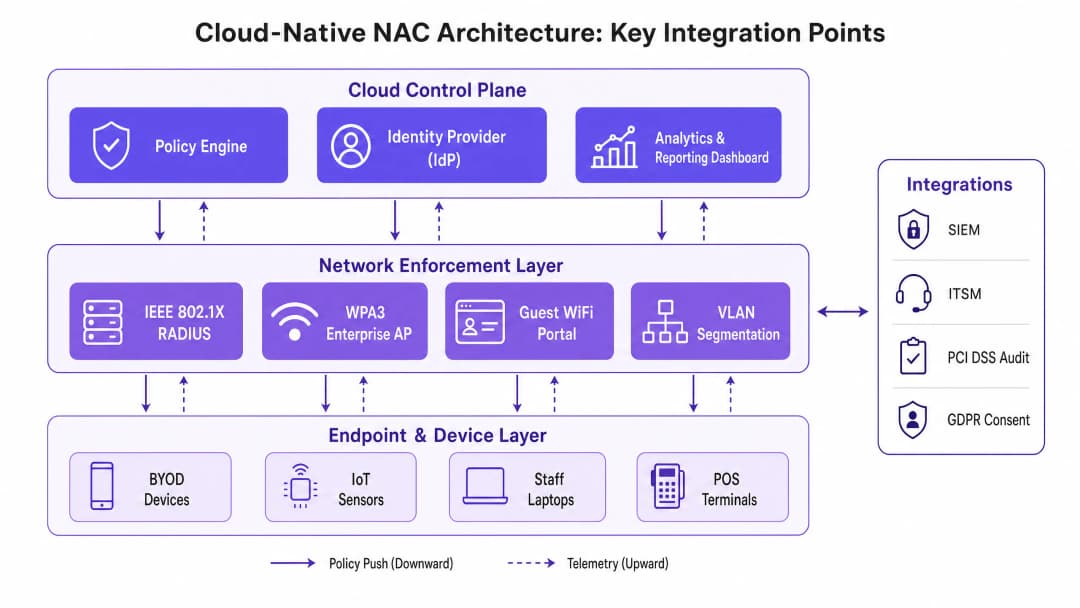
Die grundlegende Veränderung beim Übergang von Legacy zu Cloud-nativem NAC ist die Trennung von Control Plane und Data Plane. Legacy-Architekturen basieren in der Regel auf monolithischen RADIUS-Servern und physischen Appliances, die am Edge bereitgestellt oder in einem zentralen Rechenzentrum konsolidiert sind. Dieses Modell führt zu Engpässen, erhöht die Latenzzeit für verteilte Standorte und erfordert ständige manuelle Eingriffe, um die Konsistenz der Richtlinien zu wahren.
Cloud-natives NAC verlagert die Policy Engine und den Identity Provider (IdP) in eine skalierbare Cloud-Umgebung. Die Durchsetzung wird an den Edge verlagert, entweder über schlanke Software-Agenten oder über eine direkte API-Integration mit modernen Access Points und Switches. Diese Architektur verändert die Art und Weise, wie Authentifizierung und Autorisation verarbeitet werden, grundlegend.
Identitätsföderation und RADIUS
Das Herzstück der Migration ist die Umstellung des Identitätsmanagements. Legacy-NAC basiert häufig auf direkten LDAP-Binds an ein lokales Active Directory. Cloud-native Lösungen bevorzugen eine SAML- oder OIDC-Integration mit Cloud-Identity-Providern wie Azure AD oder Okta. Bei der Migration muss die RADIUS-Infrastruktur modernisiert werden. Cloud RADIUS-Dienste verarbeiten die IEEE 802.1X-Authentifizierung global (z. B. EAP-TLS, PEAP-MSCHAPv2) und reduzieren die Latenzzeit, indem sie Anfragen an den nächstgelegenen geografischen Point of Presence weiterleiten. Es ist von entscheidender Bedeutung, jede derzeit verwendete Extensible Authentication Protocol (EAP) -Methode zu dokumentieren. Wenn bestehende EAP-Typen in der neuen Umgebung nicht unterstützt werden, führt dies zu sofortigen Authentifizierungsfehlern bei den Endpunkten. Darüber hinaus ermöglicht die Integration einer robusten Guest WiFi -Plattform wie Purple für den Gastzugang eine cloudbasierte Richtliniendurchsetzung, was die Komplexität von RADIUS Change of Authorisation (CoA) und VLAN-Zuweisung von der lokalen Hardware entfernt.
Netzwerksegmentierung und Compliance
Bei modernem NAC geht es nicht nur um den Zugriff, sondern um dynamische Segmentierung. In Umgebungen, die PCI-DSS oder der GDPR unterliegen, ist die Fähigkeit, VLANs dynamisch zuzuweisen oder Richtlinien zur Mikrosegmentierung basierend auf Benutzerrolle, Gerätestatus und Standort durchzusetzen, von größter Bedeutung. Cloud-native NAC bewertet den Kontext - wer, was, wo und wann - bevor der Zugriff gewährt wird.
Während der Migration müssen bestehende statische VLAN-Zuweisungen auf dynamische Richtlinien abgebildet werden. Beispielsweise muss ein POS-Terminal vom Gastnetzwerk und dem allgemeinen Mitarbeiternetzwerk isoliert werden. Die Cloud-Richtlinien-Engine bewertet die MAC-Adresse des Geräts (oder idealerweise ein Gerätezertifikat) und weist die Netzwerkinfrastruktur an, es in einer sicheren, PCI-konformen Zone zu platzieren.
Haben Sie Fragen zu Ihrem spezifischen Setup?
Unser Team arbeitet mit Standortbetreibern, IT-Managern und Netzwerktechnikern an über 80.000 Standorten zusammen. Buchen Sie ein 20-minütiges Gespräch und wir zeigen Ihnen, wie andere diese Herausforderungen gelöst haben.
Implementierungsleitfaden
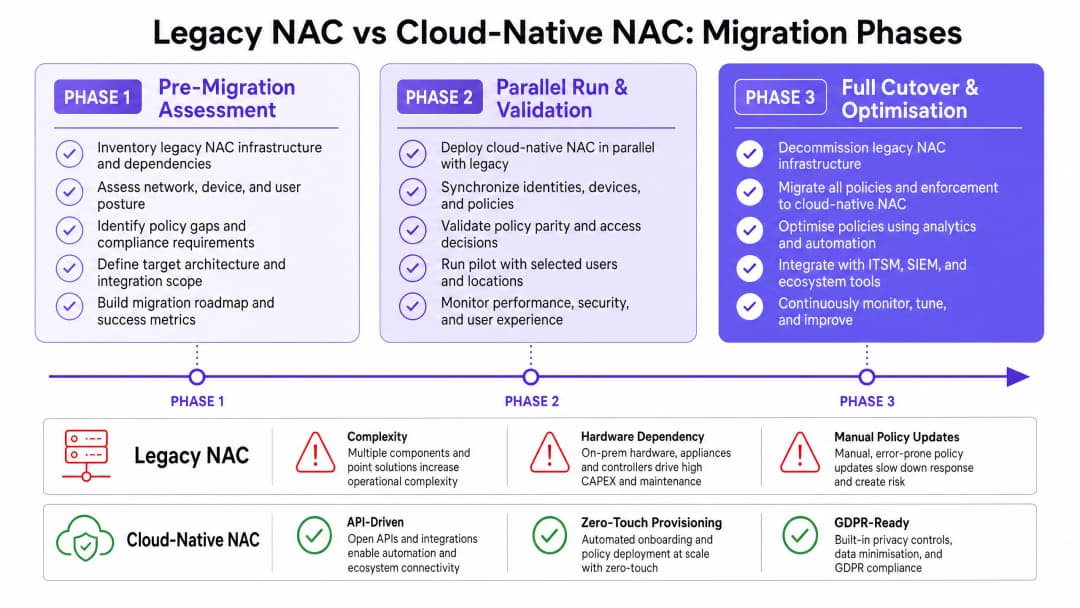
Die Durchführung der Migration erfordert einen disziplinierten, phasenweisen Ansatz, um Unterbrechungen an aktiven Standorten und bei kritischen Geschäftsabläufen zu minimieren.
Phase 1: Bewertung vor der Migration
Vor jeder Konfigurationsänderung ist eine vollständige Bestandsaufnahme des bestehenden NAC-Ökosystems zwingend erforderlich. Dies umfasst die Erfassung aller RADIUS-Server, Supplicant-Konfigurationen, VLAN-Schemas und Drittanbieter-Integrationen (wie SIEM- oder ITSM-Plattformen).
- Identitätsquellen prüfen: Identifizieren Sie alle für die Authentifizierung verwendeten Verzeichnisse und Datenbanken. Bereinigen Sie Altkonten und erzwingen Sie MFA für privilegierte Identitäten.
- EAP-Methoden erfassen: Dokumentieren Sie alle verwendeten 802.1X-Methoden in kabelgebundenen und drahtlosen Netzwerken.
- Gast-Flows analysieren: Dokumentieren Sie aktuelle Captive Portal-Integrationen. Bewerten Sie, wie eine moderne Guest WiFi -Lösung diesen Prozess rationalisieren kann.
- IoT-Geräte überprüfen: Identifizieren Sie Geräte, die auf MAC Authentication Bypass (MAB) angewiesen sind, und planen Sie nach Möglichkeit eine zertifikatsbasierte Authentifizierung.
Phase 2: Parallelbetrieb und Validierung
Die effektivste Strategie besteht darin, das cloud-native NAC im Shadow-Modus parallel zum Altsystem bereitzustellen. Dies ermöglicht die Validierung von Richtlinien, ohne den produktiven Datenverkehr zu beeinträchtigen.
- Cloud RADIUS bereitstellen: Konfigurieren Sie das Cloud-NAC so, dass es Authentifizierungsanfragen parallel zum Altsystem empfängt.
- Richtliniengleichheit validieren: Vergleichen Sie die von beiden Systemen getroffenen Zugriffsentscheidungen (Rolle, VLAN, ACL). Eventuelle Abweichungen müssen untersucht und behoben werden.3. Latenz testen: Stellen Sie sicher, dass Cloud-Authentifizierungsanfragen innerhalb akzeptabler Schwellenwerte (typischerweise unter 100 ms) abgeschlossen werden.
- Pilotgruppen: Migrieren Sie eine kleine Teilmenge von Benutzern (z. B. die IT-Abteilung) oder eine bestimmte, unkritische SSID auf das neue System, um die End-to-End-Funktionalität zu validieren.
Phase 3: Vollständige Umstellung und Optimierung
Sobald die Funktionsgleichheit bestätigt ist, führen Sie die Umstellung während eines geplanten Wartungsfensters durch.
- Reihenfolge der Umstellung festlegen: Beginnen Sie mit den Netzwerken mit dem geringsten Risiko. Migrieren Sie zuerst das Gastnetzwerk, gefolgt vom WLAN für Mitarbeiter, dem kabelgebundenen 802.1X und schließlich den IoT/OT-Netzwerken.
- Telemetrie überwachen: Nutzen Sie die erweiterte Transparenz der Cloud-Plattform, um die Erfolgsraten der Authentifizierung zu überwachen und anomales Verhalten zu identifizieren.
- Analysen integrieren: Speisen Sie die Telemetriedaten in eine WiFi Analytics-Plattform ein, um Einblicke in die Verweilzeiten von Geräten, Verbindungsmuster und die räumliche Auslastung zu gewinnen.
- Deaktivierung von Altsystemen: Sobald die Stabilität gewährleistet ist, löschen Sie die alten NAC-Appliances sicher und nehmen Sie sie außer Betrieb.
Best Practices
Um eine ausfallsichere und skalierbare Bereitstellung zu gewährleisten, befolgen Sie diese bewährten Branchenpraktiken:
- WPA3-Enterprise nutzen: Schreiben Sie dort, wo die Hardware dies unterstützt, WPA3-Enterprise mit dem 192-Bit-Modus für hochsichere Netzwerke (z. B. Finanzen, HR) vor. Dies entspricht den neuesten Sicherheitsstandards der Wi-Fi Alliance. Für ein tieferes Verständnis moderner Wireless-Standards lesen Sie unseren Leitfaden über WiFi Frequencies: A Guide to WiFi Frequencies in 2026.
- Gäste-Identität föderieren: Verwalten Sie Gästekonten nicht im Unternehmensverzeichnis. Nutzen Sie eine speziell entwickelte Plattform wie Purple, um das Onboarding von Gästen, das Einwilligungsmanagement und die Datenresidenz zu verwalten und so die GDPR-Konformität sicherzustellen.
- Zero Trust Prinzipien implementieren: Verabschieden Sie sich von implizitem Vertrauen basierend auf dem Netzwerkstandort. Implementieren Sie eine kontinuierliche Zustandsbewertung für alle Endpunkte, bevor der Zugriff gewährt wird.
- IoT-Onboarding automatisieren: Verabschieden Sie sich von MAB, indem Sie eine automatisierte Zertifikatsbereitstellung für bildschirmlos betriebene Geräte implementieren.
Weitere Einblicke in die Entwicklung der Netzwerksicherheit finden Sie in The Future of WiFi Security: AI-Driven NAC and Threat Detection und der spanischen Version, El Futuro de la Seguridad WiFi: NAC Impulsado por IA y Detección de Amenazas.
Fehlerbehebung und Risikominderung
Eine Migration birgt von Natur aus Risiken. Das Antizipieren häufiger Fehlermodi ist entscheidend für einen reibungslosen Übergang.
Fehlermodus: Probleme bei der Identitätssynchronisierung Wenn die Synchronisierung des Cloud-IdP mit dem lokalen Verzeichnis fehlschlägt, schlägt die Authentifizierung fehl. Mitigation: Implementieren Sie ein robustes Monitoring auf Directory-Sync-Agents. Konfigurieren Sie redundante Sync-Konnektoren über verschiedene physische Standorte hinweg.
Failure-Mode: Hohe Authentifizierungslatenz Das Routing von RADIUS-Traffic in eine entfernte Cloud-Region kann zu Timeouts beim Endpoint-Supplicant führen. Mitigation: Wählen Sie eine Cloud-Region, die geografisch nah an den Standorten liegt. Implementieren Sie lokale RADIUS-Proxys oder ausfallsichere Branch-Appliances für kritische Standorte, wie große Retail-Filialen oder Einrichtungen im Bereich Healthcare.
Failure-Mode: Verlust der IoT-Konnektivität Ältere IoT-Geräte verfügen oft über fest codierte Netzwerkkonfigurationen oder unterstützen keine modernen EAP-Methoden. Mitigation: Betreiben Sie eine dedizierte, isolierte SSID mit MAB-Fallback speziell für ältere IoT-Geräte, bis diese ersetzt werden können. Stellen Sie sicher, dass dieses VLAN über strenge ACLs verfügt, die laterale Bewegungen einschränken.
ROI und geschäftliche Auswirkungen
Der Übergang zu einem Cloud-nativen NAC liefert messbaren geschäftlichen Mehrwert, der über die reine Erhöhung der Sicherheit hinausgeht.
- Operative Effizienz: Zero-Touch-Provisioning und eine zentralisierte Richtlinienverwaltung reduzieren die Engineering-Stunden für Moves, Adds und Changes (MACs) erheblich.
- Hardware-Einsparungen: Die Außerbetriebnahme von On-Premises-Appliances eliminiert die damit verbundenen Kosten für Strom, Kühlung und Wartungsverträge.
- Verbesserte Guest-Experience: Die Integration von NAC in eine moderne Guest WiFi-Plattform reduziert Reibungsverluste beim Onboarding - dies führt zu höheren Opt-In-Raten und einer reichhaltigeren Datenerfassung für Marketingteams in den Branchen Hospitality und Transport.
- Risikominderung: Automatisierte Compliance-Berichte und dynamische Segmentierung verringern die Wahrscheinlichkeit und die potenziellen Auswirkungen von Datenschutzverletzungen, was die Cyber-Versicherungsprämien senkt und den Markenruf schützt.
Schlüsseldefinitionen
Network Access Control (NAC)
Eine Sicherheitslösung, die Richtlinien für Geräte und Benutzer durchsetzt, die versuchen, auf ein Netzwerk zuzugreifen.
Unerlässlich, um sicherzustellen, dass sich nur autorisierte, konforme Geräte mit Unternehmens- oder Gästenetzwerken verbinden.
Cloud-Native Architektur
Die Entwicklung von Anwendungen speziell zur Nutzung von Cloud-Computing-Modellen, typischerweise unter Verwendung von Microservices und APIs.
Ermöglicht eine unbegrenzte Skalierung der NAC und entkoppelt das Richtlinienmanagement von lokalen Hardware-Einschränkungen.
RADIUS (Remote Authentication Dial-In User Service)
Ein Netzwerkprotokoll, das eine zentrale Verwaltung für Authentifizierung, Autorisierung und Accounting (AAA) bereitstellt.
Das Kernprotokoll, das von Netzwerk-Switches und APs zur Kommunikation mit der NAC-Richtlinien-Engine verwendet wird.
IEEE 802.1X
Ein IEEE-Standard für portbasierte Network Access Control, der einen Authentifizierungsmechanismus für Geräte bereitstellt, die eine Verbindung zu einem LAN oder WLAN herstellen möchten.
Der Goldstandard für die sichere Netzwerkauthentifizierung von Mitarbeitergeräten auf Enterprise-Niveau.
MAC Authentication Bypass (MAB)
Eine Methode zur Gewährung des Netzwerkzugriffs basierend auf der MAC-Adresse des Geräts anstelle eines Benutzernamens/Passworts oder eines Zertifikats.
Wird häufig für IoT-Geräte ohne Benutzeroberfläche (Drucker, Kameras) verwendet, die 802.1X nicht unterstützen, obwohl es von Natur aus weniger sicher ist.
Dynamische Segmentierung
Die Fähigkeit, Netzwerkzugriffsrichtlinien (wie VLANs oder ACLs) dynamisch basierend auf Benutzeridentität, Gerätetyp oder Kontext zuzuweisen.
Entscheidend für die Isolierung verschiedener Datenverkehrsarten (z. B. um POS-Terminals vom Gast-WiFi getrennt zu halten).
Identity Provider (IdP)
Eine Systeminstanz, die Identitätsinformationen für Prinzipale erstellt, pflegt und verwaltet und Authentifizierungsdienste bereitstellt.
Cloud-native NAC basiert auf modernen IdPs (Azure AD, Okta) statt auf alten, lokalen LDAP-Servern.
Change of Authorisation (CoA)
Eine RADIUS-Erweiterung, die es dem NAC-Server ermöglicht, die Zugriffsrechte einer aktiven Sitzung dynamisch zu ändern.
Wird häufig in Gäste-WiFi-Portalen verwendet, um einen Benutzer nach der Zustimmung zu den Nutzungsbedingungen von einem eingeschränkten Pre-Authentication-VLAN in ein Vollzugriffs-VLAN zu verschieben.
Ausgearbeitete Beispiele
Ein Hotel mit 500 Zimmern migriert zu einer cloud-nativen NAC. Derzeit wird ein veralteter lokaler RADIUS-Server für das Mitarbeiter-802.1X (PEAP) und ein einfaches Captive Portal für Gäste genutzt. Zudem authentifizieren sich 200 IoT-Geräte (Smart-TVs, Türschlösser) über MAB. Wie sollte die Migration sequenziert werden, um Unterbrechungen für Gäste zu minimieren?
- Cloud-NAC bereitstellen und in den bestehenden IdP für Mitarbeiter integrieren. 2. Purple Guest WiFi mit dem Cloud-NAC für den Gastzugang verbinden. 3. Phase 1 Cutover: Migration der Guest SSID auf den neuen Captive Portal-Flow. Dies ist risikoarm und bietet sofortigen Marketing-ROI. 4. Phase 2 Cutover: Migration von Mitarbeiter-802.1X. Sicherstellen, dass das neue RADIUS-Serverzertifikat von den Endgeräten der Mitarbeiter als vertrauenswürdig eingestuft wird, um Warnmeldungen zu vermeiden. 5. Phase 3 Cutover: Migration der IoT-Geräte. Erstellen einer spezifischen Richtlinie im Cloud-NAC für MAB, um diese Geräte in einem isolierten VLAN zu platzieren.
Eine große Einzelhandelskette mit 150 Filialen verzeichnet während der parallelen Testphase ihrer Cloud-NAC-Migration hohe Latenzzeiten (über 500 ms), was zu Timeouts an POS-Terminals bei der Authentifizierung führt.
Die Latenz wird wahrscheinlich durch die geografische Distanz zwischen den Filialen und der Cloud-RADIUS-Region oder durch ineffiziente Verzeichnisabfragen verursacht. Die Lösung besteht darin: 1. Überprüfen, ob der Cloud-NAC-Mandant in der optimalen geografischen Region gehostet wird. 2. Bereitstellen eines schlanken RADIUS-Proxys oder einer Edge-Appliance zur Ausfallsicherung in regionalen Hubs, um Authentifizierungen zwischenzuspeichern und lokale EAP-Terminierungen durchzuführen. 3. Sicherstellen, dass die IdP-Integration schnelle, indexierte Abfragen nutzt (z. B. eine native Azure AD-Integration anstelle der Abfrage eines lokalen LDAP-Servers über ein VPN).
Übungsfragen
Q1. Ihre Organisation migriert von Cisco ISE zu einem cloud-nativen NAC. Während des Parallelbetriebs stellen Sie fest, dass eine bestimmte Gruppe älterer Barcodescanner in Ihrem Lager die Authentifizierung am Cloud-NAC fehlschlägt, auf der ISE jedoch erfolgreich ist. Was ist die wahrscheinlichste Ursache und wie sollten Sie vorgehen?
Hinweis: Berücksichtigen Sie, wie ältere Geräte mit Verschlüsselung und Protokollaushandlung umgehen.
Musterlösung anzeigen
Die wahrscheinlichste Ursache ist eine Diskrepanz bei den unterstützten EAP-Methoden oder Cipher-Suites. Der Cloud-NAC hat möglicherweise ältere, weniger sichere Protokolle (wie TLS 1.0 oder bestimmte schwache Chiffren) deaktiviert, die der alte ISE-Server noch zuließ. Um dies zu beheben, müssen Sie entweder die Firmware oder den Supplicant auf den Barcodescannern aktualisieren, um moderne Protokolle zu unterstützen, oder, falls dies nicht möglich ist, eine spezifische, isolierte Richtlinie im Cloud-NAC konfigurieren, um das ältere Protokoll vorübergehend streng auf diese Gerätegruppe zu beschränken, wodurch das Sicherheitsrisiko durch eine strikte Netzwerksegmentierung minimiert wird.
Q2. Ein Universitätscampus möchte parallel zur NAC-Migration WPA3-Enterprise für sein Personalnetzwerk implementieren. 15% der Laptops des Personals verwenden jedoch ältere WLAN-Netzwerkkarten, die kein WPA3 unterstützen. Wie sollte der Netzwerkarchitekt die SSIDs gestalten?
Hinweis: Berücksichtigen Sie Übergangsmodi und die Auswirkungen auf die Sicherheitslage.
Musterlösung anzeigen
Der Architekt sollte die Personal-SSID so konfigurieren, dass sie den WPA3-Enterprise Transition Mode verwendet. Dies ermöglicht es kompatiblen Geräten, sich über WPA3-Enterprise zu verbinden, während ältere Geräte auf WPA2-Enterprise zurückgreifen. Falls für bestimmte Abteilungen eine strikte Sicherheits-Compliance erforderlich ist, kann alternativ eine dedizierte reine WPA3-SSID für kompatible Geräte erstellt werden, während die alte SSID aktiv bleibt, bis die restliche Hardware ausgetauscht wird.
Q3. In Phase 1 (Pre-Migration Assessment) stellen Sie fest, dass das aktuelle Gäste-WiFi stark auf RADIUS CoA angewiesen ist, um Benutzer von einem Walled-Garden-VLAN in ein Internet-Zugriffs-VLAN zu verschieben. Die neuen Cloud-APs unterstützen CoA über das WAN nicht zuverlässig. Welche Architekturänderung wird empfohlen?
Hinweis: Berücksichtigen Sie, wie moderne Gäste-Plattformen die Richtliniendurchsetzung handhaben, ohne auf komplexe lokale VLAN-Wechsel angewiesen zu sein.
Musterlösung anzeigen
Der empfohlene Ansatz besteht darin, vom lokalen VLAN-Wechsel wegzugehen und eine cloud-gesteuerte Gäste-WiFi-Plattform (wie Purple) zu nutzen. In diesem Modell leitet der AP den gesamten Gästedatenverkehr in ein einziges Gäste-VLAN. Das Captive Portal und die Richtliniendurchsetzung (Bandbreitenbegrenzung, Inhaltsfilterung, Sitzungsdauer) werden entweder von der integrierten Firewall des APs oder einem Cloud-Gateway übernommen, wodurch RADIUS CoA vollständig überflüssig wird und die Konfiguration an den Standorten vereinfacht wird.
Weiterlesen in dieser Reihe
PPSK WPA3: Vergleich von Funktionen und Bereitstellungsmodellen
Dieser technische Leitfaden vergleicht PPSK und WPA3-SAE und erläutert deren architektonische Unterschiede sowie Bereitstellungsmodelle für Multi-Tenant-Umgebungen. Er bietet IT-Managern und Projektentwicklern praktische Anleitungen zur Einrichtung sicherer, isolierter WiFi-Netzwerke mithilfe der identitätsbasierten Lösungen von Purple.
Verwaltung der Bandbreite für das Mitarbeiter-WiFi: Shaping, QoS und Reduzierung des Datenverkehrs
Dieser Leitfaden beschreibt praktische Methoden zur Verwaltung der Bandbreite für das Mitarbeiter-WiFi an Unternehmensstandorten. Er umfasst Traffic Shaping, QoS-Implementierung und wie der Einsatz von Purple Shield die Netzwerklast ohne Infrastruktur-Upgrades reduziert.
So reduzieren Sie die Anzahl der WiFi SSIDs mit Per-Device PSK (iPSK, DPSK, MPSK)
Dieser maßgebliche technische Referenzleitfaden erklärt, wie IT-Teams die durch den SSID-Beacon-Overhead verursachte WiFi-Leistungsbeeinträchtigung eliminieren können, indem sie mehrere zweckgebundene Netzwerke mithilfe von Per-Device PSK (xPSK) in einer einzigen SSID zusammenfassen. Er deckt die Herstellerlandschaft mit Cisco iPSK, HPE Aruba MPSK, Ruckus DPSK, Juniper Mist PPSK und Ubiquiti UniFi PPSK ab und bietet praktische Implementierungshinweise zur dynamischen VLAN-Zuweisung, zum IoT-Onboarding und zur PCI-DSS-Compliance. Betreiber von Veranstaltungsorten in der Hotellerie, im Einzelhandel, in Stadien und in Organisationen des öffentlichen Sektors finden hier umsetzbare Architekturrichtlinien und praxisnahe Beispiele.
Haben Sie Fragen zu Ihrem spezifischen Setup?
Unser Team arbeitet mit Standortbetreibern, IT-Managern und Netzwerktechnikern an über 80.000 Standorten zusammen. Buchen Sie ein 20-minütiges Gespräch und wir zeigen Ihnen, wie andere diese Herausforderungen gelöst haben.