
Drei SSIDs, um sie alle zu beherrschen: Einrichtungsleitfaden für Gäste-, Mitarbeiter- und IoT-WiFi
Dieser maßgebliche technische Leitfaden bietet einen schrittweisen Entwurf für die Implementierung einer Drei-SSID-WiFi-Architektur. Er erklärt, wie Sie Gäste-, Mitarbeiter- und IoT-Traffic mithilfe von Captive Portals, 802.1X RADIUS und gerätespezifischen PSK (xPSK) segmentieren, um die Leistung zu optimieren und die PCI-DSS-Compliance zu gewährleisten.
Diesen Leitfaden anhören
Podcast-Transkript ansehen
📚 Teil unserer Kernserie: Enterprise WiFi Security Guide →
Executive Summary
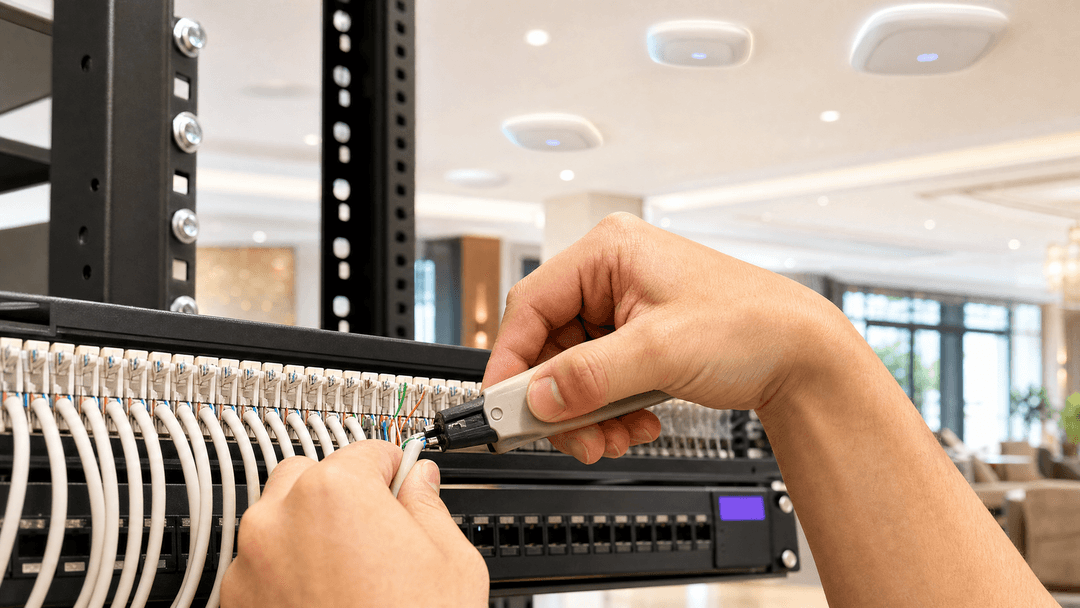
Venue operators face a growing crisis of WiFi spectrum congestion. Every time you broadcast a new SSID to segment guest, staff, point-of-sale, and IoT traffic, you actively degrade the performance of your entire wireless network. Each enabled SSID broadcasts a beacon frame every 100 milliseconds at the lowest basic data rate, consuming up to 20% of available airtime before a single packet of user data is transmitted.
The industry consensus is clear: broadcast no more than three SSIDs per access point radio. This authoritative technical reference guide explains how IT teams can eliminate WiFi performance degradation by collapsing multiple purpose-built networks into a single three-SSID architecture. This design balances strict logical network segmentation with optimal wireless airtime utilisation.
We will explore the technical configuration of an open Guest WiFi network with a captive portal, a WPA3-Enterprise Staff WiFi network using 802.1X for identity-based access, and an IoT WiFi network using per-device pre-shared keys (xPSK) for headless devices. By mapping these three SSIDs to dynamic VLANs via RADIUS, you achieve complete Layer 2 isolation for compliance standards like PCI DSS, without sacrificing throughput.
Technical Deep-Dive
To understand why SSID sprawl is so damaging, we have to look at 802.11 management frames. Every enabled SSID on an access point broadcasts a beacon frame every 100 milliseconds. To ensure that every client device at the edge of the coverage cell can hear the beacon, the access point transmits it at the lowest basic data rate, usually one or two megabits per second. If you have one access point broadcasting six SSIDs, that is 60 beacons per second. In a dense environment where a client can hear four access points on the same channel, that channel is carrying 240 beacons per second. This overhead increases latency, causes jitter on voice calls, and reduces overall throughput.
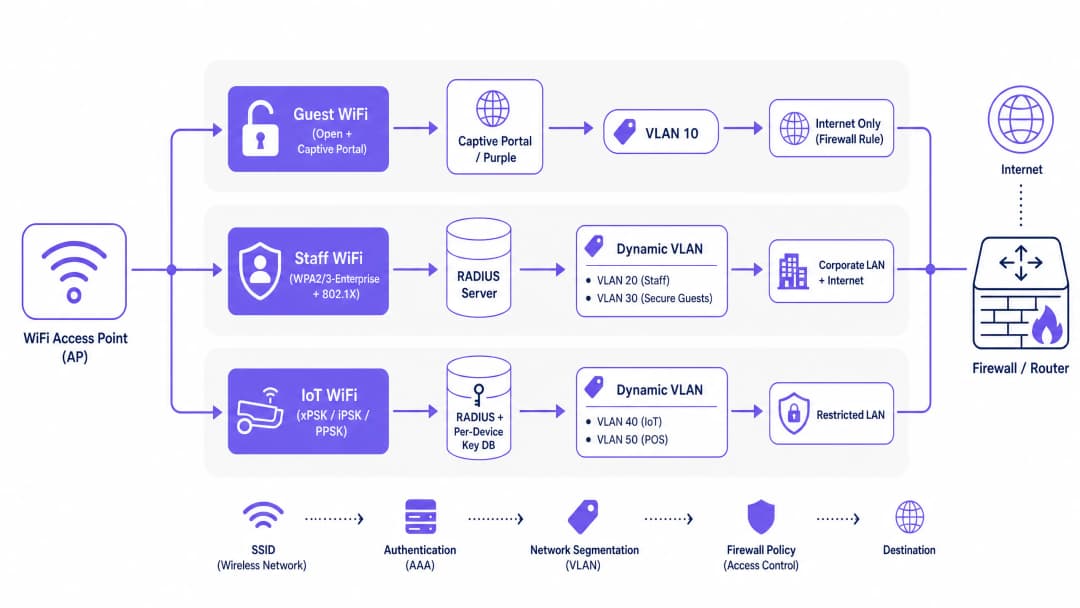
The solution is the three-SSID design. This architecture provides distinct authentication mechanisms for different device types while maintaining strict backend isolation through dynamic VLAN assignment.
1. Guest WiFi: Open + Captive Portal
The first SSID is dedicated to visitors. You configure this as an open network without a WPA2-Personal password. When a visitor connects, their device receives an IP address from a DHCP server on your dedicated guest VLAN (for example, VLAN 10).
Every DNS query and HTTP request is intercepted by the wireless controller, which redirects the visitor's browser to a captive portal page. This is where Guest WiFi platforms like Purple integrate. The captive portal handles visitor authentication via social login, email registration, or voucher codes. It captures conscious-choice opt-ins for GDPR compliance and records the visitor's details as first-party data.
The visitor's session remains tagged to VLAN 10. Your firewall must enforce a strict policy on this subnet: internet access only, with an explicit deny-all rule blocking any route to your internal RFC 1918 address space.
A critical configuration step here is the walled garden. Before a visitor completes the portal login, their device needs to reach the portal page itself. You configure a walled garden, a whitelist of IP addresses and domains accessible without authentication. This must include your captive portal server's hostname, any CDN endpoints, and social login provider endpoints like Microsoft Entra ID or Google Workspace.
2. Staff WiFi: WPA2/3-Enterprise + 802.1X
The second SSID is for corporate devices. This uses WPA2-Enterprise or WPA3-Enterprise, requiring 802.1X authentication. When a staff member connects, their device initiates an Extensible Authentication Protocol (EAP) exchange with the access point, which forwards the credentials to your RADIUS server.
The RADIUS server validates the identity and returns an Access-Accept message containing three specific IETF standard attributes:
- Attribute 64 (Tunnel-Type): set to value 13 (VLAN)
- Attribute 65 (Tunnel-Medium-Type): set to value 6 (IEEE 802)
- Attribute 81 (Tunnel-Private-Group-ID): contains the actual VLAN ID string
When the access point receives these attributes, it dynamically tags that session with the specified VLAN. A finance team member lands on VLAN 20. A contractor authenticates with different credentials and lands on VLAN 30. One broadcast SSID provides multiple logical segments.
For EAP method selection, PEAP with MSCHAPv2 is the pragmatic starting point for most venues, as it uses a server-side certificate and username-password credentials. EAP-TLS uses mutual certificate authentication and is the most secure option, but requires a Mobile Device Management (MDM) platform to push certificates silently.
3. IoT WiFi: per-device PSK (xPSK)
The third SSID solves a problem that neither open networks nor 802.1X can address. Headless IoT devices, card terminals, digital signage, and printers cannot authenticate with 802.1X because they lack a certificate store or browser. However, placing them on a flat WPA2-Personal network with a single shared password creates a lateral movement risk.
xPSK operates on a standard WPA2 or WPA3-Personal SSID. The wireless controller maintains a database of unique passwords. When a device connects using its specific password, the controller recognises that key and uses RADIUS attributes to dynamically assign that session to the correct VLAN.
A card terminal connects with its unique key and lands on VLAN 50, your PCI DSS-isolated payment network. A smart thermostat connects and lands on VLAN 40, your restricted IoT network.
Hardware vendors use different terms for this architecture: Cisco Meraki calls it iPSK, HPE Aruba calls it MPSK, Ruckus calls it DPSK, and Juniper Mist and Ubiquiti UniFi call it PPSK.
Implementation Guide
Phase 1: Traffic Classification and VLAN Design
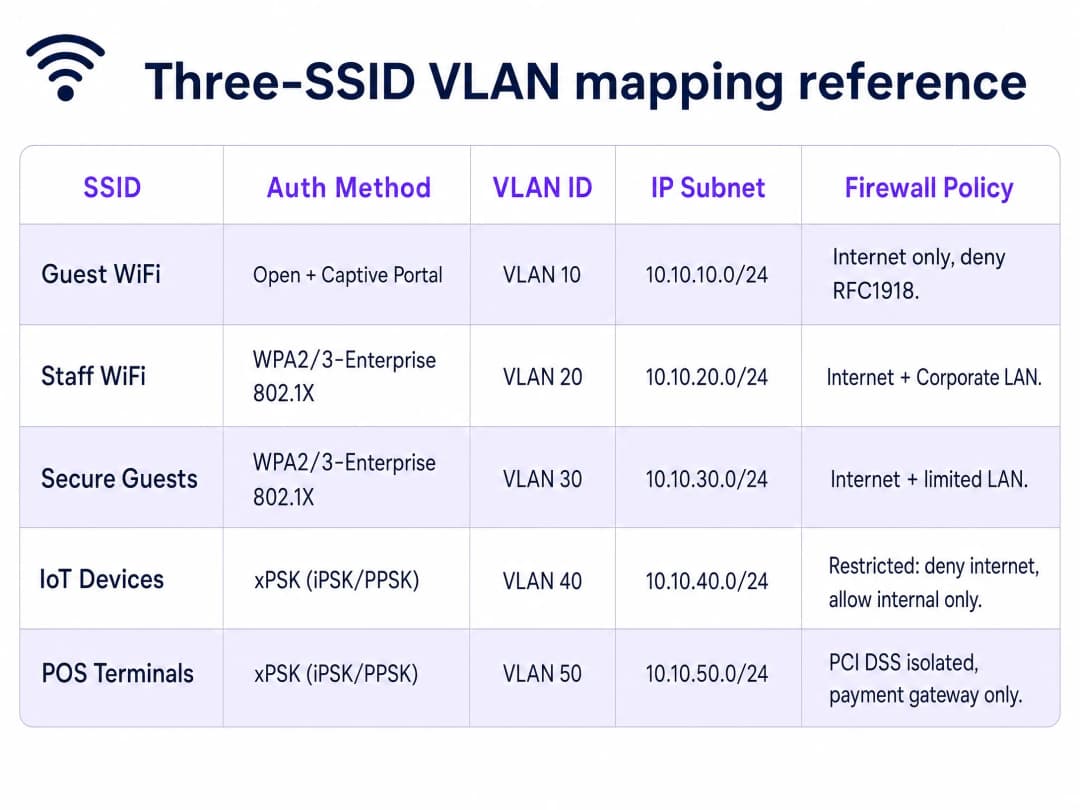
Before touching a switch port, document every device type in your environment. Assign a VLAN ID and IP subnet to each traffic class. Keep your guest VLAN on a completely separate subnet with no route to your internal address space.
Phase 2: Switch Port Configuration
Configure the switch ports connecting to your access points as 802.1Q trunk ports. If a trunk port is accidentally configured as an access port, all traffic collapses onto a single VLAN and your segmentation disappears silently.
Phase 3: Controller Configuration
Map your three SSIDs on your wireless controller.
- Cisco Meraki: Navigate to Wireless > Access Control. Configure the Guest SSID as Open with a click-through splash page. Configure the Staff SSID with WPA2-Enterprise and point to your RADIUS server. Configure the IoT SSID with WPA2 and iPSK with RADIUS.
- HPE Aruba: In Aruba Central, configure the Guest SSID with an external captive portal profile. Configure the Staff SSID with 802.1X. Configure the IoT SSID with MPSK, integrating with ClearPass Policy Manager for enterprise scale.
- Ruckus: In SmartZone, configure the Guest WLAN with a Hotspot (WISPr) portal. Configure the Staff WLAN with 802.1X. Enable DPSK on the IoT WLAN and configure the DPSK database.
Phase 4: Firewall Policy
The VLAN architecture is only as strong as the inter-VLAN routing rules on your firewall. Document every permitted flow explicitly. Default-deny everything else.
Best Practices
- Limit SSID Count: Broadcast a maximum of three SSIDs per radio to preserve wireless airtime and performance.
- Automate Key Lifecycle: Do not manage thousands of unique xPSK passwords in a spreadsheet. Integrate your xPSK platform with your property management system or identity provider via API.
- Account for MAC Randomisation: Modern mobile devices use randomised MAC addresses. Ensure your xPSK implementation binds the session to the key itself rather than the MAC address to prevent authentication failures.
- Enable Client Isolation: Always enable client isolation on your Guest SSID to prevent devices from communicating directly with each other, mitigating peer-to-peer attacks.
- Implement Rate Limiting: Apply per-client bandwidth limits (e.g., 10-20 Mbps) on the Guest SSID to prevent a single user from saturating the internet uplink.
Troubleshooting & Risk Mitigation
- Captive Portal Fails to Load: This is almost always an incomplete walled garden. If visitors see a blank screen, test the walled garden from a fresh device with no cached DNS. Ensure all CDN endpoints and social login provider URLs are whitelisted.
- Dynamic VLAN Assignment Fails: Verify that your RADIUS server is sending exactly Attribute 64 (value 13), Attribute 65 (value 6), and Attribute 81 (the correct VLAN ID string). Use packet captures to inspect the Access-Accept message.
- IoT Devices Cannot Connect: Check key complexity. Some legacy IoT devices struggle with keys longer than 32 characters or keys containing special characters. Standardise on 16 to 24 character alphanumeric keys.
ROI & Business Impact
Consolidating to a three-SSID design delivers measurable business value across Hospitality , Retail , and Transport venues.
By reclaiming 15-20% of your wireless airtime, you extend the usable lifespan of your existing access points, deferring costly hardware refresh cycles. The performance improvement reduces latency for staff voice-over-IP devices and increases throughput for point-of-sale transactions.
From a compliance perspective, dynamic VLAN assignment provides the verifiable network segmentation required by PCI DSS 4.0 auditors. Isolating payment terminals onto a dedicated VLAN via xPSK removes your broader corporate network from the audit scope, significantly reducing compliance costs and risk.
Finally, standardising the Guest WiFi layer with Purple's captive portal enables the venue to capture first-party data, driving targeted marketing campaigns through the WiFi Analytics platform. This transforms the wireless network from an IT cost centre into a revenue-generating asset.
Schlüsseldefinitionen
VLAN (Virtual Local Area Network)
Ein in IEEE 802.1Q definierter Layer-2-Konstrukt, der es einer einzelnen physischen Netzwerkinfrastruktur ermöglicht, mehrere, logisch getrennte Broadcast-Domänen zu übertragen.
Wird verwendet, um Gäste-, Mitarbeiter- und IoT-Traffic auf dem kabelgebundenen Backend zu isolieren.
Captive Portal
Eine Webseite, die DNS- und HTTP-Traffic abfängt und Benutzer zur Authentifizierung umleitet, bevor sie Netzwerkzugriff gewährt.
Wird auf der Gäste-WiFi-SSID verwendet, um Einwilligungen einzuholen, Besucher zu authentifizieren und First-Party-Daten zu sammeln.
Walled Garden
Eine Whitelist von IP-Adressen und Domänen, auf die ein Client-Gerät zugreifen kann, bevor es die Captive Portal-Authentifizierung abschließt.
Unerlässlich, damit Geräte die Portalseite, CDN-Assets und Social-Login-Anbieter wie Microsoft Entra ID erreichen können.
802.1X
Ein IEEE-Standard für portbasierte Netzwerkzugriffskontrolle, der einen Authentifizierungsmechanismus für Geräte bereitstellt, die sich mit einem LAN oder WLAN verbinden möchten.
Wird auf der Mitarbeiter-WiFi-SSID verwendet, um Benutzer mit Unternehmens-Anmeldedaten gegen einen RADIUS-Server zu authentifizieren.
xPSK (Per-Device Pre-Shared Key)
Ein Oberbegriff für Technologien, die die Verwendung mehrerer eindeutiger Passwörter auf einer einzigen WPA2/3-Personal-SSID ermöglichen, wobei jedes Passwort mit einem bestimmten Gerät und VLAN verknüpft ist.
Wird auf der IoT-WiFi-SSID verwendet, um bildschirmlose Geräte (Headless Devices) zu sichern, die keine 802.1X-Authentifizierung unterstützen.
RADIUS
Ein Netzwerkprotokoll, das eine zentrale AAA-Verwaltung (Authentication, Authorization, and Accounting) für Benutzer bereitstellt, die sich mit einem Netzwerkdienst verbinden und diesen nutzen.
Der Backend-Server, der Anmeldedaten validiert und die dynamischen VLAN-Attribute zurückgibt.
Beacon Frame
Ein 802.11-Management-Frame, der regelmäßig von einem Access Point gesendet wird, um die Existenz eines drahtlosen Netzwerks anzukündigen.
Die Hauptursache für Sendezeit-Overhead (Airtime), wenn zu viele SSIDs aktiviert sind.
Client-Isolierung
Eine Funktion des Wireless-Controllers, die verhindert, dass Geräte, die mit derselben SSID verbunden sind, direkt miteinander kommunizieren.
Eine kritische Sicherheitskontrolle in Guest WiFi-Netzwerken zur Verhinderung von Peer-to-Peer-Angriffen.
Ausgearbeitete Beispiele
Ein Hotel mit 200 Zimmern muss Gäste-WiFi in allen Zimmern, Mitarbeiter-WiFi für die Rezeption und das Housekeeping sowie IoT-Konnektivität für intelligente Thermostate und Türschlosssteuerungen bereitstellen.
Stellen Sie drei SSIDs auf Cisco Meraki bereit. SSID 1 (Gäste) nutzt das Captive Portal von Purple; Gäste landen auf VLAN 10 mit reinem Internetzugang. SSID 2 (Mitarbeiter) nutzt WPA3-Enterprise mit RADIUS gegen Microsoft Entra ID; Rezeptionsmitarbeiter landen auf VLAN 20, das Housekeeping auf VLAN 21. SSID 3 (IoT) nutzt Meraki iPSK; Thermostate verwenden einen eindeutigen Schlüssel, der VLAN 40 zugeordnet ist, Türschlösser einen Schlüssel, der VLAN 41 zugeordnet ist. Alle IoT-VLANs haben strenge Firewall-Regeln und keinen Internetzugang.
Eine Einzelhandelskette mit 50 Filialen muss Kartenzahlungsterminals, digitale Werbebildschirme und Handhelds der Mitarbeiter sichern sowie ein Einkaufs-WiFi anbieten.
Stellen Sie drei SSIDs über HPE Aruba Access Points bereit. SSID 1 (Einkäufer) nutzt ein Purple Captive Portal zur Erfassung von First-Party-Daten. SSID 2 (Mitarbeiter) nutzt WPA2-Enterprise mit RADIUS gegen Okta und weist die Mitarbeiter VLAN 20 zu. SSID 3 (IoT/POS) nutzt Aruba MPSK mit ClearPass Policy Manager. Kartenterminals verbinden sich mit eindeutigen Schlüsseln und landen auf VLAN 50, einem im PCI-DSS-Scope liegenden Netzwerk mit Firewall-Regeln, die nur ausgehenden HTTPS-Traffic zum Payment-Gateway zulassen. Digitale Werbebildschirme werden VLAN 45 zugeordnet.
Übungsfragen
Q1. Sie stellen ein neues Guest WiFi-Netzwerk bereit. Besucher beschweren sich, dass die Captive Portal-Seite leer ist und sie sich nicht anmelden können. Was ist die wahrscheinlichste Ursache?
Hinweis: Überlegen Sie, welchen Zugriff ein Gerät hat, bevor es die Authentifizierung abschließt.
Musterlösung anzeigen
Die Walled-Garden-Konfiguration ist unvollständig. Das Gerät kann den Captive Portal-Server, die CDN-Endpunkte oder die URLs des Social-Login-Anbieters nicht erreichen. Sie müssen diese Domänen in der Pre-Authentication-Zugriffskontrollliste freigeben.
Q2. Ein Stadion-IT-Team möchte 8 SSIDs bereitstellen, um den Datenverkehr für Fans, Ticketing, VIPs, Medien, Betrieb, Gebäudemanagement, Auftragnehmer und Legacy-Geräte zu segmentieren. Warum ist dies ein schlechtes Design, und was ist die Alternative?
Hinweis: Berücksichtigen Sie die Auswirkungen von 802.11-Management-Frames auf die Wireless-Airtime.
Musterlösung anzeigen
Das Ausstrahlen von 8 SSIDs führt zu einer erheblichen Leistungsbeeinträchtigung aufgrund des Overheads von Beacon-Frames, was übermäßige Airtime bei der niedrigsten Datenrate verbraucht. Die Alternative ist ein Drei-SSID-Design mit dynamischer VLAN-Zuweisung über RADIUS (für 802.1X) und xPSK (für Headless-Geräte), um eine logische Segmentierung ohne den Wireless-Overhead bereitzustellen.
Q3. Sie konfigurieren die dynamische VLAN-Zuweisung für Staff WiFi über einen RADIUS-Server. Die Authentifizierung ist erfolgreich, aber der Benutzer wird dem Standard-VLAN anstelle seines zugewiesenen VLANs zugewiesen. Welche RADIUS-Attribute sollten Sie überprüfen?
Hinweis: Es gibt drei spezifische IETF-Standardattribute, die für das VLAN-Steering erforderlich sind.
Musterlösung anzeigen
Sie müssen überprüfen, ob die RADIUS Access-Accept-Nachricht das Attribut 64 (Tunnel-Type) auf den Wert 13, das Attribut 65 (Tunnel-Medium-Type) auf den Wert 6 und das Attribut 81 (Tunnel-Private-Group-ID) mit dem korrekten VLAN-ID-String enthält.
Weiterlesen in dieser Reihe
WPA2 Personal vs Enterprise: Was ist der Unterschied und welche Variante sollten Sie nutzen?
Dieser technische Leitfaden bietet einen umfassenden Vergleich der Sicherheitsrotokolle WPA2 Personal und WPA2 Enterprise in WiFi-Umgebungen von Unternehmen. Er beschreibt die architektonischen Unterschiede, Bereitstellungsmethoden und Sicherheitsaspekte jedes Standards, um Netzwerkarchitekten und IT-Leitern eine fundierte Entscheidungsfindung zu ermöglichen.
Drei SSIDs für alle Fälle: Einrichtungsleitfaden für Guest, Passpoint und IoT WiFi
Dieser technische Leitfaden bietet eine definitive Blaupause für die Implementierung des Drei-SSID-WiFi-Designs in Unternehmensumgebungen. Er beschreibt die Konfiguration eines offenen Guest WiFi-Portals, das automatisierte Onboarding via Passpoint sowie die gerätespezifische xPSK-Authentifizierung, um eine vollständige VLAN-Segmentierung und Zero-Trust-Netzwerkzugriff zu erreichen.
Enterprise-WiFi-Authentifizierung ohne Active Directory oder On-Premises-Server
Dieser Leitfaden erklärt, wie Sie eine sichere WPA2/3-Enterprise-WiFi-Authentifizierung ohne lokales Active Directory, Windows NPS oder RADIUS-Server bereitstellen. Er behandelt die Protokoll-Diskrepanz zwischen Cloud-Identity-Providern und 802.1X, die Vorteile von EAP-TLS gegenüber PEAP-MSCHAPv2 sowie die Bereitstellung von Cloud-RADIUS mit MDM-ausgestellten Zertifikaten für Microsoft Entra ID, Okta oder Google Workspace. Geschrieben für IT-Leiter in Cloud-First- und Mac/Chromebook-intensiven Unternehmen, die bereit sind, ihre lokale Infrastruktur abzulösen.