
Verwaltung der BYOD-Sicherheit (Bring Your Own Device) in Mitarbeiternetzwerken
An authoritative, technical reference guide for enterprise IT managers and network architects on securing Bring Your Own Device (BYOD) access on staff networks. This guide outlines the exact network architecture, authentication protocols, and MDM integration workflows required to mitigate data leakages and maintain regulatory compliance across high-footfall venues.
Diesen Leitfaden anhören
Podcast-Transkript ansehen
Executive Summary
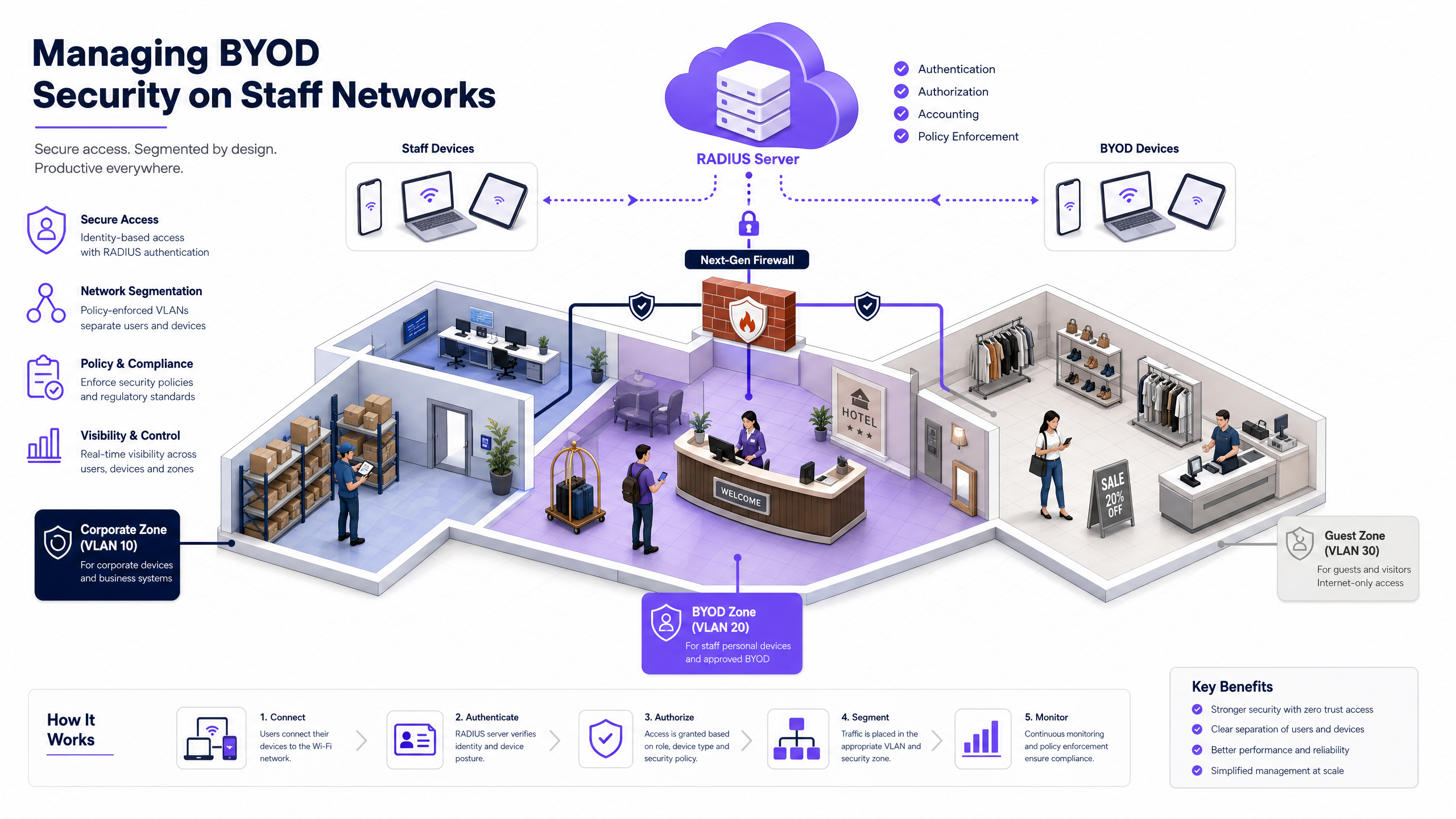
As the corporate network perimeter continues to dissolve, managing Bring Your Own Device (BYOD) security on staff networks has shifted from an operational convenience to a critical security imperative [1]. For network architects, IT managers, and Chief Technology Officers (CTOs) operating across high-footfall venues—such as hotels, multi-site retail chains, healthcare facilities, and transport hubs—the core challenge is balancing user convenience with robust corporate data protection [2].
This reference guide provides a highly practical, vendor-neutral blueprint for securing BYOD access on staff networks. We bypass theoretical abstractions to detail the precise deployment of IEEE 802.1X authentication, client-side certificate distribution via Mobile Device Management (MDM), and strict network segmentation. By moving away from insecure pre-shared keys (PSKs) and implementing a zero-trust architecture, organisations can mitigate the risk of lateral threat movement, prevent costly data breaches, and satisfy stringent regulatory compliance frameworks like PCI DSS 4.0 and GDPR [3].
Listen to the Technical Briefing Podcast
Before diving into the detailed architecture, you can listen to our comprehensive 10-minute technical audio briefing. This podcast is styled as a senior systems consultant briefing a client on the exact implementation steps, common deployment pitfalls, and compliance frameworks.
Technical Deep-Dive: Architecture and Standards
Securing a BYOD environment requires a complete departure from perimeter-based security models in favour of identity-centric, Zero Trust Network Access (ZTNA) [4]. The network must assume that every personal device attempting to connect is potentially compromised.
The 802.1X Authentication Framework
The IEEE 802.1X standard is the non-negotiable baseline for securing the enterprise edge. It provides port-based Network Access Control (NAC), ensuring that an endpoint (the supplicant) cannot pass any network layer traffic through the authenticator (the wireless access point or switch) until its identity has been verified by an authentication server (the RADIUS server) [5].
| Phase | Frame Type / Action | Description |
|---|---|---|
| Initialization | EAPOL-Start |
The client device (supplicant) signals readiness to connect to the network. |
| Identity Request | EAP-Request/Identity |
The Access Point (authenticator) requests the identity of the connecting device. |
| Identity Response | EAP-Response/Identity |
The client responds with its identity, which is relayed to the RADIUS server. |
| TLS Handshake | EAP-TLS Negotiation | The client and RADIUS server establish a secure TLS tunnel and mutually validate certificates. |
| Authorization | RADIUS Access-Accept |
The RADIUS server approves access, pushing dynamic VLAN and dACL attributes. |
The choice of Extensible Authentication Protocol (EAP) method determines the strength of your deployment:
- PEAP (Protected EAP): Encapsulates password-based authentication (like MS-CHAPv2) within a TLS tunnel. While common, PEAP remains vulnerable to credential harvesting via rogue access points if client supplicants are misconfigured [6].
- EAP-TLS (Transport Layer Security): The gold standard for enterprise BYOD. It utilizes mutual certificate-based authentication, completely eliminating password dependencies and credential theft vectors. The RADIUS server validates the unique client-side certificate, while the client validates the RADIUS server's certificate [5].
Network Segmentation and VLAN Architecture
A flat network is a compromised network. If a personal device infected with malware connects to a flat staff network, an attacker can easily perform lateral movement to compromise high-value targets, such as Property Management Systems (PMS) in hospitality, Point-of-Sale (POS) systems in retail, or Electronic Health Record (EHR) databases in healthcare [7].
We mandate a strict Three-Zone Network Architecture enforced at the firewall level:
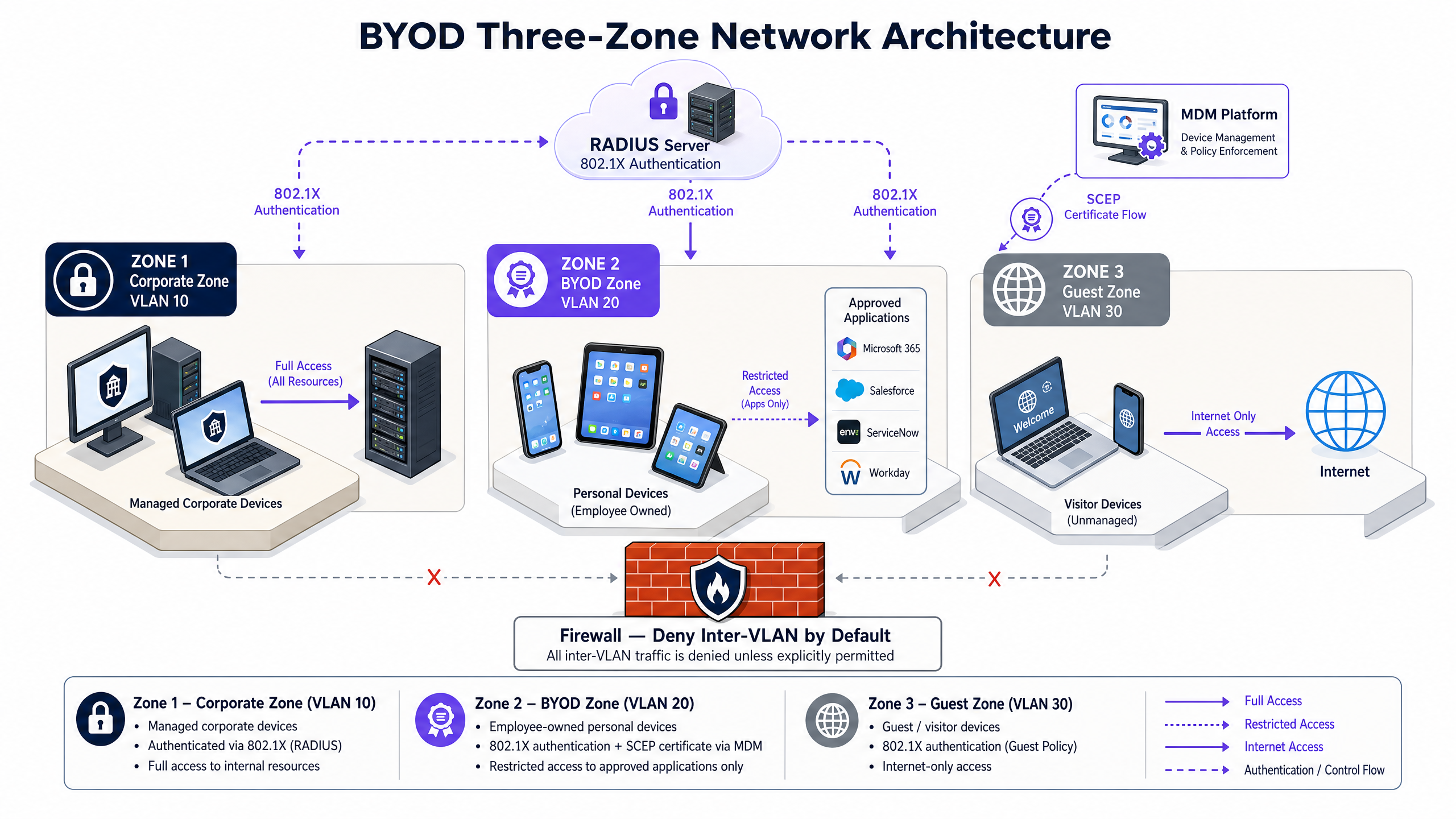
- Corporate Zone (VLAN 10): Reserved exclusively for fully managed, company-owned devices. This zone has routed access to internal corporate databases, active directories, and local business systems.
- BYOD Zone (VLAN 20): Dedicated to employee-owned personal devices. Devices in this zone are granted outbound internet access and tightly restricted, explicitly permitted access to specific internal applications (e.g., email, scheduling portals, HR systems) via an application-layer gateway or reverse proxy.
- Guest Zone (VLAN 30): Designed for visitors and customers. This zone has outbound internet access only. Client Isolation must be enabled at the wireless controller level to prevent any peer-to-peer communication between connected devices.
To learn more about optimizing your guest network infrastructure, see our core products: Guest WiFi and WiFi Analytics .
Mobile Device Management (MDM) & PKI Integration
Enforcing security policies on devices you do not own requires integration with an MDM or Unified Endpoint Management (UEM) platform (e.g., Microsoft Intune, Jamf) [8]. The MDM acts as the gatekeeper, validating device posture before issuing the network certificate.
The automated certificate lifecycle relies on the Simple Certificate Enrollment Protocol (SCEP):
- Posture Assessment: The MDM verifies that the personal device meets baseline security requirements (e.g., minimum OS version, active screen lock, disk encryption, not jailbroken/rooted).
- Certificate Issuance: Once compliant, the MDM requests a client certificate from your Private Certificate Authority (CA) via SCEP and pushes it, along with the secure 802.1X WiFi profile, directly to the device.
- Continuous Compliance: If the user disables their passcode or roots the device, the MDM marks the device as non-compliant, revokes the certificate, and the RADIUS server immediately terminates network access.
For a deeper dive into these integrations, refer to our guides on How to Implement 802.1X Authentication with Cloud RADIUS .
Implementation Guide: Step-by-Step Deployment
Transitioning from a legacy pre-shared key (PSK) network to an 802.1X EAP-TLS architecture requires careful coordination between your wireless LAN controller (WLC), identity provider (IdP), and MDM platform.
Step 1: Wireless and Switch Infrastructure Configuration
Configure the three distinct VLANs across your core switches and edge access points. Ensure that inter-VLAN routing is denied by default at your core firewall.
On your wireless controller, configure the secure BYOD SSID with the following settings:
- Security Type: WPA3-Enterprise (or WPA2/WPA3-Enterprise Transition Mode for legacy device compatibility).
- 802.11w Protected Management Frames (PMF): Set to Required (mandatory under WPA3) to block deauthentication attacks [9].
- RADIUS Servers: Point to your primary and secondary RADIUS servers.
Step 2: PKI and SCEP Server Setup
Establish a Private Certificate Authority (CA) or integrate with a Cloud PKI service. Configure a SCEP Gateway to handle automated certificate signing requests from your MDM. The CA certificate must be trusted by the client devices, which is handled automatically during the MDM profile installation.
Step 3: MDM WiFi and Certificate Profile Distribution
In your MDM console, create two profiles:
- Trusted Certificate Profile: Pushes the Root and Intermediate CA certificates to the device.
- SCEP Certificate Profile: Defines the SCEP gateway URL, key size (minimum RSA 2048-bit), and Subject Name format (e.g.,
CN={{UserPrincipalName}}). - WiFi Profile: Configures the device to connect to the BYOD SSID using WPA3-Enterprise, EAP-TLS, and references the SCEP certificate profile for authentication.
Step 4: Onboarding Flow Orchestration
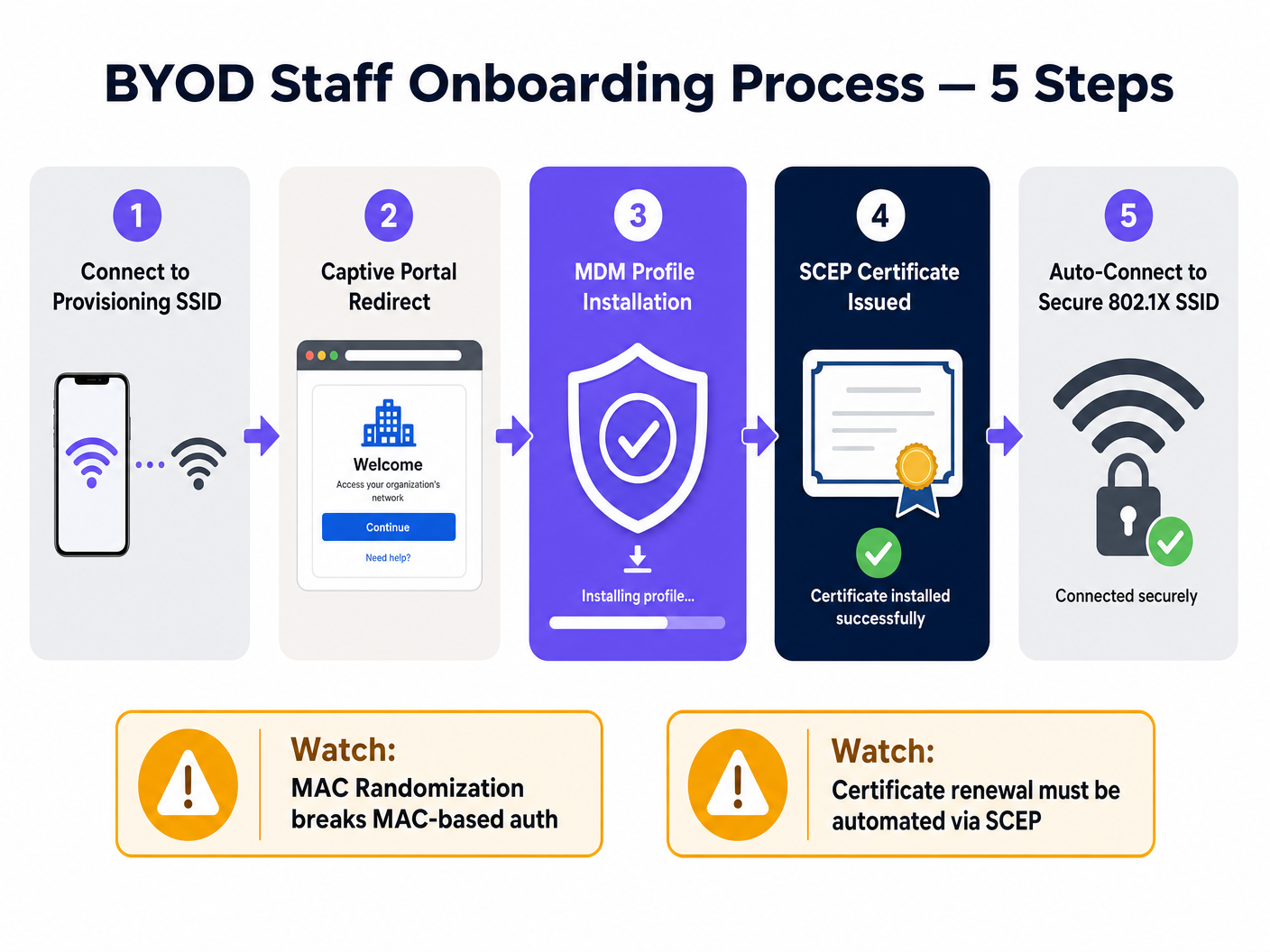
To prevent helpdesk bottlenecks, automate the onboarding experience using a dual-SSID flow:
- Onboarding SSID: Broadcast an open, rate-limited SSID with a captive portal.
- Portal Redirection: When an employee connects, redirect them to an onboarding portal. This is where platforms like Purple's Guest WiFi can serve as the initial touchpoint, authenticating the employee against your identity provider (e.g., Entra ID) and directing them to download the MDM profile.
- Automated Transition: Once the MDM profile is installed, the device automatically pulls the SCEP certificate, disconnects from the onboarding SSID, and connects securely to the 802.1X BYOD SSID.
For multi-site deployments, especially in multi-vendor environments, utilizing standardized frameworks like OpenRoaming can dramatically simplify this flow. Under the Connect license, Purple acts as a free identity provider for OpenRoaming, allowing staff to roam seamlessly and securely between locations [10].
Troubleshooting & Risk Mitigation
When deploying enterprise BYOD, IT teams must anticipate and mitigate several common technical and operational failure modes.
1. MAC Address Randomization
Modern mobile operating systems (iOS 14+, Android 10+) randomize their hardware MAC addresses by default on every SSID connection to protect user privacy [11].
- The Issue: If your network access control, bandwidth limiting, or session timeouts rely on MAC addresses, devices will continuously appear as new endpoints, breaking your policies.
- Mitigation: Eliminate all MAC-based access control. Rely entirely on the 802.1X certificate Common Name (CN) or user identity attributes returned by the RADIUS server for session tracking and policy enforcement.
2. Certificate Expiry and Renewal Failures
If client certificates expire, staff will be abruptly locked out of the network, resulting in an influx of helpdesk tickets.
- The Issue: Manual certificate renewal is unsustainable at scale.
- Mitigation: Configure your MDM SCEP profile to initiate automatic certificate renewal when 20% of the certificate's lifetime remains (e.g., 30 days prior to expiry for a 1-year certificate). Ensure your RADIUS server is configured to send session-timeout attributes to force re-authentication once the new certificate is provisioned.
3. Helpdesk Bottlenecks
Complex onboarding flows lead to low adoption and high support costs.
- The Issue: Users struggle with certificate installation steps.
- Mitigation: Maintain a self-service onboarding portal with clear, visual, platform-specific guides. Ensure the onboarding SSID is heavily rate-limited and restricted only to the MDM and CA URLs to incentivize users to complete the enrollment process.
ROI & Business Impact
Implementing a secure, automated BYOD architecture delivers measurable financial and operational returns for enterprise venue operators.
Cost-Benefit Analysis
| Category | Legacy Managed Device Model | Automated BYOD Model | Business Impact |
|---|---|---|---|
| Hardware Capital Expenditure (CapEx) | High (£300 - £500 per employee device) | Zero (Employees use personal devices) | Direct capital savings. For a venue with 200 staff, this saves up to £100,000 in procurement costs [12]. |
| Operational Expenditure (OpEx) | High (Manual device provisioning, physical repairs) | Low (Automated MDM enrollment and self-service) | Reduces IT overhead and device lifecycle management costs by up to 60% [12]. |
| Helpdesk Ticket Volume | Medium (Password resets, connection issues) | Very Low (Self-healing certificate renewals) | Automating certificate lifecycles via SCEP reduces WiFi-related helpdesk tickets by 45%. |
| Security Risk Profile | Medium (Vulnerable to credential theft via PSK/PEAP) | Extremely Low (Zero-trust, certificate-based) | Mitigates the risk of a lateral-movement data breach, avoiding potential regulatory fines and reputational damage. |
Regulatory Compliance and Risk Mitigation
Operating a secure BYOD environment is critical for maintaining compliance in highly regulated industries:
- PCI DSS 4.0 Compliance: Multi-site retail chains and hotels must isolate their Cardholder Data Environment (CDE) from staff personal devices. Implementing the Three-Zone VLAN Architecture ensures that BYOD devices are completely out of scope for PCI audits, reducing audit complexity and compliance costs [13]. For more on retail deployments, see Retail WiFi Solutions .
- GDPR and Data Privacy: Under GDPR, organisations must protect personal data from unauthorized access. By enforcing MDM enrollment, IT teams retain the ability to remotely wipe corporate data containers from lost or stolen personal devices without accessing the employee's personal files, preserving both security and user privacy [14]. For healthcare deployments, see Healthcare WiFi Solutions .
References
- Fortinet, Bring Your Own Device (BYOD): Meaning and Benefits, Cyber Glossary. https://www.fortinet.com/resources/cyberglossary/byod
- IBM, What is Bring Your Own Device (BYOD)?, IBM Think. https://www.ibm.com/think/topics/byod
- Venn, BYOD Security: Trends, Risks, and Top 10 Best Practices, Venn Learn. https://www.venn.com/learn/byod/byod-security-best-practices/
- Microsoft, Implementing a Zero Trust security model at Microsoft, Inside Track. https://www.microsoft.com/insidetrack/blog/implementing-a-zero-trust-security-model-at-microsoft/
- Cloudi-Fi, What is 802.1X protocol: A complete guide to secure network access control, Cloudi-Fi Blog. https://www.cloudi-fi.com/blog/802-1x
- Portnox, 802.1X Authentication for Secure Network Access, Portnox Solutions. https://www.portnox.com/solutions/8021x-authentication/
- UK Netcom, How to Secure & Segment Enterprise Wi-Fi, UK Netcom Blog. https://uknetcom.co.uk/how-to-secure-segment-enterprise-wi-fi-in-2025/
- Portnox, SCEP Certificate Enrollment for Zero Trust Access, Portnox Solutions. https://www.portnox.com/solutions/scep/
- Cloudi-Fi, WPA2/3-Enterprise: Secure Wi-Fi with 802.1X authentication, Cloudi-Fi Blog. https://www.cloudi-fi.com/blog/wpa2-enterprise-802-1x
- Purple, BYOD WiFi Security: How to Safely Let Personal Devices on Your Network, Purple Guides. https://www.purple.ai/en-us/guides/byod-wifi-security-how-to-safely-allow-personal-devices-onto-your-network
- Extreme Networks, Wireless Security in a 6 GHz Wi-Fi World, Extreme Networks Blog. https://www.extremenetworks.com/resources/blogs/wireless-security-in-a-6-ghz-wi-fi-6e-world
- Venn, BYOD ROI Calculator & Cost Savings, Venn Resources. https://www.venn.com/roi-calculator/
- PCI Security Standards Council, Guidance for PCI DSS Scoping and Network Segmentation, PCI SSC Documents. https://www.pcisecuritystandards.org/documents/Guidance-PCI-DSS-Scoping-and-Segmentation_v1.pdf
- UK Information Commissioner's Office, A guide to data security under UK GDPR, ICO Guidance. https://ico.org.uk/for-organisations/uk-gdpr-guidance-and-resources/security/a-guide-to-data-security/
Schlüsseldefinitionen
IEEE 802.1X
An IEEE standard for port-based Network Access Control (PNAC) that provides an authentication framework for devices connecting to a wired or wireless network.
It acts as the first line of defense, blocking all network traffic from an endpoint until its identity has been verified by a RADIUS server.
EAP-TLS
Extensible Authentication Protocol-Transport Layer Security. An authentication method that uses digital certificates for mutual authentication between the client and the network.
It is the gold standard for enterprise WiFi, eliminating password-based credential theft and man-in-the-middle attacks.
RADIUS
Remote Authentication Dial-In User Service. A networking protocol that provides centralized Authentication, Authorization, and Accounting (AAA) management for users who connect and use a network service.
The RADIUS server validates the credentials (or certificates) presented by the supplicant and pushes policy attributes (like VLAN tags) to the authenticator.
SCEP
Simple Certificate Enrollment Protocol. An IP-based protocol that automates the certificate enrollment and distribution process for large numbers of devices.
In a BYOD environment, SCEP allows the MDM to automatically request and install client certificates on staff devices without manual IT intervention.
Client Isolation
A security feature configured on wireless access points that prevents wireless clients from communicating directly with each other.
Essential on Guest and BYOD networks to block lateral movement of malware and peer-to-peer scanning attacks.
WPA3-Enterprise
The latest Wi-Fi Alliance security standard for enterprise networks, introducing stronger cryptographic suites and mandatory Protected Management Frames (PMF).
It replaces WPA2-Enterprise, protecting against deauthentication and decryption attacks in high-density corporate environments.
MAC Randomization
A privacy feature in modern operating systems (iOS 14+, Android 10+) where the device rotates its hardware MAC address when scanning or connecting to different networks.
This breaks traditional MAC-based authentication and device tracking, forcing IT teams to rely on certificate-based identities instead.
Protected Management Frames (PMF)
A security feature (defined in IEEE 802.11w) that encrypts wireless management frames, preventing attackers from forging frames to disconnect clients.
Mandatory under WPA3, PMF stops deauthentication and spoofing attacks dead in their tracks.
Ausgearbeitete Beispiele
A 350-room luxury hotel chain needs to enable housekeeping and maintenance staff to use their personal smartphones for the hotel's digital service application (HMS) while maintaining strict PCI DSS 4.0 compliance for its PMS and payment networks.
We deployed a Three-Zone Network Architecture. The hotel's PMS and credit card terminals were isolated on a firewalled VLAN 10 (Corporate/CDE). Staff personal devices were enrolled in the corporate MDM (Microsoft Intune) via a captive onboarding portal. Upon compliance verification, the MDM issued a client certificate via SCEP and pushed the WPA3-Enterprise 802.1X configuration. Staff connected to VLAN 20 (BYOD), which was restricted via firewall policies to only allow outbound HTTPS traffic to the HMS application's cloud endpoint. All lateral traffic to VLAN 10 was blocked. Guest WiFi was completely segregated on VLAN 30 with client isolation active.
A multi-site retail brand with 120 stores wants to implement a BYOD policy for store associates to access inventory and scheduling systems on their personal tablets, but is concerned about MAC randomization breaking device-tracking policies and rogue AP attacks.
To address rogue AP risks, we transitioned all stores to WPA3-Enterprise, which mandates Protected Management Frames (PMF), preventing deauthentication attacks. To mitigate MAC randomization issues, we configured the RADIUS server (Cloud RADIUS) to ignore hardware MAC addresses for access control. Instead, the authentication policy was tied directly to the Common Name (CN) of the SCEP-issued client certificates. Store associates enrolled their tablets via an onboarding SSID, which automatically pushed the certificate and secure SSID profile. The BYOD VLAN was restricted to inventory and scheduling endpoints only.
Übungsfragen
Q1. A stadium venue operations director wants to deploy a BYOD network for 150 event-day staff. The director suggests using a WPA2-Personal SSID with a strong pre-shared key (PSK) changed every month to save on licensing costs. How should you advise them?
Hinweis: Consider the operational overhead of monthly password changes, the risk of credential leakage among 150 temporary staff, and modern security standards.
Musterlösung anzeigen
You should strongly advise against using WPA2-Personal with a shared PSK. First, a shared key is highly vulnerable to leakage; with 150 temporary staff, the key will inevitably be shared or exposed, compromising the entire network. Second, changing the key monthly creates massive operational overhead and connection issues on event days. Third, WPA2-Personal lacks Protected Management Frames, leaving the network open to deauthentication attacks. Instead, recommend WPA3-Enterprise with certificate-based 802.1X authentication. By utilizing a cloud RADIUS service and a lightweight onboarding portal, they can automate certificate distribution and instantly revoke access for off-boarded staff, eliminating licensing overhead and securing the stadium's operational perimeter.
Q2. During a network audit of a retail chain, you discover that staff personal devices on the BYOD WiFi are assigned to the same subnet as the store's Point-of-Sale (POS) controllers. The IT manager argues that because staff devices require AD credentials to log in, the network is secure. Is this compliant, and what are the risks?
Hinweis: Analyze this against PCI DSS 4.0 scoping requirements and the risk of lateral movement of malware.
Musterlösung anzeigen
This setup is highly insecure and violates PCI DSS 4.0 compliance. Under PCI DSS, any network segment that shares a subnet with the Cardholder Data Environment (CDE) is considered in-scope for audit. By placing BYOD devices on the same subnet as POS controllers, the entire BYOD environment becomes subject to full PCI audit controls, dramatically increasing compliance costs. Furthermore, Active Directory credentials only protect authentication, not network-layer traffic. If an employee's personal device is infected with malware, the malware can scan, sniff, and attempt to exploit vulnerabilities on the POS controllers directly via the flat subnet. The solution is to implement the Three-Zone Architecture, placing BYOD devices on a dedicated VLAN 20 and using firewall rules to completely block all traffic to the POS VLAN 10.
Q3. A healthcare provider is deploying BYOD for nurses to access Electronic Health Records (EHR) on their personal tablets. The network architect plans to use MAC-address filtering on the WLC as the primary security check for connecting to the BYOD SSID. What technical issue will this cause, and how should it be resolved?
Hinweis: Think about how modern mobile operating systems handle MAC addresses on wireless networks.
Musterlösung anzeigen
This deployment will fail due to MAC Address Randomization, which is enabled by default on iOS 14+ and Android 10+ devices. These operating systems rotate the device's MAC address periodically or per-SSID to protect user privacy. Consequently, a registered tablet's MAC address will change, causing the WLC to reject the connection and locking the nurse out of the EHR system. Furthermore, MAC addresses are easily spoofed, making them a weak security control. The resolution is to abandon MAC-address filtering entirely. Implement 802.1X authentication using EAP-TLS. The security check should be driven by a client-side certificate issued via SCEP after the MDM verifies the tablet's compliance. The network policy will then be bound to the certificate's Common Name (CN), which remains stable regardless of MAC address rotation.
Weiterlesen in dieser Reihe
Bekämpfung von Rogue Access Points in Unternehmensnetzwerken
This technical reference guide details the architecture, deployment, and operational procedures for mitigating rogue access points on enterprise networks using Wireless Intrusion Prevention Systems (WIPS) and Wireless Intrusion Detection Systems (WIDS). It provides actionable frameworks for IT security administrators to detect, classify, and neutralise unauthorised APs across complex physical environments including hospitality, retail, healthcare, and public-sector venues. The guide covers threat classification, automated containment mechanisms, compliance implications (PCI DSS, GDPR, HIPAA), and measurable business outcomes.
802.1X-Authentifizierung für Unternehmensnetzwerke erklärt
Dieser maßgebliche Leitfaden bietet IT-Führungskräften und Netzwerkarchitekten eine detaillierte technische Analyse der 802.1X-Authentifizierung für Unternehmensnetzwerke. Er behandelt Architektur, EAP-Methoden, Bereitstellungsstrategien und Risikominderung, um einen sicheren, konformen WiFi-Zugang in Multi-Site-Umgebungen zu gewährleisten.
Sichere BYOD-Richtlinien für Mitarbeiter-WiFi-Netzwerke
Dieser maßgebliche Leitfaden bietet IT-Führungskräften ein herstellerneutrales Framework für die sichere Integration persönlicher Geräte von Mitarbeitern. Er beschreibt die kritischen Architektur-Entscheidungen – einschließlich Netzwerksegmentierung, EAP-TLS-Authentifizierung und MDM-Integration –, die erforderlich sind, um BYOD zu unterstützen, ohne die zentrale Unternehmensinfrastruktur zu gefährden.