
So scannen Sie nach WiFi -Interferenzen und finden den besten Kanal
Dieser umfassende technische Leitfaden bietet IT-Führungskräften in Unternehmen praktische Methoden zur Identifizierung von RF-Interferenzen und zur Auswahl der optimalen 5GHz-Kanäle. Er behandelt die Spektrumanalyse, DFS-Überlegungen und praktische Bereitstellungsstrategien zur Maximierung des Durchsatzes und zur Reduzierung von Latenzzeiten ohne zusätzliche Hardware-Investitionen.
Video overview
Diesen Leitfaden anhören
Podcast-Transkript ansehen
Teil unserer Kernserie: Gast WiFi Leitfaden →
Executive Summary
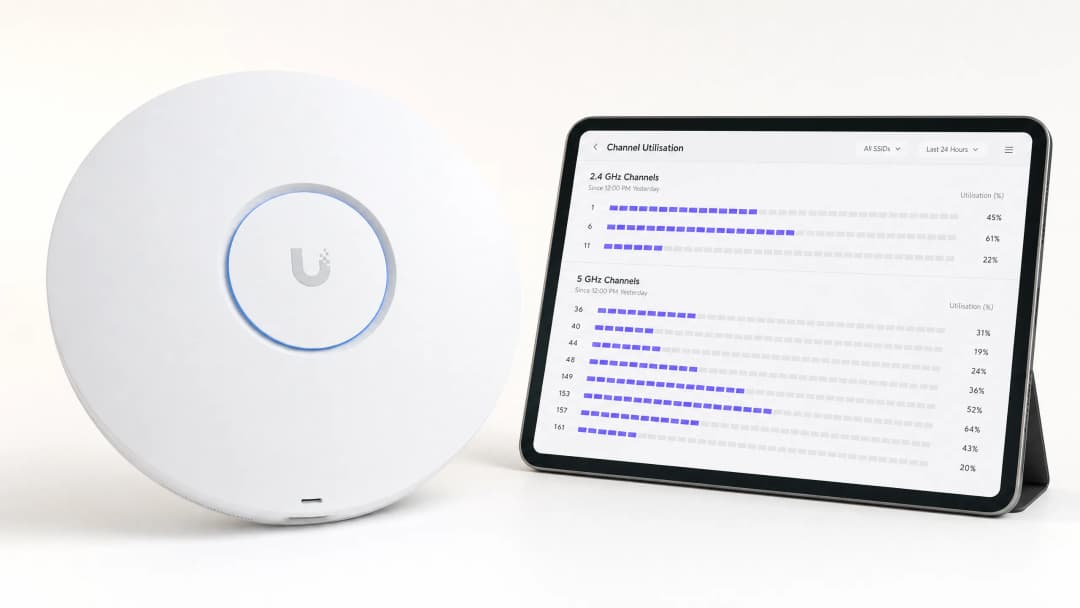
Für IT-Leiter in Unternehmen, die Standorte mit hoher Gerätedichte verwalten, ist die Ermittlung des besten Kanals für 5GHz-Bereitstellungen eine geschäftskritische Aufgabe. Eine schlechte Kanalauswahl führt zu Latenzspitzen, Roaming-Fehlern und verringertem Durchsatz, was sich direkt auf die Benutzererfahrung und den Betrieb vor Ort auswirkt.
Dieser technische Leitfaden beschreibt eine strukturierte Methodik zur Identifizierung von RF-Interferenzen, zur Durchführung von Spektrumanalysen und zur Auswahl optimaler Kanäle im 5GHz-Band. Durch den Übergang von reaktiver Fehlerbehebung zu proaktivem RF-Management können IT-Teams den Durchsatz maximieren, Co-Channel-Konflikte minimieren und höhere Gerätedichten unterstützen - und das ohne die Investitionskosten für die Anschaffung neuer Access Points.
Egal, ob Sie Guest WiFi in einem Einzelhandelsnetzwerk bereitstellen oder die betriebliche Technologie im Back-of-House-Bereich absichern - das Verständnis der Kanalauslastung ist das Fundament einer robusten Wireless-Architektur.
Technischer Deep-Dive: Das 5GHz-Spektrum und Interferenzvektoren
Die 5GHz-Landschaft verstehen
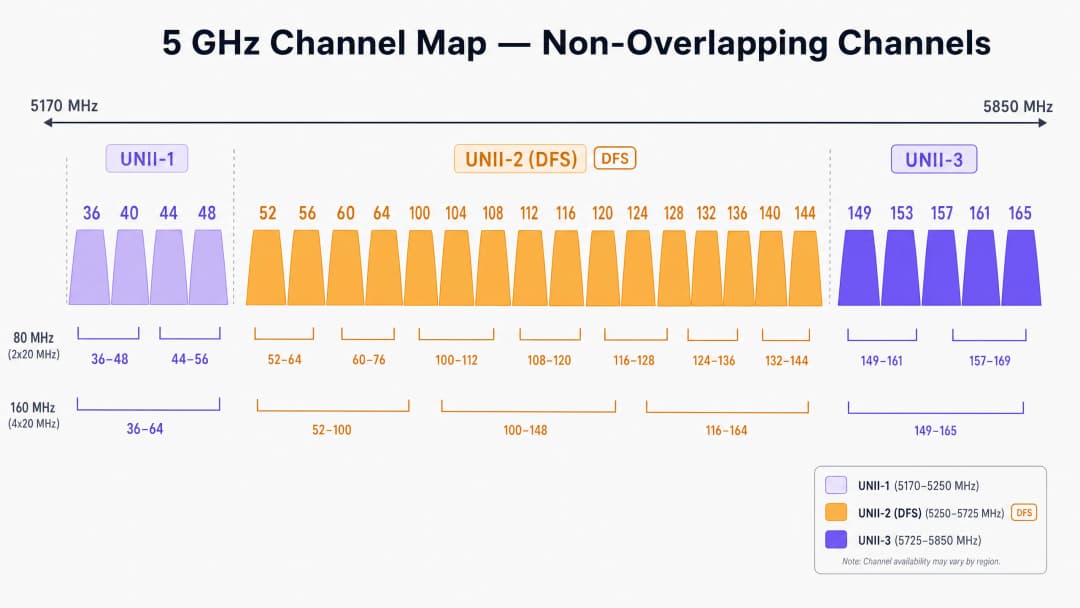
Im Gegensatz zum eingeschränkten 2.4GHz-Band, das nur drei überschneidungsfreie Kanäle bietet, stellt das 5GHz-Spektrum bis zu 25 überschneidungsfreie 20MHz-Kanäle zur Verfügung (abhängig von den regulatorischen Vorgaben). Allerdings sind nicht alle 5GHz-Kanäle gleichwertig. Sie sind in spezifische Unlicensed National Information Infrastructure (UNII) Bänder unterteilt, von denen jedes eigenen Betriebsregeln unterliegt.
UNII-1 und UNII-3: Die sicheren Häfen
Kanäle in den Bändern UNII-1 (36, 40, 44, 48) und UNII-3 (149, 153, 157, 161, 165) sind in den meisten Regionen generell frei von Einschränkungen durch Radarinterferenzen. Für High-Density-Bereitstellungen im Einzelhandel oder im Gastgewerbe stellen diese Kanäle den risikoärmsten Ausgangspunkt für Ihre Kanalplanung dar. Da UNII-3 mit einer etwas höheren Frequenz arbeitet, erfährt es eine geringfügig höhere Dämpfung durch Wände, was tatsächlich vorteilhaft sein kann, um Co-Kanal-Interferenzen zwischen benachbarten Räumen oder Etagen zu begrenzen.
UNII-2 und DFS (Dynamic Frequency Selection)
Die UNII-2-Bänder (Kanäle 52–144) teilen sich das Spektrum mit bestehenden militärischen Systemen und Wetterradaranlagen. Um diese Kanäle zu nutzen, müssen Access Points DFS unterstützen. Erkennt ein AP einen Radarimpuls, muss er den Kanal sofort räumen und darf für 30 Minuten nicht dorthin zurückkehren.
In Umgebungen nahe von Flughäfen, Häfen oder Wetterstationen können DFS-Ereignisse plötzliche, unerklärliche Verbindungsabbrüche bei Clients verursachen. Wenn an Ihrem Standort vereinzelte Ausfälle auftreten, ist die Überprüfung der Controller-Protokolle auf DFS-Ereignisse ein zwingend erforderlicher erster Schritt.
Arten von Interferenzen
Interferenzen in drahtlosen Unternehmensnetzwerken fallen typischerweise in zwei Kategorien:
- Co-Kanal-Interferenzen (CCI): Dies tritt auf, wenn mehrere APs (Ihre eigenen oder die eines Nachbarn) auf demselben Kanal arbeiten. Da WiFi ein Half-Duplex-Medium ist, das durch Carrier Sense Multiple Access with Collision Avoidance (CSMA/CA) geregelt wird, müssen alle Geräte auf demselben Kanal warten, bis sie an der Reihe sind. Hohe CCI führt zu erhöhtem Wettbewerb um Sendezeit und zu höheren Latenzzeiten.
- Nicht-WiFi-Interferenzen: Geräte, die HF-Energie im 5GHz-Band aussenden, ohne sich an die 802.11-Protokolle zu halten. Häufige Verursacher sind schnurlose Telefone, drahtlose AV-Sender und proprietäre IoT-Sensoren. Im Gegensatz zu CCI erhöht eine Nicht-WiFi-Interferenz das Grundrauschen, was WiFi-Frames beschädigt und erneute Übertragungen auslöst.
Haben Sie Fragen zu Ihrem spezifischen Setup?
Unser Team arbeitet mit Standortbetreibern, IT-Managern und Netzwerktechnikern an über 80.000 Standorten zusammen. Buchen Sie ein 20-minütiges Gespräch und wir zeigen Ihnen, wie andere diese Herausforderungen gelöst haben.
Implementierungshandbuch: Scanning und Kanalauswahl
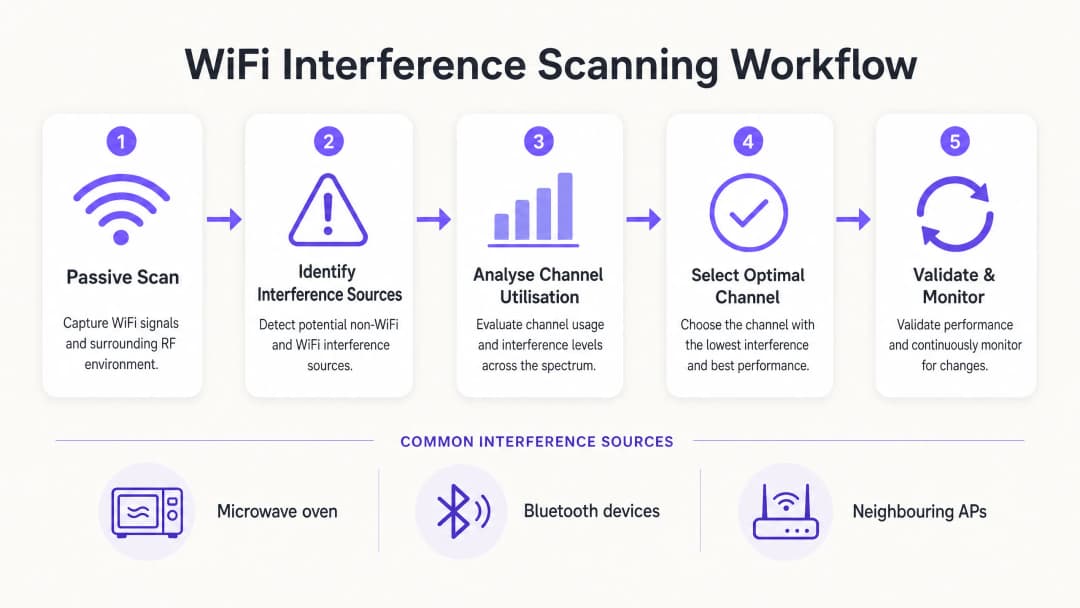
Um den besten Kanal für 5GHz zu ermitteln, müssen Sie über die Standardeinstellungen für "Auto-RF" hinausgehen und eine strukturierte Scanning-Methodik implementieren.
Schritt 1: Ausgangslage ermitteln
Bevor Sie Änderungen vornehmen, sollten Sie eine Ausgangslage (Baseline) definieren. Nutzen Sie die integrierten Monitoring-Tools Ihres Controllers oder binden Sie eine WiFi Analytics-Plattform ein, um Folgendes zu erfassen:
- Durchschnittliche und maximale Kanalauslastung in Prozent.
- Client-Verbindungsraten und Metriken zum Roaming-Erfolg.
- Basisdurchsatz während der Hauptbetriebszeiten.
Wichtige Regel: Führen Sie Ihren ersten RF-Scan niemals in einem leeren Gebäude durch. Ein Scan um 02:00 Uhr morgens an einem Sonntag zeigt nicht die Interferenzen, die durch 5.000 Konferenzteilnehmer entstehen.
Schritt 2: Spektrumanalyse durchführen
Verlässt man sich ausschließlich auf Standard-AP-Scans, werden nur andere 802.11-Netzwerke erkannt. Um Nicht-WiFi-Interferenzen zu identifizieren, benötigen Sie eine Hardware-Spektrumanalyse.
- Stufe 1 (Basis): Controller-basierte AP-Spektrum-Monitore. Viele Enterprise-APs verfügen über ein dediziertes Scan-Funkmodul, das Nicht-WiFi-Signaturen erkennen kann.
- Stufe 2 (Fortgeschritten): Dedizierte Hardware wie der Ekahau Sidekick oder MetaGeek Chanalyzer. Diese Tools erfassen die rohe RF-Energie über das gesamte Spektrum hinweg und ermöglichen es Technikern, die spezifischen Signaturen von Bluetooth-Geräten, AV-Sendern oder fehlerhafter Hardware zu identifizieren.
Schritt 3: Kanalauslastung analysieren
Die Kanalauslastung ist die wichtigste Kennzahl für die Performance. Sie stellt den Prozentsatz der Zeit dar, in der der Kanal belegt ist (entweder durch Datenübertragung oder blockiert durch Interferenzen).
- < 20 %: Hervorragend. Reichlich Kapazität für Anwendungen mit hohem Durchsatz.
- 20 % - 50 %: Normal für aktive Enterprise-Umgebungen.
- > 70 %: Kritischer Schwellenwert. Bei einer Auslastung von 70 % steigt die Latenz exponentiell an und die Client-Erfahrung verschlechtert sich rapide.
Wenn ein AP eine Auslastung von mehr als 70 % auf seinem 5GHz-Kanal meldet, ist sofortiges Handeln erforderlich.
Schritt 4: Den optimalen Kanal auswählen
Verwenden Sie bei der Auswahl des besten Kanals für 5GHz diese Entscheidungsmatrix:
- Identifizieren Sie Kanäle mit einer Auslastung von < 20 % während der Hauptverkehrszeiten.
- Priorisieren Sie UNII-1- und UNII-3-Kanäle, um DFS-bedingte Verbindungsabbrüche zu vermeiden, insbesondere in kritischen Bereichen wie Notaufnahmen von Krankenhäusern (Healthcare) oder stark frequentierten Verkehrsknotenpunkten (Transport).
- Wenn UNII-1/3 überlastet sind, aktivieren Sie selektiv DFS-Kanäle (UNII-2), aber überwachen Sie die Protokolle in den folgenden 14 Tagen intensiv auf Radar-Erkennungsereignisse.
- Standardisieren Sie auf 20MHz-Kanalbreiten in Umgebungen mit extrem hoher Dichte (wie Stadien). Verwenden Sie gebündelte Kanäle mit 40MHz oder 80MHz nur in Bereichen mit geringer Dichte, in denen ein maximaler Durchsatz für einzelne Geräte erforderlich ist.
Best Practices & Fehlerbehebung
Auto-Channel in Zonen mit hoher Dichte deaktivieren
Während Radio Resource Management (RRM) und Auto-Kanal-Algorithmen für standardmäßige Büroumgebungen ausreichen, versagen sie in komplexen Umgebungen häufig. Unkontrollierte Kanalwechsel während einer Live-Veranstaltung können zu Massenverbindungsabbrüchen bei Clients führen. In Stadien oder großen Konferenzzentren ist ein statisches, akribisch geplantes Kanaldesign zwingend erforderlich.
Verkleinern Sie die Zellengröße
Wenn alle 5-GHz-Kanäle eine hohe Auslastung aufweisen, lässt sich das Problem durch einen Kanalwechsel nicht lösen. Stattdessen müssen Sie die Co-Kanal-Interferenz reduzieren, indem Sie den RF-Footprint Ihrer APs verkleinern. Reduzieren Sie die Sendeleistung (Tx) der APs und erhöhen Sie die minimale obligatorische Datenrate (deaktivieren Sie beispielsweise Raten unter 12 Mbps oder 24 Mbps). Dies zwingt Clients dazu, früher zu roamen, und verhindert, dass weit entfernte Clients übermäßig viel Sendezeit beanspruchen.
Weiterführende Literatur
Für weitere Strategien zur Optimierung der Infrastruktur lesen Sie unseren Leitfaden Wie man die WiFi-Geschwindigkeit verbessert, ohne neue Access Points zu kaufen. Für Einblicke in den modernen Zugang lesen Sie, wie ein WiFi-Assistent den passwortlosen Zugang im Jahr 2026 ermöglicht (siehe How a wi fi assistant Enables Passwordless Access in 2026), sowie unseren aktuellen Offline Maps Mode launch. Lesen Sie auch mehr über unsere strategische Ausrichtung im Iain Fox Announcement.
ROI & geschäftlicher Nutzen
Die Optimierung der 5-GHz-Kanalzuweisung liefert messbaren geschäftlichen Nutzen ohne CapEx-Investitionen:
| Metrik | Vor der Optimierung (Typisch) | Ziel nach der Optimierung | Geschäftlicher Nutzen |
|---|---|---|---|
| Kanalauslastung | > 75 % | < 40 % | Eliminiert Latenzspitzen während der Stoßzeiten. |
| Roaming-Fehler | 10 - 15 % | < 2 % | Nahtlose Sprach- und Videoanrufe für mobiles Personal. |
| Support-Tickets | Hohes Volumen (Verbindungsabbrüche) | Minimal | Reduziert die IT-Betriebskosten (OpEx). |
| CapEx-Vermeidung | N/A | Hoch | Verzögert den Bedarf an teuren Hardware-Upgrades. |
Indem IT-Verantwortliche das RF-Spektrum als verwalteten Vermögenswert und nicht als unsichtbare Ressource behandeln, können sie sicherstellen, dass ihre drahtlose Infrastruktur den wachsenden Anforderungen des modernen Unternehmensbetriebs standhält.
Schlüsseldefinitionen
Gleichkanalstörung (Co-Channel Interference - CCI)
Interferenzen, die entstehen, wenn mehrere Access Points auf exakt demselben Kanal arbeiten und sich dadurch die Sendezeit teilen müssen.
CCI ist die Hauptursache für langsames WiFi in dichten Installationen. IT-Teams müssen CCI durch sorgfältige Planung der Kanalwiederverwendung und Steuerung der AP-Sendeleistung minimieren.
Dynamic Frequency Selection (DFS)
Eine gesetzliche Vorschrift für Geräte, die in den UNII-2-Bändern arbeiten, um Radarsysteme zu erkennen und den Kanal automatisch freizugeben.
Obwohl DFS-Kanäle wertvolles zusätzliches Spektrum bieten, können Radar-Erkennungsereignisse zu plötzlichen Client-Abbrüchen führen, was sie in der Nähe von Flughäfen oder Wetterstationen riskant macht.
Kanalauslastung
Der Prozentsatz der Zeit, in der ein bestimmter RF-Kanal aktiv Daten sendet oder empfängt, oder durch Interferenzen blockiert ist.
Dies ist die wichtigste Kennzahl für die WiFi -Leistung. Eine hohe Auslastung (>70%) steht in direktem Zusammenhang mit schlechter Benutzererfahrung und hoher Latenz.
UNII-Bänder
Unlizenzierte Bänder der nationalen Informationsinfrastruktur (Unlicensed National Information Infrastructure). Das 5GHz-Spektrum ist in UNII-1, UNII-2 (DFS) und UNII-3 unterteilt.
Das Verständnis der UNII-Band-Regeln ist für die Kanalplanung unerlässlich, da verschiedene Bänder unterschiedliche Sendeleistungsgrenzen und Anforderungen zur Radarvermeidung haben.
CSMA/CA
Carrier Sense Multiple Access with Collision Avoidance. Das Protokoll, das WiFi verwendet, um sicherzustellen, dass immer nur ein Gerät zur gleichen Zeit auf einem Kanal sendet.
Da WiFi im Halbduplex-Modus arbeitet und CSMA/CA nutzt, reagiert es sehr empfindlich auf Interferenzen. Wenn der Kanal überlastet ist, warten Geräte unbegrenzt mit dem Senden.
Spektrumanalyse
Der Prozess der Messung der rohen HF-Energie über ein Frequenzband hinweg, anstatt nur WiFi-Frames zu dekodieren.
Unerlässlich für das Auffinden von Nicht-WiFi-Störquellen wie Mikrowellen, Bluetooth-Geräten oder fehlerhaften AV-Geräten, die bei standardmäßigen AP-Scans nicht sichtbar sind.
RSSI
Received Signal Strength Indicator. Ein Maß dafür, wie gut ein Gerät das Signal von einem Access Point empfangen kann.
Obwohl ein starker RSSI notwendig ist, reicht er für eine gute Leistung nicht aus, wenn die Kanalbelegung hoch ist oder Störungen vorliegen.
Gebündelte Kanäle
Kombination mehrerer 20MHz-Kanäle zu einem breiteren Kanal (z. B. 40MHz, 80MHz), um den maximalen theoretischen Durchsatz zu erhöhen.
Die Kanalbündelung verringert die Gesamtzahl der verfügbaren überschneidungsfreien Kanäle, was sie für hochverdichtete Unternehmensumgebungen zu einer schlechten Wahl macht.
Ausgearbeitete Beispiele
Ein Hotel mit 400 Zimmern in einer dicht besiedelten Innenstadt verzeichnet während der Hauptverkehrszeit am Abend (19:00 - 22:00 Uhr) massive Beschwerden von Gästen über WiFi -Verbindungsabbrüche. Der Controller zeigt an, dass die APs willkürlich die Kanäle wechseln und die Kanalauslastung im 5GHz-Band häufig 85% überschreitet.
- Deaktivieren Sie die Auto-RF/RRM-Funktion des Controllers, um unvorhersehbare Kanalwechsel während der Hauptverkehrszeiten zu stoppen. 2. Führen Sie einen passiven RF-Scan speziell zwischen 19:00 und 22:00 Uhr durch, um die tatsächliche Interferenz-Baseline zu erfassen. 3. Stellen Sie fest, ob benachbarte private Router die UNII-1-Kanäle überlasten. 4. Weisen Sie die Flur-APs des Hotels manuell DFS-Kanälen (UNII-2) zu, sofern sich der Standort nicht in der Nähe eines Flughafens befindet. 5. Reduzieren Sie die Sendeleistung der APs um 3dBm, um die Zellgrößen zu verringern und Gleichkanalstörungen zwischen benachbarten Zimmern zu reduzieren.
Ein Logistikzentrum verlässt sich bei der Bestandsverwaltung auf Handscanner. Die Scanner verlieren häufig die Verbindung, wenn sie sich zwischen den Gängen bewegen, obwohl die Signalstärke stark ist (-60 dBm). Die APs sind so konfiguriert, dass sie Kanalbreiten von 80MHz im 5GHz-Band nutzen.
- Rekonfigurieren Sie den gesamten 5GHz-Kanalplan so, dass Kanalbreiten von 20MHz anstelle von 80MHz verwendet werden. 2. Erhöhen Sie die minimale obligatorische Datenrate auf 24 Mbps, um langsame Clients auszuschließen und Übertragungszeit schneller freizugeben. 3. Überprüfen Sie die Umgebung mit einem Spektrumanalysator auf Nicht-WiFi -Interferenzen, da Industrieumgebungen häufig ältere RF-Geräte enthalten.
Übungsfragen
Q1. Sie stellen ein WiFi-Netzwerk in einem Krankenhaus bereit, das sich 2 Meilen von einem großen internationalen Flughafen entfernt befindet. Der IT-Leiter möchte alle verfügbaren 5GHz-Kanäle nutzen, um die Kapazität zu maximieren. Empfehlen Sie die Verwendung von UNII-2 (DFS)-Kanälen?
Hinweis: Berücksichtigen Sie die Auswirkungen von Wetter- und Luftfahrtradarsystemen auf UNII-2-Kanäle.
Musterlösung anzeigen
Nein, davon wird dringend abgeraten. Die Nähe zu einem großen Flughafen macht häufige Radarerkennungsereignisse sehr wahrscheinlich. Wenn ein AP ein Radar erkennt, muss er sofort alle Clients trennen und den Kanal räumen. In einer Krankenhausumgebung, in der lebenswichtige medizinische Telemetriedaten auf das WiFi angewiesen sein können, stellen diese plötzlichen Verbindungsabbrüche ein unakzeptables Betriebsrisiko dar. Beschränken Sie sich auf UNII-1- und UNII-3-Kanäle.
Q2. Eine Stadioninstallation leidet während der Spiele unter massiven Gleichkanalstörungen (CCI). Die APs sind derzeit auf 80MHz Kanalbreite im 5GHz-Band eingestellt, um die "Geschwindigkeit zu maximieren". Welche architektonische Änderung sollten Sie umsetzen?
Hinweis: Denken Sie an die Beziehung zwischen der Kanalbreite und der Anzahl der verfügbaren, sich nicht überschneidenden Kanäle.
Musterlösung anzeigen
Reduzieren Sie die Kanalbreite im gesamten Netzwerk von 80MHz auf 20MHz. Die Verwendung von 80MHz-Kanälen verbraucht vier Standard-20MHz-Kanäle pro AP, was die Anzahl der verfügbaren überschneidungsfreien Kanäle drastisch reduziert. In einem Stadion ist die Kapazität (die Abwicklung von Tausenden von Geräten) weitaus wichtiger als der Spitzendurchsatz für ein einzelnes Gerät. Die Rückkehr zu 20MHz-Kanälen bietet bis zu 25 überschneidungsfreie Kanäle, was CCI massiv reduziert.
Q3. Ein Einzelhandelsgeschäft berichtet, dass seine drahtlosen Point-of-Sale (POS)-Terminals häufig die Verbindung verlieren, jedoch nur zwischen 12:00 und 14:00 Uhr. Standard-AP-Protokolle zeigen eine starke Signalstärke. Was ist der nächste Schritt zur Fehlerbehebung?
Hinweis: Was passiert in einer Einzelhandels- oder Büroumgebung zwischen 12:00 und 14:00 Uhr?
Musterlösung anzeigen
Führen Sie im Zeitfenster von 12:00 bis 14:00 Uhr eine Hardware-Spektrumanalyse (mit einem Tool wie Ekahau Sidekick) durch. Die spezifische Uhrzeit deutet stark auf Nicht-WiFi-Interferenzen hin, wahrscheinlich durch eine Mikrowelle im Pausenraum des Personals. Standard-AP-Scans dekodieren nur WiFi-Frames und "sehen" nicht die rohe HF-Energie einer Mikrowelle, die im 2.4GHz-Band arbeitet und WiFi-Übertragungen vollständig stören kann.
Weiterlesen in dieser Reihe
Verständnis von RSSI und Signalstärke für eine optimale Kanalplanung
Dieser Leitfaden bietet einen umfassenden technischen Einblick in RSSI, das Signal-Rausch-Verhältnis (SNR) und die Prinzipien der HF-Ausbreitung für eine optimale Kanalplanung. Er bietet IT-Managern, Netzwerkarchitekten und Leitern des Standortbetriebs praktische Strategien zur Reduzierung von Gleichkanal- und Nachbarkanalstörungen, zur Optimierung der AP-Platzierung und zur Nutzung von Analysen für messbare geschäftliche Auswirkungen in den Bereichen Gastgewerbe, Einzelhandel und im öffentlichen Sektor.
WiFi 6 vs. WiFi 5: Löst es Kanalinterferenzen?
Dieser Leitfaden bietet einen technischen Deep-Dive darüber, wie WiFi 6 (802.11ax) Kanalinterferenzen in High-Density-Unternehmensumgebungen durch OFDMA und BSS Coloring bewältigt. Er stattet IT-Manager, Netzwerkarchitekten und CTOs mit praxisnahen Bereitstellungsstrategien, realen Fallstudien aus dem Gastgewerbe und dem Gesundheitswesen sowie einem Framework zur Bewertung des ROI von Infrastruktur-Upgrades an Standorten aus, an denen die Wireless-Performance geschäftskritisch ist.
Beste WiFi Kanäle für hochfrequentierte Veranstaltungsorte
Eine maßgebliche technische Referenz für die Auswahl und Optimierung von WiFi Kanälen in hochfrequentierten Umgebungen wie Stadien, Arenen und großen öffentlichen Veranstaltungsorten. Sie behandelt HF-Physik, Kanalwiederverwendungsstrategien im 5 GHz und 6 GHz Band sowie direkt umsetzbare Bereitstellungsrichtlinien für IT-Leiter.
Haben Sie Fragen zu Ihrem spezifischen Setup?
Unser Team arbeitet mit Standortbetreibern, IT-Managern und Netzwerktechnikern an über 80.000 Standorten zusammen. Buchen Sie ein 20-minütiges Gespräch und wir zeigen Ihnen, wie andere diese Herausforderungen gelöst haben.