
Was ist 802.1X-Authentifizierung? Funktionsweise und Bedeutung
Ein umfassender technischer Leitfaden für IT-Manager und Netzwerkarchitekten zur IEEE 802.1X-Authentifizierung. Dieser Leitfaden behandelt die zugrunde liegende Architektur, Implementierungsstrategien, Sicherheitsvorteile gegenüber PSK und wie man eine unternehmensgerechte Zugriffskontrolle effektiv zusammen mit Gast-WiFi-Lösungen bereitstellt.
Diesen Leitfaden anhören
Podcast-Transkript ansehen

Executive Summary
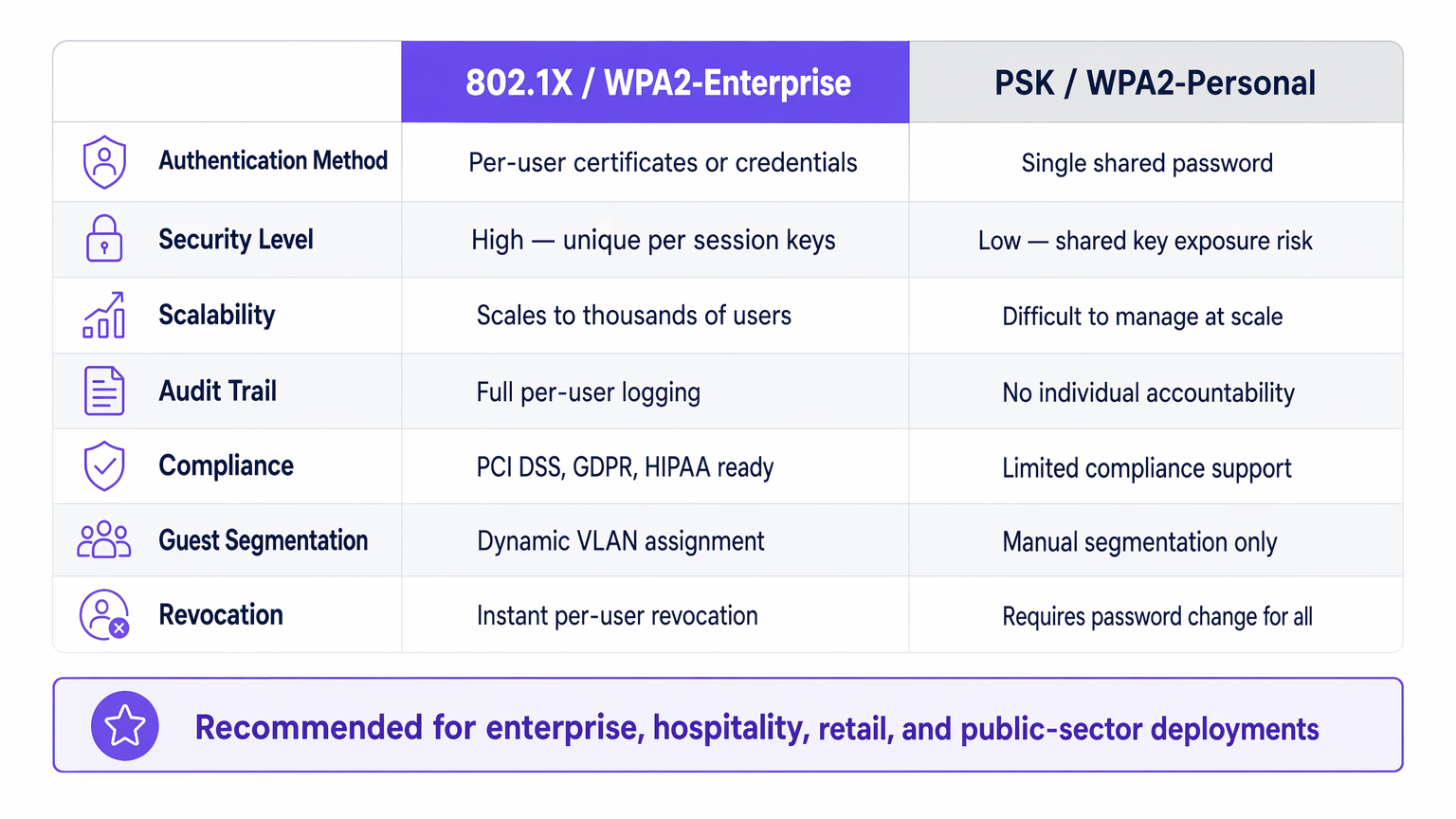
Für IT-Führungskräfte in Unternehmen, die Netzwerke in Gastgewerbe , Einzelhandel , Gesundheitswesen oder Transport verwalten, ist die Sicherung des Netzwerkzugangs eine grundlegende Anforderung. Das Vertrauen auf Pre-Shared Keys (PSK) für den Unternehmenszugang birgt inakzeptable Risiken: mangelnde individuelle Verantwortlichkeit, komplexe Widerrufsverfahren und gemeinsame Verschlüsselungsschwachstellen.
IEEE 802.1X ist der Industriestandard für die portbasierte Netzwerkzugangskontrolle. Es erzwingt einen strengen Authentifizierungsprozess, bevor ein Gerät im Netzwerk kommunizieren kann, und ermöglicht so die Identitätsprüfung pro Benutzer, die dynamische Durchsetzung von Richtlinien und die Einhaltung von Frameworks wie PCI DSS und GDPR. Dieser Leitfaden untersucht die Funktionsweise von 802.1X, die Unterschiede zwischen gängigen EAP-Methoden und praktische Bereitstellungsstrategien für Unternehmensumgebungen, einschließlich der Integration mit Guest WiFi -Lösungen, um eine ganzheitliche Zugangsstrategie zu bieten.
Technischer Deep-Dive: So funktioniert 802.1X
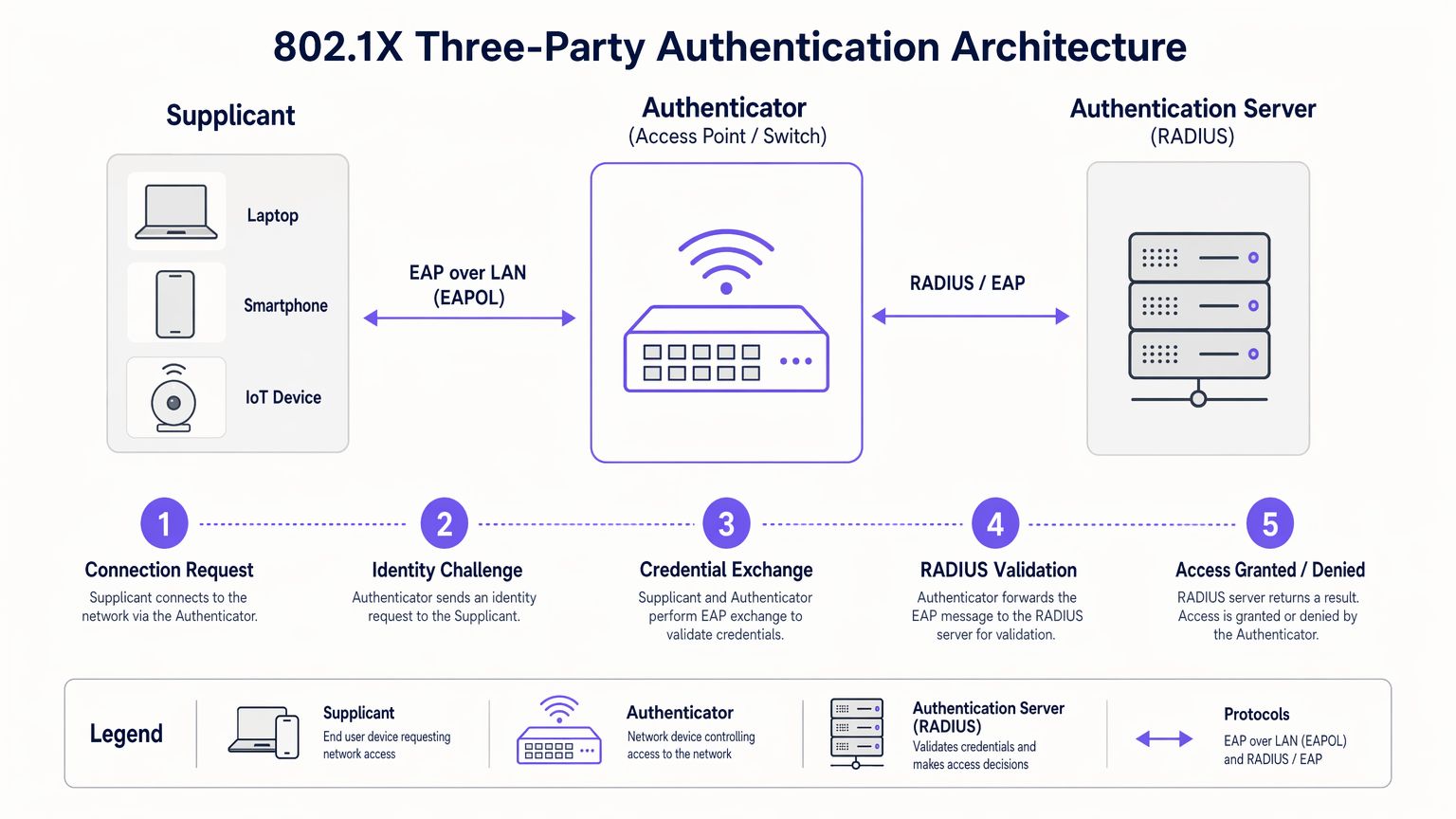
Im Kern basiert 802.1X auf einem Drei-Parteien-Modell, das darauf ausgelegt ist, nicht authentifizierte Geräte vom internen Netzwerk zu isolieren.
Die Drei-Parteien-Architektur
- Supplicant: Das Endbenutzergerät (Laptop, Smartphone, IoT-Sensor), das Netzwerkzugang anfordert. Es muss einen 802.1X-konformen Software-Client ausführen.
- Authenticator: Das Netzwerkgerät (Wireless Access Point oder verwalteter Switch), das den physischen oder logischen Port steuert. Es fungiert als Gatekeeper und blockiert den gesamten Datenverkehr außer EAP (Extensible Authentication Protocol), bis die Authentifizierung erfolgreich ist.
- Authentication Server: Typischerweise ein RADIUS (Remote Authentication Dial-In User Service)-Server. Er validiert die Anmeldeinformationen des Supplicanten anhand eines Backend-Identitätsspeichers (wie Active Directory) und gibt eine Richtlinienentscheidung zurück.
Der Authentifizierungsablauf
Wenn ein Supplicant eine Verbindung zu einem 802.1X-fähigen Port oder einer SSID herstellt, versetzt der Authenticator den Port in einen nicht autorisierten Zustand. Der Ablauf erfolgt wie folgt:
- EAPOL Start: Der Supplicant sendet einen EAP over LAN (EAPOL) Start-Frame an den Authenticator.
- Identity Request: Der Authenticator fordert die Identität des Supplicanten an.
- Identity Response: Der Supplicant übermittelt seine Identität, die der Authenticator über ein RADIUS Access-Request-Paket an den RADIUS-Server weiterleitet.
- EAP Exchange: Der RADIUS-Server und der Supplicant verhandeln eine EAP-Methode und tauschen Anmeldeinformationen sicher über den Authenticator aus.
- Access Decision: Nach erfolgreicher Validierung sendet der RADIUS-Server ein RADIUS Access-Accept-Paket an den Authenticator. Dieses Paket enthält oft herstellerspezifische Attribute (VSAs) für die dynamische VLAN-Zuweisung oder QoS-Richtlinien.
- Port Authorized: Der Authenticator versetzt den Port in einen autorisierten Zustand und erlaubt den normalen Netzwerkverkehr.
EAP-Methoden: Das richtige Protokoll wählen
Das EAP-Framework ist erweiterbar. Die Wahl der EAP-Methode bestimmt, wie Anmeldeinformationen ausgetauscht und überprüft werden:
- EAP-TLS (Transport Layer Security): Der Goldstandard für Sicherheit. Es erfordert eine gegenseitige Authentifizierung mittels digitaler Zertifikate sowohl auf Client- als auch auf Serverseite. Obwohl hochsicher, erfordert es eine robuste Public Key Infrastructure (PKI).
- PEAP-MSCHAPv2 (Protected EAP): Die häufigste Implementierung in Unternehmensumgebungen. Es verwendet ein serverseitiges Zertifikat, um einen sicheren TLS-Tunnel aufzubauen, innerhalb dessen sich der Client mit einem Standard-Benutzernamen und -Passwort (MSCHAPv2) authentifiziert. Es gleicht Sicherheit mit einfacher Bereitstellung aus.
- EAP-TTLS (Tunneled TLS): Ähnlich wie PEAP, unterstützt aber eine breitere Palette innerer Authentifizierungsprotokolle, einschließlich älterer PAP oder CHAP, die oft in Nicht-Windows-Umgebungen verwendet werden.
Implementierungsleitfaden
Die Bereitstellung von 802.1X erfordert eine sorgfältige Planung, um Benutzerunterbrechungen zu vermeiden. Ein schrittweiser Ansatz ist entscheidend für den Erfolg.
Phase 1: Infrastruktur-Bereitschaft
Bevor Sie 802.1X am Edge aktivieren, stellen Sie sicher, dass Ihre Kerninfrastruktur vorbereitet ist. Stellen Sie einen RADIUS-Server (wie Microsoft NPS oder FreeRADIUS) bereit und integrieren Sie ihn mit Ihrem Identitätsanbieter. Konfigurieren Sie Hochverfügbarkeit für die RADIUS-Infrastruktur; wenn der Authentifizierungsserver ausfällt, stoppt der Netzwerkzugang.
Phase 2: Supplicant-Konfiguration
Verlassen Sie sich nicht darauf, dass Benutzer ihre Geräte manuell konfigurieren. Verwenden Sie für verwaltete Unternehmensgeräte Group Policy Objects (GPO) oder Mobile Device Management (MDM)-Plattformen, um das korrekte 802.1X-Profil zu pushen, einschließlich der erforderlichen EAP-Methode und des vertrauenswürdigen Root-Zertifikats für den RADIUS-Server.
Phase 3: Pilot und Rollout
Beginnen Sie mit einer kleinen Pilotgruppe, die eine dedizierte Test-SSID oder einen bestimmten Switch-Stack verwendet. Überwachen Sie die RADIUS-Protokolle auf Authentifizierungsfehler, insbesondere solche, die mit Zertifikatsvertrauensproblemen oder falschen Anmeldeinformationen zusammenhängen. Sobald der Pilot stabil ist, fahren Sie mit einem schrittweisen Rollout in der gesamten Organisation fort.
Integration mit Gastzugang
802.1X ist für Unternehmensbenutzer mit bekannten Anmeldeinformationen konzipiert. Für Besucher, Auftragnehmer und Kunden benötigen Sie eine parallele Strategie. Hier wird eine dedizierte Guest WiFi -Plattform unerlässlich. Während Unternehmensgeräte nahtlos über 802.1X auf sichere VLANs authentifiziert werden, authentifizieren sich Gäste über ein Captive Portal, das wertvolle Erstanbieterdaten für WiFi Analytics liefert, während sie von internen Ressourcen isoliert bleiben.
Die Purple-Plattform kann auch als Identitätsanbieter für Dienste wie OpenRoaming unter der Connect-Lizenz fungieren und die Lücke zwischen nahtlosem öffentlichem Zugang und sicherer Authentifizierung schließen.
Best Practices
- Enforce Server Zertifikatsvalidierung: Bei der Verwendung von PEAP oder EAP-TTLS müssen Sie die Supplicants so konfigurieren, dass sie das Zertifikat des RADIUS-Servers validieren. Andernfalls ist das Netzwerk anfällig für Angriffe durch gefälschte Access Points (Evil Twin).
- Dynamische VLAN-Zuweisung implementieren: Nutzen Sie RADIUS-Attribute, um Benutzern basierend auf ihrer Active Directory-Gruppenmitgliedschaft bestimmte VLANs zuzuweisen. Dies reduziert die Anzahl der benötigten SSIDs und vereinfacht die Netzwerksegmentierung.
- IoT-Geräte mit MAB ansprechen: Viele IoT-Geräte (Drucker, Smart-TVs) unterstützen keine 802.1X-Supplicants. Verwenden Sie MAC Authentication Bypass (MAB) als Fallback. Der Authentifikator verwendet die MAC-Adresse des Geräts als Benutzernamen und Passwort. Da MAC-Adressen gefälscht werden können, beschränken Sie die Zugriffsrechte von MAB-authentifizierten Geräten streng.
Fehlerbehebung & Risikominderung
Wenn 802.1X fehlschlägt, sind die RADIUS-Server-Logs Ihr primäres Diagnosetool.
- Fehler: EAP Timeout: Der Authentifikator empfängt keine Antwort vom Supplicant. Dies deutet oft darauf hin, dass die Supplicant-Software nicht läuft oder das Gerät nicht für 802.1X konfiguriert ist.
- Fehler: Unbekannter Benutzer oder falsches Passwort: Der Benutzer hat falsche Anmeldeinformationen eingegeben, oder der RADIUS-Server kann nicht mit dem Backend-Identitätsspeicher kommunizieren.
- Fehler: Zertifikatsvertrauensfehler: Der Supplicant hat das Zertifikat des RADIUS-Servers abgelehnt. Stellen Sie sicher, dass das Root-CA-Zertifikat, das das Zertifikat des RADIUS-Servers ausgestellt hat, im vertrauenswürdigen Root-Speicher des Supplicants installiert ist.
Für eine breitere Perspektive zur Optimierung der Netzwerkarchitektur sollten Sie berücksichtigen, wie die Authentifizierung in moderne WAN-Strategien integriert wird, wie in Die Kernvorteile von SD WAN für moderne Unternehmen erörtert.
ROI & Geschäftsauswirkungen
Die Implementierung von 802.1X liefert messbaren Geschäftswert über die reine Sicherheit hinaus:
- Reduzierter Betriebsaufwand: Eliminiert die Notwendigkeit, PSKs manuell zu wechseln, wenn Mitarbeiter ausscheiden oder Auftragnehmer ihre Projekte beenden. Der Zugriff wird sofort durch Deaktivierung des Benutzerverzeichniskontos widerrufen.
- Vereinfachte Compliance: Bietet die pro-Benutzer-Audit-Trails und starken Zugriffskontrollen, die von PCI DSS, HIPAA und GDPR gefordert werden.
- Verbesserte Netzwerksichtbarkeit: Integriert Identität mit Netzwerkaktivität, wodurch IT-Teams Sicherheitsereignisse oder Leistungsprobleme bestimmten Benutzern anstatt generischen IP-Adressen zuordnen können.
Durch die Abkehr von gemeinsamen Schlüsseln und die Einführung einer portbasierten Zugriffskontrolle erreichen Unternehmensnetzwerke die granulare Sicherheit, die für moderne betriebliche Anforderungen erforderlich ist. Für einen detaillierten Vergleich der drahtlosen Sicherheitsstandards lesen Sie unseren Leitfaden zu WPA, WPA2 und WPA3: Was ist der Unterschied und welche sollten Sie verwenden? .
Audio-Briefing
Hören Sie sich unser 10-minütiges technisches Briefing zur 802.1X-Authentifizierung an:
Schlüsseldefinitionen
802.1X
An IEEE standard for port-based network access control that provides an authentication mechanism to devices wishing to attach to a LAN or WLAN.
The foundational standard replacing shared passwords with per-user authentication in enterprise networks.
Supplicant
The software client on an end-user device that requests network access and handles the EAP exchange.
Required on all laptops, phones, and tablets connecting to an 802.1X network.
Authenticator
The network edge device (switch or access point) that controls the physical or logical port, blocking traffic until authentication is complete.
The enforcement point in the network architecture.
RADIUS Server
Remote Authentication Dial-In User Service. The central server that validates credentials against a directory and returns policy decisions.
The brain of the 802.1X deployment, often implemented via Microsoft NPS or Cisco ISE.
EAP (Extensible Authentication Protocol)
An authentication framework frequently used in wireless networks and point-to-point connections, providing transport for various authentication methods.
The language spoken between the supplicant and the RADIUS server.
Dynamic VLAN Assignment
The process where a RADIUS server instructs the authenticator to place a user into a specific VLAN based on their identity or group membership.
Crucial for network segmentation and compliance without broadcasting dozens of SSIDs.
EAP-TLS
An EAP method requiring mutual certificate-based authentication between the client and the server.
The most secure method, ideal for highly regulated environments like healthcare or finance.
PEAP (Protected EAP)
An EAP method that establishes a secure TLS tunnel using a server certificate, protecting the inner credential exchange (usually a username/password).
The most common deployment method due to its balance of security and operational simplicity.
Ausgearbeitete Beispiele
A 200-room hotel needs to secure its back-of-house operational network (staff tablets, VoIP phones, management laptops) while maintaining a separate, open guest network. They currently use a single PSK for staff.
- Deploy Microsoft NPS (RADIUS) integrated with the hotel's Active Directory.
- Configure the wireless controller to broadcast a new 'Staff_Secure' SSID using WPA2-Enterprise (802.1X).
- Push a PEAP-MSCHAPv2 profile to all managed staff laptops and tablets via MDM.
- For VoIP phones lacking 802.1X support, configure MAC Authentication Bypass (MAB) on the RADIUS server, assigning them to an isolated Voice VLAN.
- Retain the open guest network, securing it with Purple's captive portal for guest isolation and analytics.
A large retail chain is failing PCI DSS compliance because their Point of Sale (PoS) terminals are on the same logical network segment as store manager laptops, using a shared WPA2-Personal key.
- Implement 802.1X across all corporate access points.
- Configure dynamic VLAN assignment on the RADIUS server.
- Create a policy: If the authenticating device is a PoS terminal (authenticated via machine certificate using EAP-TLS), assign it to the highly restricted PCI-VLAN.
- Create a second policy: If the user is a Store Manager (authenticated via PEAP), assign them to the Corp-VLAN with standard internet and intranet access.
Übungsfragen
Q1. Your organization is migrating from WPA2-Personal to WPA2-Enterprise. You have a mix of corporate-owned Windows laptops and employee-owned BYOD smartphones. You do not have a PKI infrastructure. Which EAP method should you deploy?
Hinweis: Consider the requirement for client certificates versus server-only certificates.
Musterlösung anzeigen
PEAP-MSCHAPv2. Since you lack a PKI infrastructure, deploying client certificates for EAP-TLS is not feasible. PEAP only requires a server-side certificate on the RADIUS server, allowing users to authenticate with their standard Active Directory username and password.
Q2. After deploying 802.1X using PEAP, several users report they are prompted with a security warning asking them to 'Trust' a certificate when connecting to the network. What configuration step was missed?
Hinweis: Think about how the supplicant validates the identity of the RADIUS server.
Musterlösung anzeigen
The supplicant profile pushed to the devices was not configured to explicitly trust the Root CA that issued the RADIUS server's certificate. Without this configuration, the OS prompts the user to manually verify the server's identity, which is a security risk and poor user experience.
Q3. You need to connect 50 smart TVs in hotel conference rooms to the network. These devices do not support 802.1X supplicants. How can you provide them access while maintaining security?
Hinweis: Consider alternative authentication methods for headless devices and how to restrict their access.
Musterlösung anzeigen
Implement MAC Authentication Bypass (MAB). The authenticator will use the smart TV's MAC address to authenticate against the RADIUS server. Crucially, the RADIUS server must be configured to assign these devices to a heavily restricted VLAN (e.g., internet-only, no internal access) to mitigate the risk of MAC address spoofing.
Weiterlesen in dieser Reihe
Per-Device PSK nach Anbieter: iPSK, DPSK, MPSK und PPSK im Vergleich (und WPA3-Unterstützung)
Ein umfassender Vergleich von Per-Device-PSK-Implementierungen bei Cisco Meraki, HPE Aruba, Ruckus, Juniper Mist, Extreme, Fortinet und Ubiquiti UniFi. Erfahren Sie, wie sich WPA3-SAE auf Per-Device-Key-Strategien auswirkt und wann Sie Übergangsmodi implementieren sollten, anstatt auf 802.1X umzusteigen.
Was ist MAC-Adressauthentifizierung? Wann man sie nutzen und wann man sie vermeiden sollte
Dieser maßgebliche technische Leitfaden behandelt die MAC-Adressauthentifizierung in Unternehmens-WiFi-Umgebungen – wie RADIUS-basierte MAC-Authentifizierung auf Layer 2 funktioniert, ihre inhärenten Sicherheitslücken (einschließlich MAC-Spoofing und die Auswirkungen der MAC-Randomisierung auf OS-Ebene) und die genauen operativen Kontexte, in denen sie ein gültiges Werkzeug zur Verwaltung von IoT- und kopflosen Geräten bleibt. Er bietet umsetzbare Bereitstellungsanleitungen für IT-Manager und Netzwerkarchitekten in den Bereichen Gastgewerbe, Einzelhandel, Gesundheitswesen und öffentlicher Sektor, mit realen Fallbeispielen, Entscheidungsrahmen und Integrationskontext für die Gast-WiFi- und Analyseplattform von Purple.
Einrichtung von Enterprise WiFi auf iOS und macOS mit 802.1X
Dieser maßgebliche Leitfaden bietet leitenden IT-Führungskräften umsetzbare Schritte für die Bereitstellung von 802.1X Enterprise WiFi auf iOS- und macOS-Geräten. Er behandelt die zertifikatbasierte Authentifizierung (EAP-TLS), MDM-Konfigurationsprofile und die Architekturintegration zur Sicherung von Unternehmensnetzwerken bei gleichzeitiger Unterstützung von BYOD-Initiativen.