
Was ist EAP-TLS? Zertifikatbasierte WiFi-Authentifizierung erklärt
Dieser Leitfaden bietet eine umfassende technische Referenz zu EAP-TLS (Extensible Authentication Protocol mit Transport Layer Security), der sichersten 802.1X-Authentifizierungsmethode, die für Unternehmens-WiFi verfügbar ist. Er behandelt die erforderliche X.509-Zertifikatsinfrastruktur, den gegenseitigen Authentifizierungs-Handshake und praktische Bereitstellungsmuster für Gastgewerbe, Einzelhandel, Gesundheitswesen und den öffentlichen Sektor. IT-Manager, Netzwerkarchitekten und CTOs finden hier umsetzbare Anleitungen zu PKI-Design, MDM-integrierter Zertifikatsbereitstellung, RADIUS-Konfiguration und Compliance-Ausrichtung mit PCI DSS und GDPR.
Diesen Leitfaden anhören
Podcast-Transkript ansehen
Zusammenfassung
EAP-TLS (Extensible Authentication Protocol – Transport Layer Security) ist die IEEE 802.1X-Authentifizierungsmethode, die gemeinsame Anmeldeinformationen vollständig aus Ihrer drahtlosen Authentifizierungskette eliminiert. Wo PEAP und EAP-TTLS auf Benutzernamen und Passwörter angewiesen sind, die durch einen verschlüsselten Tunnel übertragen werden, erfordert EAP-TLS, dass sowohl das Client-Gerät als auch der RADIUS-Server gültige X.509-Zertifikate vorlegen, die von einer vertrauenswürdigen Certificate Authority (CA) ausgestellt wurden. Dieses gegenseitige Authentifizierungsmodell bedeutet, dass ein gestohlenes Passwort irrelevant ist – ohne ein gültiges, nicht widerrufenes Zertifikat kann ein Gerät dem Netzwerk nicht beitreten.
Für Betreiber von Veranstaltungsorten, die Guest WiFi in Hotels, Einzelhandelsimmobilien oder Konferenzzentren betreiben, und für IT-Teams, die für Mitarbeiter- und IoT-Gerätenetzwerke verantwortlich sind, stellt EAP-TLS die derzeitige Obergrenze der drahtlosen Authentifizierungssicherheit dar. Es ist von PCI DSS 4.0 für Umgebungen mit Kartendaten, von HIPAA für drahtlose Netzwerke im Gesundheitswesen vorgeschrieben oder dringend empfohlen und die erforderliche Methode für WPA3 Enterprise 192-Bit (Suite B)-Bereitstellungen.
Der Implementierungsaufwand ist real – Zertifikats-Lebenszyklus-Management, PKI-Infrastruktur und MDM-Integration sind nicht trivial – aber der Sicherheits-ROI ist erheblich. Dieser Leitfaden beschreibt die Architektur, den Handshake, Bereitstellungsmuster und die operativen Praktiken, die darüber entscheiden, ob eine EAP-TLS-Einführung erfolgreich ist oder stagniert.
Technischer Deep-Dive
Was EAP-TLS tatsächlich leistet
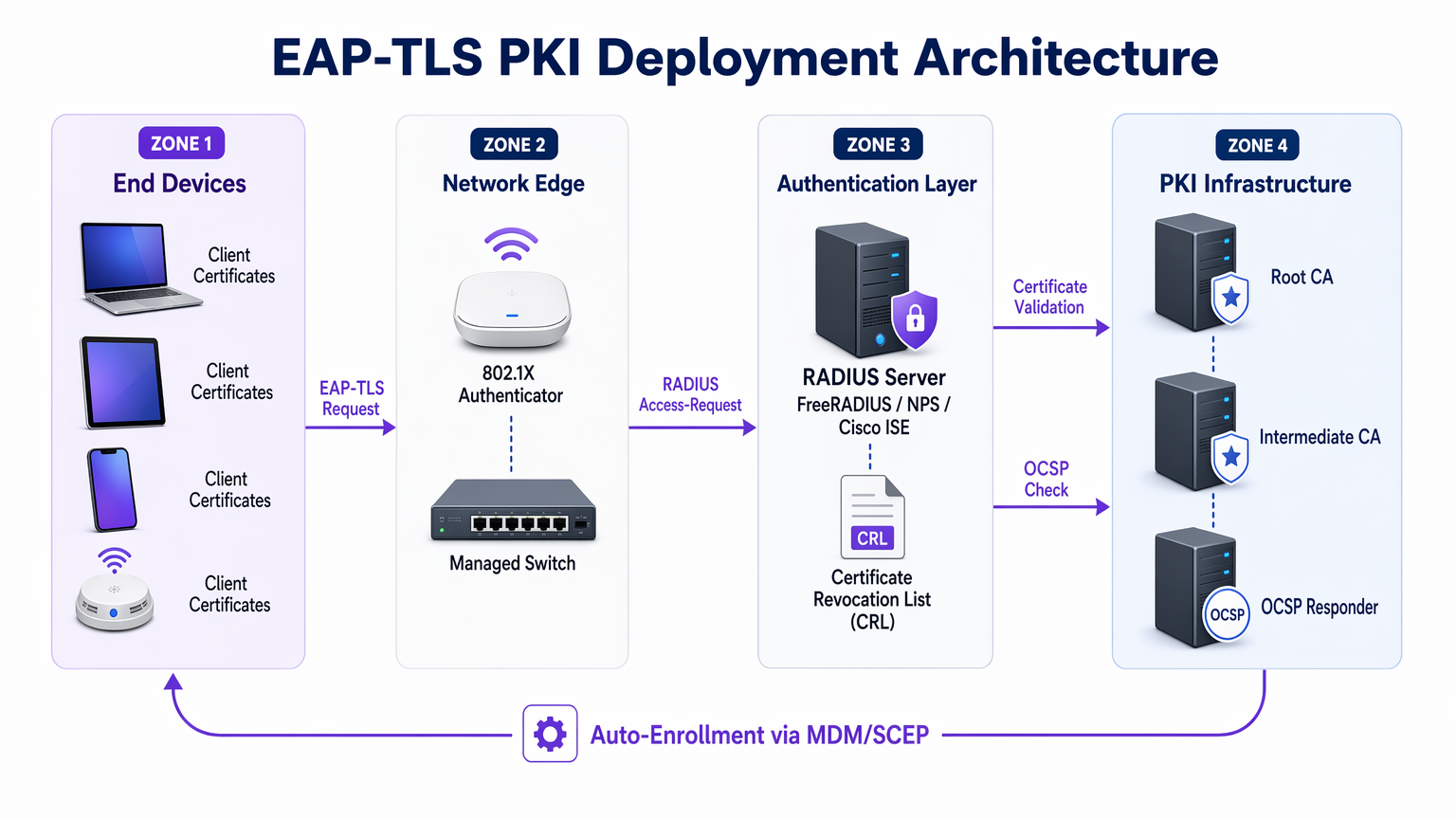
EAP-TLS arbeitet innerhalb des 802.1X-Port-basierten Zugriffssteuerungsrahmens. Die drei Akteure bei jedem Authentifizierungsaustausch sind der Supplicant (das Client-Gerät), der Authenticator (der Wireless Access Point oder verwaltete Switch) und der Authentication Server (typischerweise ein RADIUS-Server wie FreeRADIUS, Microsoft NPS oder Cisco ISE). Der Access Point trifft selbst keine Authentifizierungsentscheidungen – er fungiert als transparentes Relais, das EAP-Nachrichten in RADIUS-Pakete kapselt und an den Authentifizierungsserver weiterleitet.
Für ein tieferes Verständnis, wie RADIUS diese Architektur untermauert, siehe Was ist RADIUS? Wie RADIUS-Server WiFi-Netzwerke sichern .
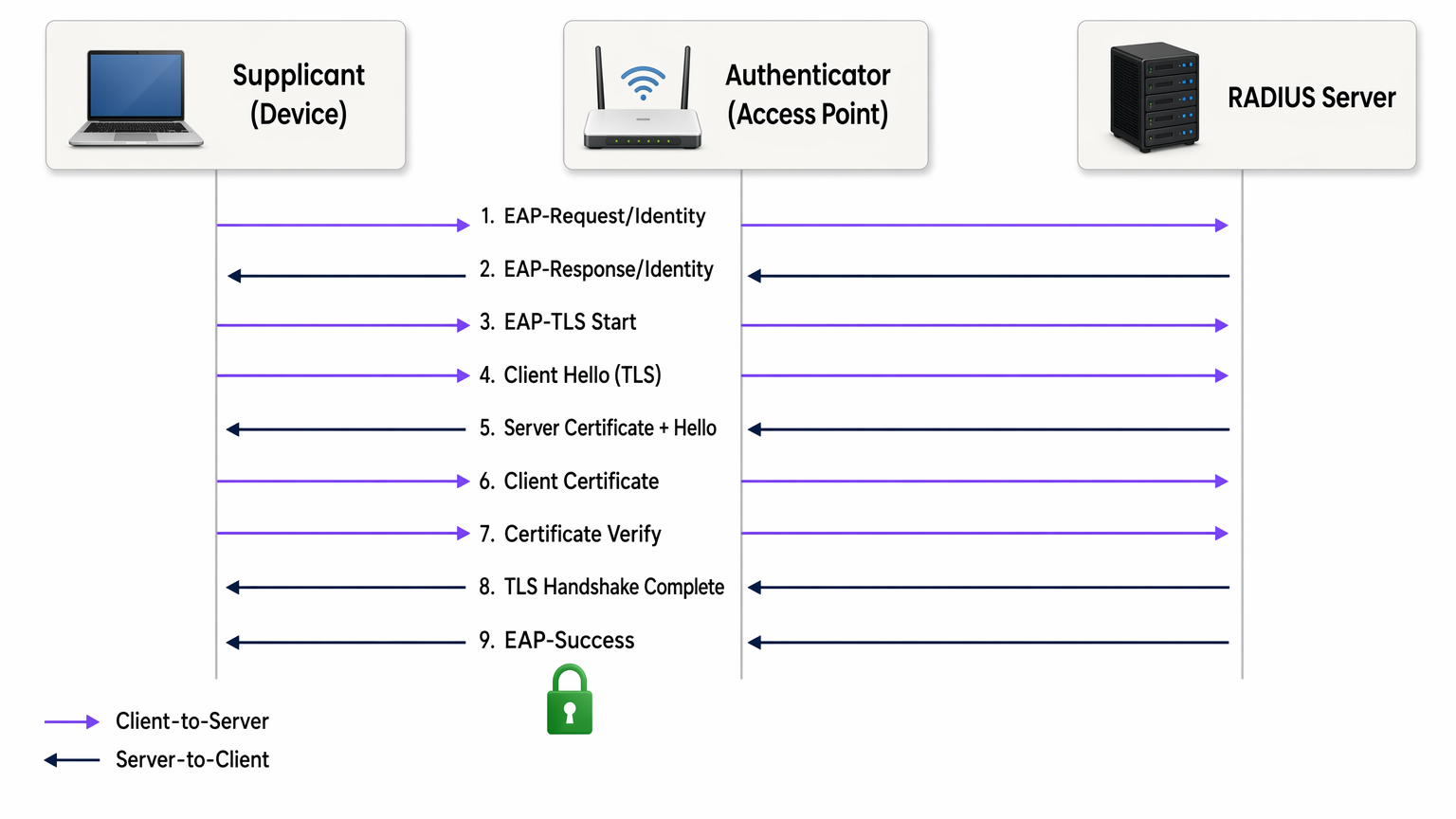
Der EAP-TLS-Handshake läuft wie folgt ab:
- Der Access Point sendet eine EAP-Request/Identity an das verbindende Gerät.
- Das Gerät antwortet mit seiner Identität (üblicherweise einer anonymen äußeren Identität, um den Benutzernamen vor Abhören zu schützen).
- Der RADIUS-Server initiiert den TLS-Handshake mit einer EAP-TLS/Start-Nachricht.
- Der Client sendet ein ClientHello, das seine unterstützten TLS-Cipher-Suites bewirbt.
- Der RADIUS-Server antwortet mit ServerHello, seinem X.509-Serverzertifikat und einer Zertifikatsanfrage.
- Der Client validiert das Serverzertifikat anhand seines vertrauenswürdigen Root-CA-Speichers. Schlägt die Validierung fehl, wird der Handshake beendet – zum Schutz vor Rogue Access Points.
- Der Client präsentiert sein eigenes X.509-Client-Zertifikat.
- Der RADIUS-Server validiert das Client-Zertifikat: Er überprüft die Signaturkette bis zur vertrauenswürdigen Root-CA, verifiziert, dass das Zertifikat nicht abgelaufen ist, und prüft die Certificate Revocation List (CRL) oder fragt den OCSP-Responder ab, um zu bestätigen, dass das Zertifikat nicht widerrufen wurde.
- Beide Seiten leiten Sitzungsschlüssel aus dem TLS-Master-Secret ab. Der RADIUS-Server sendet ein EAP-Success, und der Access Point öffnet den kontrollierten Port.
Der gesamte Austausch findet statt, bevor dem Gerät jeglicher Netzwerkzugriff gewährt wird. Es wird zu keinem Zeitpunkt ein Passwort übertragen. Die abgeleiteten Sitzungsschlüssel sind pro Sitzung einzigartig und bieten perfekte Vorwärtsgeheimhaltung bei Verwendung von ECDHE-Cipher-Suites – was bedeutet, dass selbst wenn ein Zertifikat später kompromittiert wird, der historische Datenverkehr nicht entschlüsselt werden kann.
X.509-Zertifikate und PKI-Architektur
Die Sicherheit von EAP-TLS hängt vollständig von der Integrität der zugrunde liegenden PKI ab. Eine typische Unternehmens-PKI für EAP-TLS besteht aus drei Ebenen:
| Ebene | Komponente | Rolle |
|---|---|---|
| Root CA | Offline-Stammzertifizierungsstelle | Signiert Zwischen-CA-Zertifikate; luftdicht getrennt aufbewahrt |
| Intermediate CA | Online ausstellende CA | Stellt Server- und Client-Zertifikate aus; handhabt die CRL-Veröffentlichung |
| End Entities | RADIUS-Serverzertifikat + Client-Zertifikate | Wird im Live-Authentifizierungs-Handshake verwendet |
Die Root CA sollte offline und luftdicht getrennt aufbewahrt werden. Ihr privater Schlüssel, falls kompromittiert, invalidiert Ihre gesamte Zertifikatshierarchie. Die Intermediate CA übernimmt die tägliche Ausstellung und veröffentlicht die CRL. Client-Zertifikate werden an einzelne Geräte (nicht an Benutzer) ausgestellt, typischerweise mit einem Subject Alternative Name (SAN), der die MAC-Adresse des Geräts oder eine Gerätekennung aus Ihrem MDM enthält.
EAP-TLS im Vergleich zu anderen 802.1X-Methoden
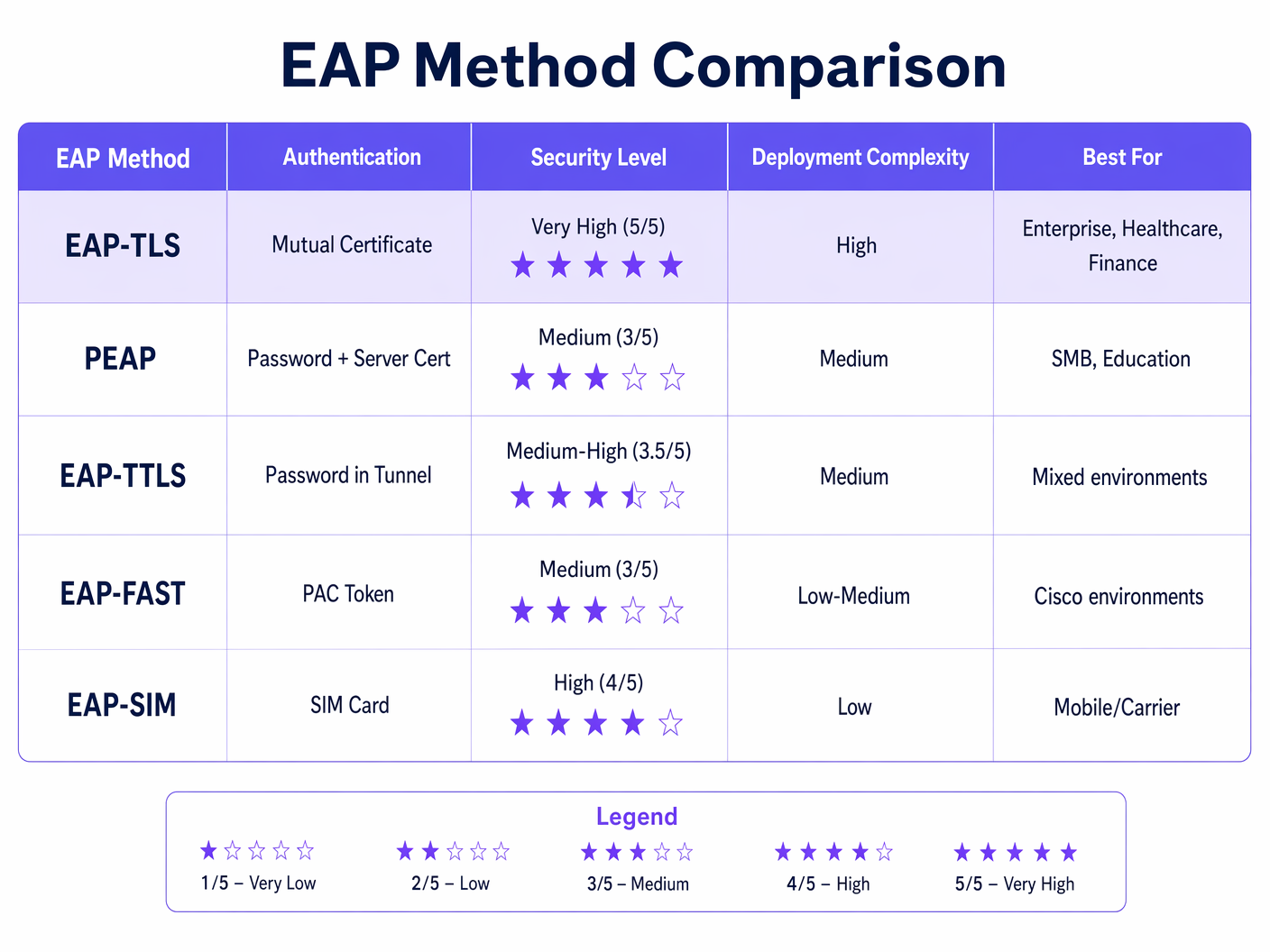
Die obige Tabelle veranschaulicht, warum EAP-TLS die empfohlene Wahl für regulierte Umgebungen ist. PEAP-MSCHAPv2, immer noch die am weitesten verbreitete 802.1X-Methode, weist bekannte Schwachstellen auf: Das Serverzertifikat wird häufig von Clients nicht validiert (eine Fehlkonfiguration, die Rogue AP-Angriffe ermöglicht), und MSCHAPv2 selbst ist seit 2012 kryptografisch gebrochen. EAP-TLS eliminiert beide Angriffsflächen.
WPA2 Enterprise und WPA3 Enterprise
EAP-TLS funktioniert identisch sowohl über WPA2 Enterprise (IEEE 802.11i) als auch WPA3 Enterprise (IEEE 802.11ax). Der Unterschied liegt in der ausgehandelten Cipher Suite für die drahtlose Datenverschlüsselungsschicht. WPA3 Enterprise schreibt Protected Management Frames (PMF) vor und bietet einen optionalen 192-Bit-Sicherheitsmodus (Suite B), der EAP-TLS mit spezifischen elliptischen Kurven-Chiffriersuiten (ECDHE + ECDSA oder RSA-3072) erfordert. Für die meisten Unternehmensbereitstellungen ist WPA3 Enterprise mit EAP-TLS und standardmäßigen AES-256-Chiffriersuiten der geeignete Zielzustand.
Implementierungsleitfaden
Phase 1: PKI-Design und -Bereitstellung
Bevor ein einziger Access Point konfiguriert wird, muss die PKI vorhanden sein. Für Organisationen ohne eine bestehende interne CA ist Microsoft Active Directory Certificate Services (AD CS) die gängigste Wahl in Windows-Umgebungen. Für plattformübergreifende oder Cloud-native Bereitstellungen sind HashiCorp Vault PKI, EJBCA oder ein verwalteter PKI-Dienst wie AWS Private CA praktikable Alternativen.
Wichtige Entscheidungen in dieser Phase:
- Gültigkeitsdauer des Zertifikats: Client-Zertifikate von 1–2 Jahren schaffen ein Gleichgewicht zwischen Sicherheit und Betriebsaufwand. Kürzere Zeiträume erhöhen die Anzahl der Widerrufsereignisse; längere Zeiträume erhöhen das Risiko der Exposition für ein kompromittiertes Zertifikat.
- Schlüsselalgorithmus: RSA-2048 wird weiterhin breit unterstützt. ECDSA P-256 bietet gleichwertige Sicherheit mit kleineren Zertifikatsgrößen und schnelleren Handshakes – empfohlen für neue Bereitstellungen.
- CRL vs. OCSP: Die CRL-Verteilung ist einfacher zu implementieren, führt aber zu Latenz- und Caching-Problemen. OCSP bietet einen Echtzeit-Widerrufsstatus. Für Hochsicherheitsumgebungen ist OCSP-Stapling auf dem RADIUS-Server der bevorzugte Ansatz.
Phase 2: RADIUS-Server-Konfiguration
Ihr RADIUS-Server muss so konfiguriert werden, dass er:
- Sein Serverzertifikat (ausgestellt von Ihrer internen CA) den verbindenden Clients präsentiert.
- Nur Ihre internen Root- und Intermediate-CAs für die Client-Zertifikatsvalidierung vertraut – vertrauen Sie keinen öffentlichen CAs für die Client-Authentifizierung.
- CRL- oder OCSP-Prüfungen für jedes präsentierte Client-Zertifikat durchführt.
- Zertifikatsattribute (Common Name, SAN oder OID-Erweiterungen) Netzwerkrichtlinienregeln zuordnet – zum Beispiel die Zuweisung von Geräten zu bestimmten VLANs basierend auf Zertifikatsattributen.
Für eine detaillierte Erläuterung der RADIUS-Server-Architektur und -Konfiguration, siehe Was ist RADIUS? Wie RADIUS-Server WiFi-Netzwerke sichern .
Phase 3: Zertifikatsverteilung via MDM/SCEP
Die manuelle Zertifikatsinstallation skaliert nicht. Für jede Bereitstellung, die über eine Handvoll Geräte hinausgeht, muss die Zertifikatsbereitstellung automatisiert werden. Der Standardansatz ist:
- Verwaltete Unternehmensgeräte: Integrieren Sie Ihre PKI in Ihre MDM-Plattform (Microsoft Intune, Jamf, VMware Workspace ONE). Konfigurieren Sie ein SCEP- oder EST-Profil, das automatisch ein Client-Zertifikat anfordert und installiert, wenn ein Gerät registriert wird. Das Zertifikat ist, sofern unterstützt, an das TPM oder die Secure Enclave des Geräts gebunden, wodurch der Zertifikatsexport verhindert wird.
- BYOD- und Auftragnehmergeräte: Stellen Sie ein Onboarding-Portal bereit (wie das Gastportal von Cisco ISE oder eine dedizierte BYOD-Lösung), das den Benutzer durch einen einmaligen Zertifikatsinstallationsprozess führt. Stellen Sie Zertifikate mit kürzeren Gültigkeitsdauern aus und beschränken Sie den Netzwerkzugriff über die VLAN-Richtlinie.
- IoT- und Headless-Geräte: Verwenden Sie SCEP mit vorab geteilten Challenge-Passwörtern oder EST mit Bootstrap-Anmeldeinformationen. Die Zertifikatserneuerung sollte vor Ablauf über dasselbe Protokoll automatisiert werden.
Phase 4: Access Point- und SSID-Konfiguration
Konfigurieren Sie die Unternehmens-SSID mit:
- Sicherheit: WPA2 Enterprise oder WPA3 Enterprise (802.1X)
- EAP-Typ: EAP-TLS
- RADIUS-Server: Verweisen Sie auf Ihren Authentifizierungsserver mit gemeinsamem Geheimnis
- VLAN-Zuweisung: Aktivieren Sie die dynamische VLAN-Zuweisung über RADIUS-Attribute (Tunnel-Type, Tunnel-Medium-Type, Tunnel-Private-Group-ID)
- PMF: Obligatorisch für WPA3; dringend empfohlen für WPA2
Phase 5: Client-Supplicant-Konfiguration
Für Windows-Geräte, die über Gruppenrichtlinien oder Intune verwaltet werden, stellen Sie eine kabelgebundene/drahtlose Netzwerkrichtlinie bereit, die EAP-TLS, die vertrauenswürdige Root-CA und die Zertifikatsauswahlkriterien festlegt. Auf macOS und iOS stellen Sie ein Konfigurationsprofil bereit. Auf Android verwenden Sie das MDM-verwaltete WiFi-Profil. Entscheidend ist, die Serverzertifikatsvalidierung zu erzwingen – geben Sie die genaue CA und den Servernamen an. Dies unüberprüft zu lassen, ist die häufigste Fehlkonfiguration bei 802.1X-Bereitstellungen.
Bewährte Verfahren
Erzwingen Sie die Serverzertifikatsvalidierung auf allen Supplicants. Die am leichtesten ausnutzbare Fehlkonfiguration bei 802.1X-Bereitstellungen sind Clients, die beliebige Serverzertifikate akzeptieren, was Angriffe durch Rogue Access Points ermöglicht. Jedes über MDM bereitgestellte WiFi-Profil sollte die vertrauenswürdige CA und den erwarteten Servernamen (CN oder SAN) angeben.
Automatisieren Sie die Zertifikatserneuerung vor dem Ablauf. Richten Sie eine Überwachung ein, die alarmiert, wenn Zertifikate innerhalb von 30 Tagen ablaufen. Konfigurieren Sie die SCEP- oder EST-Auto-Erneuerung, damit Geräte Zertifikate ohne Benutzereingriff erneuern. Ein Massenablauf von Zertifikaten ist eines der störendsten Ereignisse, mit denen ein Unternehmensnetzwerkteam konfrontiert werden kann.
Implementieren Sie OCSP anstelle von CRL, wo immer möglich. CRL-Dateien können groß werden und werden von Clients zwischengespeichert, was bedeutet, dass ein kürzlich widerrufenes Zertifikat möglicherweise immer noch akzeptiert wird, bis der Cache abläuft. OCSP bietet Echtzeitstatus und ist der bevorzugte Widerrufsmechanismus für Hochsicherheitsumgebungen.
Segmentieren Sie Ihre PKI. Verwenden Sie separate Intermediate-CAs für verschiedene Zertifikatsklassen: eine für RADIUS-Serverzertifikate, eine für Client-Gerätezertifikate, eine für Benutzerzertifikate. Dies begrenzt den Schadenbereich einer CA-Kompromittierung und vereinfacht die Widerrufsrichtlinie.
Protokollieren und überwachen Sie Authentifizierungsereignisse. Ihr RADIUS-Server generiert ein Authentifizierungsprotokoll für jeden Verbindungsversuch. Speisen Sie diese Protokolle in Ihr SIEM ein. Muster wie wiederholte Authentifizierungsfehler, Zertifikatsvalidierungsfehler oder Verbindungen von unerwarteten MAC-Adressen sind frühe Indikatoren für Fehlkonfigurationen oder Angriffe.
Richten Sie sich nach PCI DSS 4.0 aus. Anforderung 8.6 schreibt eine starke Authentifizierung für Systemkomponenten vor. Für drahtlose Netzwerke, die unter PCI DSS fallen, EAP-TLS mit zertifikatbasierter Authentifizierung erfüllt die Anforderung an eine Multi-Faktor-Authentifizierung auf der Netzwerkschicht, da das Zertifikat (etwas, das Sie besitzen) in Kombination mit dem TPM-gebundenen privaten Schlüssel des Geräts (etwas, das Sie sind) zwei Faktoren darstellt.
Fehlerbehebung & Risikominderung
Häufige Fehlerursachen
| Fehlermodus | Symptom | Grundursache | Lösung |
|---|---|---|---|
| Fehler bei der Validierung der Zertifikatskette | EAP-Failure nach Server-Zertifikatsaustausch | Client vertraut der RADIUS-Servers CA nicht | Root-CA-Zertifikat über MDM in den Vertrauensspeicher des Geräts übertragen |
| Client-Zertifikat nicht präsentiert | Authentifizierung stoppt nach Server-Zertifikat | Kein Client-Zertifikat installiert oder falsches Zertifikat ausgewählt | SCEP-Registrierung überprüfen; MDM-Profil prüfen |
| OCSP/CRL unerreichbar | Sporadische Authentifizierungsfehler | RADIUS-Server kann den Widerrufsendpunkt nicht erreichen | Sicherstellen, dass OCSP/CRL-URLs vom RADIUS-Server aus zugänglich sind; lokale CRL-Zwischenspeicherung implementieren |
| Zertifikat abgelaufen | Alle Geräte schlagen gleichzeitig bei der Authentifizierung fehl | Erneuerungsautomatisierung nicht konfiguriert | 30-Tage-Ablaufwarnungen implementieren; SCEP-Auto-Erneuerung konfigurieren |
| Rogue AP-Angriff | Benutzer verbinden sich mit bösartigem AP | Server-Zertifikatsvalidierung auf dem Supplikanten deaktiviert | Server-Zertifikatsvalidierung in allen MDM WiFi-Profilen erzwingen |
| VLAN-Zuweisungsfehler | Gerät verbindet sich, erhält aber falsches Netzwerksegment | RADIUS-Attribute falsch konfiguriert | Tunnel-Type (13=VLAN), Tunnel-Medium-Type (6=802), Tunnel-Private-Group-ID (VLAN ID) überprüfen |
Risikominderung für groß angelegte Bereitstellungen
Für hospitality -Umgebungen mit Hunderten von Access Points über mehrere Standorte hinweg und für retail -Ketten mit verteilten Standorten besteht das primäre Betriebsrisiko in einem synchronisierten Zertifikatsablaufereignis. Staffeln Sie die Ausstellungsdaten der Zertifikate über Gerätegruppen hinweg, sodass die Erneuerungen über die Zeit verteilt und nicht gleichzeitig erfolgen. Führen Sie ein Zertifikatsinventar in Ihrem MDM und erstellen Sie wöchentliche Berichte über Zertifikate, die innerhalb von 60 Tagen ablaufen.
Für healthcare -Umgebungen besteht das zusätzliche Risiko in einer Authentifizierungslatenz, die klinische Arbeitsabläufe beeinträchtigt. Optimieren Sie die Platzierung Ihres RADIUS-Servers, um die Round-Trip-Zeit zu minimieren. Erwägen Sie den Einsatz von RADIUS-Proxyservern an jedem Standort, um die WAN-Abhängigkeit für die Authentifizierung zu reduzieren.
ROI & Geschäftsauswirkungen
Quantifizierung der Sicherheitsinvestition
Der Business Case für EAP-TLS gegenüber passwortbasiertem 802.1X ist unkompliziert, wenn man ihn im Kontext der Kosten von Sicherheitsverletzungen betrachtet. Die durchschnittlichen Kosten einer Datenschutzverletzung im Vereinigten Königreich im Jahr 2024 betrugen 3,58 Millionen Pfund (IBM Cost of a Data Breach Report). Ein erheblicher Teil der Unternehmensverletzungen geht auf kompromittierte Anmeldeinformationen zurück. EAP-TLS eliminiert den Angriffsvektor des Diebstahls von Anmeldeinformationen für den Netzwerkzugriff vollständig.
Für Organisationen, die dem PCI DSS unterliegen, zieht eine drahtlose Netzwerkverletzung, die zur Offenlegung von Kartendaten führt, Bußgelder, forensische Untersuchung Kosten und potenzielle Strafen der Kartensysteme nach sich, die die Kosten einer PKI-Bereitstellung in den Schatten stellen. Allein die Einhaltung der Vorschriften rechtfertigt die Investition für jede Organisation, die Kartenzahlungen über drahtlose Infrastruktur abwickelt.
Steigerung der Betriebseffizienz
Entgegen der Intuition kann eine gut implementierte EAP-TLS-Bereitstellung mit MDM-integrierter Zertifikatsbereitstellung die Helpdesk-Belastung im Vergleich zu passwortbasiertem 802.1X reduzieren. Passwort-Resets, die Verwaltung gemeinsamer Anmeldeinformationen und „Warum kann ich mich nicht mit WiFi verbinden“-Tickets entfallen. Der anfängliche Bereitstellungsaufwand ist hoch, aber der Dauerbetrieb ist wartungsärmer.
Für Betreiber von Veranstaltungsorten, die WiFi Analytics neben sicheren Mitarbeiternetzwerken einsetzen, bedeutet die durch EAP-TLS und dynamische VLAN-Zuweisung ermöglichte Segmentierung, dass Gast-, Mitarbeiter- und IoT-Geräteverkehr auf derselben physischen Infrastruktur sauber getrennt werden können – was die Hardwarekosten senkt und gleichzeitig die Sicherheitslage verbessert.
Die Rolle von Purple im sicheren Enterprise WiFi
Die Plattform von Purple agiert an der Schnittstelle von Guest WiFi und Enterprise Network Intelligence. Für Mitarbeiter- und Unternehmensgerätenetzwerke bietet EAP-TLS die Authentifizierungsschicht. Die WiFi Analytics -Plattform von Purple sitzt darüber und bietet Einblicke in Netzwerknutzungsmuster, Verweildauern von Geräten und Besucherfrequenzen – Daten, die nur dann aussagekräftig sind, wenn das zugrunde liegende Netzwerk ordnungsgemäß segmentiert und authentifiziert ist.
Für Organisationen, die OpenRoaming und Passpoint-basierte nahtlose Konnektivität über Veranstaltungsorte hinweg erkunden, fungiert Purple als kostenloser Identitätsanbieter unter der Connect-Lizenz und nutzt dieselben 802.1X- und zertifikatsbasierten Identitätsframeworks, die EAP-TLS zugrunde liegen. Dies positioniert EAP-TLS nicht nur als Sicherheitskontrolle, sondern als Grundlage für fortschrittliche Konnektivitätsdienste in transport -Hubs, Einzelhandelsimmobilien und Gastgewerbestätten.
Für Netzwerkarchitekten, die bewerten, wie sich SD-WAN und Enterprise WiFi-Sicherheit überschneiden, bietet The Core SD-WAN Benefits for Modern Businesses ergänzenden Kontext dazu, wie sichere Authentifizierung in moderne WAN-Architekturen integriert.
Schlüsseldefinitionen
EAP-TLS (Extensible Authentication Protocol – Transport Layer Security)
An 802.1X authentication method defined in RFC 5216 that uses mutual X.509 certificate authentication between the client device and the RADIUS server. Neither side gains network access without presenting a valid, non-revoked certificate signed by a trusted Certificate Authority.
IT teams encounter EAP-TLS when evaluating 802.1X authentication methods for WPA2 Enterprise or WPA3 Enterprise deployments. It is the recommended method for regulated environments (PCI DSS, HIPAA, ISO 27001) and the required method for WPA3 Enterprise 192-bit (Suite B).
X.509 Certificate
A digital certificate standard (defined in ITU-T X.509 and RFC 5280) that binds a public key to an identity (device, server, or user). It contains the subject's identity, the public key, the issuing CA's digital signature, and validity dates. In EAP-TLS, both the RADIUS server and the client device present X.509 certificates during the authentication handshake.
IT teams encounter X.509 certificates when configuring RADIUS servers (server certificate), enrolling devices via MDM (client certificate), and managing PKI infrastructure. Certificate expiry and revocation are the primary operational concerns.
PKI (Public Key Infrastructure)
The combination of hardware, software, policies, and procedures required to create, manage, distribute, store, and revoke digital certificates. In an EAP-TLS deployment, the PKI consists of at minimum a root CA and an issuing CA, plus the CRL/OCSP infrastructure for revocation.
PKI is the foundational dependency for any EAP-TLS deployment. IT teams must design and operate a PKI before EAP-TLS can be deployed. Common PKI platforms include Microsoft AD CS, EJBCA, HashiCorp Vault PKI, and managed services such as AWS Private CA.
RADIUS (Remote Authentication Dial-In User Service)
A networking protocol (RFC 2865) providing centralised authentication, authorisation, and accounting (AAA) for network access. In 802.1X/EAP-TLS deployments, the RADIUS server validates client certificates, enforces network policy, and returns VLAN assignment attributes to the access point.
RADIUS is the authentication server component in every 802.1X deployment. Common implementations include Microsoft NPS, FreeRADIUS, Cisco ISE, and Aruba ClearPass. The RADIUS server must be configured to trust the internal CA and perform certificate revocation checks.
Mutual Authentication
An authentication process in which both communicating parties verify each other's identity before establishing a connection. In EAP-TLS, the client validates the RADIUS server's certificate (protecting against rogue APs) and the RADIUS server validates the client's certificate (protecting against unauthorised device access).
Mutual authentication is the key differentiator of EAP-TLS over PEAP and EAP-TTLS. IT teams should emphasise mutual authentication when justifying EAP-TLS to security auditors and compliance teams, as it directly addresses the rogue AP and credential theft threat vectors.
SCEP (Simple Certificate Enrollment Protocol)
A protocol (originally defined by Cisco, standardised in RFC 8894) that enables automated certificate requests and issuance between a client device and a Certificate Authority. In EAP-TLS deployments, SCEP is used by MDM platforms to automatically provision client certificates to managed devices without user intervention.
SCEP is the standard mechanism for zero-touch certificate provisioning in enterprise MDM environments. IT teams configure SCEP profiles in Intune, Jamf, or Workspace ONE to automate client certificate deployment and renewal.
CRL (Certificate Revocation List)
A periodically published list of certificate serial numbers that have been revoked by the issuing CA before their expiry date. RADIUS servers check the CRL to ensure a client certificate presented during EAP-TLS authentication has not been revoked (e.g., due to device theft or employee departure).
CRL management is a critical operational consideration in EAP-TLS deployments. IT teams must ensure the CRL distribution point is accessible from RADIUS servers, that CRLs are published frequently enough to reflect recent revocations, and that RADIUS servers are configured to reject authentication if the CRL cannot be retrieved.
OCSP (Online Certificate Status Protocol)
A real-time certificate revocation checking protocol (RFC 6960) that allows a RADIUS server to query the CA's OCSP responder for the current status of a specific certificate, rather than downloading and parsing a full CRL. OCSP provides lower latency and more current revocation information than CRL-based checking.
IT teams should prefer OCSP over CRL for high-security environments where real-time revocation is important (e.g., immediately revoking a certificate when a device is reported stolen). OCSP stapling, where the RADIUS server caches and presents the OCSP response, reduces latency and eliminates dependency on the OCSP responder being reachable during every authentication.
802.1X (Port-Based Network Access Control)
An IEEE standard that provides an authentication framework for devices attempting to connect to a LAN or WLAN. It defines three roles: supplicant (the connecting device), authenticator (the access point or switch), and authentication server (RADIUS). EAP-TLS is one of several EAP methods that can be used within the 802.1X framework.
802.1X is the overarching framework within which EAP-TLS operates. IT teams encounter 802.1X when configuring WPA2 Enterprise or WPA3 Enterprise SSIDs, and when configuring wired port authentication on managed switches. Understanding 802.1X is a prerequisite for deploying EAP-TLS.
Perfect Forward Secrecy (PFS)
A cryptographic property of key exchange protocols that ensures session keys cannot be derived from the long-term private key. In EAP-TLS with ECDHE cipher suites, each session generates a unique ephemeral key pair, meaning that compromise of the certificate's private key does not expose historical session traffic.
IT teams should specify ECDHE-based cipher suites when configuring EAP-TLS to ensure PFS. This is particularly important in environments where network traffic is recorded and could be subject to future decryption attempts (a 'harvest now, decrypt later' attack scenario).
Ausgearbeitete Beispiele
A 450-room hotel group with 12 properties needs to migrate its staff WiFi from PEAP-MSCHAPv2 to EAP-TLS. The group runs Windows 10/11 laptops managed via Microsoft Intune, plus approximately 200 Android tablets used by housekeeping staff. The IT team has no existing internal PKI. What is the recommended deployment approach?
Step 1 — PKI Deployment (Weeks 1–3): Deploy Microsoft AD CS with a two-tier hierarchy. Stand up an offline root CA on a dedicated server that will be powered down after initial setup. Deploy an online issuing CA (intermediate CA) on a Windows Server VM. Configure the issuing CA to publish CRLs to an internal web server accessible from all RADIUS servers across the 12 properties. Enable the OCSP responder role on the issuing CA server.
Step 2 — RADIUS Infrastructure (Weeks 2–4): Deploy Microsoft NPS (Network Policy Server) at each property, or centralise with NPS proxy servers at each site pointing to a central NPS cluster. Issue a RADIUS server certificate from the internal CA to each NPS instance. Configure NPS network policy: authentication method = EAP-TLS, trusted root CA = internal root CA, certificate validation = enabled, VLAN assignment via RADIUS attributes.
Step 3 — Intune Certificate Profiles (Weeks 3–5): In Microsoft Intune, create a Trusted Certificate profile to push the root CA certificate to all managed devices. Create a SCEP Certificate profile targeting the issuing CA, with subject name format CN={{DeviceId}}, key usage = Digital Signature, extended key usage = Client Authentication. Create a WiFi profile specifying EAP-TLS, the SCEP certificate profile as the client certificate, and the root CA as the trusted server certificate authority.
Step 4 — Android Tablet Enrolment (Weeks 4–6): Enrol Android tablets into Intune via Android Enterprise (Dedicated Device mode). Deploy equivalent Trusted Certificate, SCEP Certificate, and WiFi configuration profiles. Verify certificate installation on a pilot group of 10 tablets before full rollout.
Step 5 — Pilot and Cutover (Weeks 6–8): Run EAP-TLS in parallel with PEAP on a separate SSID at one pilot property. Validate authentication success rates, VLAN assignment, and certificate renewal behaviour. Roll out property by property. Decommission PEAP SSID after 30-day parallel run at each site.
A national retail chain with 280 stores needs to secure its point-of-sale WiFi network to meet PCI DSS 4.0 requirements. Each store has 8–15 Windows-based POS terminals, a mix of managed and unmanaged devices, and a single IT administrator who manages all stores remotely. The chain currently uses a shared WPA2-PSK password across all stores. What is the migration path to EAP-TLS?
Assessment and Scoping: First, define the PCI DSS cardholder data environment (CDE) scope. POS terminals processing card data are in scope; staff break-room devices are not. Segment the network so that only POS terminals are on the EAP-TLS secured SSID. This limits the certificate deployment scope to a known, managed device population.
Centralised PKI and RADIUS: Deploy a cloud-hosted RADIUS service (e.g., Cisco ISE in the cloud, or JumpCloud RADIUS) to eliminate the need for on-premise RADIUS hardware at each store. This is critical for a distributed retail estate where local server management is not feasible. The cloud RADIUS service connects to the internal PKI via a secure tunnel.
MDM-Driven Certificate Deployment: All POS terminals must be enrolled in an MDM (Microsoft Intune or equivalent). Deploy the root CA trust anchor and SCEP certificate profile via MDM policy. The certificate subject should include the store number and terminal ID (e.g., CN=POS-STORE042-TERM003) to enable granular RADIUS policy and audit logging.
SSID Configuration: Configure a dedicated POS SSID at each store access point with WPA2 Enterprise / EAP-TLS. Use dynamic VLAN assignment to place authenticated POS terminals on the CDE VLAN. Implement a separate guest SSID on a completely isolated VLAN for customer WiFi.
Monitoring and Compliance Evidence: Configure RADIUS authentication logs to be forwarded to a central SIEM. Generate monthly reports showing authentication success rates, certificate validity status, and any revocation events. This log data constitutes audit evidence for PCI DSS Requirement 10 (logging and monitoring) and Requirement 8.6 (authentication management).
Übungsfragen
Q1. Your organisation runs a 600-bed hospital with 1,200 managed Windows laptops and 400 shared Android tablets used by nursing staff. The current WiFi uses PEAP-MSCHAPv2 with Active Directory credentials. A recent penetration test identified that none of the client devices validate the RADIUS server certificate, and the tester successfully performed a rogue AP attack capturing AD credentials. You have been asked to remediate this within 90 days. What is your prioritised remediation plan?
Hinweis: Consider what can be fixed immediately (configuration change) versus what requires infrastructure work (PKI deployment). Not all remediation steps require EAP-TLS — some can be applied to the existing PEAP deployment while the longer-term migration is planned.
Musterlösung anzeigen
Immediate (Week 1–2): Fix server certificate validation on existing PEAP deployment. Push a GPO/Intune WiFi profile update to all managed Windows devices that specifies the trusted root CA and the RADIUS server's expected CN/SAN. This immediately closes the rogue AP vulnerability without requiring PKI changes. For Android tablets, push an updated MDM WiFi profile. This addresses the critical finding within days.
Short-term (Weeks 2–8): Deploy internal PKI. Stand up a two-tier AD CS PKI (offline root CA + online issuing CA). Issue a new RADIUS server certificate from the internal CA. Update the NPS configuration. Push the new root CA trust anchor to all devices via MDM.
Medium-term (Weeks 6–12): Migrate to EAP-TLS for managed devices. Configure SCEP profiles in Intune for Windows laptops. Deploy client certificate profiles. Create a new EAP-TLS SSID in parallel with the existing PEAP SSID. Pilot with 50 laptops, validate, then roll out in waves. Shared Android tablets are more complex — evaluate whether Android Enterprise Dedicated Device enrolment is feasible, or whether a certificate-based onboarding portal is more appropriate for shared-use devices.
Key consideration: HIPAA requires appropriate safeguards for wireless networks carrying ePHI. The rogue AP vulnerability is a reportable risk. Document the remediation timeline and interim controls for your compliance officer.
Q2. A conference centre is deploying a new WiFi infrastructure to support both a secure staff network (EAP-TLS) and a guest WiFi network. The venue hosts events for up to 5,000 attendees. The IT manager wants to use the same physical access point infrastructure for both networks. How should the network be architected to achieve this, and what are the key configuration decisions?
Hinweis: Consider SSID segmentation, VLAN design, and the different authentication requirements for staff (certificate-based) versus guests (captive portal or social login). Think about how Purple's guest WiFi platform integrates with this architecture.
Musterlösung anzeigen
SSID and VLAN Design: Deploy two SSIDs on the same physical access point infrastructure. SSID 1 (Staff): WPA3 Enterprise / EAP-TLS, broadcasting on 5GHz and 6GHz bands, mapped to Staff VLAN (e.g., VLAN 10). SSID 2 (Guest): WPA3 Personal or Open with OWE (Opportunistic Wireless Encryption), mapped to Guest VLAN (e.g., VLAN 20). The Guest VLAN should have no access to the Staff VLAN or internal infrastructure — only internet access.
Staff Network: Configure RADIUS server with EAP-TLS policy. Issue client certificates to all staff devices via MDM. Use dynamic VLAN assignment to place authenticated staff devices on VLAN 10. Consider deploying a separate SSID for AV/event management equipment on VLAN 30 with EAP-TLS and a separate certificate policy.
Guest Network: Integrate with Purple's Guest WiFi platform for captive portal authentication, social login, or email capture. The guest network operates entirely independently of the EAP-TLS infrastructure. Purple's WiFi Analytics platform provides dwell time, footfall, and engagement data from the guest network.
Capacity Planning: For 5,000 concurrent guests, ensure the guest VLAN's DHCP scope, internet uplink, and access point density are sized appropriately. EAP-TLS authentication adds negligible overhead per-connection but RADIUS server capacity should be validated for peak event load.
Q3. A retail CTO is evaluating whether to deploy EAP-TLS for 350 stores or to continue with WPA2-PSK with a rotated shared key. The IT team is small (3 people) and has no PKI experience. The CTO's primary concern is PCI DSS compliance for the POS network. What is your recommendation, and how do you frame the business case?
Hinweis: Consider the PCI DSS requirements, the operational capacity of a small IT team, and whether there are managed service options that reduce the PKI burden. The answer is not necessarily 'deploy full EAP-TLS immediately' — a phased or managed approach may be more appropriate.
Musterlösung anzeigen
Recommendation: EAP-TLS via a managed RADIUS and PKI service, phased over 6 months.
WPA2-PSK is not acceptable for a PCI DSS cardholder data environment. PCI DSS Requirement 8 mandates individual authentication for system components, and a shared PSK does not satisfy this. A breach of the PSK exposes all 350 stores simultaneously. The risk is not theoretical — POS network breaches via compromised WiFi credentials are a documented attack vector in retail.
Managed Service Approach: Rather than building internal PKI expertise, engage a managed RADIUS and PKI provider (e.g., Foxpass, JumpCloud, or SecureW2). These services provide a hosted RADIUS server, a managed CA, and MDM integration out of the box. The IT team configures MDM certificate profiles and access point RADIUS settings — no PKI expertise required. Cost is typically $3–8 per device per month, which is trivial against the cost of a PCI DSS breach.
Business Case: Frame the investment against three cost categories: (1) PCI DSS non-compliance fines and forensic investigation costs following a breach — typically £50k–£500k for a mid-size retailer; (2) card scheme penalties for a cardholder data breach — potentially millions; (3) reputational damage and customer churn. The managed service cost for 350 stores with 15 POS terminals each (5,250 devices) at $5/device/month is approximately $26,250/month — less than the daily cost of a breach investigation.
Weiterlesen in dieser Reihe
Per-Device PSK nach Anbieter: iPSK, DPSK, MPSK und PPSK im Vergleich (und WPA3-Unterstützung)
Ein umfassender Vergleich von Per-Device-PSK-Implementierungen bei Cisco Meraki, HPE Aruba, Ruckus, Juniper Mist, Extreme, Fortinet und Ubiquiti UniFi. Erfahren Sie, wie sich WPA3-SAE auf Per-Device-Key-Strategien auswirkt und wann Sie Übergangsmodi implementieren sollten, anstatt auf 802.1X umzusteigen.
Was ist MAC-Adressauthentifizierung? Wann man sie nutzen und wann man sie vermeiden sollte
Dieser maßgebliche technische Leitfaden behandelt die MAC-Adressauthentifizierung in Unternehmens-WiFi-Umgebungen – wie RADIUS-basierte MAC-Authentifizierung auf Layer 2 funktioniert, ihre inhärenten Sicherheitslücken (einschließlich MAC-Spoofing und die Auswirkungen der MAC-Randomisierung auf OS-Ebene) und die genauen operativen Kontexte, in denen sie ein gültiges Werkzeug zur Verwaltung von IoT- und kopflosen Geräten bleibt. Er bietet umsetzbare Bereitstellungsanleitungen für IT-Manager und Netzwerkarchitekten in den Bereichen Gastgewerbe, Einzelhandel, Gesundheitswesen und öffentlicher Sektor, mit realen Fallbeispielen, Entscheidungsrahmen und Integrationskontext für die Gast-WiFi- und Analyseplattform von Purple.
Einrichtung von Enterprise WiFi auf iOS und macOS mit 802.1X
Dieser maßgebliche Leitfaden bietet leitenden IT-Führungskräften umsetzbare Schritte für die Bereitstellung von 802.1X Enterprise WiFi auf iOS- und macOS-Geräten. Er behandelt die zertifikatbasierte Authentifizierung (EAP-TLS), MDM-Konfigurationsprofile und die Architekturintegration zur Sicherung von Unternehmensnetzwerken bei gleichzeitiger Unterstützung von BYOD-Initiativen.