
You join a guest SSID, the laptop says connected, the phone opens nothing, Windows reports limited connectivity, and the helpdesk gets blamed for a “broken portal”. Most of the time, the portal page isn't the first problem. Captive portal detection is.
That distinction matters more now than it did a few years ago. In mixed UK estates, the detection workflow affects user experience, endpoint security behaviour, logging, and whether zero-trust tooling stays stable during onboarding. If you only treat it as “the thing that pops the splash page”, you'll miss the failures that strand users.
What Captive Portal Detection Actually Does
A captive portal doesn't start with the portal page. It starts with the client deciding whether the network has unrestricted internet access.
When a device joins Wi-Fi, the operating system usually sends a background HTTP request to a vendor-controlled endpoint. If the response matches what that client expects, the device assumes open internet access and stays quiet. If the response is redirected, modified, or blocked, the OS decides that a portal probably exists and opens a login flow.
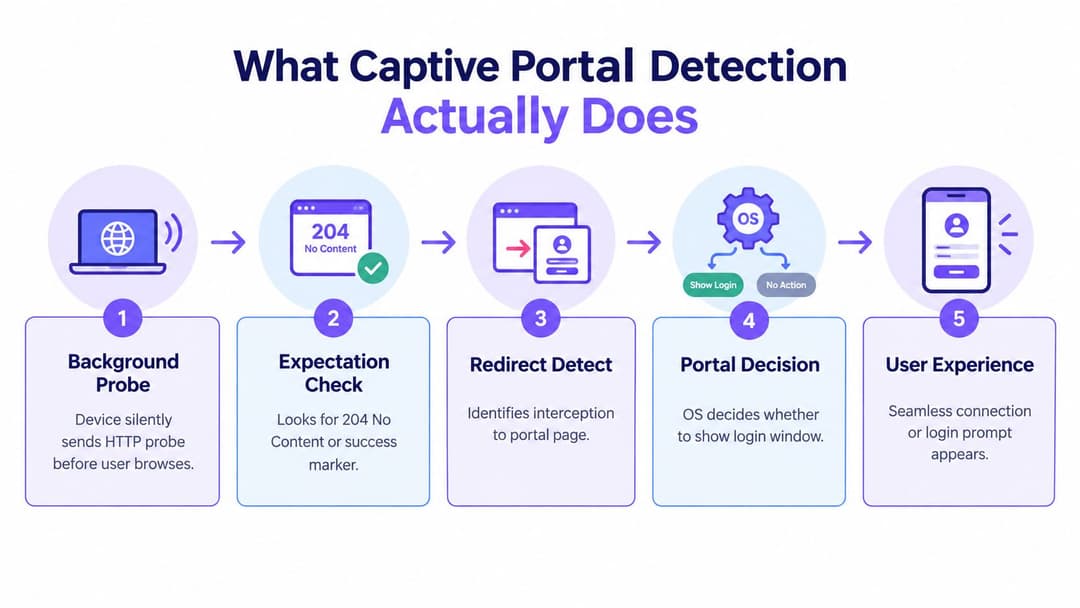
Detection is the gate, not the login
This is the part many teams blur together:
- Detection decides whether the user should see a portal at all.
- Authentication decides whether that user is allowed through.
- Authorisation decides what that user can reach afterwards.
If detection fails, the portal can be perfectly healthy and nobody will ever see it. If detection succeeds but auth fails, users will see the page and still have no access. Those are different faults, with different fixes.
A useful mental model is to treat captive portal detection as an OS-driven connectivity verdict. The browser isn't leading. The operating system is.
Why this matters in real networks
In practice, this means the user experience hinges on a very small exchange: a status code, a response body, or a redirect.
Practical rule: If users say “the portal didn't appear”, inspect the probe path before you inspect the portal page.
Why the problem has changed
Older hotspot troubleshooting focused on making the splash page load. That's still part of the job, but modern estates have another layer. Security agents, VPN clients, and onboarding tools also react when they think a captive portal exists. Mozilla documents that Firefox checks dedicated portal endpoints before opening a login page, while Cloudflare notes its client can send multiple OS-specific portal requests and may fully open the system firewall until onboarding completes, which turns detection into a reliability and endpoint-security issue, not just a sign-in issue (Mozilla captive portal support article).
That's why mature teams now ask two questions, not one. First, can the network trigger the portal consistently? Second, should this estate still rely on that workflow as a primary access method at all?
Core Probes and Heuristics Behind Reliable Detection
A client joins WiFi, gets DHCP, shows good signal, and still reports "No Internet" or never opens the sign-in window. In almost every case, the problem sits in the probe path, not the portal page.
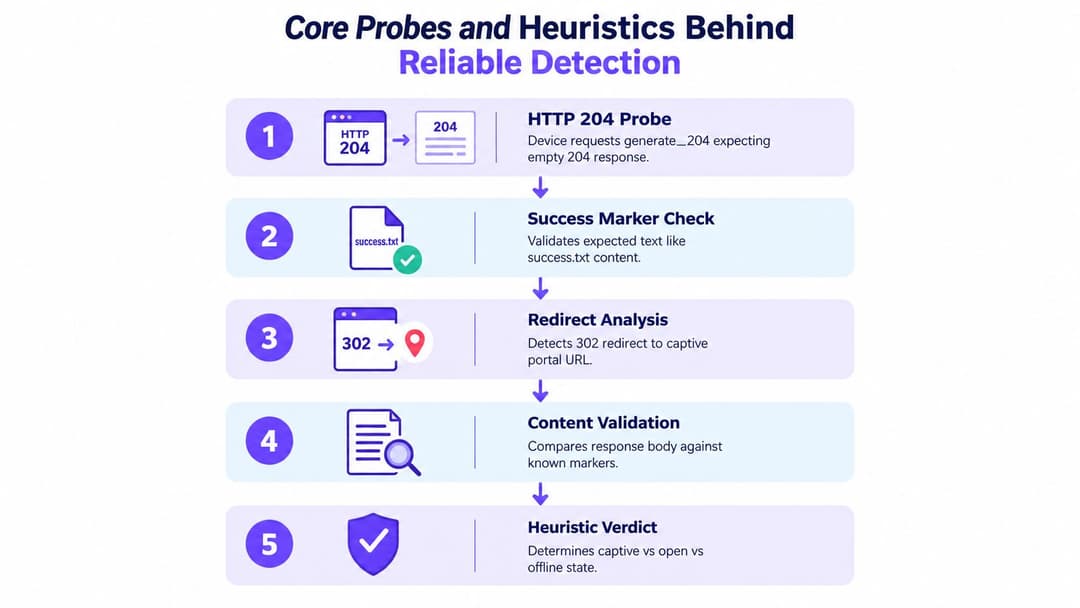
What clients are actually checking
Captive portal detection is a small decision engine built into the OS or client agent. The device sends a known request to a known endpoint, compares the reply with an expected result, and then decides whether the network is online, captive, or broken. The user may only see a pop-up browser, but the work happened a few packets earlier.
Common probe targets include Apple's captive.apple.com, Google's connectivitycheck.gstatic.com and clients3.google.com/generate_204, Microsoft's msftconnecttest.com/connecttest.txt, and Firefox's detectportal.firefox.com. The trigger is not the hostname alone. It is the combination of status code, headers, body content, redirect behaviour, and timing, as noted in the DrayTek hotspot portal overview.
The logic usually looks like this:
- Client sends a probe
- Network allows it through or intercepts it
- Client checks the response against its expected pattern
- Client classifies the network state
- OS or agent decides whether to launch a captive flow, warn the user, or stay quiet
That last step matters more than many teams expect. Security agents, VPN clients, and onboarding tools often key off the same verdict. A bad probe response can break access, delay posture checks, or leave the endpoint in an odd half-connected state.
What breaks detection most often
The common failure modes are boring, repeatable, and easy to miss during a quick browser test.
- Wrong HTTP status: Android-family checks often expect
204 No Content. Return a branded200 OKpage and the client may classify the network as captive, broken, or unstable. - Wrong body content: Windows and other stacks may look for exact plain-text markers. Proxy banners, rewritten HTML, or content-injection features can break that match.
- Redirect mistakes: One clear redirect to the portal is fine. Chained redirects, loops, or redirects that swap between HTTP and HTTPS often cause silent failures.
- DNS interference: DNS hijacking, split-horizon DNS, or recursive resolvers that answer inconsistently can send probes somewhere the client did not expect.
- TLS interception: HTTPS filtering and certificate substitution regularly cause "connected, no internet" complaints because the client no longer trusts the probe result.
- Timing and reachability issues: Slow upstream DNS, blocked CDNs for portal assets, or missing allow-lists for identity providers can make detection flap between states.
A practical rollout check is to build the pre-auth allow-list first and test it separately. Tools such as Purple's walled garden generator for captive portal domains and dependencies help catch probe hosts, portal assets, identity redirects, and post-auth destinations that need different treatment.
Ambiguous failure drives the ticket queue. A clean failure is easier to diagnose.
Why the heuristics are fragile
These checks are fragile because they were designed to infer network state from a tiny exchange, often before the device has full access. Small changes in content filtering, SSL inspection, reverse proxies, or firewall policy can change the result without anyone touching the portal itself.
I see this most often in enterprise guest and onboarding SSIDs where multiple teams own different parts of the path. The wireless team sees association succeed. The firewall team sees an allowed redirect policy. The security team sees HTTPS inspection working as intended. The endpoint only sees a probe response that no longer matches what it asked for.
That is why captive portal detection should be treated as a reliability and endpoint-security control, not just a convenience feature that pops a login page. If detection is unreliable, users fail to onboard, security agents can misread reachability, and support teams end up troubleshooting the wrong layer.
It also explains why some estates should stop relying on captive workflows as the primary access method. For BYOD guest access, short-stay visitors, and legacy onboarding, portal detection still has a place. For managed users in larger UK enterprise estates, Passpoint or OpenRoaming often gives a better result because access decisions move away from fragile HTTP heuristics and into authenticated network access from the start.
What good looks like
A sound deployment has a few consistent traits:
- Probe handling is deliberate: each major client family gets the response pattern it expects in the pre-auth state.
- Pre-auth paths are tightly scoped: only the required probe domains, portal components, identity endpoints, and update paths are reachable.
- Security controls know about probe traffic: proxies, filters, and TLS inspection policies do not rewrite or intercept these checks by accident.
- State changes are quick after auth: once the user is allowed through, the client can re-check connectivity and clear the captive verdict without toggling WiFi.
- Operations teams can test at packet level: they can predict the client outcome from DNS, HTTP, and redirect traces, not from a browser screenshot.
If the team can explain why a device marked the network captive, open, or broken from the raw exchange alone, the detection design is usually in good shape.
How Major Operating Systems Handle Detection Differently
Monday morning, the guest SSID looks healthy. Clients associate, pull DHCP, and show good signal. Then the tickets split by device type. iPhones join but never show a sign-in sheet, Android phones declare sign-in required straight away, and Windows laptops sit on "No Internet" long enough for users to blame Wi-Fi. That is why portal detection belongs in the reliability runbook, not just the guest access design.
The differences are small on paper and expensive in production. Each platform tests connectivity in its own way, and each one reacts badly to slightly different failure modes. In mixed estates, those quirks also overlap with endpoint controls such as web filtering, TLS inspection, VPN agents, and browser-specific checks. A portal that only "works in a browser" is not working properly.
OS Probe Expectations Compared
| Client Family | Probe Endpoint | Expected Success Signal |
|---|---|---|
| Apple | captive.apple.com |
HTTP response containing the expected success page |
| Android and Google stack | connectivitycheck.gstatic.com or clients3.google.com/generate_204 |
204 No Content |
| Windows | msftconnecttest.com/connecttest.txt |
Expected Microsoft Connect Test plain text |
| Firefox | detectportal.firefox.com |
Expected portal-detection response used by Firefox |
Apple often fails quietly
Apple usually gives the cleanest user experience when the pre-auth path is set up correctly. When it is wrong, the failure can be almost silent. The device joins the SSID, gets an address, and looks normal in the controller, but the captive assistant never opens.
In practice, that points to two common causes. The first is probe interception that does not match what Apple treats as captive. The second is content modification by a security control upstream. A block page, header injection, or SSL handling policy can alter the response enough that the device no longer trusts the result. Support teams then chase RF or DHCP when the problem is HTTP integrity.
Android is easier to test and less forgiving
Android's 204 No Content model is blunt. That helps during diagnosis because the expected behaviour is clear, but it also means small mistakes show up quickly. Return a redirect, an HTML body, or a filtered response where Android expected nothing, and the client may mark the network captive or impaired.
That strictness is useful. If Android is unstable on the same SSID where Apple appears fine, start with proxy behaviour, content filtering, and redirect logic before looking at the wireless layer.
Windows exposes timing and policy problems
Windows tends to surface ambiguity more openly than Apple. Users see limited connectivity, long delays before the portal appears, or a connection that looks established but fails application traffic in odd ways. In enterprise estates, that often intersects with security tooling. Always-on VPN clients, web protection modules, and host firewalls can influence the same checks that Windows uses for connectivity state.
Microsoft documents the current NCSI behaviour and endpoints in its own guidance, which is the right reference point for current Windows clients. The operational lesson is simpler. If NCSI is being intercepted, filtered, or answered too slowly, users will feel it before they understand it.
Firefox can disagree with the host OS
Firefox deserves separate attention on desktops because it runs its own portal logic. The laptop may show normal connectivity while Firefox still behaves as if access is restricted, or the reverse. That is not just a browser quirk. It creates real support noise because the operating system, the browser, and the endpoint agent can each hold a different view of the same network.
Field note: When users report "Wi-Fi is connected but Firefox is blocked," check the OS probe result, browser probe result, and any secure web gateway agent on the endpoint. One bad assumption at this stage can send the ticket to the wrong team.
Mixed estates need device-aware triage
Use the symptom to choose the first test.
- iPhone joins but no sign-in sheet appears: check Apple probe handling and confirm the returned body is intact.
- Android immediately reports sign-in required: confirm whether the redirect is deliberate and whether any device is receiving content instead of
204. - Windows says no internet, portal appears late: inspect NCSI reachability, redirect timing, DNS response, and local security agents.
- Firefox behaves differently from Chrome on the same laptop: separate browser-level detection from OS connectivity state and endpoint filtering.
This is also where the design decision matters. For guest, visitor, and BYOD access, keeping portal detection healthy is still worth the effort because the workflow is expected and the client mix is unpredictable. For managed users across larger UK enterprise estates, repeated portal edge cases are usually a sign to reduce reliance on captive logic and move toward Passpoint or OpenRoaming, where access control happens at network entry instead of through fragile post-association HTTP tests.
Hands On Detection With curl Python and Device Agents
The fastest way to stop guessing is to test the probe path directly. You don't need packet captures for every case. Start with repeatable HTTP checks, then confirm behaviour on real endpoints.

Start with curl
Use curl to inspect status codes, headers, and redirects from the same network segment as the client.
For a Google-style probe:
- Check status only: request the
generate_204endpoint and confirm whether the result is204or a redirect. - Follow redirects carefully: run the same request with redirect following enabled and see whether it lands once on the portal or loops.
- Inspect headers: if content filtering appliances add banners, category headers, or rewritten content, detection can break even when the portal is up.
For Windows-style text probes:
- Fetch the body exactly as returned
- Compare plain text output
- Look for substitutions or wrapper pages
For Apple-style checks:
- Request the expected success page
- Confirm the body is what the client expects when the network is open
- Confirm interception is deliberate when the client is unauthenticated
A quick sanity pass with an HTTP header checker helps when proxies or security layers are changing responses.
Use a small Python verifier
A short script is enough to automate the checks your service desk repeats all week. Keep it simple:
- Define the probe URLs for the client families you support.
- Send HTTP requests without browser behaviour.
- Record status, final URL, redirect count, and response body snippet.
- Compare results against expected open-network values.
- Flag ambiguous outcomes such as
200with unexpected content or repeated redirects.
That script doesn't need to log users in. Its job is to answer one question. Did the network present the probe in a way that would trigger the expected client decision?
Device agents need restraint
Managed-device testing is where teams can create collateral damage. If you push aggressive scripted tests to laptops that already run VPN clients, DNS protection, or zero-trust agents, you can trigger the very onboarding state you're trying to avoid.
Use lightweight agents with guardrails:
- Run probes on association events, not continuously.
- Avoid broad firewall changes on the endpoint side.
- Separate guest onboarding tests from production VPN enforcement where possible.
- Log verdicts locally first, then export summaries.
Operational advice: Test like a client, not like an attacker. The point is to confirm OS decisions, not to brute-force every redirect path.
What to look for in results
Good tests tell you more than “up” or “down”.
- Correct open response: probe returns the expected code or marker.
- Expected captive response: unauthenticated client gets a redirect to the portal once.
- Looping: the same request bounces repeatedly.
- Filtered result: response exists but content is modified.
- Dead path: timeout or unreachable endpoint.
If you can gather those outcomes from a laptop on the guest VLAN and from a managed corporate endpoint, you'll usually find where the problem lives before the first user screenshot lands in your inbox.
Integrating Detection With Enterprise WiFi and Identity Platforms
In enterprise Wi-Fi, captive portal detection shouldn't be the centre of the design. It should be a controlled compatibility layer.
That's the shift many estates are still working through. Guest access, contractor onboarding, and public-facing Wi-Fi may still need portal logic. Staff and known-user access usually shouldn't depend on it if you can avoid it.
Put probe handling in the right place
Whether you run Meraki, Aruba, Ruckus, Mist, or UniFi, the same design rule applies. Handle unauthenticated probes predictably at the controller, gateway, or cloud edge where your guest policy already lives.
That means:
- Permit the right pre-auth paths: probe endpoints, portal assets, and any identity redirects that must load before full access.
- Keep the unauthenticated policy narrow: enough for onboarding, not broad internet.
- Separate guest and staff logic: don't let portal interception touch certificate-based or managed corporate SSIDs.
If you're replacing password-based access with identity workflows, identity-based networking is the relevant model. It shifts known-user access away from captive flows and into authenticated, policy-driven connectivity.
Logging matters in the UK
In the UK public-sector and enterprise context, the wireless security standard SS-019 requires guest captive-portal authentications to be logged, failed portal attempts to be investigated, configuration changes to be logged with operator identity, and traffic monitoring thresholds to be set so malicious activity can be attributed to individual credentials. It also flags anomalies such as unusually high device counts on one access point, abnormally high traffic from one client, and many failed join attempts in a short period (UK wireless security standard SS-019).
That changes how I'd implement detection. Don't just log “portal hit”. Log the chain:
- Association and client identity
- Probe-triggered captive verdict
- Portal success or failure
- Policy change after auth
- Telemetry that ties the event back to AP and client behaviour
Keep zero-trust clients from fighting the portal
Bad designs unravel here. Some endpoint security tools treat captive states as exceptional and relax controls temporarily. If the network causes false captive detections, those clients can flap between onboarding logic and normal enforcement.
A safer pattern is:
- Known devices use enterprise authentication first
- Guest and unknown devices fall into a restricted onboarding path
- Portal detection remains available as fallback
- VPN and zero-trust teams validate behaviour on representative client builds before rollout
One platform option in that space is Purple, which supports guest Wi-Fi onboarding and identity-based access patterns on third-party network hardware. That's useful when you need portal support for guests but want to reduce dependence on portals for returning or managed users.
Testing Troubleshooting and Monitoring That Keeps Detection Reliable
Captive portal detection breaks. That's why one-off acceptance testing isn't enough.
The assumption I'd challenge is this: if the portal page loads during commissioning, the job is done. It isn't. Reliable operation depends on keeping the probe workflow intact across OS updates, filtering changes, identity integrations, and endpoint security changes.
A practical verification routine
Use a short checklist every time you touch guest access, DNS policy, filtering, or controller behaviour:
- Probe endpoint validation: confirm each major client family gets the response type it expects.
- Redirect sanity: check for single-hop redirects rather than loops.
- Filtering inspection: make sure web filters or proxy layers aren't rewriting body content or headers.
- DNS behaviour: confirm unauthenticated clients resolve what they need for onboarding and nothing more.
- Post-auth recovery: verify clients re-evaluate connectivity cleanly after authentication.
- Cross-platform spot checks: test on Windows, macOS, iOS, and Android with representative managed and unmanaged devices.
Monitor the right signals
For UK operations, detection reliability should be monitored alongside security telemetry, not off to the side. SS-019 is useful here because it pushes teams toward auditability and anomaly monitoring, not just login success tracking.
I'd watch for:
- Bursts of failed join attempts
- Unexpected client density on a single AP
- Repeated portal failures from the same client class
- Mismatches between association success and internet-usable sessions
- Sharp changes after endpoint or browser updates
“Connected” is not a meaningful success state for guest Wi-Fi. Usable connectivity is.
When to keep detection and when to retire it
This is the strategic question many teams avoid. Some estates still need a captive portal for guest identity capture, terms acceptance, or public-access workflows. Fine. Keep it, but treat detection as a carefully tested fallback path.
For repeat visitors, staff, and managed users, the business case for moving away from captive portals is getting stronger. UK coverage of OpenRoaming and Passpoint says these approaches are “finally delivering” automatic, secure onboarding without repeated captive portal logins, and one industry report says 38% of respondents had already deployed an OpenRoaming or Passpoint-compliant network, with 32% planning deployments in 2026 and 18% in 2027 as projected in that report (WBA Industry Report 2026).
That doesn't mean portals disappear tomorrow. It means many networks should stop designing around them as the primary user journey. In a modern UK enterprise estate, captive portal detection often belongs in the same category as other legacy-compatibility features. Necessary in some places. Worth minimising in many others.
If you're trying to reduce portal friction without losing control, Purple offers guest Wi-Fi authentication, identity-based access, and support for approaches such as OpenRoaming and Passpoint that can lower your dependence on captive portal detection. If that's the direction your estate is heading, it's worth seeing how Purple fits alongside your existing network stack and onboarding policies.