You're probably dealing with the same mess most venue operators are stuck with right now. A guest walks in, the lobby is full, the front desk is busy, the WiFi splash page is slow, and someone is already asking why the conference crowd can't get online. The network isn't failing because the radios forgot how to work, it's failing because the guest journey was designed like a password handout instead of an identity system.
That's the job of guest WiFi management. It's not just keeping visitors online, it's onboarding them quickly, authenticating them cleanly, isolating them properly, and making the network useful to the business after the session ends. In the UK, that matters more than ever, because guest access is now a meaningful infrastructure category, with the guest WiFi provider services market in the UK projected to reach $150.536 million by 2026 according to Purple's UK market overview, as cited in MyWiFi Networks' guest WiFi statistics compilation. Purple's UK market overview reference
The shift is simple to see on the ground. Guests expect access, operators need control, and compliance means you can't just throw a shared password on a card and hope for the best. The winning model is identity-based, low-friction, and measurable.
What Guest WiFi Management Actually Means
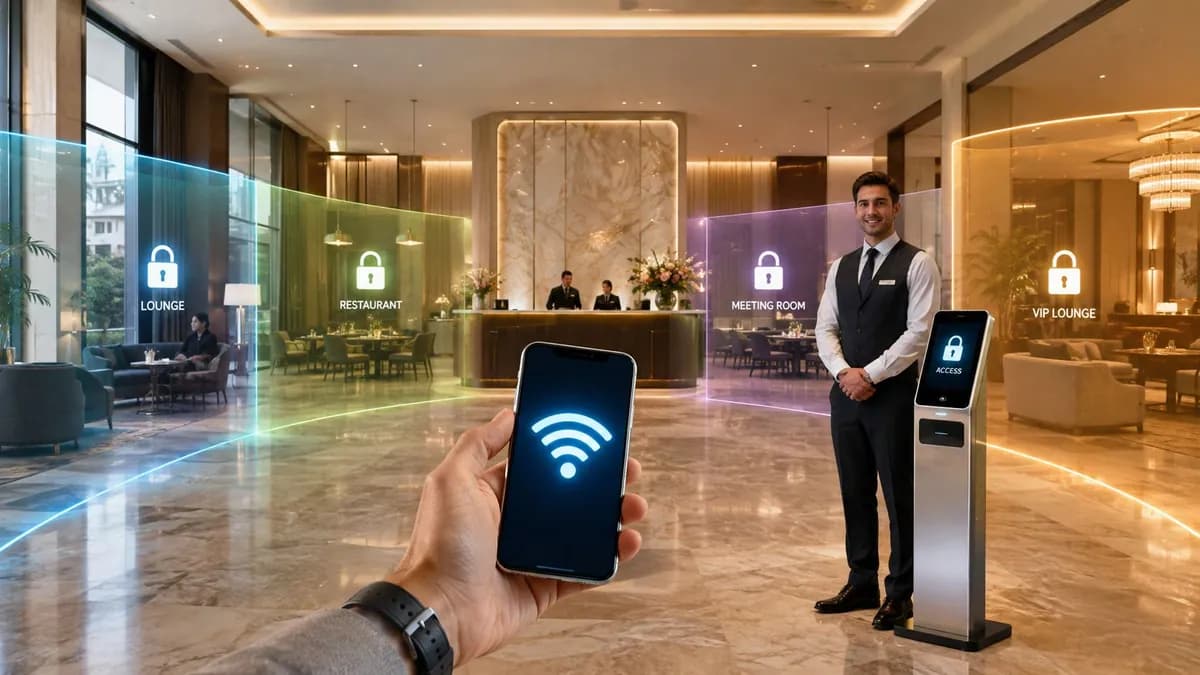
A hotel lobby tells you everything you need to know. The conference group arrives, a few people try to join at once, the receptionist is still answering room questions, and the old captive portal starts timing out under load. That's not a WiFi problem in the narrow sense, it's a guest WiFi management problem, because the venue has to handle people, access, policy, and reporting at the same time.
The job is bigger than a login page
Guest WiFi management is the discipline of onboarding, authenticating, securing, segmenting, and measuring temporary users on a venue network. It sits between the business need to keep people connected and the operational need to keep everyone else safe. That's very different from staff WiFi, where the goal is controlled access for known devices, and very different again from the old shared-password model, which gives you convenience without accountability.
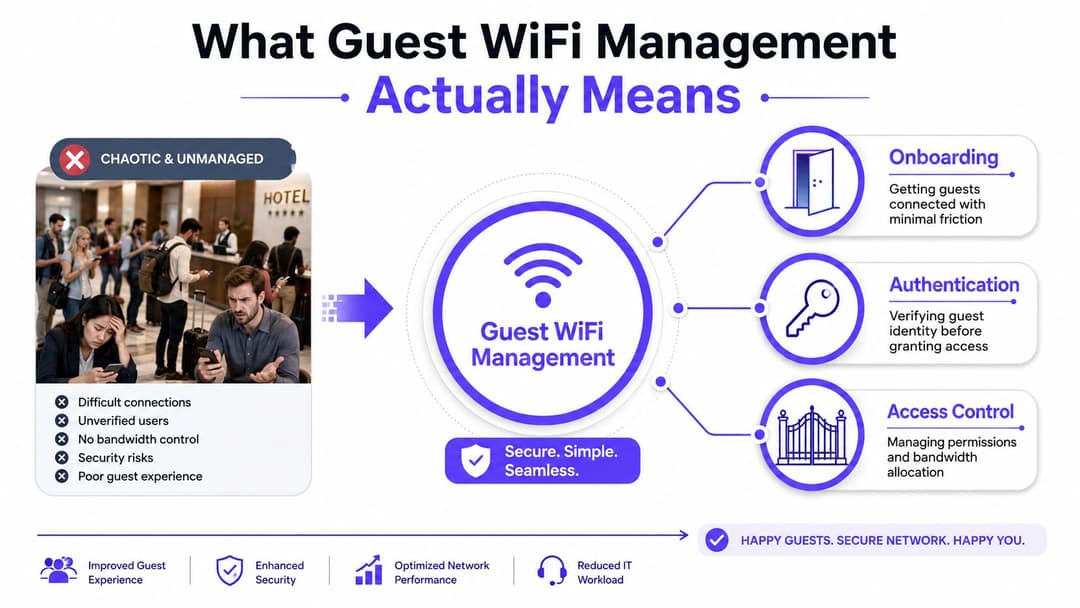
Think of it as four jobs happening together. First, the guest must connect fast enough that they don't call reception. Second, the corporate network has to stay isolated from whatever the guest device is doing. Third, the venue needs evidence of who used the network and when. Fourth, the operator should get reporting that proves the service is doing useful work, not just passing traffic.
Practical rule: if your guest network can't be explained in one sentence to a non-technical manager, it's probably still a portal, not a managed service.
The commercial angle matters because venues are no longer treating WiFi as a utility they grudgingly provide. They're treating it as part of the guest experience, the compliance trail, and the first-party data layer. That's why the UK market growth matters. It signals that guest access has moved from a loose IT side project into real operational infrastructure.
A good way to judge your own setup is brutally simple. Ask whether your guest network helps people connect quickly, protects the rest of the estate, creates usable identity records, and produces reporting you'd defend in a meeting. If the answer is no to any of those, the design needs work.
The Core Building Blocks Every Guest Network Needs
A decent guest network is built like a hotel with proper front-of-house control. Guests check in at one desk, staff move through another route, and back-of-house areas stay off limits. The same logic applies to wireless, only the doors are digital and the consequences of getting it wrong are a lot more expensive.
Start with authentication and segmentation
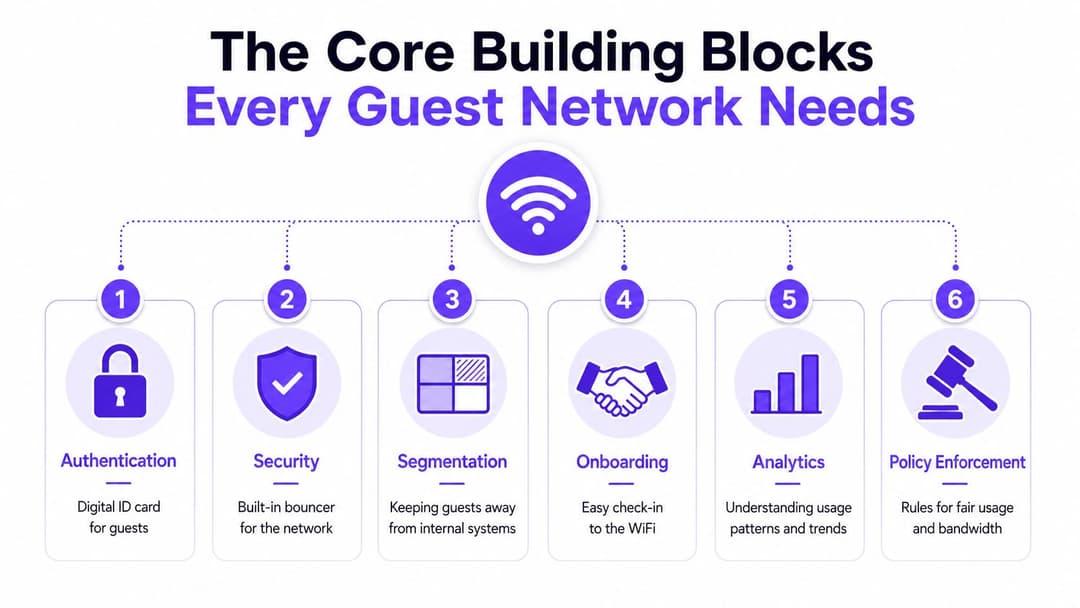
Authentication is the doorman checking IDs. It answers the question, who is this user and what should they be allowed to do? Segmentation is the wall between the lobby and the kitchen, it keeps guests away from payroll systems, room management tools, and other internal services they have no business seeing. If you're trying to assess a vendor or a home-grown build, those are the two core questions to solve first.
The easiest way to test maturity is to ask whether guest traffic can be separated cleanly from everything else. If the answer depends on a shared password and a single flat network, you're exposed. If you want a practical guide for comparing environments, Purple's multi-tenant WiFi guide is a useful reference point for how identity and isolation should be thought about in a mixed estate. multi-tenant WiFi guide
Make onboarding and policy feel invisible
Onboarding is the check-in desk. It should take as few steps as possible while still capturing the consent and identity information your organisation needs. Policy enforcement is what happens after connection, things like bandwidth limits, session controls, or access windows. That's the part many organizations neglect, then wonder why the guest experience feels chaotic during peak periods.
If your guest access policy can't distinguish a one-hour visitor from a repeat customer, you're leaving useful control on the table.
A sensible build also needs security and analytics. Security is the bouncer who keeps the wrong device classes out and limits lateral movement if something goes wrong. Analytics is the till receipt, it shows what was used, when it was used, and whether the network is supporting the venue or just consuming budget. If you're outsourcing the design, the question isn't whether the vendor has “guest WiFi”. It's whether they can prove onboarding, security, segmentation, analytics, and policy are all working together.
If you're evaluating a provider or architecting your own stack, use how to vet home network pros as a reminder that the quality of the design matters more than the surface polish of the login page. The same principle applies to guest networks, only the implications are more significant.
Choosing the Right Authentication Technology
Organizations often make an incorrect choice by comparing login screens rather than operating models. A captive portal appears simple, Passpoint seems elegant, RADIUS sounds technical, and OpenRoaming suggests the future. The optimal solution hinges on who is connecting, their frequency of return, and your acceptable level of friction.
Compare the options by the outcome you need
| Technology | Best fit | Security level | Typical friction |
|---|---|---|---|
| Captive portal | First-time guests, public venues, simple onboarding | Moderate | Medium to high |
| Passpoint | Repeat guests, managed devices, hospitality | High | Low |
| OpenRoaming | Federated repeat access across participating venues | High | Very low |
| iPSK | Legacy devices, mixed estates, simpler isolation | Moderate to high | Low |
| RADIUS with 802.1X | Staff, tenants, controlled enterprise access | High | Medium |
| Certificate-based 802.1X | Regulated staff access, strong device trust | Very high | Higher at setup, lower after deployment |
A captive portal still has a place, especially for first-time guests who need a quick, branded route onto the network. But if you stop there, you're forcing every repeat visitor to behave like a stranger. That's wasteful. Passpoint and OpenRoaming are better for returning users because they cut the repeated login friction and still keep the connection encrypted from the first packet.
Use layered authentication, not a single religious choice
The mature approach is layered. Use a lightweight portal for one-off guests, Passpoint or OpenRoaming for repeat visitors, and RADIUS-backed 802.1X for staff or resident identities. That gives you a cleaner split between public access and trusted access, and it avoids forcing the same method onto everyone.
The internal decision should also be practical. A coffee shop usually wants speed and low operational overhead. A hospital wants stronger identity control and clean auditability. A multi-tenant office needs consistent separation between users, devices, and business units. None of those environments should default to the same authentication model.
Operational advice: if you can't revoke access cleanly when someone leaves, the authentication model is too loose.
Purple's captive portal guide is relevant here because it shows the portal as one part of the access model, not the whole story. captive portal guide The mistake is treating the portal as the answer when the question is how to reduce friction while keeping identity, consent, and access control aligned.
Deploying a Guest Network That Actually Stays Up
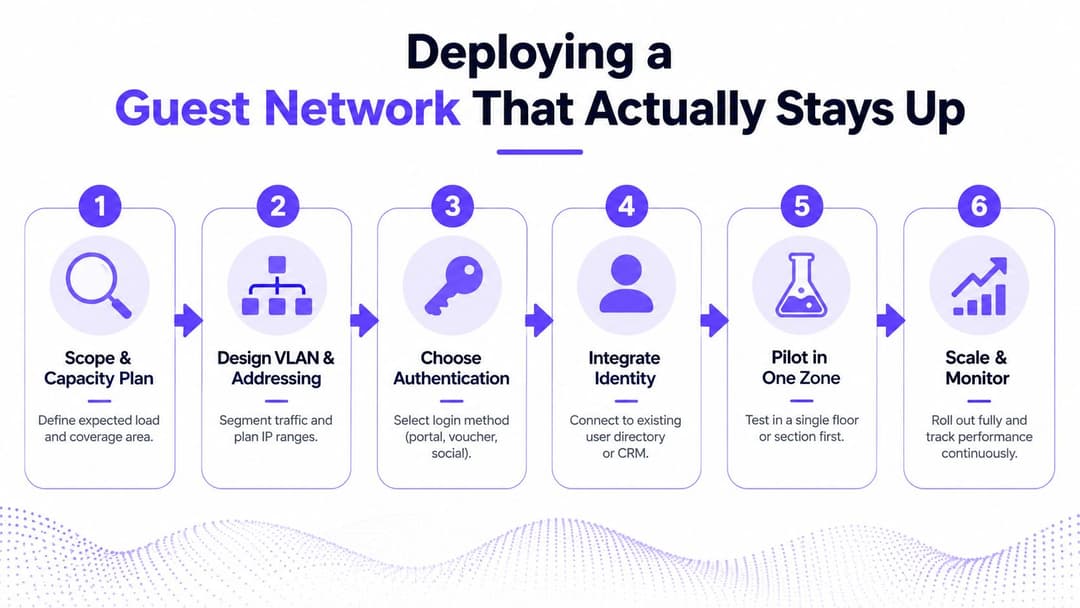
The most common deployment failure is trying to do everything at once. Teams choose the portal, the segmentation model, the consent wording, the directory integration, and the reporting stack in one shot, then wonder why go-live turns into a fire drill. A stable rollout is sequenced. It starts with capacity and ends with monitoring.
Design for churn before you design for features
A practical hospitality example makes the point. In a 200-room hotel, one vendor architecture guide recommends a guest subnet of at least a /22 with 1,022 usable addresses and DHCP leases of 2 to 4 hours because iOS 14+ and Android 10+ devices use MAC randomisation and can chew through addresses quickly. secure guest WiFi architecture That isn't a theoretical nuisance, it's the kind of detail that decides whether the guest network remains stable during busy check-in periods.
The same guide points to a dedicated guest VLAN or subnet for good reason. If you try to overload a small address pool with short-lived, randomised devices, exhaustion arrives fast and the user experience collapses. Capacity planning isn't glamorous, but it prevents the support queue.
Roll out in a strict sequence
Start by scoping the load and the coverage area. Then design the VLAN and addressing model. After that, choose the authentication method, integrate identity where needed, run a pilot in one zone, and only then scale.
Use this as your vendor checklist:
- Consent handling: ask how GDPR-compliant consent is captured, stored, and withdrawn.
- Retention controls: confirm the retention window and the automatic purge process for guest records.
- Identity integration: check whether the platform supports the directories and access patterns you use.
- Failure handling: ask what happens if the portal fails, the RADIUS server times out, or the lease pool runs low.
- Pilot tooling: insist on a single-zone trial before a full estate rollout.
The UK compliance piece matters because guest records are personal data. Purple's UK-relevant guidance explicitly calls for GDPR-compliant consent flows, data-retention policies, and automatic purging of guest records beyond the retention window. guest WiFi best practices guide for 2026
Integrations That Turn WiFi Into a Data Source
WiFi is only valuable to a business when it connects to other systems. A beautiful portal that can't communicate with identity, CRM, or marketing automation is merely a more attractive way to collect data that remains unusable. The true advantage lies in the integration layer, as that's where guest access transforms into reusable identity and follow-up.
Connect access to identity and lifecycle control
For staff and tenant access, SSO and directory services are an essential baseline. Microsoft Entra ID, Google Workspace, and Okta are the obvious places to anchor lifecycle control, because they let you grant and revoke access from a central identity source instead of maintaining a separate guest or staff list by hand. That matters operationally. If HR removes an employee from the directory, WiFi access should disappear with it.
A common failure mode is building a polished guest journey but forgetting deprovisioning. That creates an access sprawl problem, especially in buildings where employees, contractors, and residents come and go regularly. The right model is identity-driven, not list-driven.
Feed the data where the business can use it
CRM connectors matter for a simple reason, they turn a consented visitor into a record the marketing team can segment later. Marketing automation platforms take that further by using sign-in data to trigger follow-up journeys, event campaigns, and re-engagement flows. The network team doesn't need to own those workflows, but it does need to make sure the data arrives cleanly and on time.
Purple's integrations page is a useful example of how these connections are framed in practice, because it treats WiFi as an input to broader systems rather than a standalone portal. integrations
A straightforward data flow looks like this:
- The guest connects.
- The portal or roaming method authenticates the session.
- Consent and identity data land in the venue's CRM or marketing platform.
- The next visit can be recognised more quickly, and the guest doesn't start from zero again.
Good integrations reduce manual work twice, first for IT, then for the commercial team.
That's the standard you should use. If an integration doesn't improve control, reduce manual effort, or make the data usable downstream, it's noise.
Measuring Success With KPIs That Matter
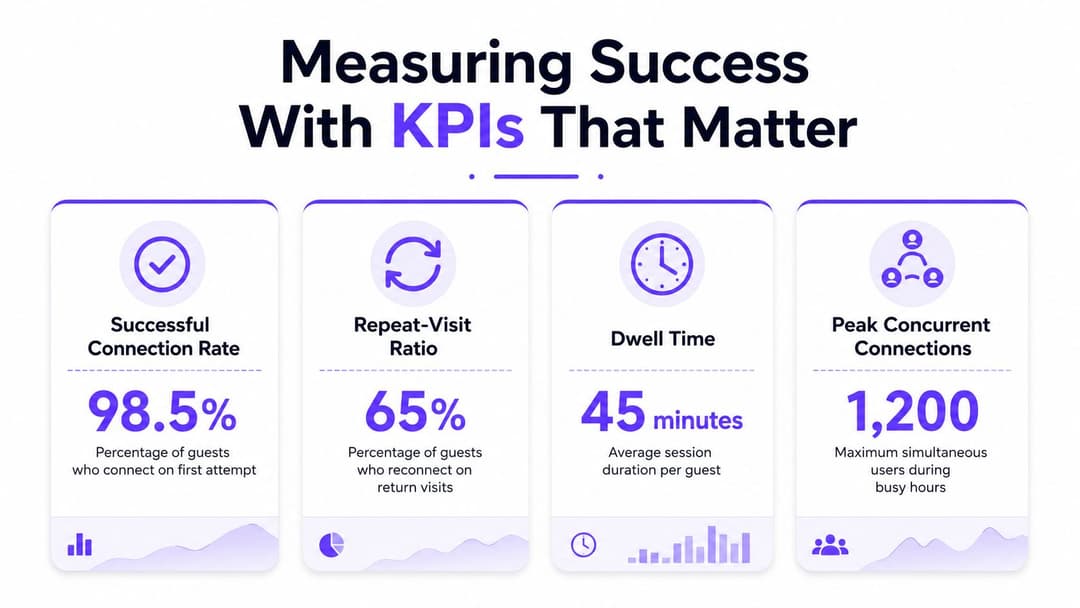
Most guest WiFi dashboards are full of vanity counts. Total connections sounds impressive until you realise it tells you almost nothing about whether guests got on, stayed on, or came back. The numbers that matter are the ones an operations director can defend in a budget review.
Track outcomes, not just activity
The most useful KPI is successful connection rate, because it tells you whether people can get online without intervention. After that comes repeat-visit ratio, which shows whether the guest experience is strong enough to support return sessions. The MyWiFi Networks compilation cites a benchmark that returning WiFi guests visit 2.7 times more frequently than one-time connectors, which is a strong argument for identity-based recognition over one-off portal interactions. real-time statistics
Dwell time matters too, because it tells you whether the network is supporting a real visit rather than a failed login. And support tickets per 1,000 sessions is the bluntest operational measure of all, because it tells you how much staff time the guest network is consuming. Data-capture conversion sits alongside these, since a network that never converts consented users into usable records isn't paying off commercially.
Wire the KPIs into action
If the connection rate falls, the service team should investigate onboarding friction first. If repeat visits stay weak, the authentication journey is probably too clunky or too forgettable. If support tickets rise, look for portal redirects, certificate issues, or address exhaustion before blaming the access points.
You should also make sure the dashboard is readable by the wider business. A hotel manager, a retail operator, and a clinical lead don't want the same view, but they do need a shared source of truth. The right dashboard shortens a decision. It doesn't just show a graph.
Sector-Specific Considerations
The same guest WiFi design doesn't land the same way everywhere. Hospitality, retail, healthcare, and residential all want connectivity, but they want it for different reasons and with different risk tolerances. If you ignore the sector, you end up with a generic network that fits nobody.
Hospitality needs density and room-level consistency
Hotels care about coverage quality, fast onboarding, and predictable experience across rooms and common areas. An enterprise specification manual used in EMEAA states that guest-room WiFi should deliver at least -65 dBm coverage on 5 GHz, with 802.11ac as a minimum and 1000 Mbps backbone cabling. IHG Connect WiFi specification manual That's a good practical bar because weak RF or sub-gigabit uplinks create contention and retransmissions that guests feel immediately.
For hospitality, language-flexible onboarding and room-based service are worth the effort. Guests don't want a technical process. They want to get online and move on.
Retail, healthcare, and residential need different trade-offs
Retail wants short sessions, simple consent, and data that can support remarketing without making the sign-in feel like a survey. The portal should be fast and branded, not heavy. Healthcare is stricter. Patient and visitor access must stay separate from clinical systems, and audit trails matter because the network is part of a regulated environment, not just a convenience layer.
Residential and multi-tenant sites need a home-like experience without sacrificing isolation. Residents, guests, and service teams should not share the same access assumptions. The network should feel simple to the person using it and strict to the operator maintaining it.
The right design is the one that matches the sector's risk profile, not the one with the prettiest demo.
If you're comparing sectors, use this lens. Hospitality asks for coverage and repeat access. Retail asks for frictionless consent and usable data. Healthcare asks for control and auditability. Residential asks for clean separation and low admin overhead.
Troubleshooting, Common Pitfalls and Next Steps
The failures you'll see are boring and predictable. Captive portal redirect loops usually mean the first web request isn't being handled cleanly, certificate validation failures usually point to trust or expiry problems, DHCP exhaustion is an addressing issue, RADIUS timeouts are an identity or backend issue, and rogue personal hotspots are a policy and containment issue. Don't guess. Isolate the failure mode first, then fix the layer that owns it.
Use a tight diagnostic order
Start with the guest device, not the dashboard. If the device can't reach the portal, check the redirect and DNS behaviour. If it reaches the portal but can't authenticate, inspect the certificate or directory path. If authentication succeeds but the user still can't browse, check the DHCP scope and the VLAN assignment.
Then check the less visible problems. RADIUS timeouts often show up as random login failures during busy periods, and they're easy to misread as “WiFi slowness”. Rogue hotspots are different, because they create bypass paths inside the venue and pull traffic away from the controlled network.
Push toward lower-friction access
Once the basics are stable, the next step is to reduce repeated friction. That means exploring OpenRoaming federation for repeat access, moving towards passwordless identity flows, and tightening CRM segmentation so the data you collect reflects the visit type and consent state. Those are practical upgrades, not shiny extras.
If you need a short action list for this week, use this:
- Audit the onboarding flow: time how long a guest needs from first click to usable access.
- Check retention settings: confirm guest records are purged on schedule.
- Review address pools: make sure the guest subnet can handle churn.
- Test a failed login: see what the user sees when authentication breaks.
- Verify downstream data use: confirm CRM and marketing integrations are receiving clean records.
Purple provides cloud guest WiFi, Passpoint and identity-based access over existing hardware, so you can reduce portal friction without losing control of segmentation or consent. If you're planning a guest WiFi refresh this quarter, visit Purple and compare how your current onboarding, authentication, and reporting stack stacks up against a managed identity model.