
Monday morning starts with a familiar support ticket. Staff can see the corporate SSID, but authentication fails after a password change. A contractor has been given the shared Wi-Fi key, a printer still depends on the same credential, and nobody can say with confidence which devices should remain connected. The wireless network works, but access control has become a collection of exceptions.
Okta WiFi authentication can replace that shared secret with an identity decision. The important qualification is architectural: Okta isn't, by itself, a complete Wi-Fi authenticator. Your WLAN controller or access points still need a standards-compliant RADIUS layer, and legacy devices and guests need their own access model.
This guide follows the operational path from an Okta identity to a permitted network connection. It covers RADIUS forwarding, SAML and captive portal designs, certificate-based access, Passpoint, OpenRoaming, and the practical compromises required in mixed UK estates.
Why Okta WiFi Authentication Matters Now
The shared Wi-Fi password looks efficient until someone leaves the organisation, a supplier loses access, or a device appears on the network without a clear owner. Changing the key means touching every managed device and redistributing the new secret. Leaving it unchanged means accepting access that can't be tied cleanly to a person, device, or business purpose.
Identity-based access changes the control point. Instead of asking whether a device knows the network password, the WLAN asks whether a named user or enrolled device satisfies the organisation's access policy. Okta can remain the system that evaluates identity and sign-in conditions, while the network applies the resulting authorisation through RADIUS attributes, VLAN placement, or a separate policy engine.
The UK is well positioned for this model. Okta's 2023 UK Secure Sign-in Trends Report recorded 75% MFA adoption among UK users, placing the UK above France at 55%, the Netherlands at 62%, Sweden at 64%, and Australia at 65% in the comparison set. The same report recorded overall MFA adoption among Okta customers rising by 6% year over year to 64% in 2023.
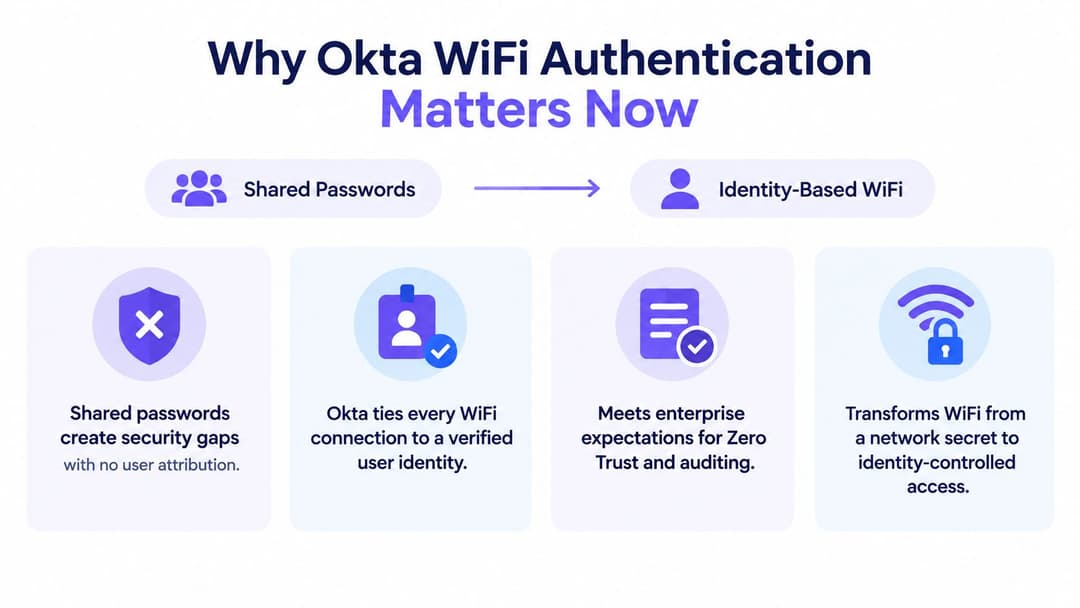
The network becomes part of the identity lifecycle
That maturity matters because the same directory events that govern application access can govern wireless access. A user who loses their Okta assignment shouldn't retain staff network access just because they once received a PSK. A contractor can belong to a restricted group, receive a different network policy, and be removed without changing the credentials used by everyone else.
Okta's 2024 Secure Sign-in Trends Report documentation recorded MFA adoption at 66% among Okta workforce users as of January 2024, with 91% of administrators using MFA. Passwordless methods were growing from an early base, with FastPass moving from 2% to 6%, FIDO2 WebAuthn from 2% to 3%, and passwordless experience moving from less than 2% in January 2023 to almost 5% in January 2024.
Those figures don't mean every access point can suddenly perform passwordless authentication. They do show why network teams are looking beyond shared keys and password prompts. A mature identity programme gives the wireless team groups, assurance signals, revocation events, and audit records to build on.
Practical rule: Treat Wi-Fi access as an extension of identity governance, not as a separate password distribution exercise.
Security isn't the only driver. Per-user access improves investigation because logs can associate a connection with an account or device. It also supports cleaner staff and guest separation, especially where a venue needs employee access, contractor access, managed IoT, and public connectivity on the same physical infrastructure.
Operators considering the wider design can use this enterprise Wi-Fi security guide to frame segmentation, authentication, and lifecycle requirements together. The key decision is not whether Okta can be mentioned in the WLAN configuration. It is whether the surrounding RADIUS, certificate, guest, and legacy-device architecture can enforce the identity decision consistently.
Understanding Your Okta WiFi Authentication Options
There are three practical patterns, and they solve different problems. RADIUS forwarding suits conventional enterprise 802.1X deployments. SAML or SSO through a captive portal suits browser-based guest and user journeys. Certificate-based WPA2-Enterprise or WPA3-Enterprise, extended through Passpoint and OpenRoaming, gives the cleanest passwordless experience for enrolled devices and recurring guests.
The most common design mistake is choosing the first pattern because it sounds closest to Wi-Fi. Okta's RADIUS integration documentation states that the integration supports Password + MFA, MFA Only, and Password + passcode, but the Okta RADIUS agent supports PAP-based authentication only and explicitly says Wi-Fi infrastructure isn't supported. That makes the agent part of an authentication chain, not a replacement for the WLAN's RADIUS service.
| Method | Best For | Security Level | User Experience |
|---|---|---|---|
| RADIUS forwarding to Okta | Existing enterprise WLANs using a controller, NAC, or cloud RADIUS service | Strong when the RADIUS layer supports suitable EAP and policy controls. Okta provides identity validation, but the surrounding service handles WLAN protocol requirements | Familiar for staff, although password and MFA prompts can interrupt first connection |
| SAML or SSO through a captive portal | Guests, contractors, and browser-led access where an identity provider can be reached before internet access | Useful for identity and session policy, but dependent on portal controls, device behaviour, and network isolation | Simple on devices with a browser, less consistent for headless equipment and roaming |
| Certificate-based WPA2-Enterprise or WPA3-Enterprise with Passpoint or OpenRoaming | Managed staff devices, recurring guests, and venues seeking automatic secure connection | High when certificates, trust chains, policy, and device enrolment are managed correctly | Near-passwordless. The device connects without repeatedly presenting a shared key or portal form |
RADIUS is a network protocol layer
In a conventional staff deployment, the access point or wireless controller sends an 802.1X exchange to a RADIUS service. That service validates the user or certificate against an identity source, then returns an accept or reject decision and possibly authorisation attributes. Okta can supply the identity and policy decision, but it doesn't remove the need for the WLAN-facing RADIUS function.
SAML and SSO take a different route. A guest or contractor is redirected to a portal, completes an identity flow, and receives a session decision from the gateway. This is practical for venues, but it isn't the same as encrypted first-packet network access. Browser redirects, walled-garden rules, captive portal detection, and non-browser clients all require testing.
Certificates and Passpoint demand more preparation, especially around MDM, trust anchors, enrolment, renewal, and revocation. In return, they avoid the operational weakness of passwords and make returning connectivity much smoother. For a cloud-managed WLAN with managed endpoints, this is usually the strongest long-term direction. For printers, scanners, POS equipment, and unmanaged contractor devices, it must be paired with a device-specific exception rather than forced onto a user certificate design.
How to Configure Okta for Secure WiFi Access
Start with the WLAN, not the Okta application tile. Identify the controller or NAC platform, the SSIDs that need identity control, the device types that can't perform 802.1X, and the network policies that should follow a successful authentication. Meraki, Aruba, Ruckus, Mist, and UniFi can all participate in this pattern, but their terminology and attribute handling differ.
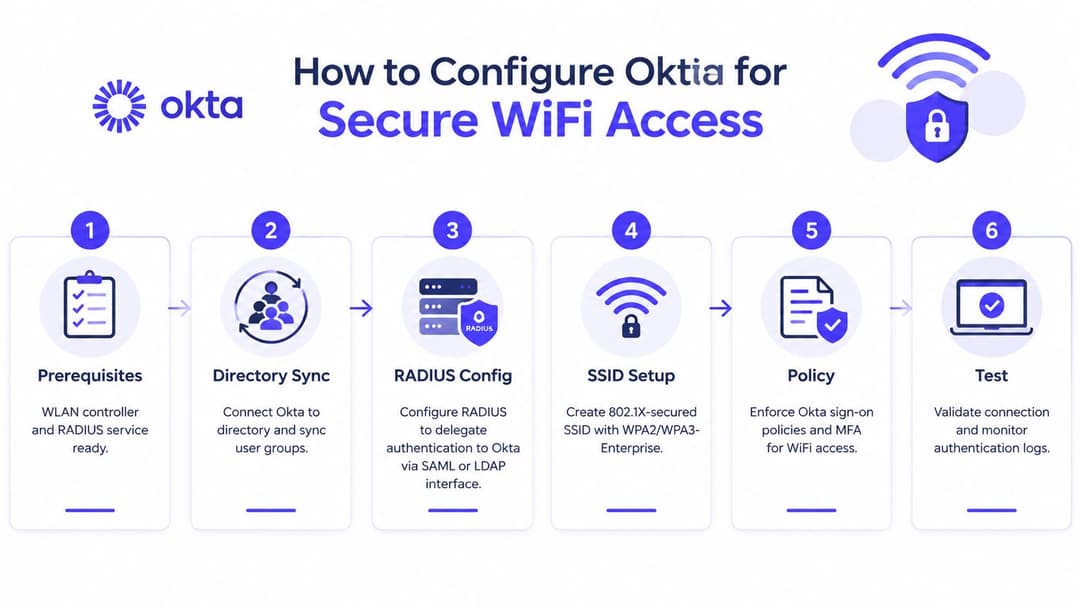
Establish the authentication path first
The correct sequence is:
Prepare the WLAN and RADIUS service. Confirm that the controller or NAC can act as a RADIUS client, that certificates can be presented where required, and that the chosen service supports the EAP method your endpoints will use. A cloud RADIUS provider can remove the need to operate an on-premises RADIUS server, but it still has to sit between the WLAN and Okta.
Connect Okta to the authoritative directory. Synchronise the groups that represent staff, contractors, administrators, and any restricted population. Keep group names and access intent straightforward. A group called
Staff-WiFiis easier to audit than a policy assembled from undocumented exceptions.Configure delegation through the RADIUS layer. The controller should send requests to the RADIUS endpoint. That endpoint then invokes the appropriate Okta integration, rather than the access point sending a Wi-Fi EAP conversation directly to the Okta RADIUS agent. The cloud RADIUS provider overview is useful when comparing a managed intermediary with self-hosted infrastructure.
Create the protected SSID. Use WPA2-Enterprise or WPA3-Enterprise with 802.1X for staff access. Define the server certificate trust requirements on clients before enabling enforcement. Don't deploy a certificate-backed SSID while endpoint management still has no reliable way to issue or renew the client certificates.
Apply authorisation policy. Authentication answers who the user or device is. Authorisation determines where it can go. Map Okta groups or certificate attributes to VLANs, downloadable ACLs, role policies, or equivalent controls on the WLAN platform. Staff, contractors, and privileged administrators shouldn't receive the same network treatment by default.
Test and observe. Test a permitted user, an unassigned user, a disabled user, a lost certificate, and a device outside the expected group. Capture controller logs, RADIUS request and response details, Okta system logs, and endpoint supplicant messages. A successful login alone doesn't prove that segmentation or revocation works.
Treat authentication modes as separate tests
Okta's documented modes behave differently. Password plus MFA can produce a password prompt followed by a push or other factor. MFA-only and passcode flows may depend on how the RADIUS service packages the request and how the client supplicant handles the response. Don't change three variables during one test and then diagnose the result from a single “access denied” message.
PAP compatibility is equally important. Okta's agent limitation means a deployment that requires EAP-TLS, PEAP, or TTLS can't point its 802.1X infrastructure at that agent and expect the handshake to work. Choose an intermediary that terminates the required EAP method, then integrate that service with Okta using the supported identity path.
Use a pilot SSID or a limited controller scope. Keep an emergency administrative path during the change window, and document how to revoke a user, replace a certificate, remove a device, and recover from an unavailable identity service. Success criterion is controlled failure, not just a green connection icon.
Simplifying Passwordless Access with Purple and Okta
Passwordless Wi-Fi works best when the user doesn't have to understand the authentication machinery. A managed staff device can receive its trust configuration through endpoint management, connect to a certificate-backed network, and lose access when its identity assignment or device posture changes. A guest can use a recognised identity flow once, then reconnect through Passpoint or OpenRoaming without returning to a shared venue password.

The useful architecture keeps Okta as the source of truth while moving WLAN delivery into a service designed for wireless policy. Purple can integrate staff Wi-Fi with Okta through identity connections such as SAML and SCIM, support automatic provisioning and revocation, and provide cloud-based controls for staff, guest, and multi-tenant networks. That avoids treating the Okta RADIUS agent as the access point's native Wi-Fi authenticator.
One identity model, several device realities
A mixed estate needs more than one credential type. Managed laptops and phones can use certificate-grade access. Guests can use a passwordless identity journey through Passpoint or OpenRoaming. Printers, scanners, POS terminals, and IoT devices may need iPSK or another device-specific method because they can't complete a user-driven 802.1X exchange.
The operational advantage is containment. A legacy device doesn't have to force the entire SSID back to a shared password. Its individual key or device identity can map to a constrained policy, while staff and guest identities continue to use stronger controls. That keeps the exception visible and limits its reach.
UK adoption signals show why this is becoming a practical design issue rather than a theoretical one. A Purple review of enterprise Wi-Fi security reported that 81% of WBA survey respondents planned OpenRoaming deployments in 2025, while UK coverage reported 38% had already deployed OpenRoaming or Passpoint-compliant networks. These figures indicate momentum, but they don't remove the engineering work around device support, roaming profiles, identity assurance, and policy boundaries.
Guest access needs lifecycle control
Guest Wi-Fi is often treated as a portal problem. In practice, the valuable control is what happens after the first connection. Can the operator distinguish a returning authorised identity from an unmanaged device? Can access be revoked without rotating every guest credential? Can staff, residents, visitors, and contractors receive different network permissions while using the same physical WLAN estate?
Passpoint and OpenRoaming can provide encrypted connectivity from the first packet when the device and service are provisioned correctly. A platform such as Purple can connect those journeys to venue analytics and identity workflows, while keeping Okta relevant for staff and enterprise users. The result isn't merely a faster sign-in. It is a more auditable relationship between identity, device, venue, and network policy.
For operators evaluating this model, passwordless Wi-Fi with Purple describes the service approach. The decision should still be tested against privacy requirements, retention policies, venue onboarding, roaming partners, and the devices that don't support modern enrolment.
Troubleshooting Common Okta WiFi Issues
Most failed deployments aren't caused by a mysterious Okta defect. They come from using an identity integration as though it were a complete 802.1X service, or from testing the happy path while ignoring certificates, group mapping, and legacy clients.
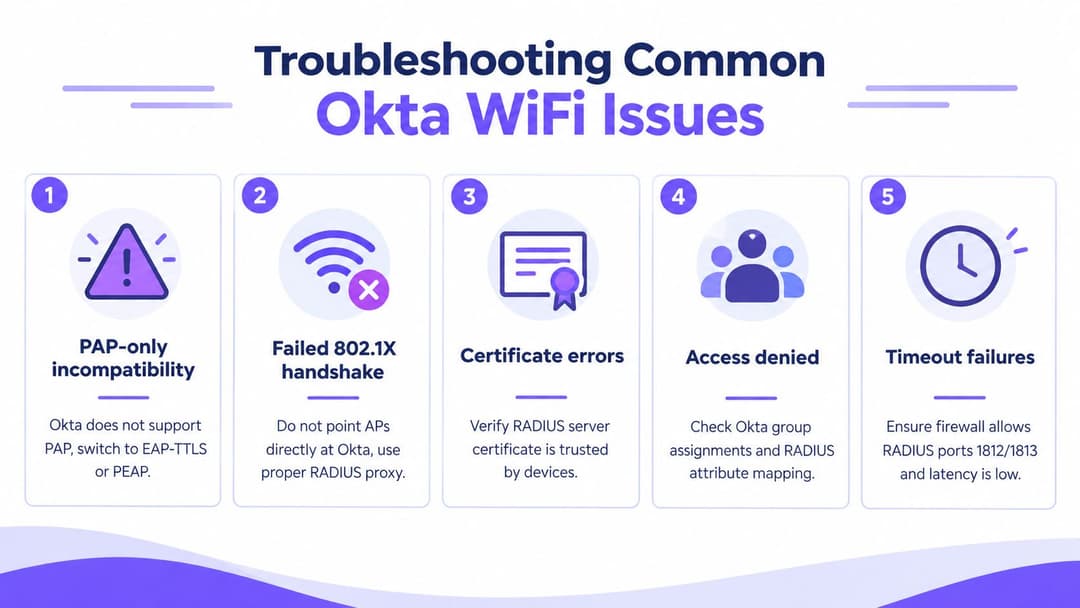
The failures that appear most often
PAP-only incompatibility: The Okta RADIUS agent supports PAP, while many enterprise 802.1X designs depend on EAP methods handled by the WLAN-facing RADIUS service. Use a RADIUS intermediary that supports the required EAP method and integrates with Okta, rather than forcing the agent into a role it doesn't support.
Failed 802.1X handshake: Pointing an access point or controller directly at the Okta agent commonly produces timeouts or rejected negotiations. Send the request to a standards-compliant RADIUS layer first, then inspect the EAP exchange and the downstream identity response separately.
Certificate errors: A client may trust the wrong server certificate, reject the issuing CA, or present an expired client certificate. Check the complete trust chain on the endpoint and RADIUS service, then test renewal before the certificate reaches its end of life.
Access denied after successful identity validation: Okta may authenticate the user while the WLAN still rejects the request because group assignments or returned RADIUS attributes don't map to a permitted role. Compare the Okta group, RADIUS response, and controller policy in one transaction.
Timeout failures: Firewalls, routing, or excessive latency can prevent the RADIUS exchange from completing. Check that the required authentication and accounting traffic is permitted according to the chosen service, and confirm that the controller can reach both primary and secondary endpoints.
Separate the layers before changing settings
Start at the endpoint and work backwards. Does the device trust the server certificate? Did it send the expected EAP method? Did the controller forward the request? Did the RADIUS service receive it? Did Okta evaluate the intended policy? Did the controller apply the returned authorisation?
Passcode and push flows deserve their own test cases. A push prompt may depend on a user interaction that a Wi-Fi supplicant doesn't present cleanly, while a passcode may behave differently from a conventional password. Test each mode in isolation, record the exact result, and avoid designing a captive-portal-like experience on an 802.1X SSID. The platform documentation explicitly distinguishes RADIUS integration from direct Wi-Fi infrastructure support.
Next Steps for Zero Trust WiFi with Okta
Choose the architecture according to the device and access journey, not according to the identity product name. Use RADIUS forwarding when you have an established enterprise WLAN and need Okta-backed identity decisions. Use certificate-based WPA2-Enterprise or WPA3-Enterprise with Passpoint or OpenRoaming when managed devices or recurring guests need automatic, passwordless connectivity. Use a portal model where browser-based guest or contractor onboarding is appropriate.
The strongest rollout plan is deliberately unglamorous:
- Validate the identity policy: Confirm which Okta groups, factors, and lifecycle events can grant or remove wireless access.
- Protect the staff network: Use per-user or per-device authentication, then apply role-based segmentation rather than one broad staff VLAN.
- Isolate exceptions: Give printers, scanners, POS systems, and IoT devices a controlled device-specific path such as iPSK instead of a shared staff credential.
- Pilot the roaming experience: Test Passpoint or OpenRoaming with supported devices, return visits, certificate trust, and revocation.
- Measure control, not just connection speed: Track password-reset demand, failed onboarding, stale access, revocation accuracy, and the quality of authentication logs.
A UK industry survey reported by Networking Plus found 47% of respondents planned to add OpenRoaming or Passpoint to their networks, alongside the wider deployment figure of 81% reported in the same industry context. The commercial case for venues is therefore broader than a smoother login. Identity-linked Wi-Fi can support better lifecycle control, clearer compliance evidence, and more useful first-party engagement, provided operators design consent, retention, and segmentation correctly.
The decision checklist is simple. Keep Okta authoritative for identity. Put a proper RADIUS or wireless policy layer between Okta and the WLAN where 802.1X requires it. Use certificates for managed devices, isolate legacy equipment, and treat guests as a separate lifecycle. Then validate the failure cases before expanding across sites.
Purple connects Okta identity to staff, guest, and multi-tenant Wi-Fi workflows, including passwordless access, Passpoint and OpenRoaming, cloud RADIUS capabilities, and iPSK support for legacy devices. Visit Purple to assess an identity-based Wi-Fi design for your UK estate and plan a controlled pilot across your WLAN vendors.