
How to Set Up Enterprise WiFi on iOS and macOS with 802.1X
This authoritative guide provides senior IT leaders with actionable steps for deploying 802.1X enterprise WiFi on iOS and macOS devices. It covers certificate-based authentication (EAP-TLS), MDM configuration profiles, and architecture integration to secure corporate networks while supporting BYOD initiatives.

執行摘要
對於管理大型場域(從 旅宿餐飲 與 零售百貨 到 大眾運輸 樞紐)的 CTO 和網路架構師而言,確保企業無線邊緣的安全至關重要。依賴預共用金鑰 (PSK) 或傳統的 Captive Portal 來進行員工和企業裝置的存取,會使網路暴露於憑證遭竊和合規性失敗的風險中。
本技術參考文件詳細介紹了針對 Apple 裝置(iOS 和 macOS)使用 EAP-TLS(可延伸驗證通訊協定-傳輸層安全性)實作 802.1X 的方法。藉由強制執行基於憑證的驗證,企業可以消除與密碼相關的安全漏洞,透過 Jamf 和 Intune 等行動裝置管理 (MDM) 平台簡化裝置上線流程,並確保強健的網路隔離。雖然 Guest WiFi 解決方案負責處理公共存取和數據收集,但架構完善的 802.1X 部署則能保護內部資源,確保符合 PCI DSS 和 GDPR 的規範要求。
請收聽下方 10 分鐘的技術簡報 Podcast,快速瞭解其架構與常見陷阱。
技術深度解析
802.1X 架構
IEEE 802.1X 標準定義了基於連接埠的網路存取控制 (PNAC)。在無線網路環境中,它會阻止用戶端(要求者)透過無線基地台(驗證者)傳送流量,直到 RADIUS 伺服器(驗證伺服器)驗證其身分為止。
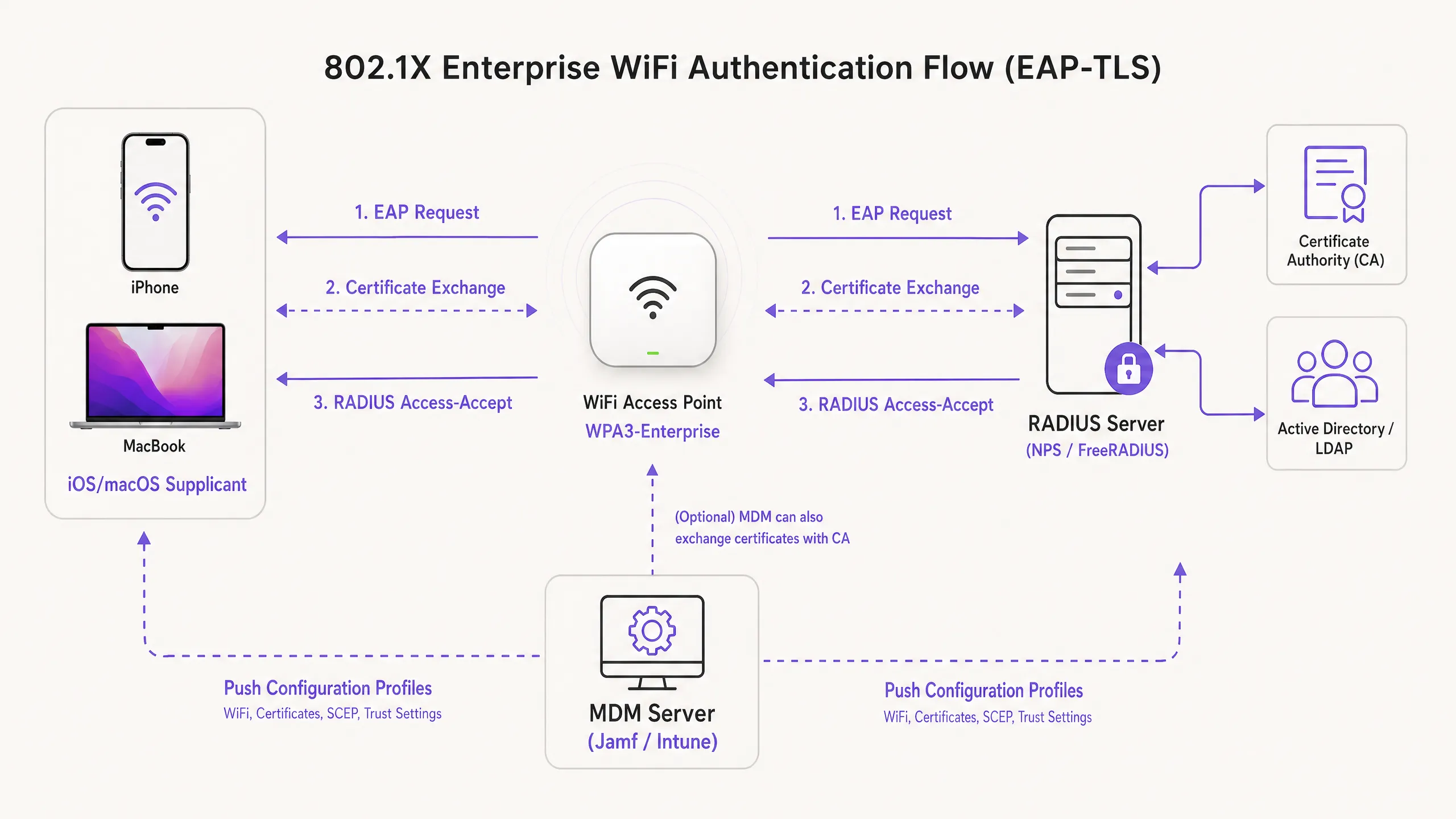
在 Apple 生態系統中進行部署時,EAP-TLS 是產業標準。與依賴易受安全威脅之使用者憑證的 PEAP 或 TTLS 不同,EAP-TLS 要求 RADIUS 伺服器和用戶端裝置雙方都必須出示數位憑證。這種雙向驗證程序可確保裝置已獲得授權,且其連線的網路是合法的,從而防範惡意 AP 攻擊。
Apple 的設定描述檔
Apple 裝置在沒有外部管理的情況下,原生並不支援自動化憑證註冊。為了大規模部署 EAP-TLS,IT 團隊必須使用設定描述檔(.mobileconfig 檔案)。這些 XML 檔案包含特定的承載資料:
- WiFi 承載資料:定義 SSID、安全性類型 (WPA3-Enterprise) 以及支援的 EAP 類型。
- 憑證承載資料:傳遞信任 RADIUS 伺服器所需的根 CA 和任何中間 CA。
- SCEP/ACME 承載資料:設定用於向憑證授權單位 (CA) 要求唯一用戶端憑證的協定。
如需深入了解如何確保 AP 基礎架構的安全,請參閱我們的指南: Access Point Security: Your 2026 Enterprise Guide 。
實作指南
步驟 1:PKI 與 RADIUS 準備工作
在開始設定 MDM 之前,必須先設定好您的公開金鑰基礎架構 (PKI) 和 RADIUS 伺服器(例如 Cisco ISE、Aruba ClearPass 或 FreeRADIUS),以發行和驗證憑證。請確保您的 RADIUS 伺服器憑證是由受信任的內部 CA 或公開 CA 所簽署,且主體替代名稱 (SAN) 與伺服器的 FQDN 相符。
步驟 2:MDM 承載資料設定 (Jamf / Intune)
若要進行可擴充的企業級部署,強制使用 MDM 進行部署。
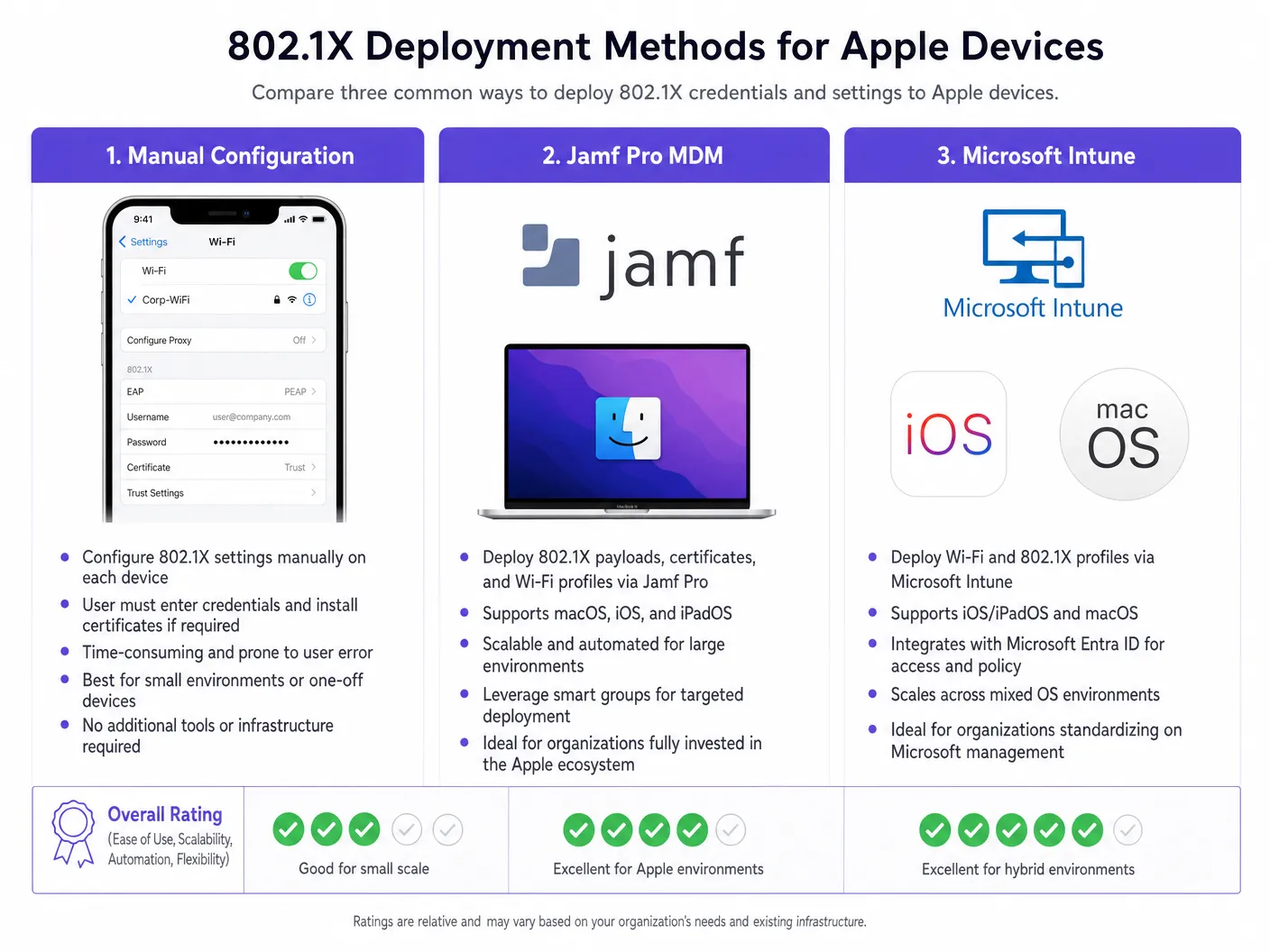
建立設定檔:
- 信任設定:此步驟至關重要。在 WiFi 承載資料中,您必須明確選擇根 CA 憑證(部署在同一設定檔中的獨立承載資料中)作為 RADIUS 伺服器的信任錨點。此外,請在「信任的伺服器憑證名稱」欄位中指定 RADIUS 伺服器的確切通用名稱 (CN) 或 SAN。若未執行此操作,iOS/macOS 將會提示使用者手動信任該憑證,進而破壞零接觸部署模式。
- 身分憑證:將 WiFi 承載資料連結至 SCEP 或 ACME 承載資料,以便裝置知道在 EAP-TLS 握手期間要出示哪張憑證。
步驟 3:網路隔離
透過 802.1X 進行驗證的企業裝置必須放置在專用的 VLAN 上,與公用存取網路完全隔離。對於使用 Purple 的 WiFi Analytics 的場域,訪客 SSID 會平行運作,以確保企業流量與訪客分析數據絕不交叉。
對於擁有混合裝置群的環境,您可能還需要參閱 How to Set Up Enterprise WiFi on Android Devices with EAP-TLS 。
最佳實踐
- 強制執行 WPA3-Enterprise:針對所有新部署強制要求 WPA3,以利用 192 位元的加密強度。僅在業務營運絕對必要時,才確保舊版裝置的相容性。
- 自動執行憑證更新:設定 SCEP 承載資料,在用戶端憑證到期前至少 14 天自動進行更新。
- 停用 MAC 隨機化:對於透過 MDM 推送的企業 SSID,請停用「專用 Wi-Fi 位址」(iOS),以確保在網路管理工具中進行一致的追蹤與原則執行。
- 利用 DNS 安全性:將 802.1X 與強大的 DNS 過濾相結合,防止受損的企業裝置連線至命令與控制伺服器。實作細節請參閱 透過強大的 DNS 與安全性保護您的網路 。
疑難排解與風險緩釋
「無聲失敗」情境
在 iOS/macOS 802.1X 部署中,最常見的問題是無聲失敗,即裝置拒絕連線且不向使用者發出提示。這幾乎總是指向信任鏈問題。如果 RADIUS 伺服器的憑證已更新,而新的根/中間憑證授權單位(CA)未在切換之前推送到裝置,Apple 裝置將會中斷 EAP 握手,以防止中間人攻擊。
緩釋措施:針對 RADIUS 憑證實施嚴格的變更管理流程。務必在更新 RADIUS 伺服器前至少一週,透過 MDM 部署新的 CA 鏈。
SCEP 註冊逾時
如果裝置無法接收其用戶端憑證,請驗證 SCEP 挑戰密碼,並確保 MDM 伺服器可以透過必要的連接埠與 NDES/CA 伺服器進行通訊。
投資報酬率(ROI)與業務影響
部署採用 EAP-TLS 的 802.1X 需要在 PKI 和 MDM 架構上進行前期投資,但其 ROI 是透過風險緩釋和營運效率來實現的。透過消除密碼重設並自動化裝置上線流程,與 WiFi 存取相關的 IT 服務台工單通常會減少 60-80%。此外,實現嚴格的網路分割通常是網路安全保險政策和 PCI DSS 合規性的強制性要求,可保護組織免受因資安漏洞而導致的災難性財務處罰。
Key Definitions
EAP-TLS
Extensible Authentication Protocol-Transport Layer Security. An authentication framework requiring digital certificates on both the client and the authentication server.
Considered the most secure 802.1X method, eliminating the need for passwords and protecting against credential theft.
Supplicant
The end-user device (e.g., iPhone, MacBook) requesting access to the network.
The supplicant must be configured via MDM to present the correct certificate and trust the correct server during the 802.1X handshake.
Authenticator
The network device, typically a WiFi Access Point or switch, that blocks traffic until the supplicant is authenticated.
The AP acts as a middleman, passing EAP messages between the supplicant and the RADIUS server.
RADIUS Server
Remote Authentication Dial-In User Service. The server that verifies the supplicant's credentials (certificates) and authorises access.
The core decision engine for enterprise network access, often integrated with Active Directory and PKI.
MDM Configuration Profile
An XML file (.mobileconfig) pushed to Apple devices to enforce settings, deploy certificates, and configure network access.
The essential delivery mechanism for achieving zero-touch 802.1X deployments on iOS and macOS.
SCEP
Simple Certificate Enrolment Protocol. A protocol used by MDM systems to automatically request and install certificates on devices.
Crucial for automating the lifecycle of the client certificates required for EAP-TLS.
SAN (Subject Alternative Name)
An extension to an X.509 certificate that allows multiple values (like FQDNs or IP addresses) to be associated with the certificate.
Apple devices strictly check the SAN of the RADIUS server certificate against the trusted names defined in their configuration profile.
WPA3-Enterprise
The latest Wi-Fi security certification requiring 192-bit cryptographic strength and mandatory Protected Management Frames (PMF).
The recommended security standard for new enterprise deployments, offering significant protection against eavesdropping.
Worked Examples
A global retail chain is deploying corporate iPads to 500 store managers. They currently use a hidden SSID with a PSK, which has been leaked. They need to secure the network using Microsoft Intune without requiring managers to manually enter credentials.
- Deploy an Enterprise CA and configure NDES/SCEP integration with Intune.
- Create a Trusted Certificate profile in Intune containing the Root CA for the RADIUS server.
- Create a SCEP Certificate profile targeting the iPads to issue unique client certificates.
- Create a Wi-Fi profile in Intune. Set the security type to WPA2/WPA3-Enterprise, EAP type to EAP-TLS. Link the SCEP profile as the client certificate and the Trusted Certificate profile for server validation. Specify the RADIUS server names.
- Push the profiles to a test group, verify connectivity, then roll out to all 500 devices.
A university is updating its network infrastructure and needs to ensure that faculty MacBooks managed by Jamf Pro transition seamlessly to a new RADIUS server cluster.
- Export the Root and Intermediate certificates of the new RADIUS server cluster.
- In Jamf Pro, update the existing Configuration Profile (or create a transition profile) to include the new CA certificates alongside the old ones.
- Update the "Trusted Server Certificate Names" in the WiFi payload to include the FQDNs of the new RADIUS servers.
- Push the updated profile to all MacBooks.
- Once the profile is confirmed installed across the fleet, cut over the network infrastructure to the new RADIUS servers.
Practice Questions
Q1. Your organisation is rolling out WPA3-Enterprise to all corporate MacBooks. During testing, users report that their devices are repeatedly prompting them to 'Verify Certificate' for the RADIUS server, even though the profile was pushed via Jamf. What is the most likely configuration error?
Hint: Consider what specific information the Apple device needs to trust the server silently.
View model answer
The Configuration Profile is missing the explicit trust mapping. While the Root CA might be installed on the device, the WiFi payload must explicitly list the RADIUS server's FQDN in the 'Trusted Server Certificate Names' field, and the Root CA must be selected as the trusted anchor for that specific WiFi network. Without this, macOS will prompt the user to manually verify and trust the certificate.
Q2. A hotel chain wants to secure its back-of-house operations (staff iPads) using 802.1X, while continuing to offer public access via a captive portal. How should the network architecture be designed to support both requirements securely?
Hint: Think about logical separation at the access point and switch level.
View model answer
The architecture should utilise two distinct SSIDs broadcast from the same Access Points. The back-of-house SSID will be configured for WPA3-Enterprise (802.1X), authenticating staff iPads via EAP-TLS and placing them on a secure, internal VLAN. The public SSID will be open, redirecting users to the Purple Guest WiFi captive portal, and dropping authenticated guests onto a heavily restricted, internet-only VLAN. This ensures complete segregation of corporate and guest traffic.
Q3. You are migrating your RADIUS infrastructure from an on-premise Cisco ISE deployment to a cloud-based RADIUS provider. The new provider uses a different public Certificate Authority. What is the critical first step before changing the RADIUS configuration on the Access Points?
Hint: Consider the order of operations to prevent a complete loss of connectivity for the client devices.
View model answer
The critical first step is to push an updated MDM Configuration Profile to all Apple devices that includes the Root and Intermediate certificates of the new public CA used by the cloud RADIUS provider. This trust chain must be established on the supplicants before the APs are cut over to the new RADIUS servers; otherwise, the devices will reject the new server certificates and fail to connect.
Continue reading in this series
Server RADIUS: a comprehensive guide for businesses
This guide provides IT managers, network architects, and CTOs with a definitive technical reference on server RADIUS authentication for enterprise WiFi. It covers the AAA framework, 802.1X architecture, EAP method selection, cloud versus on-premises deployment trade-offs, and dynamic VLAN assignment. Venue operators across hospitality, retail, events, and the public sector will find actionable implementation guidance, real-world case studies, and the decision frameworks needed to migrate from insecure pre-shared keys to a secure, identity-driven network access control architecture.
Server RADIUS: a comprehensive guide for businesses
This guide provides IT managers, network architects, and CTOs with a definitive technical reference on server RADIUS authentication for enterprise WiFi. It covers the AAA framework, 802.1X architecture, EAP method selection, cloud versus on-premises deployment trade-offs, and dynamic VLAN assignment. Venue operators across hospitality, retail, events, and the public sector will find actionable implementation guidance, real-world case studies, and the decision frameworks needed to migrate from insecure pre-shared keys to a secure, identity-driven network access control architecture.
Aruba ClearPass vs. Purple WiFi: Comparing Features and Co-deployment
A comprehensive technical guide detailing the co-deployment architecture of Aruba ClearPass and Purple WiFi. It covers RADIUS proxy configuration, dynamic VLAN assignment, and best practices for delivering secure, analytics-driven guest networks alongside enterprise NAC.