

WiFi Advertising: How to Generate Revenue From Your Guest Network
This technical reference guide details how enterprise IT and operations teams can monetise their guest WiFi infrastructure through advertising. It covers architectural models, deployment strategies, and revenue frameworks for sponsored splash pages, display ads, and premium tiers.
🎧 Listen to this Guide
View Transcript
Executive Summary
For enterprise venues—hotels, retail chains, stadiums, and transport hubs—providing guest WiFi is no longer a differentiator; it is a baseline operational requirement. However, the infrastructure, bandwidth, and maintenance costs associated with high-density WLAN deployments represent a significant capital and operational expenditure. This guide outlines the technical and commercial frameworks required to transition guest WiFi from a cost centre to a revenue-generating asset through targeted advertising and data monetisation.
By leveraging the captive portal and authentication flow, IT and marketing teams can serve brand-safe, contextually relevant advertisements to users before granting network access. This document details the primary revenue models, the underlying technical architecture required for delivery, and the integration points with existing network hardware and Guest WiFi platforms.
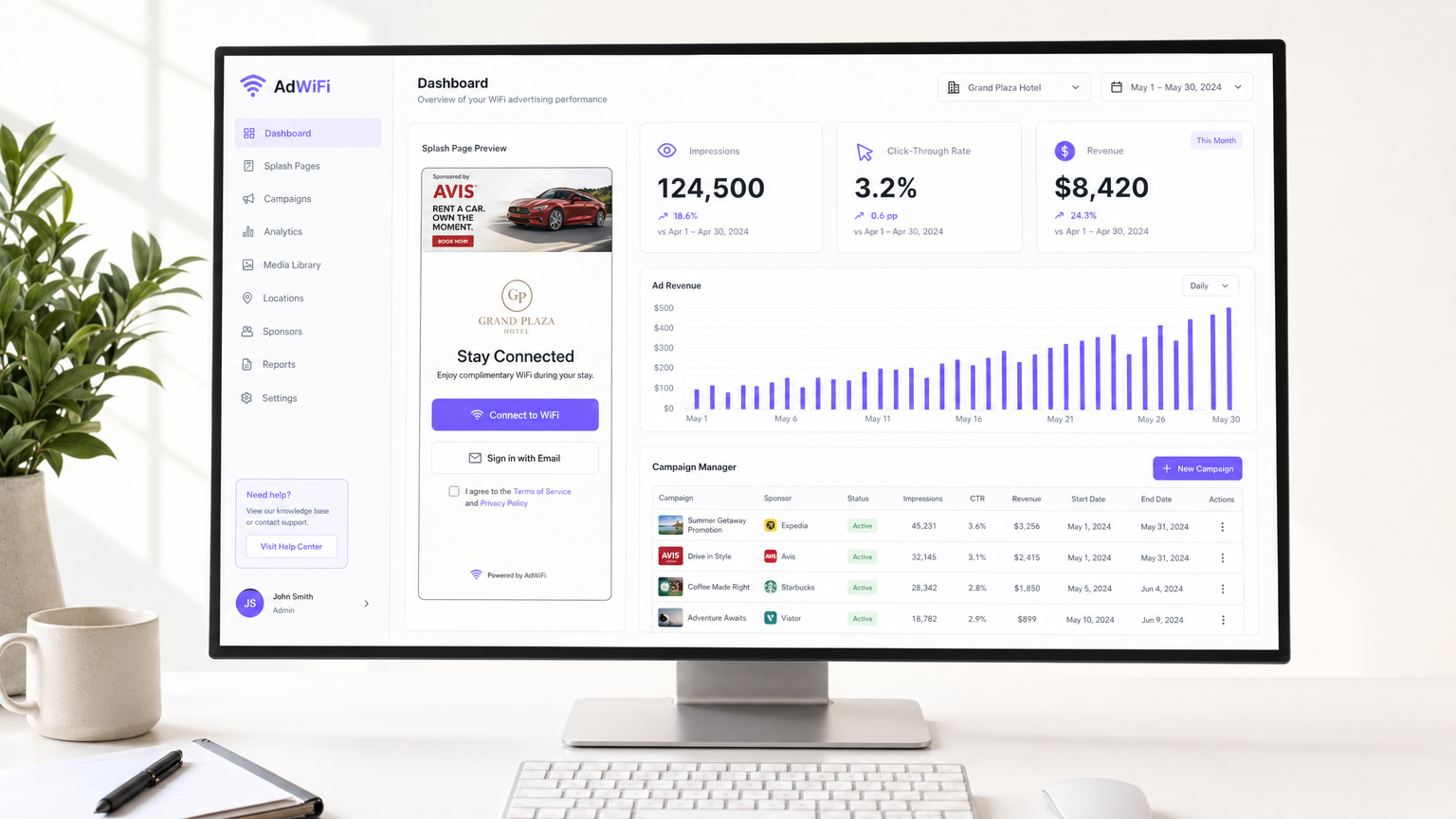
Technical Deep-Dive: Architecture and Delivery
The core mechanism for WiFi advertising relies on a robust captive portal engine integrated with the wireless LAN controller (WLC) or cloud-managed access points. The architecture must support seamless redirection, secure authentication, and dynamic content delivery without introducing unacceptable latency into the user journey.
The Authentication Flow
- Association: The guest device associates with the open SSID.
- Redirection: The network infrastructure intercepts the initial HTTP/HTTPS request and redirects the client to the captive portal's splash page via RADIUS or API integration.
- Content Delivery: The splash page renderer queries the ad server or campaign manager to retrieve the appropriate creative asset (e.g., a sponsored banner or full-screen video) based on targeting rules (location, time of day, device type).
- Authentication: The user interacts with the ad and authenticates (via email, social login, or SMS).
- Authorisation: The platform authorises the session via RADIUS Access-Accept, granting the device internet access.
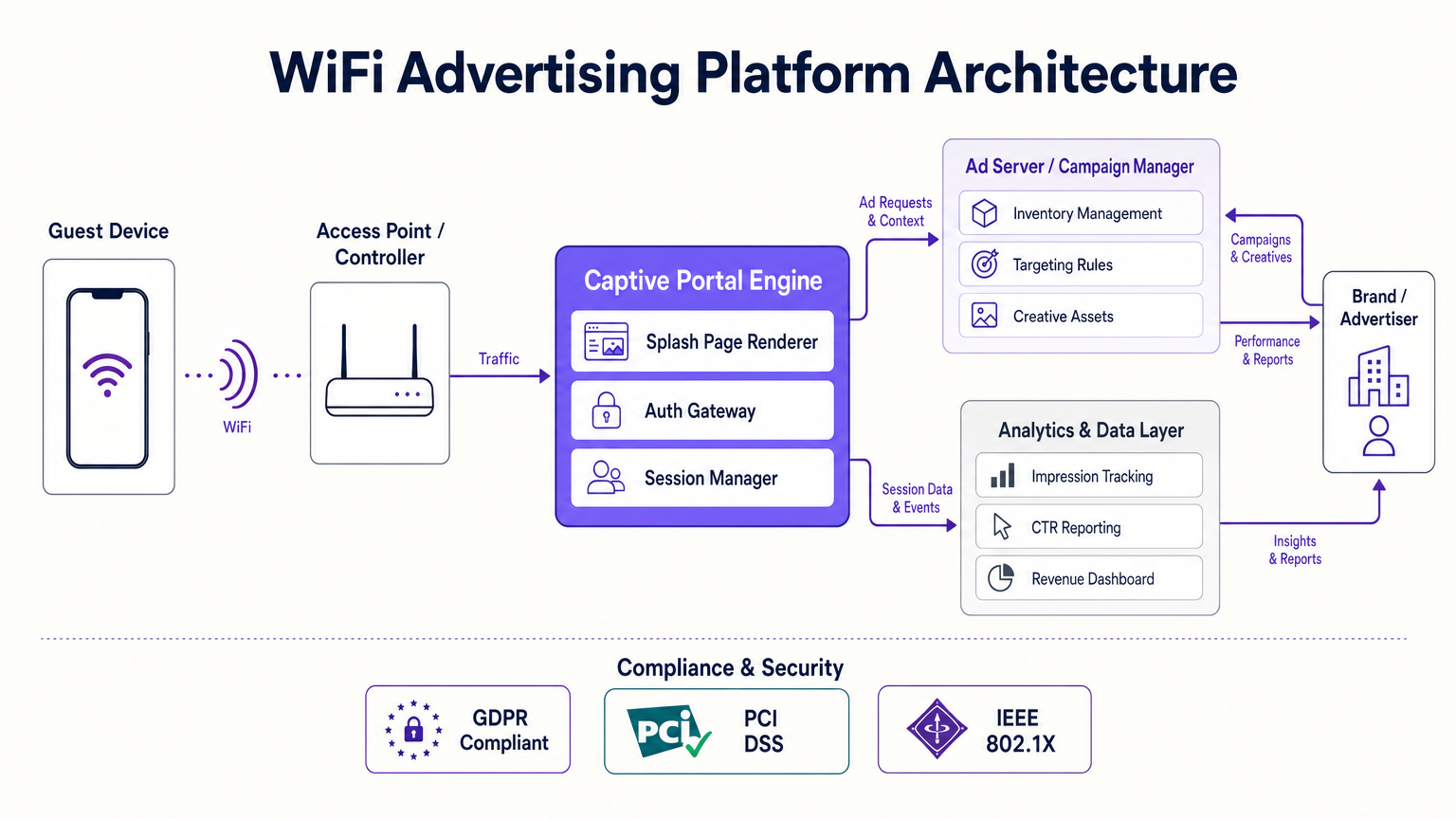
Infrastructure Requirements
To support a programmatic or direct-sold advertising model, the underlying network must be robust. Serving high-resolution media or video ads requires sufficient bandwidth at the edge. Furthermore, the captive portal must be hosted on a highly available, globally distributed CDN to ensure rapid page load times. Slow splash pages lead to high abandonment rates, directly impacting ad impressions and revenue.
Integration with a comprehensive WiFi Analytics platform is critical. The platform must handle the complex logic of frequency capping, impression tracking, and compliance (GDPR, CCPA), ensuring that the IT team is not burdened with managing individual ad campaigns.
Implementation Guide: Revenue Models
There are four primary models for generating revenue from the guest network. The optimal mix depends on the venue type, footfall, and the demographic profile of the user base.
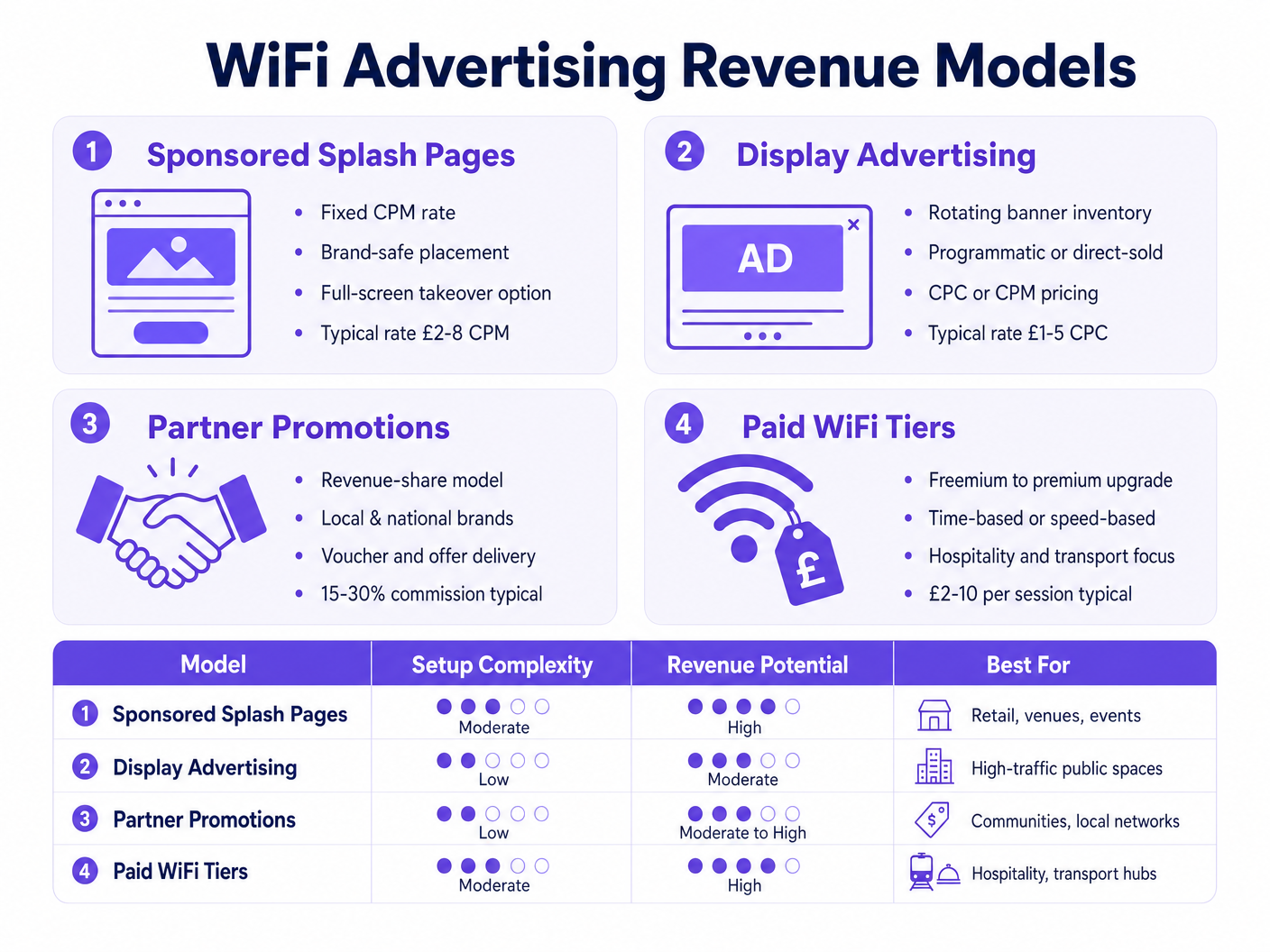
1. Sponsored Splash Pages
This is the most straightforward and brand-safe model. A single sponsor "owns" the login experience for a defined period or a set number of impressions. The sponsor's branding is integrated into the splash page design, often requiring the user to view a message or click a link before connecting.
- Pricing Model: Fixed CPM (Cost Per Mille) or a flat sponsorship fee.
- Best For: Large events, stadiums, and flagship retail locations where high visibility is guaranteed.
2. Display Advertising
This model utilises standard IAB banner formats (e.g., 300x250 rectangles or 728x90 leaderboards) embedded within the splash page or the post-authentication success page. Inventory can be sold directly to local businesses or filled programmatically via ad exchanges.
- Pricing Model: CPC (Cost Per Click) or CPM.
- Best For: High-traffic public spaces and transport hubs with diverse user demographics.
3. Partner Promotions and Revenue Share
Particularly effective in Retail and Hospitality environments, this model involves partnering with tenants or local businesses to deliver targeted offers. For example, a shopping centre might serve a 20% off voucher for a coffee shop located within the venue.
- Pricing Model: Revenue share on redeemed vouchers or a flat fee for driving footfall.
- Best For: Environments with multiple distinct commercial entities under one roof.
4. Paid WiFi Tiers (Freemium)
While basic access is offered for free (perhaps ad-supported or speed-capped), users can upgrade to a premium tier for a fee. This tier offers higher bandwidth, unrestricted access to streaming services, or longer session durations.
- Pricing Model: Per-session or time-based fee (e.g., £5 for 24 hours).
- Best For: Transport (airports, trains) and hospitality (hotels) where users have a high intent to consume bandwidth-intensive media.
Best Practices for Deployment
Successful monetisation requires balancing revenue generation with the user experience. An overly aggressive ad strategy will deter users from connecting, reducing the total addressable audience.
- Prioritise Page Load Speed: Ensure all creative assets are optimised. A splash page that takes longer than 3-5 seconds to load will see significant drop-off. Use lightweight HTML5 and compress images.
- Contextual Relevance: Leverage the data you have. If a user is connecting in a sports stadium, serve ads relevant to the event or local sponsors. Generic, untargeted ads have lower engagement rates.
- Clear Value Exchange: The user must understand that they are receiving a valuable service (free WiFi) in exchange for viewing an ad or providing basic demographic data. Transparency is key to maintaining trust.
- A/B Testing: Continuously test different splash page layouts, ad formats, and calls to action. A minor tweak to the button placement or the size of the ad unit can significantly impact the CTR (Click-Through Rate).
- Seamless Integration: Ensure the advertising platform integrates smoothly with your existing network hardware. For large estates, refer to our guide on How to Set Up WiFi in a Large Area or Multi-Site Estate .
Troubleshooting & Risk Mitigation
Deploying an ad-supported network introduces specific risks that must be mitigated during the design phase.
Compliance and Data Privacy
When capturing user data for targeted advertising, compliance with regulations like GDPR and CCPA is non-negotiable. The captive portal must present clear, unambiguous consent mechanisms. Users must actively opt-in to marketing communications, and the platform must provide a straightforward way for users to request data deletion. Failure to manage this correctly exposes the organisation to significant legal and financial risk.
Network Congestion and The "Walled Garden"
If the ad server or the CDN hosting the creative assets experiences downtime, users may be unable to authenticate, effectively taking the guest network offline. To mitigate this, configure the walled garden (the list of IP addresses and domains accessible before authentication) carefully. Ensure that the captive portal can gracefully degrade—if the ad fails to load within a specified timeout, the user should be passed through to the authentication step regardless.
Security Considerations
Ensure that all traffic between the client device, the captive portal, and the ad server is encrypted via HTTPS. This prevents man-in-the-middle attacks and ensures the integrity of the authentication process. For environments requiring higher security, such as healthcare, consider the implications discussed in WiFi in Hospitals: A Guide to Secure Clinical Networks .
ROI & Business Impact
The ultimate goal of WiFi advertising is to offset the total cost of ownership (TCO) of the network infrastructure. However, the indirect benefits often outweigh the direct ad revenue.
By incentivising users to authenticate, the venue builds a valuable first-party data asset. This CRM database can be used for subsequent email marketing, loyalty programmes, and operational analysis. For instance, understanding dwell times and return rates—perhaps augmented by an Indoor Positioning System: UWB, BLE, & WiFi Guide —provides insights that inform leasing decisions, staffing levels, and overall venue strategy.
When calculating ROI, factor in both the direct CPM/CPC revenue and the value of the acquired customer profiles. A well-executed WiFi advertising strategy transforms the network from a passive utility into an active component of the organisation's commercial engine.
Key Terms & Definitions
Captive Portal
A web page that the user of a public-access network is obliged to view and interact with before access is granted.
This is the primary real estate for delivering WiFi advertising and capturing user consent.
Walled Garden
A restricted environment that controls the user's access to web content and services. In WiFi, it's the list of domains a user can access before authenticating.
Ad servers, CDNs hosting creative assets, and privacy policy pages must be included in the walled garden to function correctly during the login phase.
CPM (Cost Per Mille)
An advertising metric representing the cost an advertiser pays for one thousand views or impressions of an advertisement.
The standard pricing model for sponsored splash pages and brand awareness campaigns on guest networks.
RADIUS (Remote Authentication Dial-In User Service)
A networking protocol that provides centralised Authentication, Authorization, and Accounting (AAA) management.
Used by the network controller to communicate with the captive portal platform to authorise the user's session after they have viewed the ad.
Frequency Capping
A feature that restricts the number of times a specific user is shown a particular advertisement within a given timeframe.
Essential for preventing ad fatigue and ensuring a positive user experience, especially for returning visitors.
First-Party Data
Information a company collects directly from its customers and owns.
The demographic and behavioural data captured during the WiFi authentication process, which is often more valuable long-term than the immediate ad revenue.
Splash Page
The initial landing page presented to a user when connecting to a guest WiFi network.
The digital storefront for the venue, where branding, terms of service, and advertisements are displayed.
Programmatic Advertising
The automated buying and selling of online advertising space in real-time.
Allows venues to fill unsold display ad inventory on their splash pages automatically via ad exchanges.
Case Studies
A 500-room resort hotel currently offers free, unmanaged guest WiFi. They are experiencing high bandwidth costs due to guests streaming video and want to introduce a monetisation strategy without alienating their core clientele.
Implement a tiered bandwidth model (Freemium). The basic tier offers free access capped at 2Mbps, sufficient for web browsing and email. This tier is supported by a sponsored splash page (e.g., a local tour operator) upon login. A premium tier is offered at £5 per 24 hours, providing uncapped speeds (up to 20Mbps) suitable for 4K streaming and VPN access. The premium tier bypasses the ad experience entirely.
A large shopping mall with 150 retail units wants to use its guest WiFi to drive footfall to specific stores and generate revenue from the tenants.
Deploy a Partner Promotion model. The IT team configures the captive portal to display a rotating carousel of digital vouchers upon successful authentication. Tenants pay a monthly subscription fee to feature their offers on the portal. The platform tracks the number of times an offer is viewed and clipped (saved to the user's device).
Scenario Analysis
Q1. Your marketing team wants to implement a full-screen video ad on the splash page that users must watch for 15 seconds before connecting. Your network is currently running on older 802.11n access points in a high-density stadium environment. What is the primary technical risk?
💡 Hint:Consider the impact of large file sizes on legacy wireless infrastructure.
Show Recommended Approach
The primary risk is network congestion and high abandonment rates. Delivering high-resolution video over legacy 802.11n APs in a high-density environment will likely cause the splash page to load very slowly or fail entirely. Users will abandon the login process, resulting in zero ad impressions and a poor guest experience. The recommendation is to use lightweight, static imagery or upgrade the infrastructure to 802.11ax (Wi-Fi 6) before deploying video assets.
Q2. A sponsor has purchased a 'Sponsored Splash Page' campaign for a major conference. During the event, users report that they are stuck on a blank white page after connecting to the WiFi and cannot access the internet. What is the most likely configuration error?
💡 Hint:Think about how the captive portal fetches external resources before the user is authenticated.
Show Recommended Approach
The most likely error is an incorrectly configured Walled Garden. The ad server's domain or the CDN hosting the sponsor's creative assets has not been added to the Walled Garden list on the wireless controller. Therefore, the device cannot fetch the ad image before authentication, causing the splash page to hang. The solution is to add the required IP addresses or domains to the pre-authentication access list.
Q3. You are deploying a 'Partner Promotion' model where local retailers offer discounts on the splash page. How do you technically ensure that a user doesn't just disconnect and reconnect repeatedly to collect multiple different vouchers?
💡 Hint:How does the platform identify a unique device across multiple sessions?
Show Recommended Approach
You must implement Frequency Capping within the campaign manager, relying on the device's MAC address (or the authenticated user profile if they have logged in previously) as the unique identifier. The platform must be configured to limit the number of times a specific campaign or voucher is shown to the same MAC address within a defined time period (e.g., once per 24 hours).




