
A guest joins your hotel WiFi. A member of staff signs into the same network family through Entra ID. A point-of-sale tablet reconnects automatically. On paper, you’ve done the hard work. Identity is managed, SSIDs are segmented, certificates are issued, and your firewall rules look tidy.
Then one quiet DNS request slips past all of that.
That’s the part many teams miss. The first question most devices ask isn’t “am I allowed on this network?” It’s “where is the thing I want to reach?” If your DNS layer answers that question blindly, an attacker can abuse the one protocol almost every network allows by default. In busy hospitality, retail, healthcare, and mixed-use environments, that’s a serious gap between access control and actual protection.
Good DNS and security practice closes that gap. It treats DNS as more than background infrastructure. It becomes a control point for integrity, privacy, policy, and visibility, especially in networks where guest traffic, staff traffic, and operational devices all coexist.
Your Network’s Unseen Vulnerability
A typical failure doesn’t begin with a dramatic alert. It begins with something small. A guest device joins a venue network and resolves a malicious lookalike domain. A back-office laptop follows a poisoned DNS response to the wrong service. An infected device uses DNS to check in with a remote controller because outbound web traffic is filtered tightly, but DNS is still broadly trusted.
That sequence feels ordinary because DNS traffic always looks ordinary at first. Every phone, tablet, browser, register, smart TV, and scanner depends on it. Teams often spend more time hardening login flows than hardening the name-resolution system that every login and application call depends on.

Why DNS deserves board-level attention
The US data is hard to ignore. DNS abuse reports surged by 44% from 2021 to 2022, reaching 356,463 incidents, according to data cited in this DNS history and security overview . The same source notes that by 2023, DNS-based attacks accounted for 25% of all reported cyber incidents in critical sectors like healthcare and transport.
Those figures matter because the affected sectors look a lot like modern high-traffic WiFi environments. They rely on constant connectivity, mixed device populations, and services that need to resolve names quickly and reliably. If DNS is compromised, user experience degrades and security breaks at the same time.
DNS isn't just part of the path. In many environments, it's the first security decision a device encounters.
Where this shows up in real operations
The business impact usually lands in three places:
- Security exposure: Users can be redirected to malicious destinations, malware can resolve command and control domains, and data can leave the network through channels many controls ignore.
- Operational disruption: Staff apps fail intermittently, captive workflows behave oddly, and troubleshooting becomes slow because symptoms look like general connectivity issues.
- Customer experience: Guests don’t care whether the failure came from DNS spoofing, filtering errors, or a resolver timeout. They only know the WiFi feels unreliable.
When teams start treating DNS as a security plane rather than plumbing, they gain a cleaner way to control risk without adding friction to every connection.
Understanding the DNS Security Blind Spot
The “phonebook of the internet” analogy is well-known. It’s useful, but incomplete. DNS doesn’t just look up names. It tells devices where to go next, often before any stronger control gets a chance to act. That makes it less like a phonebook and more like the signpost system for the entire network.
The blind spot comes from DNS’s original assumptions. It was built for a more open internet, where resolvers and authoritative servers were expected to be trustworthy. Modern enterprise and guest WiFi environments don’t operate in that world. They carry untrusted clients, roaming devices, third-party services, and applications that depend on rapid, continuous resolution.
What actually happens during a lookup
When a user opens an app or visits a site, the device first asks a resolver for the address linked to a domain name. If the resolver already has the answer cached, it replies quickly. If not, it walks the request through the DNS hierarchy until it gets an answer and passes it back to the client.
That sounds simple, but several trust assumptions sit inside that process:
- The client trusts the resolver to answer accurately.
- The resolver trusts upstream data unless verification is in place.
- Anyone observing the path may learn the query if transport isn't encrypted.
- Policy often isn't applied until later, after DNS has already pointed the device towards a destination.
A strong identity stack doesn’t fix those assumptions by itself. A user can authenticate perfectly and still be sent to the wrong place if DNS integrity or privacy is weak.
Why teams underestimate the problem
DNS often disappears into the background because it’s shared infrastructure. Nobody notices it when it works. When it fails, the symptoms spread across browsers, apps, APIs, wireless onboarding, and cloud access, so teams chase the wrong layer first.
Here’s where readers often get confused: they assume that because application traffic uses TLS, DNS is already protected. It usually isn’t. Traditional DNS queries can still be visible or tampered with before the encrypted session to the final service even begins.
Practical rule: If you protect identity, WiFi authentication, and application sessions but leave DNS unauthenticated or unencrypted, you haven't secured the start of the connection.
The architectural weakness
DNS has two core weaknesses unless you deliberately fix them:
| Weakness | What it means in practice | Why it matters |
|---|---|---|
| No built-in authenticity | A client may accept a forged or manipulated answer | Users and devices can be redirected |
| No built-in confidentiality | Other parties may observe the query path | Browsing intent, service use, and device behavior can be exposed |
That’s why dns and security belong in the same conversation as identity, segmentation, and access policy. DNS isn’t failing because teams are careless. It’s failing because many deployments still rely on trust models that no longer match real network conditions.
The Modern DNS Threat Landscape
Attackers like DNS because defenders have to allow it. A device that can’t resolve names can’t do much of anything, so DNS is one of the few protocols that remains broadly permitted across almost every network. That makes it a convenient route for redirection, covert signaling, and abuse at scale.
The scope is broad. Forrester 2025 data says 95% of organizations have suffered attacks via DNS, as cited in EfficientIP’s DNS risk assessment . The same source explains a practical sign of DNS exfiltration: adversaries can hide payloads in subdomain fields, and query lengths that are typically around 63 to 255 characters for legitimate requests can exceed 500 characters in exfiltration attempts.

Cache poisoning and false answers
Cache poisoning targets trust in the resolver. If an attacker can inject a false answer into cache, users who ask a legitimate question can receive a malicious destination. In a venue environment, that can affect many clients quickly because shared resolvers serve large populations.
The danger isn’t only phishing. Internal applications, cloud services, update systems, and vendor platforms all depend on accurate name resolution. Once the resolver returns bad data, the rest of the stack may behave as designed while still taking users to the wrong place.
DNS tunneling and data exfiltration
DNS tunneling turns query fields into a covert transport channel. Instead of using DNS only to ask for an address, malware packs information into the query name itself. A malicious authoritative server then reconstructs those fragments on the outside.
Anomalies are significant. Very long query strings, unusual numbers of dots, or repeated requests for odd subdomains can indicate that a device is using DNS for something other than resolution. In a guest or multi-tenant network, that matters because traditional controls may focus on web categories and known ports while leaving DNS mostly untouched.
Long, strange DNS queries aren't always harmless noise. They can be the network equivalent of someone carrying files out through the fire exit.
Command and control over allowed traffic
Attackers also use DNS for command and control because it blends in. Even a tightly managed network often allows DNS to flow to approved resolvers. Malware can exploit that routine path to retrieve instructions or locate the next stage of an attack.
This is particularly awkward in hospitality and retail because the environment is noisy. Devices come and go constantly. Browsers, apps, loyalty platforms, guest onboarding systems, and advertising SDKs generate a high volume of lookups. That background traffic makes weak monitoring easy to hide inside.
DDoS amplification and service strain
DNS can also be weaponized for amplification. Open or misused resolvers can become part of a larger denial-of-service pattern, either as targets or unwilling participants. Even when your organization isn’t the final victim, insecure DNS design can create instability, consume resources, and complicate incident response.
For teams operating guest WiFi, this is why filtering and policy at the DNS layer can be operationally useful as well as protective. Purple’s guide to DNS filtering for guest WiFi blocking malware and inappropriate content is worth reading if you’re mapping how domain-level control affects both safety and user experience.
What this looks like on the ground
A useful way to think about DNS threats is by business effect rather than protocol detail:
- Misrouting: users land on the wrong destination.
- Silent communication: infected devices keep talking out.
- Hidden exfiltration: data leaves in patterns that look like normal lookups.
- Service disruption: legitimate access becomes slow, unstable, or unavailable.
That’s why DNS security isn’t a niche control for specialists. It’s part of endpoint defense, access control, incident response, and customer-facing reliability all at once.
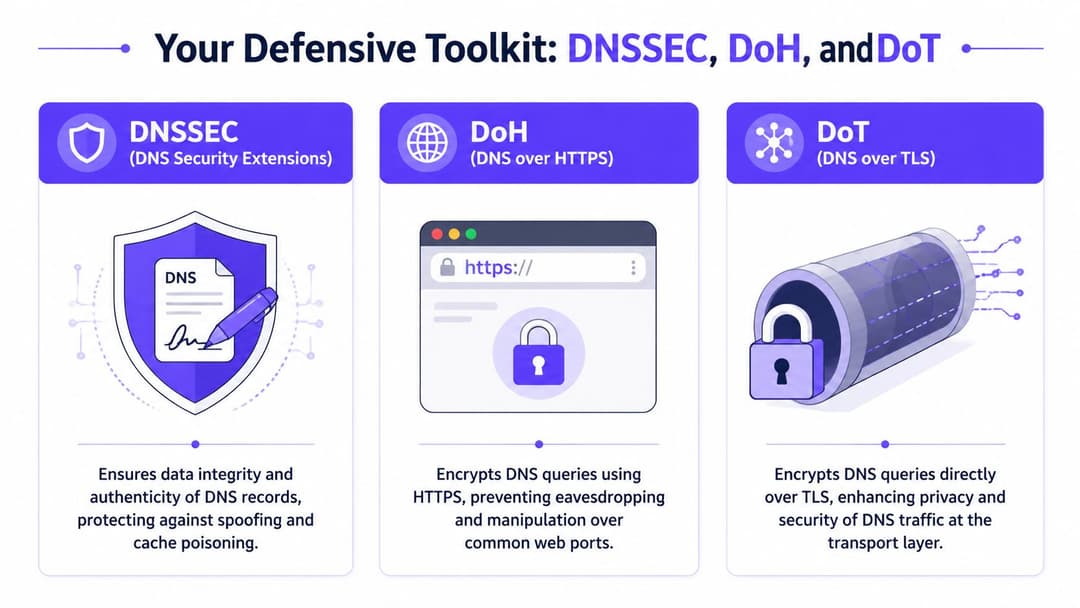
Your Defensive Toolkit DNSSEC DoH and DoT
Three technologies come up repeatedly in serious DNS security design: DNSSEC, DoH, and DoT. They solve different problems. Teams often lump them together, then get disappointed when one control doesn’t stop the threat they had in mind.
The simplest way to separate them is this. DNSSEC protects authenticity and integrity. DoH and DoT protect privacy in transit. You usually need both ideas in your architecture because “is this answer genuine?” and “can anyone watch or alter this query on the way?” are different questions.
DNSSEC as a digital wax seal
DNSSEC signs DNS data so resolvers can verify that the answer came from the right source and wasn’t altered. Think of it as a wax seal on an official letter. The seal doesn’t hide the letter’s contents, but it helps you detect forgery.
That makes DNSSEC especially useful against spoofing and cache poisoning. If a resolver validates DNSSEC and the signature chain doesn’t check out, it can reject the answer instead of trusting it blindly.
DNSSEC does not encrypt the query. People often miss that. It tells you the answer is authentic. It doesn’t stop observers from seeing what name was requested.
DoH and DoT as encrypted couriers
DNS over HTTPS (DoH) and DNS over TLS (DoT) both encrypt DNS traffic between the client and resolver, or between network elements depending on your design. Their job is privacy and transport security.
A simple analogy helps. If DNSSEC is the wax seal, DoH and DoT are the secure courier envelope. They stop casual eavesdropping and make in-transit manipulation harder.
The difference between the two is mostly operational:
- DoH sends DNS inside HTTPS. That can fit neatly with web-centric environments and some application architectures.
- DoT uses TLS specifically for DNS. Many teams prefer it when they want clearer separation and more explicit control of DNS traffic.
Comparison of DNS Security Protocols
| Protocol | Primary Goal | Mechanism | Protects Against | Best For |
|---|---|---|---|---|
| DNSSEC | Authenticity and integrity | Cryptographic signatures on DNS records | Spoofing, forged responses, cache poisoning | Validating that DNS answers are genuine |
| DoH | Privacy in transit | Encrypts DNS inside HTTPS | Eavesdropping and in-transit manipulation | Client-facing environments and web-aligned architectures |
| DoT | Privacy in transit | Encrypts DNS over TLS | Eavesdropping and in-transit manipulation | Resolver-to-client or managed network DNS privacy |
Choosing the right mix
A lot of confusion disappears when you map each control to a concrete risk.
If you’re worried about false DNS answers, start with DNSSEC validation.
If you’re worried about query visibility on untrusted networks, add DoH or DoT.
If you care about both, combine authenticity and encryption.
Key distinction: DNSSEC answers “can I trust this reply?” DoH and DoT answer “can anyone see or tamper with this conversation on the way?”
Common design mistakes
Teams tend to make three avoidable errors:
Deploying encryption without validation
Queries are private in transit, but the resolver may still accept unauthenticated data upstream.Enabling validation without operational planning
DNSSEC introduces failure modes when records or delegations are mismanaged, so monitoring and change discipline matter.Ignoring resolver behavior on guest networks
Guest devices may use their own DNS preferences unless your network policy and onboarding design account for that.
In enterprise and high-traffic WiFi environments, the strongest pattern is layered. Validate where authenticity matters. Encrypt where query privacy matters. Add protective policy at the resolver so DNS becomes an active control, not only a lookup service.
Deploying Secure DNS in Practice
The design question isn’t “should we secure DNS?” It’s “where do we enforce it, and how do we avoid breaking user journeys?” The answer differs between a managed enterprise network and a public or semi-public WiFi service.
A corporate laptop enrolled in your identity platform gives you room for tighter policy. A guest cell phone in a hotel lobby doesn’t. Both still need secure DNS, but the controls sit in different places.
On the enterprise side
For staff and managed devices, centralize DNS policy as much as your architecture allows. That usually means approved resolvers, validated answers, encrypted transport where appropriate, and clear telemetry into your monitoring stack.
A practical deployment pattern looks like this:
- Use managed resolvers: Keep staff devices tied to resolvers you control or explicitly trust, so policy and logging stay coherent.
- Validate authenticity: Enable DNSSEC validation on resolvers that serve internal users and critical workflows.
- Encrypt sensitive paths: Use DoH or DoT where query privacy matters, especially across less trusted segments or external links.
- Feed detections into operations: Resolver logs become far more valuable when your SOC or NOC can correlate them with identity, endpoint, and wireless events.
This is also the right place for protective DNS services that block known malicious or policy-violating destinations before a connection forms. Used well, that gives you a cleaner control than relying on packet inspection deep into the flow.
On guest WiFi
Guest WiFi needs a lighter touch. People expect fast, low-friction access. Overly aggressive filtering or resolver choices that add delay will generate support calls long before users appreciate your security posture.
The aim is straightforward: stop obviously harmful or inappropriate resolution paths while keeping browsing smooth.
What to prioritize first
- Choose secure upstream DNS providers: Pick providers that support modern security controls and stable performance.
- Apply category and threat filtering carefully: Block malware, phishing, and clearly unwanted destinations, but test policies against common guest behaviors.
- Keep the resolver path predictable: Design your gateways, controllers, or edge services so guest DNS doesn't drift into unmanaged paths.
- Watch for anomalies, not just known bad domains: Tunneling and data exfiltration often show up as strange query patterns before they appear on a blocklist.
One practical option in this category is Purple Shield, which applies DNS-layer filtering for WiFi environments. In a mixed venue estate, that kind of control can sit above existing network hardware and block risky domains before sessions are established.
Operational habits that matter most
Configuration is only half the work. DNS security can fail unnoticed when operational hygiene slips.
| Operational practice | Why it matters |
|---|---|
| Change control for DNS records and resolvers | Reduces accidental outages and validation failures |
| Routine review of filtering decisions | Prevents broken guest experiences and overblocking |
| Telemetry review by identity or user type | Helps separate guest noise from staff risk |
| Incident playbooks that include DNS evidence | Speeds up investigation when symptoms span multiple systems |
If your incident process doesn't ask what the device resolved before the event, you're often starting too late.
Where teams get stuck
Most deployment issues come from one of two assumptions. First, teams assume secure DNS is only a perimeter issue. It isn’t. Internal resolver behavior matters just as much. Second, they assume guest traffic can’t be meaningfully protected without adding friction. That’s also not true. Well-designed DNS controls usually improve the user experience because they remove malicious detours before users ever see them.
Secure DNS in practice is less about one product or protocol and more about disciplined placement. Put the right controls at the resolver, align them with user type, and make DNS telemetry part of your normal network operations.
Integrating DNS into Your Zero Trust Network
Most Zero Trust programs start with identity. That makes sense. You want to know who the user is, what device they’re on, and what they should be allowed to reach. But many environments stop there. They authenticate the session, segment the network, and still leave DNS operating like an open utility.
That gap has become more visible. The RSA Conference 2025 discussion cited in Cygnalabs’ analysis of DNS as the missing link in Zero Trust strategies notes that protective DNS services are gaining traction, but adoption remains inconsistent even though DNS abuse underpins phishing, ransomware, and data theft. The same source points to the unresolved challenge of integrating DNS security into passwordless authentication systems and Zero Trust networks to prevent lateral movement and data exfiltration through DNS channels.

DNS as a policy enforcement point
At this point, DNS stops being a support service and starts acting like a policy enforcement point. A resolver sees intent very early. Before a user or device reaches an application, it asks for a name. That query can be checked against policy, identity, risk signals, and threat intelligence.
The April 2025 discussion of NIST SP 800-81 Revision 3 in this RSA Conference 2025 DNS security summary describes DNS as a way to enforce access decisions by using query behavior as input to Zero Trust engines, allowing requests to be blocked or redirected when they violate policy. For identity-based networking, that’s the missing join between “this device is authenticated” and “this device may resolve this destination right now”.
What identity-aware DNS looks like
In a modern WiFi environment, you can attach DNS policy to context such as:
- User type: guest, staff, contractor, tenant, unmanaged device
- Authentication state: pre-login, newly onboarded, fully trusted
- Device posture: managed, unmanaged, legacy, shared-use
- Location or venue role: front-of-house, back-office, clinical, retail floor, resident network
A staff laptop authenticated through a directory-integrated workflow shouldn’t resolve the same destinations as a guest phone or an IoT display. DNS policy can reflect that without forcing every decision down to firewall inspection.
This is also why sound domain hygiene still matters. If your records, naming standards, and ownership models are messy, policy becomes harder to apply consistently. One useful operational reference is OneNine’s guide to Strategies for domain and DNS management , especially for teams trying to align DNS governance with broader security controls.
Why this matters in high-traffic WiFi
Identity-based networking platforms can establish who or what has joined the network. DNS adds the next logical control: what names that entity is allowed to resolve. In a Purple deployment model, that connection matters because guest, staff, and multi-tenant users share infrastructure while requiring different trust boundaries. DNS policy lets you enforce those boundaries early and unobtrusively.
For example, a guest device can be allowed ordinary browsing but blocked from resolving domains associated with malware delivery. A staff device can be allowed access to internal SaaS and operational services while still being denied suspicious destinations. A legacy device can be constrained tightly even if it can’t support richer endpoint controls.
If you’re designing the broader access model, Purple’s guide to zero trust network access implementation strategies and best practices gives useful context for how network identity and policy fit together.
The cleanest Zero Trust control is often the earliest one. If a device never resolves the destination, the risky session never starts.
A better mental model
Think of identity as the passport check and DNS as the route control. Authentication tells you who has arrived. DNS policy tells you whether they’re allowed directions to a given destination.
Without that second layer, Zero Trust can become oddly permissive. Users are verified, but their devices still get broad freedom to ask where anything is. Bringing DNS into the model fixes that asymmetry.
Making DNS Your First Line of Defense
The old view of DNS was administrative. Keep the records tidy, keep resolution fast, and move on to the “real” security layers. That view no longer holds up in enterprise and guest connectivity environments where every device depends on DNS before anything useful can happen.
DNS now sits at the start of trust. It influences whether users reach the right service, whether malware can find its controller, whether data can slip out unnoticed, and whether Zero Trust policy acts early enough to matter. If that layer is weak, the rest of your controls spend their time compensating for a flaw at the very beginning of the connection.
The practical takeaway
A durable dns and security strategy usually includes four ideas working together:
- Integrity controls: use DNSSEC where answer authenticity matters.
- Privacy controls: use DoH or DoT where query confidentiality matters.
- Protective policy: block risky, malicious, or inappropriate resolution paths at the resolver.
- Identity context: apply different DNS decisions based on who the user is, what device they have, and where they sit in the network.
That combination is particularly useful in hospitality, retail, healthcare, transportation, and residential deployments where one estate may carry guest access, staff access, and operational devices simultaneously.
What mature teams do differently
Mature teams stop treating DNS logs as background noise. They use DNS evidence in troubleshooting, incident response, and access governance. They review resolver behavior alongside authentication events. They design guest WiFi policies to reduce harm without making connectivity feel hostile.
If you want more perspective on how DNS fits into the wider protection model for wireless environments, Purple’s network and wireless security insights are a sensible next read.
The most useful shift is conceptual. Don’t ask whether DNS needs security bolted onto it. Ask how much of your security posture already depends on DNS, whether you planned for it or not. Once you see DNS as a control plane, the priorities become clearer.
Purple helps organizations deliver identity-based WiFi access for guests, staff, and multi-family environments, with options that support DNS-layer protection as part of a broader secure connectivity strategy. If you’re rethinking how authentication, policy, and user experience should work together, explore Purple .