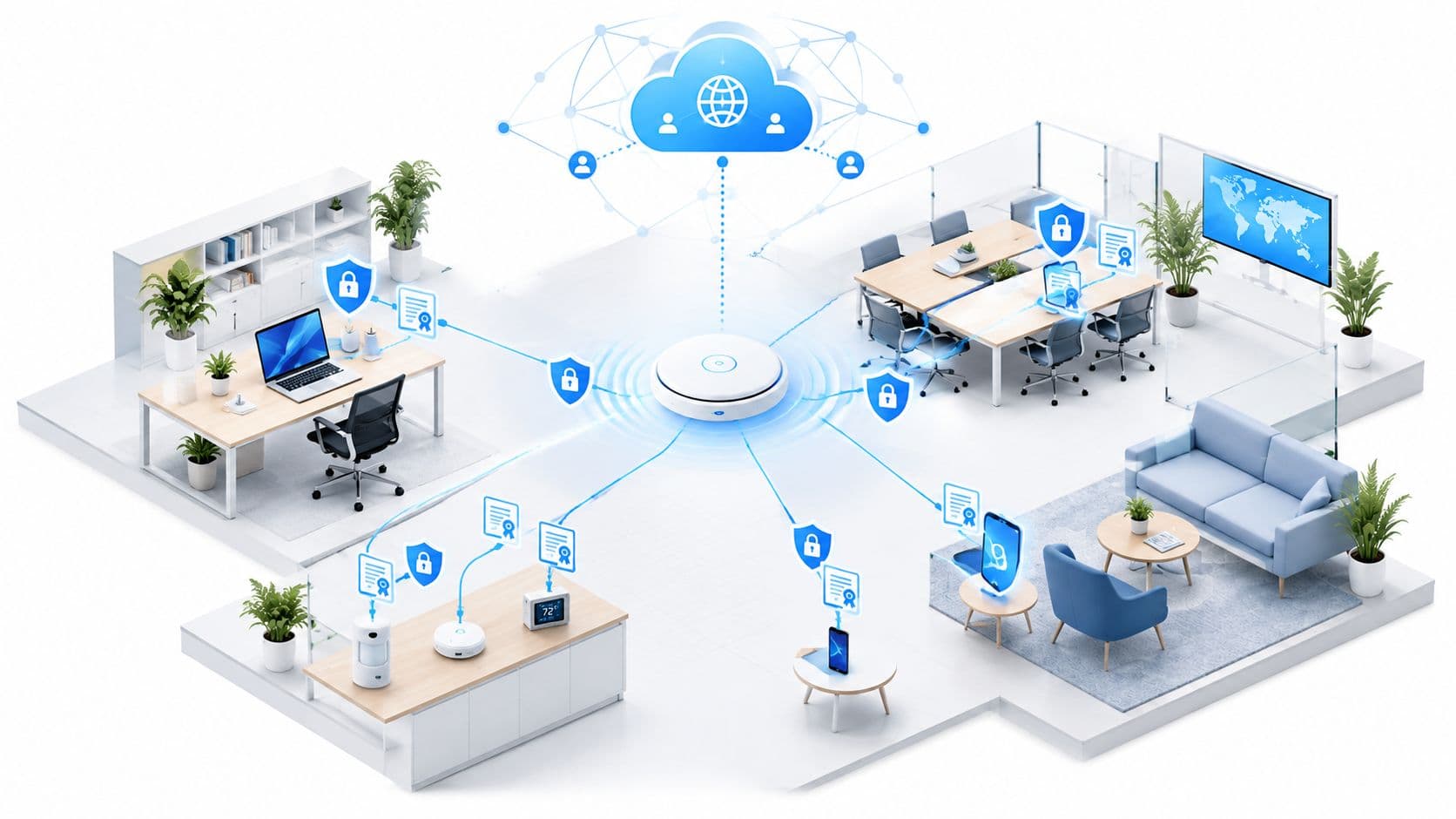
A US survey of more than 1,000 consumers found that 72% regard WiFi as one of the most requested hotel services, ahead of an iron or ironing board at 37% and tea or coffee facilities at 24%. The research also found that WiFi speed and connection dropouts were leading guest complaints. A guest WiFi network has moved from a pleasant extra to a visible part of the service you provide.
That change creates a practical responsibility for venue IT teams. You need to deliver enough capacity for simultaneous users, make joining simple, prevent visitors from reaching business systems, and handle the personal data collected during authentication with care. The right design treats WiFi as both a customer-facing service and a regulated data pipeline.
Why a Guest WiFi Network Matters in 2026
A guest WiFi network is now part of the service visitors assess. Slow loading, dropped sessions, or a confusing sign-in page can make a hotel, restaurant, shopping center, or clinic feel poorly managed. The connection may sit outside reception or facilities, yet guests experience it as part of the visit.
The operational evidence remains relevant. Hospitality research reported that 37% of hotel managers identified WiFi speed as the leading guest problem, while 26% cited connection dropouts. More than one-quarter of hotels acknowledged internet failings, and 13% of hoteliers said they were dissatisfied with the WiFi service they provided. These findings show why guest connectivity needs measurable service standards.

Demand grows faster than the footprint
Capacity planning must account for usage, not just the number of access points. Industry data collected a decade ago already showed UK public WiFi locations growing 7% between June 2014 and June 2015, while traffic across those hotspots grew 46% in the same period. The raw figures are dated, but the ratio remains useful for planning. The contrast between hotspot growth and traffic growth is useful for capacity planning.
Guests may arrive with several connected devices and use bandwidth-heavy applications throughout their stay. A venue can therefore provide strong radio coverage while still delivering slow service at busy times. Coverage shows where a signal reaches. Capacity shows whether the network can handle demand there.
A sound guest WiFi program measures four connected areas:
- Authentication: how visitors join, return, and receive access.
- Segmentation: what the guest network can and cannot reach.
- Privacy: which personal data you collect, why you collect it, and when you delete it.
- Analytics: how you monitor performance and understand usage without collecting more information than necessary.
These controls also support CCPA/CPRA responsibilities and NCSC-aligned separation. Access consent lets a visitor use the service. Marketing consent is a separate choice and should not be bundled into the connection process.
Give the program an owner, defined performance checks, an incident process, and a review cycle involving IT and the teams responsible for guest experience. A guest network is a regulated data pipeline as well as a wireless service.
What a Guest WiFi Network Actually Is
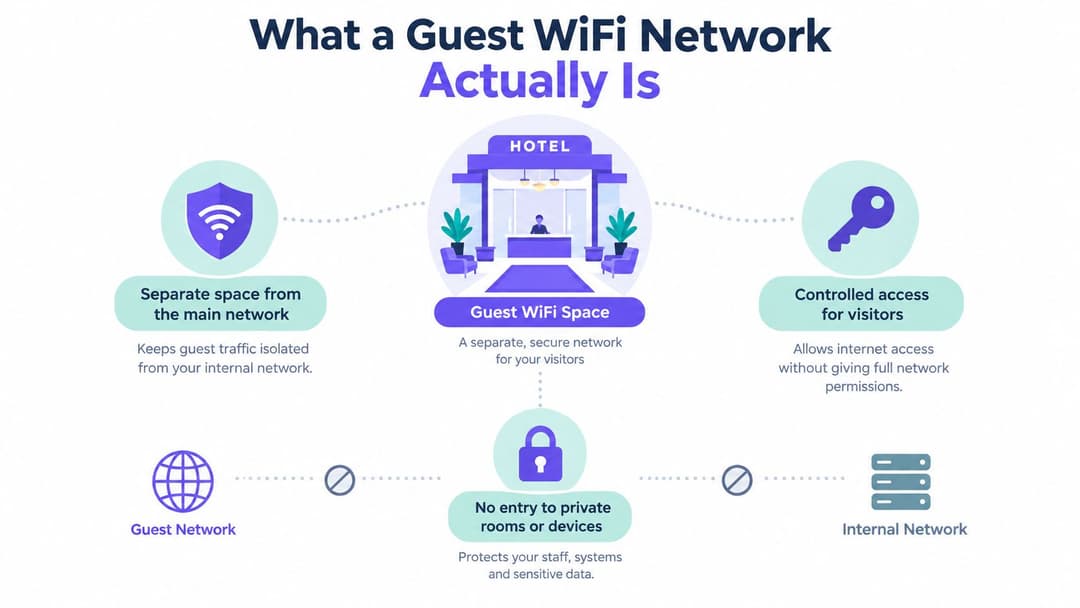
A guest WiFi network is a controlled visitor entrance to your digital estate. In a hotel, the lobby welcomes guests, while staff corridors, offices, utility rooms, and guest rooms remain subject to different access rules. The wireless equivalent gives visitors internet access while blocking deliberate routes to internal systems and other connected devices.
Technically, the guest service normally uses a dedicated SSID mapped to its own VLAN or equivalent policy domain. A firewall permits internet traffic but denies access to corporate endpoints, payment terminals, CCTV, management interfaces, and IoT equipment. The design should also prevent one guest device from discovering or communicating directly with another.
Separate the role from the device
“Guest” describes a network role, not a particular type of hardware. A visitor using a cell phone, laptop, tablet, smart display, or conference device can receive the same internet-only treatment. The same policy can serve hotel residents, conference attendees, retail shoppers, hospital visitors, contractors, or friends of residents in a multi-family building.
That distinction prevents a common design mistake. A second SSID alone isn't proof of separation. If both SSIDs reach the same internal routes, the venue has created a different name, not a different security zone.
Practical rule: Define what guests must reach, then deny everything else by policy. “Internet access only” is a useful starting intention, but the firewall and routing rules must enforce it.
A public hotspot is broader and may have little control over identity, logging, or network boundaries. A cell phone tethered to a mobile router is personal connectivity, not a venue-managed service. A guest network sits between those models. It gives the venue control over access and safeguards while keeping visitors outside the trusted operational network.
The baseline is therefore simple to state:
- Dedicated policy domain: Guest traffic has its own VLAN or equivalent segment.
- Internet-only routing: Internal subnets and administrative interfaces are unreachable.
- Client isolation: Guest devices can't browse laterally between one another.
- Capacity controls: Guest usage can't consume bandwidth reserved for essential services.
Once those boundaries are explicit, you can choose an authentication method without confusing convenience with security.
Authentication Options from Passwords to OpenRoaming
Authentication determines how a visitor proves they should receive service. It also shapes the guest's first impression and controls what information enters your data pipeline.
A shared WPA2 or WPA3 password is easy to explain. Front desk staff can print it on a card, display it in a meeting room, or provide it on a menu. The drawback is that every visitor uses the same secret, so you can't reliably distinguish one user from another, revoke access for one person, or prevent the password from spreading beyond the venue.
A captive portal offers more control. The guest joins the wireless network, sees a branded access page, accepts terms, and may provide an email address or other information. It supports clear notices and can connect to customer systems, but every field creates a governance question. A portal should never make optional marketing consent a hidden condition of basic connectivity. For practical design guidance, use this captive portal guide for guest WiFi planning.
Passpoint and OpenRoaming reduce repeated sign-ins. Purple's certification lets guests authenticate once via email and receive encrypted connectivity from the first packet across 80,000+ venues worldwide, with automatic reconnection on return visits. The OpenRoaming and Passpoint overview describes the model and its return-visit experience.
| Model | Onboarding | Encryption | Per-user data | Best fit |
|---|---|---|---|---|
| Shared WPA2 or WPA3 password | Very simple, often manual | Depends on the configured wireless security | Little or no reliable individual identity | Small venues prioritizing basic access |
| Captive portal | Browser sign-in, terms, and optional form fields | Depends on the wireless and portal configuration | Email, consent records, and session information may be collected | Venues needing branded access and governed first-party data |
| Passpoint and OpenRoaming | One-time profile or identity setup, then automatic reconnection | Enterprise-style encrypted access from the first packet | Identity and session records can be managed per user | Returning visitors, distributed venues, and low-friction access |
Match the method to the risk
Choose a shared password only when the operational benefits outweigh the lack of individual accountability. A captive portal suits venues that need explicit terms, controlled data collection, or a branded onboarding flow, but it requires privacy notices, access controls, and retention rules.
Passpoint and OpenRoaming are most useful where visitors return, move between locations, or expect a connection that behaves more like a mobile service. They don't remove the need for segmentation or governance. Authentication answers who may connect. Firewall policy answers where that connection may go.
Segmentation and Security Architecture
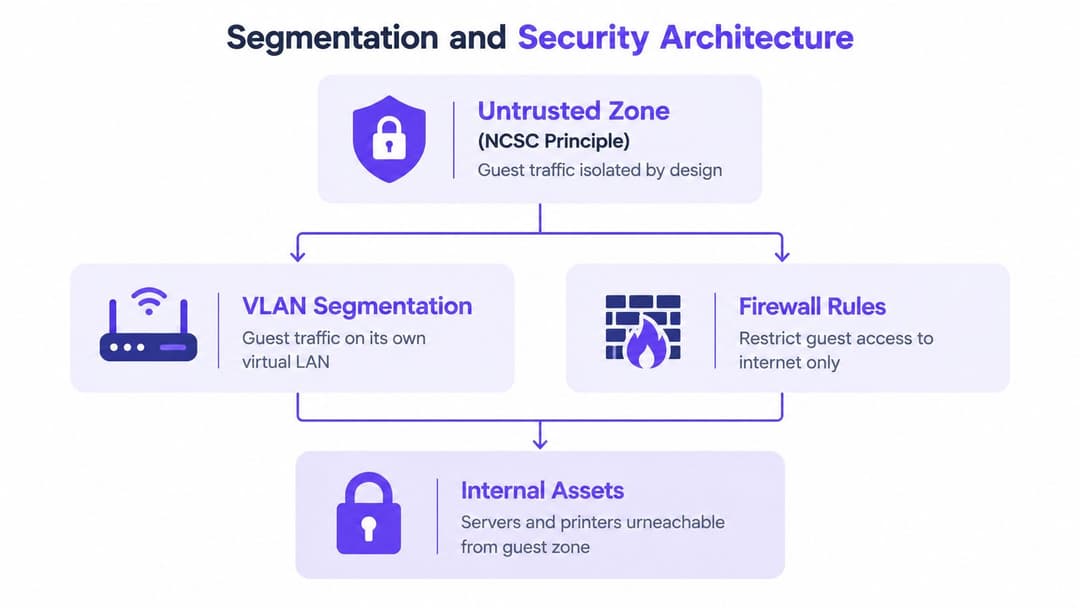
CISA recommends treating guest traffic as an untrusted security zone, segmenting distinct user groups, monitoring activity, and reserving guest internet bandwidth separately from capacity used by critical services. Federal guidance for high-profile conferences provides the underlying principle, which applies equally to hotels, venues, clinics, and offices.
Build the boundary in layers
Start with the guest SSID mapped to a dedicated VLAN or equivalent segment. In a hotel, traffic from that segment should have no route to the property management system, staff workstations, payment terminals, CCTV controllers, or building-management systems. The firewall should allow the services needed for internet access and deny internal destinations by default.
Client isolation adds another boundary. Without it, a malicious or misconfigured guest device may be able to discover other visitors' devices on the same wireless network. Isolation limits that lateral path and makes the visitor segment behave like separate internet access sessions rather than a shared local network.
Capacity controls protect availability. Apply rate limits or reserve separate upstream capacity so that one device, a large download, malware activity, or a denial-of-service event can't exhaust bandwidth needed by point-of-sale systems, telephony, booking platforms, or staff applications.
Containment matters more than labels. A network called “Guest” isn't secure because of its name. It is secure when routing, firewall rules, wireless policies, and monitoring enforce the intended boundary.
Add identity where it helps
Some environments need more than one shared visitor profile. Identity pre-shared keys can issue unique keys to devices while keeping a manageable wireless design, which is useful for legacy equipment that can't use an enterprise supplicant. Staff should normally sit on a separate service with directory-backed controls, rather than sharing the visitor policy.
Vendors differ in how they expose these controls. Before purchase, confirm support for VLAN assignment, firewall enforcement, client isolation, rate limiting, event logging, and administrative roles. Purple's enterprise WiFi security guide is one reference point when comparing an identity and guest-management layer with existing wireless infrastructure.
The same containment logic applies beyond the US. Teams reviewing the wider threat environment can use this overview of Atlanta cybersecurity threats as supplementary context, but your own deployment still needs local testing. Connect a test device, attempt approved internal-access checks, inspect peer visibility, and confirm that guest traffic can't degrade essential services.
Privacy, Data Protection, and CCPA/CPRA
A guest WiFi network becomes a personal-data pipeline as soon as the operator links a person to access records. The fields may include an email address, name, room number, device address, allocated IP address, timestamp, connection duration, visited sites, or marketing-consent status. The the FTC and state attorneys general data-security guidance identifies device addresses, allocated IP addresses, visited sites, and connection duration as information that may be logged.
Start with the minimum data set
Ask what each field does before adding it to the portal. A venue may need an email address to provide a requested service or manage a returning identity, but it may not need a full name, room number, date of birth, or detailed browsing history. The answer depends on the venue's purpose and legal analysis, so document the reason rather than copying a default form.
A defensible workflow separates four decisions:
- Access eligibility: What must the visitor do to receive internet access?
- Service communication: What information is needed for support, notices, or a requested follow-up?
- Marketing permission: Has the visitor actively agreed to promotional communication?
- Analytics retention: How long should connection and usage records remain available?
Marketing consent shouldn't be bundled into basic connectivity. A visitor who accepts terms to access the internet hasn't automatically agreed to receive campaigns, profiling, or unrelated communications. Present optional marketing as a separate, affirmative choice and record that choice independently from the access event.
Protect and delete the records
Use HTTPS and TLS for portal exchanges, encrypted administrative access, tightly scoped log permissions, and encryption where data is stored. The FTC and state attorneys general state that organizations storing or transmitting personal data should use encryption and maintain a security policy that accounts for residual risk. A platform administrator who can export every venue's contact database has more access than an operator who only needs service-health information.
Retention needs a written rationale. Define which records you keep, the purpose for keeping them, the authorized users, and the deletion or anonymization trigger. Don't retain MAC addresses or connection logs indefinitely just because the system can collect them.
Access consent and marketing consent are different events. Your portal should make that distinction visible to the guest and enforce it in the underlying data model.
Give visitors a clear privacy notice and a route for rights requests. The technology won't decide your lawful basis or retention period for you, but it can make the chosen policy enforceable through required fields, separate consent flags, role-based access, scheduled deletion, and controlled exports.
Onboarding UX and Marketing Opportunity
A well-designed guest WiFi journey starts with a small number of clear actions. A visitor selects the venue network, reads the access notice, chooses whether to receive marketing, and connects without guessing which box enables the service. The platform can then send only the communications allowed by that person's recorded choice.
Hospitality teams might use a returning identity to make a repeat visit less repetitive. The important design point isn't personalization for its own sake. Staff should know which information was collected, why it was collected, and whether the guest agreed to a follow-up message.
Retail teams can connect WiFi events with footfall or dwell-time analysis, provided the data is handled transparently and the analysis doesn't exceed the stated purpose. A shopping center might compare engagement with a campaign area against other areas, then use an aggregated report to inform future placement decisions. It shouldn't turn a connectivity interaction into unrestricted individual profiling behind the scenes.
Healthcare needs a different emphasis. A visitor network can support wayfinding, appointment information, or service notices, but the operator must take extra care with sensitive contexts. The portal shouldn't infer medical conditions from a connection or expose patient information through the guest service.
Design the journey around the visitor
Use a short cell phone-first flow, readable terms, accessible contrast, and a helpful failure message when authentication doesn't work. Give visitors a clear alternative, such as front desk support, rather than trapping them in repeated redirects.
A connected platform can pass permitted first-party information to a CRM, trigger a survey after a visit, or issue a service voucher. Purple's WiFi marketing guide describes this broader use of authenticated WiFi as a marketing and engagement channel.
Analytics should answer operational questions:
- Are visitors completing the onboarding flow?
- Which locations generate support requests?
- Does the network perform consistently during busy periods?
- Are consent records separate from basic access records?
- Can marketing staff use approved data without receiving unrestricted network logs?
That combination turns WiFi into a measurable relationship channel without treating every connection as permission to collect everything.
Implementation, Vendors, and Common Myths
A reliable deployment starts with the venue's existing network. Check whether the guest platform works with its access points and controllers, including Meraki, Aruba, Ruckus, Mist, UniFi, or comparable enterprise systems. Confirm support for VLAN assignment, firewall policy, authentication, monitoring, logs, data export, deletion, and administrative roles. These controls form a regulated data pipeline: traffic, identity details, consent records, and retention actions need clear owners and defined handling.
Keep staff access separate from guests. Entra ID, Google Workspace, or Okta can support staff identity and revocation, while visitor onboarding follows its own privacy rules. Multi-tenant properties, such as Multi-Family schemes, Student Housing, and mixed-use retail, need straightforward resident or visitor access without placing tenants, building systems, and operational services on one trusted network.
Four myths to remove
- “A guest network is just a router with a password.” A password does not replace segmentation, monitoring, capacity controls, or data governance.
- “OpenRoaming is too new to consider.” Passpoint and OpenRoaming offer one-time authentication and automatic reconnection. Assess device support, coverage, identity handling, and operational fit before adopting them.
- “Segmentation makes WiFi slow.” Slow service usually points to insufficient capacity or poor radio planning. Segmentation separates traffic and policy without reducing wireless performance.
- “Marketing consent can be included in the access checkbox.” Access agreement and promotional permission are separate decisions, so record them separately.
Capacity planning should begin with the venue's own requirements. Count expected concurrent devices, set a per-device throughput target, allow headroom for busy periods, and validate the design with a load test. Coverage alone does not show whether the service can handle demand.
Rollout duration depends on how much design work is agreed before configuration starts. Document the guest policy, VLAN map, firewall rules, authentication method, data inventory, retention process, and deletion workflow. Then test coverage, speed, internal reachability, peer isolation, portal security, and consent records during representative busy periods. Review the controls after launch with the network team and service owners.
Purple provides guest authentication, cloud-managed access policies, compliance logging, CRM connections, and Passpoint and OpenRoaming support over compatible wireless infrastructure. Visit Purple to assess whether its guest WiFi capabilities fit your venue's security, privacy, and onboarding requirements.