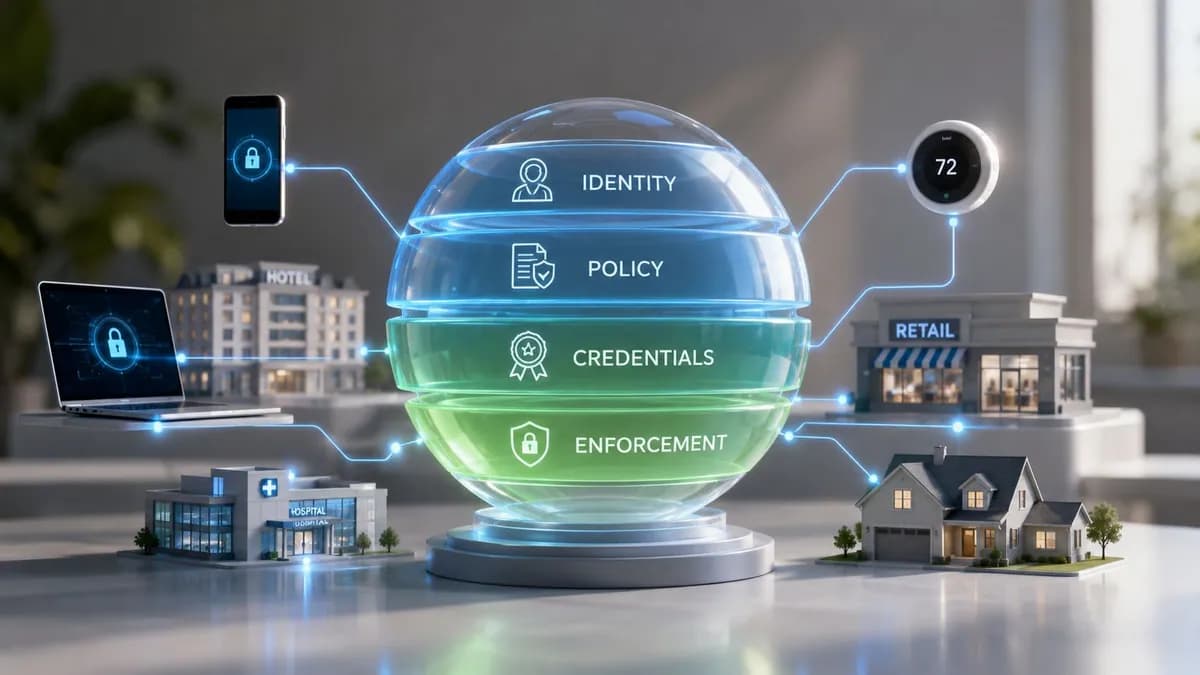
Unified access management: architecture and sizing advisor
Model enterprise identity federation, capacity bursts, zero-trust policies, and multi-tier VLAN steering across staff, BYOD, contractor, and IoT networks.
Select access persona tier
Technical policy architecture
802.1X EAP-TLS with Cloud PKIReady to unify wireless access across your enterprise?
Integrate Microsoft Entra ID, Google Workspace, and Okta directly with your wireless controllers for automated 802.1X onboarding and seamless visitor guest access.
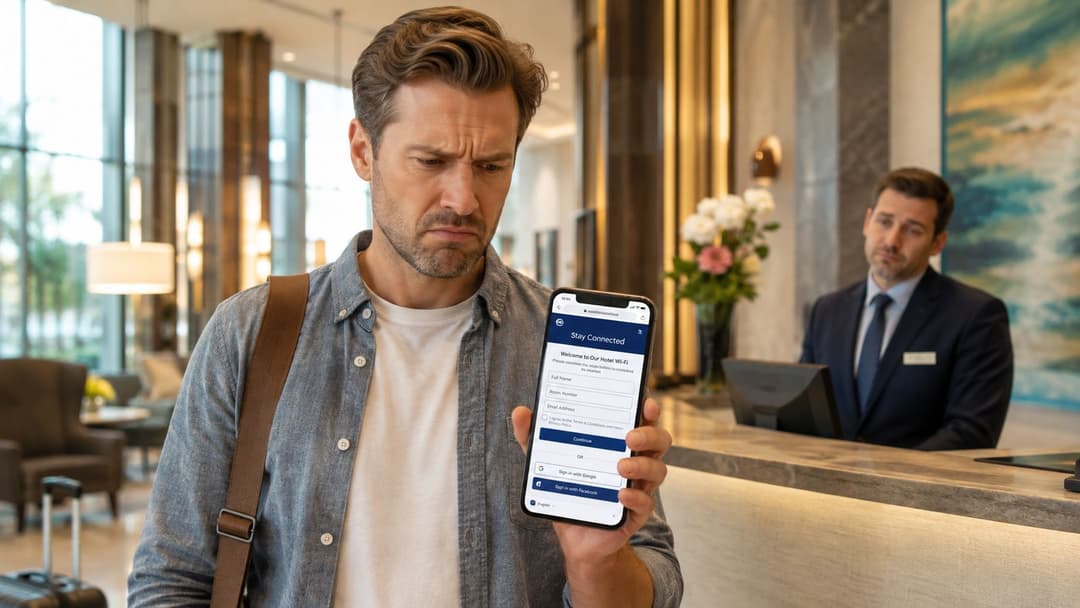
A guest arrives at a hotel, sees the WiFi network, and expects to be online in seconds. Instead, a captive portal asks for an email address, a room number, a marketing opt-in, and sometimes a password that fails on the first attempt. At the same time, a member of the staff is waiting for a RADIUS credential reset, while a thermostat, door controller, or payment device sits on a separate network with little connection to the organization's identity controls.
That arrangement was manageable when venues had fewer connected systems. It becomes fragile when guests, employees, contractors, point-of-sale systems, building controls, cameras, and cloud applications all depend on access decisions. Unified access management brings those decisions into one policy model, so the organization can determine who or what is connecting, how trust is established, and which resources are reachable.
Why Shared Passwords and Captive Portals Are Failing Modern Venues
The trouble usually starts with an apparently harmless shortcut. A hotel publishes one guest WiFi password at front desk. A restaurant shares another with temporary staff. A retailer gives contractors a code for the back-office network. Meanwhile, device installers leave IoT equipment on a network designed for convenience rather than controlled identity.
The result is a collection of access exceptions. A guest who receives the password can share it. A former employee may still know it. A contractor may connect from an unmanaged device. If the organization changes the password, every guest, staff member, printer, scanner, thermostat, and operational device that depends on it may require attention.
The operational cost of separate access worlds
Captive portals aren't wrong. They can collect consent, support promotions, and provide a branded first interaction. A practical captive portal guide is useful when a venue still needs browser-based onboarding. The problem appears when the portal becomes the only security layer for guest connectivity, while staff and devices are managed elsewhere.
A portal verifies what a visitor submits. It doesn't automatically provide the same level of device identity, encryption, lifecycle control, or network segmentation that an enterprise access policy requires. Staff credentials often live in a directory or RADIUS service, and IoT devices may rely on shared secrets or static credentials. Each silo creates its own support queue and its own revocation problem.
Physical access adds another dimension. A venue may connect WiFi policy to doors, gates, elevators, or other building systems, but those workflows still need clear identity ownership and event logging. For readers assessing remote entry systems, GSM gate opener explained offers useful context on how connected access devices fit into wider operational environments.
Practical rule: A network password should never be the only thing separating a user, device, or contractor from a venue's operational systems.
Unified access management replaces the collection of exceptions with a shared policy plane. Guest access can remain simple, staff access can be tied to organizational identity, and devices can receive tightly limited connectivity. The experience differs by audience, but the policy engine can still apply consistent rules for authentication, authorization, segmentation, monitoring, and revocation.
The Architecture Behind Unified Access Management
A useful way to design unified access management is to treat it as four connected layers. The layers don't need to come from one vendor, but they must exchange reliable identity and policy data. If any layer is disconnected, the organization ends up recreating the same silos under a new name.
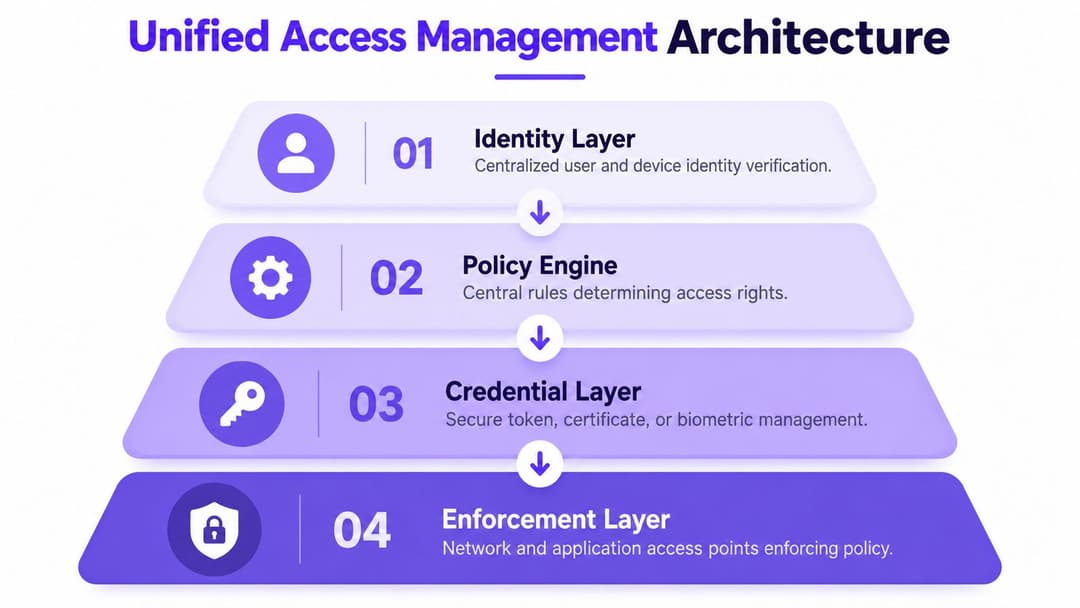
Identity establishes who or what is requesting access
The identity layer contains people, devices, services, and relevant attributes. For employees, that may mean synchronizing with Microsoft Entra ID, Google Workspace, or Okta. For guests, it may mean an email-based or federated identity. For equipment, it may involve a certificate, an iPSK, a device record, or another machine identity.
The NCSC treats identity verification as a prerequisite. Its guidance says verification should happen before credentials, authentication, or access management are issued, which supports coupling identity proofing, credential issuance, and authorization rather than treating them as unrelated administration tasks. The NCSC principle on identity and access control is a useful design reference for that sequence.
The policy engine turns identity into a decision
The policy engine evaluates more than a username. It can consider the person's role, device state, venue, time, requested service, network segment, and risk signals. A staff member may reach operational applications from a managed device, while a guest receives internet access and a contractor gets a temporary route to a specific system.
Identity-based networking becomes practical in this context. A Purple identity-based networking overview describes the model in which identity and policy determine network access instead of relying only on physical SSIDs. The network remains important, but it becomes an enforcement surface rather than the source of truth.
Credentials provide the technical proof
Certificate-based authentication is valuable for staff because it removes the shared password from the WiFi handshake. The device receives a credential that can be associated with the user, managed through an enrollment workflow, and revoked when the user or device no longer meets policy.
Passkeys can support passwordless authentication for suitable journeys, particularly where users need to establish identity without relying on a memorized secret. For devices that can't support modern certificate workflows, iPSK or tightly scoped machine credentials provide a controlled transition path. The important distinction is that each credential should have an owner, a purpose, and a revocation process.
Enforcement happens close to the connection
The final layer includes wireless infrastructure, switches, firewalls, application gateways, and physical systems. Policy should be enforced at the point where access is requested, rather than sending every connection through a central location that adds latency and complexity.
Provisioning should follow directory changes automatically. When a user joins, changes role, or leaves, the access state should update across connected services. Revocation also needs to reach active sessions and tokens, not just future login attempts. That is why event logging, session controls, and near real-time response matter as much as initial authentication.
Unified Access Management Versus IAM, ZTNA, and SSO
Buyers often encounter IAM, ZTNA, SSO, and unified access management in the same procurement process. They overlap, but they aren't interchangeable. Choosing an IAM platform and assuming it automatically delivers secure guest WiFi, IoT isolation, and venue-level enforcement is a common architectural mistake.
IAM is the broad identity control layer. It manages identity proofing, authentication, authorization, and lifecycle processes across users, devices, and applications. ZTNA focuses on granting least-privilege access to private applications, usually based on identity and context, without placing the user directly on a broad network. SSO reduces repeated application logins, but it doesn't by itself decide how a cell phone, printer, scanner, or thermostat joins a wireless network.
Unified access management connects those capabilities with the network and physical environment. It can use an IAM directory, an SSO provider, or a ZTNA policy, while also applying access decisions to WiFi, device groups, guest journeys, and operational segments.
Access technology comparison
| Capability | Unified Access Management | IAM | ZTNA | SSO |
|---|---|---|---|---|
| Primary focus | Identity-led access across people, devices, networks, applications, and venues | Identity lifecycle, authentication, authorization, and governance | Least-privilege access to private applications and services | One authentication experience across connected applications |
| Guest WiFi onboarding | Core capability when integrated with WiFi identity services | Usually requires a separate guest access layer | Not normally designed for open guest connectivity | Not normally designed for guest network onboarding |
| Staff network access | Can apply certificate or passwordless policy at the network edge | Defines identity and access attributes, but may not enforce WiFi policy directly | Can protect applications reached from the network | Simplifies application login, not network admission |
| IoT and machine access | Supports device-specific credentials, segmentation, and lifecycle rules | Can govern machine identities, depending on integrations | Protects services, but may not manage local device onboarding | Generally outside its scope |
| Application access | Can connect identity and network decisions | Strong fit for application authorization | Strong fit for private application access | Simplifies authentication to applications |
| Physical venue context | Can incorporate location, venue, device, and operational policy | Usually needs integrations for venue context | Usually centered on application context | Limited to the login experience |
| Where it falls short | Requires careful integration and policy design | Doesn't automatically provide network enforcement | Doesn't replace guest identity or IoT governance | Doesn't provide access governance on its own |
How the technologies fit together
A mature design often uses all four. IAM remains the authoritative source for staff identity and lifecycle events. SSO makes application access easier. ZTNA protects internal services that shouldn't be exposed through the venue network. Unified access management connects those controls to wireless access, guest onboarding, devices, and operational segmentation.
The trade-off is architectural discipline. A single console won't fix inconsistent identity data, vague ownership, or poorly defined roles. Teams still need to decide which system owns identity, which system makes the policy decision, and which infrastructure enforces it.
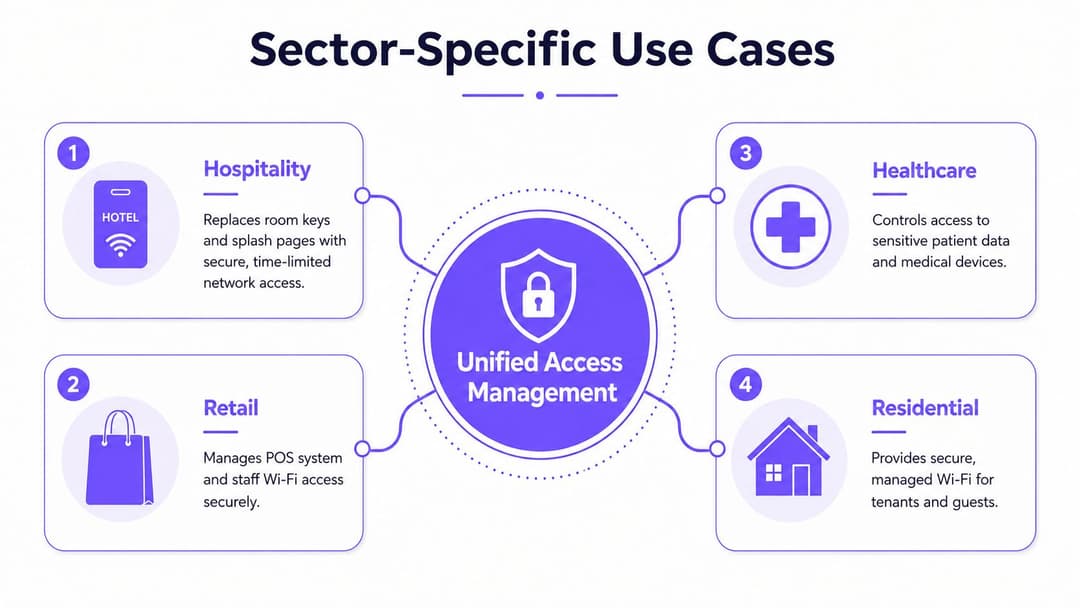
Sector-Specific Use Cases Across Hospitality, Retail, Healthcare, and Multi-Family
The same policy model produces different results in each sector because the access subjects and consequences vary. A hotel needs a frictionless guest journey and strong separation between rooms, staff, and building systems. A hospital needs staff efficiency without allowing a visitor's device anywhere near patient systems. Residential operators need tenant independence while retaining central control over shared infrastructure.
Hospitality
Hotels can use OpenRoaming and Passpoint to move beyond repeated splash-page interactions. A guest authenticates once, and a compatible device can reconnect on later visits without asking the front desk for another shared password. The venue can still apply a guest policy, isolate rooms or groups where required, and keep staff and building systems away from the guest segment.
That separation matters because hospitality networks combine public connectivity with operational technology. Door controllers, thermostats, cameras, kiosks, payment equipment, and property management systems have different trust requirements. Network access should reflect those differences instead of treating every connected device as another guest.
Operational software also deserves attention. Resources on minimizing errors in hospitality operations help frame why access workflows must be dependable at busy venues, where a small authentication failure can quickly become a front-desk or service issue.
Retail
Retailers need to separate point-of-sale systems, handheld scanners, staff devices, contractors, and shoppers. A unified policy can grant a store associate the connectivity needed for inventory operations while keeping payment infrastructure on a restricted path. Marketing teams can use consented guest WiFi data through CRM connectors and marketing automation, but that commercial use shouldn't weaken technical isolation.
The design challenge is ownership. IT should control network and identity policy, while marketing defines acceptable engagement and data use. A shared policy model lets both teams work from the same access events without turning a promotional portal into a substitute for security.
Healthcare
Hospitals and clinics need staff access that works across mobile devices, clinical workstations, medical equipment, and directory services. Certificate-grade access can reduce reliance on shared wireless passwords, while separate policies keep patient systems and medical devices away from guest connectivity.
Healthcare environments also contain legacy equipment that can't support current authentication methods. Those devices need explicit segmentation, restricted routes, monitoring, and documented ownership. Unified access management doesn't make unsupported equipment modern, but it can prevent that equipment from becoming an ungoverned exception.
Residential and Student Housing
Multi-family buildings need tenant-level isolation with an experience that feels as simple as home WiFi. iPSK can help support legacy devices while allowing operators to assign credentials or policies to individual units, tenants, or device groups. Staff, maintenance contractors, visitors, and building systems can then receive different access rights without publishing one building-wide password.
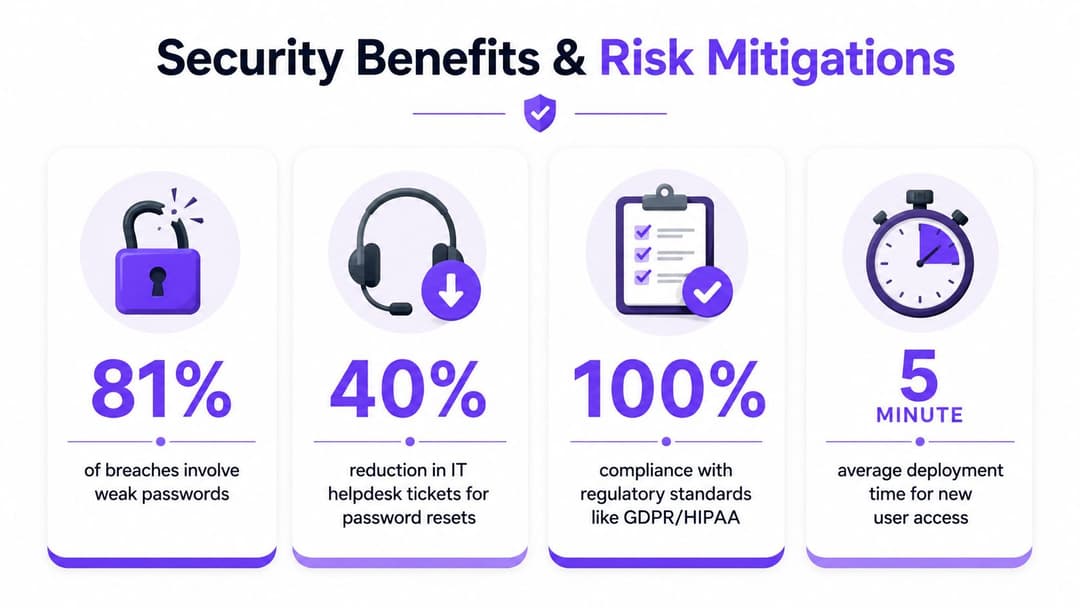
Security Benefits and Risk Mitigations That Justify the Investment
The strongest business case for unified access management isn't a promise that one product eliminates every threat. It is the reduction of avoidable exposure created by shared credentials, inconsistent onboarding, and delayed revocation.
Certificate-based and passwordless access remove the shared WiFi secret from the center of the design. A stolen guest password can't provide the same level of access when the guest journey uses individual identity and a restricted policy. For staff, certificates or passkeys can reduce dependence on credentials that attackers commonly target through phishing, reuse, and credential stuffing.
The NCSC said on 04/23/2026 that passkeys are at least as secure as, and generally more secure than, pairing the strongest password with two-step verification, describing them as the next step beyond passwords in its passkeys guidance. That endorsement gives US organizations a clear direction for authentication strategy, although implementation still needs to account for device coverage, recovery, guest journeys, and legacy systems.
Controls that make the difference
- Individual credentials: Assign access to a person, device, or service instead of a shared password.
- Per-device encryption: Use modern wireless authentication so connected devices don't all rely on one common secret.
- Automatic revocation: Tie access to directory and device status, then remove or limit access when those attributes change.
- Privileged restrictions: Apply stronger controls to administration and maintenance paths than to ordinary guest access.
- Central event visibility: Record authentication and authorization events so security teams can connect activity to an identity or token.
The NCSC recommends MFA for management, maintenance, and administration access, alongside privileged access management that limits administrative use to trusted workstations. It also recommends logging and monitoring authentication and authorization events. Its guidance for operating secure online services further supports controls against session hijacking, token replay, and AiTM attacks, including prompt detection and session revocation.
The US market indicates that this work has moved into mainstream enterprise operations. The US IAM market was valued at $1.7517 billion in 2025 and is projected to reach $2.6639 billion by 2030, implying an 8.7% CAGR from 2025 to 2030, according to MarketsandMarkets US IAM market data. The same source context places IAM at the core of identity proofing, authentication, authorization, and lifecycle management.
For organizations assessing specialist security tooling, the Horus Intelligence platform is another example of the type of security capability teams may evaluate alongside identity controls. The important question is how monitoring, identity policy, and response workflows connect, not how many dashboards an organization can operate.
Implementation Checklist and Migration Best Practices
Start with an inventory, not a product demonstration. List every SSID, access point, directory, RADIUS dependency, guest workflow, device category, application, and physical access integration. Record who owns each one, what it protects, how credentials are issued, and what happens when a person or device loses permission.
Build the control model first
Define policy groups before configuring them. Typical groups include guests, employees, contractors, managed endpoints, IoT equipment, payment systems, building controls, and administrators. For each group, specify:
- Identity source: Decide whether the source is Entra ID, Google Workspace, Okta, a guest identity workflow, an inventory record, or a device credential.
- Authentication method: Select passkeys, certificates, Passpoint, OpenRoaming, iPSK, or another method that matches the device and risk.
- Network reach: Document the exact services and segments the identity needs, then deny everything else by default.
- Lifecycle owner: Assign responsibility for provisioning, review, incident response, and revocation.
Directory synchronization should come before broad staff rollout. Test joiner, mover, and leaver events with a small group, then verify that policy changes affect wireless access, applications, and active sessions as intended. Don't assume that deleting a directory account automatically closes every existing token or connection.
Migrate in parallel
Run the modern access path beside the existing network during the transition. Start with a controlled staff group and a representative set of managed devices. Keep a carefully restricted fallback for unsupported equipment, but give that exception an owner and a retirement condition.
For IoT and legacy systems, use dedicated credentials and explicit segmentation rather than placing them on the guest network. Test printers, scanners, thermostats, cameras, payment terminals, and building controls under normal and failure conditions. A device that connects successfully during installation but cannot renew its credential or survive an access-point change isn't ready for production.
Watch the evidence
Monitor authentication logs during rollout. Look for repeated failures, unexpected device types, unusual venue access, stale certificates, and accounts that continue requesting access after a role change. Train reception, store managers, ward staff, and facilities teams before changing their daily connection method.
A multi-site deployment can be completed in weeks rather than months when the inventory is accurate, the policy model is agreed, and the network estate supports the required integrations. That isn't a universal promise. Sites with undocumented legacy systems, inconsistent directories, or unsupported devices need more preparation, and rushing that work moves the delay into incident response.
How Purple Delivers Passwordless Access and Actionable Analytics
Purple brings guest, staff, and device access into a common operational model by combining OpenRoaming, Passpoint, iPSK, and directory synchronization. Guests can authenticate through an email-based journey and connect with encrypted access from the first packet, while staff can use certificate-grade, passwordless policies connected to Entra ID, Google Workspace, or Okta.
The platform also supports multi-family environments where residents need simple connectivity but operators need isolation. iPSK provides a route for legacy devices, while staff access can be tied to directory identity and managed without maintaining on-premises RADIUS servers. Purple supports network environments built around vendors including Meraki, Aruba, Ruckus, Mist, and UniFi.
The other half of the design is visibility. CRM connectors, marketing automation, surveys, and security add-ons can turn consented first-party WiFi data into operational and commercial insight. That lets network teams measure authentication behavior and policy outcomes while marketing teams work with approved engagement data.
For organizations specifically evaluating a passwordless guest experience, Purple passwordless WiFi sets out how the approach can replace shared passwords and repeated captive-portal interactions. The right deployment still depends on device support, identity ownership, segmentation, and a tested migration plan.
Purple offers a unified platform for passwordless guest, staff, and multi-tenant WiFi access, with OpenRoaming, Passpoint, certificate-grade identity, iPSK, and analytics in the same operational model. Visit Purple to assess how it can connect your venue's guest WiFi, workforce identity, and IoT access policies.