4.9 million people in the US used public hotspots in the year before September 2011, up from 0.7 million in 2007. A well-designed captive portal is the most important touchpoint between a guest, your network, and your data practices.
The familiar scene is a guest selecting the right SSID, waiting for the browser window to appear, then tapping through an unclear form that fails before access starts. Staff get asked for help, the line grows, and the visitor may switch to an unknown hotspot instead. A WiFi login page should remove that uncertainty, not create it.
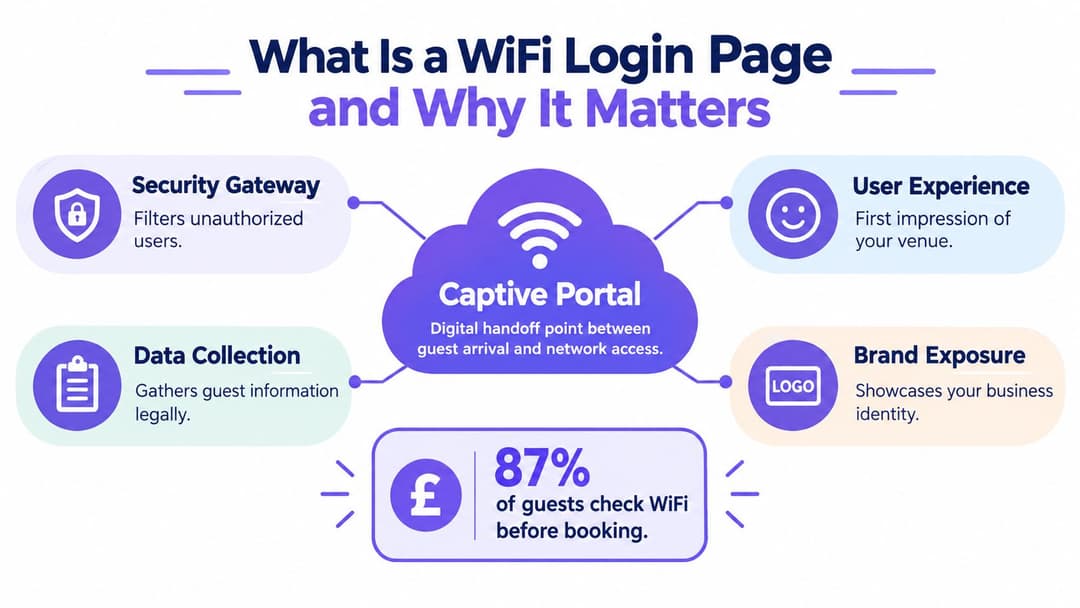
What Is a WiFi Login Page and Why It Matters
A guest enters a hotel, cafe, clinic, or office, selects the advertised network, and sees WiFi connected without usable internet access. Traffic stays restricted until a captive portal presents a welcome or authentication screen. That WiFi login page forms the digital handoff between arriving at a venue and getting online.
The mechanism is simple. The guest network places the device in a controlled pre-authentication state, allows access to the portal and required connectivity services, then grants broader access after the visitor accepts terms, enters a code, or completes an identity check. The redirect is the easy part; the harder work is designing a journey that keeps legitimate visitors from feeling blocked.
A gateway with a customer-facing job
Older splash pages often showed little more than a logo and an “I agree” button. Modern portals can support email authentication, vouchers, staff sponsorship, identity providers, or access that continues across participating locations. Each option can help a particular audience, but each also adds dependencies, support demands, and another possible failure point.
A portal has four practical responsibilities:
- Security gateway: It separates guest traffic from internal systems and applies access policy before internet use.
- Experience layer: It creates the first digital impression, especially for visitors under time pressure or using an unfamiliar device.
- Data boundary: It explains what information is collected and keeps optional marketing capture separate from the conditions for access.
- Operational record: It helps support teams investigate failed authentication, expired sessions, and recurring device problems.
Public WiFi had become a significant access channel before smartphones and app-based authentication were widespread. The BBC's account of public hotspot adoption reports 4.9 million users connecting through hotels, cafes, airports, and similar locations in the year before September 2011, compared with 0.7 million in 2007. The history shows why a portal became part of venue operations rather than a minor convenience.
A practical captive portal guide should cover configuration, user consent, accessibility, and support procedures. Non-digital users may need a staffed alternative, while poorly designed consent can create legal exposure. Legacy shared passwords also create hidden work: staff must distribute them, rotate them, answer access requests, and troubleshoot devices that retain outdated credentials. The page controls access, communicates limitations, and shapes whether guests trust the venue enough to connect.
Designing a Frictionless Guest Experience
A guest in a hotel lobby has only a few seconds before frustration sets in. Every extra tap on the WiFi login page increases the chance that they abandon the venue network, especially on a cell phone with a small captive-browser window. The page should make the next action obvious without exposing guests to the venue's authentication machinery.

Start with the shortest valid journey
Place the venue name, network purpose, and primary action above the fold. If access only requires acceptance of acceptable-use terms, do not add account creation. If an email address supports identity checks or service delivery, state that purpose beside the field.
Progressive disclosure keeps the first screen focused. Let guests connect before presenting optional communications or preferences, and keep marketing consent separate from the access decision. Social sign-in can reduce typing for some visitors, but it introduces third-party dependencies, additional consent questions, and another failure point inside a restricted browser window.
Test the complete journey on current iOS and Android devices, laptops, and each operating system's captive-network assistant. Desktop Chrome is not enough. Redirects, pop-ups, heavy scripts, or cross-domain cookies may work in a full browser and fail in the limited window that opens after a device joins the network.
Design for people who do not live in network settings
Accessibility starts with concrete interface choices. Use visible form labels, a logical keyboard order, controls large enough to activate accurately, readable error messages, and screen-reader-compatible structure. Placeholder text should not carry the only field label, and a checkbox should not be the sole route to critical information.
Design the failure path as carefully as the successful one. If the portal does not open, the device cannot complete authentication, or the selected method is unavailable, show what to try next. A staffed route should use a defined temporary-access process, not an improvised shared password that creates later support and security work.
The guest WiFi connection guidance reflects a practical standard: instructions must suit ordinary visitors, not only technically confident users. Libraries and community venues also need clear form design and low-tech assistance. US public-library research found that 80.6% of responding services displayed a dedicated captive-portal page, while PINs or passwords remained common for members and non-members, as documented in the MAIPLE project findings.
Practical rule: If a frustrated guest can abandon the official network and join an unknown one more easily, extra friction may reduce safety instead of improving it.
Keep the visual system trustworthy
Use the venue's real logo, domain, colors, and support contact. Avoid turning the login screen into an advertising microsite. Compress assets, remove unnecessary animation, and make the primary action unmistakable. A plain page that completes reliably serves guests better than a polished page that stalls during authentication.
Navigating Security and Legal Compliance
A branded portal is only one layer of guest network security. Authentication identifies who has been admitted, but it does not encrypt traffic, block malicious devices, filter inappropriate content, or prove that visitors are using the genuine venue network. Those outcomes require separate controls.
Public expectations are shaped by the quality of the connectivity people use at home and work. Reports indicate that fiber broadband was available to 69% of US households, approximately 20.7 million of 30.1 million households, in recent infrastructure studies. Gigabit-capable broadband reached 80% of homes in spring 2024 and 86% of homes by spring 2025, according to connectivity reports. These are fixed-line coverage figures rather than public WiFi usage figures, but they help explain why guests expect a login page and online service to respond quickly.
Treat privacy as part of the connection flow
If the portal requests an email address, cell phone number, name, or device-linked identifier, present the relevant privacy information before authentication finishes. The the FTC and state attorneys general guidance on the right to be informed says people should receive concise, intelligible information about purposes, lawful basis, data categories, retention, recipients or transfers, and their rights.
Keep connectivity separate from marketing. An email collected to provide access should not automatically become permission for promotional messages or behavioral profiling. Use distinct, unchecked controls for optional purposes, record the notice version and timestamp, and provide a practical withdrawal route. The data privacy guidance for guest WiFi offers an implementation reference, but your organization remains responsible for its purposes, retention schedule, and lawful basis.
Make the technical controls match the promise
Place the guest SSID on a separate network, restrict device-to-device traffic, and use current encryption and certificate practices where the equipment and deployment support them. Keep the pre-authentication allow-list narrow enough for the portal, identity providers, and operating-system connectivity checks to work without exposing unnecessary destinations.
Identity-linked data needs a documented path. If you connect a visitor to device identifiers, location, visit history, or behavioral analytics, assess whether a Privacy Impact Assessment is required. Guidance from the FTC and state attorneys general identifies large-scale monitoring of publicly accessible places, extensive profiling, novel technology, and location or behavior tracking as situations that may create high risk. Record how network events move through the portal, identity store, CRM, analytics system, and deletion process.
A login page also needs accurate safety language. A 2025 report describing tests of businesses raised concerns about content filtering and child-safety controls. Its limited sample should not be generalized nationally, as discussed in ISPreview's coverage of the report. State what the network does, what it does not do, and how visitors can report an incident.
Comparing Authentication Methods
Shared passwords remain attractive because they're familiar. A receptionist can print one, a venue can put it on a receipt, and most devices understand the basic flow. The operational weakness appears later, when the password spreads beyond the intended audience, staff need to rotate it, or a former employee still knows a credential that protects current access.
Identity-based access changes the unit of control. Instead of treating everyone as the same user, the network can associate access with a person, device, certificate, directory account, or time-bound entitlement. That can improve revocation and accountability, but it adds identity integration, support requirements, and privacy responsibilities.
Authentication method comparison
| Feature | Shared Password | Identity-Based Access |
|---|---|---|
| Guest effort | One credential is easy to understand, but visitors may not know where to find it | Email, sponsored access, Passpoint, or another identity flow can remove repeated password entry |
| Revocation | Usually requires changing the shared secret for everyone | Access can be withdrawn for an individual or group |
| Staff workload | Distribution, resets, rotation, and desk-side explanations remain manual | Provisioning and policy can connect to an identity directory or access platform |
| Accountability | Activity is associated with a shared credential unless extra logging is added | Sessions can be tied to an approved identity or device context |
| Security boundary | A leaked password may grant access until rotation | Per-user or per-device policy limits the impact of a compromised entitlement |
| Guest continuity | Visitors repeat the process when the password changes | Returning users can reconnect through an approved identity experience |
| Failure mode | A single wrong or outdated password blocks many people | Identity, certificate, roaming, or integration faults require better monitoring |
Where legacy systems cost more than expected
The password itself is rarely the expensive part. The cost comes from printing replacements, answering “what's the WiFi password?”, explaining why one device works while another does not, changing credentials after a leak, and updating signs across multiple locations. A password can also become an unofficial staff credential if the same network serves visitors and employees.
Identity-based access isn't automatically superior. A portal that asks for too much information or depends on a failing external provider creates a different kind of outage. Build a break-glass process, define session expiration, monitor authentication errors, and keep a controlled fallback for users who cannot complete the normal route.
For environments that already manage staff through Entra ID, Google Workspace, or Okta, directory integration can make onboarding and revocation more systematic. For customer-facing venues, Passpoint or OpenRoaming can provide a smoother return experience, but operators still need to explain consent, identity use, and support routes.
Businesses evaluating front-desk automation may also find the discussion of how to cut staffing with automated entry useful. The same principle applies here, with an important qualification: removing manual work only helps when the automated path is understandable and recoverable.
Common Pitfalls and Real-World Examples
A hotel can spend time refining its logo and still fail at the first technical handoff. The guest joins the SSID, the operating system checks connectivity, and the portal never appears because the pre-authentication path is incomplete. Staff then tell visitors to open random pages, disable settings, or reconnect repeatedly, none of which builds confidence.
Another venue collects an email address beside an “Accept and connect” button, then sends promotional messages without a distinct optional choice. The organization may believe the page explains the arrangement through a general privacy-policy link, but the visitor never received clear information at the moment of collection. That design creates an audit problem and makes deletion or consent withdrawal harder to administer.
Failure patterns worth testing
- The portal works only in a full browser: Captive-network assistants are constrained environments. Test the page without assuming pop-ups, multiple tabs, or complex scripts will behave normally.
- The fallback is verbal: If a visitor's device cannot complete the flow, staff shouldn't invent a shared password or ask for unnecessary personal details. Provide a documented alternative with an expiration date and a clear support owner.
- The consent model is bundled: Required access acceptance, optional marketing, analytics, and profiling should have separate purposes and controls.
- The network promise is vague: “Secure WiFi” may be interpreted as encryption, content filtering, or protection from local threats. Say which controls are present and which are not.
- The portal captures too much: Every extra field increases support questions, retention obligations, and the impact of a breach. Start with the minimum data needed for the stated purpose.
- Legacy credentials survive staff changes: A shared password cannot tell you which individual should lose access. Review staff authentication separately from guest access.
Diagnose the experience, not just the controller
Collect support observations alongside controller logs. Ask which device failed, whether the portal appeared, whether the user could read the form, and what happened after submission. A technically successful authentication can still be a service failure if the guest can't understand the privacy notice or has no route to recover from an expired session.
Content filtering deserves careful treatment too. A restrictive policy can block legitimate services, while a permissive policy may expose children and vulnerable users to unsuitable material. The right response isn't to imply that the login page solves every risk. It is to document filtering, segmentation, incident response, and acceptable-use controls as separate parts of the service.
The Future of Frictionless WiFi Access
A guest who returns to the same venue should not have to complete the same login form again. Passpoint and OpenRoaming can let participating devices and networks establish trusted access through installed profiles or recognized identities. That reduces repeated password entry, but it also creates operational work around identity assurance, certificate renewal, roaming policy, and revocation. A failed renewal can lock out a legitimate visitor just as effectively as a broken captive portal.

From gatekeeping to continuity
A captive portal still serves first-time access, explicit consent, venue information, and visitors without a roaming profile. The design should separate that initial interaction from later connections. Returning visitors should not repeatedly submit the same details just because they revisit a building or move between managed locations.
Accessibility needs a place in this model. Some guests will not have a compatible device, may struggle with a small-screen form, or may be unable to complete an email or text flow. Provide a clear alternative, such as staff-assisted access or a usable registration route, without forcing people to disclose more information than the service requires.
WiFi data also needs firm boundaries. Connection records can support service analysis, while linking those records to a CRM profile creates further privacy and security duties. State the purpose, limit retention, restrict access by role, and explain the processing clearly. Consent to connect is not automatically permission for marketing.
Build the operating model before the technology
A future-ready service includes:
- Network separation: Guest, staff, operational, and tenant traffic follow different policies.
- Identity lifecycle: Access is provisioned, renewed, and revoked through an accountable process.
- Connection continuity: Returning visitors avoid repeated forms where the legal and technical basis supports it.
- Transparent analytics: Teams collect only signals they can explain, protect, and delete.
- Human support: People who cannot use the automated route receive a practical alternative.
Legacy shared passwords create hidden costs through manual resets, unclear accountability, and access that survives staff or vendor changes. Passpoint and OpenRoaming reduce those weaknesses only when teams maintain profiles, certificates, directories, and support procedures.
Purple provides cloud captive-portal software for branded guest WiFi, with authentication options including email, SMS, social login, and Cloud RADIUS. Its platform supports identity-based networking, Passpoint and OpenRoaming deployments, directory integrations, analytics, and CRM connectors.
The practical test is whether a guest can connect securely, understand data use, recover from portal failure, and return without unnecessary repetition. Purple also offers branded guest authentication, identity-based access, and roaming connectivity. Review the current WiFi login page and guest journey at Purple.