
Fewer than 30 of approximately 25 million UK-based name servers had IPv6 addresses when the UK government's IPv6 rollout report was published in 2010. That historical starting point helps explain why so many address plans, support procedures and asset records were built around IPv4.
Managing IP addresses now means maintaining an estate where devices can use either protocol, sometimes without administrators realizing it. The useful discipline is one accountable owner, one documented routing intent and one traceable allocation record for every address. Redundant routes are fine; competing ownership and unexplained reachability aren't.
When to Use DHCP Static or Reserved Addresses
In August 2026, 54.27% of 5,340,321 crawled hosts were dual-stack, while 45.73% remained IPv4-only, according to the Internet Society's UK measurements. Those are measurements of crawled hosts, not a census of enterprise devices, but they illustrate why an IPv4-only inventory no longer describes everything a network team may encounter.
A device can communicate over IPv6 while its help desk record, firewall object and incident worksheet still contain only IPv4. Treat dual-stack as a second record set, including address history, rather than just a routing capability.
Choose an assignment method by device class before drawing subnets. DHCP issues time-limited address assignments; a reservation gives a particular device a predictable address through that same service. The DHCP glossary provides a useful reference when explaining that distinction to colleagues outside networking.
Address assignment methods and when to use them
| Method | Use it for | Stability | Main risk |
|---|---|---|---|
| Dynamic DHCP | Guests, contractors, short-stay clients | Usually retained through renewals; eligible for reuse after expiration | Reuse hides who held the address without logs |
| DHCP reservation | Printers, access points, cameras, IoT | Fixed address still issued by DHCP | Stale reservation after the device leaves |
| Static configuration | Routers, firewalls, DNS, out-of-band management | Permanent until changed by hand | Orphan address with no owner record |
| SLAAC | Ordinary IPv6 clients on a /64 | Stable addresses may coexist with rotating privacy addresses | Host invisible if IPAM never sees it |
| DHCPv6 | Supported IPv6 clients requiring server-side assignment records | Lease with a server-side record | Scope drift if DNS isn't updated with the lease |
Match leases to how devices behave
A lease doesn't force an address change at every renewal. Clients commonly renew the address they already hold, so don't use DHCP churn as a security control.
For a hypothetical venue, an eight-hour guest lease could suit daytime visitors, while a staff LAN might start with leases of one to seven days. These are configuration starting points, not compliance thresholds. Compare pool occupancy, renewal traffic and visit patterns before adjusting them.
Use reservations for equipment that needs stable addressing but should remain centrally revocable. Keep manually configured addresses outside dynamic pools, and record the administrator responsible for changing them. Static configuration is most defensible for infrastructure that must start or remain manageable without DHCP.
On IPv6, SLAAC lets clients construct addresses from an advertised prefix. DHCPv6 can provide assignment records where clients support it, but it doesn't replace router advertisements for default-router discovery, and it doesn't automatically identify a person.
Assignment rule: Give each device class a default method, then document exceptions with an owner and a reason.
Label each current VLAN with its chosen method. A mixed-purpose VLAN may need separate documented classes, rather than an artificial rule that every device must behave identically.
How to Size Subnets and Leave Room to Grow
Size for the devices that can connect simultaneously, including replacements, transient clients and infrastructure. Don't choose a prefix just because another site used it.
Default prefix sizes by network zone
These are engineering starting points. Validate host demand, cloud reservations and platform support before adopting a row.
| Zone | IPv4 plan | IPv6 plan | Planning note |
|---|---|---|---|
| Staff or user LAN | /23 or /24 | /64 | Leave the next block free before the VLAN fills |
| Guest WiFi | /22 for a busy venue | /64 | Short leases and no route to staff or servers |
| Servers and infrastructure | /24 or smaller, mostly static | /64 | Every managed host named in forward and reverse DNS |
| Management and out-of-band | /26 or /27 | /64 | Not routed toward guests or directly exposed to the internet |
| Point-to-point link | /31 | /127 | Use only where both endpoints support it |
| Site aggregate | One summarizable block per site | Often a /48 per site | Advertise the summary, not every VLAN |
| Cloud VPC or VNet | Non-overlapping RFC1918 space | Provider IPv6 allocation | Check overlap before every merger or peering |
Use a subnet calculator to check boundaries and capacity rather than doing prefix arithmetic from memory. For ordinary IPv4 LANs, distinguish total addresses from assignable host addresses; cloud platforms may reserve additional addresses.
For IPv6, NHS England's addressing guidance specifies 128-bit addresses and a standard 64-bit subnet size. Use /64 for normal LANs and security segments, not smaller client subnets intended to conserve address space.
Build the hierarchy before filling it
Give each site an aligned IPv4 summary block. Where the allocation permits, give it an IPv6 aggregate too, then carve VLAN prefixes inside those boundaries.
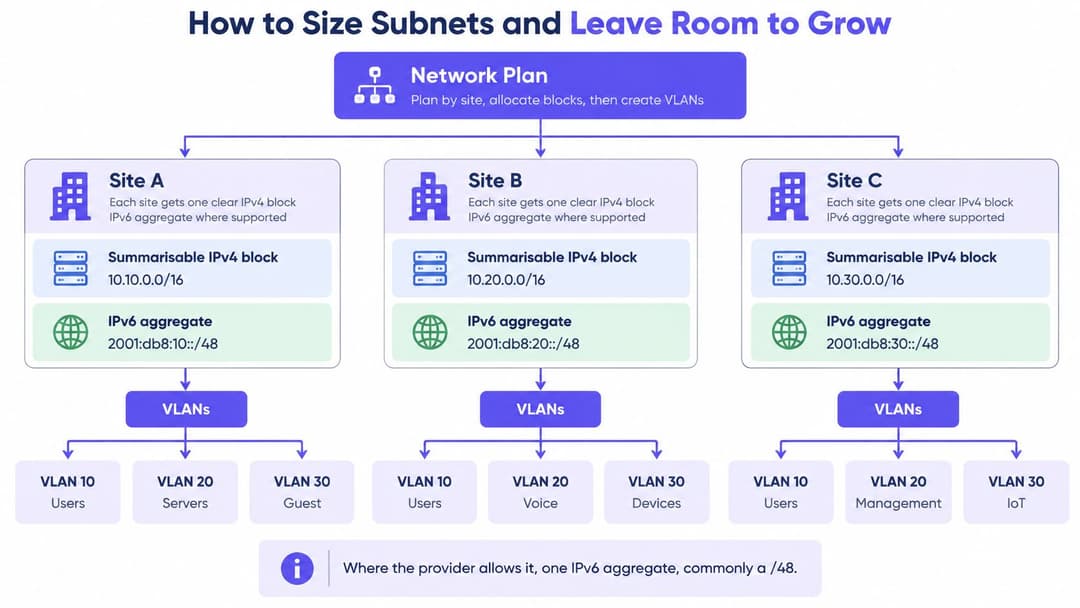
Reserve an adjacent, correctly aligned growth block for user networks. Adjacency alone doesn't guarantee that two prefixes can become a larger prefix, so check the binary boundary before promising painless expansion.
Private address space isn't globally unique. Offices, acquired businesses and cloud projects can independently choose overlapping ranges, then discover the conflict when someone requests peering.
A one-site sketch can remain readable without listing individual addresses:
| VLAN role | Allocated prefix | Parent block | Growth reservation |
|---|---|---|---|
| Staff | /24 | Site IPv4 summary | Adjacent aligned /24 |
| Guest | /22 | Site IPv4 summary | Separate aligned /22 |
| Management | /27 | Site IPv4 summary | Adjacent aligned /27 |
| IPv6 client segments | /64 each | Site IPv6 aggregate | Unallocated segment prefixes |
A summary is a routing convenience, not permission for every zone to communicate. Keep guest, management and server policy boundaries explicit.
How to Build a Version-Controlled Address Inventory
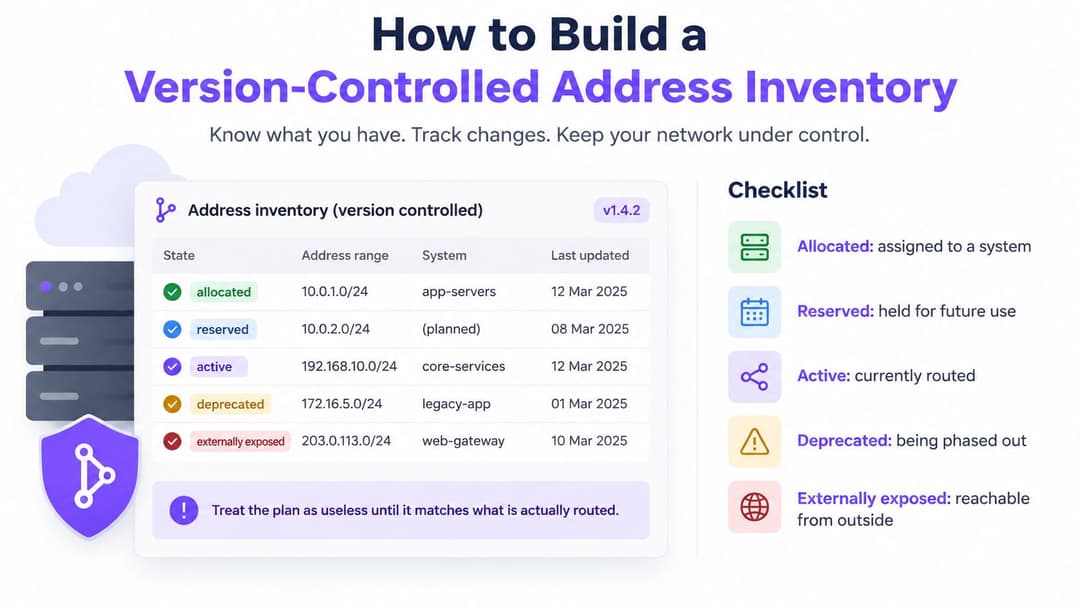
An address inventory is useful only if it reflects both planned allocations and live configuration. IP address management (IPAM) records who owns each prefix, what it supports, and where its address information appears. Keep one owner, one intended route and one traceable record for every address.
Record the prefix, owner, business purpose, site, security zone, assignment method and review date. Include expiration dates for temporary allocations, plus registry and routing references for public blocks. Version-control the inventory so each change has an approval and a meaningful diff.
Reconcile configuration in a repeatable order
- Registry records. Confirm the public allocations the organization is entitled to use.
- DNS zones. Export forward and reverse records, including stale A and AAAA entries.
- DHCP records. Collect leases, reservations, exclusions and DHCPv6 assignments.
- Firewall and NAT objects. Record translated addresses, published services and management rules.
- Cloud networks. Export VPC, VNet and subnet allocations across relevant accounts or subscriptions.
- Routing state. Compare configured advertisements with routes learned and installed.
The newest export is not automatically authoritative. An undocumented cloud subnet may be legitimate; an old firewall object may expose a service with no current owner. Assign each mismatch to someone who can establish its purpose.
Use clear lifecycle states such as allocated, reserved, active, deprecated and externally exposed. Treat exposure as a separate flag: an active subnet can also be externally exposed.
Verify what appears empty
Check every address range the organization owns or is authorized to assess, including ranges not believed to be in use. This helps uncover forgotten allocations and services without extending checks beyond approved boundaries. The National Cyber Security Centre's secure-connectivity guidance on OT network segregation concerns separating operational technology networks; it does not direct organizations to scan public address space.
Confirm records against sources already within your authorized scope, such as DNS zones, cloud network configurations, routing records and neighbor information. For sensitive or operational-technology equipment, follow the organization's approved assessment procedures.
Document the boundary each VLAN represents, including its prefixes and permitted paths. For US public-sector environments, record whether constrained services such as FedRAMP and GSA Schedule environments are compatible with the planned address configuration.
Keep procedures alongside the inventory. Technical documentation software can help organize export, reconciliation and exception-handling procedures, while IPAM remains the authority for address ownership.
A subnet with no owner is unresolved operational risk.
Automate checks for proposed overlaps, missing owners and inconsistent DNS or policy records. Flag live drift for review rather than automatically deleting an unexpected production route.
Each address should have one accountable owner, one intended route and a traceable change record. Keep credentials and identifiable lease histories out of broadly accessible documentation repositories.
How to Allocate and Retire an Address
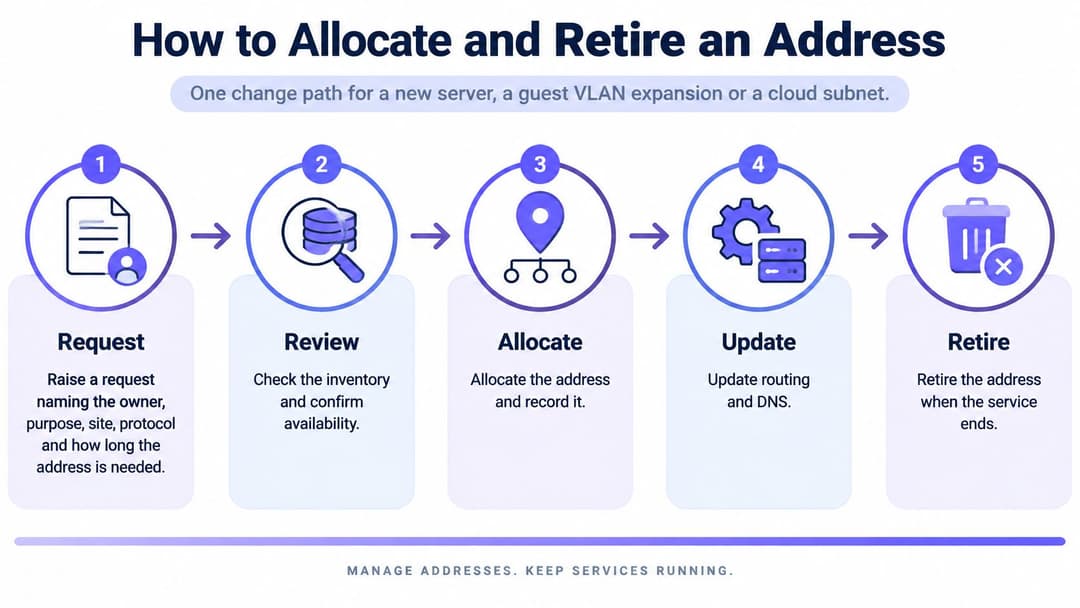
Use the same change path for a server, guest-network expansion or cloud subnet. The implementation differs, but the approval, evidence and retirement requirements shouldn't disappear because a deployment is automated.
Follow the allocation lifecycle
- Raise the request. Name the owner, purpose, site, protocol and required lifetime. Identify any inbound connectivity or vendor dependency.
- Check the inventory for overlap and capacity within the site summary. Confirm the assignment method for the device class.
- Reserve before configuring. Record the prefix, expiry or review date, and change reference so parallel requests can't claim it.
- Create or extend the DHCP scope, reservation or static record. For dual-stack segments, configure the approved DHCPv6 or SLAAC arrangement.
- Publish forward and reverse DNS where appropriate. Release AAAA records only after the service passes IPv6 testing.
- Update firewall, NAT and route objects from the approved allocation. Verify the intended source, destination and return path.
- Apply client access policy through the directory and WiFi controller. Map staff and guests to their authorized VLANs instead of relying on a shared passphrase.
- Capture evidence. Confirm the lease or neighbor entry, DNS response and an allocation event that can be correlated with a user, device or ticket.
- On expiry, remove the allocation and dependent objects, then mark the prefix deprecated. Verify that residual traffic and dependencies have stopped before returning it to the pool.
The lifecycle diagram summarizes the change controls without replacing the detailed checklist.
If the address will send email, include reputation checks before activation. MailGenius's email blacklist lookup can identify listed sending addresses, although a clean result doesn't guarantee delivery or replace proper mail authentication.
Make the allocation event accountable
An address alone can't identify its holder after reuse. Preserve the assignment start and end, protocol, device identifier and relevant authentication reference, using a common time source for DHCP, RADIUS, controllers and DNS.
The historical UK Data Retention (EC Directive) Regulations 2009 required public communications providers to retain specified communications data for 12 months, including time-linked subscriber allocation information. That framework has since been superseded and amended; it isn't a blanket current retention rule for enterprise networks.
Set retention against applicable obligations and business needs. Restrict access, protect integrity and test whether an authorized investigator can reconstruct an assignment without exposing unrelated users' records.
For translated connections, retain the mapping details needed for attribution, including ports where addresses are shared. A single allocation event is the starting point, not a substitute for authentication and translation evidence.
Choose Between Keeping, Leasing, Translating or Renumbering
Start with the IPv4 services you can't remove: partner connections, vendor allowlists, VPN endpoints and legacy applications. Those dependencies establish the minimum stable public footprint your estate needs.
Choose an option per environment, not one answer for the entire organization. A guest network and a vendor-facing service have different inbound access, attribution and continuity requirements.
IPv4 retention, leasing, translation and renumbering options
| Option | Use when | Main risk |
|---|---|---|
| Keep owned IPv4 | Existing public space covers partners, suppliers and legacy services | Unused blocks hide unless they're scanned and recorded |
| Lease IPv4 space | Growth is real and the block can be recorded with owner and route | Leased ranges drift from registry and route records |
| Carrier-grade NAT | Clients need outbound access only and attribution can still be logged | Shared addresses complicate per-user logging and inbound services |
| Dual-stack IPv6 | Services and clients are IPv6-ready with matching controls | Additional address records and a bypass if controls lag |
| Renumber | Summaries won't form or an RFC1918 range collides with a VPC | Outage risk and hard-coded addresses in applications |
Choose by dependency, not convenience
Keeping owned space makes sense when you can justify its use and maintain its routing authority. Don't buy or lease more just because administrators haven't reconciled unused allocations.
For leased blocks, document the lessor, permitted use, routing arrangements, renewal conditions and withdrawal process. Plan how supplier allowlists and externally published endpoints will change if the lease ends. An apparently available block isn't deployable until the right party can authorize its advertisement.
Carrier-grade NAT suits some outbound client populations, but it introduces shared-address behavior. Check application compatibility, port capacity and the ability to correlate translated sessions before treating it as a conservation measure.
Renumbering is usually the cleaner long-term answer to overlapping private networks. Say an acquired hotel's management range collides with a cloud VPC: translation might restore a narrow service path temporarily, but it won't produce a coherent site summary or remove embedded addresses from applications.
Decision test: Choose the option you can operate, attribute and withdraw safely, not merely the one you can configure fastest.
Use dual-stack for new environments that pass compatibility and operational checks. Keep constrained vendor paths on IPv4 until their requirements change.
Record the decision with each block, including the dependency that justifies it and the condition that would allow retirement. That gives the next administrator a reason to preserve the allocation, or evidence that it's time to remove it.
Roll Out Dual-Stack Without an IPv6 Bypass
Globally, roughly 33 million IPv4 addresses were transferred within regional registry systems during 2025, according to Geoff Huston's address report. That continuing transfer activity is a useful reminder that IPv6 deployment doesn't immediately remove commercial and operational dependence on IPv4.
Run IPv6 as a controlled program. Inventory applications and dependencies first, looking for embedded IPv4 literals, protocol-specific ACLs, monitoring assumptions and vendors that require a fixed IPv4 endpoint.
Gate each expansion
Pilot a low-risk segment with a defined rollback. Test user-facing transactions, not just successful pings, and verify failover, identity controls and incident visibility before extending the deployment.
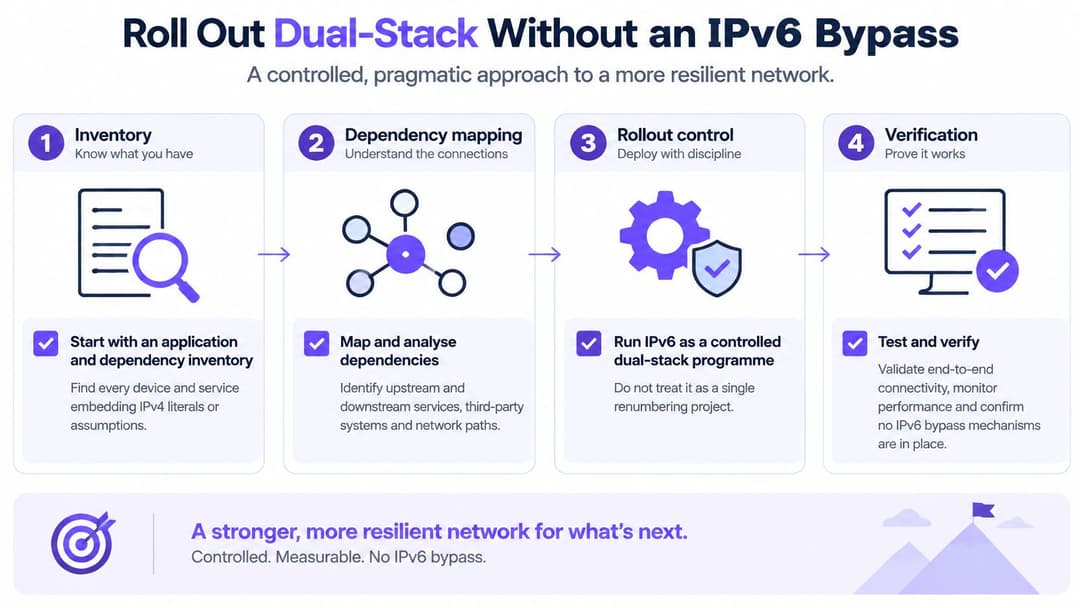
- Control publication. Hold AAAA records until application tests, firewall policy and logging are approved. Include external paths, not only internal access.
- Protect router advertisements with suitable switch controls, such as RA Guard where supported. Translate the intended IPv4 security policy into IPv6 rules, including necessary ICMPv6 rather than indiscriminately blocking it.
- Normalize addresses in the SIEM. Equivalent textual forms must correlate consistently. Normalization alone won't link rotating privacy addresses, so retain device and identity context too.
- Record the SLAAC or DHCPv6 choice for each VLAN. Where both operate intentionally, document their roles and how discovery covers both.
- Give the help desk a script that resolves an address to its device, assignment period, prefix and applied policy. Include separate tests for each protocol so fallback doesn't conceal a broken path.
Measure readiness and dependency separately
Track technical readiness against the assets and services in the rollout scope. Track IPv4 dependency as a separate register, with an owner and removal condition for each remaining service.
- Discovery coverage. Every in-scope IPv6-capable asset has a discoverable record and accountable owner.
- Route and DNS consistency. Advertised prefixes and published records match approved configuration, with discrepancies resolved.
- Policy coverage. Every required control has an IPv6 implementation and a recorded test result.
- Exposure exceptions. No externally reachable IPv6 service remains unexplained or unapproved.
- Dependency reduction. The register shows which services have stopped requiring IPv4, supported by transaction and failover tests.
Don't declare success because clients prefer IPv6. Declare a segment ready when administrators can operate it, troubleshoot it and contain an incident without falling back to IPv4-only procedures.
Retire IPv4 only after service owners confirm that normal operation, recovery and vendor connections no longer depend on it. Keep rollback evidence until that retirement has been tested.
Make One System the Owner of Every Address
Choose a system of record before adding another spreadsheet. It should hold the approved prefix, owner, assignment method and lifecycle dates, while DHCP, DNS, firewalls and cloud accounts provide evidence of implementation.
The system isn't the accountable human owner. Name a network lead who maintains allocation policy, and delegate subnet responsibilities to people who can approve changes and resolve discrepancies.
Reconcile a site before attaching access roles
Begin with a bounded site rather than a property-wide migration. Export its scopes, reservations, static hosts and connected cloud ranges, then turn the differences into a controlled work queue.
- Mark uncertainty. Identify overlaps, unowned allocations and objects whose purpose nobody can explain.
- Investigate before renumbering. Document or retire unowned ranges only after checking dependencies and traffic.
- Attach the network roles. Map the site's VLANs to approved prefixes and distinguish guest, staff, management and tenant access.
- Test identity changes. Confirm that onboarding, role changes and revocation produce the intended access policy and usable audit evidence.
A directory account identifies a person; a DHCP lease identifies an assignment. Link those records through authentication and controller events rather than assuming that an address permanently belongs to an employee.
Keep the wireless identity layer distinct
Where wireless access needs that identity layer, we run Purple as a cloud overlay on the access points a venue already owns, so no rip and replace is needed. Our platform delivers guest WiFi, staff 802.1X security and xPSK Private Area Networks, with cloud RADIUS replacing FreeRADIUS or Windows NPS so there are no on-premises authentication servers to patch or fail over.
Compatibility depends on the controller's RADIUS, change-of-authorization and walled-garden support. This is the wireless identity slice, not a replacement for IPAM, route control or address-lifecycle records.
Keep the allocation authority separate from the authentication service, with a clear integration boundary. An access role should select an approved network, not create an undocumented subnet.
Name the owner of the address plan and reconcile the first site before attaching WiFi roles to it. That gives administrators a defensible foundation for expanding access without expanding uncertainty.
Purple provides identity-based guest, staff and private-network access on existing access points, helping you connect wireless access decisions to a documented network plan. Visit Purple to discuss your controller compatibility and how the wireless identity layer can fit your address-management process.