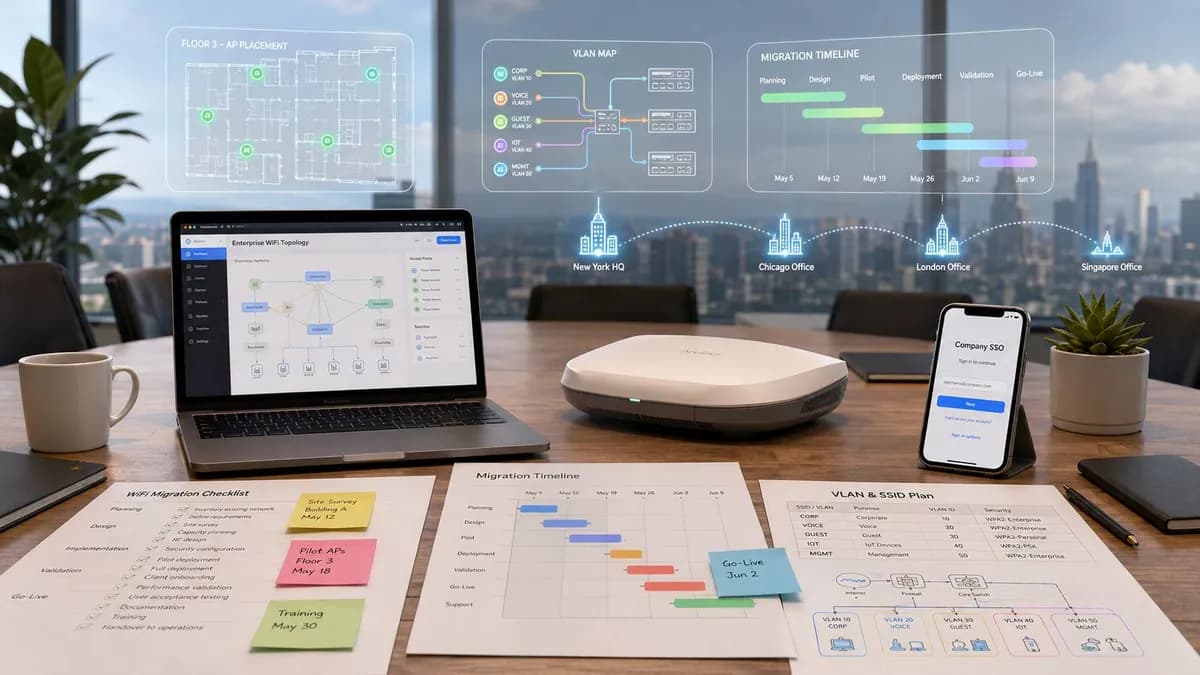
The access points are mounted, the change window is booked, and the vendor says the configuration is ready. Then the first Monday login fails. A hotel front desk terminal lands on the wrong VLAN, retail scanners refuse to authenticate, or tenants discover that their devices have been moved behind a policy they can't satisfy. The hardware may be perfectly sound. The migration planning wasn't.
Enterprise WiFi migrations fail in the gaps between infrastructure, identity, applications, and operations. A reliable plan treats those gaps as engineering risks, not administrative details. It identifies every client class, sequences authentication dependencies, gives business teams a realistic cutover window, and proves that rollback works before production users depend on it.
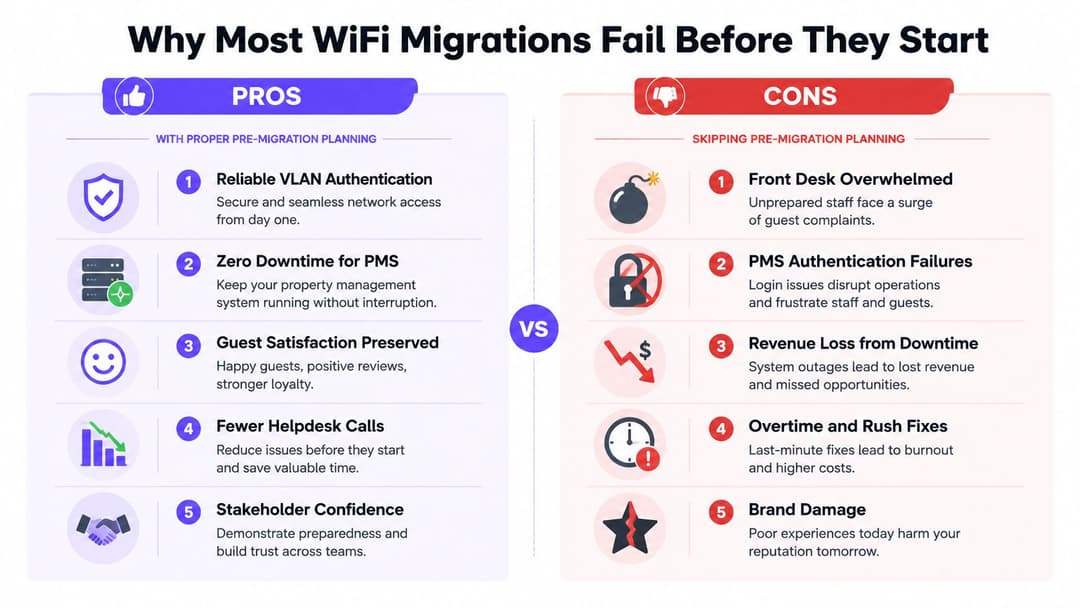
Why Most WiFi Migrations Fail Before They Start
A 200-room hotel changes its wireless platform on a Monday morning. By the time the breakfast service ends, the front desk is handling complaints from guests and staff, while the IT team is trying to understand why property management system terminals can see the network but can't complete authentication. The new access points are online. The SSID is visible. The failure sits in the policy mapping between the terminal's VLAN, its authentication method, and the application services it needs.
That incident is common in shape, even when the venue changes. In retail, an undocumented barcode scanner can stop a replenishment workflow. In a multi-family building, a resident device can be stranded because the migration team treated every client as though it supported modern enterprise authentication. These failures begin during discovery, long before an engineer replaces an access point.
The assumptions that break first
Three assumptions cause disproportionate trouble:
- Every device supports the new authentication method. Older scanners, printers, cameras, room-control systems, IPTV endpoints, and building sensors may use fixed credentials, outdated security modes, or a vendor-specific onboarding process.
- SSO can be connected at the end. Identity providers, RADIUS policies, certificates, directory groups, and conditional access rules form a dependency chain. If the wireless platform is cut over before that chain has been tested with real accounts, users experience an outage even though the network itself is healthy.
- Rollback means restoring the old configuration. A saved controller backup isn't a rollback plan. You need a tested decision point, an owner with authority to call it, and confirmation that clients can reconnect to the previous service without stale credentials, conflicting SSIDs, or exhausted DHCP capacity.
A migration checklist focused on hardware serial numbers won't expose these issues. A useful plan maps client behavior to business workflow. The front desk needs more than wireless coverage. It needs dependable access to the PMS, payment services, printers, and staff applications during a defined operating window.
Practical rule: Treat every undocumented client as a potential production dependency until its owner, authentication method, network policy, and recovery path are recorded.
Planning is risk control
Structured pre-work also changes the quality of the cutover conversation. Instead of promising that the change will be invisible, the project team can state which services are protected, which devices require a migration path, how long validation will take, and what evidence will trigger an abort.
That discipline matters because a WiFi refresh is rarely just an access-point replacement. It's a coordinated change across switching, DHCP, DNS, firewalls, identity, endpoint configuration, application support, facilities access, and front-line operations. The teams that plan those interfaces early spend the cutover validating known assumptions. The teams that don't spend it discovering them.
Building a Complete Network Inventory and Discovery Map
Start with an inventory that describes how the network behaves, not just what equipment the organization owns. A controller export might list access points and radios, but it won't necessarily reveal which SSID a room-control system uses, which RADIUS policy assigns its VLAN, or whether the switch port has enough PoE headroom for the replacement model.
Build the map from four perspectives: logical configuration, physical infrastructure, client population, and business dependency. Assign each asset a site, building or floor, owner, criticality tier, and migration wave. “Hotel north wing” is useful. “Hotel north wing, third-floor corridor, AP model, switch port, PoE state, serving SSIDs, adjacent APs, and affected room systems” is actionable.
Catalog the logical service chain
Record the relationship between SSIDs and the services behind them:
- Wireless infrastructure: access point model, serial number, firmware, radio settings, group membership, channel plan, transmit-power policy, and controller or cloud lease.
- Network services: VLAN identifiers, subnet purpose, DHCP scope, DNS forwarding, firewall rules, quality-of-service policies, and routing dependencies.
- Identity services: 802.1X profiles, RADIUS clients, certificate authorities, directory groups, SSO connectors, captive portal settings, and guest account workflows.
- Client classes: staff laptops, POS terminals, scanners, voice handsets, televisions, sensors, printers, cameras, tablets, and resident or guest devices.
Don't rely on one discovery source. Compare controller data with switch telemetry, DHCP leases, RADIUS logs, endpoint-management records, application-owner interviews, and a physical walk-through. A single iPSK group missed during this process can block a retail cutover when legacy scanners lose their expected network access.
Capture the physical constraints
Facilities information belongs in the same migration record. Note mounting height, access requirements, cable condition, run length, switch location, PoE budget, ceiling type, elevator requirements, and any areas where business operations, check-in, clinical work, or resident access restricts engineering activity.
The following checklist gives each discovery conversation a consistent shape.
| Asset Category | Examples to Catalog | Common Blind Spots |
|---|---|---|
| Access points | Model, firmware, location, radio profile, neighboring APs | Unlabeled units, inaccessible ceilings, non-standard profiles |
| Controllers and cloud platforms | Tenant, configuration groups, templates, licenses, backups | Site-specific overrides, inactive templates, undocumented administrators |
| SSIDs and VLANs | SSID purpose, VLAN mapping, DHCP scope, firewall path | Retired SSIDs still used by devices, overlapping policies |
| Authentication | RADIUS clients, 802.1X profiles, certificates, directory groups, iPSKs | Expired trust chains, vendor-specific settings, shared legacy keys |
| Switching and PoE | Switch model, port, PoE state, uplink, trunk configuration | Insufficient power, edge ports with local overrides |
| Endpoints and applications | Device type, owner, application, operating system, support contact | IPTV, room controls, scanners, printers, payment devices |
| Physical environment | Mounting, cabling, access window, coverage constraints | Renovation zones, restricted areas, hidden patching |
Use a structured field model rather than another unowned spreadsheet. A network multi-tool for structured WiFi discovery can sit alongside controller exports and site surveys, provided the project team validates the records against live behavior.
The output should be a migration dependency map. For each wave, show the APs, switches, SSIDs, identity services, applications, device owners, test accounts, and rollback assets involved. If an item has no owner or validation method, it isn't ready for production.
Stakeholder Mapping and Realistic Timeline Construction
The fastest WiFi migration is often the one that avoids an unrealistic schedule. A single-weekend cutover may reduce program duration, but it concentrates technical risk and operational disruption into one event. A phased rollout takes more coordination, yet it gives the team a chance to learn from a pilot, verify device behavior, and adjust templates before the next site.
The right choice depends on the operating model. A hotel may need room-by-room access and coordination with housekeeping, front desk, engineering, and the PMS vendor. A retailer must protect business hours, payment services, loss-prevention systems, and inventory workflows. A residential operator has to account for tenants who can't be expected to follow an internal IT runbook.
Map decisions, not just attendees
Create a responsibility matrix that names who approves, performs, validates, and receives updates for each dependency.
- Executive sponsor: Approves business risk, budget, and the final maintenance window.
- Network team: Owns configuration, staging, change execution, telemetry, and rollback mechanics.
- Security and identity teams: Validate RADIUS, Entra ID, Okta, certificates, group membership, and access policy.
- Application owners: Confirm that PMS, POS, voice, clinical, building, and tenant services work from the target network.
- Facilities: Provides access, coordinates cabling and mounting, and confirms physical constraints.
- Operations and service desk: Communicates impact, handles escalation, and records user symptoms during support.
- Vendors: Support the applications or endpoints that internal teams can't independently test.
Stakeholder mapping should also record availability, not just names. A security engineer who can review a policy but can't join the cutover call is not an available dependency. Neither is a PMS vendor whose support contract excludes overnight changes.
Build dependencies into the schedule
A practical sequence starts with requirements and discovery, then moves through configuration design, lab testing, pilot deployment, staged rollout, and production support. Don't schedule the pilot until the inventory is sufficiently complete. Don't schedule the full rollout until the pilot has produced evidence for authentication, roaming, application access, and recovery.
Use explicit entry and exit criteria:
- Discovery exit: Client classes, SSIDs, VLANs, identity paths, physical constraints, and owners are documented.
- Lab exit: Target templates, authentication flows, certificates, DHCP, firewall policy, and representative clients pass controlled tests.
- Pilot exit: Real endpoints and applications work at the selected site, support procedures are rehearsed, and rollback has been demonstrated.
- Wave exit: Monitoring is clean, exceptions are recorded, and the site owner accepts the result.
- Program exit: Documentation, credentials, escalation paths, and optimization tasks have transferred to operations.
Add buffer for the work that always expands, especially identity testing, vendor troubleshooting, access coordination, and client remediation. A vendor delivery date is not a cutover date. Business continuity, test evidence, and support capacity should set the schedule.
A maintenance window is only useful when the people who own the affected workflow are present and empowered to approve the next move.
Integration Points for SSO and Legacy Device Strategy
Authentication needs its own migration sequence. It shouldn't be treated as a configuration tab inside the wireless project, because a successful association proves very little if the user can't obtain the correct policy, address, route, or application access.
For staff access, define the identity path before changing the production SSID. That may include Entra ID or Okta integration, RADIUS or RADIUS-as-a-Service, certificate issuance, directory-group mapping, conditional access, and revocation behavior. Test an ordinary user, a privileged user, a disabled account, an account outside the target group, and a device with an invalid or missing certificate.
Sequence the trust chain
A safe order looks like this:
- Prepare identity connectors and policies. Create the target groups, authentication profiles, certificates, and policy mappings without removing the existing path.
- Validate the trust chain. Confirm that the wireless service, RADIUS layer, identity provider, and certificate authorities recognize each other.
- Test with representative endpoints. Include managed and unmanaged devices where both are expected, and test the actual operating systems used at the site.
- Introduce the target SSID or policy to a controlled population. Keep the existing service available while the pilot group proves access.
- Move users in waves. Monitor failed authentication reasons, VLAN assignment, DHCP acquisition, and application reachability.
- Drain the legacy path only after evidence is stable. Decommissioning is a separate change, not an automatic consequence of the new SSID going live.
Teams that need an external RADIUS transition can follow a staged approach such as RADIUS-as-a-Service migration guidance, where the new service operates alongside the existing setup before SSIDs move individually and the old path is retired after traffic has drained.
Give legacy devices a deliberate route
Legacy devices aren't a nuisance to be hidden on the main staff network. They need an explicit design. Identify devices that can't perform 802.1X, SAML, certificate authentication, or modern captive-portal flows, then assign them to a dedicated SSID or controlled onboarding path.
An iPSK design can provide device or group-specific passphrases mapped to the appropriate VLAN. That gives barcode scanners, room controls, digital signage, sensors, and similar endpoints a workable migration path while preserving segmentation. Keep the inventory tied to each key, record ownership, define rotation procedures, and restrict the resulting VLAN to the services that device class needs.
| Phase | Integration Task | Dependency | Risk if Skipped |
|---|---|---|---|
| Design | Define staff, guest, IoT, and legacy device policies | Client inventory and application requirements | Devices inherit an unsuitable access model |
| Preparation | Configure identity groups, certificates, RADIUS, and iPSKs | Identity and security approval | Cutover exposes untested trust or key dependencies |
| Lab validation | Test representative endpoints and failure states | Test accounts and sample devices | Teams mistake configuration success for user success |
| Pilot | Move a controlled user and device population | Support coverage and monitoring | Problems reach the whole site at once |
| Wave rollout | Change SSIDs or policies by site or client class | Pilot evidence and rollback readiness | Authentication failures spread across operations |
| Retirement | Drain and remove legacy services | Stable traffic and documented ownership | Recovery becomes harder after decommissioning |
The most dangerous ordering is simple: deploy the new APs, switch the SSID, and hope the identity layer catches up. Authentication must be ready before client migration, while legacy devices need a supported path rather than an exception discovered during the cutover.
Testing Validation and Rollback Planning
A controller dashboard can report healthy radios while users fail to authenticate, roam badly, or lose access to applications. Lab testing catches configuration errors. It doesn't reproduce the full mixture of devices, traffic, interference, vendor applications, and human workflows found in a hotel, store, campus, or residential building.
Validate three layers of behavior
Use three validation tiers, each answering a different question.
Association and authentication asks whether clients can discover the SSID, associate, complete authentication, receive the intended policy, and obtain network services. Test a mixed fleet, including iOS, Android, Windows, and ChromeOS devices where those platforms exist in the environment. Include legacy endpoints and failure cases, not just a pristine managed laptop.
Roaming asks whether a moving client remains usable as it crosses AP boundaries. Walk a site with an active voice or VoWiFi call, test busy corridors and operational areas, and record drops, reauthentication events, and changes in application behavior. A static desk test won't expose a handoff problem.
Application performance asks whether the business workflow survived. A hotel team should test the PMS, payment-related workflows, printers, and guest services. Retail teams should validate POS, scanners, inventory systems, and loss-prevention workflows. Don't use a speed test as a substitute for application validation. It measures capacity, not whether the service people need responds.
Choose rollback based on the site
Parallel operation and hard cutover solve different problems.
| Approach | Strength | Weakness | Better fit |
|---|---|---|---|
| Parallel SSIDs with gradual migration | Limits blast radius and allows controlled client movement | Adds temporary configuration and support complexity | Multi-family sites, hospitality, mixed legacy fleets |
| Hard cutover with staged rollback configuration | Shorter transition and cleaner end state | A failure affects the whole population quickly | Controlled campuses with compatible clients and strong support |
| Pilot plus wave rollout | Produces operational evidence before expansion | Requires more scheduling and site coordination | Distributed retail and hotel portfolios |
Before the window, save the known-good configuration, confirm access to the old management plane, verify switch and firewall rollback steps, and identify who can authorize an abort. During the cutover, use a decision tree:
- Is the failure isolated to a known client class? If yes, pause that class, apply the documented legacy strategy, and continue only if critical services remain healthy.
- Are staff authentication or core applications failing broadly? Stop the wave and restore the previous service path.
- Can the team explain the fault and recover within the agreed window? If not, roll back rather than extending uncertainty.
- After rollback, do representative clients reconnect and applications work? If not, keep the incident open and don't declare recovery.
A rollback decision must be based on observed service impact, not on the hope that another configuration change will fix it. The best plans make the safe choice easy to execute.
Post-Migration Monitoring and Success Verification
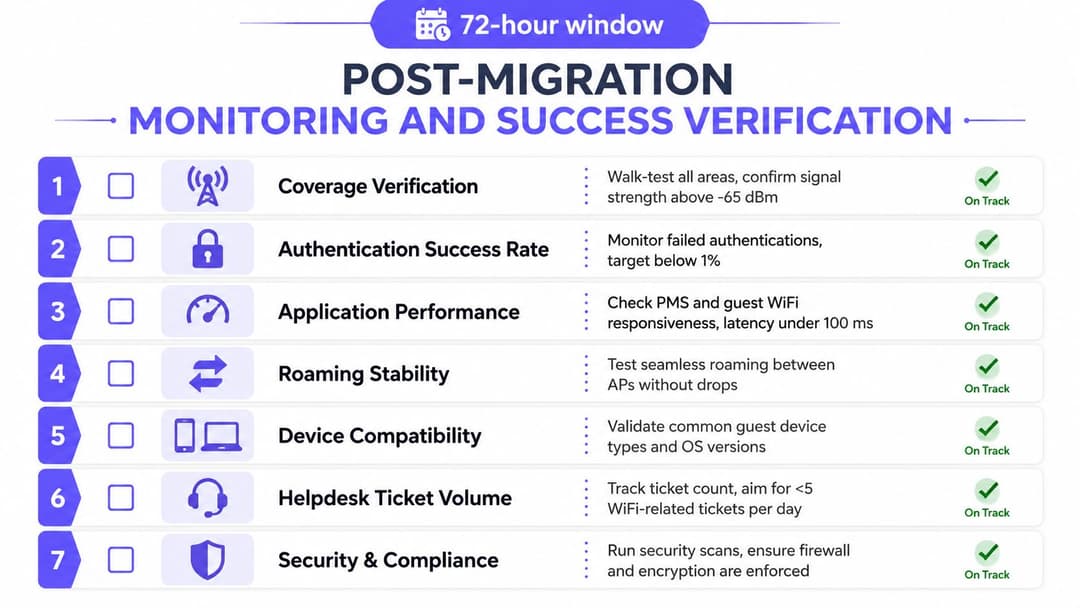
The last AP coming online marks the start of operational verification, not the end of the migration. The support team needs evidence that clients can authenticate, obtain network services, roam, and complete the workflows that justified the change.
Use pre-migration observations as comparison points. Review association failures, DHCP lease acquisition, DNS resolution, application response, roaming events, radio health, and support contacts. Look at both aggregate dashboards and individual incidents. A good average can hide a failed room wing, a problematic switch stack, or one device family that represents a critical operational function.
Turn telemetry into decisions
Configure alerts around symptoms that require action, such as repeated authentication failures, abnormal DHCP delays, DNS errors, roaming drops, or application response deterioration. Thresholds should reflect the baseline and the business impact. A short burst during a device restart may be normal. Repeated failures from all front-desk terminals are not.
User feedback fills gaps that telemetry can't. Ask front desk staff whether check-in is responsive, store colleagues whether scanners behave normally, facilities teams whether building devices report correctly, and residents or guests whether onboarding is clear. Keep surveys short and tie every report to site, area, device type, and time so engineers can correlate it with network events.
The WiFi analytics guide can help teams organize operational visibility, but no analytics platform removes the need for application owners and support staff to verify real workflows.
Make handover part of the success test
Operations should receive a usable baseline, not a folder of exports. The handover pack should include:
- Configuration baseline: SSIDs, VLAN intent, authentication flows, policy mappings, firmware, templates, and approved exceptions.
- Asset record: AP locations, switch ports, physical constraints, legacy devices, iPSK ownership, and unresolved inventory gaps.
- Support model: First-line symptoms, escalation contacts, vendor responsibilities, access procedures, and rollback authority.
- Evidence pack: Test results for association, roaming, applications, coverage, and critical device classes.
- Optimization backlog: Coverage refinements, policy changes, client upgrades, capacity observations, and tasks deferred from the cutover.
Keep monitoring active through the agreed post-change window, with daily review by network operations and site representatives. Close the migration only when service evidence, stakeholder feedback, documentation, and ownership all agree. That is how migration planning becomes operational confidence rather than a claim that the equipment is online.
Purple provides identity-based WiFi access, SSO integrations, iPSK support for legacy devices, RADIUS-as-a-Service options, and analytics that can support the discovery, authentication, cutover, and verification work described here. Review the migration capabilities at Purple and assess whether they fit your network, identity, and operational requirements.