
SD-WAN is software that centrally controls how a business's sites connect, choosing the best available link for each application instead of relying on one fixed private circuit.
If a cheaper connection still leaves your team configuring every branch separately, have you really improved the network? That's the gap SD-WAN addresses: not just which circuits you buy, but how you operate them.
For a US IT manager, understanding the architecture is only the start. You also need to decide who owns application policies, how security will work at each branch, and whether the complete service costs less than the network it replaces.
What software-defined WAN means in plain terms
A wide area network, or WAN, connects networks across different locations. Your office's local network connects devices inside the building; the WAN connects that office to branches, data centers and services elsewhere.
Think of a conventional private WAN as a planned highway route. The network engineer chooses the route and configures the equipment to use it. Software-defined WAN adds something closer to GPS navigation: administrators set priorities, and the software selects suitable routes across the connections available.
The analogy has a limit. A navigation system can't create a road, and SD-WAN can't create connectivity. You still purchase physical access services.
Traditional WAN versus SD-WAN
This comparison describes a common branch-network starting point, not every traditional WAN. Conventional networks can also have redundant circuits and automated management.
| Aspect | Traditional WAN | SD-WAN |
|---|---|---|
| Transport | One private circuit, usually MPLS | Any mix of MPLS, broadband, fiber, and 4G/5G |
| Configuration | Each router set up by hand | Policies defined centrally |
| Failover | Routing convergence after a fault | Affected traffic steered to a working link |
| Change rollout | Technician visits or manual changes per site | Changes pushed to branches from one console |
| Cost basis | Premium pricing per private circuit | Potentially cheaper internet links plus an overlay service |
| Best fit | Stable estates with one carrier and few changes | Many branches, cloud-heavy applications, and frequent change |
MPLS isn't the opposite of SD-WAN. MPLS is a carrier networking service that can provide transport. SD-WAN controls how applications use transport, including MPLS. Keeping a private connection while adding broadband is a legitimate design, not an incomplete migration.
US interest predates the current cloud security conversation. In the 2018 European Enterprise Communications Survey, 35% of respondents said they used SD-WAN in some form, including pilots, and another 18% planned to begin, according to the IDC white paper on network transformation. Those are historical adoption figures, not a measure of today's market.
Practical rule: Treat SD-WAN as a way to operate your WAN, not as a circuit you order.
The operational change matters most. Instead of translating every business requirement into separate router configurations, your team defines shared policies, controls exceptions and checks whether branches follow them. Centralization reduces repetitive work, but it also makes policy design and change approval more important.
How the Parts of an SD-WAN Fit Together
Say a retail group wants staff calls to take priority over background file transfers. Follow a call from a store to its destination, and the architecture becomes easier to understand.
The call first reaches the SD-WAN Edge, a physical or virtual device serving the branch. The edge identifies the traffic, applies the relevant policy and forwards it across an available connection. For traffic between participating SD-WAN endpoints, it can place packets inside an encrypted tunnel.
The functional relationship looks like this:
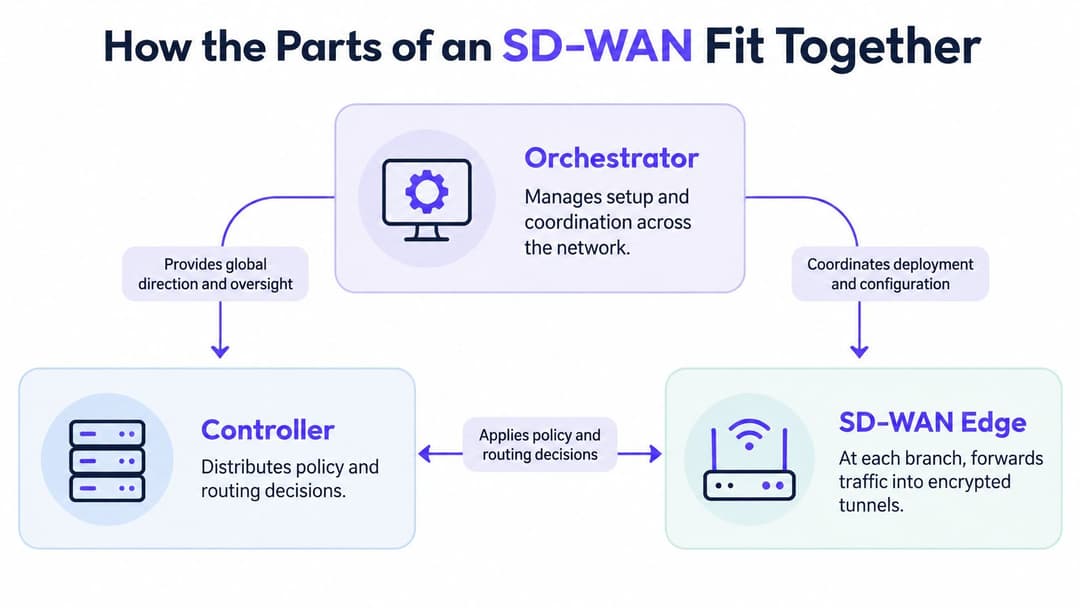
Edge, controller and orchestrator
The Controller distributes control information, policy and routing instructions to the edges. The Orchestrator handles service-wide setup and coordination, including provisioning, templates and configuration management.
These are functional roles, not necessarily separate boxes to purchase. In a supplier's platform, the management interfaces may combine them. The separation between policy control and underlying transport is central to the architecture described in Red Hat's SD-WAN explanation.
For the retail administrator, changing the approved voice policy centrally replaces editing each store's configuration. The administrator should still check deployment status, identify exceptions and retain a rollback plan. A successful command in the console isn't proof that every edge applied it.
Overlay, underlay and cloud access
The underlay is the actual connectivity: leased Ethernet, broadband, mobile access or another transport. The overlay is the logical network built across those services.
An application policy can therefore remain consistent when a branch changes access provider. However, direct internet traffic doesn't necessarily remain inside an encrypted SD-WAN tunnel all the way to a SaaS application. Check where each tunnel ends and what protects the remaining path.
Cloud connectivity also needs careful terminology. Local internet breakout sends approved cloud traffic out from the branch rather than through headquarters. A cloud on-ramp connects the WAN to a cloud environment or provider gateway. They can support the same cloud-access objective, but they aren't identical services.
Use a procurement checklist that covers:
- Routing compatibility: Confirm integration with existing routes and network boundaries.
- Encrypted overlays: Establish supported tunnel endpoints and encryption options.
- Addressing: Check IPv4 and IPv6 requirements.
- Cloud connectivity: Identify the gateways and on-ramps your applications need.
- Firewall integration: Confirm where inspection happens and who manages it.
Finally, validate access availability at each address. A proposed secondary connection is useful only when the provider can deliver it.
How traffic finds the best path automatically
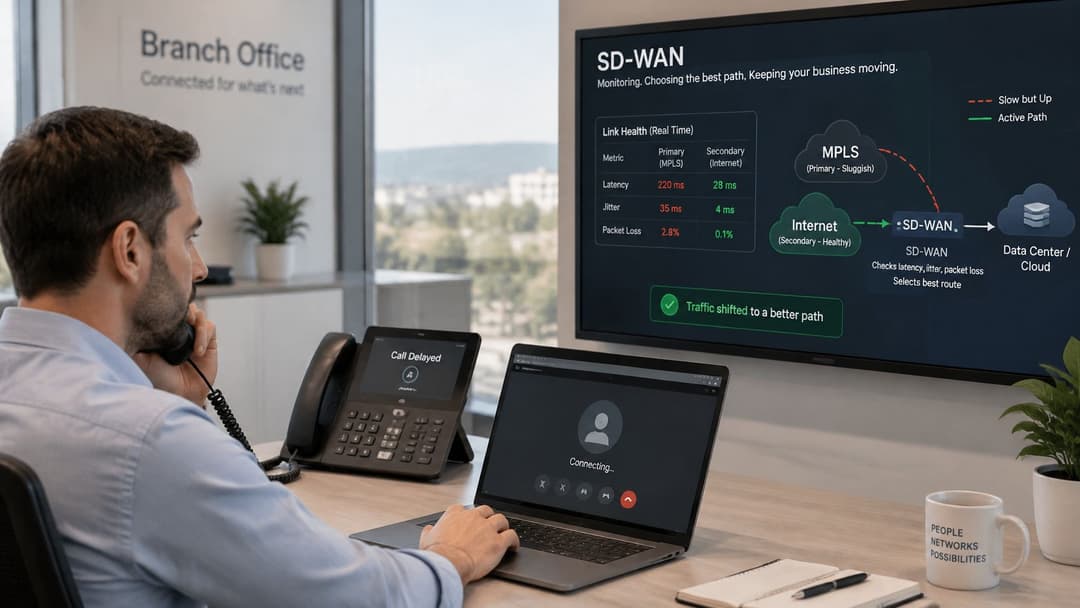
A branch's primary connection becomes congested. It's still technically online, but callers hear broken speech and long pauses. This is a brownout, rather than a complete outage.
A routing configuration that checks only whether the link is up may continue using it. SD-WAN can instead evaluate whether the connection remains suitable for the application and move affected traffic to an alternative.
Application-aware dynamic path selection uses measurements such as latency, jitter, packet loss and availability alongside administrator-defined rules, as described in Palo Alto Networks' SD-WAN documentation.
Define what suitable means
The best path isn't always the fastest or cheapest. Your team must define what each application needs.
- Voice and video: Prefer a path with low jitter, meaning little variation in packet arrival times.
- Transactional applications: Set an acceptable packet loss ceiling and protect business critical exchanges.
- Interactive SaaS: Prioritize responsive application transactions, not just the shortest looking route.
- Ordinary browsing: Allow lower cost broadband where its performance is sufficient.
- Bulk transfers: Prevent backups and large downloads from exhausting capacity needed elsewhere.
Advanced features need equally careful evaluation. Forward-error correction sends recovery information to help compensate for loss. Tunnel bonding combines link resources, while quality of service, or QoS, prioritizes competing traffic.
These mechanisms consume resources. Recovery traffic uses bandwidth, encryption uses processing capacity, and prioritization can't manufacture capacity on an overloaded circuit.
Test degradation, not just disconnection
Build an acceptance test around round-trip latency, jitter, packet loss, failover time, voice mean opinion score and SaaS transaction performance under congestion. A latency and jitter test can help establish a baseline, but it doesn't replace application testing.
A successful speed test doesn't prove that a branch can keep taking calls when its preferred connection deteriorates.
Check what users experience during path changes. Don't assume an active session survives just because the vendor advertises automatic failover.
SD-WAN doesn't guarantee performance by itself. Results reflect access-loop quality, carrier diversity, controller placement, encryption overhead and policy accuracy. If the alternative connection is also congested, the edge has no healthy route to select.
Deployment models and where SD-WAN pays off
Choose the operating arrangement before comparing feature lists. Your organization needs a model that matches its skills, support coverage and appetite for direct control.
SD-WAN deployment models
| Deployment model | Who runs it | Best for | Watch for |
|---|---|---|---|
| Self-managed | Your IT team | Organizations with strong network skills and a manageable estate | Full responsibility for upgrades, policies, and troubleshooting |
| Managed SD-WAN | Service provider | Multi-site estates without a large network team | Provider SLA limits and less direct control |
| Secure SD-WAN or SASE | Service provider in a managed offering | Sites needing integrated firewall and cloud security | Higher monthly cost and deeper vendor dependence |
| Hybrid overlay | Shared between you and provider | Keeping MPLS for critical sites while adding broadband | Parallel transport and support arrangements during transition |
These categories overlap. A hybrid network can be self-managed or provider-managed, while secure SD-WAN describes capabilities rather than a universal support arrangement. Read the service description, not just the package name.
Match the design to the workload
Retail. Say a chain moves routine browsing, inventory system access and approved SaaS traffic onto business broadband, then adds mobile backup at each store. It retains existing private transport until payment and operational applications pass testing. The intended result is continued trading during a fixed line fault, not merely a smaller circuit bill.
Hospitality. A hotel group introduces shared policies for guest, staff and payment traffic. It adds a secondary access service and assigns guest downloads lower priority than operational transactions. The useful outcome is consistent traffic treatment across properties, while local access controls keep different users separated.
Healthcare. A provider changes approved clinical cloud traffic from headquarters backhaul to a tested cloud-access path. It retains private connectivity where an application dependency requires it. Records access and imaging workflows need separate evaluation: a responsive login doesn't prove that image retrieval performs acceptably.
For student housing and residential buildings, WAN control can protect building-management and staff applications from competing demand. It doesn't create resident isolation by itself. At the local access layer, our Multi-Tenant WiFi gives each resident a private network across their devices, including browserless consoles and TVs.
A single-site business with a reliable circuit, simple applications and no meaningful resilience requirement may gain little from an SD-WAN overlay. A well-managed router and suitable backup service could be enough.
The strongest sign of a suitable deployment model is organizational: you can name who approves policy, who monitors faults and who escalates to each vendor. If those responsibilities remain unclear, the service isn't ready to buy.
What SD-WAN really costs compared with MPLS
Does SD-WAN lower the whole cost of running a WAN, or just the monthly circuit bill? To compare it fairly with MPLS, include connectivity, resilience, security, equipment and the people who keep the service working.
Indicative US SD-WAN costs per site
Compare Your Business Costs' SD-WAN pricing guidance gives indicative monthly ranges: basic overlays are around $50–$150 per site, managed services $150–$500, and secure SD-WAN or SASE $250–$800 or more per site. The guidance also notes that dedicated Ethernet can exceed $1,000 monthly, while basic broadband may cost about $50.
| Service level | Typical monthly cost | Usually extra |
|---|---|---|
| Basic overlay | $50–$150 per site | Connectivity, hardware and support |
| Managed SD-WAN | $150–$500 per site | Circuits, hardware and support outside the agreed package |
| Secure SD-WAN or SASE | $250–$800 or more per site | Connectivity, hardware and support outside the agreed package |
| Dedicated Ethernet comparison | Can exceed $1,000 per circuit | Installation charges where quoted; check lead time and contract term |
| Basic broadband comparison | About $50 per line | Additional resilience and enhanced support where available |
Treat these as buying ranges, not quotations. Installation lead time is not itself a charge, but delays can mean paying for an existing circuit for longer. Broadband products also differ in their service and support terms.
Build a complete comparison
Add access circuits, edge hardware, subscriptions, mobile data, security inspection, monitoring and provider management. Include transition costs too: parallel services, installation work, overlapping contracts and engineering time.
A second circuit only improves resilience if it avoids the same points of failure. Buying from different retailers does not prove that cables use separate ducts or independent infrastructure.
Ask:
- Is application-aware routing necessary here? A small site may need straightforward backup rather than an extensive overlay.
- Are the access paths diverse? Request delivery information to assess shared failure points.
- Can the team troubleshoot across suppliers? Someone must identify whether a fault sits with access, the overlay, a firewall, or an application.
The managed service cost insights from Vight offer context for separating management fees from connectivity and project work.
Buying test: Compare equivalent resilience and support, not premium private connectivity against an unprotected broadband line.
Central provisioning can reduce repetitive configuration and site visits. Larger enterprises may value that consistency more than transport savings; smaller properties may value access to managed expertise.
SD-WAN can lower transport costs while raising other operating costs. The decision is whether the resulting resilience and control justify the full cost of running the service.
Security limits and Identity-Based Access
An encrypted tunnel protects traffic over a defined path. It doesn't make an unmanaged laptop trustworthy, fix an exposed cloud application or correct an over-permissive firewall rule.
The SD-WAN security guidance summarized by Compare Your Business Costs highlights the emphasis on routing controls and encryption, including checking end-to-end IPsec protection and a strong configuration profile. The practical question is where protection starts, where it ends and who maintains it.
Give every control an owner
A managed service doesn't transfer every security responsibility automatically. Put the following responsibilities into the service design and contract:
- Encryption and keys: Define encryption scope, key rotation, and certificate management.
- Control-plane access: Require authenticated administration and control communications.
- Segmentation and isolation: Document tenant boundaries and permitted traffic between segments.
- Supplier access: Specify privileged access approval, restrictions, and revocation.
- Logging and response: Assign alert review, incident investigation, and evidence retention.
- Software maintenance: Name the owner for updates, vulnerability response, and audit evidence.
Local internet breakout also changes enforcement requirements. If a branch no longer sends traffic through a central inspection point, provide suitable inspection and policy enforcement on its new route.
Keep networking and identity distinct
SD-WAN steers traffic across WAN connections. SASE, or secure access service edge, combines WAN connectivity with cloud-delivered security capabilities. Zero-trust access evaluates whether a particular user and device should receive access to a resource.
Those layers solve different problems. Recognizing a business application doesn't establish the identity of the person using it, and being connected inside a branch shouldn't automatically grant broad access.
At the WiFi edge, identity-based networking lets administrators base access on authenticated users and devices rather than a shared password or network location. Your access policy should then align with the segmentation enforced through the wider network.
Our Staff WiFi onboards employee devices with managed EAP-TLS certificates, so there's no shared passphrase to rotate. It provides WPA2/3-Enterprise, Passwordless WiFi and RADIUS-as-a-Service, offering enterprise-level employee WiFi security without the complexity of a NAC.
That doesn't replace WAN security. It addresses the local authentication layer, which must work alongside routing, inspection and application authorization.
For personal, clinical or payment data, architecture and day-to-day operations matter more than the SD-WAN label. Require evidence that the intended controls work together, rather than accepting encryption as proof of complete protection.
How to plan a move from MPLS to SD-WAN
Start with a pilot that proves your policies, not a shortlist built around vendor demonstrations. A sensible migration preserves the ability to recover while your team learns how the new service behaves.
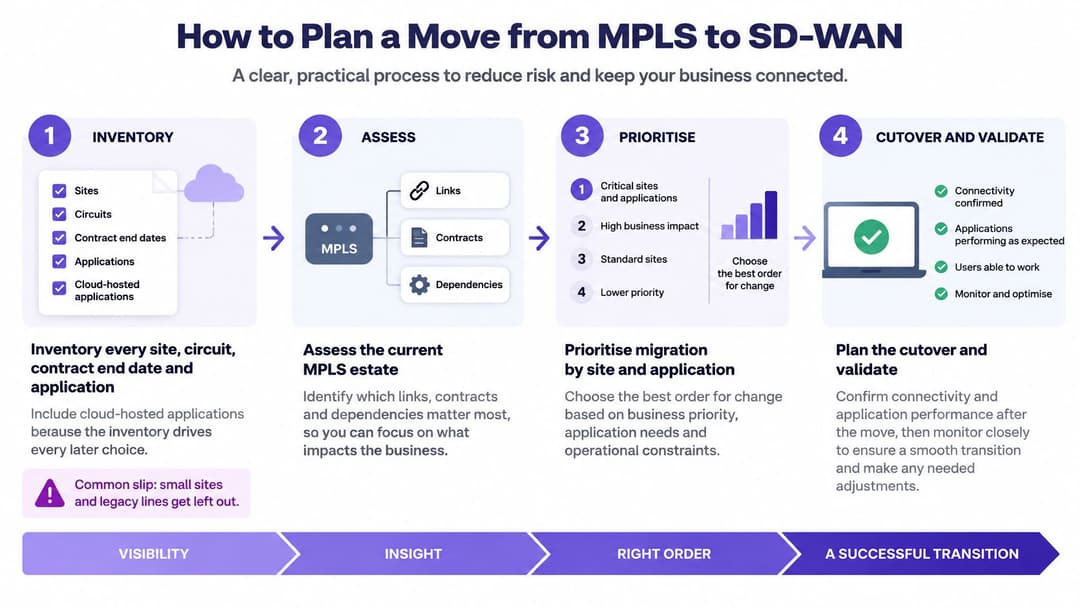
The roadmap shows the broad sequence; the implementation needs explicit validation and rollback decisions.
Prepare the property portfolio and responsibilities
Inventory every site, circuit, contract and application. Record contract end dates, notice requirements, access providers and application destinations, including cloud-hosted services. Include small sites, legacy lines and dependencies such as fixed addressing that might otherwise disappear from the design.
Classify traffic by sensitivity and performance need. Separate voice, video, transactions and bulk transfers. Document which applications may use local internet access and which require a controlled private path; applying one policy to everything defeats application-aware design.
Choose the operating model and assign security ownership. Write down who approves changes, maintains certificates, reviews alerts and handles supplier escalation. Don't assume the managed provider owns a control unless the agreement says so.
Prove the design before retiring circuits
Pilot at a low-risk branch with a fallback. Run the overlay alongside existing connectivity and keep a documented route back. Choose a site with representative applications, not the easiest location to install.
Run the congestion-based acceptance test. Use the performance checks described earlier, with application owners observing real workflows. Agree pass criteria before testing, and include degraded-link conditions rather than relying on an unplugged-cable demonstration.
Migrate in controlled waves. Group sites by business risk, application dependencies and access readiness. Retain private connectivity at critical locations until an agreed monitoring period demonstrates acceptable operation, and don't schedule cutover around an unconfirmed broadband delivery date.
Decommission only after technical and contractual checks. Confirm stable operation, remove obsolete routes and check the notice period before canceling services. Keep configuration backups and update diagrams, support records and incident procedures.
Before authorizing a wave, review unresolved exceptions with the service desk and application owners. A network dashboard can look healthy while staff still struggle with a business workflow.
Your first deliverable should be a tested policy set and a recoverable pilot. Once those exist, provider comparisons become more meaningful because you can evaluate services against requirements your organization has demonstrated.
We provide Guest WiFi, Staff WiFi and Multi-Tenant WiFi to help control who connects at the access layer alongside your WAN design. Visit Purple to explore passwordless staff access and private resident networks, and discuss how those access policies can fit your SD-WAN migration.