
Blocking Malware and Phishing at the Network Edge
This technical reference guide outlines the architecture, deployment, and business impact of implementing network-level threat protection to secure unmanaged guest and IoT devices at the network edge. It provides actionable guidance for IT leaders to block malware and phishing proactively.
Listen to this guide
View podcast transcript
執行摘要
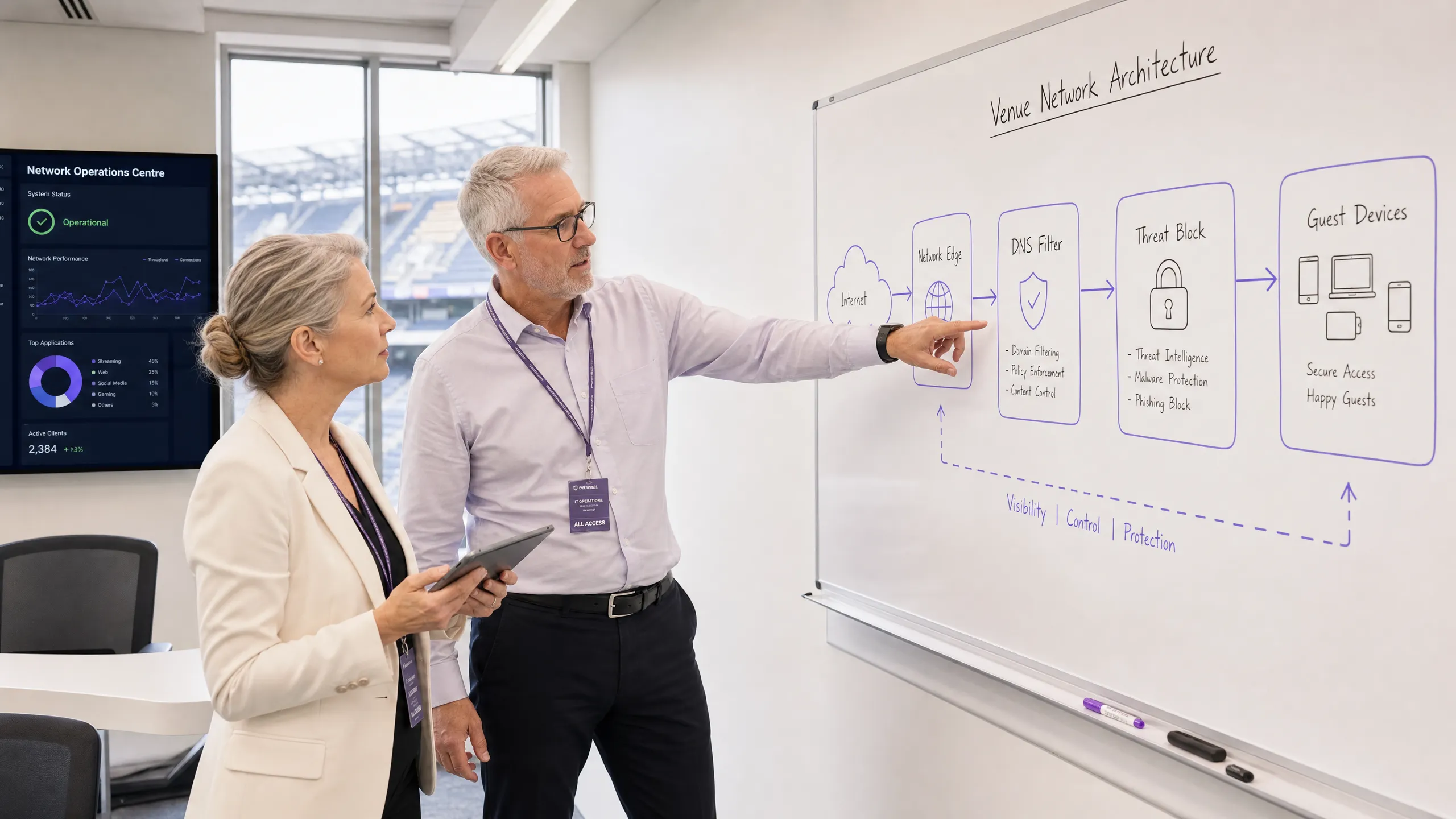
對於管理高人流量場所的 CTO 和網路架構師而言,保護未託管設備的安全是一項關鍵的營運挑戰。您無法在訪客智慧型手機上部署端點代理程式,也無法指望使用者主動避開惡意連結。本指南詳細介紹了實施網路層級威脅防護如何能在惡意軟體和網路釣魚到達訪客設備之前,在網路邊緣將其阻斷。透過 DNS 過濾和威脅情資整合在閘道端執行安全策略,場所可以主動保護 BYOD、IoT 和訪客流量。這種方法減少了事件回應的開銷,確保符合 GDPR 和 PCI DSS 等標準,並為 Hospitality 、 Retail 和 Transport 行業的 Guest WiFi 使用者維護一個安全的環境。
技術深度解析
網路邊緣防護架構
網路邊緣惡意軟體防護將安全執行點從端點轉移到閘道。當設備連接到場所網路並嘗試解析網域時,DNS 查詢會被邊緣閘道攔截。該查詢不會進行標準解析,而是會根據持續更新的威脅情資來源進行評估。
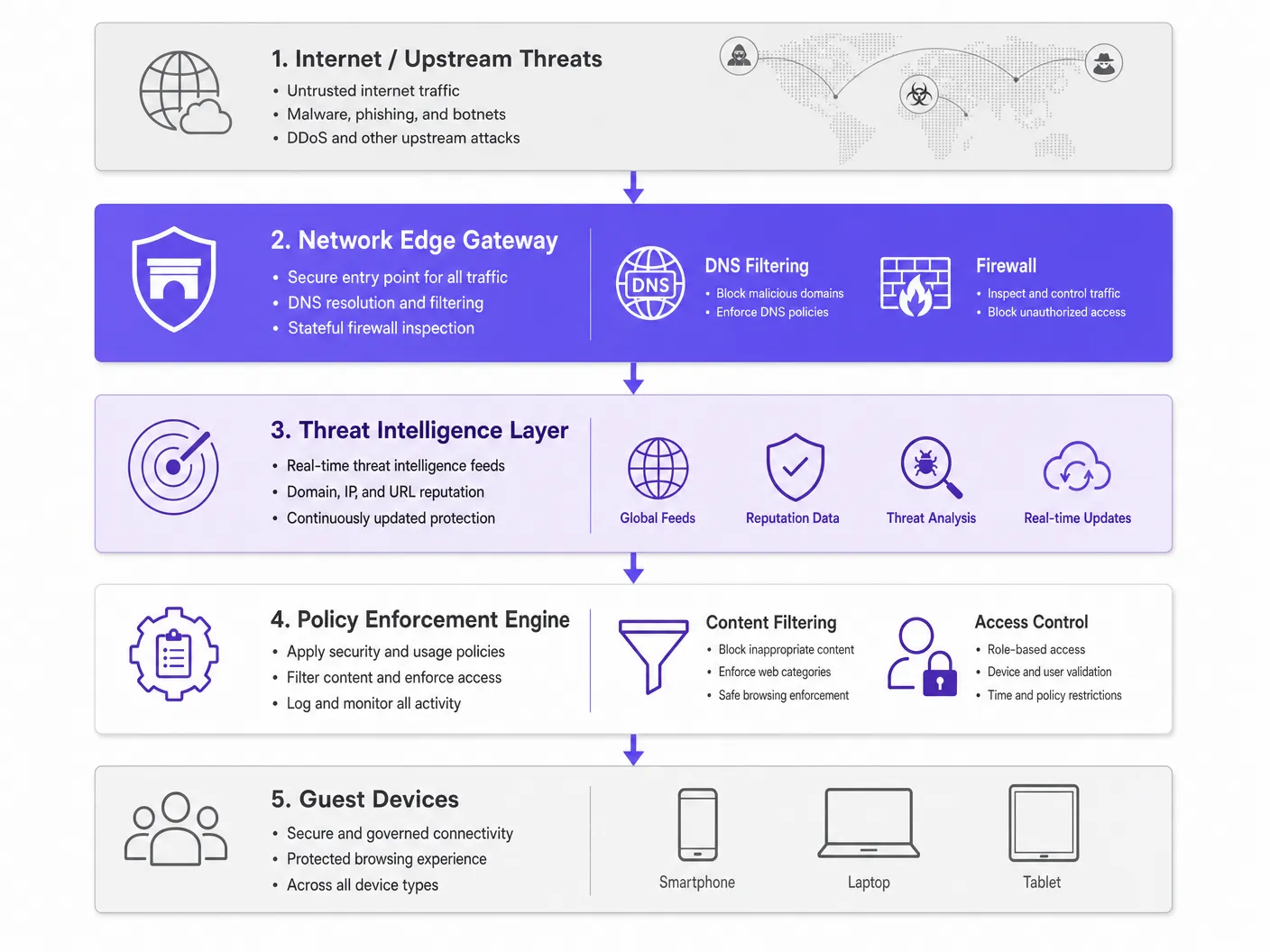
如果該網域與惡意軟體散播、網路釣魚活動或殭屍網路命令與控制 (C2) 架構相關聯,DNS 請求將會被導向「黑洞」(sinkholed)。在下載惡意承載內容之前,連線就會被中斷。這種主動阻斷可防止橫向移動並保護場所的 IP 商譽。
關鍵元件
- DNS 過濾引擎:檢查所有外發的 DNS 請求。配置此引擎以阻斷已知的公共 DoH (DNS over HTTPS) 解析器至關重要,以防止使用者繞過場所的安全 DNS。
- 威脅情資整合:訂閱全球情資來源,根據商譽、新註冊網域狀態和已知惡意活動即時對網域進行分類。
- 策略執行:根據使用者角色(例如:員工與訪客)和內容類別套用細粒度規則,確保符合 IWF Compliance for Public WiFi Networks in the UK 。
實施指南
部署網路邊緣防護需要採取分階段的方法,以在最大程度減少干擾的同時,實現最大程度的安全覆蓋。
步驟 1:網路分段
確保您的網路已使用 VLAN 進行適當的分段。訪客流量、企業員工、IoT 設備和 POS 系統必須位於隔離的分段上。這可以限制設備在加入網路前遭到入侵時的受害範圍。
步驟 2:閘道器設定
設定您的邊緣路由器或防火牆,將所有 DNS 流量轉發至安全的 DNS 過濾服務。實施防火牆規則,以阻擋連接埠 53 (DNS) 和連接埠 853 (DoT) 往已核准安全解析程式以外之任何目的地的外網流量。如需更多關於現代網路最佳化的資訊,請參閱 Office Wi Fi: Optimize Your Modern Office Wi-Fi Network 。
步驟 3:原則定義
建立基準原則。在全域阻擋已知的惡意類別。針對內容過濾,請根據場域類型套用特定原則——例如,與一般零售相比,在 Healthcare 環境中實施更嚴格的過濾。
最佳實務
- 細粒度原則套用:避免產生技術支援工單的全面性阻擋。使用與您的身分識別提供者整合的角色型存取控制 (RBAC)(例如 Purple 的 Connect 授權)。
- 完整記錄:維持 DNS 查詢和已阻擋威脅的完整稽核追蹤。這對於事件回應和合規性報告至關重要。請參閱 Explain what is audit trail for IT Security in 2026 以瞭解詳細需求。
- 持續監控:利用 WiFi Analytics 即時監控網路效能和安全性事件。
疑難排解與風險緩釋
處理加密 DNS
現代作業系統越來越常使用 DoH 和 DoT,這會加密 DNS 查詢並可能繞過傳統的邊緣過濾。為了緩釋此問題,請維持一份已更新的已知公開 DoH 解析程式(例如 8.8.8.8、1.1.1.1)阻擋清單,以強制設備退回使用場域透過標準連接埠 53 所提供的安全 DNS。
過度阻擋合法流量
積極的威脅情資來源有時可能會標記合法的網域,特別是用於行銷活動的新註冊網域。建立快速的允許清單流程,並授權 IT 營運團隊快速解決誤判問題。
投資報酬率與業務影響
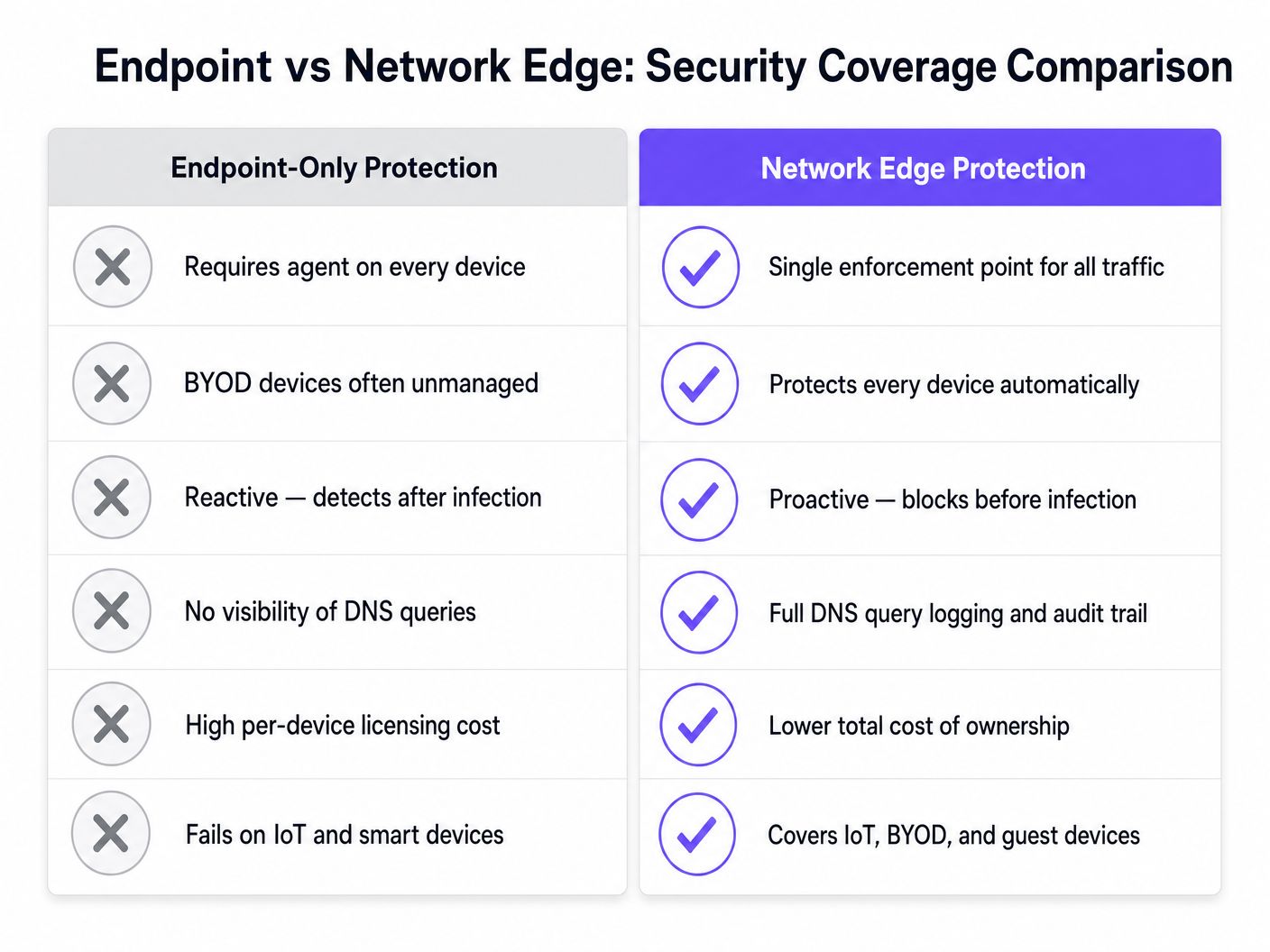
網路邊緣惡意軟體防護的商業案例是建立在降低風險與提高營運效率的基礎上。透過在閘道端阻擋威脅,場域能省去與 BYOD 和訪客裝置端點安全相關的單一裝置授權成本。此外,這也大幅減少了 IT 客服人員在調查受駭裝置或處理黑名單 IP 位址上所花費的時間。由此帶來的安全且可靠的連線能力,不僅能提升訪客體驗,還能保護場域的品牌聲譽。
Key Definitions
Network Edge
The boundary where a local network connects to the internet, typically managed by a router, firewall, or gateway.
This is the optimal location to deploy security controls for unmanaged devices, as all traffic must pass through it.
DNS Filtering
The process of blocking access to certain websites or IP addresses by intercepting DNS queries and evaluating them against a policy or threat feed.
Used to proactively stop devices from connecting to malicious domains before any data is transferred.
Sinkholing
Redirecting malicious traffic to a safe, controlled IP address instead of its intended destination.
When a guest device tries to reach a malware server, the edge gateway sinkholes the request, preventing infection.
Threat Intelligence Feed
A continuously updated stream of data regarding potential or current cyber threats, including known malicious domains and IP addresses.
Edge gateways use these feeds to make real-time decisions on whether to allow or block traffic.
DoH (DNS over HTTPS)
A protocol for performing remote Domain Name System resolution via the HTTPS protocol, encrypting the data.
While good for privacy, DoH can bypass corporate edge filtering unless known DoH resolvers are explicitly blocked.
VLAN Segmentation
Dividing a single physical network into multiple logical networks to isolate traffic.
Essential for separating untrusted guest traffic from sensitive corporate or POS systems.
BYOD (Bring Your Own Device)
The practice of allowing employees or guests to use their personal devices on the organisation's network.
BYOD devices are typically unmanaged, making endpoint security impossible and necessitating network edge protection.
Audit Trail
A chronological record of system activities, including DNS queries and blocked connections.
Required for compliance with frameworks like PCI DSS and GDPR to prove security controls are active.
Worked Examples
A 500-room hotel needs to secure guest WiFi while ensuring IoT devices (smart TVs, room controls) are protected from external command-and-control servers.
Deploy a network edge gateway with DNS filtering. Segment the network into Guest, IoT, and Corporate VLANs. Configure the gateway to intercept all DNS queries from the IoT and Guest VLANs, forwarding them to the secure DNS service. Apply a strict policy for the IoT VLAN that only allows resolution of known, required domains (allowlisting), while applying a standard threat-blocking policy for the Guest VLAN.
A large retail chain experiences frequent IP blacklisting due to guest devices sending spam while connected to the in-store WiFi.
Implement network edge malware protection with active threat intelligence feeds. Configure the firewall to block outbound SMTP (port 25) for all guest traffic. Enable DNS filtering to sinkhole requests to known botnet and spam-distribution domains.
Practice Questions
Q1. A stadium network administrator notices that while DNS filtering is enabled, some guest devices are still reaching known malicious domains. What is the most likely cause and how should it be addressed?
Hint: Consider modern protocols that might bypass standard port 53 filtering.
View model answer
The devices are likely using encrypted DNS protocols like DNS over HTTPS (DoH) or DNS over TLS (DoT), which bypass standard port 53 filtering. The administrator should update firewall rules to block known public DoH/DoT resolvers and block outbound traffic on port 853, forcing devices to fall back to the venue's secure DNS.
Q2. When deploying network edge protection in a hospital environment, how should the policies differ between the guest WiFi and the medical IoT device VLAN?
Hint: Think about the concept of least privilege and predictable behavior.
View model answer
The guest WiFi should use a standard threat-blocking policy (blocking malware, phishing, and inappropriate content per IWF guidelines) but generally allow internet access. The medical IoT VLAN should use a strict 'default deny' policy with an allowlist, permitting communication only with specific, required vendor servers. IoT devices have predictable traffic patterns, making allowlisting highly effective.
Q3. A retail client wants to implement edge filtering but is concerned about blocking legitimate marketing campaign domains that are newly registered. What process should be implemented?
Hint: Focus on operational workflows and balancing security with business needs.
View model answer
Implement a rapid allowlisting workflow. While 'Newly Registered Domains' is a common threat category, the IT team should have a process to quickly verify and allowlist domains provided by the marketing team before campaigns launch, ensuring security does not impede business operations.
Continue reading in this series
DNS Over HTTPS (DoH): Implications for Public WiFi Filtering
This technical reference guide explains how DNS over HTTPS (DoH) bypasses traditional port 53 content filtering on public WiFi networks. It provides actionable, vendor-neutral mitigation strategies for network architects and IT managers to regain visibility, enforce compliance, and secure guest access in enterprise environments.
DNS Over HTTPS (DoH): Implications for Public WiFi Filtering
This technical reference guide explains how DNS over HTTPS (DoH) bypasses traditional port 53 content filtering on public WiFi networks. It provides actionable, vendor-neutral mitigation strategies for network architects and IT managers to regain visibility, enforce compliance, and secure guest access in enterprise environments.
Public WiFi Liability: Why Content Filtering is Mandatory
This technical reference guide outlines the legal and operational risks of providing unfiltered public WiFi, detailing why content filtering is a mandatory deployment requirement for venue operators. It provides actionable architecture strategies, implementation steps, and risk mitigation tactics to protect networks from illegal activity, copyright infringement, and regulatory non-compliance. Venue operators and CTOs will find concrete case studies, decision frameworks, and configuration guidance to implement a defensible, compliant Guest WiFi environment.