
Bulk internet agreement vs managed WiFi: which model fits your building
A practical procurement reference for property, IT and operations leaders comparing resident-paid retail broadband, a bulk internet agreement and managed WiFi. It clarifies ownership, resident move-in, security, cost scope and contractual exit, using US bulk-internet framing and UK equivalents.
Video overview
Listen to this guide
View podcast transcript
Part of our core series: Multi-Tenant WiFi Guide →
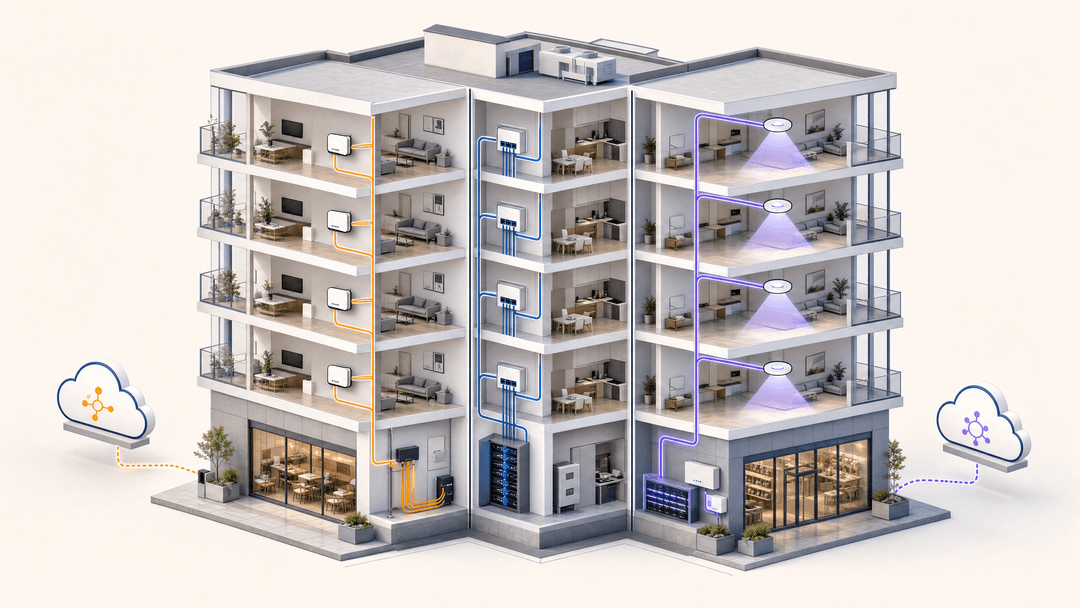
When selecting how a multi-family or Multi-Family (MDU) property delivers internet access, property operators face three distinct procurement models: a bulk internet agreement with a single ISP, individual resident-paid retail broadband, or property-wide managed WiFi delivered as a core building amenity.
Choosing the right approach dictates infrastructure capital expenditure, ongoing operational costs, resident move-in satisfaction, and long-term net operating income (NOI). This technical guide breaks down the procurement trade-offs, network asset ownership, day-one connection workflows, and churn management across all three connectivity models.
The Three Multi-Tenant Connectivity Models Explained
Property managers and developers generally evaluate three structural models for residential connectivity:
| Feature / Metric | Individual Retail Broadband | Bulk Internet Agreement | Property-Wide Managed WiFi |
|---|---|---|---|
| Procurement Relationship | Resident contracts directly with retail ISP | Property owner contracts bandwidth in bulk with ISP | Property owner contracts commercial transit and managed network |
| Asset Ownership | ISP owns wiring/ONT; resident leases router | ISP owns distribution; building may own cabling | Property owner owns enterprise cabling, switches, and access points |
| Move-In Experience | 3 to 14 days waiting for router delivery or technician | Immediate wired access; resident supplies own router | Instant activation via captive portal or pre-provisioned Passpoint/iPSK |
| Revenue Opportunity | Zero (ISP captures 100% of revenue) | Marginal markup (amenity fee minus bulk cost) | Significant recurring revenue via bundled technology amenity fees |
| Network Visibility & Control | Zero property visibility; unmanaged RF interference | Minimal visibility; unmanaged RF interference in units | Complete centralized control; enterprise RF management and SLA guarantees |
1. Individual Resident-Paid Broadband
In the traditional retail model, the property developer provides telecom conduit or fiber risers, but takes no active part in connectivity. Each resident contacts an ISP (e.g. Comcast, Spectrum, AT&T), orders a package, waits for delivery or technician dispatch, and installs a consumer wireless router.
The operational drawback: Units end up packed with dozens of consumer routers operating on overlapping 2.4 GHz and 5 GHz channels. Co-channel interference spikes, performance degrades across walls, and property management has no control over connectivity issues that negatively impact tenant satisfaction.
2. Bulk Internet Agreements
Under a bulk internet contract, the property owner signs an exclusive commercial agreement with a single internet service provider to supply all units at a discounted wholesale rate. The property charges residents a fixed technology fee as part of their monthly rent or amenity billing.
The trade-off: While bulk agreements deliver volume pricing, they often bind the property to 5-to-10 year exclusive contracts. Furthermore, most bulk agreements terminate at a wall jack or ONT in each apartment, still requiring residents to manage separate modems or access points rather than enabling seamless roaming across the entire building, amenities, gym, and courtyard.
3. Property-Wide Managed WiFi
In a modern managed WiFi deployment, enterprise access points (APs) are installed throughout residential units and shared communal areas (lounges, coworking spaces, pools, rooftop terraces). Bandwidth is delivered via redundant commercial leased lines, and traffic is segmented using Dynamic Pre-Shared Keys (DPSK / iPSK) or 802.1X enterprise authentication.
Residents experience instant, seamless connectivity from the moment of move-in. Each resident receives a secure Private Area Network (PAN) that follows them throughout the entire estate, allowing wireless printing, casting, and streaming without exposing devices to other tenants.
Day-One Move-In and Tenant Churn Workflows
Resident turnover is an operational friction point in Multi-Family housing. The connectivity model dictates the labor required during onboarding and departures:
- Move-In Activation: With managed WiFi integrated into property management software (PMS) like Yardi, RealPage, or Entrata, tenant lease creation automatically provisions a unique DPSK passphrase or Passpoint profile. When the resident arrives on site, their cell phone connects immediately without waiting for hardware installation.
- Tenant Churn & Security: When a lease ends, the PMS webhook automatically revokes the tenant DPSK. Their devices are immediately disconnected from the network, eliminating security risks and preventing former residents from consuming building bandwidth.
Frequently Asked Questions
Is bulk internet cheaper than managed WiFi for property owners?
Bulk internet often requires lower initial hardware investment because the ISP may subsidize unit cabling. However, property-wide managed WiFi generates higher recurring returns and adds property asset value by establishing building-owned enterprise network infrastructure.
How do managed WiFi networks keep resident devices private?
Enterprise multi-tenant networks employ client isolation and private VLANs (or Micro-segmentation). Even though multiple residents connect to a shared building SSID, each apartment unit operates inside an isolated Personal Area Network (PAN), preventing neighbors from viewing or accessing each other's devices.
Can residents connect smart home and headless IoT devices to managed WiFi?
Yes. Modern managed WiFi platforms provide a self-service resident onboarding portal where residents can register MAC addresses for game consoles, smart TVs, and IoT appliances that do not support web browsers or 802.1X certificates.
Key Definitions
Bulk internet agreement
A building-wide commercial arrangement where one ISP supplies service for all tenants or residents, with costs recovered through the building or provider billing process.
Use this term in US MDU procurement. Confirm it does not include prohibited exclusive provider access.
Resident-paid retail broadband
A model where each resident separately buys, activates and cancels broadband from a retail provider.
It prioritizes individual choice but can create inconsistent move-in and support experiences.
Managed WiFi
A building service in which the access network, resident access journey and operational support are centrally managed under a defined service model.
It fits properties where connectivity is part of the operating promise and lifecycle control matters.
Demarcation point
The documented boundary at which responsibility moves from one party or network component to another.
Put it in the contract and architecture diagram to avoid fault and cost disputes.
IEEE 802.1X
The IEEE standard for port-based network access control, using EAP to authenticate access before a controlled port permits normal communication.
Use it for staff and managed-device access where individual identity matters.
RADIUS
A service used to authenticate and authorize network access requests and return the policy associated with an identity.
It sits behind identity-based access workflows, including controlled WiFi onboarding.
Captive portal
The splash page shown before internet access is granted on a WiFi service.
Use it for login, terms and opt-ins, not as the sole network security control.
iPSK
An individual pre-shared key assigned to a person or device rather than shared across a whole building.
It can help isolate households and make access revocation more precise.
Private network bubble
A policy pattern that groups authorized household devices into a private area while separating them from other residents.
Consider it when residents expect personal-device discovery without cross-household exposure.
Joiners, movers, leavers
The operating process used to grant, change and remove access as a person’s relationship with the building changes.
It is the key lifecycle test for a managed building service.
Worked Examples
A 220-unit Multi-Family building wants connectivity available when residents collect keys, but currently allows individual retail broadband orders.
Survey risers, closets and unit coverage first. Establish who owns usable cabling and active equipment. Run a managed WiFi pilot on a representative section, define the resident identity and support journey, then phase the cutover with parallel retail service where permitted. Approve only after coverage, capacity, security boundaries and service-desk handover pass acceptance testing.
A 90-room hotel is offered a low-cost bulk internet agreement bundled with on-site equipment and support.
Price the same scope against a retained-access-layer option. Require the ISP to list circuit, switches, access points, cabling, cloud management, response targets and service credits separately. Confirm the exit treatment of equipment and inside wiring, then run a fault drill that tests a guest outage, payment-environment segmentation and a failed access point.
A conference venue wants one service for exhibitors, staff, guests and temporary event networks.
Keep each role as a separate identity and traffic policy. Use 802.1X for managed staff devices, define guest access through the captive portal where appropriate, and isolate payment and operational systems. Test the design with peak-event capacity, exhibitor move-in, lost-device revocation and service-provider failure before the first contracted event.
Sources
- FCC: Consumer FAQ, rules for service providers in multiple-tenant environments
- GOV.UK: Millions of homeowners and tenants to get better access to faster broadband
- IEEE 802.1X: Port-Based Network Access Control
- PCI Security Standards Council: Scoping and segmentation guidance for modern network architectures
- Purple Support: Captive Portal
- ICO: A guide to the data protection principles
- Purple case study: Harrods
- Purple case study: Formula 1 Mexico City Grand Prix
- Wi-Fi Alliance: WPA3 specification
Continue reading in this series
Per-unit VLAN and PSK architecture: a design walkthrough for MDU networks
You will be able to choose between a VLAN per apartment and policy carried by each resident's unique key, using four factors: wired ports, churn, segment count and hardware support. You can then size DHCP scopes, count segments against your real platform limits and estimate running cost for Multi-Family, Student Housing and aparthotel sites.
Retrofit vs new build: planning MDU WiFi cabling and access point placement
Decide whether an apartment building needs corridor or in-unit access points, and plan the cabling, risers, fire-stopping and PoE budget each path demands. You will be able to scope an occupied-building retrofit around access limits, or bring network design into a new build by AIA Phase 3 so every AP sits within the 90-meter permanent link.
Managed WiFi cost per door: a worked model for MDU operators
You will be able to build a defensible managed WiFi cost per door for an MDU property, line by line across cabling, access points, switching, licensing and support. You can then normalize managed service bids, test how scale and asset lives move the figure, and compare the fully loaded monthly cost with a retail broadband benchmark.
Got questions about your specific setup?
Our team works with venue operators, IT managers, and network engineers across 80,000 venues. Book a 20-minute call and we will show you how others like you solved it.