
Designing Secure Staff WiFi Networks Separated from Guest Traffic
An authoritative technical reference guide for network architects and IT leaders on designing secure, high-performance staff WiFi networks. It details the logical and physical segmentation of operational traffic from public guest networks using VLANs, 802.1X authentication, and WPA3-Enterprise to satisfy compliance mandates (PCI DSS, CCPA/CPRA) and eliminate lateral movement security risks.
Video overview
Listen to this guide
View podcast transcript
Part of our core series: Guest WiFi Guide →
In enterprise, hospitality, retail, and healthcare venues, wireless networks must support two conflicting groups: public visitors who require frictionless internet access, and internal staff members who access sensitive corporate databases, point-of-sale (POS) systems, and internal operational tools.
Allowing guest devices to communicate with corporate hardware or failing to isolate guest internet traffic creates severe security risks, including packet interception, malware propagation, and regulatory compliance breaches (such as PCI-DSS and CCPA/CPRA).
This guide outlines enterprise network design patterns for segregating staff and guest WiFi networks through VLAN tagging, 802.1X certificate authentication, firewall access control lists (ACLs), and Layer 2 client isolation.
Security Architecture: Core Staff vs Guest Network Segregation
Enterprise network segregation relies on separating traffic at the physical, data link, and network layers:
| Architectural Layer | Guest WiFi Network Design | Internal Staff WiFi Network Design |
|---|---|---|
| Authentication | Captive portal with SMS, email, or social login | 802.1X EAP-TLS with enterprise certificates or SAML SSO |
| VLAN Assignment | Isolated Guest VLAN (e.g. VLAN 50) | Enterprise Corporate VLANs (e.g. Management, Staff, POS) |
| Layer 2 Policy | Client Isolation enabled (no peer-to-peer communication) | Peer discovery enabled for printers, servers, and collaboration |
| Routing & Firewall | Direct outbound NAT to internet; RFC 1918 internal subnets blocked | Access to internal servers, ERP, and databases permitted via stateful firewall rules |
| DNS Configuration | Content-filtered public DNS (protective DNS / CIPA compliant) | Internal Active Directory / split-horizon corporate DNS |
1. VLAN Tagging and 802.1Q Trunking
Never mix guest and corporate traffic on a flat subnet. The wireless access points must support multi-SSID tagging using IEEE 802.1Q trunks back to managed distribution switches:
- Corporate SSID: Maps to the Corporate VLAN. Packets pass through internal firewalls to reach domain controllers and business applications.
- Guest SSID: Maps to an isolated DMZ or Guest VLAN. Traffic is directed straight to an edge firewall or dedicated internet gateway, completely bypassing internal server subnets.
2. Mandatory Firewall Access Control Lists (ACLs)
At the layer 3 default gateway for the guest network, implement explicit egress firewall rules:
- Drop RFC 1918 Ranges: Block all traffic originating from the guest subnet targeting
10.0.0.0/8,172.16.0.0/12, and192.168.0.0/16.- Enforce Client Isolation: Enable Layer 2 client isolation on the guest SSID within the wireless access point firmware. This drops address resolution protocol (ARP) lookups and prevents guest devices from scanning or communicating with other guest devices connected to the same AP. - Restrict DNS Port Access: Prevent guests from circumventing corporate content filtering by redirecting outbound UDP/TCP port 53 and port 853 traffic to the designated protective DNS gateway.
Got questions about your specific setup?
Our team works with venue operators, IT managers, and network engineers across 80,000 venues. Book a 20-minute call and we will show you how others like you solved it.
Staff Authentication: Migrating from Shared Passwords to 802.1X EAP-TLS
While guest networks prioritize onboarding ease, staff networks must enforce identity-based access control. Relying on a shared WPA2-PSK password for staff creates severe operational vulnerabilities when employees leave the company.
Modern staff wireless design employs 802.1X EAP-TLS:
- Each corporate laptop or cell phone is provisioned with a cryptographic device certificate pushed via Mobile Device Management (MDM) platforms such as Microsoft Intune, Jamf, or Kandji.
- Authentication occurs against a RADIUS server (or Cloud RADIUS).
- If an employee is terminated, revoking their directory account in Microsoft Entra ID or Google Workspace automatically invalidates their wireless access in real time without affecting any other staff member.
Compliance and Auditing Considerations
- PCI DSS 4.0 Requirement 1.2: Payment card environments (POS terminals) must be completely isolated from guest wireless networks. Firewalls must enforce non-routable boundaries between cardholder data environments (CDE) and guest traffic.
- CCPA/CPRA / Data Protection: Guest registration data captured via captive portals must be stored in compliant marketing databases with explicit opt-in mechanisms, segregated from operational staff logs.
Frequently Asked Questions
Can staff and guests share the same physical access points?
Yes. Enterprise access points support multiple virtual BSSIDs (SSIDs) broadcast from a single radio. Each SSID is mapped to its own 802.1Q VLAN tag, allowing physical hardware to be shared safely while maintaining absolute cryptographic and logical separation.
Why is client isolation necessary if guest traffic is already on a separate VLAN?
VLAN segmentation isolates the guest network from the internal corporate network. However, without Layer 2 client isolation on the access point, one infected guest device could scan, probe, or attack another visitor device connected to that same guest WiFi network. Client isolation ensures that visitors can only communicate with the external internet gateway.
Key Definitions
VLAN (Virtual Local Area Network)
A logical subnetwork that groups together a collection of devices on one or more physical local area networks, isolating their traffic broadcast domains.
Used to separate guest devices from staff hardware on the same physical switches and access points.
IEEE 802.1X
An IEEE standard for port-based Network Access Control (NAC) that provides an authentication mechanism to devices wishing to attach to a LAN or WLAN.
The standard protocol used to enforce per-user credential or certificate authentication on enterprise staff WiFi networks.
RADIUS (Remote Authentication Dial-In User Service)
A networking protocol that provides centralized Authentication, Authorization, and Accounting (AAA) management for users who connect and use a network service.
The server (e.g., Microsoft NPS or Cloud RADIUS) that validates staff credentials against Active Directory before allowing network access.
WPA3-Enterprise
The latest generation of WiFi Protected Access security for enterprise networks, mandating 192-bit cryptographic strength and Protected Management Frames.
The required wireless security protocol for new staff networks, eliminating offline dictionary attacks and rogue AP deauthentication exploits.
Client Isolation
A security setting on wireless access points that prevents connected wireless clients from communicating directly with each other.
Mandatory configuration on guest networks to block lateral attacks and malware spreading between guest devices.
EAP-TLS (Extensible Authentication Protocol - Transport Layer Security)
An EAP type that uses digital certificates for mutual authentication between the client and the RADIUS server, eliminating the need for passwords.
The highest-security authentication method for corporate-managed device fleets, deployed via MDM platforms.
WIPS (Wireless Intrusion Prevention System)
A security device or software capability that monitors the radio spectrum for the presence of unauthorized access points and automatically takes countermeasures.
Required for PCI DSS compliance to detect and mitigate rogue APs or "evil twin" attacks in retail and hospitality environments.
Airtime Fairness
A wireless scheduling feature that allocates equal transmission time (airtime) to each wireless client, rather than equal packet counts.
Prevents slow, legacy guest devices from hogging wireless channel capacity and dragging down the performance of fast staff devices.
Worked Examples
A 250-room luxury hotel running a shared, unsegmented network is preparing for a PCI DSS audit. The hotel uses mobile tablets for front-desk check-in, a PMS server on-premises, and offers free guest WiFi. How should the network architect redesign the wireless infrastructure to ensure compliance and security?
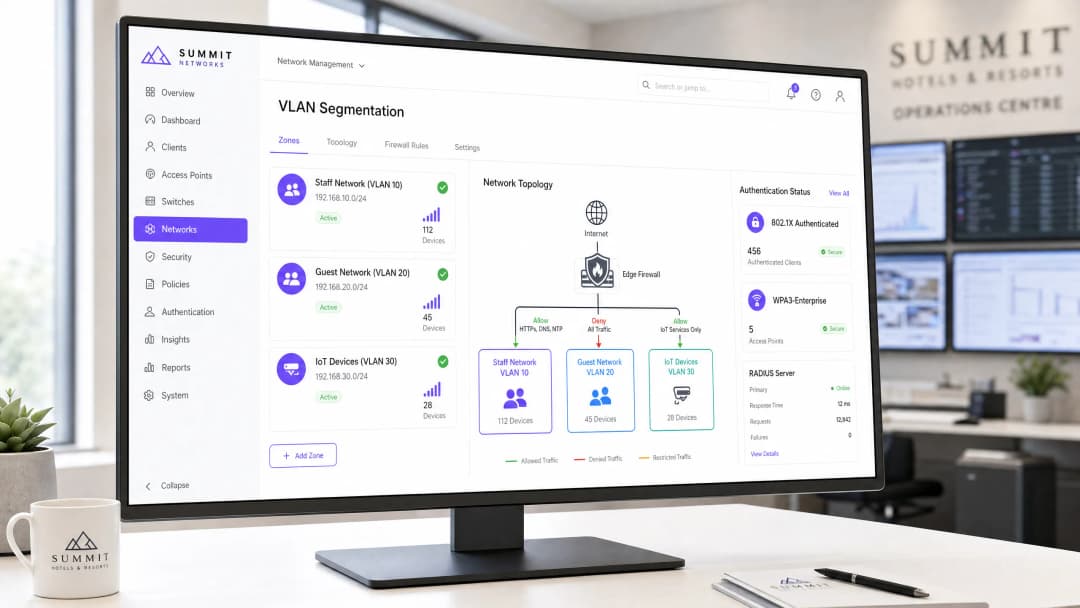
- Physical & Logical Segmentation: Create VLAN 10 for Staff (PMS & tablets), VLAN 20 for Guest WiFi, and VLAN 30 for IoT (smart TVs, thermostats). Configure the switchports connecting to the APs as 802.1Q trunks.
- Authentication Hardening: Replace the shared WPA2-PSK on the staff network with WPA3-Enterprise (802.1X). Integrate the wireless controller with the hotel's Active Directory via NPS (RADIUS). Provision the front-desk tablets with WPA3-Enterprise credentials or EAP-TLS certificates via MDM.
- Firewall Access Control: Deploy a stateful firewall. Write rules to allow VLAN 10 to access the PMS server IP over HTTPS/SQL ports, but deny all traffic from VLAN 20 (Guest) to VLAN 10 and VLAN 30. Enable Client Isolation on VLAN 20.
- Compliance Validation: Enable WIPS on the wireless controller to monitor and alert on rogue APs, satisfying PCI DSS Requirement 11.4.
A high-density retail chain with 50 stores wants to deploy guest WiFi to capture customer analytics while ensuring that store-operational handheld scanners (used for inventory and stock management) do not suffer from wireless congestion or dropouts during peak shopping hours. How should the IT team design the SSID and QoS architecture?
- SSID Separation: Deploy two SSIDs across all stores:
Retail-Operations(VLAN 10) andGuest-Free-WiFi(VLAN 20). - 802.1X Authentication: Secure
Retail-Operationsusing WPA3-Enterprise. Authenticate the handheld scanners using certificate-based EAP-TLS, pre-provisioned via the chain's MDM platform. Configure the guest SSID with an open network behind a Captive Portal managed by Purple. - Quality of Service (QoS) & WMM: On the wireless controller, enable Wi-Fi Multi-Media (WMM). Map the
Retail-Operationstraffic to the Video (AC_VI) or Voice (AC_VO) access categories, ensuring priority over guest traffic. MapGuest-Free-WiFito Best Effort (AC_BE). - Bandwidth Rate Limiting: On the WAN edge firewall, configure a traffic-shaping policy. Guarantee a minimum of 15 Mbps symmetrical bandwidth for VLAN 10 at each store. On the Purple Captive Portal platform, enforce a per-user rate limit of 3 Mbps download and 1 Mbps upload for guest devices on VLAN 20.
A municipal public-sector convention center frequently hosts large events with up to 5,000 concurrent guest users. The IT director notices that during events, administrative staff on the same physical network experience severe latency on corporate video calls and file transfers. How can this be resolved without purchasing additional physical internet lines?
- VLAN Segmentation: Verify that admin staff sit on VLAN 100 and guests sit on VLAN 200.
- WAN-Edge Traffic Shaping: On the primary internet gateway (e.g., a 1 Gbps symmetrical leased line), configure a Class-Based Weighted Fair Queueing (CBWFQ) policy. Define a class for VLAN 100 with a guaranteed bandwidth of 200 Mbps and a priority queue for real-time voice/video traffic.
- Dynamic Bandwidth Allocation: Configure a policy on the firewall that dynamically limits the total bandwidth allocated to VLAN 200 (Guest) to a maximum of 80% of total WAN capacity (800 Mbps) during business hours, leaving 200 Mbps always available for staff.
- Wireless Airtime Fairness: On the wireless access points, enable Airtime Fairness. This prevents slow legacy guest devices (e.g., older 802.11n smartphones) from monopolizing the wireless channels and dragging down the throughput of modern staff devices.
Practice Questions
Q1. A hotel group is deploying a new staff WiFi network. The network architect suggests using WPA2-Personal (PSK) with a strong password because it is easier for staff to enter on their devices. As the Senior Technical Content Strategist, write a decision-forcing scenario exercise that demonstrates why this approach is a security risk and what the recommended alternative is.
Hint: Consider what happens when a disgruntled employee is terminated or leaves the company.
View model answer
Recommended Approach: Reject the WPA2-Personal (PSK) proposal and mandate WPA3-Enterprise (802.1X) authentication.
Reasoning: Using WPA2-PSK creates a massive security blind spot. If a staff member leaves the company, they still know the shared password. To maintain security, the IT team would have to change the password on every single staff device (laptops, PMS tablets, VoIP phones) across the hotel. In practice, this operational overhead is so high that passwords are rarely changed, leaving the network vulnerable to unauthorized access by former employees.
By deploying WPA3-Enterprise with 802.1X, each employee authenticates using their individual corporate directory credentials (e.g., Active Directory). When an employee is offboarded, their account is disabled in Active Directory, and their network access is revoked instantly and automatically, without affecting any other staff devices.
Q2. During a network audit of a retail chain, the auditor notes that the guest WiFi network and the POS payment terminals sit on different IP subnets but are connected to the same physical Layer 3 switch without any ACLs configured. The IT manager argues that because they are on different subnets, they are secure. Create a scenario-based exercise to evaluate this setup against PCI-DSS requirements.
Hint: Does an IP subnet boundary block traffic by default on a Layer 3 switch?
View model answer
Recommended Approach: The current setup is non-compliant and highly insecure. The IT team must implement strict VLAN segmentation and stateful firewall rules to isolate the POS network from the guest network.
Reasoning: IP subnets only define logical groupings; they do not enforce security boundaries. On a standard Layer 3 switch, routing between subnets is enabled by default. This means any device on the guest subnet can route traffic directly to the POS subnet simply by sending packets to the switch's gateway IP. An attacker on the guest WiFi could easily scan, discover, and attempt to exploit vulnerabilities on the POS payment terminals, violating PCI-DSS Requirement 1.3.
To remediate this, the POS terminals must be placed on a dedicated VLAN (e.g., VLAN 40) and the guest WiFi on VLAN 20. A stateful firewall must sit between these VLANs, with an explicit rule configured to DENY all traffic originating from VLAN 20 (Guest) destined for VLAN 40 (POS). Additionally, Client Isolation must be enabled on the guest SSID to prevent lateral attacks within the guest network itself.
Q3. A convention center is hosting a major tech summit with 3,000 attendees. The administrative staff, who share the same internet connection, report that they cannot access their cloud-based ticketing system or make clear VoIP calls due to extreme network slowness. Explain how to design a traffic management strategy to resolve this issue without upgrading the physical internet bandwidth.
Hint: Think about over-the-air channel congestion and WAN-link saturation.
View model answer
Recommended Approach: Implement a multi-layered traffic management strategy combining wireless-level QoS, WAN-edge bandwidth reservation, and per-user rate limiting.
Reasoning: The slowness is caused by two bottlenecks: over-the-air channel congestion (RF saturation) and WAN-link saturation. To resolve this without upgrading the physical line:
- WAN Bandwidth Reservation: On the edge firewall, configure Class-Based Weighted Fair Queueing (CBWFQ). Reserve a minimum guaranteed pool of 150 Mbps symmetrical bandwidth exclusively for the staff VLAN (VLAN 10), ensuring it can never be starved by guest traffic.
- Per-User Rate Limiting: On the captive portal platform (e.g., Purple), configure a traffic-shaping profile that limits each guest connection to a maximum of 3 Mbps download and 1 Mbps upload. This prevents a small number of high-bandwidth guest users (e.g., streaming 4K video) from saturating the WAN link.
- Wireless Quality of Service (QoS): Enable WiFi Multi-Media (WMM) on the access points. Map staff VoIP and ticketing traffic to high-priority queues (AC_VO and AC_VI), while mapping all guest traffic to the Best Effort (AC_BE) or Background (AC_BK) queues.
- Airtime Fairness: Enable Airtime Fairness on all APs to ensure that slow legacy devices do not monopolize wireless channel transmission time, preserving channel capacity for fast staff devices.
Continue reading in this series
How Staff WiFi Helps You Meet ISO/IEC 27001: Mapping Annex A Controls to Your Wireless Network
You will be able to decide whether your staff WiFi can evidence 12 ISO/IEC 27001:2022 Annex A controls, including A.5.15, A.8.5 and A.8.22. You will also be able to replace a shared WPA2-PSK key with IEEE 802.1X and dynamic VLANs. Finally, you can assemble the RADIUS logs, segregation tests and supplier records an auditor accepts at stage 2.
DFS radar events on Cisco Meraki, HPE Aruba and Ruckus: a diagnostics checklist for channel changes
Work out whether a DFS radar event caused your 5GHz outage on Cisco Meraki, HPE Aruba or Ruckus. Tell genuine radar from false positives and planner moves. Then decide which channels to exclude, on which APs, without giving up the capacity your venue needs.
Planning a WiFi 6 to WiFi 7 access point refresh when Cisco Meraki WiFi 6 reaches end of sale
This technical reference gives multi-site operators a decision framework for a Cisco Meraki WiFi 6 to WiFi 7 refresh before the 12/31/2026 last-order date. It pairs property and backhaul planning with the Meraki Dashboard checks that protect Purple authentication and location-analytics continuity during every access point swap.
Got questions about your specific setup?
Our team works with venue operators, IT managers, and network engineers across 80,000 venues. Book a 20-minute call and we will show you how others like you solved it.