
How to Connect With Customers: Digital Strategies for Physical Businesses
This authoritative technical reference guide details how physical-location businesses - hotels, retail chains, stadiums, and public-sector venues - can deploy enterprise WiFi infrastructure as a first-party data capture and customer engagement engine. It covers the full architecture from captive portal design and seamless authentication (IEEE 802.11u/Passpoint) through to CRM integration, CCPA/CPRA compliance, and measurable ROI. IT leaders and venue operators will find actionable deployment guidance, real-world case studies, and a compliance-first risk mitigation framework.
Listen to this guide
View podcast transcript
Part of our core series: WiFi Marketing Guide →
Executive Summary
For IT leaders managing physical venues - whether a 500-room hotel, a sprawling retail complex, or a high-capacity stadium - the network is no longer just a cost center delivering internet access. It is the primary vehicle for understanding customer behavior and driving revenue. Physical businesses face a massive data deficit compared to e-commerce competitors: an online retailer knows every click, every scroll, and every abandoned cart. A physical venue only knows a customer exists if they use a loyalty card at checkout.
This guide details how to bridge that gap by transforming passive Guest WiFi infrastructure into an active, compliance-friendly data capture engine. Deploying an enterprise-grade customer connection strategy requires aligning network architecture with marketing objectives. By leveraging Captive Portals, seamless authentication protocols like Passpoint/OpenRoaming, and robust API integrations with CRM systems, IT teams can deliver measurable ROI. We cover the technical requirements, deployment strategies, and risk mitigation strategies needed to build a secure, scalable digital relationship with your physical visitors - across Retail, Hospitality, Healthcare, and Transport environments.
Technical Deep Dive: The Architecture of Connection
Connecting with customers digitally within a physical venue relies on a multi-tiered architecture that balances seamless user experience with stringent security and compliance requirements. This architecture can be broken down into three functional layers: the Access Layer, the Intelligence Layer, and the Integration Layer.
Access Layer: Authentication and Onboarding
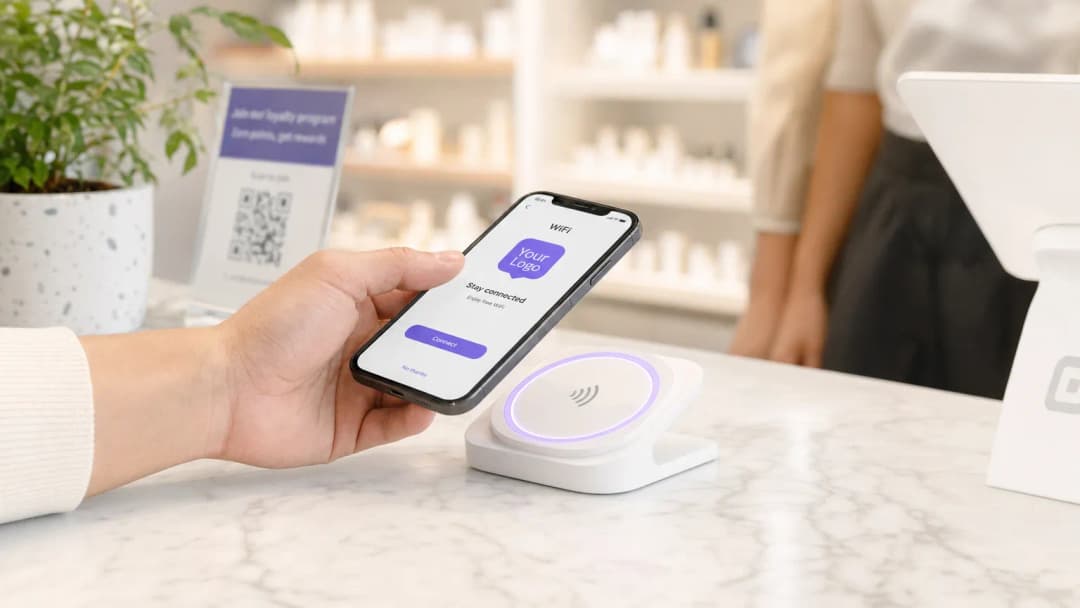
The traditional Captive Portal remains a foundational element, but its execution must evolve. A modern deployment leverages a responsive, dynamically rendered splash page that authenticates users while capturing first-party data. The portal must be mobile-first - as the vast majority of users will be on smartphones - and must load in under two seconds to prevent drop-offs.
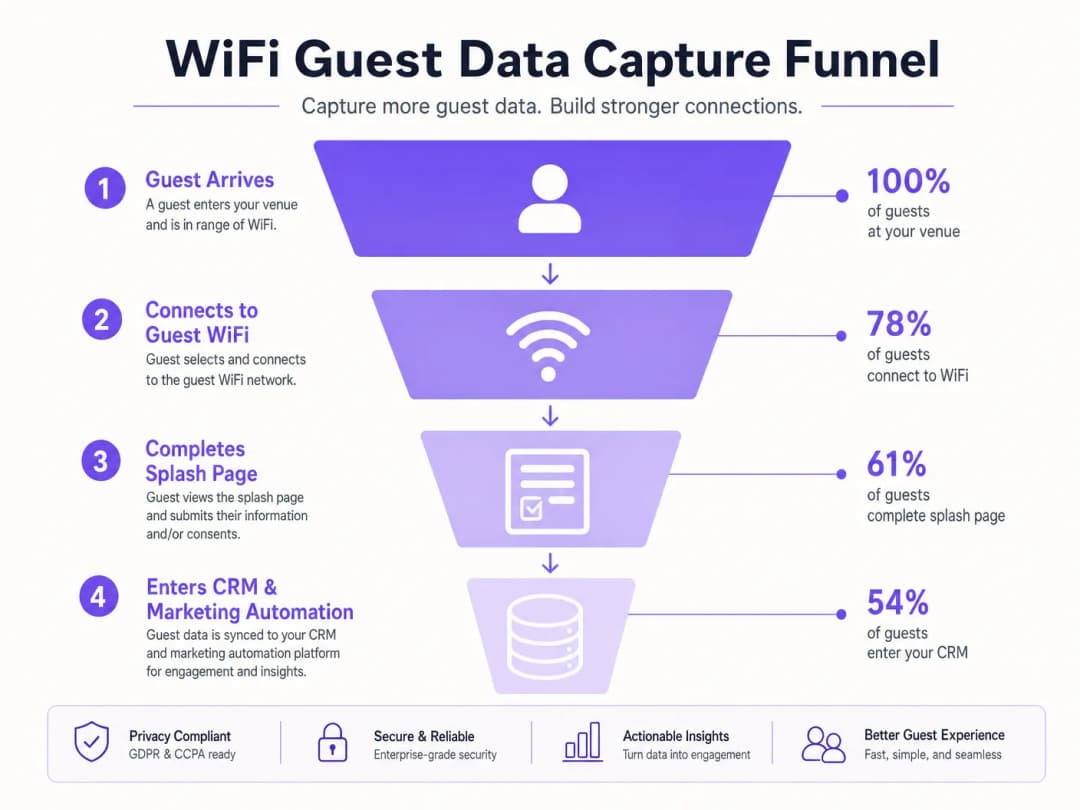
Captive Portal Customization: The splash page serves as the initial touchpoint, capturing explicit consent for data processing (CCPA/CPRA compliance) and gathering baseline demographics. Crucially, it must implement progressive profiling - requesting minimal data on the first visit (e.g., email address) and gathering richer profile data on subsequent visits. Venues that demand excessive data upfront consistently see drop-off rates exceeding 60%.
Seamless Authentication (Passpoint/OpenRoaming): For returning visitors or loyal customers, frictionless onboarding is critical. Implementing IEEE 802.11u (Passpoint/Hotspot 2.0) allows devices to authenticate automatically and securely - using WPA2/WPA3-Enterprise - without any user intervention, mirroring the cellular roaming experience. OpenRoaming extends this to a consortium of participating networks. Purple acts as an identity provider in this ecosystem, facilitating secure, automated connections under its Connect license. This completely eliminates the Captive Portal for enrolled users, delivering a carrier-grade experience.
Intelligence Layer: Data Processing and Analytics
Once a device is authenticated, the network infrastructure - access points and controllers - generates an abundance of telemetry data. This is where WiFi Analytics platforms deliver critical value, turning raw network events into actionable business intelligence.
Presence and Location Analytics: By analyzing probe requests and RSSI (Received Signal Strength Indicator) data, the platform calculates dwell times, return rates, and foot traffic patterns across the venue. Advanced deployments utilize trilateration across multiple access points, or BLE beacon overlays for precise indoor positioning within a few meters.
MAC Hashing and Privacy Compliance: This is a critical compliance threshold. Before a user provides explicit consent via the Captive Portal, the system must not store personally identifiable information (PII). Raw MAC addresses must be immediately anonymized using a one-way cryptographic hash (e.g., HMAC-SHA256). This allows the platform to track aggregate behavior - dwell time, frequency of return visits - without storing any PII, thereby maintaining compliance with CCPA/CPRA. Once the user authenticates and consents, the network data is integrated with their full user profile.
Integration Layer: Activating the Data
Data that merely resides in a networking dashboard provides limited business value. The architecture must support real-time data export into the broader marketing technology stack.
API and Webhook Architecture: Robust RESTful APIs and webhooks are essential for pushing authenticated user profiles and location events to CRM platforms, marketing automation tools, and loyalty applications. Integration must be bidirectional - the WiFi platform must also receive enriched customer data from the CRM to personalize the portal experience for returning visitors.
Trigger-Based Engagement: Integration enables real-time workflow automation. A webhook triggered by a guest connecting to WiFi can initiate a personalized welcome email or an SMS offer within seconds of connection. A location event triggered by a VIP customer entering a premium zone can send a tailored notification to their mobile app. This is the mechanism that converts a passive network event into a measurable revenue action. As explained in our guide How Personalization Increases Customer Loyalty and Sales, contextual relevance is the primary driver of conversion.

Got questions about your specific setup?
Our team works with venue operators, IT managers, and network engineers across 80,000 venues. Book a 20-minute call and we will show you how others like you solved it.
Implementation Guide: Vendor-Neutral Deployment Strategy
A successful deployment requires cross-functional collaboration between IT, marketing, and operations. The following sequence applies in hospitality, retail, and public sector environments.
Step 1 - Define the Data Strategy: Before configuring SSIDs, determine exactly what data is required and what business objective it serves. Are you building an email marketing list, driving app downloads, tracking dwell time for operational optimization, or reducing OTA dependency? The answer dictates the Captive Portal design, the required integrations, and the KPIs against which the deployment will be measured.
Step 2 - Network Assessment and Infrastructure Verification: Ensure that the underlying WLAN infrastructure can support high-density client environments. This includes RF site surveys, capacity planning (targeting a minimum of 25 clients per access point at peak load), and verification of backhaul bandwidth. For high-traffic venues, assess whether a dedicated Leased Line is necessary to guarantee throughput and latency SLAs.
Step 3 - Captive Portal Configuration: Design a mobile-first splash page with a clear value proposition. Implement progressive profiling. Ensure that the walled garden is correctly configured to allow pre-authentication traffic for all required services (social login APIs, app store URLs, payment gateways). Implement clear, unambiguous opt-in mechanisms for marketing communications - separate checkboxes for email, SMS, and third-party sharing are best practices under the CCPA/CPRA.Step 4 — Integration Configuration: Establish secure API connections between the WiFi platform and the CRM. Map data fields accurately. Implement webhook endpoints with robust error handling, retry logic, and delivery confirmation. Verify that Last Seen timestamps, visit frequency, and location status data correctly populate CRM fields.
Step 5 — Testing and Validation: Perform rigorous end-to-end testing across all major device types (iOS, Android, Windows, macOS) and browsers. Test each authentication path (email, social login, Passpoint). Verify data flow from the network edge to the CRM using test profiles. Document and resolve all walled garden issues prior to go-live.
Step 6 — Monitoring and Continuous Optimization: Post-deployment, set up dashboards tracking portal conversion rates, data capture rates, API error rates, and webhook delivery success. Review these weekly during the first month. A/B test portal designs to optimize conversion.
Best Practices for Venue Operators
Prioritize Frictionless Access: Every additional step in the onboarding process reduces conversion. Use social login options (OAuth 2.0) or seamless authentication protocols where applicable. A well-optimized portal should target a connect-time of under 30 seconds.
Clarify the Value Exchange: Customers expect a tangible benefit in exchange for their data. Clearly articulate the value on the splash page - whether that is high-speed access, an exclusive discount, or enhanced location services. Vague or generic messaging significantly lowers opt-in rates.
Contextual Engagement Drives ROI: Leverage location data to deliver relevant messages at the right time. A generic weekly newsletter is far less effective than an SMS triggered when a customer enters a specific department within a retail store or a specific zone within a hospitality venue. This is the core principle behind how to build relationships with customers in retail and other physical environments.
Segment and Personalize: Use visit frequency, dwell time, and demographic data captured through the portal to segment your audience. First-time visitors, repeat loyalists, and lapsed visitors should receive distinct communications. For a detailed framework on personalization strategy, see our guide Wie Personalisierung Kundenbindung und Umsatz steigert.
Continuous Monitoring: A digital connection strategy is not a set-and-forget deployment. Regularly review connection analytics, portal drop-off rates, integration logs, and campaign performance. OS updates from Apple and Google frequently alter Captive Portal detection behavior, requiring portal adjustments.
Troubleshooting and Risk Mitigation
| Risk | Root Cause | Mitigation | |---|---|---|---| | High Portal Drop-off Rate | Incorrectly configured walled garden; excessive data requests; slow portal load times | Audit walled garden whitelist; implement progressive profiling; optimize portal assets | | Social Login Failures | Authentication provider servers not in whitelist | Add all OAuth endpoint IPs/domains to walled garden | | CCPA/CPRA Non-Compliance | Implicit consent; missing data retention policy | Implement explicit opt-in checkboxes; define and enforce retention periods; conduct regular privacy audits | | CRM Data Sync Failures | API rate limits; schema changes; webhook delivery failures | Implement error alerting; use exponential backoff retry logic; monitor webhook delivery rates | | Poor Location Accuracy | Insufficient AP density; multipath interference | Conduct RF surveys; increase AP density in targeted areas; consider BLE beacon overlay | | PCI-DSS Scope Creep | Guest WiFi network not properly segmented from payment network | Implement strict network segmentation (separate VLANs); ensure guest traffic cannot access POS systems |
ROI and Business Impact
The transition from a cost-center network to a revenue-enabling platform is measurable. The following KPIs provide a framework for demonstrating business impact to the C-suite.
| KPI | Definition | Benchmark |
|---|---|---|
| Data Capture Rate | Percentage of venue visitors who authenticate and provide contact info | 40-65% (varies by venue type and portal design) |
| Email List Growth Rate | New opt-in contacts per month driven by WiFi | Venue-dependent; track month-on-month trend |
| Campaign-Attributed Revenue | Revenue from customers acquired via WiFi portal, tracked through CRM | Requires UTM tracking and CRM attribution |
| Return Visit Rate | Percentage of WiFi users who return within 30/60/90 days | Baseline varies; track post-campaign lift |
| Dwell Time | Average time spent at the venue by connected users | Operational benchmark; use to optimize layout and staffing |
| App Download Rate | Percentage of portal users who download the venue app | Target 15-25% with strong incentives |
Case Study: Boutique Hotel Group (200 rooms, 3 properties)
A boutique hotel group deployed Purple's guest WiFi platform across three properties, integrating with their existing PMS and email marketing platform. The Captive Portal was configured to identify guests who had booked via OTAs and offer them a personalized offer for direct booking on their next stay. Within six months, the group reported a 22% increase in direct booking inquiries from repeat guests, a 41% increase in their opt-in email database, and a measurable reduction in OTA commission costs. The deployment fully amortized its costs within the first quarter.
Case Study: Regional Retail Chain (45 stores) A regional retail chain deployed guest WiFi across 45 stores, integrating the platform with their loyalty CRM. Location analytics identified that a significant proportion of customers visiting the homeware section did not proceed to make a purchase. A triggered SMS campaign - sent to customers who lingered in that section for more than three minutes without making a transaction - offering a 10% discount, recorded a 17% conversion increase on that specific category. The campaign was designed, deployed, and generated results within four weeks of the WiFi platform going live.
Key Definitions
Captive Portal
A web page that a user of a public-access network is required to interact with before full internet access is granted. Used for authentication, payment processing, or capturing consent and demographic data.
The primary interface for converting an anonymous physical visitor into a known digital profile. Portal design and load speed directly impact data capture rates.
MAC Hashing
A cryptographic process (typically HMAC-SHA256) that irreversibly anonymizes a device's Media Access Control (MAC) address. Allows venues to track aggregate traffic and dwell time without storing Personally Identifiable Information (PII) prior to explicit user consent.
Crucial for maintaining CCPA/CPRA and GDPR compliance while still gathering valuable operational analytics from unauthenticated devices.
Passpoint (Hotspot 2.0 / IEEE 802.11u)
An industry standard that streamlines network access, allowing devices to automatically and securely connect to participating WiFi networks using WPA2/WPA3-Enterprise credentials without requiring user interaction or Captive Portal completion.
Essential for delivering a frictionless, cellular-like roaming experience for loyal customers and mobile app users. Eliminates the Captive Portal for enrolled devices.
OpenRoaming
A Wireless Broadband Alliance (WBA) federation that enables users to seamlessly and securely roam between participating WiFi networks and cellular networks without repeated manual authentication. Built on Passpoint/IEEE 802.11u.
Provides a seamless connectivity experience across multiple venues and operators. Purple acts as an identity provider within the OpenRoaming federation under its Connect license.
Walled Garden
A network configuration on the controller or firewall that permits unauthenticated users access to a specific, restricted set of IP addresses or domains before full network access is granted.
Required for enabling social logins (OAuth), promoting app downloads, or providing access to payment pages on the Captive Portal. Misconfiguration is the leading cause of portal authentication failures.
RSSI (Received Signal Strength Indicator)
A measurement of the power level of a received radio signal, expressed in dBm. Used by analytics platforms to estimate the proximity of a device to a specific access point.
The foundational metric for calculating dwell time, traffic density, and basic indoor location tracking. Accuracy improves significantly when trilateration is applied across three or more access points.
Progressive Profiling
A data collection strategy that gathers customer information incrementally across multiple interactions or visits, rather than requesting a comprehensive profile upfront.
Improves Captive Portal conversion rates by reducing friction during initial onboarding. Particularly effective in retail and hospitality environments where repeat visits are common.
Webhook
An HTTP callback mechanism that sends a real-time data payload to a specified endpoint URL when a defined event occurs in the source system.
Used to trigger real-time actions in external systems (CRM updates, SMS sends, push notifications) the moment a specific network event occurs (user connection, zone entry, dwell threshold exceeded).
First-Party Data
Data collected directly from customers through owned channels and interactions, with explicit consent. Includes email addresses, demographic information, and behavioral data captured via the Captive Portal.
Increasingly valuable as third-party cookie deprecation limits digital advertising targeting. WiFi-captured first-party data is a strategic asset for physical-location businesses.
Worked Examples
A 200-room boutique hotel wants to increase direct bookings and reduce reliance on OTAs (Online Travel Agencies). They currently offer an open, unauthenticated guest WiFi network with no data capture.
- Deploy a captive portal requiring email authentication or social login (OAuth 2.0). 2. Integrate with the Property Management System (PMS) via API to identify which guests booked via OTAs at the point of WiFi authentication. 3. Configure an API integration with the marketing automation platform to sync authenticated guest profiles. 4. Set up an automated trigger workflow: when a guest authenticates, the system checks the PMS booking source. If the source is an OTA, a personalized email is triggered offering a direct-booking discount or loyalty perk for their next stay. 5. Configure a post-stay automated email sequence (triggered 48 hours after check-out) reinforcing the direct booking value proposition. 6. Track conversion via UTM parameters on all direct booking links in the email campaigns.
A large stadium (capacity 60,000) wants to improve the fan experience and drive in-seat food and beverage ordering via their mobile app, but app adoption is currently below 8% of attendees.
- Implement OpenRoaming/Passpoint for enrolled app users to provide automatic, frictionless connectivity in the high-density environment - this also provides a strong incentive for app download. 2. Configure the captive portal (for non-roaming users) to feature the app download as the primary call-to-action, with a clear incentive (e.g., a free drink on first in-seat order). 3. Utilize location analytics to identify congested areas (concourse bars, specific concession stands) based on real-time dwell time data. 4. Configure location-based push notifications (via the app) or SMS messages - triggered when a recognized user device is detected in a high-congestion zone - directing fans to less crowded concessions or offering in-seat delivery. 5. Post-event, trigger a re-engagement email to all authenticated attendees with a personalized highlight reel link and a prompt to pre-register for the next event.
Practice Questions
Q1. A retail chain is experiencing a 70% drop-off rate on their Captive Portal. Users connect to the SSID but abandon the splash page before authenticating. The portal offers Facebook and Google login options. What is the most likely architectural or configuration issue, and how would you diagnose and resolve it?
Hint: Consider what network access is required before authentication is complete, and what services the portal depends on.
View model answer
The most likely issue is a misconfigured walled garden. The Captive Portal is attempting to load Facebook and Google OAuth authentication endpoints, but those domains and IP ranges have not been whitelisted in the pre-authentication walled garden. The browser silently fails to load the login scripts, presenting the user with a broken or unresponsive portal. Diagnosis: inspect browser developer tools on a test device connected to the guest SSID - look for blocked requests (HTTP 403 or connection timeout) to oauth.facebook.com, accounts.google.com, and associated CDN domains. Resolution: add all required OAuth endpoint domains and IP ranges to the walled garden whitelist on the network controller. Also audit for any CDN assets (JavaScript, CSS) loaded by the portal itself that may be blocked. Secondary consideration: if the form is also too long, implement progressive profiling to reduce friction further.
Q2. A public sector venue (a large municipal library) needs to track visitor dwell time and return visit frequency to justify staffing levels and opening hours to the city council. They cannot require users to register or log in due to their public access mandate. How do you deliver this analytics capability while strictly adhering to CCPA/CPRA?
Hint: Consider how to identify returning devices without storing any Personally Identifiable Information.
View model answer
Deploy passive presence analytics using MAC hashing. The access points detect probe requests from all devices in range - including those that never connect to the WiFi. The analytics platform immediately applies a one-way cryptographic hash (such as HMAC-SHA256 with a rotating salt) to each detected MAC address. The resulting hash is stored, not the original MAC address. This allows the system to recognize a returning hashed identifier (calculating return visit frequency and dwell time) without ever storing PII. Under CCPA/CPRA, a properly implemented hashed MAC address is considered pseudonymous data rather than personal data, provided the original MAC cannot be reverse-engineered - which a one-way hash with a secure salt ensures. The venue should document this processing activity in their Record of Processing Activities and include it in their privacy notice as a legitimate interest basis for operational analytics.
Q3. A stadium IT director wants to trigger a personalized SMS offer to VIP season ticket holders the moment they enter the premium hospitality lounge, offering them a complimentary drink. Design the technical architecture required to deliver this in real time.
Hint: Think about how the system identifies the user, determines their location, and triggers the outbound communication.
View model answer
This requires a four-component integration architecture. First, identity resolution: the CRM/ticketing system must be synchronized with the WiFi platform, mapping VIP season ticket holder records to their authenticated WiFi device profiles (MAC address or Passpoint credential). Second, zone definition: the premium lounge must be defined as a named location zone in the WiFi analytics platform, using access point trilateration or a BLE beacon overlay to create a precise geographic boundary. Third, event triggering: a webhook must be configured on the WiFi platform to fire when a recognized VIP device is detected within the lounge zone. Fourth, SMS dispatch: the webhook payload (containing the user identifier and zone entry timestamp) is sent to the SMS gateway API, which looks up the user's cell phone number from the CRM and dispatches the personalized offer message. End-to-end latency from zone entry to SMS delivery should target under 30 seconds. Ensure the user has provided explicit SMS marketing consent in their CRM profile before dispatching.
Q4. Your organization is deploying guest WiFi across a 45-store retail chain. The CISO has raised concerns about PCI DSS scope creep - specifically, that guest WiFi traffic could potentially reach the payment card network. How do you architect the network to address this risk?
Hint: Consider network segmentation standards and the principle of least privilege.
View model answer
Strict network segmentation is the primary control. The guest WiFi SSID must be isolated on a dedicated VLAN that has no Layer 2 or Layer 3 connectivity to the payment card network (the Cardholder Data Environment, or CDE). This is enforced at the network controller and validated at the firewall. Specifically: 1) The guest VLAN must be terminated on a separate firewall zone with an explicit deny-all rule for any traffic destined for CDE IP ranges. 2) The guest SSID should route directly to the internet via a separate uplink or a DMZ, bypassing the internal corporate network entirely. 3) Conduct a network segmentation test (penetration test) as part of the PCI DSS assessment to verify that a device on the guest VLAN cannot reach any CDE system. 4) Document the segmentation architecture in the PCI DSS scoping documentation. This approach removes the guest WiFi network from PCI DSS scope entirely, provided the segmentation is robust and validated.
Continue reading in this series
Restaurant WiFi Marketing: How to Turn Free WiFi Into Repeat Customers
This authoritative technical reference guide explores the architecture and implementation of restaurant WiFi marketing - the practice of using guest network access as a structured data acquisition and marketing automation channel. It provides IT managers, network architects, and venue operations directors with a tactical blueprint for deploying captive portals, integrating with CRM platforms, and triggering automated campaigns that drive measurable repeat business. From CCPA/CPRA-compliant data capture to event-driven email workflows, this guide covers the full deployment lifecycle with concrete ROI metrics.
How to Use First-Party Data in Marketing Campaigns
This authoritative guide details how enterprise IT and marketing teams can transform their guest WiFi infrastructure into a powerful first-party data engine. It covers technical architecture for data capture, GDPR-compliant consent management, segmentation strategies, and real-world activation across email, SMS, social advertising, and programmatic display. Venue operators and IT teams will find concrete implementation guidance, worked examples from hospitality and retail, and measurable ROI frameworks.
Social WiFi: What It Is and How It Drives Customer Engagement
This authoritative technical reference guide covers the architecture, deployment, and business value of Social WiFi - the practice of authenticating guest network users via OAuth 2.0 social login on a captive portal. It provides IT managers, network architects, and venue operations directors with actionable guidance on technical implementation, GDPR compliance, and leveraging captured first-party data for targeted customer engagement. Venue operators across hospitality, retail, and events sectors will find concrete deployment frameworks and real-world scenarios that demonstrate measurable ROI.
Got questions about your specific setup?
Our team works with venue operators, IT managers, and network engineers across 80,000 venues. Book a 20-minute call and we will show you how others like you solved it.