
The Ultimate Guide to WiFi Channels: 2.4GHz vs 5GHz Explained
This authoritative guide details the critical differences between 2.4GHz and 5GHz WiFi channels for enterprise environments. It provides IT managers and network architects with actionable strategies for channel planning, mitigating interference, and optimizing high-density venue deployments to drive ROI.
Video overview
Listen to this guide
View podcast transcript
Part of our core series: WiFi RF Engineering Guide →
2.4 GHz vs 5 GHz WiFi channel & capacity planner
Model channel availability, co-channel interference (CCI), and cell coverage balance across 2.4 GHz and 5 GHz frequency bands. Generate vendor-ready configurations for Cisco Meraki, Aruba HPE, Ruckus, and Ubiquiti UniFi.
RF analysis & channel allocation strategy
Dual-band imbalance: 2.4 GHz is heavily saturated while 5 GHz carries excessive channel width contention. Transition clients to 5 GHz 20/40 MHz.
- Transmit Power Balancing: Crucial 6 dB rule: maintain a 6 dB transmit power delta between 2.4 GHz and 5 GHz radios. Because 2.4 GHz propagates further, equal power causes clients to stick to slow 2.4 GHz connections.
- Airtime & Rate Pruning: Set 12 Mbps minimum on 2.4 GHz and 12-24 Mbps minimum on 5 GHz. Enforce 802.11k/v neighbor reports to assist client roaming.
- Client Band Steering: Configure band steering probe suppression for RSSI > -72 dBm to steer dual-band devices to 5 GHz.
- Target Distribution: 80% to 85% of clients steered to 5 GHz; 15% to 20% on 2.4 GHz (IoT and legacy)
Vendor-specific radio configuration blueprints
Cisco Meraki
Wireless > Radio Settings:
- RF Profile: Assign high-density template
- 2.4 GHz: Channel width 20 MHz only, Min bitrate 12 Mbps
- 5 GHz: Channel width 20 MHz, Min bitrate 12 Mbps
- Band Steering: Dual-band operation (Band steering enabled, 5 GHz preferred)
- Transmit Power: 2.4 GHz Min 8 dBm / Max 11 dBm; 5 GHz Min 14 dBm / Max 17 dBm
Meraki Auto-RF will automatically balance channels 1, 6, and 11 on 2.4 GHz while honoring the configured 6 dB power gap.
Aruba HPE (AOS-10 / Central)
RF Management > Adaptive Radio Management (ARM):
- 2.4 GHz Radio: Allowed channels 1, 6, 11 (Channel width: 20MHz)
- 5 GHz Radio: Allowed channels 36-64, 100-144, 149-165 (Width: 20 MHz)
- Client Match: Enabled with steer-margin 6 dB
- Basic Rates: Disable 1, 2, 5.5, 6, 9, 11 Mbps; Beacon rate 12 Mbps
- Tx Power: 2.4 GHz 9-12 dBm EIRP, 5 GHz 15-18 dBm EIRP
Aruba Client Match actively evaluates client RSSI and steers capable devices away from congested 2.4 GHz channels without disconnecting active sessions.
Ruckus (SmartZone / Unleashed)
Wireless LANs > Advanced Options:
- ChannelScan: Background scanning enabled (Interval: 300s)
- 2.4 GHz: Restrict to non-overlapping 1, 6, 11 (20 MHz width)
- 5 GHz: Channelization 20 MHz (DFS enabled if outside radar exclusion zones)
- Band Balancing: Enabled (80% 5 GHz distribution target)
- BSS Min Rate: 12 Mbps for both bands
Ruckus BeamFlex+ dynamic antenna arrays assist in mitigating adjacent interference by focusing RF energy directly toward connected clients.
Ubiquiti UniFi
Settings > Radio Settings:
- 2.4 GHz: Width HT20, Channels Auto (1, 6, 11), Power Custom (10 dBm)
- 5 GHz: Width HE20, Channels Auto (DFS allowed), Power Custom (16 dBm)
- Band Steering: Prefer 5 GHz
- Minimum Data Rate Control: 2.4 GHz set to 12 Mbps; 5 GHz set to 12 Mbps
- Fast Roaming (802.11r) and BSS Transition (802.11v): Enabled
Set fixed transmit power rather than Auto in UniFi Network to prevent access points from broadcasting 2.4 GHz at maximum 20+ dBm.
Request an enterprise WiFi capacity & channel planning audit
Need assistance designing a conflict-free channel plan or optimising guest onboarding across multi-vendor wireless environments? Speak with Purple's network solutions engineers for a comprehensive site survey and airtime analysis.
Executive Summary
For IT managers and network architects deploying high-density wireless infrastructure, the choice between 2.4GHz and 5GHz is no longer a simple trade-off of range versus speed. In modern enterprise environments - from 500-room hotels to sprawling retail estates - channel selection is a fundamental architectural decision that determines network throughput, client experience, and security posture. This guide provides a definitive technical deep-dive into the best channels for 5GHz WiFi, mitigating co-channel interference on 2.4GHz, and designing a scalable channel plan.
By standardizing on 5GHz for primary client access and restricting 2.4GHz for legacy IoT devices, venue operators can dramatically increase overall network capacity. When paired with Guest WiFi and robust WiFi Analytics, a clear channel plan transforms a cost center into a reliable engine for data capture and customer engagement.
Technical Deep-Dive: Understanding Frequency Bands and Channels
To build a resilient network, we must distinguish between frequency bands and the channels within them. A frequency band represents the broad radio spectrum allocated for wireless communication, while channels are the specific subdivisions where access points (APs) and client devices establish connections.
2.4GHz Band: Legacy Limitations and Interference
The 2.4GHz band (2.400 - 2.4835 GHz) is the legacy workhorse of wireless networking. Its primary advantage is signal propagation; lower-frequency waves penetrate walls, doors, and floors more effectively than higher frequencies. However, this range comes with a severe architectural penalty in high-density deployments.
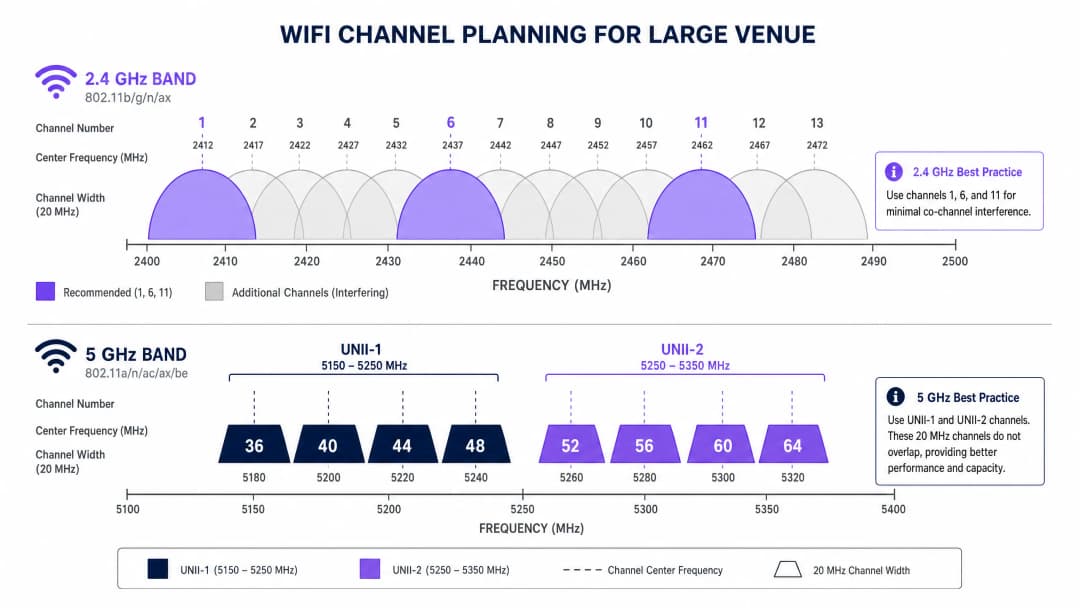
In the US, the 2.4GHz band provides 11 channels. Each channel is 20MHz wide, but they are spaced only 5MHz apart. This structural overlap means that only three channels - 1, 6, and 11 - are truly non-overlapping. In a dense environment, such as a Hospitality venue where APs are deployed in every other room, forcing hundreds of devices onto three channels inevitably leads to severe co-channel interference (CCI). Furthermore, the 2.4GHz spectrum is heavily polluted by non-WiFi interferers, including microwave ovens, Bluetooth devices, and DECT phones.
5GHz Band: Capacity and the DFS Challenge
The 5GHz band (5.150 - 5.850 GHz) fundamentally changes the capacity equation. It provides significantly more usable spectrum, allowing for wider channels and higher data rates. In the US, the 5GHz band is divided into Unlicensed National Information Infrastructure (UNII) sub-bands, offering up to 25 non-overlapping 20MHz channels.

When determining the best channel for 5GHz WiFi, network architects must navigate Dynamic Frequency Selection (DFS). DFS is a regulatory requirement designed to prevent WiFi networks from interfering with incumbent radar systems, such as weather and military radar.
- UNII-1 (channels 36, 40, 44, 48): These channels do not require DFS. They are the gold standard for enterprise deployments because APs will not suddenly change channels if radar is detected, ensuring stable client connectivity.
- UNII-2A and UNII-2C (channels 52-144): These are DFS channels. If an AP detects a radar signature on its operating channel, it must immediately vacate that channel and move to another, potentially dropping active client sessions.
- UNII-3 (channels 149-165): Availability varies by region, but where permitted, these are generally non-DFS channels.
Got questions about your specific setup?
Our team works with venue operators, IT managers, and network engineers across 80,000 venues. Book a 20-minute call and we will show you how others like you solved it.
Implementation Guide: Creating a Channel Plan
A successful deployment requires a vendor-neutral, data-driven approach to channel planning. Whether you are deploying in a Retail environment or upgrading a Transport hub, these steps form the baseline for a high-performance network.
1. Conduct an Active RF Site Survey
Never rely solely on predictive modeling. Conduct an active survey using a spectrum analyzer to map the existing RF environment. Identify rogue APs, non-WiFi interference, and neighboring networks. This empirical data is essential for assigning channels that avoid existing congestion.
2. Define Channel Width Conservatively
The tendency to maximize throughput by bonding channels (e.g. using 80MHz or 160MHz widths) is a common architectural error in dense venues.
- On 5GHz: Standardize on 20MHz or 40MHz channel widths. Although per-client peak speeds are lower than with 80MHz channels, the overall throughput of the network increases because you preserve more non-overlapping channels, reducing CCI.
- On 2.4GHz: Strictly enforce 20MHz channel widths. Using 40MHz on 2.4GHz in an enterprise setting guarantees severe interference.
3. Implement Band Steering
Modern enterprise APs support band steering, a feature that encourages dual-band capable clients to connect to the 5GHz band. This clears the 2.4GHz spectrum for legacy devices and IoT sensors, as discussed in our BLE Low Energy Explained for Enterprise guide.
4. Optimize Transmit Power
Higher transmit power does not mean better performance; it means a larger interference domain. In high-density deployments, reduce the transmit power on 2.4GHz radios (e.g., 8 - 11 dBm) to shrink cell size and limit CCI. 5GHz radios can operate at slightly higher power (e.g., 14 - 17 dBm) to compensate for their lower penetration capabilities.
Best Practices and Industry Standards
To maintain compliance and operational excellence, follow these industry-standard recommendations:
- Standardize on UNII-1 for critical infrastructure: Use channels 36, 40, 44, and 48 for areas requiring absolute stability, such as executive boardrooms or point-of-sale (POS) clusters.
- Leverage analytics for dynamic optimization: Use platforms like Purple to continuously monitor the RF environment. If a neighboring tenant deploys a rogue AP, your analytics should detect the increased channel utilization and trigger an automated or manual channel adjustment. For insights on optimizing office environments, see Office WiFi: Optimize Your Modern Office WiFi Network.
- Audit DFS behavior before going live: If using UNII-2 channels, conduct rigorous testing to monitor how often APs trigger DFS events. If radar detection is frequent (e.g., near an airport), remove those specific channels from the AP's allowed channel list.
- Prepare for Wi-Fi 6E: If performing a hardware refresh, evaluate Wi-Fi 6E (802.11ax operating in the 6GHz band). The 6GHz spectrum provides up to 500MHz of additional, interference-free bandwidth in the US, effectively solving the high-density capacity problem. Read more in WiFi Frequencies: A Guide to WiFi Frequencies in 2026.
Troubleshooting and Risk Mitigation
Despite careful planning, RF environments are dynamic. Common failure modes include:
The "sticky client" problem: Clients refusing to roam to a closer AP, maintaining a weak connection that degrades overall cell performance. Mitigation: Enforce minimum RSSI thresholds and utilize 802.11k/v/r protocols to facilitate seamless roaming.
Auto-channel disasters: Controller-based auto-channel algorithms often converge on the same few channels, causing widespread CCI. Mitigation: Use auto-channel features only during initial deployment or scheduled maintenance windows. For ongoing operations, rely on a static, carefully planned channel map validated by analytics.- Degraded security posture: Poor channel planning can mask the presence of rogue APs or evil twin attacks. Mitigation: A clean RF environment makes anomaly detection significantly more reliable. Ensure your architecture aligns with modern security frameworks, as discussed in La lista de verificación para migrar de NAC heredado a NAC nativo de la nube and A Lista de Verificação para Migrar de NAC Legado para NAC Nativo da Nuvem.
ROI and Business Impact
The business impact of a correctly engineered wireless network extends far beyond a reduction in IT helpdesk tickets. In retail and hospitality, the WiFi network is the primary medium for guest engagement and data acquisition.
When co-channel interference is eliminated and clients are successfully steered to clean 5GHz channels, the network can support high client densities without performance degradation. This reliability ensures that Captive Portals load instantly, increasing the conversion rate of Guest WiFi logins. The resulting first-party data capture drives targeted marketing campaigns, directly impacting the bottom line.
Listen to our full technical briefing on this topic:
Key Definitions
Co-Channel Interference (CCI)
Interference caused when two or more access points operate on the exact same channel and their coverage areas overlap.
CCI forces devices to wait their turn to transmit, drastically reducing network throughput in dense deployments.
Dynamic Frequency Selection (DFS)
A regulatory mandate requiring WiFi devices operating in certain 5GHz bands to detect and avoid incumbent radar systems.
If an AP detects radar on a DFS channel, it must immediately switch channels, causing brief connectivity drops for connected clients.
Band Steering
A feature on enterprise APs that detects dual-band capable clients and actively encourages them to connect to the 5GHz band rather than 2.4GHz.
Essential for preserving the limited 2.4GHz spectrum for legacy IoT devices and ensuring high-performance clients get optimal speeds.
Channel Bonding
The practice of combining two or more adjacent 20MHz channels into a single wider channel (e.g., 40MHz, 80MHz) to increase data throughput.
While it increases speed, it reduces the total number of non-overlapping channels available, making it dangerous in high-density environments.
UNII-1 Band
The lower segment of the 5GHz spectrum (channels 36, 40, 44, 48) that does not require DFS compliance.
The most stable and reliable channels for mission-critical enterprise wireless traffic.
Adjacent Channel Interference (ACI)
Interference caused by transmissions on overlapping but not identical frequencies (e.g., using channel 3 and channel 6 in 2.4GHz).
ACI is more destructive than CCI because devices cannot properly decode the overlapping signals, leading to high packet loss.
RSSI (Received Signal Strength Indicator)
A measurement of the power present in a received radio signal.
Used by network administrators to set minimum connection thresholds, forcing 'sticky clients' to roam to closer access points.
BSS Coloring
A feature introduced in WiFi 6 (802.11ax) that adds a 'color' identifier to transmissions, allowing APs on the same channel to ignore each other's traffic if the color doesn't match.
Significantly mitigates the impact of co-channel interference in extremely dense deployments like stadiums.
Worked Examples
A 400-room hotel in a dense urban environment is experiencing widespread guest complaints regarding WiFi speeds during the evening peak (7 PM - 10 PM). The current deployment uses dual-band APs in every other room, with auto-channel selection enabled and 80MHz channel widths on 5GHz.
- Disable auto-channel selection to prevent continuous channel thrashing. 2. Reduce 5GHz channel width from 80MHz to 20MHz to increase the number of available non-overlapping channels and eliminate co-channel interference. 3. Statically assign 5GHz channels, prioritizing UNII-1 (36, 40, 44, 48) and clean UNII-2 channels. 4. Reduce 2.4GHz transmit power to 8dBm and restrict to channels 1, 6, and 11 to minimize cell overlap.
A large retail chain is deploying a new point-of-sale (POS) system that relies on wireless connectivity. The store is located in a shopping center with dozens of neighboring retail WiFi networks visible. The POS vendor recommends using 2.4GHz for "better range".
- Reject the vendor's 2.4GHz recommendation for critical infrastructure. 2. Configure a dedicated SSID for the POS system operating exclusively on the 5GHz band. 3. Assign this SSID to UNII-1 channels (36, 40, 44, 48) to avoid any potential DFS radar disruptions. 4. Implement band steering on the public Guest WiFi SSID to keep consumer devices off the 2.4GHz spectrum as much as possible.
Practice Questions
Q1. You are deploying WiFi in a hospital where life-critical telemetry equipment operates on 2.4GHz. The hospital also wants to offer high-speed Guest WiFi in the waiting areas. How do you architect the channel plan?
Hint: Consider physical separation and band dedication.
View model answer
- Dedicate the 2.4GHz band entirely to the telemetry equipment, statically assigning channels 1, 6, and 11. 2. Disable the Guest WiFi SSID on the 2.4GHz radios completely. 3. Broadcast the Guest WiFi exclusively on the 5GHz band using UNII-1 and UNII-2 channels. This ensures the life-critical 2.4GHz spectrum remains uncontended while providing high capacity for guests.
Q2. A stadium deployment is suffering from massive interference on 5GHz, despite using 20MHz channels. The APs are mounted very high up and are 'hearing' each other across the bowl. What configuration change is required?
Hint: Think about how far the signal is traveling and how APs decide when the channel is clear.
View model answer
- Significantly reduce the transmit (Tx) power on the 5GHz radios to shrink the cell size. 2. Increase the RX-SOP (Receive Start of Packet) threshold, which makes the AP 'deaf' to weak signals from distant APs across the stadium bowl, allowing it to transmit simultaneously without triggering carrier sense mechanisms.
Q3. Your corporate office is located less than 2 miles from a major commercial airport. You are currently using channels 36, 40, 44, 48, 52, 56, 60, and 64. Users are complaining of random, brief disconnects. What is the likely cause and solution?
Hint: Consider the regulatory requirements for specific 5GHz channels.
View model answer
The disconnects are caused by DFS (Dynamic Frequency Selection) events. The APs on channels 52-64 are detecting airport radar and vacating the channel. The solution is to remove the UNII-2 DFS channels (52-64) from the allowed channel list and rely solely on the non-DFS UNII-1 channels (36-48), or upgrade to WiFi 6E to utilize the non-DFS 6GHz band.
Frequently asked questions
Why are channels 1, 6, and 11 the only non-overlapping channels on 2.4 GHz?
The 2.4 GHz ISM band allocates channels spaced only 5 MHz apart, but standard 802.11 transmissions require 20 MHz or 22 MHz of channel width. Channels 1 (2412 MHz), 6 (2437 MHz), and 11 (2462 MHz) are separated by 25 MHz, allowing them to operate concurrently without spectral overlap or adjacent channel interference.
What is the recommended transmit power difference between 2.4 GHz and 5 GHz radios?
Enterprise network engineers recommend maintaining a 6 dB transmit power differential between 2.4 GHz and 5 GHz radios (for example, setting 2.4 GHz to 10-12 dBm and 5 GHz to 16-18 dBm). Because 2.4 GHz RF signals propagate further and penetrate obstacles more effectively, equal power levels cause client devices to stick to slower 2.4 GHz associations instead of roaming to high-throughput 5 GHz cells.
Should enterprise networks use 40 MHz or 80 MHz channel widths on 5 GHz?
For high-density venues, hospitals, and corporate offices, 20 MHz or conservative 40 MHz channel widths are recommended. While 80 MHz delivers higher peak single-client PHY rates, it reduces the number of non-overlapping channels in the UNII bands to only 6 (or only 2 without DFS), creating severe co-channel interference and airtime contention across multi-AP deployments.
How does band steering improve overall WiFi network performance?
Band steering detects dual-band capable client probe requests and suppresses responses on the 2.4 GHz radio while responding promptly on the 5 GHz radio. This steers modern smartphones and laptops to the wider, cleaner 5 GHz spectrum, reserving scarce 2.4 GHz airtime for legacy clients and low-power IoT devices.
How does Purple optimize guest WiFi across multi-band enterprise wireless infrastructure?
Purple provides hardware-agnostic captive portal onboarding and footfall analytics that integrate directly with enterprise controllers (Cisco Meraki, Aruba HPE, Ruckus, Ubiquiti). Purple enables seamless visitor authentication, bandwidth capping, and network segmentation across 2.4 GHz and 5 GHz SSIDs without degrading internal corporate airtime capacity.
Continue reading in this series
Understanding RSSI and Signal Strength for Optimal Channel Planning
This guide provides a comprehensive technical deep-dive into RSSI, Signal-to-Noise Ratio (SNR), and RF propagation principles for optimal channel planning. It equips IT managers, network architects, and venue operations directors with actionable strategies to mitigate Co-Channel and Adjacent Channel Interference, optimize AP placement, and leverage analytics for measurable business impact across hospitality, retail, and public-sector environments.
20MHz vs 40MHz vs 80MHz: Which Channel Width Should You Use?
This guide provides a definitive, vendor-neutral technical reference for IT managers, network architects, and venue operations directors on selecting the correct WiFi channel width - 20MHz, 40MHz, or 80MHz - across enterprise deployments in hospitality, retail, events, and public-sector environments. It covers the underlying IEEE 802.11 mechanics, real-world capacity trade-offs, and step-by-step deployment guidance to help teams make the right call this quarter. Understanding channel width selection is one of the highest-leverage decisions in any wireless LAN design, directly impacting throughput, interference, client density support, and the reliability of guest-facing services.
WiFi 6 vs WiFi 5: Does it Solve Channel Interference?
This guide provides a technical deep dive into how WiFi 6 (802.11ax) addresses channel interference in high-density enterprise environments through OFDMA and BSS Coloring. It equips IT managers, network architects, and CTOs with actionable deployment strategies, real-world case studies from hospitality and healthcare, and a framework for evaluating the ROI of infrastructure upgrades in venues where wireless performance is business-critical.
Got questions about your specific setup?
Our team works with venue operators, IT managers, and network engineers across 80,000 venues. Book a 20-minute call and we will show you how others like you solved it.