
The Impact of Video Ads on Guest Network Throughput
This guide explores how auto-playing video ads silently consume guest network throughput in high-density environments. It provides actionable, vendor-neutral strategies for IT managers and network architects to reclaim bandwidth using edge DNS filtering.
Video overview
Listen to this guide
View podcast transcript
Part of our core series: Guest WiFi Guide →

Executive Summary
For CTOs and network architects managing high-density venues - such as stadiums, retail centers, hospitality environments, and transport hubs - guest WiFi performance is a critical operational metric. However, standard network capacity planning often overlooks a silent, structural pressure on bandwidth: auto-play video advertisements.
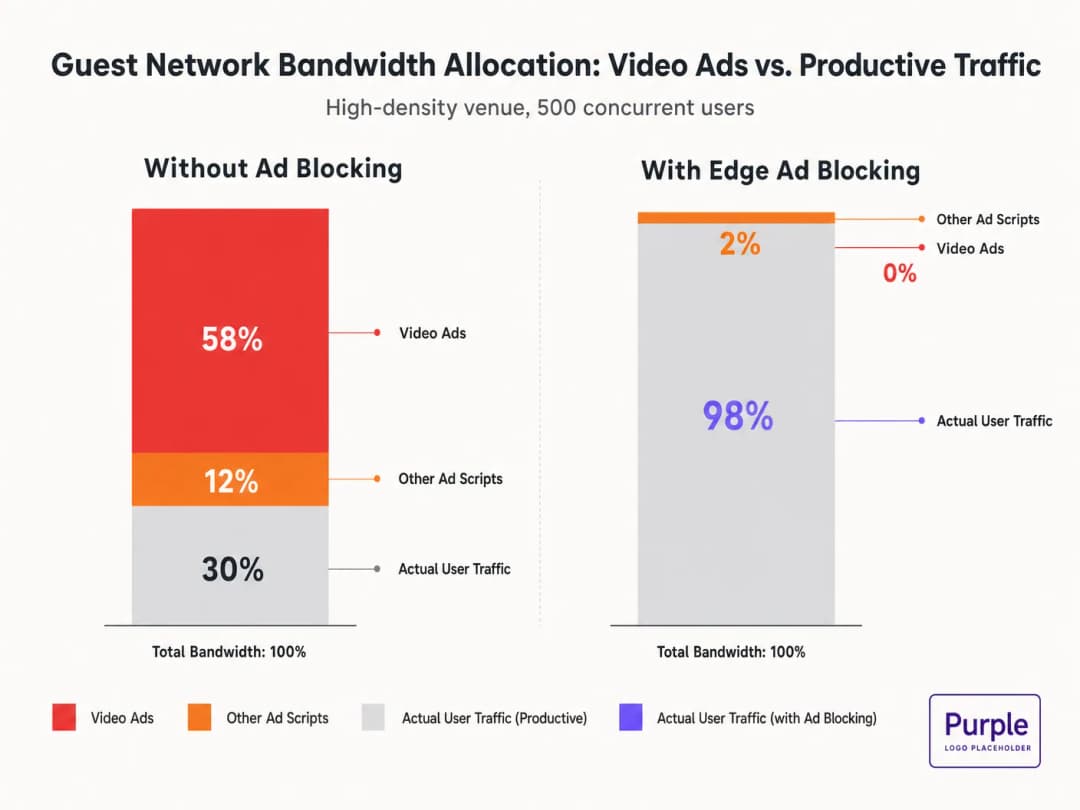
When guests connect to the network and browse standard web assets, their devices initiate dozens of background connections to ad delivery networks. These adaptive bitrate video streams can consume up to 50-70% of available throughput, degrading the experience for all users and saturating backhaul links. This guide details the technical mechanics of this bandwidth drain and provides a vendor-neutral blueprint to mitigate it at the edge using DNS filtering. By implementing these strategies, venues can dramatically improve guest WiFi performance without waiting for hardware refresh cycles, reducing infrastructure costs and enhancing compliance.
Listen to our briefing on this topic:
Technical Deep Dive: The Physics of Ad-Driven Network Saturation
Anatomy of a Web Request
When a user on a guest network accesses an ad-supported website, the browser's behavior is highly aggressive. A single page load typically triggers connections to 8-40 distinct third-party domains, including ad exchanges, demand-side platforms (DSPs), and content delivery networks (CDNs).
The Video Ad Bandwidth Penalty
Video advertisements, particularly pre-roll and mid-roll formats served by major exchanges, are delivered as adaptive bitrate streams. The CDN probes the available bandwidth and serves the best possible quality stream. In a high-density environment with 500 concurrent users, if 20% of users trigger a 1080p ad stream at 4-8 Mbps, the aggregate demand instantly spikes by 400-800 Mbps. This unwanted traffic bypasses standard Quality of Service (QoS) shaping because it originates from legitimate HTTPS connections.
Airtime Consumption and Spectral Inefficiency
In addition to backhaul saturation, video advertisements consume valuable radio airtime. In a shared wireless medium, every device actively receiving a high-bitrate stream reduces transmission opportunities for other devices. Although the IEEE 802.11ax (WiFi 6) standard introduced OFDMA and BSS Coloring to improve spectral efficiency, these mechanisms cannot compensate for the sheer volume of data demanded by ad networks. The radio layer becomes congested, increasing latency and packet loss for productive traffic.
DNS Resolution Latency Cascade
Ad delivery relies on complex redirect chains. A single ad impression can require 6-12 DNS lookups before the video stream even begins. In a dense deployment, this rapidly escalates the load on the local DNS resolver. When the resolver becomes a bottleneck, latency spikes, causing a perceptible degradation in page load times for every user on the network.
Got questions about your specific setup?
Our team works with venue operators, IT managers, and network engineers across 80,000 venues. Book a 20-minute call and we will show you how others like you solved it.
Implementation Guide: Edge DNS Filtering Architecture
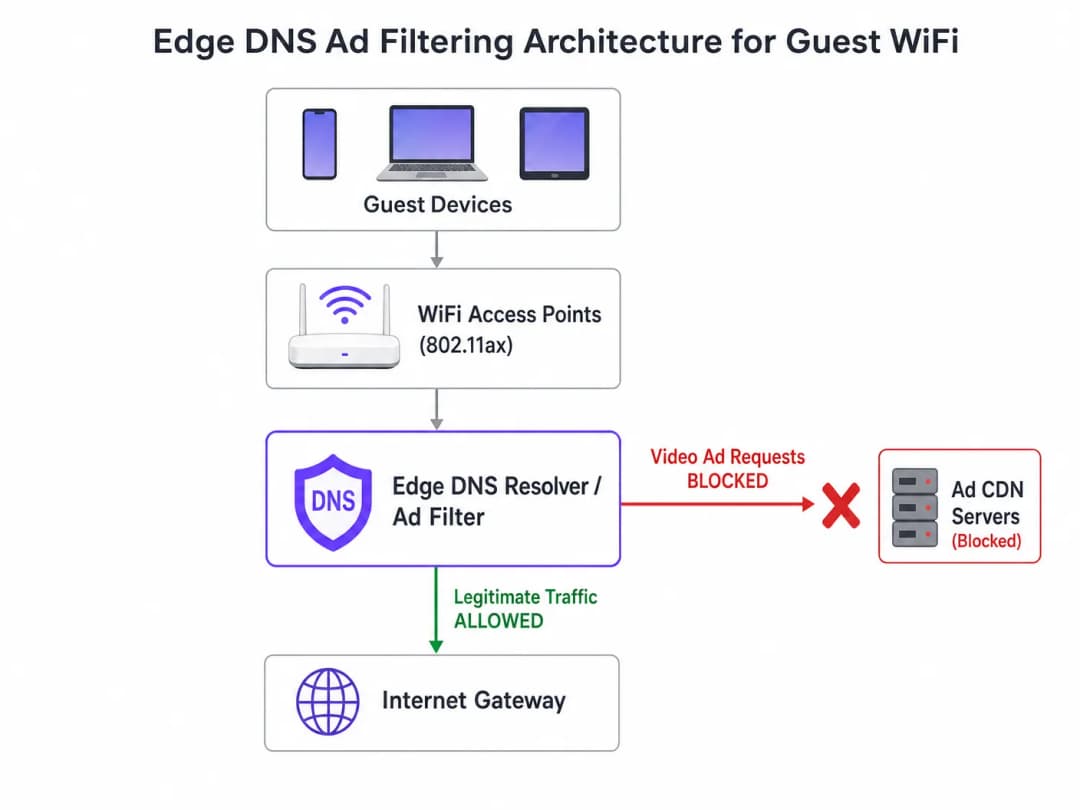
The most effective architectural intervention is edge DNS filtering. By blocking ad network domains at the resolver level, the network prevents TCP connections from ever being established. This approach is stateless, scales linearly, and adds negligible latency.
Step-by-Step Deployment Strategy
- Passive Instrumentation: Deploy passive DNS logging on the guest network for 48-72 hours to establish a baseline traffic profile. Identify the top queried domains and their volume. Use platforms like WiFi analytics to visualize this data.
- Conservative Blocklist Application: Do not deploy massive community blocklists (e.g., Steven Black's list) on day one. Start with the top 500 known video ad delivery domains. Verify that legitimate content delivery is not affected.
- Split-Horizon DNS Configuration: Ensure strict separation between corporate and guest DNS infrastructure. The filtering policy should be confined exclusively to the guest VLAN to prevent operational disruptions.
- Automated Blocklist Maintenance: Ad networks dynamically rotate domains and use Domain Generation Algorithms (DGAs). Configure the resolver to pull updated threat intelligence and blocklist feeds at least every 4 hours.
- Handling DNS over HTTPS (DoH): Modern browsers may attempt to bypass local resolvers using DoH. Mitigate this by blocking outbound TCP/UDP port 443 for known DoH provider IP ranges, forcing a fallback to the network-provided resolver.
To dive deeper into configuration details, see our guide on Improving WiFi Speeds by Blocking Ad Networks at the Edge.
Best Practices and Compliance
Privacy by Design (CCPA/CPRA Article 25)
Implementing edge DNS filtering aligns with CCPA/CPRA privacy-by-design principles. By preventing connections to third-party tracking domains, the network inherently protects guest data from unauthorized harvesting. This proactive stance reduces the venue's compliance burden.
Network Segmentation (PCI DSS)
For retail and hospitality venues processing payments, PCI DSS requires strict network segmentation. DNS filtering reinforces this boundary by ensuring guest devices cannot inadvertently serve as vectors for malicious payloads delivered via compromised ad networks (malvertising).
Transparent User Experience
Unlike Captive Portal interstitials or deep packet inspection, DNS filtering is transparent. The user experiences faster page loads and reduced battery consumption. If an ad slot fails to load, it typically collapses or displays empty space, which is rarely perceived by the user as a network failure.
Troubleshooting and Risk Mitigation
| Failure Mode | Root Cause | Mitigation Strategy |
|---|---|---|
| Over-blocking of Legitimate Content | Root-level blocking of shared CDNs (e.g., Akamai, Fastly). | Apply filtering at the subdomain level. Maintain a robust allowlist for critical venue services. |
| Bypassing of Filtering via DoH | Browsers using hardcoded DoH resolvers. | Null-route known DoH provider IPs. Implement split-tunneling policies if using Mobile Device Management (MDM). |
| Resolver CPU Exhaustion | Under-provisioned DNS infrastructure handling excessive NXDOMAIN responses. | Provision resolvers with adequate CPU/RAM. Use caching aggressively. Consider cloud-hosted recursive resolvers for elasticity. |
ROI and Business Impact
The business impact of edge DNS filtering is immediate and measurable:
- Bandwidth Recovery: Venues typically reclaim 30-50% of their guest network bandwidth, deferring expensive backhaul upgrades.
- Improved Guest Satisfaction: Faster page loads and reliable connectivity correlate directly with higher Net Promoter Scores (NPS) and positive venue reviews.
- Operational Efficiency: Fewer helpdesk tickets related to "slow WiFi" allow IT teams to focus on strategic initiatives, such as deploying offline maps mode or expanding smart city integrations, as championed by our leadership (see Purple appoints Iain Fox as VP Growth).
- Enhanced Security Posture: Proactively blocking malvertising and tracking domains simplifies security audits and compliance reporting. Learn more in our article on maintaining a secure posture: Explain what is an audit trail for IT security in 2026.
Key Definitions
Edge DNS Filtering
The practice of blocking access to specific domains at the local DNS resolver level, preventing devices from resolving the IP addresses of known ad networks.
Used by IT teams to silently drop unwanted traffic before a TCP connection is even attempted, saving bandwidth and improving performance.
Adaptive Bitrate Streaming (ABR)
A technology that dynamically adjusts the quality of a video stream based on the user's available bandwidth.
Ad networks use ABR to serve the highest possible quality video, which aggressively consumes available guest WiFi throughput.
Split-Horizon DNS
A configuration where different DNS responses are provided depending on the source IP address of the query (e.g., guest vs. corporate).
Essential for applying restrictive filtering policies to guest networks without impacting back-office operations.
DNS over HTTPS (DoH)
A protocol for performing remote DNS resolution via the HTTPS protocol, encrypting the queries.
DoH can bypass local edge filtering; network architects must actively block known DoH providers to enforce local DNS policies.
BSS Coloring
A Wi-Fi 6 (802.11ax) feature that adds a 'color' identifier to transmissions, allowing access points to ignore traffic from overlapping networks.
Improves radio efficiency in dense venues, but does not solve the backhaul saturation caused by video ads.
NXDOMAIN
A DNS response code indicating that the requested domain name does not exist.
The standard response returned by a filtering resolver when a device attempts to query a blocked ad network domain.
Domain Generation Algorithm (DGA)
Techniques used by malware and some aggressive ad networks to periodically generate new domain names to evade static blocklists.
Requires IT teams to use dynamic, frequently updated threat intelligence feeds rather than static hosts files.
Malvertising
The use of online advertising to distribute malware or redirect users to malicious websites.
Blocking ad networks at the edge inherently protects guest devices from these threats, improving the venue's security posture.
Worked Examples
A 400-room hotel is experiencing severe guest WiFi degradation every evening between 7:00 PM and 10:00 PM. The 1 Gbps backhaul is saturated, but the property management system (PMS) shows only 600 connected devices. How should the network architect address this without upgrading the circuit?
- Implement passive DNS logging on the guest VLAN to analyze the traffic profile during the peak window. 2. Identify the top bandwidth-consuming domains, which are likely video ad CDNs. 3. Deploy a recursive DNS resolver with a curated blocklist targeting these specific ad networks. 4. Configure the guest DHCP scope to assign the new resolver. 5. Monitor bandwidth utilization; expect a 30-40% reduction in peak load.
A stadium IT director wants to implement DNS ad blocking but is concerned about breaking the venue's own mobile app, which uses a third-party analytics SDK.
- Audit the mobile app's network dependencies using a proxy tool. 2. Identify the specific API endpoints required for the app's functionality. 3. Add these specific FQDNs (Fully Qualified Domain Names) to the DNS resolver's allowlist, superseding any blocklist policies. 4. Roll out the filtering policy to a subset of access points (e.g., one concourse) for beta testing before a venue-wide deployment.
Practice Questions
Q1. A retail chain wants to deploy DNS filtering across 500 stores. They currently use a cloud-managed firewall solution. Should they deploy local DNS resolvers at each store or route all DNS queries to a centralized cloud resolver?
Hint: Consider the latency impact of DNS queries on page load times.
View model answer
They should route queries to a centralized cloud resolver with geographically distributed points of presence (PoPs), provided the latency to the nearest PoP is under 20ms. Deploying and maintaining 500 local resolvers introduces significant operational overhead. Cloud resolvers offer centralized policy management and automated blocklist updates, which is ideal for a distributed retail environment.
Q2. After implementing a DNS blocklist, the marketing team reports that the venue's captive portal splash page is failing to load for some users. What is the most likely cause?
Hint: Captive portals often rely on external resources for tracking or authentication.
View model answer
The blocklist has likely inadvertently blocked a CDN or tracking pixel domain (e.g., Google Analytics or a social login API) that the captive portal depends on. The architect must review the DNS logs for the captive portal's walled garden IP range, identify the blocked dependency, and add it to the allowlist.
Q3. A convention center is hosting a digital marketing summit. The IT director is concerned that blocking ad networks will disrupt the attendees' ability to work and demonstrate their products. How should this be handled?
Hint: Network policies can be segmented by SSID or VLAN.
View model answer
The IT director should provision a dedicated SSID/VLAN for the summit attendees with a bypass policy that uses unfiltered DNS resolvers (e.g., 8.8.8.8). The standard guest WiFi network can remain filtered. This provides the necessary access for the specific event without compromising the performance of the general public network.
Continue reading in this series
How to Scan for WiFi Interference and Find the Best Channel
This comprehensive technical guide provides enterprise IT leaders with actionable methodologies for identifying RF interference and selecting the optimal 5GHz channels. It covers spectrum analysis, DFS considerations, and practical deployment strategies to optimize throughput and reduce latency without requiring new hardware investments.
How to Improve WiFi Speed Without Buying New Access Points
This guide details how enterprise venues can reclaim 30%+ of their WiFi bandwidth without purchasing new access points. By implementing DNS filtering, band steering, and QoS policies, IT teams can extend hardware lifespans, reduce CapEx, and improve network performance and security.
Reducing Latency on High-Density WiFi Networks
This guide details how eliminating unnecessary DNS lookups for tracking domains drastically lowers latency on high-density WiFi networks. It provides actionable architecture, implementation, and ROI guidance for IT leaders managing congested venue environments.
Got questions about your specific setup?
Our team works with venue operators, IT managers, and network engineers across 80,000 venues. Book a 20-minute call and we will show you how others like you solved it.