
Power over Ethernet (PoE) for Access Points: An Implementation Guide
This guide provides infrastructure technicians, network architects, and IT decision-makers with a definitive technical reference for deploying Power over Ethernet (PoE) access points across enterprise venues including hotels, retail estates, stadiums, and public-sector facilities. It covers IEEE standards from 802.3af through 802.3bt, power budget calculation, cabling requirements, VLAN segmentation, and security compliance, with concrete implementation scenarios and measurable ROI benchmarks. Understanding PoE architecture is foundational to any [Guest WiFi](/guest-wifi) or [WiFi Analytics](/guest-wifi-marketing-analytics-platform) deployment, as the reliability of the physical layer directly determines the quality of data capture, user experience, and operational uptime.
Video overview
Listen to this guide
View podcast transcript
Part of our core series: Guest WiFi Guide →

Executive Summary
Power over Ethernet (PoE) is the foundational infrastructure layer underlying every enterprise-grade wireless deployment. As WiFi 6, WiFi 6E, and WiFi 7 access points place ever-greater demands on power budgets - in some cases exceeding 60 watts per device - the consequences of under-specified PoE infrastructure are more severe than ever. Degraded access point performance, captive portal outages, broken analytics pipelines, and unplanned downtime are all direct symptoms of poor PoE planning.
This guide gives you the technical framework to make the right decisions: which IEEE standard to specify, how to calculate switch power budgets, what cabling you must use, and how to plan VLAN segmentation for compliance. It also connects these decisions to real business outcomes - from guest satisfaction in hospitality environments to dwell-time analytics in retail deployments. Whether you are undertaking a 50-room hotel refurbishment or a 2,000-seat conference center build, the principles here apply in full.
Technical Deep Dive
Overview of the IEEE PoE Standards
The IEEE 802.3 working group has defined four progressive PoE standards, each raising the maximum power delivered over standard Ethernet cabling. Understanding these differences is not an academic exercise - specifying the wrong standard at procurement locks your infrastructure into a performance bottleneck that constrains your future wireless roadmap.
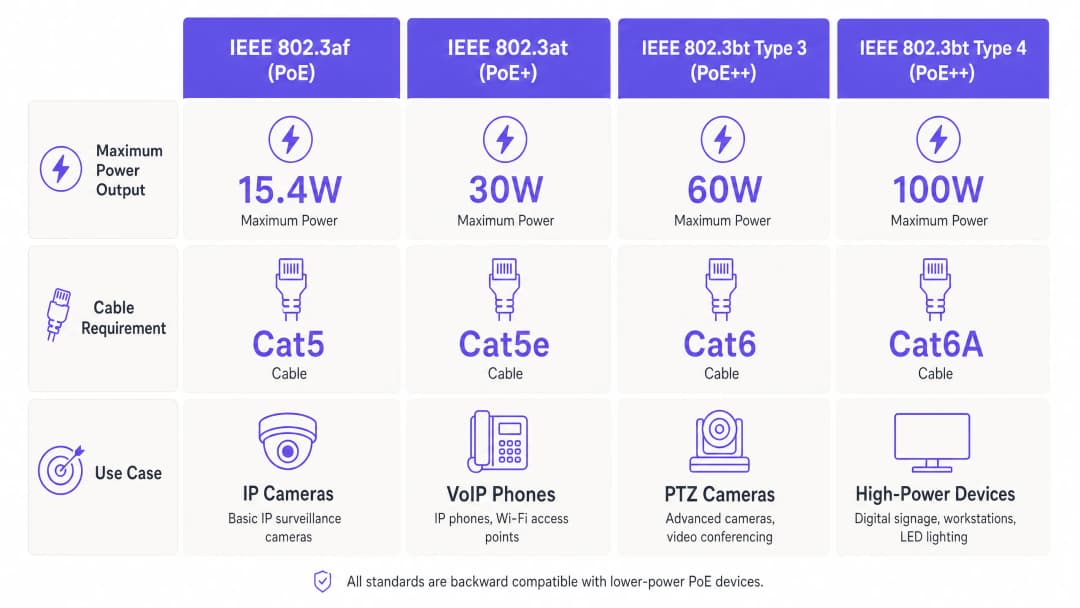
| Standard | Common Name | Max PSE Output | Max PD Received | Minimum Cabling | Pairs Used |
|---|---|---|---|---|---|
| IEEE 802.3af (2003) | PoE | 15.4 W | 12.9 W | Cat 5 | 2 pairs |
| IEEE 802.3at (2009) | PoE+ | 30 W | 25.5 W | Cat 5e | 2 pairs |
| IEEE 802.3bt Type 3 (2018) | PoE++ | 60 W | 51 W | Cat 6 | 4 pairs |
| IEEE 802.3bt Type 4 (2018) | PoE++ | 100 W | 71.3 W | Cat 6A | 4 pairs |
The difference between PSE (power sourcing equipment - your switch) output and PD (powered device - your access point) is critical. Cable resistance causes power loss in proportion to run length and conductor gauge. A 30-watt PoE+ port at the end of a 100-meter Cat 5e run will deliver approximately 25.5 watts to the device. For high-density deployments where access points operate close to their power ceiling, this loss margin must be factored into every per-port calculation.
Power Negotiation via LLDP
Modern PoE switches and access points use the Link Layer Discovery Protocol (LLDP) - specifically the LLDP-MED extensions - to negotiate power requirements dynamically. The powered device advertises its maximum and current power consumption; the switch allocates accordingly. This prevents over-allocation of the switch budget and protects devices from excessive voltage. Ensure your switch firmware supports LLDP-MED power negotiation, particularly in mixed-vendor environments, as third-party APs may not be able to use proprietary protocols such as Cisco's CDP.
WiFi 6, 6E and 7 Power Requirements
With each successive WiFi generation, the power requirements of modern enterprise-grade access points have increased substantially. A typical WiFi 5 (802.11ac) AP draws 12 to 18 watts, sitting comfortably within the 802.3af limit. A tri-band WiFi 6 (802.11ax) AP with a 2.5GbE uplink typically consumes 20 to 30 watts, requiring PoE+. WiFi 6E APs supporting the 6 GHz band generally need 30 to 40 watts, pushing into 802.3bt Type 3 territory. And emerging WiFi 7 (802.11be) APs with multi-link operation and 320 MHz channel support are already listed in vendor datasheets as requiring 40 to 60 watts. Specifying 802.3bt-capable switches today is a forward-looking investment, not a luxury.
Power Budget Calculation
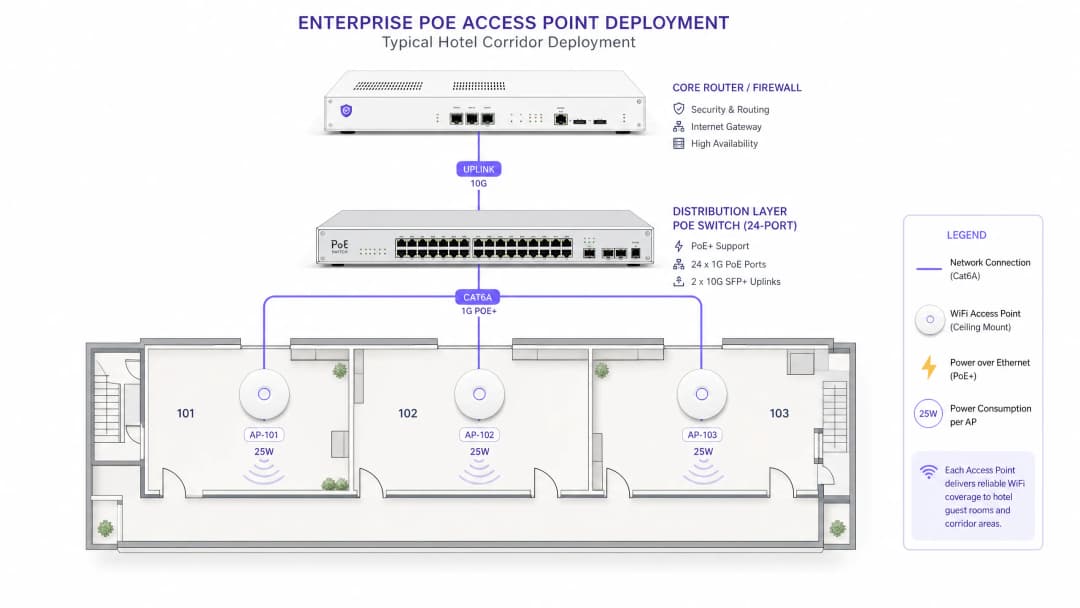
The most common and most costly PoE deployment error is failing to calculate the switch's total power budget against actual device consumption. A 48-port PoE+ switch may claim 30 watts per port, but its total power budget - the aggregate wattage its internal power supply can deliver across all PoE ports simultaneously - is typically 370 to 740 watts depending on the model. Deploying 30 APs each consuming 25 watts requires 750 watts; a switch with a 740-watt budget will begin shedding ports under full load.
The correct calculation is:
Required budget = (number of APs × maximum power draw per AP) × 1.25 overhead factor
This 25% overhead accounts for power supply efficiency losses, thermal derating at elevated ambient temperatures, and headroom for future device additions. Always validate this figure against the switch vendor's published PoE budget specification, not the per-port maximum.
Cabling Architecture for PoE Access Points
Cable selection is a thermal and electrical engineering question, not merely a matter of data throughput. The IEEE 802.3bt standard mandates minimum conductor specifications because higher wattages generate proportionally more heat within the cable. For bundled cables running through ceiling plenums or conduit, the cumulative thermal load raises ambient temperature, degrading both power delivery efficiency and data integrity. The recommended cabling specifications by PoE standard are as follows. For 802.3af deployments, Cat 5e is the minimum viable option, but Cat 6 is recommended for any installation with a planned upgrade path. For 802.3at (PoE+) deployments, Cat 6 should be treated as the baseline, with Cat 6A strongly recommended where cable runs exceed 200 feet or sit in high-density trays. For 802.3bt deployments at 60 watts or above, Cat 6A is mandatory. The ANSI/TIA-568-B2-1 standard specifies AWG24 conductors as the minimum for PoE applications; the AWG23 conductors in Cat 6A provide significantly lower resistance and better heat dissipation.
For venues such as stadiums and large conference centers - where cable runs from IDF cabinets to under-seat or ceiling-mounted APs can approach the 328-foot limit - Cat 6A is the only sensible specification. The incremental material cost per foot is trivial relative to the labor cost of re-pulling cable.
VLAN Segmentation and Network Architecture
Every enterprise-grade PoE access point deployment must implement VLAN-based network segmentation. The minimum viable architecture separates three traffic domains: management (switch and AP management interfaces, accessible only from the NOC VLAN), corporate (authenticated staff devices, connected to the corporate directory via 802.1X), and guest (unauthenticated or captive-portal-authenticated visitor traffic, isolated from all internal resources).
Purple's Guest WiFi platform operates natively within this architecture. The guest SSID maps to a dedicated VLAN, traffic is routed to Purple's cloud infrastructure for captive portal authentication and data capture, and the platform's WiFi Analytics engine processes dwell time, repeat visit rates, and demographic data entirely within the guest traffic domain. This segmentation is not optional - it is a requirement under PCI DSS 4.0 for any venue processing card payments, and it is foundational to demonstrating CCPA/CPRA compliance for guest data collection.
For healthcare environments, the segmentation model extends further: IoT medical devices, nurse call systems, and patient WiFi must each occupy separate VLANs with explicit firewall policies between them. PoE switches in healthcare deployments should support 802.1X port-based authentication to prevent unauthorized device connections at the physical layer.
Got questions about your specific setup?
Our team works with venue operators, IT managers, and network engineers across 80,000 venues. Book a 20-minute call and we will show you how others like you solved it.
Implementation Guide
Phase 1: Site Survey and Requirements Gathering
Before making any procurement decision, conduct a structured site survey covering four dimensions. First, map every planned AP location to its nearest IDF or MDF, calculating the actual cable routing distance - including runs through conduit and ceiling voids - rather than the straight-line distance. Second, audit the existing cable plant: confirm cable category, installation date, and any known fault history. Third, inventory the existing switch estate: record PoE capabilities, per-port wattage, and total power budget. Fourth, document the AP models under evaluation and extract their maximum power draw under full radio load from vendor datasheets, not the "typical" figures.
For transport hubs and large public-sector estates, this survey phase should also include an RF propagation study to determine AP density requirements, which directly drives the total PoE port count and switch specification.
Phase 2: Switch and Infrastructure Specification
With survey data in hand, specify your PoE switches using the budget calculation method above. For multi-floor or multi-building deployments, the standard architecture places a PoE distribution switch in each IDF cabinet, connected to core switches in the MDF via 10GbE or 25GbE fiber uplinks. This keeps PoE cable runs short, reducing power loss and thermal load, while centralizing management at the core.
For redundancy in critical environments such as hospitals, airports, or large hospitality venues, specify switches with dual redundant power supplies. A single PSU failure on a 48-port PoE switch can take down an entire floor of access points simultaneously.
Phase 3: Cable Installation
Install cabling to the ANSI/TIA-568-C.2 standard. Key requirements include maintaining minimum bend radius (four times the cable diameter for Cat 6A), avoiding cable routes adjacent to high-voltage electrical conduit (maintain at least 300mm of separation), and keeping tray fill below 50% capacity to allow adequate airflow and heat dissipation. Test every run against TIA-568-C.2 channel limits with a cable certification tester before switches are installed - finding a fault at this stage costs minutes; finding it after APs are mounted costs hours.
Phase 4: Switch Configuration
Configure the following baseline settings on your PoE switches. Enable LLDP globally and on all access ports. Set PoE priority levels: assign "critical" priority to APs serving primary coverage areas, "high" to secondary coverage APs, and "low" to non-critical devices such as IoT sensors. Set per-port power limits to match each AP's maximum draw plus a 10% safety margin - this prevents a single faulty AP from consuming a disproportionate share of the budget. Enable SNMP traps for PoE power threshold alerts, and configure your NMS to alert when total switch budget utilization reaches 80%.
For 802.1X port security, configure the switch to place unauthenticated devices into a restricted VLAN rather than blocking them entirely - this simplifies troubleshooting while maintaining the security posture.
Phase 5: Access Point Deployment and Validation
Install APs according to the RF survey plan. After physical installation, validate PoE delivery from the switch CLI: confirm the negotiated power class, actual power draw, and LLDP power advertisements for every port. Compare actual draw against the vendor datasheet maximum - a significant discrepancy can indicate a cable fault, a power budget constraint, or a firmware issue causing the AP to operate in a degraded power mode.
For platforms such as Purple's Guest WiFi, validate the captive portal journey end-to-end from a guest device: confirm SSID visibility, portal redirect, authentication, and data capture before signing off the installation. A PoE-related power downgrade that disables the 5GHz radio will not be immediately visible on the switch CLI, but it will show up in Purple's analytics as a sharp drop in connected device counts on that AP.
Best Practices
The following vendor-agnostic best practices are drawn from the IEEE standards, ANSI/TIA cabling specifications, and practical experience of enterprise deployments.
Always specify Cat 6A for new installations. Even if your current AP models only require PoE+, the incremental cost per meter of Cat 6A over Cat 6 is typically just 15-20%. The cost of re-pulling cable to support future WiFi 7 APs is orders of magnitude higher. For any installation expected to serve for five years or more, Cat 6A is the correct specification.
Never rely on per-port wattage figures alone. Always verify the switch's total PoE power budget and calculate aggregate draw. This is the single most common cause of post-installation PoE failures in enterprise deployments.
Implement PoE power monitoring as standard operating procedure. SNMP-based monitoring of per-port and total PoE utilization should be part of your standard NMS configuration. Trending this data over time catches gradually degrading power supplies before they cause an outage.
Maintain 20-30% power budget headroom. This is not wasteful over-provisioning - it accounts for PSU efficiency losses, thermal derating, and future device additions. A switch running at 95% of its PoE budget is a maintenance incident waiting to happen.
Differentiate PoE-powered devices by criticality in your VLAN and QoS strategy. Access points serving primary guest WiFi should carry a higher PoE priority than IoT sensors or digital signage. When the switch has to shed load, you want it to make the right decision automatically. To explore further how wireless architecture choices interact with venue scale, see our guide Mesh Networks vs Access Points: Which Is Better for Large Venues?, which details the trade-offs between PoE-wired AP deployments and mesh topologies.
Troubleshooting and Risk Mitigation
Access Point Operating in Degraded Mode
Symptom: the AP is online, but specific features - such as USB ports, secondary radios, or the multi-gigabit uplink - are unavailable. Root cause: insufficient PoE power. The AP is receiving fewer watts than its minimum operating requirement and has disabled non-essential features to stay online. Diagnosis: check the switch CLI to confirm the negotiated power class and actual power draw; compare against the vendor datasheet. Check the run length and certify the cable with a tester. Resolution: verify the switch's remaining power budget, upgrade the cabling if necessary, or move the AP to a switch port supporting a higher PoE standard.
Switch Ports Shutting Down Under Load
Symptom: AP ports intermittently lose power, particularly during peak usage when all radios are under full load. Root cause: the switch's total PoE power budget has been exceeded. Diagnosis: check aggregate PoE utilization across the switch via SNMP or the CLI; compare against the switch's rated power budget. Resolution: redistribute APs across multiple switches, add a second switch, or replace with a higher-budget switch model. In the interim, reduce per-port power limits on lower-priority devices.
Intermittent Connectivity on Long Runs
Symptom: APs on cable runs approaching 90-100 meters show intermittent connectivity or reduced throughput. Root cause: voltage drop over long runs and heat-induced resistance increases. Elevated ambient temperatures in ceiling voids exacerbate the problem. Diagnosis: run cable certification tests on the affected runs; check ambient temperature at cable trays. Resolution: install PoE extenders or an intermediate switch to segment the run, or re-route the cable to shorten the length.
LLDP Power Negotiation Failure
Symptom: the AP powers on but draws maximum class power rather than negotiated power, over-allocating the power budget. Root cause: LLDP-MED is not enabled on the switch port, or the AP firmware does not support the LLDP-MED power TLV. Resolution: enable LLDP globally and on the individual ports on the switch; update the AP firmware; verify that LLDP frames are being exchanged via a packet capture on the management VLAN.
Security Risk: Unauthorized Device Connections
Risk: an unauthorized device connects to a PoE switch port in a public area and gains network access. Mitigation: enable 802.1X port authentication on all access-layer switch ports. For devices that do not support an 802.1X supplicant, configure MAC Authentication Bypass (MAB) as a fallback and place them in a restricted VLAN. For venues running Purple Guest WiFi, the captive portal layer provides an additional authentication checkpoint above the network layer, ensuring that even a device that obtains an IP address cannot access the internet until it completes the portal journey.
ROI and Commercial Impact
Quantifying the Cost of Under-Specification
The business case for correct PoE specification becomes obvious once you account for the full cost of failure. An access point operating in degraded mode due to insufficient power may disable its 5GHz radio, halving effective throughput and forcing clients onto the congested 2.4GHz band. In a hotel environment, this correlates directly with guest satisfaction scores - WiFi quality consistently ranks in the top three factors in guest reviews. Purple's data from hospitality deployments shows that venues with stable, high-performance WiFi achieve measurably higher Net Promoter Scores (NPS) and repeat booking rates. For more on the relationship between WiFi quality and guest experience, see How to Improve Guest Satisfaction: The Ultimate Guide.
The Dependence of Analytics Revenue on Infrastructure Stability
Purple's WiFi Analytics platform captures first-party data from every guest WiFi session: dwell time, visit frequency, demographic data from portal registrations, and movement patterns across the venue. This data carries direct commercial value - it informs marketing segmentation, staffing decisions, and retail floor planning. Every AP that goes offline due to a PoE failure represents a gap in that data chain. Across a 200-site retail estate, even a 2% degradation in AP uptime produces measurable data loss across the entire analytics pipeline.
The Infrastructure Investment vs Operational Cost Trade-Off
At procurement, the incremental cost of specifying 802.3bt-capable switches over 802.3at switches is typically 15–25%. The cost of retrofitting higher-capacity switches into a 100-AP deployment two years later - including labor, downtime, and reconfiguration - routinely exceeds the cost of the original switches. For a CTO, the correct framing is not "do we need this capability today?" but "will we need this capability within the operational lifetime of this infrastructure?". For any deployment expected to support WiFi 6E or WiFi 7 APs, the answer is unambiguously yes.
Public Sector and Smart City Context
For public-sector organizations deploying outdoor or semi-outdoor PoE access points as part of smart city or digital inclusion programs, environmental factors - temperature extremes, moisture ingress, and the absence of nearby electrical infrastructure - amplify the power budget and cabling considerations. These call for industrial-grade PoE switches with extended temperature ratings and IP-rated enclosures. Purple's growing public-sector practice - reflected in the appointment of Iain Fox as VP of Public Sector Growth - is directly engaged with these deployment challenges across local council, transportation, and education settings.
Passwordless and Seamless Authentication at Scale
As venues move toward passwordless guest access - leveraging technologies such as Passpoint and OpenRoaming - the access point infrastructure must support the associated authentication overhead. WPA3 and 802.1X-based authentication place additional processing demands on APs, which in turn increases power consumption. Ensuring your PoE infrastructure has sufficient headroom to support these authentication protocols is part of future-proofing your deployment. For more on how this authentication model works in practice, see How WiFi Assistants Enable Passwordless Access in 2026.
Key Definitions
PSE (Power Sourcing Equipment)
The device that supplies power over the Ethernet cable - in enterprise deployments, this is the PoE switch or PoE injector. The PSE detects whether a connected device is PoE-capable before applying power, preventing damage to non-PoE equipment.
IT teams encounter this term when reviewing switch datasheets and power budget specifications. The PSE output wattage is always higher than the PD receive wattage due to cable losses - a distinction critical to accurate power budget calculations.
PD (Powered Device)
The device that receives power over the Ethernet cable - in wireless deployments, this is the access point. The PD communicates its power class and current draw to the PSE via LLDP, enabling dynamic power allocation.
Relevant when reading AP vendor datasheets. The 'required power' figure in an AP datasheet is the PD receive figure, not the PSE output figure. Always verify which figure the vendor is quoting.
PoE Power Budget
The total aggregate wattage a PoE switch can deliver across all its PoE ports simultaneously. This is a hard limit determined by the switch's internal power supply capacity and is distinct from the per-port maximum wattage.
The most commonly misunderstood specification in PoE switch procurement. A 48-port PoE+ switch with a 30W per-port maximum may have a total budget of only 370W - sufficient for approximately 12 APs at full load, not 48.
LLDP-MED (Link Layer Discovery Protocol - Media Endpoint Discovery)
An extension to the IEEE 802.1AB LLDP standard that enables PoE-capable devices to advertise their power requirements and capabilities to the PSE. Allows dynamic power negotiation rather than static class-based allocation.
Relevant during switch configuration and AP commissioning. If LLDP-MED is not enabled on the switch port, the switch will allocate the maximum class power rather than the negotiated amount, consuming more of the power budget than necessary.
4PPoE (4-Pair Power over Ethernet)
The power delivery method introduced in IEEE 802.3bt that uses all four pairs of conductors in an Ethernet cable to carry power, enabling the higher wattage levels of PoE++ (60W and 100W). Earlier standards used only two pairs.
Critical when specifying cabling for 802.3bt deployments. 4PPoE requires that all four pairs in the cable are intact and correctly terminated - a single faulty pair will prevent the device from receiving full power. Cable certification must verify all four pairs.
IDF (Intermediate Distribution Frame)
A secondary wiring closet or rack that aggregates network connections from a floor or zone and connects them via uplink to the main distribution frame (MDF). In PoE deployments, the IDF is where distribution-layer PoE switches are located.
IDF placement is a critical design decision in PoE deployments. Every meter of cable run between an IDF and an AP represents power loss and thermal load. Poorly positioned IDFs force long cable runs that push the limits of PoE power delivery.
PoE Priority Class
A switch configuration parameter that determines which ports receive power first when the switch approaches its total power budget limit. Typically three levels: critical, high, and low. Lower-priority ports are shut down first when budget is exhausted.
Must be configured during switch setup. Access points serving primary coverage areas should be assigned 'critical' priority. Failing to configure priority means the switch makes arbitrary decisions during power budget exhaustion, potentially shutting down mission-critical APs.
802.1X Port Authentication
An IEEE standard for port-based network access control that requires devices to authenticate before being granted network access. In PoE switch deployments, 802.1X prevents unauthorized devices from connecting to access-layer switch ports and gaining network access.
Relevant in any deployment where PoE switch ports are physically accessible to non-IT personnel - retail store floors, hotel corridors, conference rooms. Without 802.1X, any device plugged into a switch port receives network access. This is a PCI-DSS and general security requirement.
Thermal Derating
The reduction in a PoE switch's maximum power output capacity at elevated ambient temperatures. Most enterprise switches are rated for full PoE output at 77°F; above this threshold, the power supply reduces output to prevent overheating.
Relevant in deployments where switches are located in poorly ventilated spaces - ceiling spaces, compact wall-mount enclosures, or outdoor cabinets. A switch rated at 740W at 77°F may only deliver 600W at 104°F. Factor thermal derating into power budget calculations for any non-conditioned environment.
Worked Examples
A 200-room hotel is upgrading from legacy WiFi 4 to WiFi 6. The existing cabling plant is Cat 5e, installed approximately 12 years ago. The IT manager needs to deploy 180 access points - one per room plus hallways and public areas - and wants to future-proof for WiFi 6E within three years. The budget is constrained, and a full cabling replacement is not feasible in Phase 1. How should the PoE infrastructure be specified?
The solution requires a phased approach that respects the current cabling constraint while building a credible upgrade path. In Phase 1, specify WiFi 6 APs with a maximum draw of 25 watts or less - this keeps the deployment within 802.3at (PoE+) limits and within the thermal envelope of the existing Cat 5e cabling. Select APs that explicitly support operation at 25.5W (the maximum PD receive for 802.3at) rather than requiring 30W at the PSE port. For the switch layer, specify 802.3bt-capable switches even though Phase 1 APs only require PoE+. The incremental cost is modest, and this avoids a switch replacement in Phase 2. Size each IDF switch at a minimum of 740W total PoE budget for a 24-port switch, supporting up to 24 APs at 25W with a 24% overhead margin. Deploy one switch per floor in IDF closets, connected via 10GbE SFP+ fiber uplinks to the core. In Phase 2 (12 - 24 months), replace Cat 5e with Cat 6A in sections where WiFi 6E APs will be deployed first - typically high-density public areas: lobby, restaurant, conference rooms. The 802.3bt switches are already in place; simply swap the APs and the infrastructure is ready. Configure VLANs from day one: VLAN 10 for management, VLAN 20 for corporate staff, VLAN 30 for guest WiFi. Map Purple's Captive Portal to VLAN 30 with a dedicated DHCP scope and upstream routing to Purple's cloud.
A regional retail chain with 85 stores is deploying Purple's Guest WiFi and WiFi Analytics platform across its entire estate. Each store has between 3 and 8 access points depending on floor area. The estate manager wants a standardized PoE switch specification that works across all store sizes, minimizes SKU count, and supports the analytics platform reliably. Current cabling is a mix of Cat 5e and Cat 6, installed at various points over the past decade. How should the PoE infrastructure be standardized?
For a retail estate of this scale, standardization on a single switch SKU is operationally correct - it simplifies spares management, firmware standardization, and NOC support. The recommended approach is to specify a single 8-port or 16-port managed PoE+ switch (802.3at, minimum 120W total budget) as the standard store unit, with a 24-port variant for larger stores exceeding 6 APs. The 8-port unit at 120W supports up to 4 APs at 25W with a 20% overhead margin; the 16-port unit at 240W supports up to 8 APs. Both units should support 802.3bt on at least 2 ports to accommodate future AP upgrades without a full switch replacement. For cabling, audit each store during the initial deployment visit. Where Cat 5e is present and run lengths are under 60 meters, it is acceptable for current PoE+ APs. Flag stores with Cat 5e runs over 60 meters or with known cable faults for cabling replacement, prioritized by store revenue. Configure all switches with a standardized VLAN template: VLAN 10 management, VLAN 20 guest WiFi (mapped to Purple's platform), VLAN 30 POS systems (isolated from guest traffic per PCI-DSS requirements). Deploy a zero-touch provisioning configuration so that replacement switches can be shipped to stores and self-configure on first boot - critical for an 85-store estate where on-site IT support is limited.
Practice Questions
Q1. You are specifying the network infrastructure for a new 350-seat conference center. The venue will host events ranging from small boardroom meetings to full-capacity conferences with live streaming. The IT team has specified 45 WiFi 6E access points, each with a maximum draw of 35 watts. The venue has no existing cabling. You have been asked to specify the PoE switch infrastructure. What is the minimum total PoE budget required across all switches, and what cable category should be specified?
Hint: Remember to apply the 25% overhead factor to your calculated load, and consider that 35W per AP exceeds the 802.3at maximum PD receive figure of 25.5W.
View model answer
The minimum required PoE budget calculation is: 45 APs × 35W = 1,575W base load. Applying the 25% overhead factor: 1,575W × 1.25 = 1,969W minimum total switch PoE budget across the deployment. Since 35W per AP exceeds the 802.3at PD receive maximum of 25.5W, the switches must support IEEE 802.3bt Type 3 (60W per port). For cabling, Cat 6A is mandatory for 802.3bt deployments and is the correct specification for a new installation regardless. A typical architecture would distribute this across 3 - 4 IDF locations with 24-port 802.3bt switches (each with a minimum 740W budget), connected via 10GbE fiber uplinks to a core switch. Three 740W switches provide 2,220W of budget, satisfying the 1,969W requirement with adequate headroom.
Q2. During a post-installation audit of a 60-AP retail deployment, you discover that 12 access points on the third floor are operating with their 5GHz radio disabled. The switch shows all ports as 'PoE active' with no errors. The cable runs on the third floor average 85 meters. What is the most likely root cause, and what is the remediation path?
Hint: Consider the relationship between cable run length, power loss, and the AP's behavior when it receives insufficient power. The switch showing 'PoE active' does not mean the AP is receiving full rated power.
View model answer
The most likely root cause is voltage drop and power loss on the 85-meter Cat 5e or Cat 6 cable runs, resulting in the APs receiving less than their minimum required wattage for full-feature operation. The switch showing 'PoE active' confirms power is being delivered but does not confirm the wattage received at the device. At 85 meters, resistance losses on Cat 5e can reduce delivered power by 15 - 20% compared to a 30-meter run. If the APs require 25W for full operation (including 5GHz radio), they may be receiving only 20 - 21W, causing the radio to be disabled as a power-saving measure. Remediation: first, check the switch CLI for per-port actual power draw and compare against the AP's rated maximum. Second, certify the cable runs - look for resistance values above TIA-568-C.2 limits. Third, either replace the cable runs with Cat 6A (lower resistance per meter) or install intermediate PoE extender switches to break the run length. Fourth, verify that LLDP-MED is enabled so the switch allocates the correct power class.
Q3. A hotel group is planning to deploy Purple's Guest WiFi platform across a 150-room property. The network architect has proposed a flat network design with all devices - guest WiFi, POS terminals, IP cameras, and staff devices - on a single VLAN to simplify configuration. The hotel processes card payments at the front desk and restaurant. Identify the compliance and security risks in this design and propose a corrected architecture.
Hint: Consider PCI-DSS requirements for cardholder data environments, CCPA/CPRA obligations for guest data, and the security implications of guest devices sharing a broadcast domain with POS terminals.
View model answer
The flat network design presents multiple critical compliance and security failures. Under PCI DSS 4.0, any network that carries cardholder data must be segmented from all other network traffic. A flat network where guest WiFi devices share a VLAN with POS terminals means the cardholder data environment (CDE) is not isolated - this is a direct PCI DSS violation that would result in a failed QSA assessment and potential loss of card processing capability. Under CCPA/CPRA, guest data collected via the Purple captive portal must be handled in a controlled environment; a flat network increases the attack surface for data exfiltration. The corrected architecture requires a minimum of four VLANs: VLAN 10 for network management (switches, APs, cameras - accessible only from NOC); VLAN 20 for POS and payment systems (the CDE, with strict firewall rules permitting only payment processor traffic); VLAN 30 for guest WiFi (routed to Purple's platform, no access to internal resources); VLAN 40 for staff corporate devices (authenticated via 802.1X, access to internal systems). Each VLAN requires explicit firewall policy between it and all others, with the CDE VLAN having the most restrictive rules. This architecture satisfies PCI DSS network segmentation requirements and provides a defensible CCPA/CPRA data handling posture.
Continue reading in this series
What is a WLC (Wireless LAN Controller) and Do You Still Need One?
This comprehensive guide explores the evolution of Wireless LAN Controllers (WLCs) and provides a technical framework for determining the right architecture in 2026. It covers traditional hardware, cloud-managed, and controller-less models, detailing their impact on compliance, scalability, and guest experience.
Mesh Network vs Access Points: Which is Better for Large Venues?
This technical guide provides a definitive comparison between mesh networks and traditional wired access points for large-scale venues, covering architecture, performance trade-offs, and deployment strategy. It equips IT managers, network architects, and CTOs with actionable frameworks to design high-performance, compliant WiFi infrastructures for hospitality, retail, events, and public-sector environments. The guide also maps these architectural decisions to Purple's hardware-agnostic guest WiFi and analytics platform, demonstrating how the right infrastructure choice drives measurable business outcomes.
The Best Wi-Fi Access Points for Enterprise and Homelabs
This technical guide evaluates the best enterprise Wi-Fi access points for 2025-2026, covering Wi-Fi 6E and Wi-Fi 7 hardware from Cisco, HPE Aruba, Ruckus, Juniper Mist, and Ubiquiti across high-density hospitality, retail, and public venue deployments. It provides actionable architecture strategies, vendor comparisons, security frameworks, and ROI metrics for IT leaders building next-generation wireless networks. Purple's hardware-agnostic guest WiFi and analytics platform is mapped throughout as the intelligence layer that transforms network infrastructure into a first-party data asset.
Got questions about your specific setup?
Our team works with venue operators, IT managers, and network engineers across 80,000 venues. Book a 20-minute call and we will show you how others like you solved it.