

WiFi for Events: How to Deliver Reliable Connectivity for Large Crowds
This authoritative guide provides IT leaders, network architects, and venue operators with actionable strategies for designing, deploying, and managing high-density temporary WiFi networks for large-scale events — from corporate conferences to outdoor festivals. It covers RF design principles, capacity planning, security compliance, and how to leverage guest WiFi analytics to turn the network into a revenue-generating asset.
🎧 Listen to this Guide
View Transcript
Executive Summary
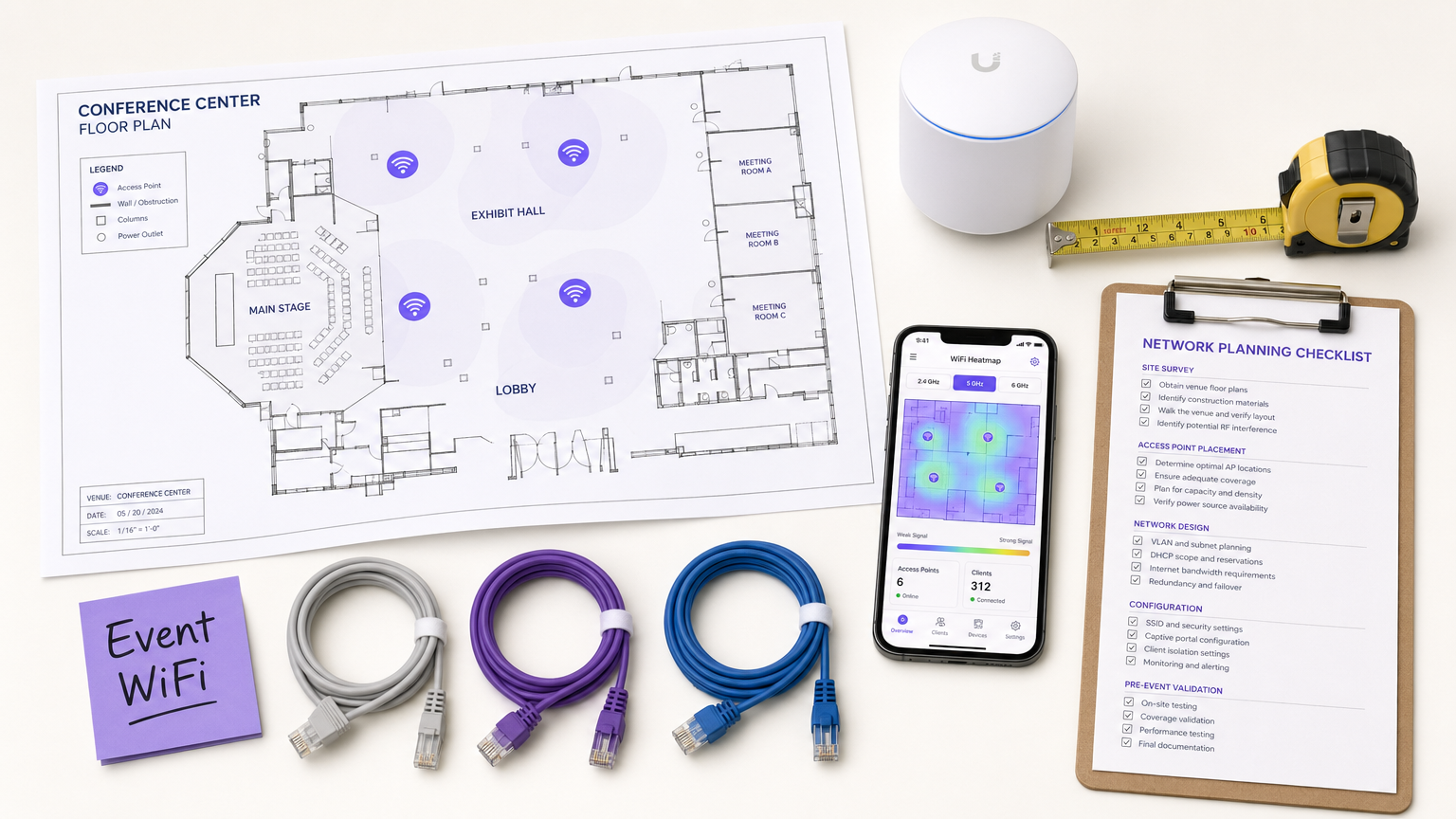
For CTOs, IT directors, and venue operators, deploying temporary WiFi for large-scale events presents a unique set of challenges that standard enterprise network design simply does not address. Unlike static office environments, event connectivity demands rapid deployment, extreme high-density capacity, and seamless user onboarding — all while maintaining strict security and regulatory compliance. A failed network at a keynote address or trade show is not just an inconvenience; it is a reputational and commercial risk.
This guide provides a comprehensive blueprint for architecting and managing event WiFi networks that deliver reliable performance under pressure. We explore the technical requirements for high-density environments, vendor-neutral deployment strategies, and the integration of Guest WiFi solutions to capture first-party data and drive ROI. Whether you are managing a corporate conference, a Hospitality venue hosting a gala, or a massive outdoor festival, these principles will ensure your network architecture can handle the load and deliver a seamless attendee experience.
Technical Deep-Dive
The High-Density Challenge
Standard office WiFi deployments are designed for coverage; event WiFi must be designed for capacity. In a typical enterprise setting, an access point (AP) might serve 20–30 concurrent clients comfortably. In a conference keynote hall or a stadium, that same AP footprint must support hundreds of devices simultaneously — many of which are actively streaming video, syncing cloud data, or posting to social media in real time.
This requires a fundamental shift in RF (Radio Frequency) design philosophy. The primary objective is no longer to eliminate dead zones, but to mitigate co-channel interference (CCI) and optimise the signal-to-noise ratio (SNR) in environments where the noise floor is exceptionally high due to the sheer density of transmitting devices.
Architecture and Standards
Modern event networks should be built on Wi-Fi 6 (802.11ax) or Wi-Fi 6E (802.11ax in the 6 GHz band) standards. These protocols introduce critical features specifically engineered for high-density environments:
| Feature | Standard | Benefit in High-Density Deployments |
|---|---|---|
| OFDMA | Wi-Fi 6/6E | Serves multiple clients simultaneously on sub-channels, reducing latency |
| BSS Coloring | Wi-Fi 6/6E | Mitigates interference by identifying and ignoring overlapping BSS traffic |
| Target Wake Time (TWT) | Wi-Fi 6/6E | Schedules client transmissions, reducing medium contention |
| MU-MIMO (8x8) | Wi-Fi 6/6E | Allows APs to communicate with multiple clients simultaneously |
| 6 GHz Band | Wi-Fi 6E | Provides clean, uncongested spectrum with no legacy device interference |
RF Design Principles for High Density
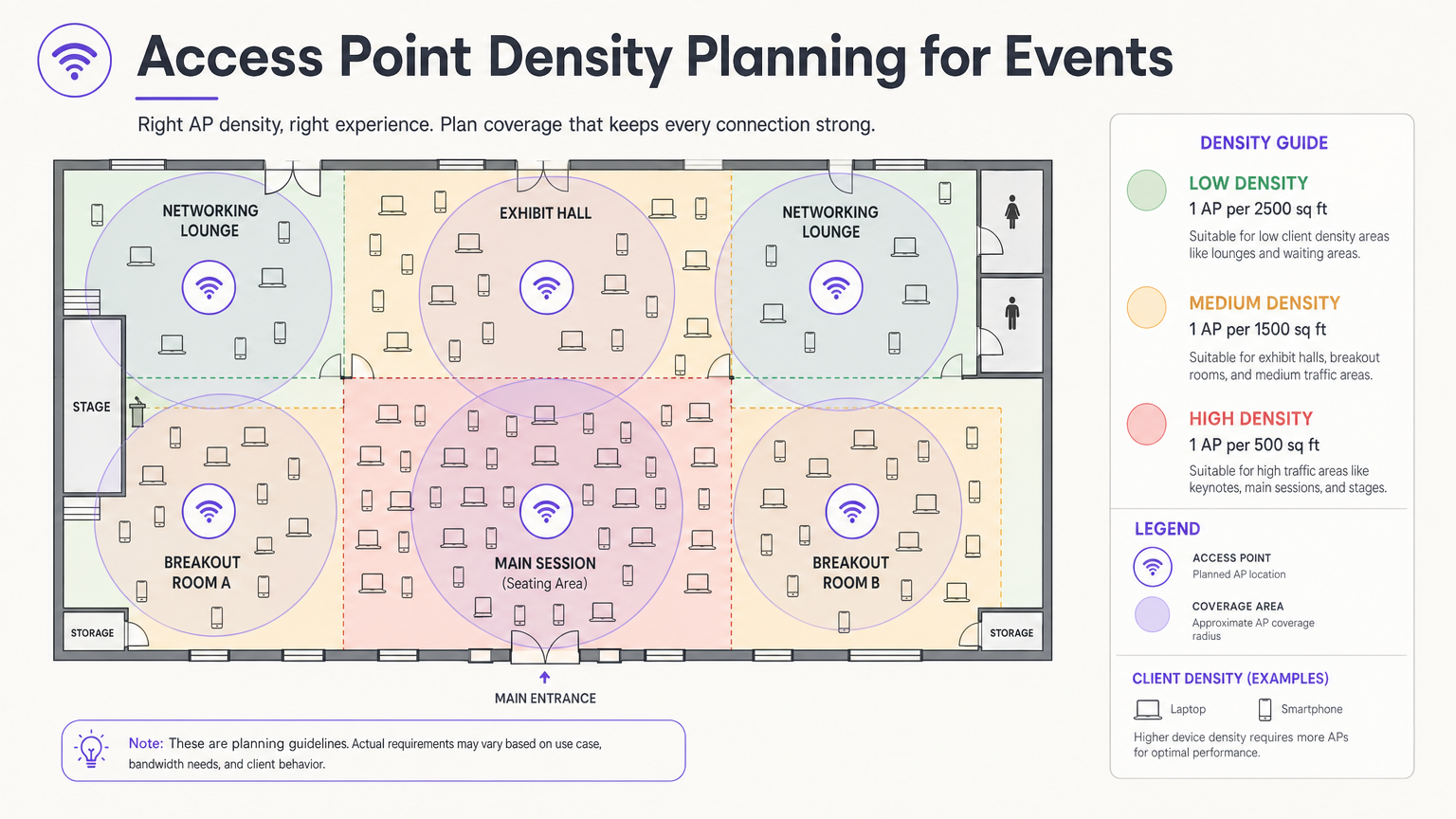
The most critical design decision is antenna selection and placement. In a large hall, omnidirectional antennas broadcast RF energy in all directions, meaning every AP can hear every other AP — the definition of co-channel interference. The correct approach is to use directional patch or sector antennas that focus the RF energy into a tight beam, creating small, contained micro-cells. This allows you to reuse the same channels across adjacent APs without them interfering with each other.
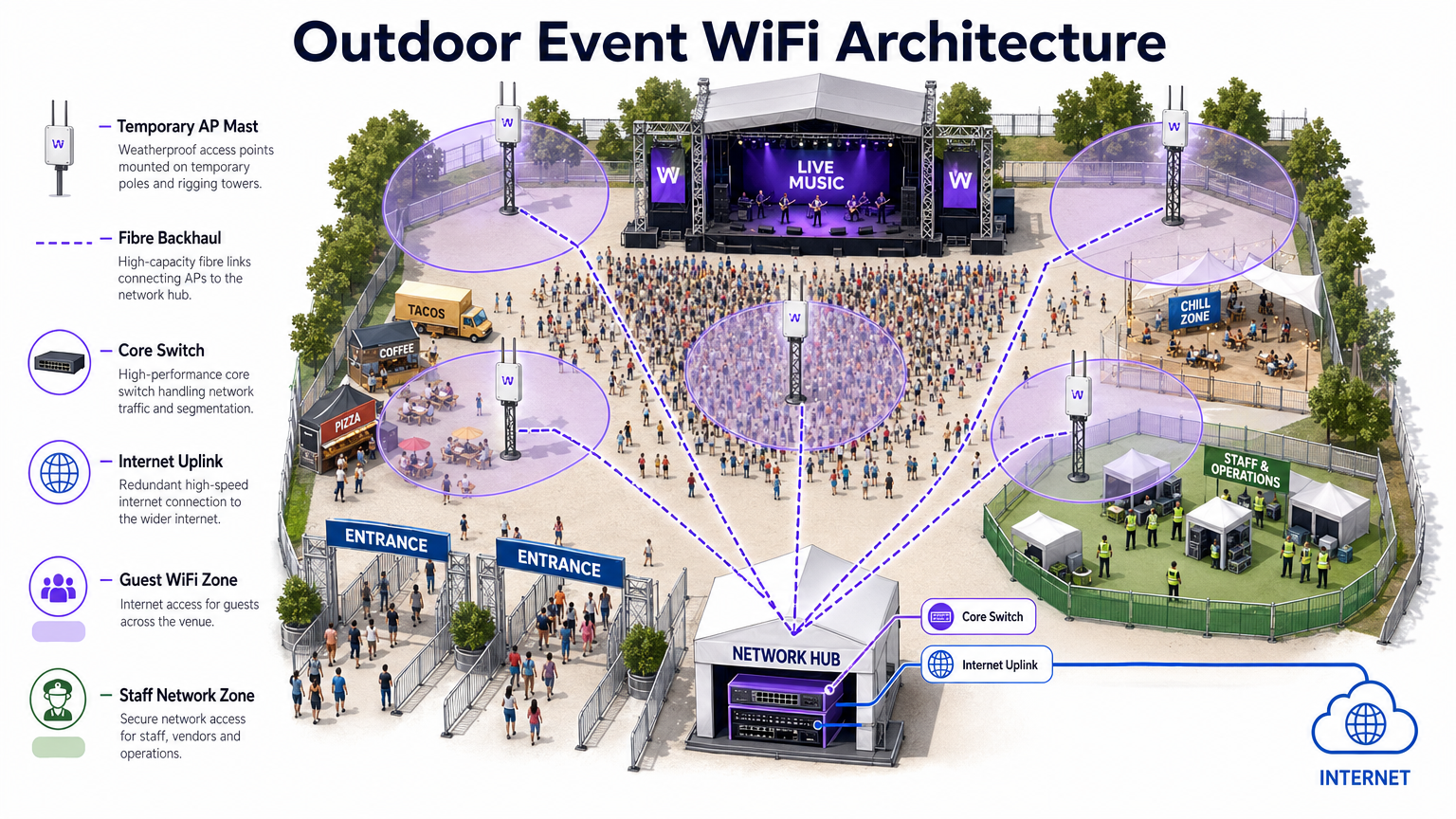
Mount APs at a height that provides adequate coverage without over-shooting. For seating areas, a mounting height of 4–8 metres is typically optimal. Above 10 metres, signal strength at the client level degrades significantly. For outdoor deployments, refer to the architecture diagram below.
Security and Compliance
Event networks must balance ease of access with robust security. While open networks with captive portals are common for guest access, they expose traffic to interception without additional encryption. Implementing WPA3-Personal with Enhanced Open (OWE — Opportunistic Wireless Encryption) provides transparent encryption even on public networks, with no additional complexity for the end user.
For events involving financial transactions — retail pop-ups, ticketing, food vendors — the network must comply with PCI DSS standards. Segregating point-of-sale (POS) traffic onto a dedicated, encrypted VLAN with strict firewall rules is non-negotiable. Similarly, all data collected via captive portals must adhere to GDPR and applicable local privacy regulations, requiring explicit consent and transparent data handling policies.
Implementation Guide
Phase 1: Requirements Gathering and Site Survey
Before deploying a single piece of hardware, you must understand the venue's physical constraints and the event's specific connectivity requirements. Obtain accurate floor plans and conduct a walk-through to identify construction materials that attenuate RF signals — dense concrete, steel structural elements, and mirrored glass are particularly problematic.
Conduct an active site survey using professional tools such as Ekahau Site Survey or AirMagnet. This is critical for determining optimal AP placement, identifying existing sources of interference (rogue APs, microwave ovens, Bluetooth devices, DECT phones), and planning channel assignments before hardware is installed.
Phase 2: Network Design and Capacity Planning
Calculate your required bandwidth based on the expected number of attendees and their anticipated usage profile. Apply the 2.5 Device Rule: assume every attendee brings 2.5 connected devices, with a concurrent connection rate of 60–80% at peak times.
For IP addressing, design your DHCP scopes to accommodate this volume. A /24 subnet (254 addresses) is wholly inadequate for a 500-person event. Use a /21 or /20 subnet and set short DHCP lease times of 30–60 minutes to prevent IP exhaustion as attendees arrive and depart throughout the day.
Phase 3: Hardware Deployment and Configuration
Deploy high-density APs with directional antennas in seating and congregation areas. Key configuration steps include:
- Disable legacy data rates (802.11b/g rates of 1, 2, 5.5, 11 Mbps). Set the minimum basic rate to 12 or 24 Mbps.
- Enable band steering to push dual-band clients to the 5 GHz or 6 GHz bands.
- Implement client isolation to prevent peer-to-peer communication between guest devices.
- Configure per-client bandwidth limits (e.g., 5 Mbps down / 2 Mbps up) to prevent a small number of users from monopolising the connection.
- Enable rogue AP detection on the wireless controller to identify and alert on unauthorised hotspots.
Phase 4: Captive Portal and Guest Onboarding
The captive portal is the primary touchpoint between the venue and the attendee. A poorly designed portal — slow to load, complex to navigate, or requiring excessive personal data — will result in high abandonment rates and frustrated users.
Platforms like Purple's Guest WiFi solution allow you to authenticate users via social login, email, or SMS verification, while simultaneously capturing valuable first-party data with explicit GDPR consent. The portal should be mobile-responsive, load in under three seconds, and present a clear, branded experience. For large events, ensure the authentication server infrastructure is scaled to handle thousands of simultaneous requests during peak association periods — typically the 10 minutes before a keynote begins.
Best Practices
The following table summarises the key configuration best practices for high-density event deployments, drawn from industry-standard guidance and real-world deployment experience.
| Practice | Rationale | Impact if Ignored |
|---|---|---|
| Disable legacy data rates | Prevents slow clients from monopolising airtime | Severe throughput degradation for all users |
| Enable band steering | Moves capable clients to less congested bands | 2.4 GHz congestion, poor performance |
| Implement client isolation | Prevents peer-to-peer attacks and malware spread | Security risk, potential data breach |
| Short DHCP leases (30–60 min) | Recycles IP addresses from departed clients | DHCP exhaustion, new clients cannot connect |
| Use directional antennas | Reduces CCI between adjacent APs | Network-wide throughput collapse |
| Segment VLANs by traffic type | Isolates sensitive traffic, ensures compliance | PCI DSS violation, security breach |
| Deploy redundant WAN links | Eliminates single point of failure for internet access | Complete network outage if primary link fails |
For a deeper exploration of bandwidth management strategies applicable to both permanent and temporary deployments, see our guide on How to Manage Bandwidth on a WiFi Network .
Troubleshooting & Risk Mitigation
Common Failure Modes
1. DHCP Exhaustion. As noted above, this is the most common failure mode at events. The symptom is that APs appear online and functioning, but new clients cannot connect. The fix is to reduce lease times and ensure subnets are adequately sized. Monitor DHCP pool utilisation in real-time during the event.
2. Co-Channel Interference Cascade. If AP placement or channel planning is incorrect, a single congested AP can trigger a cascade where clients roam to neighbouring APs, overloading them in turn. Prevent this with a proper pre-event site survey and post-deployment validation walk.
3. Rogue AP Interference. Exhibitors and attendees routinely bring personal hotspots and MiFi devices, creating severe interference. Enable rogue AP detection and containment on your wireless controller. Brief event staff to communicate the policy to exhibitors during setup.
4. Captive Portal Authentication Bottleneck. During peak association periods, the authentication server can be overwhelmed. Load-test your portal infrastructure before the event and ensure it is horizontally scalable.
5. Association Storm. When a large session ends and thousands of devices simultaneously attempt to reconnect, the management frame traffic can overwhelm the network. Implement 802.11r (Fast BSS Transition) and 802.11k (Neighbour Reports) to facilitate smooth roaming and reduce re-association overhead.
Redundancy and Failover Architecture
For mission-critical events, a single point of failure is unacceptable. Implement:
- Dual WAN links from different ISPs with automatic failover at the edge router.
- High-availability (HA) wireless controller configurations with active-standby failover.
- Redundant core switches with link aggregation (LACP) for uplink resilience.
- UPS (Uninterruptible Power Supply) for all core network equipment.
ROI & Business Impact
Deploying a robust event WiFi network is a significant investment, but it also presents a substantial opportunity for measurable ROI. By integrating WiFi Analytics , you can transform the network from a cost centre into a strategic business asset.
First-Party Data Capture. Every attendee who connects via the captive portal provides a verified email address and, optionally, demographic and social profile data. For a 2,000-person conference, this can generate a high-quality, consented marketing list in a single day — a list that would cost significantly more to acquire through conventional paid channels.
Footfall and Behavioural Analytics. By analysing connection patterns and dwell times, you can understand how attendees move through the venue. Which exhibition stands attracted the most traffic? How long did attendees spend in the sponsor lounge? This data is directly actionable for Retail pop-ups, Hospitality venues, and event organisers planning future layouts.
Sponsorship Monetisation. The captive portal splash page is premium advertising real estate. Sponsors can be offered branded login experiences, targeted post-authentication redirects, and measurable impression data — all of which command a significant premium over traditional event sponsorship packages.
Operational Efficiency. For venue operations teams, real-time network analytics provide visibility into crowd density and flow, enabling proactive management of queues, catering, and security resources. This is particularly relevant in large Transport hubs and stadium environments.
For organisations deploying WiFi in more permanent settings, the same principles of data capture and analytics apply. See our guide on Small Business WiFi: How to Get the Setup Right Without Breaking the Budget for a complementary perspective on permanent deployments.
Key Terms & Definitions
Co-Channel Interference (CCI)
Interference caused when multiple access points operate on the same frequency channel within range of each other, forcing them to take turns transmitting and significantly reducing overall network throughput.
The primary performance enemy in high-density event deployments. Mitigated through careful channel planning, reduced AP transmit power, and directional antennas that constrain the coverage area of each AP.
BSS Coloring
A Wi-Fi 6 (802.11ax) feature that adds a numerical 'color' identifier to all transmissions from a Basic Service Set (BSS). APs can identify and ignore transmissions from neighboring networks on the same channel, allowing them to transmit simultaneously rather than waiting.
Crucial for improving spectral efficiency in crowded environments like exhibition halls where dozens of APs are deployed in close proximity. Effectively reduces the impact of CCI without requiring additional spectrum.
Captive Portal
A web page that users are redirected to and must interact with before gaining full access to a public WiFi network. Typically used for authentication, terms of service acceptance, or marketing data capture.
The critical onboarding step where venues can capture GDPR-compliant first-party data, present sponsorship messaging, and control network access. The quality and speed of the captive portal directly impacts the user experience.
Band Steering
A wireless controller feature that encourages dual-band or tri-band client devices to connect to the 5 GHz or 6 GHz bands rather than the heavily congested 2.4 GHz band, by delaying or suppressing probe responses on the lower band.
Essential for maximising available spectrum utilisation at events. The 2.4 GHz band has only three non-overlapping channels and is shared with Bluetooth, microwave ovens, and other devices, making it particularly susceptible to congestion.
Target Wake Time (TWT)
A Wi-Fi 6 (802.11ax) feature that allows an AP to negotiate specific scheduled windows with client devices for when they will wake up to transmit or receive data, reducing the number of devices contending for the medium simultaneously.
Improves overall network efficiency in high-density environments and significantly extends the battery life of attendees' mobile devices — a notable benefit at multi-day events.
DHCP Exhaustion
A network failure condition where the DHCP server has assigned all available IP addresses in its configured scope and cannot issue new leases to connecting devices, preventing them from obtaining network access.
One of the most common and easily preventable failure modes at events. Prevented by using adequately sized subnets (e.g., /21 or /20) and setting short DHCP lease times of 30–60 minutes to ensure addresses are recycled as attendees come and go.
Rogue Access Point
An unauthorised wireless access point connected to the network or operating in the same RF airspace, either inadvertently (an exhibitor's personal hotspot) or maliciously (an evil twin attack), causing interference and potential security risks.
A persistent challenge at trade shows and conferences where exhibitors routinely bring their own networking equipment. Must be actively monitored using wireless intrusion detection features on the wireless controller.
PCI DSS (Payment Card Industry Data Security Standard)
A set of security standards mandated by the major card networks (Visa, Mastercard, Amex) that all organisations accepting, processing, storing, or transmitting credit card information must comply with, covering network security, encryption, access control, and monitoring.
Non-negotiable for any event network supporting retail vendors, cashless payment systems, or ticketing. Requires strict network segmentation, encryption of cardholder data in transit, and regular security assessments.
OFDMA (Orthogonal Frequency-Division Multiple Access)
A Wi-Fi 6 channel access method that subdivides a single channel into smaller frequency allocations called Resource Units (RUs), allowing an AP to serve multiple clients with different bandwidth requirements simultaneously within a single transmission window.
A fundamental improvement over the OFDM used in Wi-Fi 5, which could only serve one client per transmission. In high-density event environments, OFDMA dramatically reduces latency and improves overall network efficiency.
Case Studies
A 500-person corporate conference is being held in a hotel ballroom. The event includes a keynote presentation requiring high bandwidth for interactive polling, followed by four simultaneous breakout sessions in adjacent rooms. The hotel's existing WiFi infrastructure is inadequate. How should the IT team approach the temporary deployment?
Step 1 — Site Survey: Conduct an active RF survey of the ballroom and breakout rooms to identify the hotel's existing AP channels and any interference sources. Coordinate with the hotel to temporarily disable or reduce power on APs in adjacent areas during the event.
Step 2 — Capacity Calculation: 500 attendees × 2.5 devices = 1,250 devices. At 70% concurrency, plan for approximately 875 simultaneous connections. Allocate a /22 subnet (1,022 usable addresses) with 45-minute DHCP leases.
Step 3 — AP Placement: Deploy 4–6 high-density APs in the ballroom using directional patch antennas mounted at 5–6 metres, focused on the seating area. Deploy 1–2 APs per breakout room.
Step 4 — Configuration: Create a dedicated event SSID on VLAN 20 (guest). Disable 802.11b/g rates. Set minimum basic rate to 24 Mbps. Enable band steering and client isolation. Apply per-user bandwidth limits of 5 Mbps down / 2 Mbps up.
Step 5 — Onboarding: Deploy a custom captive portal integrated with the event registration system, allowing pre-registered attendees to authenticate with their registration email for a frictionless experience.
Step 6 — Monitoring: Assign a network engineer to monitor the wireless controller dashboard throughout the event, watching for AP load, client counts, and DHCP pool utilisation.
A three-day outdoor music festival expects 10,000 daily attendees across a 5-hectare greenfield site. The venue has no existing network infrastructure. The event requires guest WiFi for attendees, a secure network for cashless payment vendors, and a dedicated operations network for staff. What is the optimal architecture?
Step 1 — Backhaul: Establish a high-capacity point-to-point microwave link (minimum 1 Gbps) back to the nearest fibre point of presence, with a secondary 4G/5G bonded link as failover. Alternatively, negotiate a temporary fibre installation with the local ISP if lead time permits.
Step 2 — Core Network: Deploy a ruggedised core switch and edge router/firewall in a secure, climate-controlled equipment tent at the centre of the site. Install a UPS for all core equipment.
Step 3 — Distribution: Run armoured fibre optic cables from the core tent to distribution switches located at key zones: Main Stage, Food Court, VIP Area, Entrance Gates, and Staff Operations.
Step 4 — Edge Deployment: Mount IP67-rated outdoor APs on temporary masts (4–6 metres) or rigging structures. Use sector antennas to cover crowd areas. Deploy APs at a density of 1 per 300–500 attendees in high-density zones.
Step 5 — Network Segmentation: Configure three VLANs: VLAN 20 (Guest WiFi with captive portal), VLAN 30 (Vendor POS — PCI DSS compliant, restricted to payment gateway IPs only), VLAN 40 (Staff Operations — management access, CCTV, communications).
Step 6 — Monitoring: Deploy a cloud-based wireless management platform accessible via the staff operations network for real-time monitoring and remote configuration.
Scenario Analysis
Q1. You are designing the WiFi for a major product launch keynote. The venue is a large, open auditorium with a flat floor and no fixed seating. The client expects 2,000 attendees to be simultaneously streaming a live interactive poll and posting to social media during the 90-minute presentation. What is the most critical RF design consideration, and how would you address it?
💡 Hint:Think about the difference between providing coverage in an empty room versus capacity in a packed auditorium. Consider what happens when dozens of APs can all hear each other.
Show Recommended Approach
The most critical consideration is mitigating Co-Channel Interference (CCI) while providing extreme capacity. With 2,000 attendees and the 2.5 Device Rule, you are planning for approximately 3,500 devices at 70% concurrency — roughly 2,450 simultaneous connections. This requires deploying a high density of APs (likely 20–30 units) in the auditorium. If those APs are configured with omnidirectional antennas and overlapping channels, they will create severe CCI and the network will perform worse than a single AP. The solution is to use high-density APs with directional patch antennas mounted overhead, focused on specific sections of the audience. Reduce AP transmit power to create tight micro-cells. Assign non-overlapping channels carefully and leverage BSS Coloring (Wi-Fi 6) to further reduce interference. Disable all legacy data rates to ensure fast airtime clearance.
Q2. During a multi-day trade show, the IT helpdesk receives reports at 10:15 AM that attendees cannot connect to the guest WiFi network in the main exhibition hall. The wireless controller dashboard shows all APs are online, associated client counts are near zero, and no error alerts are present. What is the most likely root cause, and what is the immediate remediation?
💡 Hint:Consider the lifecycle of a device connecting to a network and what server-side resource is consumed even when a device is idle or has left the venue.
Show Recommended Approach
The most likely cause is DHCP Exhaustion. The exhibition hall opened the previous day, and if the DHCP lease time was set to the default 24 hours, the IP address pool will have been depleted by the accumulation of leases from the previous day's attendees — devices that are no longer present but whose leases have not yet expired. The APs are functioning correctly, but new devices cannot obtain an IP address and therefore cannot complete the connection process. Immediate remediation: (1) Reduce the DHCP lease time to 30 minutes on the DHCP server. (2) Clear all existing leases in the pool to immediately free up addresses. (3) If the subnet is undersized, expand it to a /21 or /20 to provide sufficient headroom. Long-term: implement DHCP pool utilisation monitoring with alerting thresholds at 70% and 90% capacity.
Q3. A retail brand is running a three-day pop-up event in a shopping centre. The event requires guest WiFi for visitors, and six vendor stations will be processing contactless card payments using wireless POS terminals. The IT manager proposes running both on the same SSID with a shared passphrase to simplify setup. Evaluate this proposal and provide a compliant alternative architecture.
💡 Hint:Consider the regulatory requirements that apply to any network carrying payment card data, and what the consequences of non-compliance are.
Show Recommended Approach
The proposed single-SSID architecture is non-compliant with PCI DSS and must not be implemented. PCI DSS Requirement 1.3 mandates that cardholder data environments (CDE) be isolated from untrusted networks, including general guest WiFi. Placing POS terminals on the same network segment as guest devices creates a direct path for a compromised guest device to attack the POS systems or intercept payment data. The compliant alternative is strict VLAN segmentation: (1) Create VLAN 20 for guest WiFi with a captive portal — this is an untrusted network with internet access only. (2) Create VLAN 30 for POS terminals — this is the CDE, restricted by firewall rules to outbound connections to the specific payment gateway IP addresses only. All inbound connections from VLAN 20 to VLAN 30 must be blocked. (3) Use separate SSIDs for each VLAN, with WPA3-Enterprise or a strong WPA2/3-PSK for the POS SSID. (4) Document the network segmentation and firewall rules as evidence for PCI DSS compliance.




