

WiFi para eventos: Cómo ofrecer conectividad fiable para grandes multitudes
Esta guía autorizada proporciona a los líderes de TI, arquitectos de red y operadores de recintos estrategias prácticas para diseñar, implementar y gestionar redes WiFi temporales de alta densidad para eventos a gran escala, desde conferencias corporativas hasta festivales al aire libre. Cubre principios de diseño de RF, planificación de capacidad, cumplimiento de seguridad y cómo aprovechar los análisis de Guest WiFi para convertir la red en un activo generador de ingresos.
🎧 Escuchar esta guía
Ver transcripción
Resumen Ejecutivo
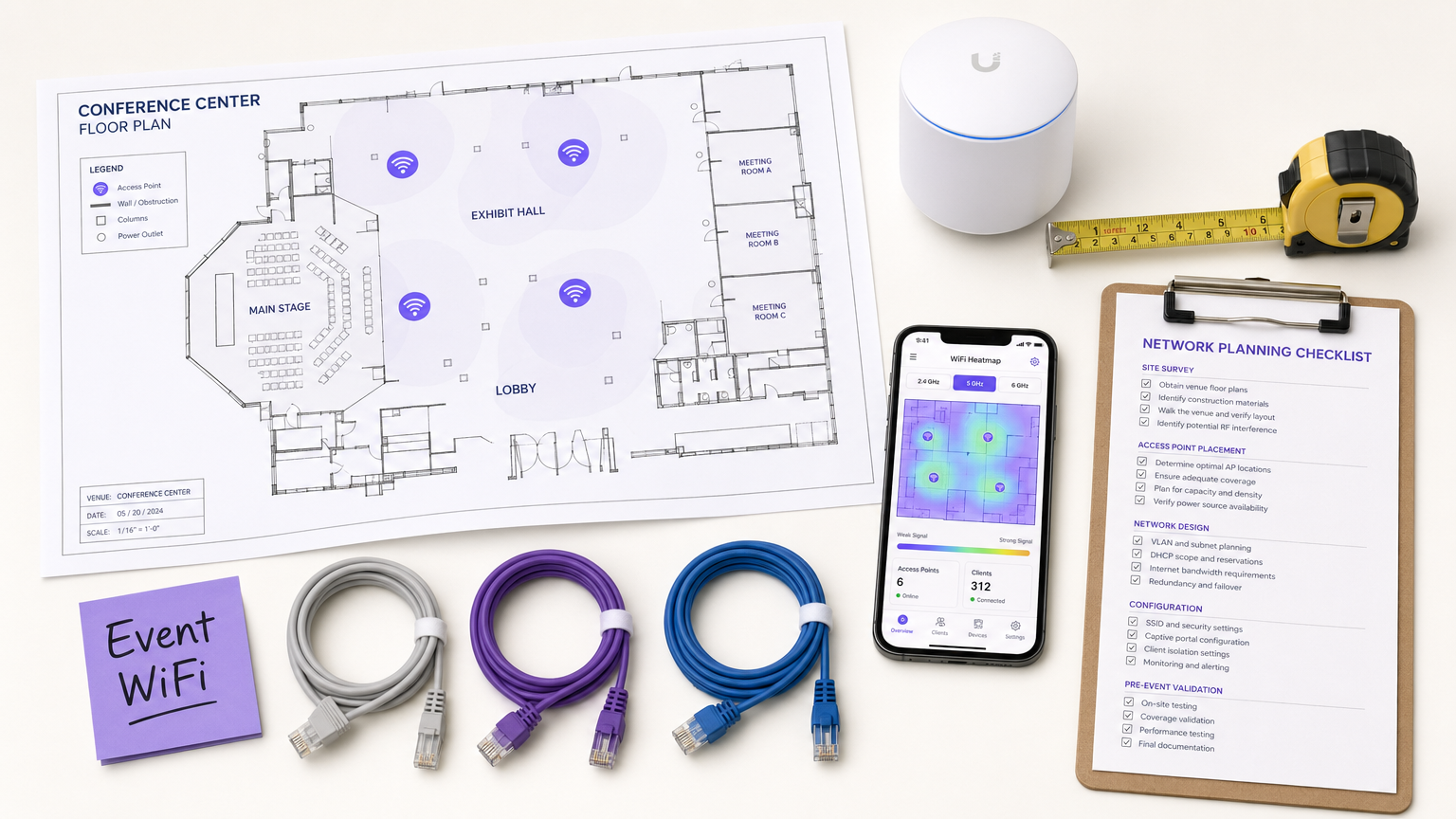
Para los CTO, directores de TI y operadores de recintos, la implementación de WiFi temporal para eventos a gran escala presenta un conjunto único de desafíos que el diseño de red empresarial estándar simplemente no aborda. A diferencia de los entornos de oficina estáticos, la conectividad para eventos exige una implementación rápida, una capacidad de densidad extremadamente alta y una incorporación de usuarios sin interrupciones, todo ello manteniendo una estricta seguridad y cumplimiento normativo. Una red fallida en una conferencia magistral o feria comercial no es solo un inconveniente; es un riesgo reputacional y comercial.
Esta guía proporciona un plan integral para la arquitectura y gestión de redes WiFi para eventos que ofrecen un rendimiento fiable bajo presión. Exploramos los requisitos técnicos para entornos de alta densidad, estrategias de implementación neutrales respecto al proveedor y la integración de soluciones de Guest WiFi para capturar datos de primera parte e impulsar el ROI. Ya sea que esté gestionando una conferencia corporativa, un recinto de Hospitality que alberga una gala o un festival masivo al aire libre, estos principios asegurarán que su arquitectura de red pueda manejar la carga y ofrecer una experiencia fluida a los asistentes.
Análisis Técnico Detallado
El Desafío de la Alta Densidad
Las implementaciones estándar de WiFi en oficinas están diseñadas para la cobertura; el WiFi para eventos debe diseñarse para la capacidad. En un entorno empresarial típico, un punto de acceso (AP) podría servir cómodamente a 20-30 clientes concurrentes. En una sala de conferencias magistrales o un estadio, esa misma huella de AP debe soportar cientos de dispositivos simultáneamente, muchos de los cuales están transmitiendo vídeo activamente, sincronizando datos en la nube o publicando en redes sociales en tiempo real.
Esto requiere un cambio fundamental en la filosofía de diseño de RF (Radio Frecuencia). El objetivo principal ya no es eliminar las zonas muertas, sino mitigar la interferencia cocanal (CCI) y optimizar la relación señal/ruido (SNR) en entornos donde el nivel de ruido es excepcionalmente alto debido a la gran densidad de dispositivos transmisores.
Arquitectura y Estándares
Las redes modernas para eventos deben construirse sobre los estándares Wi-Fi 6 (802.11ax) o Wi-Fi 6E (802.11ax en la banda de 6 GHz). Estos protocolos introducen características críticas diseñadas específicamente para entornos de alta densidad:
| Característica | Estándar | Beneficio en implementaciones de alta densidad |
|---|---|---|
| OFDMA | Wi-Fi 6/6E | Sirve a múltiples clientes simultáneamente en subcanales, reduciendo la latencia |
| BSS Coloring | Wi-Fi 6/6E | Mitiga la interferencia identificando e ignorando el tráfico BSS superpuesto |
| Target Wake Time (TWT) | Wi-Fi 6/6E | Programa las transmisiones de los clientes, reduciendo la contención del medio |
| MU-MIMO (8x8) | Wi-Fi 6/6E | Permite a los AP comunicarse con múltiples clientes simultáneamente |
| Banda de 6 GHz | Wi-Fi 6E | Proporciona un espectro limpio y descongestionado sin interferencias de dispositivos heredados |
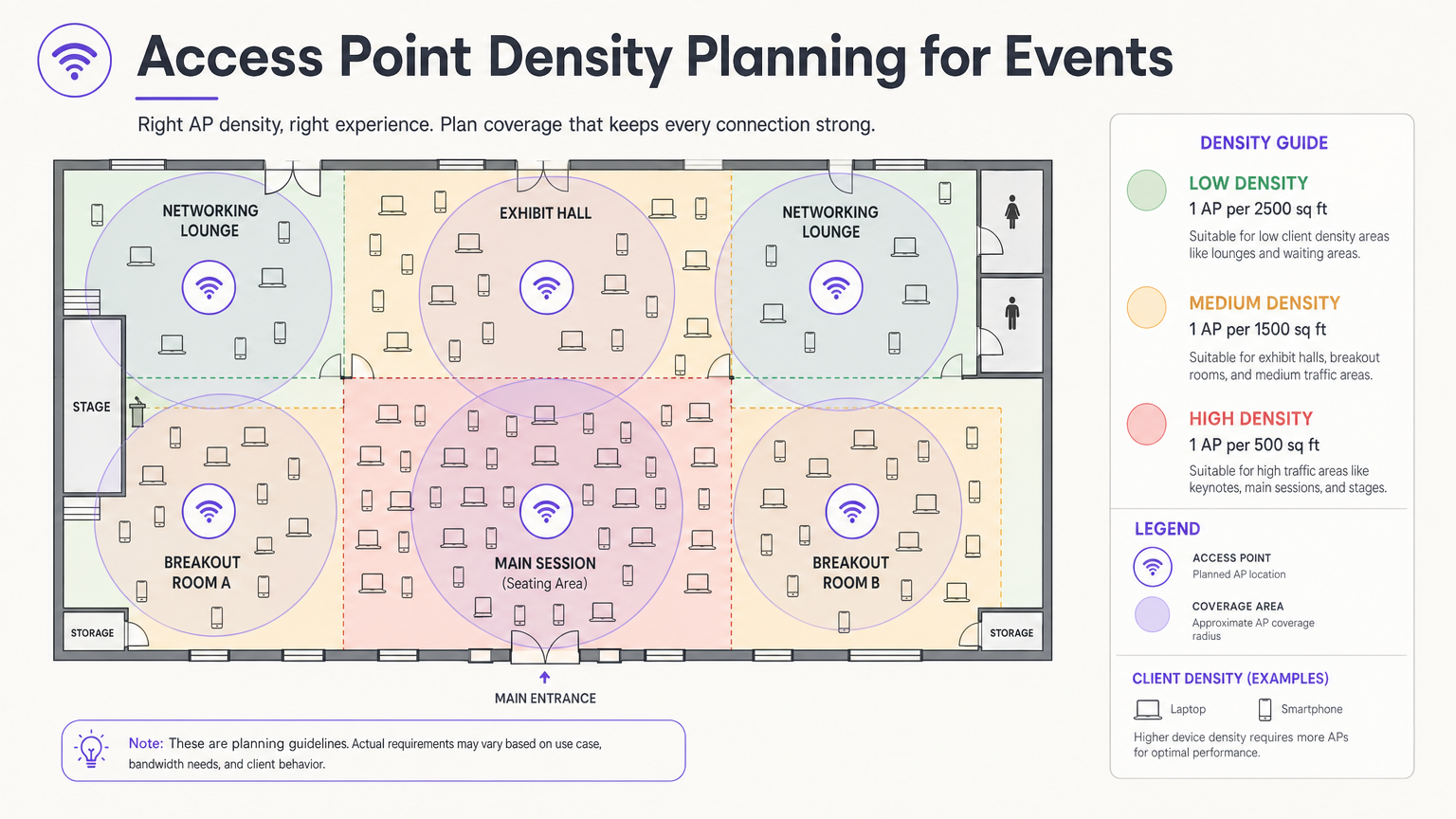
Principios de Diseño de RF para Alta Densidad
La decisión de diseño más crítica es la selección y ubicación de la antena. En una sala grande, las antenas omnidireccionales emiten energía de RF en todas direcciones, lo que significa que cada AP puede escuchar a todos los demás AP, la definición de interferencia cocanal. El enfoque correcto es utilizar antenas direccionales de parche o sectoriales que concentran la energía de RF en un haz estrecho, creando microceldas pequeñas y contenidas. Esto permite reutilizar los mismos canales en AP adyacentes sin que interfieran entre sí.
Monte los AP a una altura que proporcione una cobertura adecuada sin excederse. Para las áreas de asientos, una altura de montaje de 4 a 8 metros suele ser óptima. Por encima de los 10 metros, la intensidad de la señal a nivel del cliente se degrada significativamente. Para implementaciones en exteriores, consulte el diagrama de arquitectura a continuación.
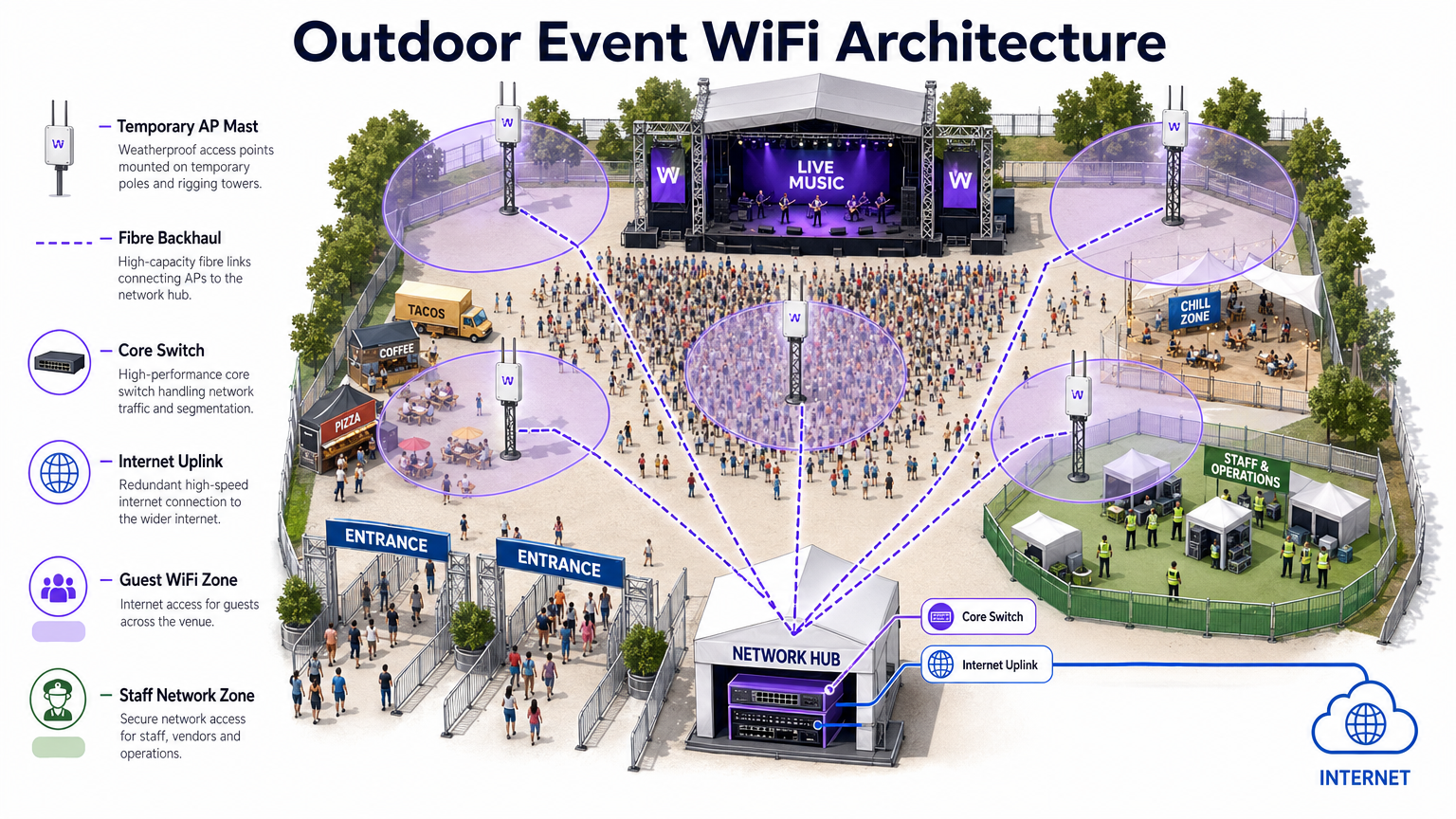
Seguridad y Cumplimiento
Las redes para eventos deben equilibrar la facilidad de acceso con una seguridad robusta. Si bien las redes abiertas con Captive Portals son comunes para el acceso de invitados, exponen el tráfico a la interceptación sin cifrado adicional. La implementación de WPA3-Personal con Enhanced Open (OWE – Opportunistic Wireless Encryption) proporciona cifrado transparente incluso en redes públicas, sin complejidad adicional para el usuario final.
Para eventos que implican transacciones financieras (tiendas pop-up, venta de entradas, proveedores de alimentos), la red debe cumplir con los estándares PCI DSS. Segregar el tráfico de puntos de venta (POS) en una VLAN dedicada y cifrada con reglas de firewall estrictas es innegociable. Del mismo modo, todos los datos recopilados a través de Captive Portals deben adherirse al GDPR y a las regulaciones de privacidad locales aplicables, lo que requiere consentimiento explícito y políticas transparentes de manejo de datos.
Guía de Implementación
Fase 1: Recopilación de Requisitos y Estudio del Sitio
Antes de implementar una sola pieza de hardware, debe comprender las limitaciones físicas del recinto y los requisitos específicos de conectividad del evento. Obtenga planos precisos y realice un recorrido para identificar los materiales de construcción que atenúan las señales de RF: el hormigón denso, los elementos estructurales de acero y el vidrio espejado son particularmente problemáticos.
Realice un estudio de sitio activo utilizando herramientas profesionales como Ekahau Site Survey o AirMagnet. Esto es fundamental para determinar la ubicación óptima de los AP, identificar las fuentes de interferencia existentes (AP no autorizados, hornos microondas, dispositivos Bluetooth, teléfonos DECT) y planificar las asignaciones de canales antes de instalar el hardware.
Fase 2: Diseño de Red y Planificación de Capacidad
Calcule el ancho de banda requerido en función del número esperado de asistentes y su perfil de uso anticipado. Aplique el 2.5 DRegla de dispositivo: asuma que cada asistente trae 2,5 dispositivos conectados, con una tasa de conexión concurrente del 60-80% en horas pico.
Para el direccionamiento IP, diseñe sus ámbitos DHCP para acomodar este volumen. Una subred /24 (254 direcciones) es totalmente inadecuada para un evento de 500 personas. Utilice una subred /21 o /20 y establezca tiempos de concesión DHCP cortos de 30 a 60 minutos para evitar el agotamiento de IP a medida que los asistentes llegan y se van a lo largo del día.
Fase 3: Implementación y Configuración de Hardware
Implemente APs de alta densidad con antenas direccionales en áreas de asientos y congregación. Los pasos clave de configuración incluyen:
- Deshabilite las tasas de datos heredadas (tasas 802.11b/g de 1, 2, 5.5, 11 Mbps). Establezca la tasa básica mínima en 12 o 24 Mbps.
- Habilite la dirección de banda para dirigir a los clientes de doble banda a las bandas de 5 GHz o 6 GHz.
- Implemente el aislamiento de clientes para evitar la comunicación peer-to-peer entre dispositivos de invitados.
- Configure límites de ancho de banda por cliente (por ejemplo, 5 Mbps de bajada / 2 Mbps de subida) para evitar que un pequeño número de usuarios monopolice la conexión.
- Habilite la detección de APs no autorizados en el controlador inalámbrico para identificar y alertar sobre puntos de acceso no autorizados.
Fase 4: Captive Portal y Onboarding de Invitados
El Captive Portal es el punto de contacto principal entre el lugar y el asistente. Un portal mal diseñado —lento de cargar, complejo de navegar o que requiere datos personales excesivos— resultará en altas tasas de abandono y usuarios frustrados.
Plataformas como la solución Guest WiFi de Purple le permiten autenticar usuarios a través de inicio de sesión social, correo electrónico o verificación por SMS, mientras captura simultáneamente valiosos datos de primera parte con el consentimiento explícito del GDPR. El portal debe ser adaptable a dispositivos móviles, cargar en menos de tres segundos y presentar una experiencia clara y de marca. Para eventos grandes, asegúrese de que la infraestructura del servidor de autenticación esté escalada para manejar miles de solicitudes simultáneas durante los períodos pico de asociación —típicamente los 10 minutos antes de que comience una conferencia magistral.
Mejores Prácticas
La siguiente tabla resume las mejores prácticas de configuración clave para implementaciones de eventos de alta densidad, extraídas de la guía estándar de la industria y la experiencia de implementación en el mundo real.
| Práctica | Razón | Impacto si se ignora |
|---|---|---|
| Deshabilitar tasas de datos heredadas | Evita que los clientes lentos monopolicen el tiempo de aire | Degradación severa del rendimiento para todos los usuarios |
| Habilitar dirección de banda | Mueve a los clientes capaces a bandas menos congestionadas | Congestión de 2.4 GHz, rendimiento deficiente |
| Implementar aislamiento de clientes | Previene ataques peer-to-peer y propagación de malware | Riesgo de seguridad, posible violación de datos |
| Concesiones DHCP cortas (30–60 min) | Recicla direcciones IP de clientes que se han ido | Agotamiento de DHCP, los nuevos clientes no pueden conectarse |
| Usar antenas direccionales | Reduce la CCI entre APs adyacentes | Colapso del rendimiento en toda la red |
| Segmentar VLANs por tipo de tráfico | Aísla el tráfico sensible, asegura el cumplimiento | Violación de PCI DSS, brecha de seguridad |
| Implementar enlaces WAN redundantes | Elimina el punto único de fallo para el acceso a internet | Interrupción completa de la red si falla el enlace principal |
Para una exploración más profunda de las estrategias de gestión de ancho de banda aplicables tanto a implementaciones permanentes como temporales, consulte nuestra guía sobre Cómo Gestionar el Ancho de Banda en una Red WiFi .
Resolución de Problemas y Mitigación de Riesgos
Modos de Fallo Comunes
1. Agotamiento de DHCP. Como se mencionó anteriormente, este es el modo de fallo más común en eventos. El síntoma es que los APs aparecen en línea y funcionando, pero los nuevos clientes no pueden conectarse. La solución es reducir los tiempos de concesión y asegurar que las subredes tengan un tamaño adecuado. Monitoree la utilización del pool DHCP en tiempo real durante el evento.
2. Cascada de Interferencia Co-Canal. Si la ubicación del AP o la planificación de canales es incorrecta, un único AP congestionado puede desencadenar una cascada donde los clientes se desplazan a APs vecinos, sobrecargándolos a su vez. Prevenga esto con un estudio de sitio previo al evento adecuado y una verificación posterior a la implementación.
3. Interferencia de APs no autorizados. Los expositores y asistentes suelen traer puntos de acceso personales y dispositivos MiFi, creando una interferencia severa. Habilite la detección y contención de APs no autorizados en su controlador inalámbrico. Informe al personal del evento para que comunique la política a los expositores durante la configuración.
4. Cuello de Botella de Autenticación del Captive Portal. Durante los períodos pico de asociación, el servidor de autenticación puede verse abrumado. Realice pruebas de carga en la infraestructura de su portal antes del evento y asegúrese de que sea escalable horizontalmente.
5. Tormenta de Asociación. Cuando una sesión grande termina y miles de dispositivos intentan reconectarse simultáneamente, el tráfico de tramas de gestión puede abrumar la red. Implemente 802.11r (Transición Rápida de BSS) y 802.11k (Informes de Vecinos) para facilitar el roaming fluido y reducir la sobrecarga de reasociación.
Arquitectura de Redundancia y Conmutación por Error
Para eventos de misión crítica, un único punto de fallo es inaceptable. Implemente:
- Enlaces WAN duales de diferentes ISPs con conmutación por error automática en el router de borde.
- Configuraciones de controlador inalámbrico de alta disponibilidad (HA) con conmutación por error activo-pasivo.
- Switches de núcleo redundantes con agregación de enlaces (LACP) para la resiliencia del enlace ascendente.
- UPS (Sistema de Alimentación Ininterrumpida) para todo el equipo de red central.
ROI e Impacto Comercial
Implementar una red WiFi robusta para eventos es una inversión significativa, pero también presenta una oportunidad sustancial para un ROI medible. Al integrar WiFi Analytics , puede transformar la red de un centro de costes en un activo empresarial estratégico.
Captura de Datos de Primera Parte. Cada asistente que se conecta a través del Captive Portal proporciona una dirección de correo electrónico verificada y, opcionalmente, datos demográficos y de perfil social. Para un evento de 2.000 personas conferencia, esto puede generar una lista de marketing de alta calidad y con consentimiento en un solo día, una lista que costaría significativamente más adquirir a través de canales de pago convencionales.
Análisis de afluencia y comportamiento. Al analizar los patrones de conexión y los tiempos de permanencia, puede comprender cómo se mueven los asistentes por el recinto. ¿Qué stands de exposición atrajeron más tráfico? ¿Cuánto tiempo pasaron los asistentes en la sala de patrocinadores? Estos datos son directamente aplicables para pop-ups de Retail , recintos de Hospitality y organizadores de eventos que planifican diseños futuros.
Monetización de patrocinios. La página de bienvenida del Captive Portal es un espacio publicitario premium. A los patrocinadores se les pueden ofrecer experiencias de inicio de sesión personalizadas, redireccionamientos dirigidos después de la autenticación y datos de impresiones medibles, todo lo cual tiene un valor significativamente superior a los paquetes de patrocinio de eventos tradicionales.
Eficiencia operativa. Para los equipos de operaciones del recinto, el análisis de red en tiempo real proporciona visibilidad de la densidad y el flujo de la multitud, lo que permite una gestión proactiva de las colas, el catering y los recursos de seguridad. Esto es particularmente relevante en grandes centros de Transport y entornos de estadios.
Para las organizaciones que implementan WiFi en entornos más permanentes, se aplican los mismos principios de captura de datos y análisis. Consulte nuestra guía sobre WiFi para pequeñas empresas: cómo configurar correctamente sin salirse del presupuesto para una perspectiva complementaria sobre implementaciones permanentes.
Términos clave y definiciones
Co-Channel Interference (CCI)
Interference caused when multiple access points operate on the same frequency channel within range of each other, forcing them to take turns transmitting and significantly reducing overall network throughput.
The primary performance enemy in high-density event deployments. Mitigated through careful channel planning, reduced AP transmit power, and directional antennas that constrain the coverage area of each AP.
BSS Coloring
A Wi-Fi 6 (802.11ax) feature that adds a numerical 'color' identifier to all transmissions from a Basic Service Set (BSS). APs can identify and ignore transmissions from neighboring networks on the same channel, allowing them to transmit simultaneously rather than waiting.
Crucial for improving spectral efficiency in crowded environments like exhibition halls where dozens of APs are deployed in close proximity. Effectively reduces the impact of CCI without requiring additional spectrum.
Captive Portal
A web page that users are redirected to and must interact with before gaining full access to a public WiFi network. Typically used for authentication, terms of service acceptance, or marketing data capture.
The critical onboarding step where venues can capture GDPR-compliant first-party data, present sponsorship messaging, and control network access. The quality and speed of the captive portal directly impacts the user experience.
Band Steering
A wireless controller feature that encourages dual-band or tri-band client devices to connect to the 5 GHz or 6 GHz bands rather than the heavily congested 2.4 GHz band, by delaying or suppressing probe responses on the lower band.
Essential for maximising available spectrum utilisation at events. The 2.4 GHz band has only three non-overlapping channels and is shared with Bluetooth, microwave ovens, and other devices, making it particularly susceptible to congestion.
Target Wake Time (TWT)
A Wi-Fi 6 (802.11ax) feature that allows an AP to negotiate specific scheduled windows with client devices for when they will wake up to transmit or receive data, reducing the number of devices contending for the medium simultaneously.
Improves overall network efficiency in high-density environments and significantly extends the battery life of attendees' mobile devices — a notable benefit at multi-day events.
DHCP Exhaustion
A network failure condition where the DHCP server has assigned all available IP addresses in its configured scope and cannot issue new leases to connecting devices, preventing them from obtaining network access.
One of the most common and easily preventable failure modes at events. Prevented by using adequately sized subnets (e.g., /21 or /20) and setting short DHCP lease times of 30–60 minutes to ensure addresses are recycled as attendees come and go.
Rogue Access Point
An unauthorised wireless access point connected to the network or operating in the same RF airspace, either inadvertently (an exhibitor's personal hotspot) or maliciously (an evil twin attack), causing interference and potential security risks.
A persistent challenge at trade shows and conferences where exhibitors routinely bring their own networking equipment. Must be actively monitored using wireless intrusion detection features on the wireless controller.
PCI DSS (Payment Card Industry Data Security Standard)
A set of security standards mandated by the major card networks (Visa, Mastercard, Amex) that all organisations accepting, processing, storing, or transmitting credit card information must comply with, covering network security, encryption, access control, and monitoring.
Non-negotiable for any event network supporting retail vendors, cashless payment systems, or ticketing. Requires strict network segmentation, encryption of cardholder data in transit, and regular security assessments.
OFDMA (Orthogonal Frequency-Division Multiple Access)
A Wi-Fi 6 channel access method that subdivides a single channel into smaller frequency allocations called Resource Units (RUs), allowing an AP to serve multiple clients with different bandwidth requirements simultaneously within a single transmission window.
A fundamental improvement over the OFDM used in Wi-Fi 5, which could only serve one client per transmission. In high-density event environments, OFDMA dramatically reduces latency and improves overall network efficiency.
Casos de éxito
A 500-person corporate conference is being held in a hotel ballroom. The event includes a keynote presentation requiring high bandwidth for interactive polling, followed by four simultaneous breakout sessions in adjacent rooms. The hotel's existing WiFi infrastructure is inadequate. How should the IT team approach the temporary deployment?
Step 1 — Site Survey: Conduct an active RF survey of the ballroom and breakout rooms to identify the hotel's existing AP channels and any interference sources. Coordinate with the hotel to temporarily disable or reduce power on APs in adjacent areas during the event.
Step 2 — Capacity Calculation: 500 attendees × 2.5 devices = 1,250 devices. At 70% concurrency, plan for approximately 875 simultaneous connections. Allocate a /22 subnet (1,022 usable addresses) with 45-minute DHCP leases.
Step 3 — AP Placement: Deploy 4–6 high-density APs in the ballroom using directional patch antennas mounted at 5–6 metres, focused on the seating area. Deploy 1–2 APs per breakout room.
Step 4 — Configuration: Create a dedicated event SSID on VLAN 20 (guest). Disable 802.11b/g rates. Set minimum basic rate to 24 Mbps. Enable band steering and client isolation. Apply per-user bandwidth limits of 5 Mbps down / 2 Mbps up.
Step 5 — Onboarding: Deploy a custom captive portal integrated with the event registration system, allowing pre-registered attendees to authenticate with their registration email for a frictionless experience.
Step 6 — Monitoring: Assign a network engineer to monitor the wireless controller dashboard throughout the event, watching for AP load, client counts, and DHCP pool utilisation.
A three-day outdoor music festival expects 10,000 daily attendees across a 5-hectare greenfield site. The venue has no existing network infrastructure. The event requires guest WiFi for attendees, a secure network for cashless payment vendors, and a dedicated operations network for staff. What is the optimal architecture?
Step 1 — Backhaul: Establish a high-capacity point-to-point microwave link (minimum 1 Gbps) back to the nearest fibre point of presence, with a secondary 4G/5G bonded link as failover. Alternatively, negotiate a temporary fibre installation with the local ISP if lead time permits.
Step 2 — Core Network: Deploy a ruggedised core switch and edge router/firewall in a secure, climate-controlled equipment tent at the centre of the site. Install a UPS for all core equipment.
Step 3 — Distribution: Run armoured fibre optic cables from the core tent to distribution switches located at key zones: Main Stage, Food Court, VIP Area, Entrance Gates, and Staff Operations.
Step 4 — Edge Deployment: Mount IP67-rated outdoor APs on temporary masts (4–6 metres) or rigging structures. Use sector antennas to cover crowd areas. Deploy APs at a density of 1 per 300–500 attendees in high-density zones.
Step 5 — Network Segmentation: Configure three VLANs: VLAN 20 (Guest WiFi with captive portal), VLAN 30 (Vendor POS — PCI DSS compliant, restricted to payment gateway IPs only), VLAN 40 (Staff Operations — management access, CCTV, communications).
Step 6 — Monitoring: Deploy a cloud-based wireless management platform accessible via the staff operations network for real-time monitoring and remote configuration.
Análisis de escenarios
Q1. You are designing the WiFi for a major product launch keynote. The venue is a large, open auditorium with a flat floor and no fixed seating. The client expects 2,000 attendees to be simultaneously streaming a live interactive poll and posting to social media during the 90-minute presentation. What is the most critical RF design consideration, and how would you address it?
💡 Sugerencia:Think about the difference between providing coverage in an empty room versus capacity in a packed auditorium. Consider what happens when dozens of APs can all hear each other.
Mostrar enfoque recomendado
The most critical consideration is mitigating Co-Channel Interference (CCI) while providing extreme capacity. With 2,000 attendees and the 2.5 Device Rule, you are planning for approximately 3,500 devices at 70% concurrency — roughly 2,450 simultaneous connections. This requires deploying a high density of APs (likely 20–30 units) in the auditorium. If those APs are configured with omnidirectional antennas and overlapping channels, they will create severe CCI and the network will perform worse than a single AP. The solution is to use high-density APs with directional patch antennas mounted overhead, focused on specific sections of the audience. Reduce AP transmit power to create tight micro-cells. Assign non-overlapping channels carefully and leverage BSS Coloring (Wi-Fi 6) to further reduce interference. Disable all legacy data rates to ensure fast airtime clearance.
Q2. During a multi-day trade show, the IT helpdesk receives reports at 10:15 AM that attendees cannot connect to the guest WiFi network in the main exhibition hall. The wireless controller dashboard shows all APs are online, associated client counts are near zero, and no error alerts are present. What is the most likely root cause, and what is the immediate remediation?
💡 Sugerencia:Consider the lifecycle of a device connecting to a network and what server-side resource is consumed even when a device is idle or has left the venue.
Mostrar enfoque recomendado
The most likely cause is DHCP Exhaustion. The exhibition hall opened the previous day, and if the DHCP lease time was set to the default 24 hours, the IP address pool will have been depleted by the accumulation of leases from the previous day's attendees — devices that are no longer present but whose leases have not yet expired. The APs are functioning correctly, but new devices cannot obtain an IP address and therefore cannot complete the connection process. Immediate remediation: (1) Reduce the DHCP lease time to 30 minutes on the DHCP server. (2) Clear all existing leases in the pool to immediately free up addresses. (3) If the subnet is undersized, expand it to a /21 or /20 to provide sufficient headroom. Long-term: implement DHCP pool utilisation monitoring with alerting thresholds at 70% and 90% capacity.
Q3. A retail brand is running a three-day pop-up event in a shopping centre. The event requires guest WiFi for visitors, and six vendor stations will be processing contactless card payments using wireless POS terminals. The IT manager proposes running both on the same SSID with a shared passphrase to simplify setup. Evaluate this proposal and provide a compliant alternative architecture.
💡 Sugerencia:Consider the regulatory requirements that apply to any network carrying payment card data, and what the consequences of non-compliance are.
Mostrar enfoque recomendado
The proposed single-SSID architecture is non-compliant with PCI DSS and must not be implemented. PCI DSS Requirement 1.3 mandates that cardholder data environments (CDE) be isolated from untrusted networks, including general guest WiFi. Placing POS terminals on the same network segment as guest devices creates a direct path for a compromised guest device to attack the POS systems or intercept payment data. The compliant alternative is strict VLAN segmentation: (1) Create VLAN 20 for guest WiFi with a captive portal — this is an untrusted network with internet access only. (2) Create VLAN 30 for POS terminals — this is the CDE, restricted by firewall rules to outbound connections to the specific payment gateway IP addresses only. All inbound connections from VLAN 20 to VLAN 30 must be blocked. (3) Use separate SSIDs for each VLAN, with WPA3-Enterprise or a strong WPA2/3-PSK for the POS SSID. (4) Document the network segmentation and firewall rules as evidence for PCI DSS compliance.




