

WiFi para Eventos: Como Fornecer Conectividade Fiável para Grandes Multidões
Este guia abrangente fornece a líderes de TI, arquitetos de rede e operadores de recintos estratégias acionáveis para projetar, implementar e gerir redes WiFi temporárias de alta densidade para eventos de grande escala — desde conferências corporativas a festivais ao ar livre. Abrange princípios de design de RF, planeamento de capacidade, conformidade de segurança e como aproveitar a análise de Guest WiFi para transformar a rede num ativo gerador de receita.
🎧 Ouça este Guia
Ver Transcrição
Resumo Executivo
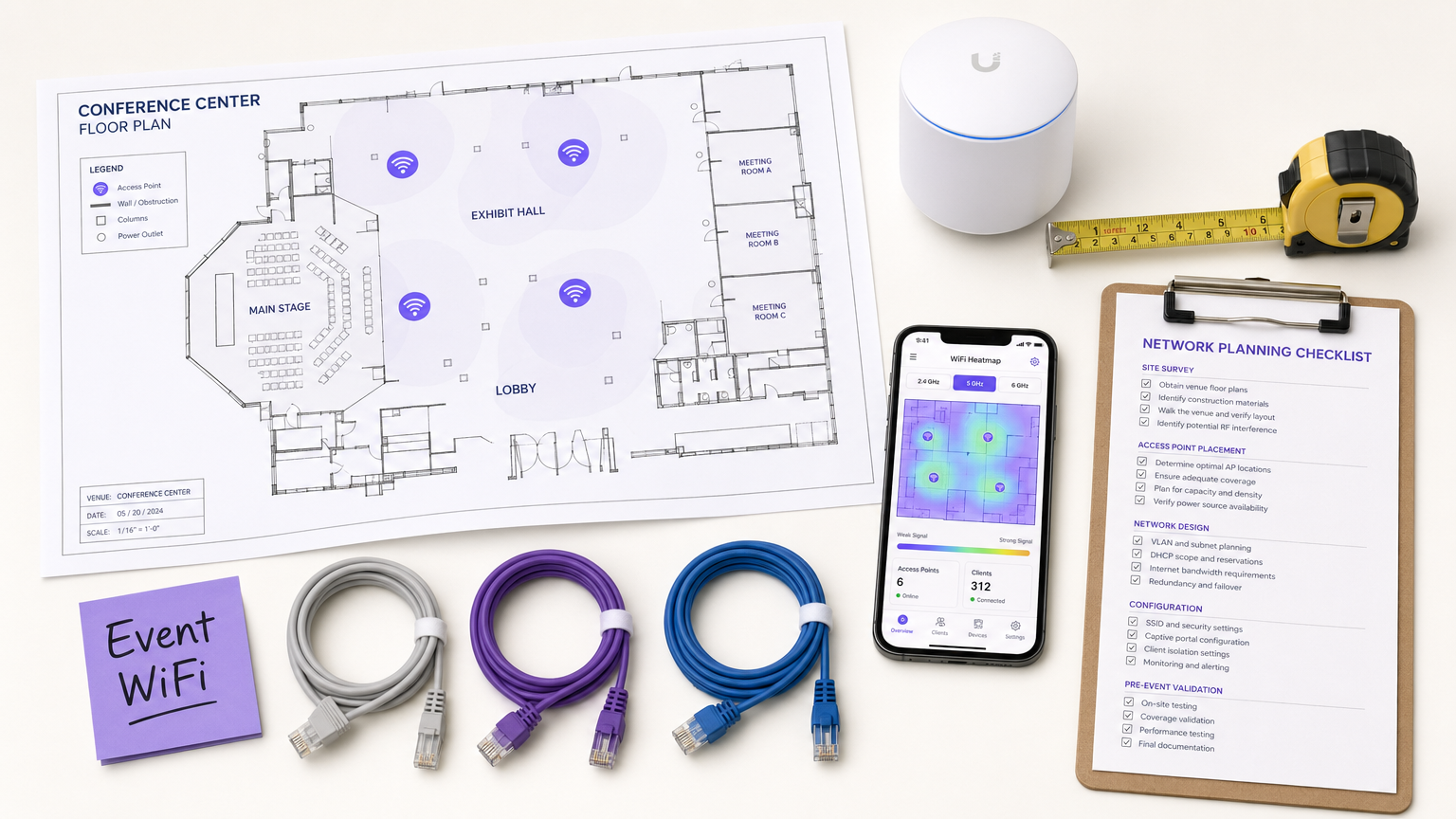
Para CTOs, diretores de TI e operadores de recintos, a implementação de WiFi temporário para eventos de grande escala apresenta um conjunto único de desafios que o design de rede empresarial padrão simplesmente não aborda. Ao contrário de ambientes de escritório estáticos, a conectividade para eventos exige implementação rápida, capacidade de alta densidade extrema e integração de utilizadores sem interrupções — tudo isto enquanto se mantém uma segurança rigorosa e conformidade regulamentar. Uma falha de rede num discurso principal ou numa feira não é apenas um inconveniente; é um risco reputacional e comercial.
Este guia fornece um plano abrangente para arquitetar e gerir redes WiFi para eventos que oferecem desempenho fiável sob pressão. Exploramos os requisitos técnicos para ambientes de alta densidade, estratégias de implementação independentes de fornecedores e a integração de soluções de Guest WiFi para capturar dados primários e impulsionar o ROI. Quer esteja a gerir uma conferência corporativa, um recinto de Hospitality a acolher uma gala, ou um festival ao ar livre de grande dimensão, estes princípios garantirão que a sua arquitetura de rede consegue lidar com a carga e proporcionar uma experiência perfeita aos participantes.
Análise Técnica Detalhada
O Desafio da Alta Densidade
As implementações padrão de WiFi em escritórios são projetadas para cobertura; o WiFi para eventos deve ser projetado para capacidade. Num ambiente empresarial típico, um ponto de acesso (AP) pode servir confortavelmente 20–30 clientes em simultâneo. Numa sala de conferências principal ou num estádio, essa mesma pegada de AP deve suportar centenas de dispositivos em simultâneo — muitos dos quais estão ativamente a transmitir vídeo, a sincronizar dados na nuvem ou a publicar nas redes sociais em tempo real.
Isto exige uma mudança fundamental na filosofia de design de RF (Radiofrequência). O objetivo principal já não é eliminar zonas mortas, mas sim mitigar a interferência de co-canal (CCI) e otimizar a relação sinal-ruído (SNR) em ambientes onde o nível de ruído é excecionalmente alto devido à densidade pura de dispositivos transmissores.
Arquitetura e Padrões
As redes de eventos modernas devem ser construídas com base nos padrões Wi-Fi 6 (802.11ax) ou Wi-Fi 6E (802.11ax na banda de 6 GHz). Estes protocolos introduzem funcionalidades críticas especificamente projetadas para ambientes de alta densidade:
| Funcionalidade | Padrão | Benefício em Implementações de Alta Densidade |
|---|---|---|
| OFDMA | Wi-Fi 6/6E | Serve múltiplos clientes simultaneamente em subcanais, reduzindo a latência |
| BSS Coloring | Wi-Fi 6/6E | Mitiga a interferência identificando e ignorando o tráfego BSS sobreposto |
| Target Wake Time (TWT) | Wi-Fi 6/6E | Agenda as transmissões dos clientes, reduzindo a contenção do meio |
| MU-MIMO (8x8) | Wi-Fi 6/6E | Permite que os APs comuniquem com múltiplos clientes simultaneamente |
| Banda de 6 GHz | Wi-Fi 6E | Fornece um espectro limpo e descongestionado, sem interferência de dispositivos legados |
Princípios de Design de RF para Alta Densidade
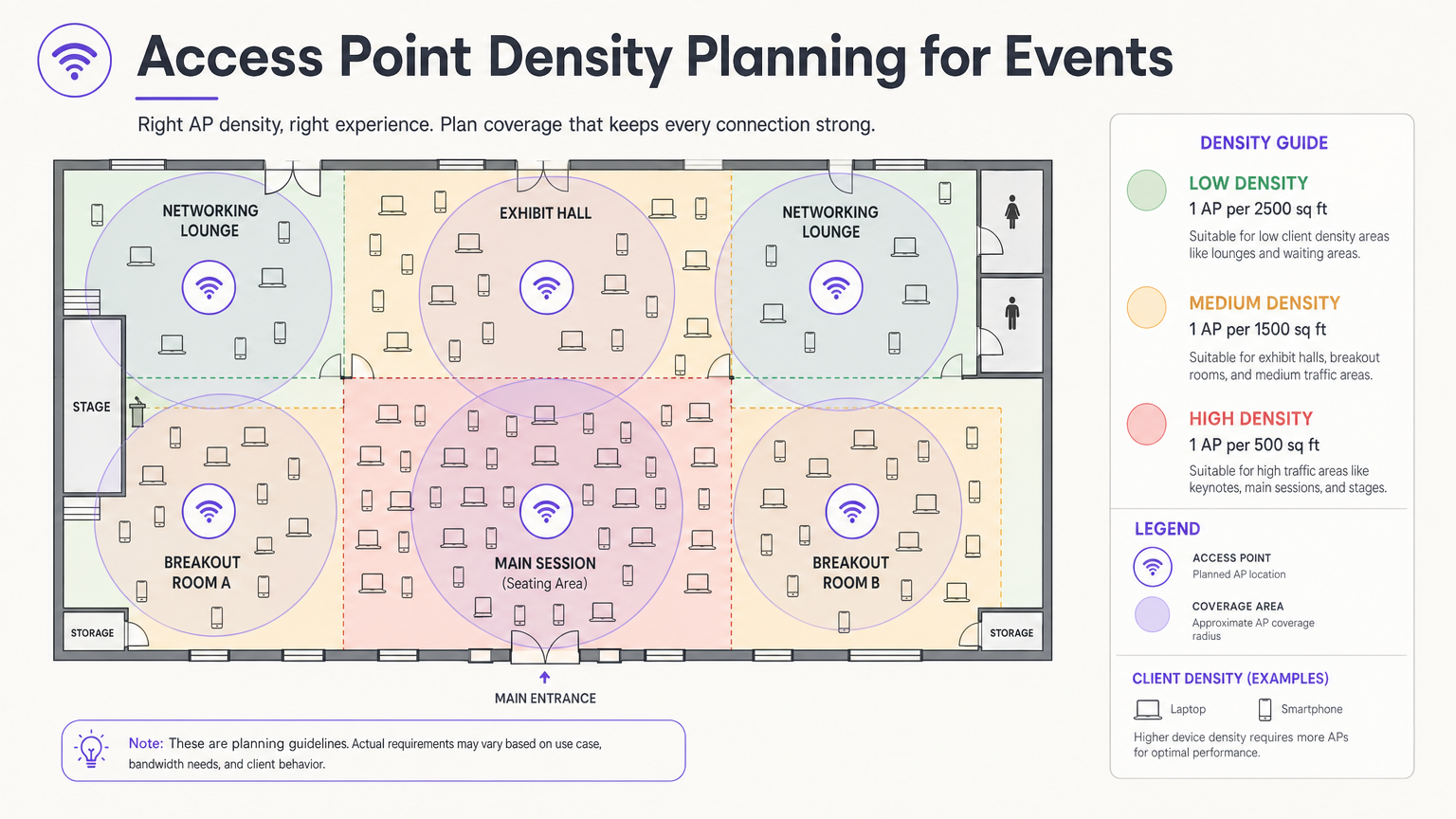
A decisão de design mais crítica é a seleção e colocação da antena. Numa grande sala, as antenas omnidirecionais transmitem energia de RF em todas as direções, o que significa que cada AP pode ouvir todos os outros APs — a definição de interferência de co-canal. A abordagem correta é usar antenas direcionais patch ou setoriais que focam a energia de RF num feixe apertado, criando microcélulas pequenas e contidas. Isto permite reutilizar os mesmos canais em APs adjacentes sem que interfiram uns com os outros.
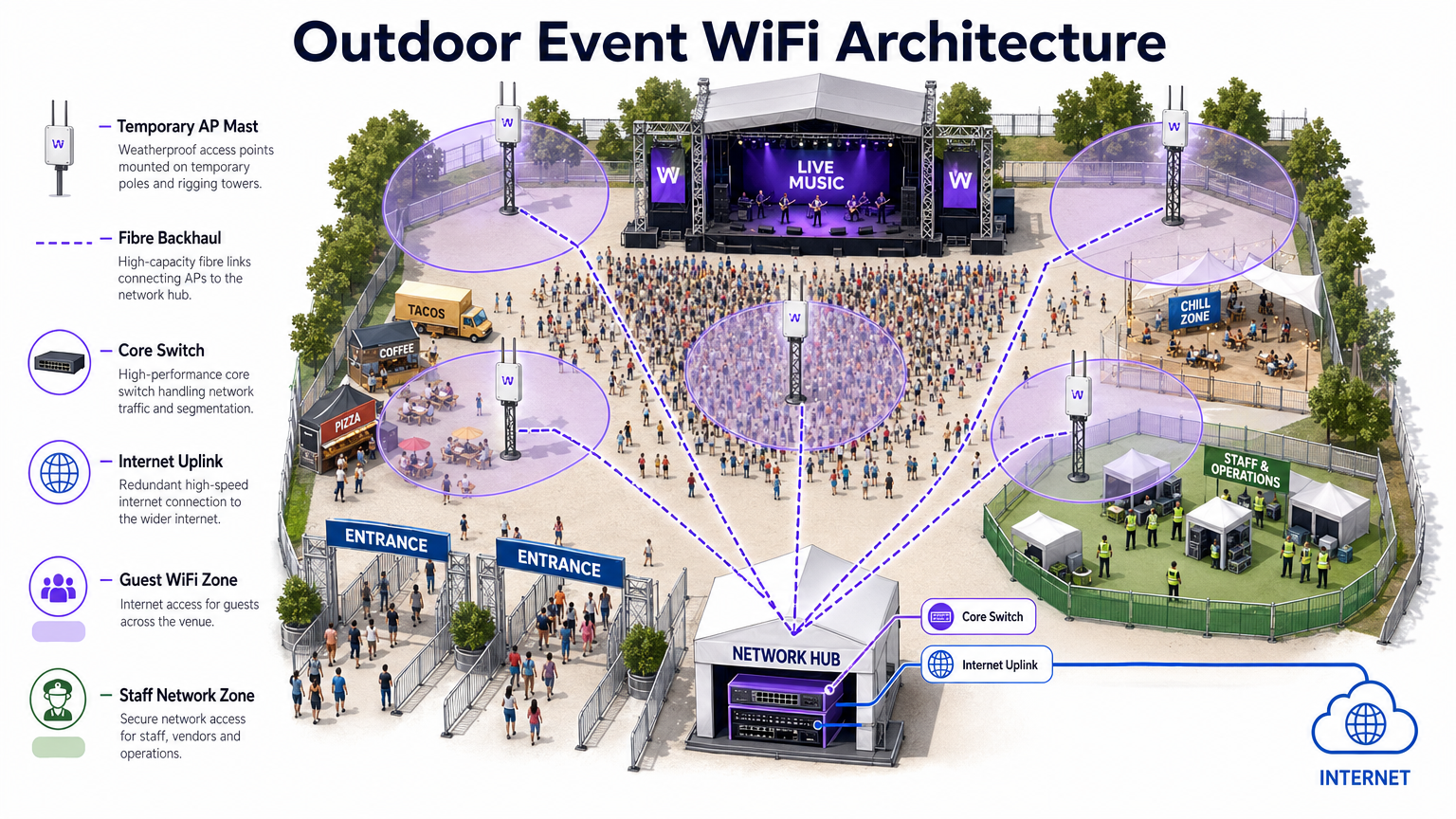
Monte os APs a uma altura que forneça cobertura adequada sem excesso de alcance. Para áreas de assentos, uma altura de montagem de 4–8 metros é geralmente ideal. Acima de 10 metros, a força do sinal ao nível do cliente degrada-se significativamente. Para implementações ao ar livre, consulte o diagrama de arquitetura abaixo.
Segurança e Conformidade
As redes de eventos devem equilibrar a facilidade de acesso com uma segurança robusta. Embora redes abertas com Captive Portals sejam comuns para acesso de convidados, elas expõem o tráfego à interceção sem encriptação adicional. A implementação de WPA3-Personal com Enhanced Open (OWE — Opportunistic Wireless Encryption) fornece encriptação transparente mesmo em redes públicas, sem complexidade adicional para o utilizador final.
Para eventos que envolvem transações financeiras — lojas pop-up, bilhética, vendedores de comida — a rede deve cumprir os padrões PCI DSS. Segregar o tráfego de ponto de venda (POS) para uma VLAN dedicada e encriptada com regras de firewall rigorosas é inegociável. Da mesma forma, todos os dados recolhidos através de Captive Portals devem aderir ao GDPR e às regulamentações de privacidade locais aplicáveis, exigindo consentimento explícito e políticas transparentes de tratamento de dados.
Guia de Implementação
Fase 1: Recolha de Requisitos e Levantamento do Local
Antes de implementar uma única peça de hardware, é fundamental compreender as restrições físicas do local e os requisitos específicos de conectividade do evento. Obtenha plantas precisas e realize uma visita ao local para identificar materiais de construção que atenuam os sinais de RF — betão denso, elementos estruturais de aço e vidro espelhado são particularmente problemáticos.
Realize um levantamento ativo do local utilizando ferramentas profissionais como Ekahau Site Survey ou AirMagnet. Isto é crucial para determinar a colocação ideal dos APs, identificar fontes de interferência existentes (APs não autorizados, fornos de micro-ondas, dispositivos Bluetooth, telefones DECT) e planear as atribuições de canais antes da instalação do hardware.
Fase 2: Design de Rede e Planeamento de Capacidade
Calcule a largura de banda necessária com base no número esperado de participantes e no seu perfil de utilização antecipado. Aplique o 2.5 DRegra do Dispositivo: assuma que cada participante traz 2,5 dispositivos conectados, com uma taxa de conexão simultânea de 60–80% nos horários de pico.
Para o endereçamento IP, projete os seus âmbitos DHCP para acomodar este volume. Uma sub-rede /24 (254 endereços) é totalmente inadequada para um evento de 500 pessoas. Utilize uma sub-rede /21 ou /20 e defina tempos de concessão DHCP curtos de 30–60 minutos para evitar o esgotamento de IP à medida que os participantes chegam e partem ao longo do dia.
Fase 3: Implementação e Configuração de Hardware
Implemente APs de alta densidade com antenas direcionais em áreas de assentos e congregação. Os principais passos de configuração incluem:
- Desativar taxas de dados legadas (taxas 802.11b/g de 1, 2, 5.5, 11 Mbps). Defina a taxa básica mínima para 12 ou 24 Mbps.
- Ativar band steering para direcionar clientes de banda dupla para as bandas de 5 GHz ou 6 GHz.
- Implementar isolamento de cliente para evitar a comunicação peer-to-peer entre dispositivos de convidados.
- Configurar limites de largura de banda por cliente (por exemplo, 5 Mbps de download / 2 Mbps de upload) para evitar que um pequeno número de utilizadores monopolize a conexão.
- Ativar a deteção de APs não autorizados no controlador wireless para identificar e alertar sobre hotspots não autorizados.
Fase 4: Captive Portal e Onboarding de Convidados
O Captive Portal é o principal ponto de contacto entre o local e o participante. Um portal mal projetado — lento a carregar, complexo de navegar ou que exija dados pessoais excessivos — resultará em altas taxas de abandono e utilizadores frustrados.
Plataformas como a solução Guest WiFi da Purple permitem autenticar utilizadores via login social, e-mail ou verificação por SMS, enquanto simultaneamente capturam dados valiosos de primeira parte com consentimento explícito do GDPR. O portal deve ser responsivo a dispositivos móveis, carregar em menos de três segundos e apresentar uma experiência clara e de marca. Para grandes eventos, garanta que a infraestrutura do servidor de autenticação esteja dimensionada para lidar com milhares de pedidos simultâneos durante os períodos de pico de associação — tipicamente os 10 minutos antes do início de uma apresentação principal.
Melhores Práticas
A tabela seguinte resume as principais melhores práticas de configuração para implementações de eventos de alta densidade, extraídas de orientações padrão da indústria e experiência de implementação no mundo real.
| Prática | Racional | Impacto se Ignorado |
|---|---|---|
| Desativar taxas de dados legadas | Impede que clientes lentos monopolizem o tempo de antena | Degradação severa do débito para todos os utilizadores |
| Ativar band steering | Move clientes capazes para bandas menos congestionadas | Congestionamento de 2.4 GHz, desempenho fraco |
| Implementar isolamento de cliente | Previne ataques peer-to-peer e propagação de malware | Risco de segurança, potencial violação de dados |
| Concessões DHCP curtas (30–60 min) | Recicla endereços IP de clientes que saíram | Esgotamento de DHCP, novos clientes não conseguem conectar |
| Usar antenas direcionais | Reduz a CCI entre APs adjacentes | Colapso do débito em toda a rede |
| Segmentar VLANs por tipo de tráfego | Isola tráfego sensível, garante conformidade | Violação PCI DSS, violação de segurança |
| Implementar links WAN redundantes | Elimina ponto único de falha para acesso à internet | Interrupção completa da rede se o link primário falhar |
Para uma exploração mais aprofundada das estratégias de gestão de largura de banda aplicáveis a implementações permanentes e temporárias, consulte o nosso guia sobre Como Gerir a Largura de Banda numa Rede WiFi .
Resolução de Problemas e Mitigação de Riscos
Modos de Falha Comuns
1. Esgotamento de DHCP. Como referido acima, este é o modo de falha mais comum em eventos. O sintoma é que os APs aparecem online e a funcionar, mas novos clientes não conseguem conectar. A solução é reduzir os tempos de concessão e garantir que as sub-redes têm o tamanho adequado. Monitorize a utilização do pool DHCP em tempo real durante o evento.
2. Cascata de Interferência Co-Canal. Se a colocação do AP ou o planeamento do canal estiverem incorretos, um único AP congestionado pode desencadear uma cascata onde os clientes se movem para APs vizinhos, sobrecarregando-os por sua vez. Previna isto com um levantamento de local pré-evento adequado e uma validação pós-implementação.
3. Interferência de APs Não Autorizados. Expositores e participantes trazem rotineiramente hotspots pessoais e dispositivos MiFi, criando interferência severa. Ative a deteção e contenção de APs não autorizados no seu controlador wireless. Informe a equipa do evento para comunicar a política aos expositores durante a montagem.
4. Gargalo de Autenticação do Captive Portal. Durante os períodos de pico de associação, o servidor de autenticação pode ser sobrecarregado. Teste a carga da sua infraestrutura de portal antes do evento e garanta que é escalável horizontalmente.
5. Tempestade de Associação. Quando uma sessão grande termina e milhares de dispositivos tentam reconectar simultaneamente, o tráfego do quadro de gestão pode sobrecarregar a rede. Implemente 802.11r (Fast BSS Transition) e 802.11k (Neighbour Reports) para facilitar o roaming suave e reduzir a sobrecarga de re-associação.
Arquitetura de Redundância e Failover
Para eventos de missão crítica, um único ponto de falha é inaceitável. Implemente:
- Links WAN duplos de diferentes ISPs com failover automático no router de borda.
- Configurações de controlador wireless de alta disponibilidade (HA) com failover ativo-em-espera.
- Switches de núcleo redundantes com agregação de links (LACP) para resiliência de uplink.
- UPS (Uninterruptible Power Supply) para todo o equipamento de rede central.
ROI e Impacto nos Negócios
Implementar uma rede WiFi robusta para eventos é um investimento significativo, mas também apresenta uma oportunidade substancial para um ROI mensurável. Ao integrar WiFi Analytics , pode transformar a rede de um centro de custos num ativo estratégico de negócios.
Captura de Dados de Primeira Parte. Cada participante que se conecta através do Captive Portal fornece um endereço de e-mail verificado e, opcionalmente, dados demográficos e de perfil social. Para um evento de 2.000 pessoas conferência, isto pode gerar uma lista de marketing de alta qualidade e consentida num único dia — uma lista que custaria significativamente mais para adquirir através de canais pagos convencionais.
Análise de Fluxo de Pessoas e Comportamental. Ao analisar padrões de conexão e tempos de permanência, pode compreender como os participantes se movem pelo local. Que stands de exposição atraíram mais tráfego? Quanto tempo os participantes passaram no lounge do patrocinador? Estes dados são diretamente acionáveis para pop-ups de Retalho , locais de Hotelaria e organizadores de eventos que planeiam layouts futuros.
Monetização de Patrocínios. A página de splash do Captive Portal é um espaço publicitário de primeira linha. Os patrocinadores podem ter experiências de login personalizadas, redirecionamentos pós-autenticação direcionados e dados de impressão mensuráveis — tudo isto com um prémio significativo em relação aos pacotes de patrocínio de eventos tradicionais.
Eficiência Operacional. Para as equipas de operações do local, a análise de rede em tempo real oferece visibilidade sobre a densidade e o fluxo da multidão, permitindo a gestão proativa de filas, catering e recursos de segurança. Isto é particularmente relevante em grandes centros de Transporte e ambientes de estádio.
Para organizações que implementam WiFi em ambientes mais permanentes, os mesmos princípios de recolha de dados e análise aplicam-se. Consulte o nosso guia sobre WiFi para Pequenas Empresas: Como Configurar Corretamente Sem Ultrapassar o Orçamento para uma perspetiva complementar sobre implementações permanentes.
Termos-Chave e Definições
Co-Channel Interference (CCI)
Interference caused when multiple access points operate on the same frequency channel within range of each other, forcing them to take turns transmitting and significantly reducing overall network throughput.
The primary performance enemy in high-density event deployments. Mitigated through careful channel planning, reduced AP transmit power, and directional antennas that constrain the coverage area of each AP.
BSS Coloring
A Wi-Fi 6 (802.11ax) feature that adds a numerical 'color' identifier to all transmissions from a Basic Service Set (BSS). APs can identify and ignore transmissions from neighboring networks on the same channel, allowing them to transmit simultaneously rather than waiting.
Crucial for improving spectral efficiency in crowded environments like exhibition halls where dozens of APs are deployed in close proximity. Effectively reduces the impact of CCI without requiring additional spectrum.
Captive Portal
A web page that users are redirected to and must interact with before gaining full access to a public WiFi network. Typically used for authentication, terms of service acceptance, or marketing data capture.
The critical onboarding step where venues can capture GDPR-compliant first-party data, present sponsorship messaging, and control network access. The quality and speed of the captive portal directly impacts the user experience.
Band Steering
A wireless controller feature that encourages dual-band or tri-band client devices to connect to the 5 GHz or 6 GHz bands rather than the heavily congested 2.4 GHz band, by delaying or suppressing probe responses on the lower band.
Essential for maximising available spectrum utilisation at events. The 2.4 GHz band has only three non-overlapping channels and is shared with Bluetooth, microwave ovens, and other devices, making it particularly susceptible to congestion.
Target Wake Time (TWT)
A Wi-Fi 6 (802.11ax) feature that allows an AP to negotiate specific scheduled windows with client devices for when they will wake up to transmit or receive data, reducing the number of devices contending for the medium simultaneously.
Improves overall network efficiency in high-density environments and significantly extends the battery life of attendees' mobile devices — a notable benefit at multi-day events.
DHCP Exhaustion
A network failure condition where the DHCP server has assigned all available IP addresses in its configured scope and cannot issue new leases to connecting devices, preventing them from obtaining network access.
One of the most common and easily preventable failure modes at events. Prevented by using adequately sized subnets (e.g., /21 or /20) and setting short DHCP lease times of 30–60 minutes to ensure addresses are recycled as attendees come and go.
Rogue Access Point
An unauthorised wireless access point connected to the network or operating in the same RF airspace, either inadvertently (an exhibitor's personal hotspot) or maliciously (an evil twin attack), causing interference and potential security risks.
A persistent challenge at trade shows and conferences where exhibitors routinely bring their own networking equipment. Must be actively monitored using wireless intrusion detection features on the wireless controller.
PCI DSS (Payment Card Industry Data Security Standard)
A set of security standards mandated by the major card networks (Visa, Mastercard, Amex) that all organisations accepting, processing, storing, or transmitting credit card information must comply with, covering network security, encryption, access control, and monitoring.
Non-negotiable for any event network supporting retail vendors, cashless payment systems, or ticketing. Requires strict network segmentation, encryption of cardholder data in transit, and regular security assessments.
OFDMA (Orthogonal Frequency-Division Multiple Access)
A Wi-Fi 6 channel access method that subdivides a single channel into smaller frequency allocations called Resource Units (RUs), allowing an AP to serve multiple clients with different bandwidth requirements simultaneously within a single transmission window.
A fundamental improvement over the OFDM used in Wi-Fi 5, which could only serve one client per transmission. In high-density event environments, OFDMA dramatically reduces latency and improves overall network efficiency.
Estudos de Caso
A 500-person corporate conference is being held in a hotel ballroom. The event includes a keynote presentation requiring high bandwidth for interactive polling, followed by four simultaneous breakout sessions in adjacent rooms. The hotel's existing WiFi infrastructure is inadequate. How should the IT team approach the temporary deployment?
Step 1 — Site Survey: Conduct an active RF survey of the ballroom and breakout rooms to identify the hotel's existing AP channels and any interference sources. Coordinate with the hotel to temporarily disable or reduce power on APs in adjacent areas during the event.
Step 2 — Capacity Calculation: 500 attendees × 2.5 devices = 1,250 devices. At 70% concurrency, plan for approximately 875 simultaneous connections. Allocate a /22 subnet (1,022 usable addresses) with 45-minute DHCP leases.
Step 3 — AP Placement: Deploy 4–6 high-density APs in the ballroom using directional patch antennas mounted at 5–6 metres, focused on the seating area. Deploy 1–2 APs per breakout room.
Step 4 — Configuration: Create a dedicated event SSID on VLAN 20 (guest). Disable 802.11b/g rates. Set minimum basic rate to 24 Mbps. Enable band steering and client isolation. Apply per-user bandwidth limits of 5 Mbps down / 2 Mbps up.
Step 5 — Onboarding: Deploy a custom captive portal integrated with the event registration system, allowing pre-registered attendees to authenticate with their registration email for a frictionless experience.
Step 6 — Monitoring: Assign a network engineer to monitor the wireless controller dashboard throughout the event, watching for AP load, client counts, and DHCP pool utilisation.
A three-day outdoor music festival expects 10,000 daily attendees across a 5-hectare greenfield site. The venue has no existing network infrastructure. The event requires guest WiFi for attendees, a secure network for cashless payment vendors, and a dedicated operations network for staff. What is the optimal architecture?
Step 1 — Backhaul: Establish a high-capacity point-to-point microwave link (minimum 1 Gbps) back to the nearest fibre point of presence, with a secondary 4G/5G bonded link as failover. Alternatively, negotiate a temporary fibre installation with the local ISP if lead time permits.
Step 2 — Core Network: Deploy a ruggedised core switch and edge router/firewall in a secure, climate-controlled equipment tent at the centre of the site. Install a UPS for all core equipment.
Step 3 — Distribution: Run armoured fibre optic cables from the core tent to distribution switches located at key zones: Main Stage, Food Court, VIP Area, Entrance Gates, and Staff Operations.
Step 4 — Edge Deployment: Mount IP67-rated outdoor APs on temporary masts (4–6 metres) or rigging structures. Use sector antennas to cover crowd areas. Deploy APs at a density of 1 per 300–500 attendees in high-density zones.
Step 5 — Network Segmentation: Configure three VLANs: VLAN 20 (Guest WiFi with captive portal), VLAN 30 (Vendor POS — PCI DSS compliant, restricted to payment gateway IPs only), VLAN 40 (Staff Operations — management access, CCTV, communications).
Step 6 — Monitoring: Deploy a cloud-based wireless management platform accessible via the staff operations network for real-time monitoring and remote configuration.
Análise de Cenários
Q1. You are designing the WiFi for a major product launch keynote. The venue is a large, open auditorium with a flat floor and no fixed seating. The client expects 2,000 attendees to be simultaneously streaming a live interactive poll and posting to social media during the 90-minute presentation. What is the most critical RF design consideration, and how would you address it?
💡 Dica:Think about the difference between providing coverage in an empty room versus capacity in a packed auditorium. Consider what happens when dozens of APs can all hear each other.
Mostrar Abordagem Recomendada
The most critical consideration is mitigating Co-Channel Interference (CCI) while providing extreme capacity. With 2,000 attendees and the 2.5 Device Rule, you are planning for approximately 3,500 devices at 70% concurrency — roughly 2,450 simultaneous connections. This requires deploying a high density of APs (likely 20–30 units) in the auditorium. If those APs are configured with omnidirectional antennas and overlapping channels, they will create severe CCI and the network will perform worse than a single AP. The solution is to use high-density APs with directional patch antennas mounted overhead, focused on specific sections of the audience. Reduce AP transmit power to create tight micro-cells. Assign non-overlapping channels carefully and leverage BSS Coloring (Wi-Fi 6) to further reduce interference. Disable all legacy data rates to ensure fast airtime clearance.
Q2. During a multi-day trade show, the IT helpdesk receives reports at 10:15 AM that attendees cannot connect to the guest WiFi network in the main exhibition hall. The wireless controller dashboard shows all APs are online, associated client counts are near zero, and no error alerts are present. What is the most likely root cause, and what is the immediate remediation?
💡 Dica:Consider the lifecycle of a device connecting to a network and what server-side resource is consumed even when a device is idle or has left the venue.
Mostrar Abordagem Recomendada
The most likely cause is DHCP Exhaustion. The exhibition hall opened the previous day, and if the DHCP lease time was set to the default 24 hours, the IP address pool will have been depleted by the accumulation of leases from the previous day's attendees — devices that are no longer present but whose leases have not yet expired. The APs are functioning correctly, but new devices cannot obtain an IP address and therefore cannot complete the connection process. Immediate remediation: (1) Reduce the DHCP lease time to 30 minutes on the DHCP server. (2) Clear all existing leases in the pool to immediately free up addresses. (3) If the subnet is undersized, expand it to a /21 or /20 to provide sufficient headroom. Long-term: implement DHCP pool utilisation monitoring with alerting thresholds at 70% and 90% capacity.
Q3. A retail brand is running a three-day pop-up event in a shopping centre. The event requires guest WiFi for visitors, and six vendor stations will be processing contactless card payments using wireless POS terminals. The IT manager proposes running both on the same SSID with a shared passphrase to simplify setup. Evaluate this proposal and provide a compliant alternative architecture.
💡 Dica:Consider the regulatory requirements that apply to any network carrying payment card data, and what the consequences of non-compliance are.
Mostrar Abordagem Recomendada
The proposed single-SSID architecture is non-compliant with PCI DSS and must not be implemented. PCI DSS Requirement 1.3 mandates that cardholder data environments (CDE) be isolated from untrusted networks, including general guest WiFi. Placing POS terminals on the same network segment as guest devices creates a direct path for a compromised guest device to attack the POS systems or intercept payment data. The compliant alternative is strict VLAN segmentation: (1) Create VLAN 20 for guest WiFi with a captive portal — this is an untrusted network with internet access only. (2) Create VLAN 30 for POS terminals — this is the CDE, restricted by firewall rules to outbound connections to the specific payment gateway IP addresses only. All inbound connections from VLAN 20 to VLAN 30 must be blocked. (3) Use separate SSIDs for each VLAN, with WPA3-Enterprise or a strong WPA2/3-PSK for the POS SSID. (4) Document the network segmentation and firewall rules as evidence for PCI DSS compliance.




