

WiFi for Events: बड़ी भीड़ के लिए विश्वसनीय कनेक्टिविटी कैसे प्रदान करें
यह आधिकारिक गाइड IT लीडर्स, नेटवर्क आर्किटेक्ट्स और वेन्यू ऑपरेटर्स को बड़े पैमाने के इवेंट्स — कॉर्पोरेट कॉन्फ्रेंस से लेकर आउटडोर फेस्टिवल्स तक — के लिए उच्च-घनत्व वाले अस्थायी WiFi नेटवर्क को डिज़ाइन करने, डिप्लॉय करने और प्रबंधित करने के लिए कार्रवाई योग्य रणनीतियाँ प्रदान करता है। इसमें RF डिज़ाइन सिद्धांतों, क्षमता योजना, सुरक्षा अनुपालन और नेटवर्क को राजस्व-उत्पादक संपत्ति में बदलने के लिए गेस्ट WiFi एनालिटिक्स का लाभ उठाने के तरीके शामिल हैं।
🎧 इस गाइड को सुनें
ट्रांसक्रिप्ट देखें
कार्यकारी सारांश
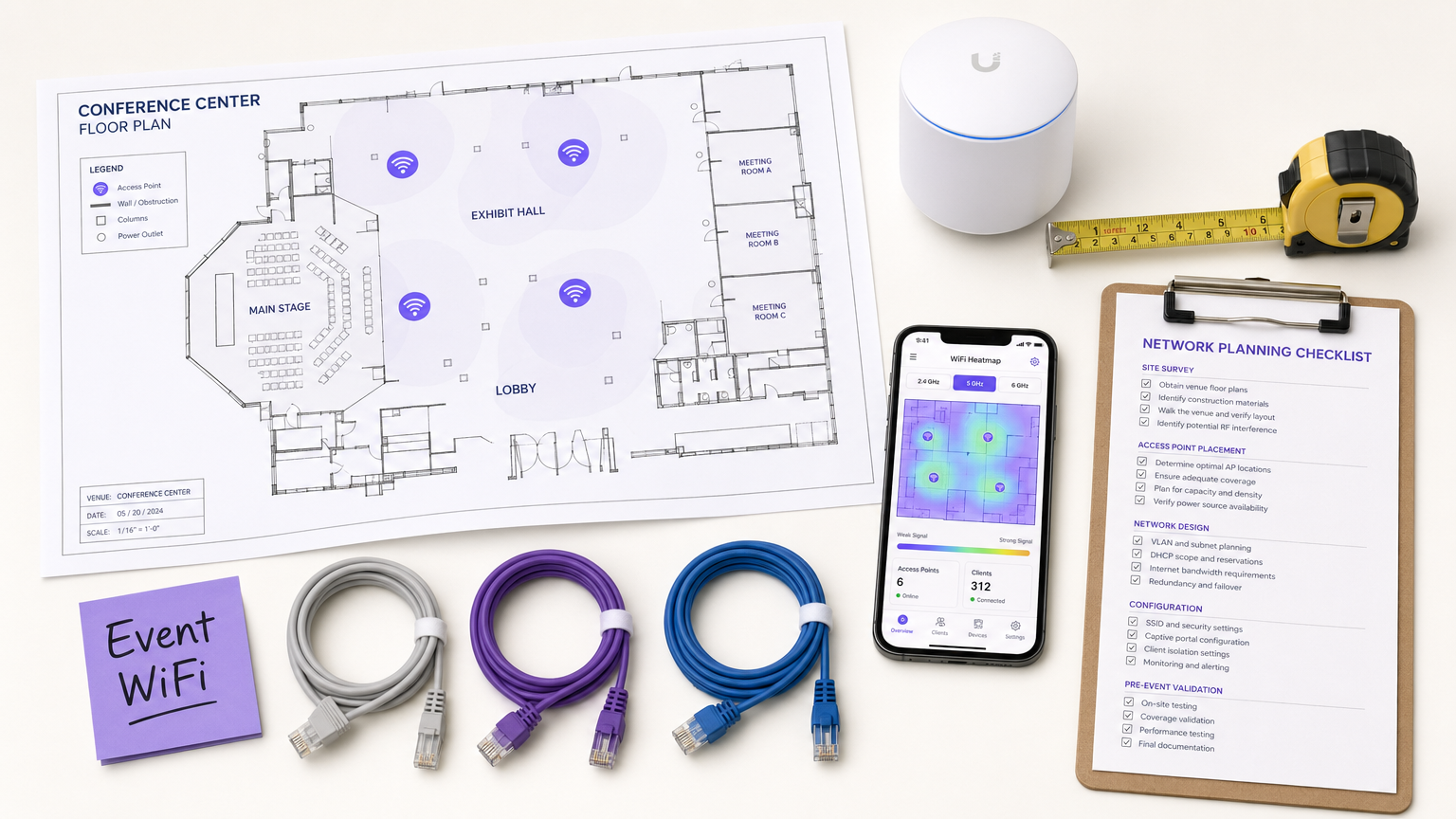
CTO, IT डायरेक्टर्स और वेन्यू ऑपरेटर्स के लिए, बड़े पैमाने के इवेंट्स के लिए अस्थायी WiFi डिप्लॉय करना चुनौतियों का एक अनूठा सेट प्रस्तुत करता है जिसे मानक एंटरप्राइज़ नेटवर्क डिज़ाइन संबोधित नहीं करता है। स्थिर कार्यालय वातावरण के विपरीत, इवेंट कनेक्टिविटी के लिए तीव्र डिप्लॉयमेंट, अत्यधिक उच्च-घनत्व क्षमता और सहज उपयोगकर्ता ऑनबोर्डिंग की आवश्यकता होती है — यह सब सख्त सुरक्षा और नियामक अनुपालन बनाए रखते हुए। एक मुख्य भाषण या ट्रेड शो में विफल नेटवर्क सिर्फ एक असुविधा नहीं है; यह एक प्रतिष्ठा और व्यावसायिक जोखिम है।
यह गाइड इवेंट WiFi नेटवर्क को आर्किटेक्ट करने और प्रबंधित करने के लिए एक व्यापक ब्लूप्रिंट प्रदान करता है जो दबाव में विश्वसनीय प्रदर्शन प्रदान करते हैं। हम उच्च-घनत्व वाले वातावरण के लिए तकनीकी आवश्यकताओं, विक्रेता-तटस्थ डिप्लॉयमेंट रणनीतियों और फर्स्ट-पार्टी डेटा कैप्चर करने और ROI बढ़ाने के लिए Guest WiFi समाधानों के एकीकरण का पता लगाते हैं। चाहे आप एक कॉर्पोरेट कॉन्फ्रेंस, एक गाला की मेजबानी करने वाला Hospitality वेन्यू, या एक विशाल आउटडोर फेस्टिवल का प्रबंधन कर रहे हों, ये सिद्धांत सुनिश्चित करेंगे कि आपका नेटवर्क आर्किटेक्चर लोड को संभाल सके और एक सहज अटेंडी अनुभव प्रदान कर सके।
तकनीकी गहन-विश्लेषण
उच्च-घनत्व चुनौती
मानक कार्यालय WiFi डिप्लॉयमेंट कवरेज के लिए डिज़ाइन किए गए हैं; इवेंट WiFi को क्षमता के लिए डिज़ाइन किया जाना चाहिए। एक विशिष्ट एंटरप्राइज़ सेटिंग में, एक एक्सेस पॉइंट (AP) 20-30 समवर्ती क्लाइंट्स को आराम से सेवा दे सकता है। एक कॉन्फ्रेंस कीनोट हॉल या स्टेडियम में, उसी AP फुटप्रिंट को सैकड़ों डिवाइसों को एक साथ सपोर्ट करना चाहिए — जिनमें से कई सक्रिय रूप से वीडियो स्ट्रीम कर रहे हैं, क्लाउड डेटा सिंक कर रहे हैं, या वास्तविक समय में सोशल मीडिया पर पोस्ट कर रहे हैं।
इसके लिए RF (रेडियो फ्रीक्वेंसी) डिज़ाइन दर्शन में एक मौलिक बदलाव की आवश्यकता है। प्राथमिक उद्देश्य अब डेड ज़ोन को खत्म करना नहीं है, बल्कि सह-चैनल हस्तक्षेप (CCI) को कम करना और ऐसे वातावरण में सिग्नल-टू-नॉइज़ अनुपात (SNR) को अनुकूलित करना है जहाँ ट्रांसमिटिंग डिवाइसों की अत्यधिक घनत्व के कारण नॉइज़ फ्लोर असाधारण रूप से उच्च है।
आर्किटेक्चर और मानक
आधुनिक इवेंट नेटवर्क को Wi-Fi 6 (802.11ax) या Wi-Fi 6E (6 GHz बैंड में 802.11ax) मानकों पर बनाया जाना चाहिए। ये प्रोटोकॉल विशेष रूप से उच्च-घनत्व वाले वातावरण के लिए डिज़ाइन की गई महत्वपूर्ण सुविधाएँ प्रस्तुत करते हैं:
| सुविधा | मानक | उच्च-घनत्व डिप्लॉयमेंट में लाभ |
|---|---|---|
| OFDMA | Wi-Fi 6/6E | सब-चैनलों पर एक साथ कई क्लाइंट्स को सेवा प्रदान करता है, विलंबता कम करता है |
| BSS Coloring | Wi-Fi 6/6E | ओवरलैपिंग BSS ट्रैफ़िक की पहचान करके और उसे अनदेखा करके हस्तक्षेप को कम करता है |
| Target Wake Time (TWT) | Wi-Fi 6/6E | क्लाइंट ट्रांसमिशन को शेड्यूल करता है, माध्यम विवाद को कम करता है |
| MU-MIMO (8x8) | Wi-Fi 6/6E | APs को एक साथ कई क्लाइंट्स के साथ संवाद करने की अनुमति देता है |
| 6 GHz Band | Wi-Fi 6E | बिना किसी लेगेसी डिवाइस हस्तक्षेप के स्वच्छ, भीड़भाड़ रहित स्पेक्ट्रम प्रदान करता है |
उच्च घनत्व के लिए RF डिज़ाइन सिद्धांत
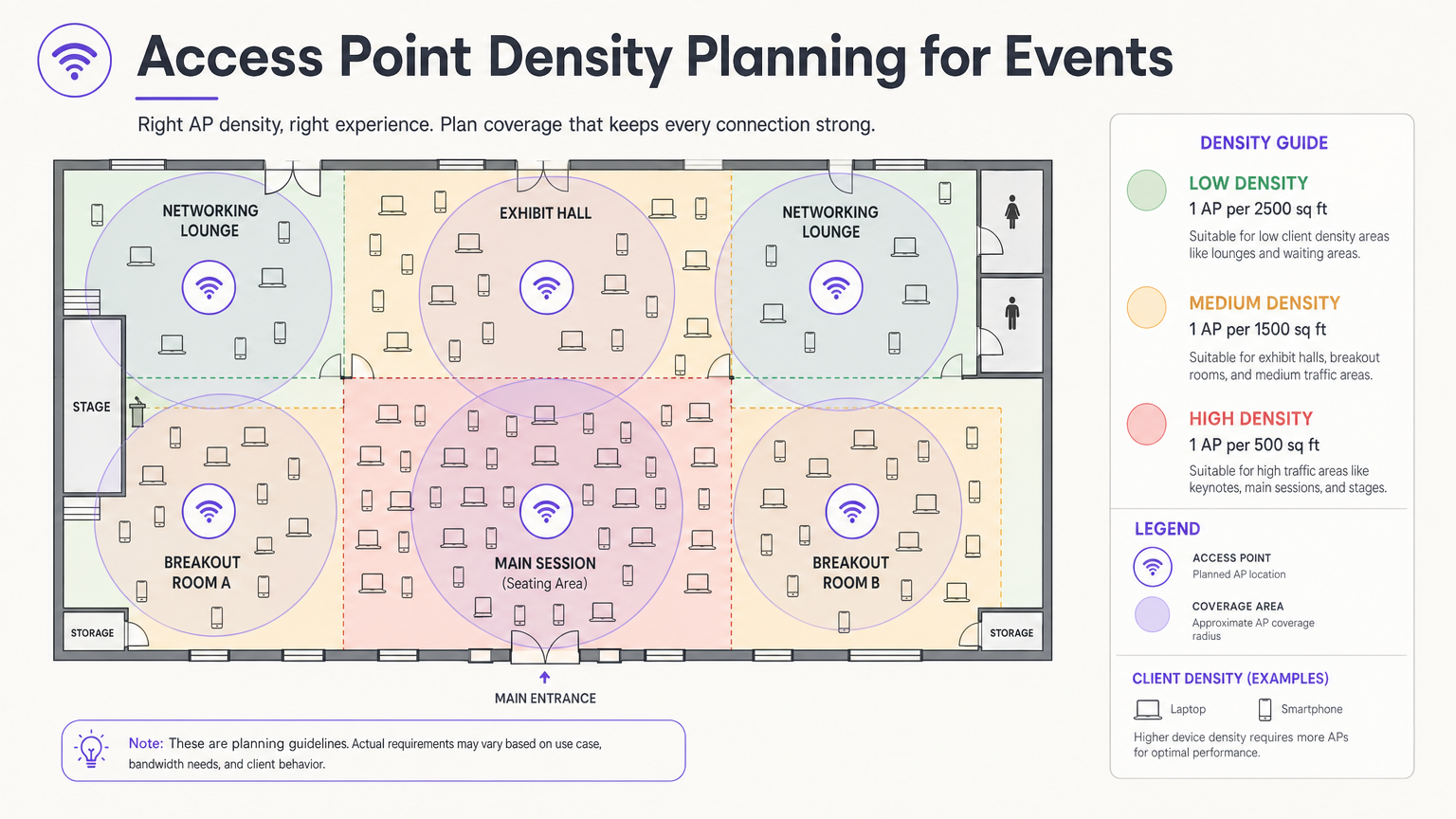
सबसे महत्वपूर्ण डिज़ाइन निर्णय एंटीना चयन और प्लेसमेंट है। एक बड़े हॉल में, ओमनीडायरेक्शनल एंटीना सभी दिशाओं में RF ऊर्जा प्रसारित करते हैं, जिसका अर्थ है कि प्रत्येक AP दूसरे AP को सुन सकता है — सह-चैनल हस्तक्षेप की परिभाषा। सही तरीका दिशात्मक पैच या सेक्टर एंटीना का उपयोग करना है जो RF ऊर्जा को एक संकीर्ण बीम में केंद्रित करते हैं, जिससे छोटे, निहित माइक्रो-सेल बनते हैं। यह आपको आसन्न APs में एक ही चैनल का पुन: उपयोग करने की अनुमति देता है, बिना उनके एक-दूसरे के साथ हस्तक्षेप किए।
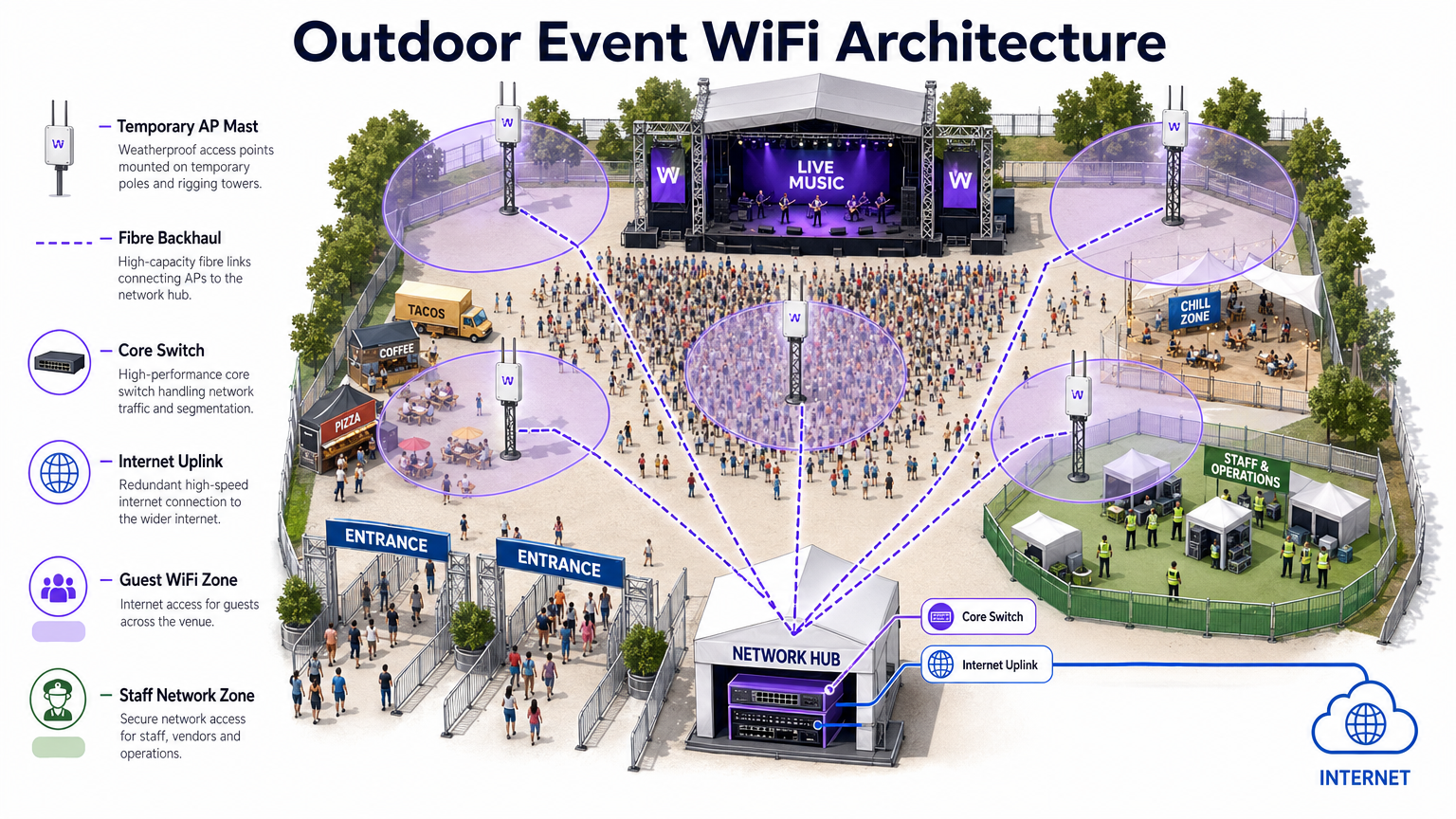
APs को ऐसी ऊंचाई पर माउंट करें जो अत्यधिक कवरेज प्रदान किए बिना पर्याप्त कवरेज प्रदान करे। बैठने वाले क्षेत्रों के लिए, 4-8 मीटर की माउंटिंग ऊंचाई आमतौर पर इष्टतम होती है। 10 मीटर से ऊपर, क्लाइंट स्तर पर सिग्नल की शक्ति काफी कम हो जाती है। आउटडोर डिप्लॉयमेंट के लिए, नीचे दिए गए आर्किटेक्चर डायग्राम को देखें।
सुरक्षा और अनुपालन
इवेंट नेटवर्क को मजबूत सुरक्षा के साथ पहुंच की आसानी को संतुलित करना चाहिए। जबकि कैप्टिव पोर्टल्स वाले खुले नेटवर्क गेस्ट एक्सेस के लिए आम हैं, वे अतिरिक्त एन्क्रिप्शन के बिना ट्रैफ़िक को अवरोधन के लिए उजागर करते हैं। WPA3-Personal with Enhanced Open (OWE — Opportunistic Wireless Encryption) को लागू करने से सार्वजनिक नेटवर्क पर भी पारदर्शी एन्क्रिप्शन मिलता है, जिसमें अंतिम उपयोगकर्ता के लिए कोई अतिरिक्त जटिलता नहीं होती है।
वित्तीय लेनदेन वाले इवेंट्स के लिए — रिटेल पॉप-अप्स, टिकटिंग, फूड वेंडर्स — नेटवर्क को PCI DSS मानकों का पालन करना चाहिए। पॉइंट-ऑफ-सेल (POS) ट्रैफ़िक को सख्त फ़ायरवॉल नियमों के साथ एक समर्पित, एन्क्रिप्टेड VLAN पर अलग करना गैर-परक्राम्य है। इसी तरह, कैप्टिव पोर्टल्स के माध्यम से एकत्र किए गए सभी डेटा को GDPR और लागू स्थानीय गोपनीयता नियमों का पालन करना चाहिए, जिसके लिए स्पष्ट सहमति और पारदर्शी डेटा हैंडलिंग नीतियों की आवश्यकता होती है।
कार्यान्वयन गाइड
चरण 1: आवश्यकताएँ एकत्र करना और साइट सर्वेक्षण
हार्डवेयर का एक भी टुकड़ा डिप्लॉय करने से पहले, आपको वेन्यू की भौतिक बाधाओं और इवेंट की विशिष्ट कनेक्टिविटी आवश्यकताओं को समझना चाहिए। सटीक फ्लोर प्लान प्राप्त करें और उन निर्माण सामग्रियों की पहचान करने के लिए एक वॉक-थ्रू करें जो RF संकेतों को क्षीण करती हैं — घना कंक्रीट, स्टील संरचनात्मक तत्व और दर्पणयुक्त ग्लास विशेष रूप से समस्याग्रस्त हैं।
Ekahau Site Survey या AirMagnet जैसे पेशेवर उपकरणों का उपयोग करके एक सक्रिय साइट सर्वेक्षण करें। यह इष्टतम AP प्लेसमेंट निर्धारित करने, हस्तक्षेप के मौजूदा स्रोतों (रोग APs, माइक्रोवेव ओवन, Bluetooth डिवाइस, DECT फोन) की पहचान करने और हार्डवेयर स्थापित होने से पहले चैनल असाइनमेंट की योजना बनाने के लिए महत्वपूर्ण है।
चरण 2: नेटवर्क डिज़ाइन और क्षमता योजना
उपस्थित लोगों की अपेक्षित संख्या और उनके अनुमानित उपयोग प्रोफ़ाइल के आधार पर अपनी आवश्यक बैंडविड्थ की गणना करें। 2.5 Dडिवाइस नियम**: मान लें कि प्रत्येक उपस्थित व्यक्ति 2.5 कनेक्टेड डिवाइस लाता है, जिसमें पीक समय में 60-80% की समवर्ती कनेक्शन दर होती है।
IP एड्रेसिंग के लिए, इस वॉल्यूम को समायोजित करने के लिए अपने DHCP स्कोप डिज़ाइन करें। 500-व्यक्ति के कार्यक्रम के लिए एक /24 सबनेट (254 एड्रेस) पूरी तरह से अपर्याप्त है। एक /21 या /20 सबनेट का उपयोग करें और 30-60 मिनट के छोटे DHCP लीज़ टाइम सेट करें ताकि दिन भर उपस्थित लोगों के आने-जाने पर IP की कमी को रोका जा सके।
चरण 3: हार्डवेयर परिनियोजन और कॉन्फ़िगरेशन
बैठने और सभा क्षेत्रों में दिशात्मक एंटेना के साथ उच्च-घनत्व वाले APs तैनात करें। मुख्य कॉन्फ़िगरेशन चरणों में शामिल हैं:
- लेगेसी डेटा दरों को अक्षम करें (802.11b/g की दरें 1, 2, 5.5, 11 Mbps)। न्यूनतम मूल दर को 12 या 24 Mbps पर सेट करें।
- डुअल-बैंड क्लाइंट को 5 GHz या 6 GHz बैंड पर धकेलने के लिए बैंड स्टीयरिंग सक्षम करें।
- अतिथि डिवाइसों के बीच पीयर-टू-पीयर संचार को रोकने के लिए क्लाइंट आइसोलेशन लागू करें।
- कनेक्शन पर एकाधिकार करने वाले उपयोगकर्ताओं की एक छोटी संख्या को रोकने के लिए प्रति-क्लाइंट बैंडविड्थ सीमाएँ कॉन्फ़िगर करें (उदाहरण के लिए, 5 Mbps डाउन / 2 Mbps अप)।
- अनधिकृत हॉटस्पॉट की पहचान करने और उन पर अलर्ट करने के लिए वायरलेस कंट्रोलर पर रोग AP डिटेक्शन सक्षम करें।
चरण 4: Captive Portal और अतिथि ऑनबोर्डिंग
The Captive Portal स्थल और उपस्थित व्यक्ति के बीच प्राथमिक संपर्क बिंदु है। एक खराब डिज़ाइन किया गया पोर्टल — लोड होने में धीमा, नेविगेट करने में जटिल, या अत्यधिक व्यक्तिगत डेटा की आवश्यकता वाला — उच्च परित्याग दर और निराश उपयोगकर्ताओं का कारण बनेगा।
Platforms like Purple's Guest WiFi समाधान आपको सामाजिक लॉगिन, ईमेल, या SMS सत्यापन के माध्यम से उपयोगकर्ताओं को प्रमाणित करने की अनुमति देते हैं, जबकि स्पष्ट GDPR सहमति के साथ मूल्यवान फर्स्ट-पार्टी डेटा को एक साथ कैप्चर करते हैं। पोर्टल मोबाइल-रिस्पॉन्सिव होना चाहिए, तीन सेकंड से कम समय में लोड होना चाहिए, और एक स्पष्ट, ब्रांडेड अनुभव प्रस्तुत करना चाहिए। बड़े आयोजनों के लिए, सुनिश्चित करें कि प्रमाणीकरण सर्वर इन्फ्रास्ट्रक्चर पीक एसोसिएशन अवधियों के दौरान हजारों समवर्ती अनुरोधों को संभालने के लिए स्केल किया गया है — आमतौर पर मुख्य भाषण शुरू होने से 10 मिनट पहले।
सर्वोत्तम अभ्यास
निम्नलिखित तालिका उच्च-घनत्व वाले इवेंट परिनियोजन के लिए मुख्य कॉन्फ़िगरेशन सर्वोत्तम प्रथाओं को सारांशित करती है, जो उद्योग-मानक मार्गदर्शन और वास्तविक दुनिया के परिनियोजन अनुभव से ली गई हैं।
| अभ्यास | तर्क | अनदेखा करने पर प्रभाव |
|---|---|---|
| लेगेसी डेटा दरों को अक्षम करें | धीमे क्लाइंट को एयरटाइम पर एकाधिकार करने से रोकता है | सभी उपयोगकर्ताओं के लिए गंभीर थ्रूपुट गिरावट |
| बैंड स्टीयरिंग सक्षम करें | सक्षम क्लाइंट को कम भीड़भाड़ वाले बैंड पर ले जाता है | 2.4 GHz भीड़भाड़, खराब प्रदर्शन |
| क्लाइंट आइसोलेशन लागू करें | पीयर-टू-पीयर हमलों और मैलवेयर के प्रसार को रोकता है | सुरक्षा जोखिम, संभावित डेटा उल्लंघन |
| छोटे DHCP लीज़ (30-60 मिनट) | छोड़े गए क्लाइंट से IP एड्रेस रीसायकल करता है | DHCP की कमी, नए क्लाइंट कनेक्ट नहीं हो सकते |
| दिशात्मक एंटेना का उपयोग करें | आसन्न APs के बीच CCI को कम करता है | नेटवर्क-व्यापी थ्रूपुट पतन |
| ट्रैफ़िक प्रकार के अनुसार VLANs को सेगमेंट करें | संवेदनशील ट्रैफ़िक को अलग करता है, अनुपालन सुनिश्चित करता है | PCI DSS उल्लंघन, सुरक्षा उल्लंघन |
| रिडंडेंट WAN लिंक तैनात करें | इंटरनेट एक्सेस के लिए विफलता के एकल बिंदु को समाप्त करता है | प्राथमिक लिंक विफल होने पर पूर्ण नेटवर्क आउटेज |
स्थायी और अस्थायी दोनों परिनियोजन पर लागू बैंडविड्थ प्रबंधन रणनीतियों की गहन खोज के लिए, How to Manage Bandwidth on a WiFi Network पर हमारी मार्गदर्शिका देखें।
समस्या निवारण और जोखिम न्यूनीकरण
सामान्य विफलता मोड
1. DHCP की कमी। जैसा कि ऊपर उल्लेख किया गया है, यह आयोजनों में सबसे आम विफलता मोड है। लक्षण यह है कि APs ऑनलाइन और कार्यशील दिखाई देते हैं, लेकिन नए क्लाइंट कनेक्ट नहीं हो सकते। इसका समाधान लीज़ टाइम को कम करना और यह सुनिश्चित करना है कि सबनेट पर्याप्त आकार के हों। आयोजन के दौरान DHCP पूल उपयोगिता की वास्तविक समय में निगरानी करें।
2. को-चैनल इंटरफेरेंस कैस्केड। यदि AP प्लेसमेंट या चैनल प्लानिंग गलत है, तो एक एकल भीड़भाड़ वाला AP एक कैस्केड को ट्रिगर कर सकता है जहाँ क्लाइंट पड़ोसी APs पर घूमते हैं, जिससे वे बदले में ओवरलोड हो जाते हैं। इसे उचित प्री-इवेंट साइट सर्वेक्षण और पोस्ट-परिनियोजन सत्यापन वॉक के साथ रोकें।
3. रोग AP इंटरफेरेंस। प्रदर्शक और उपस्थित व्यक्ति नियमित रूप से व्यक्तिगत हॉटस्पॉट और MiFi डिवाइस लाते हैं, जिससे गंभीर हस्तक्षेप होता है। अपने वायरलेस कंट्रोलर पर रोग AP डिटेक्शन और रोकथाम सक्षम करें। सेटअप के दौरान प्रदर्शकों को नीति के बारे में सूचित करने के लिए इवेंट स्टाफ को संक्षिप्त करें।
4. Captive Portal प्रमाणीकरण बॉटलनेक। पीक एसोसिएशन अवधियों के दौरान, प्रमाणीकरण सर्वर अभिभूत हो सकता है। आयोजन से पहले अपने पोर्टल इन्फ्रास्ट्रक्चर का लोड-टेस्ट करें और सुनिश्चित करें कि यह क्षैतिज रूप से स्केलेबल है।
5. एसोसिएशन स्टॉर्म। जब एक बड़ा सत्र समाप्त होता है और हजारों डिवाइस एक साथ फिर से कनेक्ट करने का प्रयास करते हैं, तो प्रबंधन फ्रेम ट्रैफ़िक नेटवर्क को अभिभूत कर सकता है। सुचारू रोमिंग की सुविधा के लिए और पुन: एसोसिएशन ओवरहेड को कम करने के लिए 802.11r (Fast BSS Transition) और 802.11k (Neighbour Reports) लागू करें।
अतिरेक और फ़ेलओवर आर्किटेक्चर
मिशन-क्रिटिकल आयोजनों के लिए, विफलता का एक भी बिंदु अस्वीकार्य है। लागू करें:
- एज राउटर पर स्वचालित फ़ेलओवर के साथ विभिन्न ISPs से दोहरी WAN लिंक।
- सक्रिय-स्टैंडबाय फ़ेलओवर के साथ उच्च-उपलब्धता (HA) वायरलेस कंट्रोलर कॉन्फ़िगरेशन।
- अपलिंक लचीलेपन के लिए लिंक एग्रीगेशन (LACP) के साथ रिडंडेंट कोर स्विच।
- सभी कोर नेटवर्क उपकरणों के लिए UPS (अनइंटरप्टिबल पावर सप्लाई)।
ROI और व्यावसायिक प्रभाव
एक मजबूत इवेंट WiFi नेटवर्क तैनात करना एक महत्वपूर्ण निवेश है, लेकिन यह मापने योग्य ROI के लिए एक महत्वपूर्ण अवसर भी प्रस्तुत करता है। WiFi Analytics को एकीकृत करके, आप नेटवर्क को एक लागत केंद्र से एक रणनीतिक व्यावसायिक संपत्ति में बदल सकते हैं।
फर्स्ट-पार्टी डेटा कैप्चर। Captive Portal के माध्यम से कनेक्ट होने वाला प्रत्येक उपस्थित व्यक्ति एक सत्यापित ईमेल पता और, वैकल्पिक रूप से, जनसांख्यिकीय और सामाजिक प्रोफ़ाइल डेटा प्रदान करता है। 2,000-व्यक्ति के लिएकॉन्फ्रेंस में, यह एक ही दिन में एक उच्च-गुणवत्ता वाली, सहमति-प्राप्त मार्केटिंग सूची तैयार कर सकता है — एक ऐसी सूची जिसे पारंपरिक सशुल्क चैनलों के माध्यम से प्राप्त करने में काफी अधिक लागत आएगी।
फुटफॉल और व्यवहार संबंधी विश्लेषण। कनेक्शन पैटर्न और ठहरने के समय का विश्लेषण करके, आप समझ सकते हैं कि उपस्थित लोग स्थल में कैसे घूमते हैं। किन प्रदर्शनी स्टैंडों ने सबसे अधिक भीड़ को आकर्षित किया? उपस्थित लोगों ने प्रायोजक लाउंज में कितना समय बिताया? यह डेटा Retail पॉप-अप, Hospitality स्थलों और भविष्य के लेआउट की योजना बनाने वाले इवेंट आयोजकों के लिए सीधे कार्रवाई योग्य है।
प्रायोजन मुद्रीकरण। Captive Portal स्प्लैश पेज प्रीमियम विज्ञापन रियल एस्टेट है। प्रायोजकों को ब्रांडेड लॉगिन अनुभव, लक्षित पोस्ट-प्रमाणीकरण रीडायरेक्ट और मापने योग्य इंप्रेशन डेटा की पेशकश की जा सकती है — ये सभी पारंपरिक इवेंट प्रायोजन पैकेजों की तुलना में काफी अधिक प्रीमियम प्रदान करते हैं।
परिचालन दक्षता। स्थल संचालन टीमों के लिए, रीयल-टाइम नेटवर्क एनालिटिक्स भीड़ घनत्व और प्रवाह में दृश्यता प्रदान करते हैं, जिससे कतारों, खानपान और सुरक्षा संसाधनों का सक्रिय प्रबंधन संभव हो पाता है। यह बड़े Transport हब और स्टेडियम वातावरण में विशेष रूप से प्रासंगिक है।
अधिक स्थायी सेटिंग्स में WiFi तैनात करने वाले संगठनों के लिए, डेटा कैप्चर और एनालिटिक्स के समान सिद्धांत लागू होते हैं। स्थायी परिनियोजन पर एक पूरक परिप्रेक्ष्य के लिए Small Business WiFi: How to Get the Setup Right Without Breaking the Budget पर हमारी मार्गदर्शिका देखें।
मुख्य शब्द और परिभाषाएं
Co-Channel Interference (CCI)
Interference caused when multiple access points operate on the same frequency channel within range of each other, forcing them to take turns transmitting and significantly reducing overall network throughput.
The primary performance enemy in high-density event deployments. Mitigated through careful channel planning, reduced AP transmit power, and directional antennas that constrain the coverage area of each AP.
BSS Coloring
A Wi-Fi 6 (802.11ax) feature that adds a numerical 'color' identifier to all transmissions from a Basic Service Set (BSS). APs can identify and ignore transmissions from neighboring networks on the same channel, allowing them to transmit simultaneously rather than waiting.
Crucial for improving spectral efficiency in crowded environments like exhibition halls where dozens of APs are deployed in close proximity. Effectively reduces the impact of CCI without requiring additional spectrum.
Captive Portal
A web page that users are redirected to and must interact with before gaining full access to a public WiFi network. Typically used for authentication, terms of service acceptance, or marketing data capture.
The critical onboarding step where venues can capture GDPR-compliant first-party data, present sponsorship messaging, and control network access. The quality and speed of the captive portal directly impacts the user experience.
Band Steering
A wireless controller feature that encourages dual-band or tri-band client devices to connect to the 5 GHz or 6 GHz bands rather than the heavily congested 2.4 GHz band, by delaying or suppressing probe responses on the lower band.
Essential for maximising available spectrum utilisation at events. The 2.4 GHz band has only three non-overlapping channels and is shared with Bluetooth, microwave ovens, and other devices, making it particularly susceptible to congestion.
Target Wake Time (TWT)
A Wi-Fi 6 (802.11ax) feature that allows an AP to negotiate specific scheduled windows with client devices for when they will wake up to transmit or receive data, reducing the number of devices contending for the medium simultaneously.
Improves overall network efficiency in high-density environments and significantly extends the battery life of attendees' mobile devices — a notable benefit at multi-day events.
DHCP Exhaustion
A network failure condition where the DHCP server has assigned all available IP addresses in its configured scope and cannot issue new leases to connecting devices, preventing them from obtaining network access.
One of the most common and easily preventable failure modes at events. Prevented by using adequately sized subnets (e.g., /21 or /20) and setting short DHCP lease times of 30–60 minutes to ensure addresses are recycled as attendees come and go.
Rogue Access Point
An unauthorised wireless access point connected to the network or operating in the same RF airspace, either inadvertently (an exhibitor's personal hotspot) or maliciously (an evil twin attack), causing interference and potential security risks.
A persistent challenge at trade shows and conferences where exhibitors routinely bring their own networking equipment. Must be actively monitored using wireless intrusion detection features on the wireless controller.
PCI DSS (Payment Card Industry Data Security Standard)
A set of security standards mandated by the major card networks (Visa, Mastercard, Amex) that all organisations accepting, processing, storing, or transmitting credit card information must comply with, covering network security, encryption, access control, and monitoring.
Non-negotiable for any event network supporting retail vendors, cashless payment systems, or ticketing. Requires strict network segmentation, encryption of cardholder data in transit, and regular security assessments.
OFDMA (Orthogonal Frequency-Division Multiple Access)
A Wi-Fi 6 channel access method that subdivides a single channel into smaller frequency allocations called Resource Units (RUs), allowing an AP to serve multiple clients with different bandwidth requirements simultaneously within a single transmission window.
A fundamental improvement over the OFDM used in Wi-Fi 5, which could only serve one client per transmission. In high-density event environments, OFDMA dramatically reduces latency and improves overall network efficiency.
केस स्टडीज
A 500-person corporate conference is being held in a hotel ballroom. The event includes a keynote presentation requiring high bandwidth for interactive polling, followed by four simultaneous breakout sessions in adjacent rooms. The hotel's existing WiFi infrastructure is inadequate. How should the IT team approach the temporary deployment?
Step 1 — Site Survey: Conduct an active RF survey of the ballroom and breakout rooms to identify the hotel's existing AP channels and any interference sources. Coordinate with the hotel to temporarily disable or reduce power on APs in adjacent areas during the event.
Step 2 — Capacity Calculation: 500 attendees × 2.5 devices = 1,250 devices. At 70% concurrency, plan for approximately 875 simultaneous connections. Allocate a /22 subnet (1,022 usable addresses) with 45-minute DHCP leases.
Step 3 — AP Placement: Deploy 4–6 high-density APs in the ballroom using directional patch antennas mounted at 5–6 metres, focused on the seating area. Deploy 1–2 APs per breakout room.
Step 4 — Configuration: Create a dedicated event SSID on VLAN 20 (guest). Disable 802.11b/g rates. Set minimum basic rate to 24 Mbps. Enable band steering and client isolation. Apply per-user bandwidth limits of 5 Mbps down / 2 Mbps up.
Step 5 — Onboarding: Deploy a custom captive portal integrated with the event registration system, allowing pre-registered attendees to authenticate with their registration email for a frictionless experience.
Step 6 — Monitoring: Assign a network engineer to monitor the wireless controller dashboard throughout the event, watching for AP load, client counts, and DHCP pool utilisation.
A three-day outdoor music festival expects 10,000 daily attendees across a 5-hectare greenfield site. The venue has no existing network infrastructure. The event requires guest WiFi for attendees, a secure network for cashless payment vendors, and a dedicated operations network for staff. What is the optimal architecture?
Step 1 — Backhaul: Establish a high-capacity point-to-point microwave link (minimum 1 Gbps) back to the nearest fibre point of presence, with a secondary 4G/5G bonded link as failover. Alternatively, negotiate a temporary fibre installation with the local ISP if lead time permits.
Step 2 — Core Network: Deploy a ruggedised core switch and edge router/firewall in a secure, climate-controlled equipment tent at the centre of the site. Install a UPS for all core equipment.
Step 3 — Distribution: Run armoured fibre optic cables from the core tent to distribution switches located at key zones: Main Stage, Food Court, VIP Area, Entrance Gates, and Staff Operations.
Step 4 — Edge Deployment: Mount IP67-rated outdoor APs on temporary masts (4–6 metres) or rigging structures. Use sector antennas to cover crowd areas. Deploy APs at a density of 1 per 300–500 attendees in high-density zones.
Step 5 — Network Segmentation: Configure three VLANs: VLAN 20 (Guest WiFi with captive portal), VLAN 30 (Vendor POS — PCI DSS compliant, restricted to payment gateway IPs only), VLAN 40 (Staff Operations — management access, CCTV, communications).
Step 6 — Monitoring: Deploy a cloud-based wireless management platform accessible via the staff operations network for real-time monitoring and remote configuration.
परिदृश्य विश्लेषण
Q1. You are designing the WiFi for a major product launch keynote. The venue is a large, open auditorium with a flat floor and no fixed seating. The client expects 2,000 attendees to be simultaneously streaming a live interactive poll and posting to social media during the 90-minute presentation. What is the most critical RF design consideration, and how would you address it?
💡 संकेत:Think about the difference between providing coverage in an empty room versus capacity in a packed auditorium. Consider what happens when dozens of APs can all hear each other.
अनुशंसित दृष्टिकोण दिखाएं
The most critical consideration is mitigating Co-Channel Interference (CCI) while providing extreme capacity. With 2,000 attendees and the 2.5 Device Rule, you are planning for approximately 3,500 devices at 70% concurrency — roughly 2,450 simultaneous connections. This requires deploying a high density of APs (likely 20–30 units) in the auditorium. If those APs are configured with omnidirectional antennas and overlapping channels, they will create severe CCI and the network will perform worse than a single AP. The solution is to use high-density APs with directional patch antennas mounted overhead, focused on specific sections of the audience. Reduce AP transmit power to create tight micro-cells. Assign non-overlapping channels carefully and leverage BSS Coloring (Wi-Fi 6) to further reduce interference. Disable all legacy data rates to ensure fast airtime clearance.
Q2. During a multi-day trade show, the IT helpdesk receives reports at 10:15 AM that attendees cannot connect to the guest WiFi network in the main exhibition hall. The wireless controller dashboard shows all APs are online, associated client counts are near zero, and no error alerts are present. What is the most likely root cause, and what is the immediate remediation?
💡 संकेत:Consider the lifecycle of a device connecting to a network and what server-side resource is consumed even when a device is idle or has left the venue.
अनुशंसित दृष्टिकोण दिखाएं
The most likely cause is DHCP Exhaustion. The exhibition hall opened the previous day, and if the DHCP lease time was set to the default 24 hours, the IP address pool will have been depleted by the accumulation of leases from the previous day's attendees — devices that are no longer present but whose leases have not yet expired. The APs are functioning correctly, but new devices cannot obtain an IP address and therefore cannot complete the connection process. Immediate remediation: (1) Reduce the DHCP lease time to 30 minutes on the DHCP server. (2) Clear all existing leases in the pool to immediately free up addresses. (3) If the subnet is undersized, expand it to a /21 or /20 to provide sufficient headroom. Long-term: implement DHCP pool utilisation monitoring with alerting thresholds at 70% and 90% capacity.
Q3. A retail brand is running a three-day pop-up event in a shopping centre. The event requires guest WiFi for visitors, and six vendor stations will be processing contactless card payments using wireless POS terminals. The IT manager proposes running both on the same SSID with a shared passphrase to simplify setup. Evaluate this proposal and provide a compliant alternative architecture.
💡 संकेत:Consider the regulatory requirements that apply to any network carrying payment card data, and what the consequences of non-compliance are.
अनुशंसित दृष्टिकोण दिखाएं
The proposed single-SSID architecture is non-compliant with PCI DSS and must not be implemented. PCI DSS Requirement 1.3 mandates that cardholder data environments (CDE) be isolated from untrusted networks, including general guest WiFi. Placing POS terminals on the same network segment as guest devices creates a direct path for a compromised guest device to attack the POS systems or intercept payment data. The compliant alternative is strict VLAN segmentation: (1) Create VLAN 20 for guest WiFi with a captive portal — this is an untrusted network with internet access only. (2) Create VLAN 30 for POS terminals — this is the CDE, restricted by firewall rules to outbound connections to the specific payment gateway IP addresses only. All inbound connections from VLAN 20 to VLAN 30 must be blocked. (3) Use separate SSIDs for each VLAN, with WPA3-Enterprise or a strong WPA2/3-PSK for the POS SSID. (4) Document the network segmentation and firewall rules as evidence for PCI DSS compliance.




