

WiFi für Veranstaltungen: Wie man zuverlässige Konnektivität für große Menschenmengen bereitstellt
Dieser maßgebliche Leitfaden bietet IT-Führungskräften, Netzwerkarchitekten und Veranstaltungsortbetreibern umsetzbare Strategien für die Planung, Bereitstellung und Verwaltung von temporären WiFi-Netzwerken mit hoher Dichte für Großveranstaltungen – von Firmenkonferenzen bis hin zu Outdoor-Festivals. Er behandelt RF-Designprinzipien, Kapazitätsplanung, Sicherheitskonformität und wie man Guest WiFi-Analysen nutzt, um das Netzwerk in ein umsatzgenerierendes Asset zu verwandeln.
🎧 Diesen Leitfaden anhören
Transkript anzeigen
Zusammenfassung für Führungskräfte
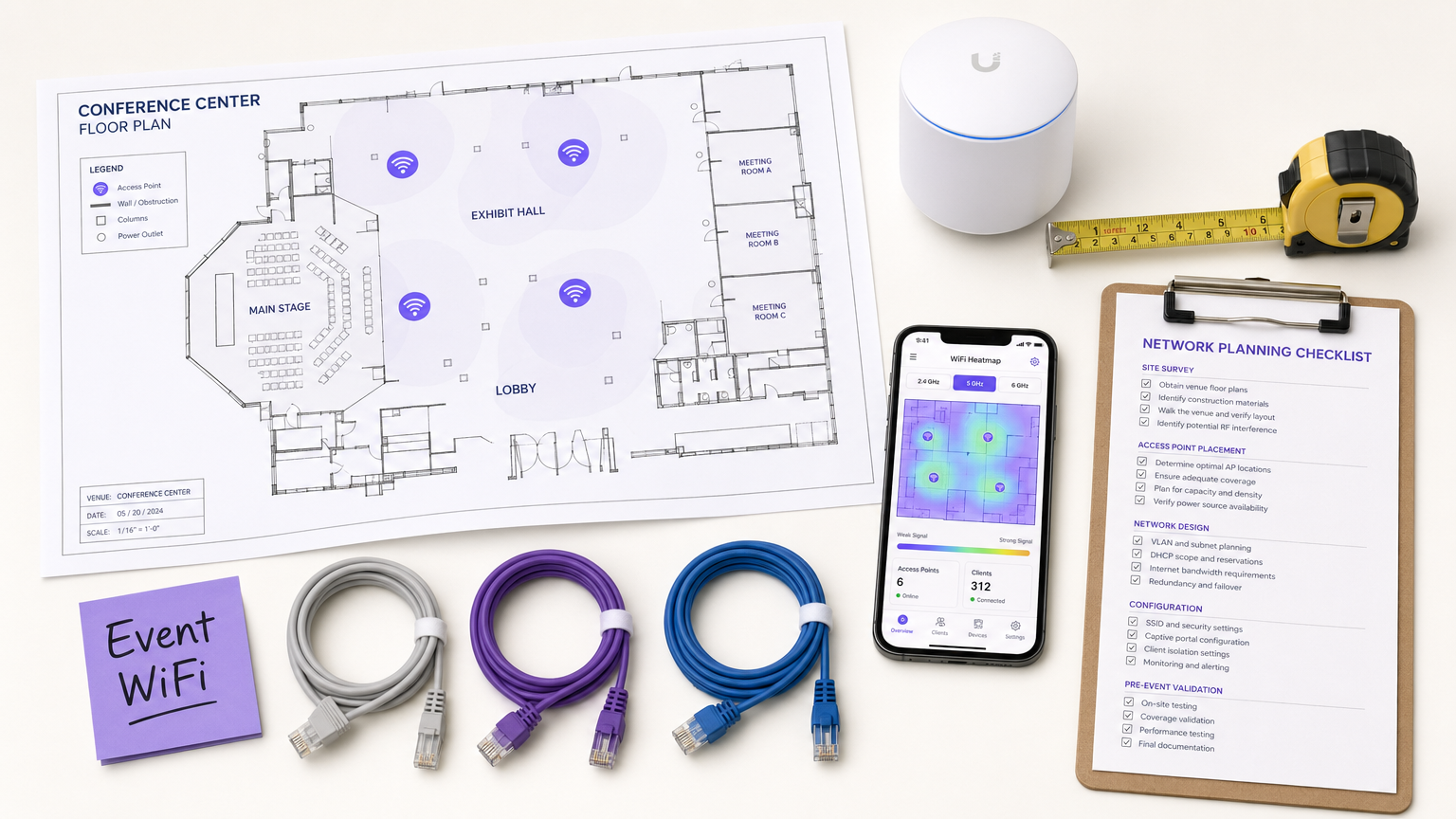
Für CTOs, IT-Direktoren und Veranstaltungsortbetreiber stellt die Bereitstellung von temporärem WiFi für Großveranstaltungen eine einzigartige Reihe von Herausforderungen dar, die ein Standard-Unternehmensnetzwerkdesign einfach nicht bewältigt. Im Gegensatz zu statischen Büroumgebungen erfordert die Konnektivität bei Veranstaltungen eine schnelle Bereitstellung, extrem hohe Kapazität und nahtloses Benutzer-Onboarding – all dies unter Einhaltung strenger Sicherheits- und Compliance-Vorschriften. Ein ausgefallenes Netzwerk bei einer Keynote-Rede oder Fachmesse ist nicht nur eine Unannehmlichkeit; es ist ein Reputations- und Geschäftsrisiko.
Dieser Leitfaden bietet einen umfassenden Entwurf für die Architektur und Verwaltung von Event-WiFi-Netzwerken, die unter Druck zuverlässige Leistung liefern. Wir untersuchen die technischen Anforderungen für Umgebungen mit hoher Dichte, herstellerneutrale Bereitstellungsstrategien und die Integration von Guest WiFi -Lösungen, um Erstanbieterdaten zu erfassen und den ROI zu steigern. Egal, ob Sie eine Firmenkonferenz, einen Hospitality -Veranstaltungsort, der eine Gala ausrichtet, oder ein riesiges Outdoor-Festival verwalten, diese Prinzipien stellen sicher, dass Ihre Netzwerkarchitektur die Last bewältigen und ein nahtloses Teilnehmererlebnis bieten kann.
Technischer Tiefgang
Die Herausforderung der hohen Dichte
Standard-Büro-WiFi-Bereitstellungen sind auf Abdeckung ausgelegt; Event-WiFi muss auf Kapazität ausgelegt sein. In einer typischen Unternehmensumgebung kann ein Access Point (AP) 20–30 gleichzeitige Clients komfortabel bedienen. In einem Konferenzsaal oder Stadion muss derselbe AP-Footprint Hunderte von Geräten gleichzeitig unterstützen – viele davon streamen aktiv Videos, synchronisieren Cloud-Daten oder posten in Echtzeit in sozialen Medien.
Dies erfordert eine grundlegende Änderung der RF (Radio Frequency)-Designphilosophie. Das primäre Ziel ist nicht länger die Eliminierung von Funklöchern, sondern die Minderung von Gleichkanalinterferenzen (CCI) und die Optimierung des Signal-Rausch-Verhältnisses (SNR) in Umgebungen, in denen der Grundrauschpegel aufgrund der schieren Dichte der sendenden Geräte außergewöhnlich hoch ist.
Architektur und Standards
Moderne Event-Netzwerke sollten auf den Standards Wi-Fi 6 (802.11ax) oder Wi-Fi 6E (802.11ax im 6-GHz-Band) basieren. Diese Protokolle führen kritische Funktionen ein, die speziell für Umgebungen mit hoher Dichte entwickelt wurden:
| Funktion | Standard | Vorteil bei Bereitstellungen mit hoher Dichte |
|---|---|---|
| OFDMA | Wi-Fi 6/6E | Bedient mehrere Clients gleichzeitig auf Unterkanälen, reduziert die Latenz |
| BSS Coloring | Wi-Fi 6/6E | Mindert Interferenzen durch Identifizierung und Ignorieren von überlappendem BSS-Verkehr |
| Target Wake Time (TWT) | Wi-Fi 6/6E | Plant Client-Übertragungen, reduziert die Medienkonkurrenz |
| MU-MIMO (8x8) | Wi-Fi 6/6E | Ermöglicht APs die gleichzeitige Kommunikation mit mehreren Clients |
| 6 GHz Band | Wi-Fi 6E | Bietet sauberes, ungestörtes Spektrum ohne Interferenzen von älteren Geräten |
RF-Designprinzipien für hohe Dichte
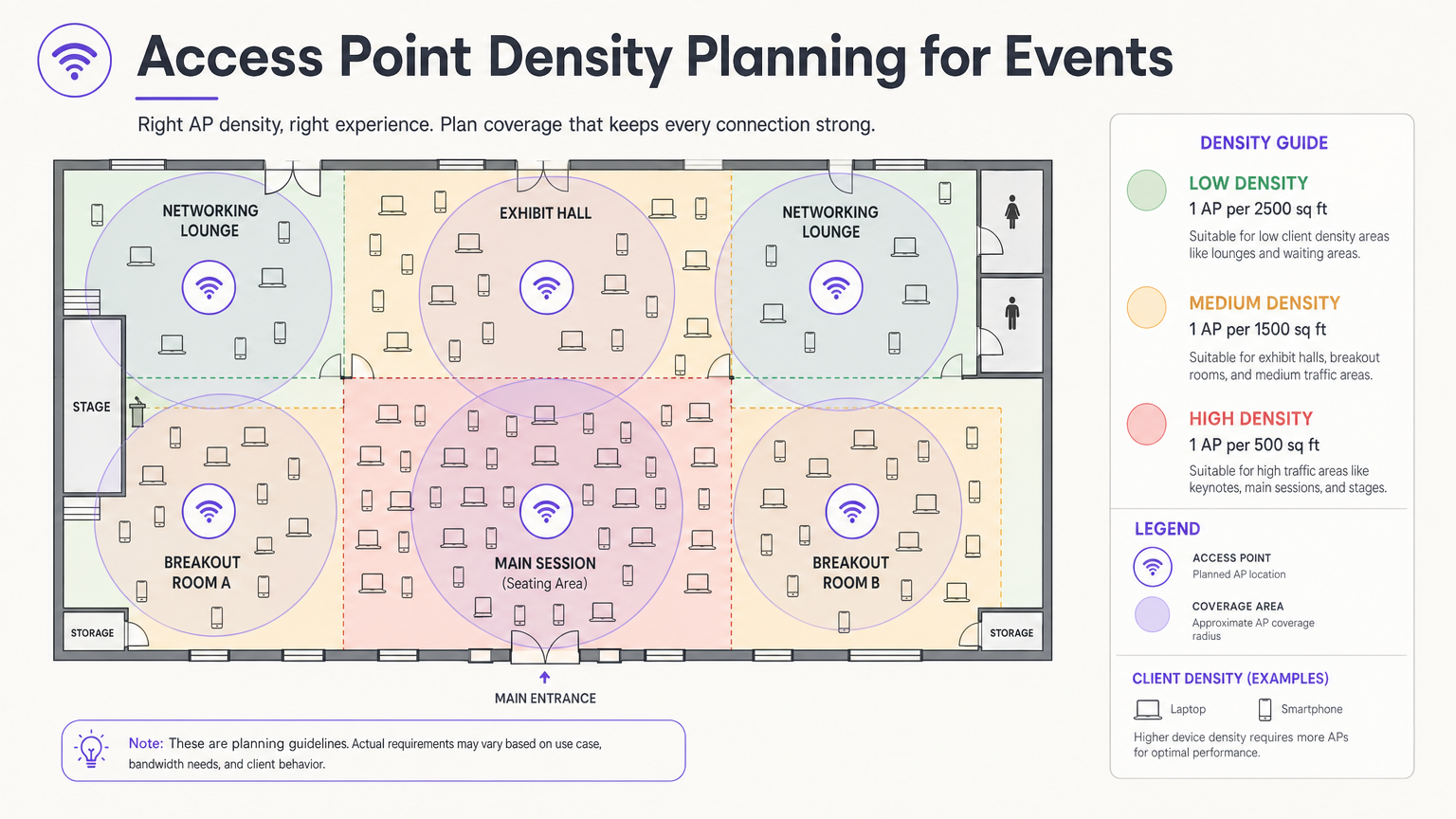
Die wichtigste Designentscheidung ist die Antennenauswahl und -platzierung. In einer großen Halle senden omnidirektionale Antennen RF-Energie in alle Richtungen, was bedeutet, dass jeder AP jeden anderen AP hören kann – die Definition von Gleichkanalinterferenzen. Der richtige Ansatz ist die Verwendung von direktionalen Patch- oder Sektorantennen, die die RF-Energie in einem engen Strahl bündeln und so kleine, begrenzte Mikrozellen erzeugen. Dies ermöglicht es Ihnen, dieselben Kanäle über benachbarte APs hinweg wiederzuverwenden, ohne dass diese sich gegenseitig stören.
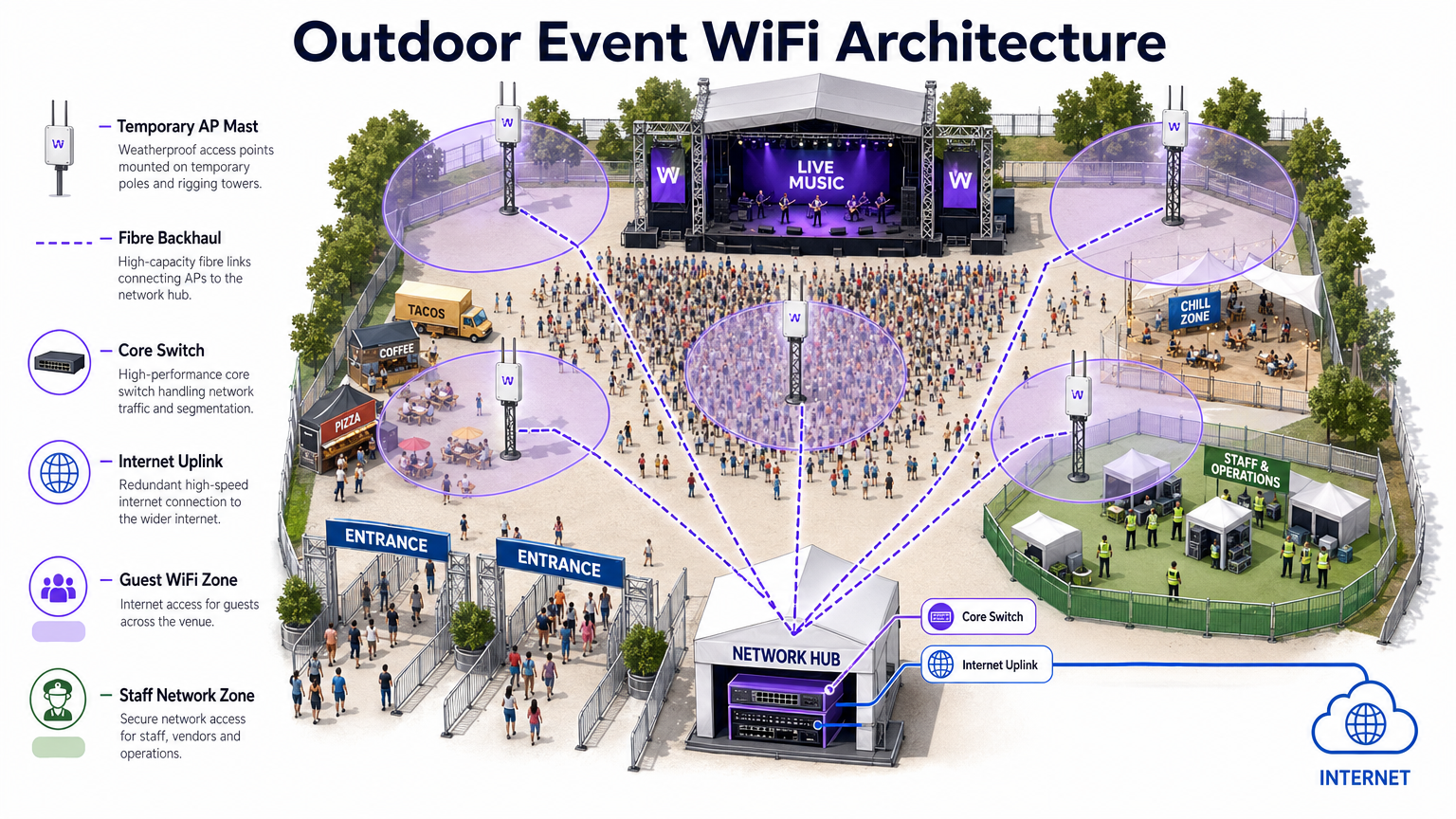
Montieren Sie APs in einer Höhe, die eine ausreichende Abdeckung ohne Überschießen bietet. Für Sitzbereiche ist eine Montagehöhe von 4–8 Metern typischerweise optimal. Über 10 Metern nimmt die Signalstärke auf Client-Ebene erheblich ab. Für Outdoor-Bereitstellungen siehe das Architekturdiagramm unten.
Sicherheit und Compliance
Event-Netzwerke müssen die Benutzerfreundlichkeit mit robuster Sicherheit in Einklang bringen. Während offene Netzwerke mit Captive Portals für den Gastzugang üblich sind, setzen sie den Datenverkehr ohne zusätzliche Verschlüsselung der Abhörung aus. Die Implementierung von WPA3-Personal mit Enhanced Open (OWE – Opportunistic Wireless Encryption) bietet transparente Verschlüsselung auch in öffentlichen Netzwerken, ohne zusätzliche Komplexität für den Endbenutzer.
Für Veranstaltungen mit Finanztransaktionen – Pop-up-Stores, Ticketing, Lebensmittelverkäufer – muss das Netzwerk den PCI DSS-Standards entsprechen. Die Trennung des Point-of-Sale (POS)-Verkehrs auf ein dediziertes, verschlüsseltes VLAN mit strengen Firewall-Regeln ist nicht verhandelbar. Ebenso müssen alle über Captive Portals gesammelten Daten der GDPR und den anwendbaren lokalen Datenschutzbestimmungen entsprechen, was eine explizite Zustimmung und transparente Datenverarbeitungsrichtlinien erfordert.
Implementierungsleitfaden
Phase 1: Anforderungserfassung und Standortbegehung
Bevor Sie ein einziges Hardwareteil bereitstellen, müssen Sie die physischen Einschränkungen des Veranstaltungsortes und die spezifischen Konnektivitätsanforderungen der Veranstaltung verstehen. Beschaffen Sie genaue Grundrisse und führen Sie eine Begehung durch, um Baumaterialien zu identifizieren, die RF-Signale dämpfen – dichter Beton, Stahlbauelemente und Spiegelglas sind besonders problematisch.
Führen Sie eine aktive Standortbegehung mit professionellen Tools wie Ekahau Site Survey oder AirMagnet durch. Dies ist entscheidend für die Bestimmung der optimalen AP-Platzierung, die Identifizierung bestehender Interferenzquellen (Rogue APs, Mikrowellenherde, Bluetooth-Geräte, DECT-Telefone) und die Planung der Kanalzuweisungen, bevor die Hardware installiert wird.
Phase 2: Netzwerkdesign und Kapazitätsplanung
Berechnen Sie Ihre benötigte Bandbreite basierend auf der erwarteten Anzahl der Teilnehmer und deren voraussichtlichem Nutzungsprofil. Wenden Sie die 2.5 DGeräteregel: Gehen Sie davon aus, dass jeder Teilnehmer 2,5 verbundene Geräte mitbringt, mit einer gleichzeitigen Verbindungsrate von 60–80 % zu Spitzenzeiten.
Für die IP-Adressierung sollten Sie Ihre DHCP-Bereiche so gestalten, dass sie dieses Volumen aufnehmen können. Ein /24-Subnetz (254 Adressen) ist für eine Veranstaltung mit 500 Personen völlig unzureichend. Verwenden Sie ein /21- oder /20-Subnetz und legen Sie kurze DHCP-Lease-Zeiten von 30–60 Minuten fest, um eine IP-Erschöpfung zu verhindern, wenn Teilnehmer im Laufe des Tages ankommen und abreisen.
Phase 3: Hardware-Bereitstellung und Konfiguration
Setzen Sie hochdichte APs mit Richtantennen in Sitz- und Versammlungsbereichen ein. Wichtige Konfigurationsschritte umfassen:
- Deaktivieren Sie ältere Datenraten (802.11b/g-Raten von 1, 2, 5,5, 11 Mbps). Legen Sie die minimale Basisrate auf 12 oder 24 Mbps fest.
- Aktivieren Sie Band Steering, um Dual-Band-Clients auf die 5 GHz- oder 6 GHz-Bänder zu leiten.
- Implementieren Sie Client-Isolation, um Peer-to-Peer-Kommunikation zwischen Gastgeräten zu verhindern.
- Konfigurieren Sie Bandbreitenbegrenzungen pro Client (z. B. 5 Mbps Down / 2 Mbps Up), um zu verhindern, dass eine kleine Anzahl von Benutzern die Verbindung monopolisiert.
- Aktivieren Sie die Erkennung von Rogue APs auf dem Wireless Controller, um unautorisierte Hotspots zu identifizieren und zu melden.
Phase 4: Captive Portal und Gast-Onboarding
Das Captive Portal ist der primäre Berührungspunkt zwischen dem Veranstaltungsort und dem Teilnehmer. Ein schlecht gestaltetes Portal – langsam zu laden, komplex zu navigieren oder übermäßige persönliche Daten erfordernd – führt zu hohen Abbruchraten und frustrierten Benutzern.
Plattformen wie die Purple's Guest WiFi -Lösung ermöglichen es Ihnen, Benutzer über Social Login, E-Mail- oder SMS-Verifizierung zu authentifizieren und gleichzeitig wertvolle Erstanbieterdaten mit expliziter GDPR-Zustimmung zu erfassen. Das Portal sollte mobilfreundlich sein, in weniger als drei Sekunden laden und ein klares, gebrandetes Erlebnis bieten. Stellen Sie bei Großveranstaltungen sicher, dass die Infrastruktur des Authentifizierungsservers so skaliert ist, dass sie Tausende gleichzeitiger Anfragen während der Spitzenzeiten der Verbindung – typischerweise die 10 Minuten vor Beginn einer Keynote – bewältigen kann.
Best Practices
Die folgende Tabelle fasst die wichtigsten Best Practices für die Konfiguration von High-Density-Event-Bereitstellungen zusammen, basierend auf branchenüblichen Richtlinien und praktischer Bereitstellungserfahrung.
| Praxis | Begründung | Auswirkungen bei Nichtbeachtung |
|---|---|---|
| Deaktivieren Sie ältere Datenraten | Verhindert, dass langsame Clients die Sendezeit monopolisieren | Starke Durchsatzverschlechterung für alle Benutzer |
| Aktivieren Sie Band Steering | Verschiebt fähige Clients auf weniger überlastete Bänder | 2.4 GHz Überlastung, schlechte Leistung |
| Implementieren Sie Client-Isolation | Verhindert Peer-to-Peer-Angriffe und Malware-Verbreitung | Sicherheitsrisiko, potenzieller Datenverstoß |
| Kurze DHCP-Leases (30–60 Min.) | Recycelt IP-Adressen von abgereisten Clients | DHCP-Erschöpfung, neue Clients können sich nicht verbinden |
| Verwenden Sie Richtantennen | Reduziert CCI zwischen benachbarten APs | Netzwerkweiter Durchsatzkollaps |
| Segmentieren Sie VLANs nach Verkehrstyp | Isoliert sensiblen Verkehr, gewährleistet Compliance | PCI DSS-Verstoß, Sicherheitsverletzung |
| Stellen Sie redundante WAN-Links bereit | Eliminiert Single Point of Failure für den Internetzugang | Kompletter Netzwerkausfall, wenn der primäre Link ausfällt |
Für eine tiefere Untersuchung von Bandbreitenmanagementstrategien, die sowohl für permanente als auch für temporäre Bereitstellungen anwendbar sind, lesen Sie unseren Leitfaden zu So verwalten Sie die Bandbreite in einem WiFi-Netzwerk .
Fehlerbehebung & Risikominderung
Häufige Fehlerursachen
1. DHCP-Erschöpfung. Wie oben erwähnt, ist dies die häufigste Fehlerursache bei Veranstaltungen. Das Symptom ist, dass APs online und funktionsfähig erscheinen, aber neue Clients sich nicht verbinden können. Die Lösung besteht darin, die Lease-Zeiten zu verkürzen und sicherzustellen, dass die Subnetze ausreichend dimensioniert sind. Überwachen Sie die DHCP-Pool-Auslastung in Echtzeit während der Veranstaltung.
2. Gleichkanalinterferenz-Kaskade. Wenn die AP-Platzierung oder Kanalplanung falsch ist, kann ein einzelner überlasteter AP eine Kaskade auslösen, bei der Clients zu benachbarten APs wechseln und diese wiederum überlasten. Verhindern Sie dies durch eine ordnungsgemäße Standortuntersuchung vor der Veranstaltung und einen Validierungsrundgang nach der Bereitstellung.
3. Rogue AP-Interferenz. Aussteller und Teilnehmer bringen routinemäßig persönliche Hotspots und MiFi-Geräte mit, die starke Interferenzen verursachen. Aktivieren Sie die Erkennung und Eindämmung von Rogue APs auf Ihrem Wireless Controller. Weisen Sie das Veranstaltungspersonal an, die Richtlinie den Ausstellern während des Aufbaus mitzuteilen.
4. Captive Portal-Authentifizierungsengpass. Während der Spitzenzeiten der Verbindung kann der Authentifizierungsserver überlastet sein. Führen Sie vor der Veranstaltung einen Lasttest Ihrer Portal-Infrastruktur durch und stellen Sie sicher, dass diese horizontal skalierbar ist.
5. Assoziationssturm. Wenn eine große Sitzung endet und Tausende von Geräten gleichzeitig versuchen, sich wieder zu verbinden, kann der Management-Frame-Verkehr das Netzwerk überlasten. Implementieren Sie 802.11r (Fast BSS Transition) und 802.11k (Neighbour Reports), um reibungsloses Roaming zu ermöglichen und den Overhead bei der Wiederverbindung zu reduzieren.
Redundanz- und Failover-Architektur
Für geschäftskritische Veranstaltungen ist ein Single Point of Failure inakzeptabel. Implementieren Sie:
- Dual-WAN-Links von verschiedenen ISPs mit automatischem Failover am Edge-Router.
- Hochverfügbare (HA) Wireless Controller-Konfigurationen mit Active-Standby-Failover.
- Redundante Core-Switches mit Link Aggregation (LACP) für Uplink-Resilienz.
- USV (Unterbrechungsfreie Stromversorgung) für alle zentralen Netzwerkgeräte.
ROI & Geschäftsauswirkungen
Der Einsatz eines robusten Event-WiFi-Netzwerks ist eine erhebliche Investition, bietet aber auch eine beträchtliche Möglichkeit für einen messbaren ROI. Durch die Integration von WiFi Analytics können Sie das Netzwerk von einem Kostenfaktor in ein strategisches Geschäftsgut verwandeln.
Erstanbieter-Datenerfassung. Jeder Teilnehmer, der sich über das Captive Portal verbindet, gibt eine verifizierte E-Mail-Adresse und optional demografische und soziale Profildaten an. Für eine 2.000-Personen-Konferenz kann dies an einem einzigen Tag eine hochwertige, einwilligungsbasierte Marketingliste generieren – eine Liste, deren Erwerb über herkömmliche bezahlte Kanäle erheblich teurer wäre.
Besucherfrequenz- und Verhaltensanalysen. Durch die Analyse von Verbindungsmustern und Verweildauern können Sie verstehen, wie sich die Teilnehmer durch den Veranstaltungsort bewegen. Welche Messestände zogen den meisten Verkehr an? Wie lange verbrachten die Teilnehmer in der Sponsoren-Lounge? Diese Daten sind direkt umsetzbar für Einzelhandels -Pop-ups, Gastronomiebetriebe und Veranstalter, die zukünftige Layouts planen.
Sponsoring-Monetarisierung. Die Captive Portal Splash Page ist eine erstklassige Werbefläche. Sponsoren können gebrandete Anmeldeerlebnisse, gezielte Weiterleitungen nach der Authentifizierung und messbare Impressionsdaten angeboten werden – all dies erzielt einen erheblichen Mehrwert gegenüber traditionellen Event-Sponsoring-Paketen.
Operative Effizienz. Für Betriebsteams von Veranstaltungsorten bieten Echtzeit-Netzwerkanalysen Einblicke in die Besucherdichte und den Besucherfluss, was ein proaktives Management von Warteschlangen, Catering und Sicherheitsressourcen ermöglicht. Dies ist besonders relevant in großen Verkehrsknotenpunkten und Stadionumgebungen.
Für Organisationen, die WiFi in dauerhafteren Umgebungen einsetzen, gelten dieselben Prinzipien der Datenerfassung und -analyse. Eine ergänzende Perspektive zu permanenten Installationen finden Sie in unserem Leitfaden zu Small Business WiFi: How to Get the Setup Right Without Breaking the Budget .
Schlüsselbegriffe & Definitionen
Co-Channel Interference (CCI)
Interference caused when multiple access points operate on the same frequency channel within range of each other, forcing them to take turns transmitting and significantly reducing overall network throughput.
The primary performance enemy in high-density event deployments. Mitigated through careful channel planning, reduced AP transmit power, and directional antennas that constrain the coverage area of each AP.
BSS Coloring
A Wi-Fi 6 (802.11ax) feature that adds a numerical 'color' identifier to all transmissions from a Basic Service Set (BSS). APs can identify and ignore transmissions from neighboring networks on the same channel, allowing them to transmit simultaneously rather than waiting.
Crucial for improving spectral efficiency in crowded environments like exhibition halls where dozens of APs are deployed in close proximity. Effectively reduces the impact of CCI without requiring additional spectrum.
Captive Portal
A web page that users are redirected to and must interact with before gaining full access to a public WiFi network. Typically used for authentication, terms of service acceptance, or marketing data capture.
The critical onboarding step where venues can capture GDPR-compliant first-party data, present sponsorship messaging, and control network access. The quality and speed of the captive portal directly impacts the user experience.
Band Steering
A wireless controller feature that encourages dual-band or tri-band client devices to connect to the 5 GHz or 6 GHz bands rather than the heavily congested 2.4 GHz band, by delaying or suppressing probe responses on the lower band.
Essential for maximising available spectrum utilisation at events. The 2.4 GHz band has only three non-overlapping channels and is shared with Bluetooth, microwave ovens, and other devices, making it particularly susceptible to congestion.
Target Wake Time (TWT)
A Wi-Fi 6 (802.11ax) feature that allows an AP to negotiate specific scheduled windows with client devices for when they will wake up to transmit or receive data, reducing the number of devices contending for the medium simultaneously.
Improves overall network efficiency in high-density environments and significantly extends the battery life of attendees' mobile devices — a notable benefit at multi-day events.
DHCP Exhaustion
A network failure condition where the DHCP server has assigned all available IP addresses in its configured scope and cannot issue new leases to connecting devices, preventing them from obtaining network access.
One of the most common and easily preventable failure modes at events. Prevented by using adequately sized subnets (e.g., /21 or /20) and setting short DHCP lease times of 30–60 minutes to ensure addresses are recycled as attendees come and go.
Rogue Access Point
An unauthorised wireless access point connected to the network or operating in the same RF airspace, either inadvertently (an exhibitor's personal hotspot) or maliciously (an evil twin attack), causing interference and potential security risks.
A persistent challenge at trade shows and conferences where exhibitors routinely bring their own networking equipment. Must be actively monitored using wireless intrusion detection features on the wireless controller.
PCI DSS (Payment Card Industry Data Security Standard)
A set of security standards mandated by the major card networks (Visa, Mastercard, Amex) that all organisations accepting, processing, storing, or transmitting credit card information must comply with, covering network security, encryption, access control, and monitoring.
Non-negotiable for any event network supporting retail vendors, cashless payment systems, or ticketing. Requires strict network segmentation, encryption of cardholder data in transit, and regular security assessments.
OFDMA (Orthogonal Frequency-Division Multiple Access)
A Wi-Fi 6 channel access method that subdivides a single channel into smaller frequency allocations called Resource Units (RUs), allowing an AP to serve multiple clients with different bandwidth requirements simultaneously within a single transmission window.
A fundamental improvement over the OFDM used in Wi-Fi 5, which could only serve one client per transmission. In high-density event environments, OFDMA dramatically reduces latency and improves overall network efficiency.
Fallstudien
A 500-person corporate conference is being held in a hotel ballroom. The event includes a keynote presentation requiring high bandwidth for interactive polling, followed by four simultaneous breakout sessions in adjacent rooms. The hotel's existing WiFi infrastructure is inadequate. How should the IT team approach the temporary deployment?
Step 1 — Site Survey: Conduct an active RF survey of the ballroom and breakout rooms to identify the hotel's existing AP channels and any interference sources. Coordinate with the hotel to temporarily disable or reduce power on APs in adjacent areas during the event.
Step 2 — Capacity Calculation: 500 attendees × 2.5 devices = 1,250 devices. At 70% concurrency, plan for approximately 875 simultaneous connections. Allocate a /22 subnet (1,022 usable addresses) with 45-minute DHCP leases.
Step 3 — AP Placement: Deploy 4–6 high-density APs in the ballroom using directional patch antennas mounted at 5–6 metres, focused on the seating area. Deploy 1–2 APs per breakout room.
Step 4 — Configuration: Create a dedicated event SSID on VLAN 20 (guest). Disable 802.11b/g rates. Set minimum basic rate to 24 Mbps. Enable band steering and client isolation. Apply per-user bandwidth limits of 5 Mbps down / 2 Mbps up.
Step 5 — Onboarding: Deploy a custom captive portal integrated with the event registration system, allowing pre-registered attendees to authenticate with their registration email for a frictionless experience.
Step 6 — Monitoring: Assign a network engineer to monitor the wireless controller dashboard throughout the event, watching for AP load, client counts, and DHCP pool utilisation.
A three-day outdoor music festival expects 10,000 daily attendees across a 5-hectare greenfield site. The venue has no existing network infrastructure. The event requires guest WiFi for attendees, a secure network for cashless payment vendors, and a dedicated operations network for staff. What is the optimal architecture?
Step 1 — Backhaul: Establish a high-capacity point-to-point microwave link (minimum 1 Gbps) back to the nearest fibre point of presence, with a secondary 4G/5G bonded link as failover. Alternatively, negotiate a temporary fibre installation with the local ISP if lead time permits.
Step 2 — Core Network: Deploy a ruggedised core switch and edge router/firewall in a secure, climate-controlled equipment tent at the centre of the site. Install a UPS for all core equipment.
Step 3 — Distribution: Run armoured fibre optic cables from the core tent to distribution switches located at key zones: Main Stage, Food Court, VIP Area, Entrance Gates, and Staff Operations.
Step 4 — Edge Deployment: Mount IP67-rated outdoor APs on temporary masts (4–6 metres) or rigging structures. Use sector antennas to cover crowd areas. Deploy APs at a density of 1 per 300–500 attendees in high-density zones.
Step 5 — Network Segmentation: Configure three VLANs: VLAN 20 (Guest WiFi with captive portal), VLAN 30 (Vendor POS — PCI DSS compliant, restricted to payment gateway IPs only), VLAN 40 (Staff Operations — management access, CCTV, communications).
Step 6 — Monitoring: Deploy a cloud-based wireless management platform accessible via the staff operations network for real-time monitoring and remote configuration.
Szenarioanalyse
Q1. You are designing the WiFi for a major product launch keynote. The venue is a large, open auditorium with a flat floor and no fixed seating. The client expects 2,000 attendees to be simultaneously streaming a live interactive poll and posting to social media during the 90-minute presentation. What is the most critical RF design consideration, and how would you address it?
💡 Hinweis:Think about the difference between providing coverage in an empty room versus capacity in a packed auditorium. Consider what happens when dozens of APs can all hear each other.
Empfohlenen Ansatz anzeigen
The most critical consideration is mitigating Co-Channel Interference (CCI) while providing extreme capacity. With 2,000 attendees and the 2.5 Device Rule, you are planning for approximately 3,500 devices at 70% concurrency — roughly 2,450 simultaneous connections. This requires deploying a high density of APs (likely 20–30 units) in the auditorium. If those APs are configured with omnidirectional antennas and overlapping channels, they will create severe CCI and the network will perform worse than a single AP. The solution is to use high-density APs with directional patch antennas mounted overhead, focused on specific sections of the audience. Reduce AP transmit power to create tight micro-cells. Assign non-overlapping channels carefully and leverage BSS Coloring (Wi-Fi 6) to further reduce interference. Disable all legacy data rates to ensure fast airtime clearance.
Q2. During a multi-day trade show, the IT helpdesk receives reports at 10:15 AM that attendees cannot connect to the guest WiFi network in the main exhibition hall. The wireless controller dashboard shows all APs are online, associated client counts are near zero, and no error alerts are present. What is the most likely root cause, and what is the immediate remediation?
💡 Hinweis:Consider the lifecycle of a device connecting to a network and what server-side resource is consumed even when a device is idle or has left the venue.
Empfohlenen Ansatz anzeigen
The most likely cause is DHCP Exhaustion. The exhibition hall opened the previous day, and if the DHCP lease time was set to the default 24 hours, the IP address pool will have been depleted by the accumulation of leases from the previous day's attendees — devices that are no longer present but whose leases have not yet expired. The APs are functioning correctly, but new devices cannot obtain an IP address and therefore cannot complete the connection process. Immediate remediation: (1) Reduce the DHCP lease time to 30 minutes on the DHCP server. (2) Clear all existing leases in the pool to immediately free up addresses. (3) If the subnet is undersized, expand it to a /21 or /20 to provide sufficient headroom. Long-term: implement DHCP pool utilisation monitoring with alerting thresholds at 70% and 90% capacity.
Q3. A retail brand is running a three-day pop-up event in a shopping centre. The event requires guest WiFi for visitors, and six vendor stations will be processing contactless card payments using wireless POS terminals. The IT manager proposes running both on the same SSID with a shared passphrase to simplify setup. Evaluate this proposal and provide a compliant alternative architecture.
💡 Hinweis:Consider the regulatory requirements that apply to any network carrying payment card data, and what the consequences of non-compliance are.
Empfohlenen Ansatz anzeigen
The proposed single-SSID architecture is non-compliant with PCI DSS and must not be implemented. PCI DSS Requirement 1.3 mandates that cardholder data environments (CDE) be isolated from untrusted networks, including general guest WiFi. Placing POS terminals on the same network segment as guest devices creates a direct path for a compromised guest device to attack the POS systems or intercept payment data. The compliant alternative is strict VLAN segmentation: (1) Create VLAN 20 for guest WiFi with a captive portal — this is an untrusted network with internet access only. (2) Create VLAN 30 for POS terminals — this is the CDE, restricted by firewall rules to outbound connections to the specific payment gateway IP addresses only. All inbound connections from VLAN 20 to VLAN 30 must be blocked. (3) Use separate SSIDs for each VLAN, with WPA3-Enterprise or a strong WPA2/3-PSK for the POS SSID. (4) Document the network segmentation and firewall rules as evidence for PCI DSS compliance.




