

WiFi per Eventi: Come Fornire Connettività Affidabile per Grandi Folle
Questa guida autorevole fornisce a leader IT, architetti di rete e operatori di sedi strategie attuabili per la progettazione, l'implementazione e la gestione di reti WiFi temporanee ad alta densità per eventi su larga scala, dalle conferenze aziendali ai festival all'aperto. Copre i principi di progettazione RF, la pianificazione della capacità, la conformità alla sicurezza e come sfruttare l'analisi del WiFi per gli ospiti per trasformare la rete in una risorsa generatrice di entrate.
🎧 Ascolta questa guida
Visualizza trascrizione
Riepilogo Esecutivo
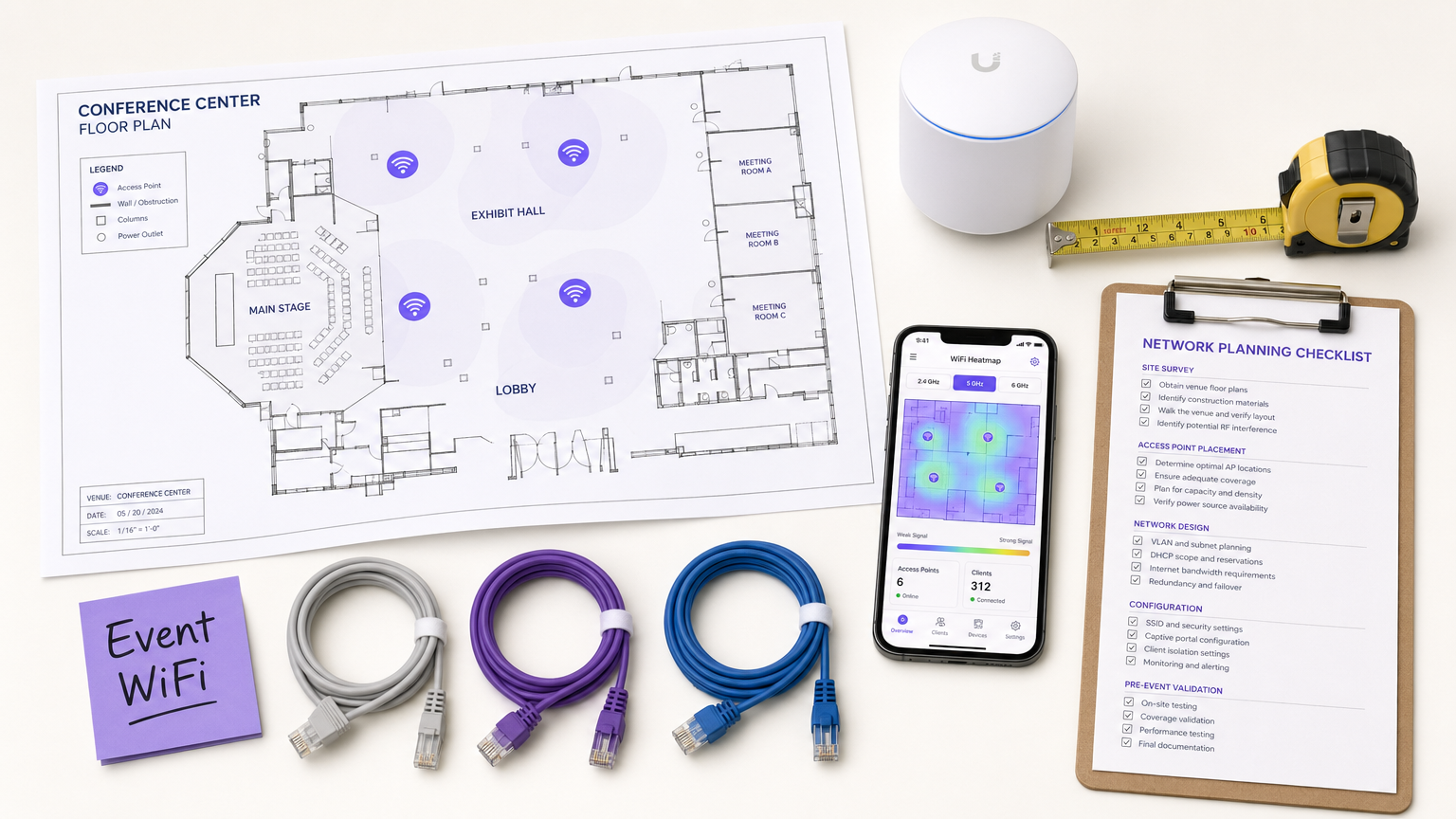
Per CTO, direttori IT e operatori di sedi, l'implementazione di WiFi temporaneo per eventi su larga scala presenta una serie unica di sfide che la progettazione di rete aziendale standard semplicemente non affronta. A differenza degli ambienti d'ufficio statici, la connettività per eventi richiede un'implementazione rapida, una capacità estremamente elevata e un onboarding utente senza interruzioni, il tutto mantenendo una rigorosa sicurezza e conformità normativa. Una rete fallita durante un discorso chiave o una fiera non è solo un inconveniente; è un rischio reputazionale e commerciale.
Questa guida fornisce un progetto completo per l'architettura e la gestione di reti WiFi per eventi che offrono prestazioni affidabili sotto pressione. Esploriamo i requisiti tecnici per ambienti ad alta densità, le strategie di implementazione vendor-neutral e l'integrazione di soluzioni Guest WiFi per acquisire dati di prima parte e generare ROI. Che tu stia gestendo una conferenza aziendale, una sede Hospitality che ospita un gala o un enorme festival all'aperto, questi principi garantiranno che la tua architettura di rete possa gestire il carico e offrire un'esperienza senza interruzioni ai partecipanti.
Approfondimento Tecnico
La Sfida dell'Alta Densità
Le implementazioni WiFi standard per ufficio sono progettate per la copertura; il WiFi per eventi deve essere progettato per la capacità. In un tipico ambiente aziendale, un access point (AP) potrebbe servire comodamente 20-30 client contemporaneamente. In una sala conferenze principale o in uno stadio, la stessa impronta di AP deve supportare centinaia di dispositivi contemporaneamente, molti dei quali stanno attivamente trasmettendo video in streaming, sincronizzando dati cloud o pubblicando sui social media in tempo reale.
Ciò richiede un cambiamento fondamentale nella filosofia di progettazione RF (Radio Frequency). L'obiettivo primario non è più eliminare le zone morte, ma mitigare l'interferenza co-canale (CCI) e ottimizzare il rapporto segnale/rumore (SNR) in ambienti in cui il rumore di fondo è eccezionalmente alto a causa della pura densità dei dispositivi trasmittenti.
Architettura e Standard
Le moderne reti per eventi dovrebbero essere costruite sugli standard Wi-Fi 6 (802.11ax) o Wi-Fi 6E (802.11ax nella banda a 6 GHz). Questi protocolli introducono funzionalità critiche specificamente progettate per ambienti ad alta densità:
| Funzionalità | Standard | Vantaggio nelle Implementazioni ad Alta Densità |
|---|---|---|
| OFDMA | Wi-Fi 6/6E | Serve più client contemporaneamente su sottocanali, riducendo la latenza |
| BSS Coloring | Wi-Fi 6/6E | Mitiga le interferenze identificando e ignorando il traffico BSS sovrapposto |
| Target Wake Time (TWT) | Wi-Fi 6/6E | Pianifica le trasmissioni dei client, riducendo la contesa del mezzo |
| MU-MIMO (8x8) | Wi-Fi 6/6E | Consente agli AP di comunicare con più client contemporaneamente |
| 6 GHz Band | Wi-Fi 6E | Fornisce uno spettro pulito e non congestionato senza interferenze da dispositivi legacy |
Principi di Progettazione RF per l'Alta Densità
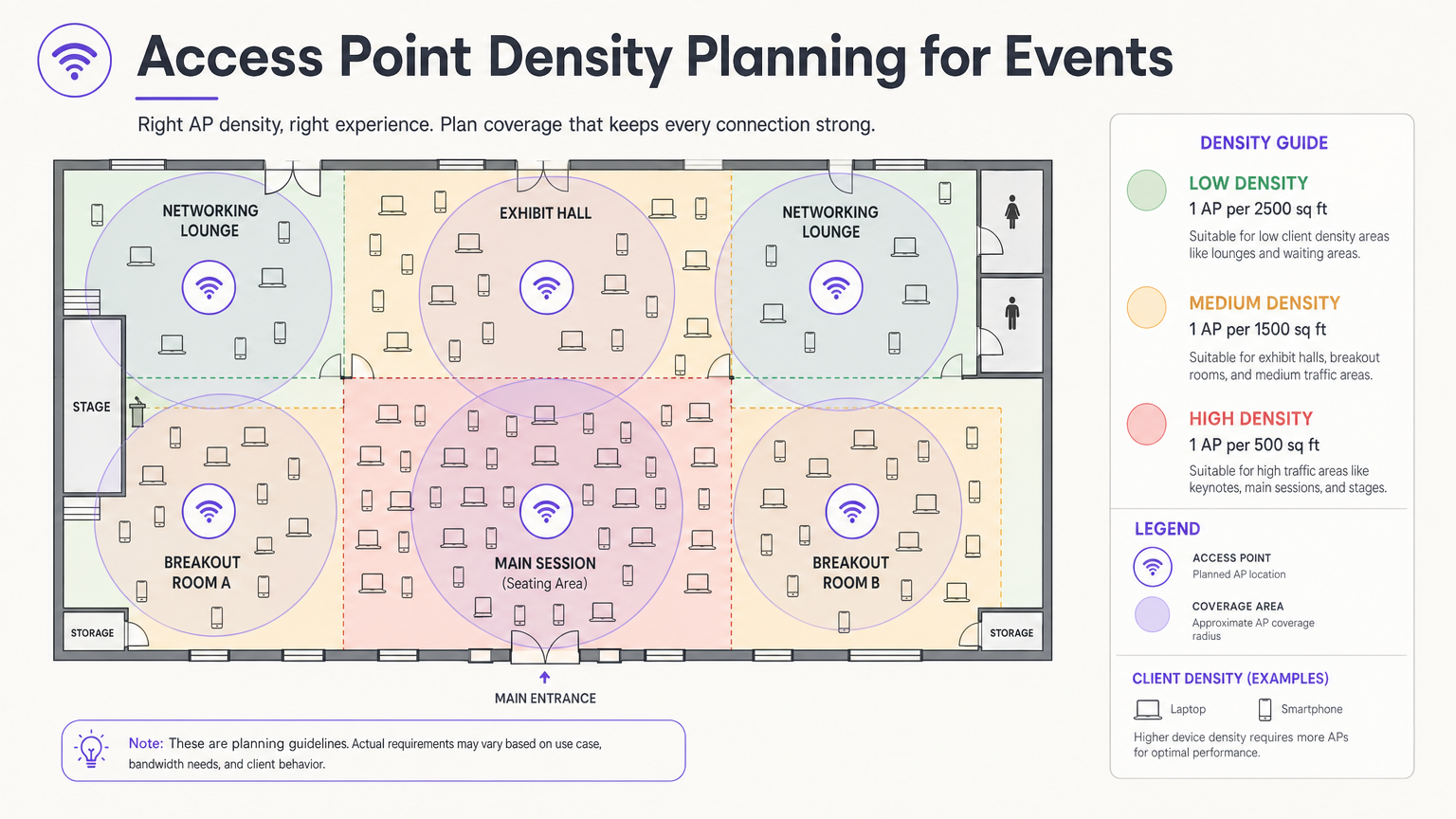
La decisione di progettazione più critica è la selezione e il posizionamento dell'antenna. In una grande sala, le antenne omnidirezionali trasmettono energia RF in tutte le direzioni, il che significa che ogni AP può sentire ogni altro AP – la definizione di interferenza co-canale. L'approccio corretto è utilizzare antenne patch o settoriali direzionali che focalizzano l'energia RF in un fascio stretto, creando micro-celle piccole e contenute. Ciò consente di riutilizzare gli stessi canali su AP adiacenti senza che si interferiscano a vicenda.
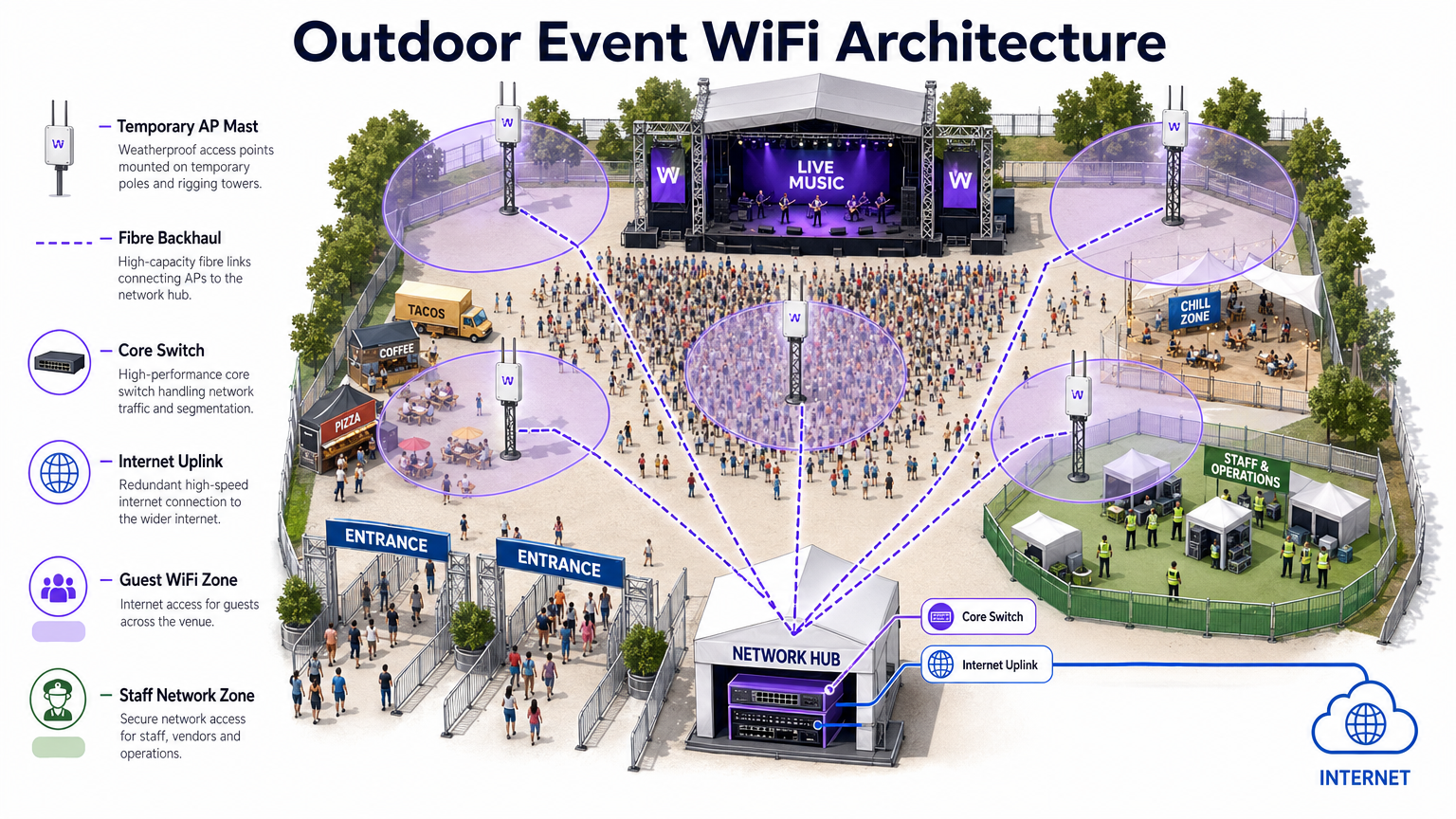
Montare gli AP a un'altezza che fornisca una copertura adeguata senza eccessi. Per le aree di seduta, un'altezza di montaggio di 4-8 metri è tipicamente ottimale. Sopra i 10 metri, la potenza del segnale a livello del client si degrada significativamente. Per le implementazioni all'aperto, fare riferimento al diagramma di architettura sottostante.
Sicurezza e Conformità
Le reti per eventi devono bilanciare la facilità di accesso con una sicurezza robusta. Sebbene le reti aperte con captive portal siano comuni per l'accesso degli ospiti, espongono il traffico all'intercettazione senza crittografia aggiuntiva. L'implementazione di WPA3-Personal con Enhanced Open (OWE – Opportunistic Wireless Encryption) fornisce una crittografia trasparente anche su reti pubbliche, senza complessità aggiuntive per l'utente finale.
Per eventi che coinvolgono transazioni finanziarie – pop-up di vendita al dettaglio, biglietteria, fornitori di cibo – la rete deve essere conforme agli standard PCI DSS. La segregazione del traffico point-of-sale (POS) su una VLAN dedicata e crittografata con regole firewall rigorose è non negoziabile. Allo stesso modo, tutti i dati raccolti tramite captive portal devono aderire al GDPR e alle normative locali sulla privacy applicabili, richiedendo un consenso esplicito e politiche trasparenti di gestione dei dati.
Guida all'Implementazione
Fase 1: Raccolta dei Requisiti e Sopralluogo
Prima di implementare un singolo pezzo di hardware, è necessario comprendere i vincoli fisici della sede e i requisiti specifici di connettività dell'evento. Ottenere planimetrie accurate ed effettuare un sopralluogo per identificare i materiali da costruzione che attenuano i segnali RF – cemento denso, elementi strutturali in acciaio e vetro a specchio sono particolarmente problematici.
Condurre un sopralluogo attivo utilizzando strumenti professionali come Ekahau Site Survey o AirMagnet. Questo è fondamentale per determinare il posizionamento ottimale degli AP, identificare le fonti di interferenza esistenti (AP rogue, forni a microonde, dispositivi Bluetooth, telefoni DECT) e pianificare le assegnazioni dei canali prima dell'installazione dell'hardware.
Fase 2: Progettazione della Rete e Pianificazione della Capacità
Calcolare la larghezza di banda richiesta in base al numero previsto di partecipanti e al loro profilo di utilizzo anticipato. Applicare il 2.5 DRegola del dispositivo: si assume che ogni partecipante porti 2,5 dispositivi connessi, con un tasso di connessione simultanea del 60-80% nei momenti di punta.
Per l'assegnazione degli IP, progetta i tuoi ambiti DHCP per accogliere questo volume. Una sottorete /24 (254 indirizzi) è del tutto inadeguata per un evento di 500 persone. Utilizza una sottorete /21 o /20 e imposta tempi di lease DHCP brevi di 30-60 minuti per prevenire l'esaurimento degli IP man mano che i partecipanti arrivano e partono durante il giorno.
Fase 3: Implementazione e configurazione dell'hardware
Implementa AP ad alta densità con antenne direzionali nelle aree di seduta e di aggregazione. I passaggi chiave della configurazione includono:
- Disabilita le velocità di trasmissione dati legacy (velocità 802.11b/g di 1, 2, 5.5, 11 Mbps). Imposta la velocità di base minima a 12 o 24 Mbps.
- Abilita il band steering per indirizzare i client dual-band alle bande a 5 GHz o 6 GHz.
- Implementa l'isolamento dei client per prevenire la comunicazione peer-to-peer tra i dispositivi degli ospiti.
- Configura limiti di larghezza di banda per client (ad esempio, 5 Mbps in download / 2 Mbps in upload) per evitare che un piccolo numero di utenti monopolizzi la connessione.
- Abilita il rilevamento di AP non autorizzati sul controller wireless per identificare e segnalare hotspot non autorizzati.
Fase 4: Captive Portal e onboarding degli ospiti
Il Captive Portal è il punto di contatto principale tra la sede e il partecipante. Un portale mal progettato — lento da caricare, complesso da navigare o che richiede dati personali eccessivi — si tradurrà in alti tassi di abbandono e utenti frustrati.
Piattaforme come la soluzione Guest WiFi di Purple ti consentono di autenticare gli utenti tramite social login, email o verifica SMS, acquisendo contemporaneamente preziosi dati di prima parte con il consenso esplicito del GDPR. Il portale dovrebbe essere mobile-responsive, caricarsi in meno di tre secondi e presentare un'esperienza chiara e brandizzata. Per eventi di grandi dimensioni, assicurati che l'infrastruttura del server di autenticazione sia dimensionata per gestire migliaia di richieste simultanee durante i periodi di picco di associazione — tipicamente i 10 minuti prima dell'inizio di un keynote.
Migliori pratiche
La seguente tabella riassume le migliori pratiche di configurazione chiave per le implementazioni di eventi ad alta densità, tratte da linee guida standard del settore ed esperienza di implementazione nel mondo reale.
| Pratica | Motivazione | Impatto se ignorata |
|---|---|---|
| Disabilita le velocità di trasmissione dati legacy | Impedisce ai client lenti di monopolizzare il tempo di trasmissione | Grave degrado del throughput per tutti gli utenti |
| Abilita il band steering | Sposta i client compatibili su bande meno congestionate | Congestione a 2.4 GHz, prestazioni scarse |
| Implementa l'isolamento dei client | Previene attacchi peer-to-peer e la diffusione di malware | Rischio di sicurezza, potenziale violazione dei dati |
| Lease DHCP brevi (30–60 min) | Ricicla gli indirizzi IP dei client disconnessi | Esaurimento DHCP, nuovi client non possono connettersi |
| Utilizza antenne direzionali | Riduce l'interferenza co-canale (CCI) tra AP adiacenti | Collasso del throughput a livello di rete |
| Segmenta le VLAN per tipo di traffico | Isola il traffico sensibile, garantisce la conformità | Violazione PCI DSS, violazione della sicurezza |
| Implementa collegamenti WAN ridondanti | Elimina il singolo punto di guasto per l'accesso a Internet | Interruzione completa della rete se il collegamento primario fallisce |
Per un'esplorazione più approfondita delle strategie di gestione della larghezza di banda applicabili sia a implementazioni permanenti che temporanee, consulta la nostra guida su Come gestire la larghezza di banda su una rete WiFi .
Risoluzione dei problemi e mitigazione dei rischi
Modalità di guasto comuni
1. Esaurimento DHCP. Come notato sopra, questa è la modalità di guasto più comune negli eventi. Il sintomo è che gli AP appaiono online e funzionanti, ma i nuovi client non riescono a connettersi. La soluzione è ridurre i tempi di lease e assicurarsi che le sottoreti siano dimensionate adeguatamente. Monitora l'utilizzo del pool DHCP in tempo reale durante l'evento.
2. Cascata di interferenze co-canale. Se il posizionamento degli AP o la pianificazione dei canali sono errati, un singolo AP congestionato può innescare una cascata in cui i client si spostano verso AP vicini, sovraccaricandoli a loro volta. Previeni ciò con un'adeguata indagine sul sito pre-evento e una verifica post-implementazione.
3. Interferenza da AP non autorizzati. Espositori e partecipanti portano regolarmente hotspot personali e dispositivi MiFi, creando gravi interferenze. Abilita il rilevamento e il contenimento degli AP non autorizzati sul tuo controller wireless. Istruisci il personale dell'evento a comunicare la politica agli espositori durante l'allestimento.
4. Collo di bottiglia nell'autenticazione del Captive Portal. Durante i periodi di picco di associazione, il server di autenticazione può essere sovraccaricato. Esegui test di carico sull'infrastruttura del tuo portale prima dell'evento e assicurati che sia scalabile orizzontalmente.
5. Tempesta di associazioni. Quando una sessione numerosa termina e migliaia di dispositivi tentano di riconnettersi simultaneamente, il traffico dei frame di gestione può sovraccaricare la rete. Implementa 802.11r (Fast BSS Transition) e 802.11k (Neighbour Reports) per facilitare il roaming fluido e ridurre il sovraccarico di ri-associazione.
Architettura di ridondanza e failover
Per eventi mission-critical, un singolo punto di guasto è inaccettabile. Implementa:
- Doppi collegamenti WAN da diversi ISP con failover automatico sul router di bordo.
- Configurazioni di controller wireless ad alta disponibilità (HA) con failover attivo-standby.
- Switch core ridondanti con aggregazione di link (LACP) per la resilienza dell'uplink.
- UPS (Uninterruptible Power Supply) per tutte le apparecchiature di rete core.
ROI e impatto sul business
L'implementazione di una robusta rete WiFi per eventi è un investimento significativo, ma presenta anche un'opportunità sostanziale per un ROI misurabile. Integrando WiFi Analytics , puoi trasformare la rete da un centro di costo a una risorsa aziendale strategica.
Acquisizione di dati di prima parte. Ogni partecipante che si connette tramite il Captive Portal fornisce un indirizzo email verificato e, facoltativamente, dati demografici e del profilo social. Per un evento di 2.000 persone conferenza, questo può generare un elenco di marketing di alta qualità e con consenso in un solo giorno — un elenco che costerebbe significativamente di più acquisire tramite canali a pagamento convenzionali.
Analisi del Flusso di Visitatori e del Comportamento. Analizzando i modelli di connessione e i tempi di permanenza, è possibile comprendere come i partecipanti si muovono all'interno della sede. Quali stand espositivi hanno attratto più traffico? Quanto tempo hanno trascorso i partecipanti nella lounge degli sponsor? Questi dati sono direttamente utilizzabili per pop-up Retail , sedi Hospitality e organizzatori di eventi che pianificano layout futuri.
Monetizzazione delle Sponsorizzazioni. La pagina splash del Captive Portal è un immobile pubblicitario di pregio. Agli sponsor possono essere offerte esperienze di accesso personalizzate, reindirizzamenti mirati post-autenticazione e dati di impression misurabili — tutti elementi che garantiscono un premio significativo rispetto ai pacchetti di sponsorizzazione di eventi tradizionali.
Efficienza Operativa. Per i team operativi delle sedi, l'analisi della rete in tempo reale fornisce visibilità sulla densità e sul flusso della folla, consentendo una gestione proattiva di code, catering e risorse di sicurezza. Ciò è particolarmente rilevante in grandi hub di Transport e ambienti stadio.
Per le organizzazioni che implementano il WiFi in contesti più permanenti, si applicano gli stessi principi di acquisizione e analisi dei dati. Consulta la nostra guida su Small Business WiFi: How to Get the Setup Right Without Breaking the Budget per una prospettiva complementare sulle implementazioni permanenti.
Termini chiave e definizioni
Co-Channel Interference (CCI)
Interference caused when multiple access points operate on the same frequency channel within range of each other, forcing them to take turns transmitting and significantly reducing overall network throughput.
The primary performance enemy in high-density event deployments. Mitigated through careful channel planning, reduced AP transmit power, and directional antennas that constrain the coverage area of each AP.
BSS Coloring
A Wi-Fi 6 (802.11ax) feature that adds a numerical 'color' identifier to all transmissions from a Basic Service Set (BSS). APs can identify and ignore transmissions from neighboring networks on the same channel, allowing them to transmit simultaneously rather than waiting.
Crucial for improving spectral efficiency in crowded environments like exhibition halls where dozens of APs are deployed in close proximity. Effectively reduces the impact of CCI without requiring additional spectrum.
Captive Portal
A web page that users are redirected to and must interact with before gaining full access to a public WiFi network. Typically used for authentication, terms of service acceptance, or marketing data capture.
The critical onboarding step where venues can capture GDPR-compliant first-party data, present sponsorship messaging, and control network access. The quality and speed of the captive portal directly impacts the user experience.
Band Steering
A wireless controller feature that encourages dual-band or tri-band client devices to connect to the 5 GHz or 6 GHz bands rather than the heavily congested 2.4 GHz band, by delaying or suppressing probe responses on the lower band.
Essential for maximising available spectrum utilisation at events. The 2.4 GHz band has only three non-overlapping channels and is shared with Bluetooth, microwave ovens, and other devices, making it particularly susceptible to congestion.
Target Wake Time (TWT)
A Wi-Fi 6 (802.11ax) feature that allows an AP to negotiate specific scheduled windows with client devices for when they will wake up to transmit or receive data, reducing the number of devices contending for the medium simultaneously.
Improves overall network efficiency in high-density environments and significantly extends the battery life of attendees' mobile devices — a notable benefit at multi-day events.
DHCP Exhaustion
A network failure condition where the DHCP server has assigned all available IP addresses in its configured scope and cannot issue new leases to connecting devices, preventing them from obtaining network access.
One of the most common and easily preventable failure modes at events. Prevented by using adequately sized subnets (e.g., /21 or /20) and setting short DHCP lease times of 30–60 minutes to ensure addresses are recycled as attendees come and go.
Rogue Access Point
An unauthorised wireless access point connected to the network or operating in the same RF airspace, either inadvertently (an exhibitor's personal hotspot) or maliciously (an evil twin attack), causing interference and potential security risks.
A persistent challenge at trade shows and conferences where exhibitors routinely bring their own networking equipment. Must be actively monitored using wireless intrusion detection features on the wireless controller.
PCI DSS (Payment Card Industry Data Security Standard)
A set of security standards mandated by the major card networks (Visa, Mastercard, Amex) that all organisations accepting, processing, storing, or transmitting credit card information must comply with, covering network security, encryption, access control, and monitoring.
Non-negotiable for any event network supporting retail vendors, cashless payment systems, or ticketing. Requires strict network segmentation, encryption of cardholder data in transit, and regular security assessments.
OFDMA (Orthogonal Frequency-Division Multiple Access)
A Wi-Fi 6 channel access method that subdivides a single channel into smaller frequency allocations called Resource Units (RUs), allowing an AP to serve multiple clients with different bandwidth requirements simultaneously within a single transmission window.
A fundamental improvement over the OFDM used in Wi-Fi 5, which could only serve one client per transmission. In high-density event environments, OFDMA dramatically reduces latency and improves overall network efficiency.
Casi di studio
A 500-person corporate conference is being held in a hotel ballroom. The event includes a keynote presentation requiring high bandwidth for interactive polling, followed by four simultaneous breakout sessions in adjacent rooms. The hotel's existing WiFi infrastructure is inadequate. How should the IT team approach the temporary deployment?
Step 1 — Site Survey: Conduct an active RF survey of the ballroom and breakout rooms to identify the hotel's existing AP channels and any interference sources. Coordinate with the hotel to temporarily disable or reduce power on APs in adjacent areas during the event.
Step 2 — Capacity Calculation: 500 attendees × 2.5 devices = 1,250 devices. At 70% concurrency, plan for approximately 875 simultaneous connections. Allocate a /22 subnet (1,022 usable addresses) with 45-minute DHCP leases.
Step 3 — AP Placement: Deploy 4–6 high-density APs in the ballroom using directional patch antennas mounted at 5–6 metres, focused on the seating area. Deploy 1–2 APs per breakout room.
Step 4 — Configuration: Create a dedicated event SSID on VLAN 20 (guest). Disable 802.11b/g rates. Set minimum basic rate to 24 Mbps. Enable band steering and client isolation. Apply per-user bandwidth limits of 5 Mbps down / 2 Mbps up.
Step 5 — Onboarding: Deploy a custom captive portal integrated with the event registration system, allowing pre-registered attendees to authenticate with their registration email for a frictionless experience.
Step 6 — Monitoring: Assign a network engineer to monitor the wireless controller dashboard throughout the event, watching for AP load, client counts, and DHCP pool utilisation.
A three-day outdoor music festival expects 10,000 daily attendees across a 5-hectare greenfield site. The venue has no existing network infrastructure. The event requires guest WiFi for attendees, a secure network for cashless payment vendors, and a dedicated operations network for staff. What is the optimal architecture?
Step 1 — Backhaul: Establish a high-capacity point-to-point microwave link (minimum 1 Gbps) back to the nearest fibre point of presence, with a secondary 4G/5G bonded link as failover. Alternatively, negotiate a temporary fibre installation with the local ISP if lead time permits.
Step 2 — Core Network: Deploy a ruggedised core switch and edge router/firewall in a secure, climate-controlled equipment tent at the centre of the site. Install a UPS for all core equipment.
Step 3 — Distribution: Run armoured fibre optic cables from the core tent to distribution switches located at key zones: Main Stage, Food Court, VIP Area, Entrance Gates, and Staff Operations.
Step 4 — Edge Deployment: Mount IP67-rated outdoor APs on temporary masts (4–6 metres) or rigging structures. Use sector antennas to cover crowd areas. Deploy APs at a density of 1 per 300–500 attendees in high-density zones.
Step 5 — Network Segmentation: Configure three VLANs: VLAN 20 (Guest WiFi with captive portal), VLAN 30 (Vendor POS — PCI DSS compliant, restricted to payment gateway IPs only), VLAN 40 (Staff Operations — management access, CCTV, communications).
Step 6 — Monitoring: Deploy a cloud-based wireless management platform accessible via the staff operations network for real-time monitoring and remote configuration.
Analisi degli scenari
Q1. You are designing the WiFi for a major product launch keynote. The venue is a large, open auditorium with a flat floor and no fixed seating. The client expects 2,000 attendees to be simultaneously streaming a live interactive poll and posting to social media during the 90-minute presentation. What is the most critical RF design consideration, and how would you address it?
💡 Suggerimento:Think about the difference between providing coverage in an empty room versus capacity in a packed auditorium. Consider what happens when dozens of APs can all hear each other.
Mostra l'approccio consigliato
The most critical consideration is mitigating Co-Channel Interference (CCI) while providing extreme capacity. With 2,000 attendees and the 2.5 Device Rule, you are planning for approximately 3,500 devices at 70% concurrency — roughly 2,450 simultaneous connections. This requires deploying a high density of APs (likely 20–30 units) in the auditorium. If those APs are configured with omnidirectional antennas and overlapping channels, they will create severe CCI and the network will perform worse than a single AP. The solution is to use high-density APs with directional patch antennas mounted overhead, focused on specific sections of the audience. Reduce AP transmit power to create tight micro-cells. Assign non-overlapping channels carefully and leverage BSS Coloring (Wi-Fi 6) to further reduce interference. Disable all legacy data rates to ensure fast airtime clearance.
Q2. During a multi-day trade show, the IT helpdesk receives reports at 10:15 AM that attendees cannot connect to the guest WiFi network in the main exhibition hall. The wireless controller dashboard shows all APs are online, associated client counts are near zero, and no error alerts are present. What is the most likely root cause, and what is the immediate remediation?
💡 Suggerimento:Consider the lifecycle of a device connecting to a network and what server-side resource is consumed even when a device is idle or has left the venue.
Mostra l'approccio consigliato
The most likely cause is DHCP Exhaustion. The exhibition hall opened the previous day, and if the DHCP lease time was set to the default 24 hours, the IP address pool will have been depleted by the accumulation of leases from the previous day's attendees — devices that are no longer present but whose leases have not yet expired. The APs are functioning correctly, but new devices cannot obtain an IP address and therefore cannot complete the connection process. Immediate remediation: (1) Reduce the DHCP lease time to 30 minutes on the DHCP server. (2) Clear all existing leases in the pool to immediately free up addresses. (3) If the subnet is undersized, expand it to a /21 or /20 to provide sufficient headroom. Long-term: implement DHCP pool utilisation monitoring with alerting thresholds at 70% and 90% capacity.
Q3. A retail brand is running a three-day pop-up event in a shopping centre. The event requires guest WiFi for visitors, and six vendor stations will be processing contactless card payments using wireless POS terminals. The IT manager proposes running both on the same SSID with a shared passphrase to simplify setup. Evaluate this proposal and provide a compliant alternative architecture.
💡 Suggerimento:Consider the regulatory requirements that apply to any network carrying payment card data, and what the consequences of non-compliance are.
Mostra l'approccio consigliato
The proposed single-SSID architecture is non-compliant with PCI DSS and must not be implemented. PCI DSS Requirement 1.3 mandates that cardholder data environments (CDE) be isolated from untrusted networks, including general guest WiFi. Placing POS terminals on the same network segment as guest devices creates a direct path for a compromised guest device to attack the POS systems or intercept payment data. The compliant alternative is strict VLAN segmentation: (1) Create VLAN 20 for guest WiFi with a captive portal — this is an untrusted network with internet access only. (2) Create VLAN 30 for POS terminals — this is the CDE, restricted by firewall rules to outbound connections to the specific payment gateway IP addresses only. All inbound connections from VLAN 20 to VLAN 30 must be blocked. (3) Use separate SSIDs for each VLAN, with WPA3-Enterprise or a strong WPA2/3-PSK for the POS SSID. (4) Document the network segmentation and firewall rules as evidence for PCI DSS compliance.




