
Comprensión de Cisco SUDI: Identidad de Dispositivo Basada en Hardware en el Control de Acceso a la Red
Esta guía detalla la arquitectura técnica de Cisco SUDI, explicando cómo la identidad anclada en hardware protege el control de acceso a la red. Proporciona pasos de implementación prácticos para que los líderes de TI implementen la autenticación 802.1X EAP-TLS y automaticen el aprovisionamiento Zero Touch en todos los recintos corporativos.
Video overview
Escuchar esta guía
Ver transcripción del podcast
Parte de nuestra serie principal: Guía de Seguridad WiFi para Empresas →

Resumen Ejecutivo
La autenticación por hardware protege la base física de las redes empresariales. El Cisco Secure Unique Device Identifier (SUDI) proporciona una identidad inmutable y criptográficamente verificable para los dispositivos de infraestructura, integrada directamente en un chip resistente a manipulaciones durante la fabricación. Para los líderes de TI que gestionan despliegues a gran escala en los sectores de hostelería, retail y sector público, SUDI elimina el riesgo de hardware no autorizado y permite el aprovisionamiento automatizado Zero Touch.
Esta guía detalla la arquitectura técnica de Cisco SUDI, su integración con el control de acceso a la red (NAC) IEEE 802.1X y los pasos operativos necesarios para desplegar y mantener la identidad basada en hardware a escala. Aprenderá a realizar la transición desde el débil bypass de direcciones MAC hacia una autenticación EAP-TLS robusta, a gestionar el ciclo de vida de los certificados SUDI-2099 y a alinear la seguridad de la infraestructura con las plataformas de gestión de identidad de usuarios como Purple.
Análisis Técnico Detallado
La Arquitectura de la Identidad de Hardware
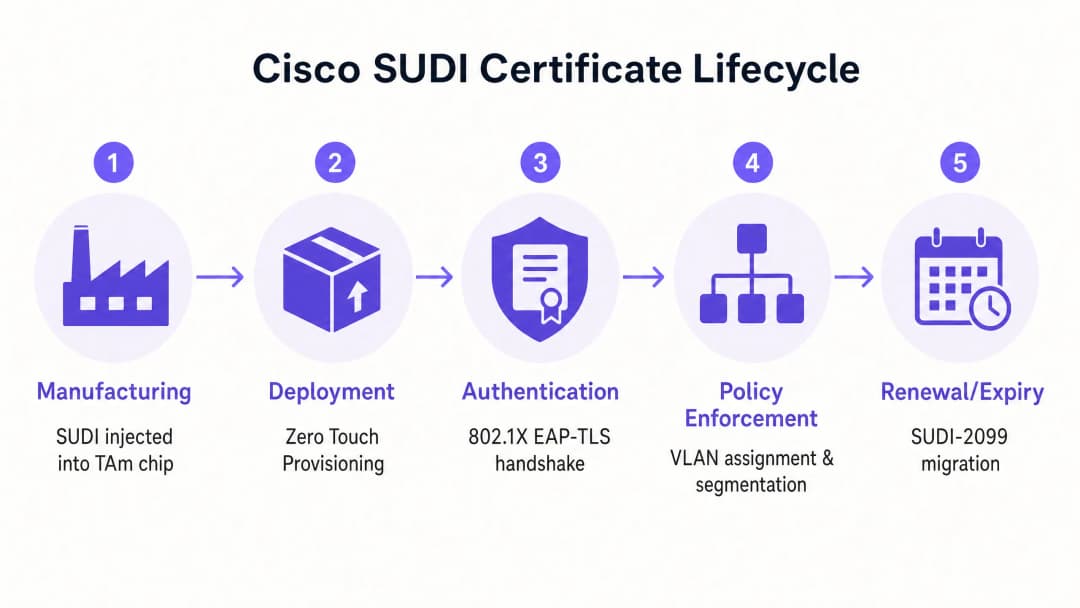
El Cisco Secure Unique Device Identifier (SUDI) es un certificado X.509v3 que proporciona una identidad permanente para los dispositivos de red. A diferencia de los certificados de software que los equipos de TI generan y despliegan, Cisco inyecta el certificado SUDI y su par de claves asociado en el dispositivo durante el proceso de fabricación.
El certificado se almacena de forma segura en el módulo Trust Anchor (TAm), un chip propietario y resistente a manipulaciones. El TAm genera la clave privada internamente, garantizando que nunca pueda ser exportada o clonada. Esta raíz de confianza de hardware garantiza que, si un dispositivo se autentica correctamente utilizando su SUDI, es un producto Cisco genuino.
SUDI implementa el estándar IEEE 802.1AR para identificadores de dispositivos seguros. Bajo este estándar, el certificado proporcionado por el fabricante se conoce como Initial Device Identifier (IDevID). Las organizaciones pueden complementar el IDevID con un Locally Significant Device Identifier (LDevID) emitido por su propia infraestructura de clave pública (PKI) empresarial.

Integración con el Control de Acceso a la Red
En un entorno empresarial, SUDI se integra con los sistemas de control de acceso a la red (NAC) principalmente a través de la autenticación basada en puertos IEEE 802.1X. Cuando un punto de acceso o switch de Cisco se conecta a la red, actúa como suplicante y presenta su certificado SUDI a un servidor RADIUS, como Cisco Identity Services Engine (ISE).
El proceso de autenticación utiliza el Protocolo de Autenticación Extensible con Seguridad en la Capa de Transporte (EAP-TLS). El servidor RADIUS valida el certificado SUDI contra la Infraestructura de Clave Pública de Cisco. Una vez validado, el servidor RADIUS autoriza el dispositivo y lo asigna a la VLAN correcta según la política de acceso a la red.
Este enfoque sustituye al MAC Address Bypass (MAB), un método heredado que depende de direcciones MAC fácilmente falsificables. MAB ofrece una garantía criptográfica nula sobre la identidad del dispositivo, lo que deja a las redes expuestas a puntos de acceso no autorizados.
Identificación de hardware por huella digital y detección de manipulación
El módulo Trust Anchor proporciona algo más que un almacenamiento seguro. Protege activamente el dispositivo contra la manipulación física durante el transporte o el despliegue.
Durante la fabricación, Cisco registra una huella digital criptográfica de los componentes de hardware críticos, como las CPU y los ASIC. Esta huella digital se almacena de forma permanente en el TAm. Cuando el dispositivo arranca, el firmware UEFI calcula una nueva huella digital del hardware detectado y la compara con la huella digital maestra del TAm. Si las huellas digitales no coinciden, el dispositivo detiene el proceso de arranque. Este mecanismo garantiza que el hardware desplegado en un hotel o en una tienda minorista no se haya visto comprometido entre la fábrica y el lugar de instalación.
¿Tiene preguntas sobre su configuración específica?
Nuestro equipo trabaja con operadores de recintos, responsables de TI e ingenieros de redes en 80 000 espacios. Reserve una llamada de 20 minutos y le mostraremos cómo lo han solucionado otros profesionales como usted.
Guía de implementación
El despliegue de la autenticación basada en SUDI requiere la coordinación entre su infraestructura de conmutación, su servidor RADIUS y su plataforma de gestión de red. Siga estos pasos para implementar la identidad de hardware.
Paso 1: Configurar la confianza de RADIUS
Su servidor RADIUS debe confiar en la autoridad de certificación de Cisco que emitió el SUDI.
- Descargue los certificados de la CA raíz de Cisco y de la CA SUDI ACT2 desde el portal de PKI de Cisco.
- Importe estos certificados en el almacén de certificados de confianza de su servidor RADIUS (por ejemplo, Cisco ISE).
- Configure el servidor RADIUS para utilizar estos certificados para la autenticación EAP-TLS.
Paso 2: Definir las políticas 802.1X
Cree políticas de autenticación específicas para los dispositivos de infraestructura, independientes de las políticas de autenticación de usuarios.
- Cree un conjunto de políticas en Cisco ISE que coincida con los atributos del certificado SUDI (por ejemplo, comparando el Nombre alternativo del sujeto con los PID esperados del dispositivo).
- Asigne las autenticaciones correctas a la VLAN de gestión de la infraestructura.
- Configure una VLAN de cuarentena para los dispositivos que no superen la autenticación SUDI. No configure una alternativa a MAB para los puertos de infraestructura.
Paso 3: Habilitar Zero Touch Provisioning
Utilice SUDI para automatizar la incorporación de dispositivos.
- Configure su sistema de gestión de red (como Cisco Catalyst Center) para que actúe como servidor ZTP.
- Cuando un nuevo dispositivo se conecta, presenta su certificado SUDI.
- El sistema de gestión verifica el certificado, confirma el número de serie del dispositivo con la base de datos de inventario y envía la configuración inicial.
Paso 4: Gestionar la migración a SUDI-2099
Los certificados SUDI emitidos antes de mayo de 2019 caducan a los 10 años de la fecha de fabricación o el 14 de mayo de 2029, lo que ocurra primero. Cuando un SUDI caduca, las funciones que dependen de él, incluidos HTTPS, SSH y Zero Touch Provisioning, fallarán.
Cisco ha introducido los certificados SUDI-2099, que siguen siendo válidos hasta diciembre de 2099. Para garantizar la continuidad:
- Audite su inventario utilizando el comando
show crypto pki certificateen los dispositivos IOS-XE. Compruebe laend datedel punto de confianzaCISCO_IDEVID_SUDI. - Actualice el hardware afectado a las versiones de software recomendadas. Por ejemplo, los switches Catalyst 9200 requieren IOS-XE 17.12.2 o posterior para gestionar correctamente la fecha de caducidad de 2099.
Buenas prácticas
Para maximizar los beneficios de seguridad de la identidad de hardware, respete estos principios independientes del fabricante.
- Forzar EAP-TLS estricto: Exija EAP-TLS para todos los dispositivos de infraestructura. No permita métodos EAP más débiles como PEAP para la autenticación de dispositivos.
- Aislar la identidad de la infraestructura de la identidad del usuario: SUDI autentica el hardware, no al usuario. Utilice una plataforma dedicada para gestionar la identidad humana. Por ejemplo, utilice Purple para gestionar la autenticación de invitados, la captura de consentimiento y la recopilación de datos de primera mano, mientras confía en SUDI para proteger el hardware Cisco Meraki o HPE Aruba subyacente.
- Automatizar la monitorización de certificados: Implemente herramientas de monitorización para realizar un seguimiento de las fechas de caducidad de los certificados en todo su parque tecnológico. La monitorización proactiva evita fallos repentinos de autenticación.
- Implementar microsegmentación: Utilice la identidad verificada por SUDI para asignar dispositivos a VLANs estrictamente controladas. Un punto de acceso solo debe tener alcance de red a su controlador y sistemas de gestión, nada más.
Resolución de problemas y mitigación de riesgos
Al implementar la autenticación basada en SUDI, prepárese para estos modos de fallo comunes.
| Modo de fallo | Causa raíz | Estrategia de mitigación |
|---|---|---|
| Fallo de autenticación EAP-TLS | El servidor RADIUS carece de los certificados de CA raíz o intermedia de Cisco correctos. | Verifique que la cadena de confianza completa de Cisco esté instalada en el almacén de confianza del servidor RADIUS. |
| El dispositivo se niega a arrancar | La huella digital del hardware calculada al arrancar no coincide con la huella digital maestra en el TAm. | Trate el dispositivo como comprometido. Devuelva el hardware al proveedor a través del proceso RMA. |
| Fallo de acceso de gestión | El certificado SUDI ha caducado, interrumpiendo la autenticación de certificados HTTPS y SSH. | Actualice el firmware del dispositivo a una versión compatible con SUDI-2099, o implemente un LDevID utilizando la PKI de su empresa. |
ROI e impacto empresarial
La implementación de la identidad de dispositivos basada en hardware ofrece un valor empresarial medible en tres áreas principales.
1. Reducción de los costes de aprovisionamiento El aprovisionamiento de intervención cero asegurado por SUDI elimina la preparación manual. En lugar de que un ingeniero dedique 45 minutos a preconfigurar un punto de acceso antes de enviarlo a una tienda minorista, el dispositivo se envía directamente desde el distribuidor. Se autentica de forma segura al conectarse y descarga su configuración automáticamente. Para un despliegue minorista de 500 centros, esto ahorra aproximadamente 375 horas de ingeniería.
2. Eliminación del riesgo de dispositivos no autorizados Al retirar el método MAC Address Bypass en favor de la identidad criptográfica de hardware, elimina el riesgo de que un atacante conecte un dispositivo no autorizado a un puerto de infraestructura. Esto respalda directamente el cumplimiento de los requisitos de PCI-DSS y ISO 27001 para el control de acceso a la red.
3. Límites de identidad claros El despliegue de SUDI establece un límite arquitectónico limpio. La capa de hardware se autentica criptográficamente, lo que le permite centrar sus recursos en la capa de identidad del usuario. Cuando integra una plataforma como Purple para gestionar el WiFi para invitados y las analíticas de WiFi, lo hace sobre una base de infraestructura verificable y segura.
Definiciones clave
SUDI (Secure Unique Device Identifier)
Un certificado X.509v3 y una clave privada asociada integrados en un dispositivo Cisco durante la fabricación para proporcionar una identidad de hardware inmutable.
Utilizado por los equipos de TI para verificar criptográficamente que un dispositivo que se conecta a la red es un producto Cisco legítimo.
TAm (Trust Anchor module)
Un chip de hardware patentado y resistente a manipulaciones que almacena de forma segura el certificado SUDI, genera claves criptográficas y gestiona la identificación por huella digital del hardware.
Proporciona la raíz de confianza de hardware. Si el TAm se ve comprometido, el dispositivo no podrá arrancar ni autenticarse.
IDevID (Initial Device Identifier)
El identificador de dispositivo seguro instalado por el fabricante definido por el estándar IEEE 802.1AR. Cisco SUDI es una implementación de un IDevID.
Proporciona la identidad fundacional de un dispositivo antes de que se integre en el propio entorno PKI de una organización.
LDevID (Locally Significant Device Identifier)
Un certificado de dispositivo emitido por la propia infraestructura de clave pública (PKI) empresarial de una organización, que complementa al IDevID del fabricante.
Utilizado cuando los equipos de TI requieren que los dispositivos se autentiquen mediante certificados emitidos por su CA corporativa interna en lugar de la CA del proveedor.
IEEE 802.1X
El estándar IEEE para el control de acceso a redes basado en puertos, que proporciona un mecanismo de autenticación para los dispositivos que desean conectarse a una LAN o WLAN.
El protocolo principal utilizado para hacer cumplir la seguridad de la red, garantizando que solo los dispositivos y usuarios autorizados puedan enviar tráfico a través de un puerto de switch.
EAP-TLS (Extensible Authentication Protocol-Transport Layer Security)
Un protocolo de autenticación de alta seguridad que requiere que tanto el cliente como el servidor de autenticación demuestren sus identidades mediante certificados digitales.
El método específico utilizado dentro de 802.1X para validar el certificado SUDI entre el dispositivo de red y el servidor RADIUS.
Zero Touch Provisioning (ZTP)
Un proceso automatizado que permite aprovisionar y configurar dispositivos de red de forma automática sin intervención manual.
SUDI protege ZTP al garantizar que el sistema de gestión solo envíe configuraciones a hardware genuino y verificado.
MAC Address Bypass (MAB)
Un método de autenticación heredado en el que un switch utiliza la dirección MAC del dispositivo que se conecta como su credencial de identidad.
Un método de respaldo inseguro que debe eliminarse y reemplazarse por la autenticación 802.1X basada en SUDI.
Ejemplos prácticos
Un hotel de 400 habitaciones está actualizando su infraestructura de red y necesita implementar 250 nuevos puntos de acceso Cisco Catalyst. El equipo de TI quiere evitar configurar manualmente cada dispositivo antes de la instalación, garantizando al mismo tiempo que ningún dispositivo no autorizado pueda unirse a la VLAN de gestión.
- El equipo de TI configura Cisco ISE con la CA raíz de Cisco para confiar en los certificados SUDI.
- Crean una política 802.1X en ISE que asigna los dispositivos que presentan un SUDI válido a una VLAN de aprovisionamiento restringida.
- Los puntos de acceso se envían directamente al hotel y se conectan a los switches PoE.
- Cada punto de acceso arranca, presenta su SUDI a través de EAP-TLS y es autenticado por ISE.
- El sistema de gestión (Catalyst Centre) verifica el número de serie, aprovisiona el punto de acceso e ISE cambia el puerto a la VLAN de gestión de producción.
Una cadena de tiendas de distribución nacional con 1.200 establecimientos descubre que sus switches heredados utilizan bypass de dirección MAC (MAB) para autenticar los puntos de acceso. Necesitan migrar a un estándar seguro sin provocar interrupciones en el servicio de las tiendas.
- El equipo de red audita el inventario de switches para confirmar que todos los dispositivos admiten 802.1X y SUDI.
- Implementan los certificados CA de Cisco en su infraestructura RADIUS.
- Configuran los puertos de los switches en "modo monitor" (autenticación abierta), lo que permite que los dispositivos intenten 802.1X EAP-TLS utilizando SUDI, recurriendo a MAB si fallan, pero registrando los resultados.
- Tras verificar en los registros de RADIUS que todos los puntos de acceso legítimos se están autenticando correctamente a través de SUDI, cambian los puertos a "modo cerrado", aplicando un 802.1X estricto y desactivando MAB.
Preguntas de práctica
Q1. Está desplegando 50 switches Cisco Catalyst nuevos en un entorno de estadio. La política de seguridad exige una autenticación 802.1X estricta para todos los dispositivos de infraestructura. Durante las pruebas, los switches no logran autenticarse en su servidor Cisco ISE. ¿Cuál es la causa más probable?
Sugerencia: Considere la cadena de confianza requerida para la autenticación EAP-TLS.
Ver respuesta modelo
Al servidor Cisco ISE le faltan los certificados de la CA raíz de Cisco o de la CA SUDI ACT2 en su almacén de certificados de confianza. Sin estos, ISE no puede validar el certificado SUDI presentado por los switches. Debe descargar los certificados del portal PKI de Cisco e importarlos en ISE.
Q2. Un ingeniero de redes propone configurar los puertos del switch para que intenten primero la autenticación 802.1X, pero que recurran a MAC Address Bypass (MAB) si el dispositivo no tiene un certificado válido. ¿Por qué debería rechazar esta propuesta para los puertos de infraestructura?
Sugerencia: Evalúe la solidez de seguridad del mecanismo de respaldo.
Ver respuesta modelo
Recurrir a MAB debilita todo el modelo de seguridad. Un atacante podría simplemente conectar un dispositivo no autorizado, esperar a que expire el tiempo de espera de 802.1X y suplantar la dirección MAC de un punto de acceso legítimo para obtener acceso a la VLAN de infraestructura. Los puertos de infraestructura deben exigir 802.1X estricto con SUDI, y los dispositivos no compatibles deben ubicarse en una VLAN de cuarentena restringida.
Q3. Está auditando una red de switches Catalyst 9200 desplegados en 2018. Ejecuta el comando "show crypto pki certificate" y nota que el punto de confianza CISCO_IDEVID_SUDI expira en mayo de 2029. ¿Qué medida debe tomar para evitar futuras interrupciones del servicio?
Sugerencia: Revise los requisitos de migración de SUDI-2099 para hardware heredado.
Ver respuesta modelo
Debe actualizar el software IOS-XE en los switches Catalyst 9200 a la versión 17.12.2 o posterior. Esta actualización garantiza que el hardware admita correctamente la extensión de certificado SUDI-2099, prolongando la identidad válida del dispositivo hasta diciembre de 2099 y evitando fallos de autenticación para servicios como HTTPS y ZTP.
Continúe leyendo esta serie
Cumplimiento con CIPA: lista de verificación para operadores de establecimientos
Podrá decidir si CIPA vincula su WiFi, segmentar redes, enrutar DNS a través de Purple Shield y cerrar rutas de derivación. También sabrá qué pruebas conservar para la certificación del Formulario 486 o del Formulario 479. La lista de verificación asigna un responsable a cada requisito, para que no falte nada en la certificación de su próximo año de financiación.
Fallos de conexión en modo de transición WPA3: lista de comprobación de implementación para Cisco Meraki, HPE Aruba y Ruckus
Utilice esta lista de comprobación para diagnosticar por qué los dispositivos fallan en un SSID con modo de transición WPA3 SAE y soluciónelo en Cisco Meraki, HPE Aruba o Ruckus. Relacionará los códigos de estado 802.11 con sus causas, aislará problemas de PMF, 802.11r y 6GHz, y decidirá cuándo pasar a un SSID exclusivo de WPA3.
El mejor filtrado de DNS: una guía completa para empresas
Esta guía de referencia técnica explica cómo el filtrado de DNS empresarial protege las redes públicas al bloquear dominios maliciosos en la capa de resolución, antes de que se establezca una conexión. Proporciona a los directores de TI, arquitectos de redes y equipos de operaciones de las instalaciones la arquitectura de despliegue, la configuración del firewall y el contexto de cumplimiento que necesitan para proteger el WiFi de invitados en entornos de hostelería, comercio minorista y sector público. Purple Shield bloquea el malware, las redes de bots y el contenido inapropiado a nivel de DNS en más de 80.000 establecimientos activos.
¿Tiene preguntas sobre su configuración específica?
Nuestro equipo trabaja con operadores de recintos, responsables de TI e ingenieros de redes en 80 000 espacios. Reserve una llamada de 20 minutos y le mostraremos cómo lo han solucionado otros profesionales como usted.