

Aruba ClearPass y Purple WiFi: Guía de Integración y Despliegue
Esta guía proporciona una referencia técnica completa para integrar HPE Aruba ClearPass Policy Manager con la plataforma Purple WiFi, cubriendo la arquitectura de proxy RADIUS, la configuración del Captive Portal y el mapeo dinámico de roles de VLAN. Está diseñada para gerentes de TI y arquitectos de red en entornos con gran presencia de Aruba que necesitan mantener ClearPass para NAC mientras implementan Purple para la autenticación de invitados y análisis. La implementación de esta integración cierra una brecha crítica de proveedores, permitiendo seguridad y cumplimiento de nivel empresarial junto con las capacidades líderes en el mercado de inteligencia de visitantes de Purple.
🎧 Escucha esta guía
Ver transcripción
Resumen Ejecutivo
Para entornos empresariales con una fuerte inversión en infraestructura HPE Aruba, gestionar políticas complejas de acceso a la red mientras se ofrece una experiencia de WiFi para invitados fluida y rica en datos presenta un desafío arquitectónico significativo. Aunque ClearPass Policy Manager destaca en el Control de Acceso a la Red (NAC) y la autenticación IEEE 802.1X para dispositivos corporativos, los operadores de recintos requieren cada vez más las capacidades avanzadas de Captive Portal, análisis y marketing proporcionadas por Purple WiFi.
Esta guía detalla la arquitectura y la estrategia de despliegue para integrar Aruba ClearPass con Purple WiFi utilizando un modelo de proxy RADIUS. Al configurar ClearPass para que actúe como proxy de las solicitudes de autenticación de invitados hacia el RADIUS-as-a-Service de Purple, las organizaciones pueden mantener políticas de seguridad centralizadas, aplicar asignaciones dinámicas de VLAN basadas en roles y, al mismo tiempo, aprovechar la sólida plataforma de información de visitantes de Purple. Esta integración es fundamental para despliegues a gran escala en centros de Comercio Minorista , Hostelería , Salud y Transporte donde el cumplimiento, la seguridad y el compromiso del cliente deben coexistir sin compromiso. El resultado es un despliegue donde ClearPass decide, Purple interactúa y Aruba aplica.
Análisis Técnico Detallado
Resumen de la Arquitectura
La integración se basa en una arquitectura de proxy RADIUS estándar respaldada por RFC 2865 (RADIUS) y RFC 5176 (Extensiones de Autorización Dinámica). El Aruba Mobility Controller o el clúster Instant AP se configura para usar ClearPass como su servidor RADIUS principal para todos los SSIDs. ClearPass gestiona la autenticación corporativa 802.1X localmente contra Active Directory o una autoridad de certificación interna, pero está configurado con una política de enrutamiento de servicio RADIUS para reenviar las solicitudes de autenticación de invitados a los servidores RADIUS en la nube de Purple.
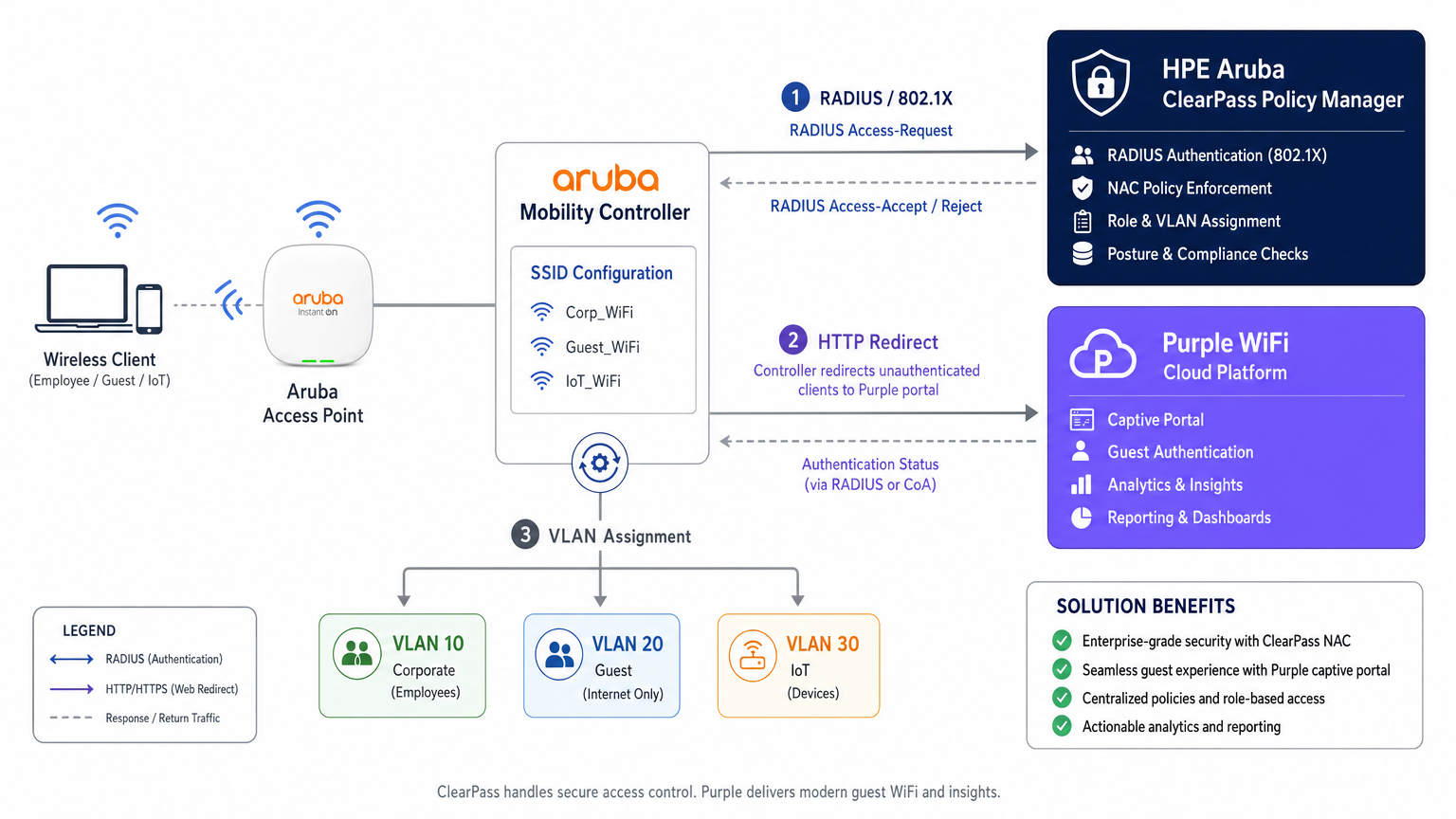
Esta arquitectura preserva la inversión en ClearPass como el punto central de decisión de políticas, delegando la capa de experiencia del invitado completamente a Purple. Cada evento de autenticación —corporativo o de invitado— se registra en el Access Tracker de ClearPass, proporcionando una pista de auditoría unificada que satisface los requisitos de cumplimiento bajo PCI DSS v4.0 y GDPR Artículo 30 (Registros de Actividades de Procesamiento).
Flujo de Autenticación: Paso a Paso
Comprender la secuencia precisa de eventos es esencial tanto para el despliegue inicial como para la resolución de problemas posterior. El flujo para un dispositivo de invitado es el siguiente.
| Paso | Actor | Acción |
|---|---|---|
| 1 | Dispositivo de Invitado | Se asocia con el SSID de Invitado abierto |
| 2 | Controlador Aruba | Asigna IP de pre-autenticación y coloca el dispositivo en rol de inicio de sesión |
| 3 | Dispositivo de Invitado | Envía solicitud HTTP (ej., http://example.com ) |
| 4 | Controlador Aruba | Intercepta y redirige HTTP 302 a la URL del portal Purple |
| 5 | Dispositivo de Invitado | Carga el Captive Portal Purple a través de walled garden |
| 6 | Usuario Invitado | Autentica (inicio de sesión social, formulario u OpenRoaming) |
| 7 | Plataforma Purple | Envía RADIUS Access-Request al Controlador Aruba |
| 8 | Controlador Aruba | Reenvía solicitud RADIUS a ClearPass |
| 9 | ClearPass | Coincide con la Regla de Servicio de invitado, actúa como proxy para Purple RADIUS |
| 10 | Purple RADIUS | Devuelve Access-Accept |
| 11 | ClearPass | Añade VSAs de Aruba (User-Role), reenvía Accept |
| 12 | Controlador Aruba | Mueve el dispositivo a rol post-autenticación, asigna VLAN de invitado |
El comportamiento del mecanismo de detección de Captive Portal —específicamente el Captive Network Assistant (CNA) de Apple, la comprobación de conectividad de Android y Microsoft NCSI— tiene una influencia directa en si el portal se carga correctamente. Para un desglose detallado de estos comportamientos a nivel de sistema operativo, consulte Apple CNA, Android Connectivity Check, Microsoft NCSI: Cómo funciona realmente la detección de Captive Portal .
Asignación Dinámica de VLAN y Mapeo de Roles de ClearPass
La segmentación de red es un requisito no negociable para el cumplimiento de PCI DSS y una arquitectura de seguridad sólida.
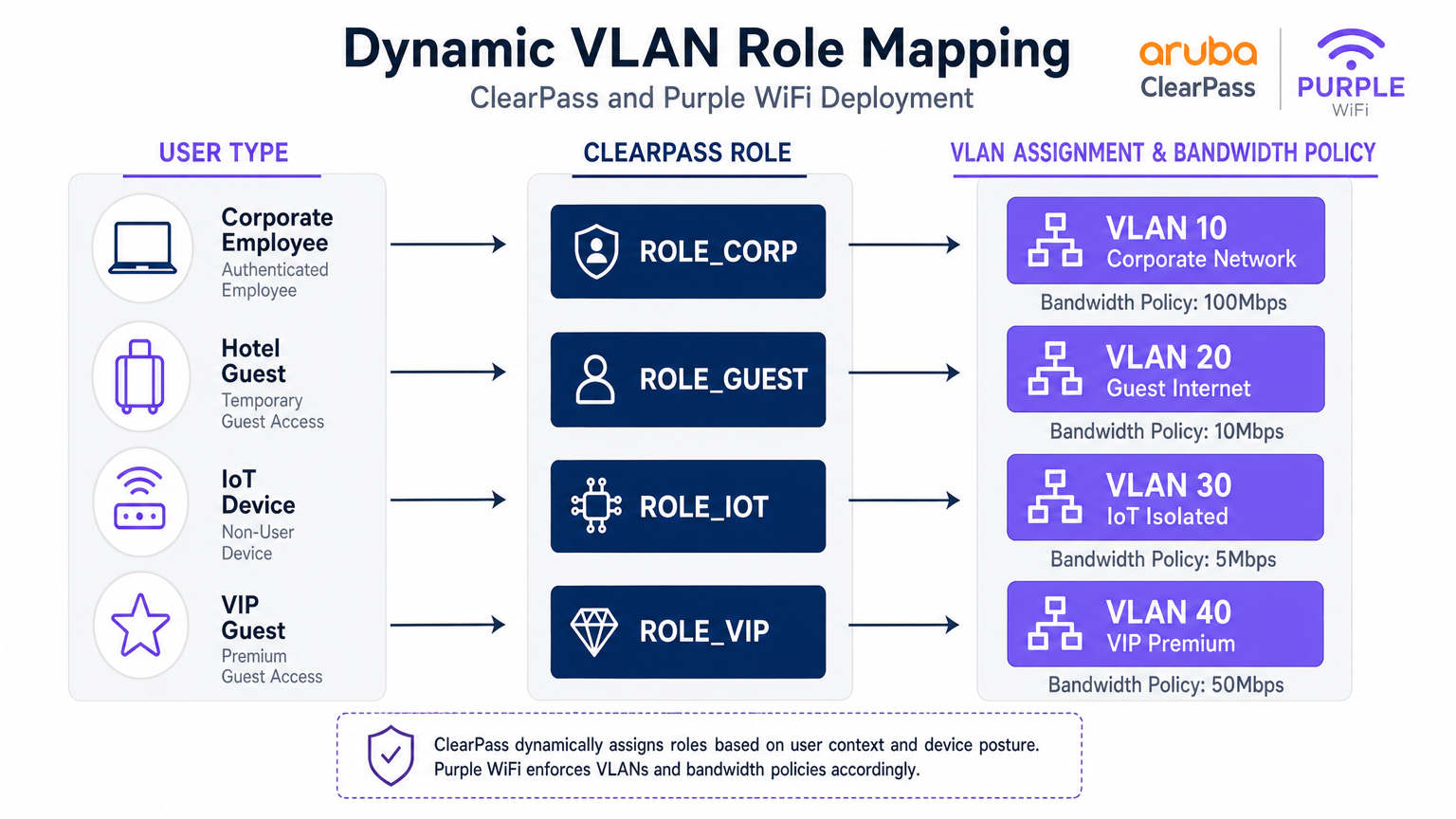
Cuando ClearPass procesa una solicitud de autenticación, evalúa atributos contextuales —identidad del usuario, tipo de dispositivo (perfilado mediante huella digital DHCP o HTTP User-Agent), hora del día y ubicación de la conexión— y asigna un Rol. Este Rol se mapea luego a un Perfil de Aplicación que devuelve atributos RADIUS específicos al controlador Aruba, siendo el más crítico el atributo específico del proveedor Aruba-User-Role (VSA, ID de Proveedor 14823, Atributo 1).
El controlador Aruba mapea cada User-Role a una VLAN y a un conjunto de políticas de firewall con estado. A continuación se muestra un modelo de segmentación representativo para un recinto grande.
| Tipo de Usuario | Rol de ClearPass | VLAN | Política de Ancho de Banda | Política de Firewall |
|---|---|---|---|---|
| Empleado Corporativo | ROLE_CORP | 10 | 100 Mbps | Acceso interno completo |
| Invitado Estándar | ROLE_GUEST | 20 | 10 Mbps | Solo Internet |
| Dispositivo IoT | ROLE_IOT | 30 | 5 Mbps | Solo local, sin internet |
| Invitado VIP / Premium | ROLE_VIP | 40 | 50 Mbps | Internet + servicios seleccionados |
| Contratista | ROLE_CONTRACTOR | 50 | 20 Mbps | Acceso interno limitado |
Configuración del Proxy RADIUS en ClearPass
La configuración del proxy RADIUS en ClearPass Policy Manager requiere tres componentes: un Destino de Proxy RADIUS (que define los puntos finales del servidor RADIUS de Purple), una Política de Enrutamiento de Servicio (que define qué solicitudes se deben proxy) y un Perfil de Aplicación (que define "los VSAs a añadir en la ruta de retorno).
El objetivo de proxy se configura en Administración > Servidores externos > Servidores RADIUS. Añada las direcciones IP RADIUS de Purple (disponibles en el portal de Purple en Hardware > Configuración RADIUS), el secreto compartido y el puerto de autenticación (UDP 1812) y el puerto de contabilidad (UDP 1813).
El servicio se configura en Configuración > Servicios. Cree un nuevo servicio con el tipo establecido en RADIUS Proxy. En Reglas de servicio, añada una condición que coincida con el Called-Station-ID (el nombre del SSID) o NAS-Identifier para identificar el tráfico de invitados. En Autenticación, seleccione el objetivo de proxy RADIUS creado anteriormente.
Es fundamental asegurarse de que la contabilidad RADIUS también se proxy a Purple. Purple utiliza datos de contabilidad (Acct-Start, Acct-Interim-Update, Acct-Stop) para rellenar la duración de la sesión, el consumo de datos y los datos de presencia en tiempo real en su plataforma WiFi Analytics . Omitir la contabilidad es un error común de implementación que resulta en paneles de análisis incompletos.
Guía de implementación
Fase 1: Configuración del controlador Aruba
Paso 1 — Definir ClearPass como servidor RADIUS. Navegue a Configuración > Seguridad > Servidores de autenticación. Añada las direcciones IP primarias y secundarias de ClearPass. Establezca el secreto compartido, el puerto de autenticación (1812) y el puerto de contabilidad (1813). Configure el tiempo de espera en 10 segundos y los reintentos en 3 para tener en cuenta el salto de proxy a la infraestructura en la nube de Purple.
Paso 2 — Configurar el SSID de invitados. Cree un nuevo perfil de SSID para el acceso de invitados. Establezca el modo de seguridad en Abierto o WPA3-SAE (recomendado para el cumplimiento de GDPR). En el perfil AAA, establezca el rol inicial en un rol de inicio de sesión predefinido que solo tenga acceso a la zona de acceso restringido (walled garden).
Paso 3 — Configurar el perfil del Captive Portal. Cree un perfil de Captive Portal que apunte a la URL de la página de bienvenida de Purple. Esta URL se obtiene del portal de Purple en Ubicaciones > [Su lugar] > URL de página de bienvenida. Habilite la opción de redirigir a la URL original después de la autenticación.
Paso 4 — Configurar la zona de acceso restringido (Walled Garden). Este es el paso más delicado desde el punto de vista operativo. La zona de acceso restringido debe incluir los dominios del portal de Purple, los puntos finales de CDN y todos los dominios de proveedores de inicio de sesión social. Como mínimo, incluya:
*.purple.aiy*.purple-portal.com*.facebook.com,*.fbcdn.net(para inicio de sesión de Facebook)*.google.com,*.googleapis.com(para inicio de sesión de Google)- Punto final de verificación CNA de Apple:
captive.apple.com - Microsoft NCSI:
www.msftconnecttest.com
Paso 5 — Definir roles post-autenticación. Cree los roles que ClearPass asignará después de la autenticación (por ejemplo, guest-authenticated). Cada rol se asigna a una VLAN y a una política de firewall que permite el acceso solo a internet.
Fase 2: Configuración del Administrador de políticas de ClearPass
Paso 1 — Añadir controladores Aruba como dispositivos de red. En Configuración > Red > Dispositivos, añada cada controlador Aruba con su IP de administración, secreto compartido y proveedor (Aruba Networks).
Paso 2 — Añadir Purple como objetivo de proxy RADIUS. En Administración > Servidores externos > Servidores RADIUS, añada los puntos finales RADIUS de Purple con el secreto compartido proporcionado en el portal de Purple.
Paso 3 — Crear el servicio de autenticación de invitados. En Configuración > Servicios, cree un nuevo servicio. Establezca el tipo de servicio en RADIUS Proxy. Configure las reglas de servicio para que coincidan con el SSID de invitados (por ejemplo, Called-Station-SSID EQUALS GuestWiFi). En Autenticación, seleccione el objetivo de proxy RADIUS de Purple.
Paso 4 — Crear el perfil de aplicación. En Configuración > Aplicación > Perfiles, cree un perfil de aplicación RADIUS. Añada el atributo Aruba-User-Role con el valor guest-authenticated. Esto instruye al controlador Aruba para que mueva al usuario al rol de invitado post-autenticación.
Paso 5 — Configurar el proxy de contabilidad. Asegúrese de que el servicio también esté configurado para proxy la contabilidad RADIUS al servidor de contabilidad de Purple (UDP 1813).
Fase 3: Configuración de la plataforma Purple
Paso 1 — Registrar hardware. En el portal de Purple, navegue a Ubicaciones > Hardware. Añada la dirección IP pública o el NAS-Identifier del controlador Aruba. Esto permite a Purple asociar las solicitudes de autenticación con el lugar correcto.
Paso 2 — Configurar la página de bienvenida. Diseñe la experiencia del Captive Portal utilizando el creador de portales de Purple. Configure los métodos de autenticación, los términos y condiciones, y los campos de suscripción de marketing en cumplimiento con GDPR.
Paso 3 — Recuperar credenciales RADIUS. En Ubicaciones > [Lugar] > Configuración RADIUS, recupere las direcciones IP del servidor RADIUS, el secreto compartido y los puertos. Utilice estos valores en la configuración del objetivo de proxy de ClearPass.
Mejores prácticas
Mantenimiento de la zona de acceso restringido (Walled Garden). Trate la zona de acceso restringido como una configuración viva. Los proveedores de inicio de sesión social actualizan regularmente sus dominios CDN y rangos de IP. Establezca un proceso de revisión trimestral y suscríbase a las notificaciones de cambios de los principales proveedores.
Redundancia RADIUS. Configure ambas IP de servidor RADIUS de Purple en ClearPass para la conmutación por error. De manera similar, implemente ClearPass en un clúster de suscriptor/editor para eliminar puntos únicos de falla en la ruta de autenticación.
Integridad de la contabilidad. Verifique que Purple reciba los registros de detención de contabilidad RADIUS para cada sesión. Las sesiones huérfanas (Inicio sin Detención) indican un problema de red y distorsionarán los datos analíticos.
Gestión de certificados para 802.1X. Para los SSIDs corporativos que utilizan EAP-TLS o PEAP, asegúrese de que los certificados del servidor se renueven mucho antes de su vencimiento. Un certificado caducado bloqueará todos los dispositivos corporativos simultáneamente, un incidente de alto impacto.
Perfilado de dispositivos IoT. Aproveche ClearPass Device Insight o el motor de perfilado incorporado para clasificar automáticamente los dispositivos IoT por OUI y huella digital DHCP. Esto permite la asignación automática de VLAN sin la gestión manual de direcciones MAC.
Cumplimiento de GDPR. Purple captura datos personales (correo electrónico, nombre, perfil social) durante la autenticación de invitados. Asegúrese de que su página de bienvenida de Purple incluya un aviso de privacidad conforme a la normativa yque las políticas de retención de datos en el portal de Purple se alineen con las obligaciones de GDPR de su organización.
Solución de Problemas y Mitigación de Riesgos
Captive Portal no se muestra
Síntoma: El cliente se conecta al guest SSID, pero no aparece ningún portal; el dispositivo muestra "Conectado, sin internet."
Diagnóstico: Utilice una captura de paquetes en el enlace ascendente del controlador para verificar que las consultas DNS para la URL del portal se estén resolviendo y que el tráfico HTTP esté siendo interceptado. Verifique que los puntos finales de verificación de CNA/NCSI estén en el walled garden.
Resolución: Agregue los dominios faltantes al walled garden. Verifique que el perfil del Captive Portal esté correctamente asociado con el perfil AAA del guest SSID.
Fallos de Autenticación Silenciosos
Síntoma: El usuario completa el formulario del portal, pero se deniega el acceso a la red. ClearPass Access Tracker muestra un Access-Reject.
Diagnóstico: Abra la entrada de Access Tracker y examine la razón del fallo de autenticación. Las causas comunes son una falta de coincidencia del secreto compartido de RADIUS, el servidor RADIUS de Purple inaccesible o una regla de servicio incorrecta que coincide con el servicio equivocado.
Resolución: Verifique los secretos compartidos tanto en los tramos del controlador Aruba a ClearPass como de ClearPass a Purple. Pruebe la accesibilidad del RADIUS de Purple desde el servidor ClearPass usando radtest.
Asignación de VLAN Incorrecta
Síntoma: El invitado se autentica correctamente, pero recibe una dirección IP en la subred corporativa (VLAN 10).
Resolución: Verifique que el valor Aruba-User-Role en el perfil de aplicación de ClearPass coincida exactamente (incluyendo mayúsculas y minúsculas) con el nombre del rol definido en el controlador Aruba. Verifique los atributos de salida de ClearPass Access Tracker para confirmar que se está enviando el VSA.
Errores de Tiempo de Espera de RADIUS
Síntoma: La autenticación falla intermitentemente, particularmente bajo carga. Access Tracker muestra errores de tiempo de espera.
Resolución: Aumente el tiempo de espera del servidor RADIUS en el controlador Aruba a 10 segundos. Verifique que los puertos UDP 1812 y 1813 estén abiertos y no estén sujetos a limitación de velocidad en el firewall entre ClearPass y la infraestructura en la nube de Purple.
ROI e Impacto Comercial
La implementación de esta arquitectura integrada ofrece retornos medibles en las funciones de TI, seguridad y comerciales. Desde una perspectiva de seguridad y cumplimiento, centralizar todos los eventos de autenticación en ClearPass proporciona una pista de auditoría unificada que simplifica los informes de cumplimiento de PCI DSS y GDPR. La segmentación dinámica de VLAN elimina el riesgo de que el tráfico de invitados atraviese la infraestructura corporativa, reduciendo directamente la superficie de ataque.
Desde una perspectiva comercial, la plataforma Guest WiFi de Purple transforma la red de invitados de un centro de costos en un activo de datos de primera parte. Cada sesión de invitado autenticado genera datos de marketing con consentimiento explícito — direcciones de correo electrónico, frecuencia de visitas, tiempo de permanencia y tipo de dispositivo — que se alimentan directamente a las plataformas de CRM y automatización de marketing. Los lugares que implementan Purple junto con la infraestructura Aruba existente reportan consistentemente mejoras medibles en el crecimiento de la lista de correo electrónico, las tasas de visitas repetidas y la conversión de campañas.
La integración también elimina la necesidad de reemplazar las licencias de ClearPass existentes o el hardware de Aruba, lo que la convierte en una adición de bajo riesgo y alto retorno a una inversión en infraestructura existente. Para organizaciones que gestionan múltiples sitios —una cadena minorista, un grupo hotelero o un campus universitario— el portal de gestión centralizado de Purple proporciona análisis entre sitios que ClearPass por sí solo no puede ofrecer.
Para entornos donde comprender el comportamiento físico de los visitantes es tan importante como la seguridad de la red —como grandes superficies comerciales o centros de transporte— los análisis de Purple se integran naturalmente con los datos de Indoor Positioning System para proporcionar inteligencia espacial junto con métricas de conectividad.
Términos clave y definiciones
RADIUS Proxy
A configuration where a RADIUS server (ClearPass) forwards authentication requests to another RADIUS server (Purple) based on specific matching criteria, such as the SSID name or NAS-Identifier.
Used when an organisation wants to maintain a single NAC solution internally while utilising a third-party cloud service for guest authentication. The proxy preserves the central audit log in ClearPass while delegating the authentication decision to Purple.
Change of Authorization (CoA)
A RADIUS extension defined in RFC 5176 that allows a RADIUS server to dynamically modify the session authorisation attributes of an active client connection without requiring the client to disconnect.
Critical for captive portal deployments. CoA allows Purple to signal the Aruba controller to transition a user from the pre-authentication logon role to the post-authentication guest role the moment the user completes the portal form.
Walled Garden
A pre-authentication access control list on the Aruba controller that permits unauthenticated devices to reach specific IP addresses and domains required for the captive portal to function.
If the device cannot reach the portal URL, social login provider endpoints, or OS-level captive portal detection URLs (Apple CNA, Microsoft NCSI), the portal will fail to load. This is the most common source of captive portal deployment failures.
Vendor-Specific Attribute (VSA)
Custom RADIUS attributes defined by network equipment vendors (Vendor ID 14823 for Aruba) to extend the standard RADIUS protocol with proprietary instructions.
The Aruba-User-Role VSA (Attribute 1) is the primary mechanism by which ClearPass instructs the Aruba controller which role to assign to an authenticated user. The value must exactly match a role defined on the controller.
Dynamic VLAN Assignment
The process of placing a user or device into a specific VLAN based on their authenticated identity or assigned role, rather than the physical port or SSID they connected to.
Enables venue operators to broadcast a single guest SSID while securely segmenting standard guests, VIP guests, IoT devices, and contractors onto separate, isolated network segments — a requirement for PCI DSS compliance.
Enforcement Profile
A ClearPass configuration object that defines the specific RADIUS attributes and values to return to the network device when a device successfully matches an authentication service.
This is where the business logic of 'if guest, then assign guest role' is translated into specific RADIUS VSAs sent to the Aruba controller. A misconfigured Enforcement Profile is a common cause of incorrect VLAN assignment.
Captive Network Assistant (CNA)
The mini-browser built into iOS, macOS, Android, and Windows that automatically detects a captive portal by making HTTP requests to known endpoints and prompts the user to authenticate.
Understanding CNA behaviour is essential for troubleshooting portal display issues on specific device types. The CNA endpoints (captive.apple.com, www.msftconnecttest.com) must be in the walled garden.
Access Tracker
The real-time diagnostic tool within ClearPass Policy Manager that logs every RADIUS authentication and accounting event, including the request attributes, matched service, applied enforcement profile, and result.
The first diagnostic tool to consult when troubleshooting authentication failures or incorrect role assignments. It provides a complete record of what ClearPass received, what decision it made, and what it returned to the network device.
RADIUS-as-a-Service (RaaS)
A cloud-delivered RADIUS authentication service where the RADIUS server infrastructure is managed and hosted by a third-party provider rather than on-premises.
Purple's RADIUS-as-a-Service eliminates the need for venues to deploy and manage their own RADIUS infrastructure for guest authentication, while integrating with existing on-premises NAC solutions like ClearPass via the proxy architecture described in this guide.
Casos de éxito
A 500-room hotel group with Aruba controllers and ClearPass deployed centrally needs to provide secure 802.1X WiFi for staff, a branded captive portal for guests, and isolated connectivity for IoT devices (smart TVs, thermostats, door locks). How should they architect the authentication flow?
Deploy three SSIDs: Hotel_Corp (802.1X, WPA2-Enterprise), Hotel_Guest (open SSID with captive portal redirect), and Hotel_IoT (open SSID with MAC-based authentication). All three SSIDs point to ClearPass as the RADIUS server. In ClearPass, create three Services: Service 1 matches Hotel_Corp and authenticates against Active Directory via PEAP-MSCHAPv2, returning ROLE_CORP (VLAN 10, full internal access). Service 2 matches Hotel_Guest and uses a RADIUS Routing Policy to proxy requests to Purple's RADIUS servers; the Enforcement Profile returns Aruba-User-Role = guest-authenticated (VLAN 20, internet only, 10 Mbps). Service 3 matches Hotel_IoT and uses ClearPass Device Profiling to classify devices by OUI; the Enforcement Profile returns ROLE_IOT (VLAN 30, local only, no internet). The walled garden on the Aruba controller includes Purple's portal domains, Facebook, Google, and Apple's CNA endpoint.
A retail chain is rolling out Purple across 120 stores, all running Aruba Instant APs. Guest authentication latency is high and portal drop-offs are occurring. Preliminary investigation shows the RADIUS timeout is set to the default 3 seconds.
Increase the RADIUS server timeout on all Aruba Instant APs to 10 seconds and configure 3 retries. Deploy both of Purple's RADIUS server IPs as primary and secondary servers in the Instant AP configuration to provide failover. Review the walled garden configuration to ensure all social login provider domains are included, as incomplete walled gardens cause the portal page to load slowly or partially, increasing perceived latency. Enable RADIUS Accounting on the Instant APs to ensure Purple receives session data. Finally, review the Purple portal design to minimise the number of external resource calls (fonts, images) that must load before the authentication form is displayed.
Análisis de escenarios
Q1. Your deployment requires guests to authenticate via Facebook login. The Purple portal loads, but when users tap the Facebook button, the page times out and returns an error. Corporate 802.1X authentication is working correctly. What is the most likely cause and how do you resolve it?
💡 Sugerencia:Consider what the device is permitted to access before it has completed authentication. The portal page loaded, so the portal domain is in the walled garden — but what about the resources the portal needs to call?
Mostrar enfoque recomendado
The walled garden configuration on the Aruba controller is missing the required Facebook authentication domains and CDN endpoints (*.facebook.com, *.fbcdn.net, *.facebook.net). Pre-authentication traffic to Facebook's OAuth servers is being blocked by the controller's default-deny policy. Resolution: add the missing Facebook domains to the walled garden. Also verify that Google's domains are included if Google login is also offered. Use a browser developer tools network trace from a test device to identify any additional blocked domains.
Q2. You want to use a single SSID ('VenueWiFi') for both corporate employees (802.1X) and guests (captive portal via Purple). How do you configure ClearPass to correctly differentiate and route the two authentication types?
💡 Sugerencia:ClearPass Services are matched in priority order. Consider how 802.1X and MAC-Auth requests differ at the RADIUS protocol level, and how Service Rules can exploit this difference.
Mostrar enfoque recomendado
Create two ClearPass Services, both matching the SSID 'VenueWiFi'. Service 1 (higher priority) uses a Service Rule matching on the RADIUS attribute 'Service-Type EQUALS Framed-User' or the presence of EAP attributes, identifying 802.1X requests. It authenticates against Active Directory and returns ROLE_CORP. Service 2 (lower priority) matches MAC-Auth requests (Service-Type EQUALS Call-Check or Authenticate-Only). It uses a RADIUS Routing Policy to proxy the request to Purple. The Enforcement Profile for Service 2 returns the pre-auth logon role, triggering the captive portal. When Purple sends the post-authentication RADIUS request, it is matched by Service 2 and returns the guest-authenticated role.
Q3. Guest authentication is successful — the Purple dashboard shows the user as active and the ClearPass Access Tracker shows an Access-Accept. However, the user cannot access the internet and the Aruba controller shows the user is still in the 'logon' role. What are the two most likely causes?
💡 Sugerencia:The authentication succeeded and ClearPass sent an Accept. The problem is therefore in what ClearPass sent back, or in how the Aruba controller interpreted it.
Mostrar enfoque recomendado
Cause 1: The ClearPass Enforcement Profile is not configured to return the Aruba-User-Role VSA, or is returning an empty value. Check the Enforcement Profile and verify the VSA is explicitly set. Cause 2: The Aruba-User-Role value returned by ClearPass does not exactly match (including capitalisation) a role defined on the Aruba controller. For example, ClearPass returns 'guest-authenticated' but the controller has 'Guest-Authenticated' defined. Resolution: Open the ClearPass Access Tracker entry, expand the Output Attributes section, and verify the Aruba-User-Role value. Then cross-reference this value against the role names defined on the Aruba controller under Configuration > Roles.
Q4. A stadium venue wants to offer tiered guest WiFi: a free tier with 5 Mbps and mandatory portal authentication, and a premium tier with 50 Mbps for ticket holders who have pre-registered. Both tiers use the same SSID. How would you architect this using ClearPass and Purple?
💡 Sugerencia:Think about how ClearPass can differentiate between the two user types post-authentication, and how Purple can pass identity information to ClearPass to enable this differentiation.
Mostrar enfoque recomendado
Configure Purple to pass a user attribute (e.g., a custom RADIUS attribute or the Class attribute) indicating whether the user is a registered ticket holder. In ClearPass, create a Role Mapping Policy that checks this attribute: if present and valid, assign ROLE_VIP; otherwise assign ROLE_GUEST. Create two Enforcement Profiles: ROLE_GUEST returns Aruba-User-Role = guest-standard (VLAN 20, 5 Mbps bandwidth contract); ROLE_VIP returns Aruba-User-Role = guest-premium (VLAN 40, 50 Mbps). On the Aruba controller, define both roles with the appropriate VLAN and bandwidth contracts. This approach uses a single SSID and single Purple portal while delivering differentiated service levels based on user identity.




