

Aruba ClearPass und Purple WiFi: Integrations- und Bereitstellungshandbuch
Dieser Leitfaden bietet eine vollständige technische Referenz für die Integration von HPE Aruba ClearPass Policy Manager mit der Purple WiFi-Plattform, einschließlich RADIUS-Proxy-Architektur, Captive Portal-Konfiguration und dynamischer VLAN-Rollen-Zuordnung. Er richtet sich an IT-Manager und Netzwerkarchitekten in Umgebungen mit starker Aruba-Präsenz, die ClearPass für NAC beibehalten und gleichzeitig Purple für die Gastauthentifizierung und -analyse einsetzen möchten. Die Implementierung dieser Integration schließt eine kritische Anbieterlücke und ermöglicht Sicherheit und Compliance auf Unternehmensniveau zusammen mit den marktführenden Besucheranalysefunktionen von Purple.
🎧 Diesen Leitfaden anhören
Transkript anzeigen
Zusammenfassung für Führungskräfte
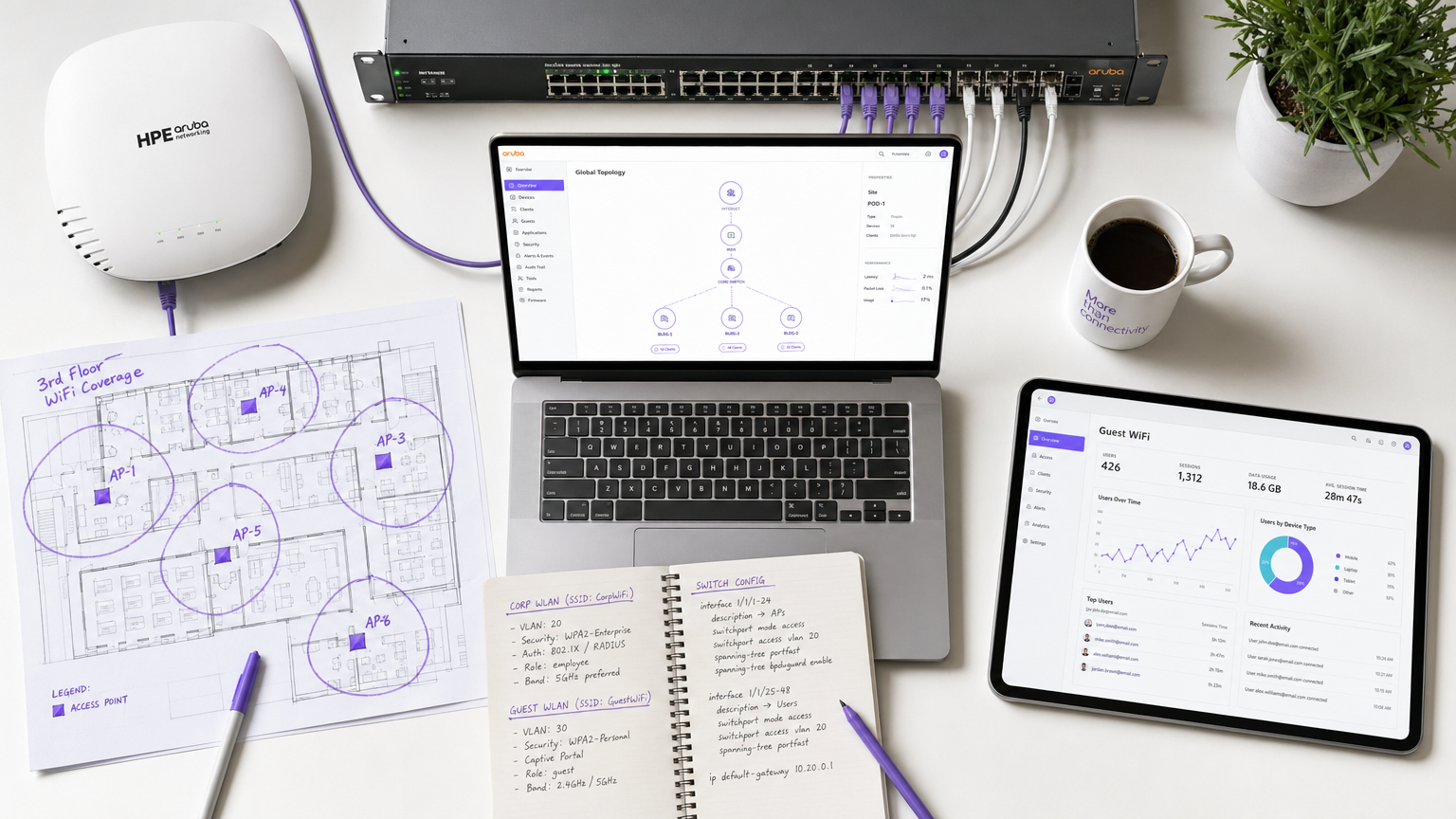
Für Unternehmensumgebungen, die stark in die HPE Aruba-Infrastruktur investiert haben, stellt die Verwaltung komplexer Netzwerkzugriffsrichtlinien bei gleichzeitiger Bereitstellung eines nahtlosen, datenreichen Gast-WiFi-Erlebnisses eine erhebliche architektonische Herausforderung dar. Während ClearPass Policy Manager bei der Network Access Control (NAC) und der IEEE 802.1X-Authentifizierung für Unternehmensgeräte hervorragend ist, benötigen Betreiber von Veranstaltungsorten zunehmend die erweiterten Captive Portal-, Analyse- und Marketingfunktionen, die von Purple WiFi bereitgestellt werden.
Dieser Leitfaden beschreibt die Architektur und Bereitstellungsstrategie für die Integration von Aruba ClearPass mit Purple WiFi unter Verwendung eines RADIUS-Proxy-Modells. Durch die Konfiguration von ClearPass zur Proxy-Weiterleitung von Gastauthentifizierungsanfragen an Purples RADIUS-as-a-Service können Organisationen zentralisierte Sicherheitsrichtlinien aufrechterhalten, dynamische rollenbasierte VLAN-Zuweisungen durchsetzen und gleichzeitig Purples robuste Plattform für Besucheranalysen nutzen. Diese Integration ist entscheidend für groß angelegte Bereitstellungen in Einzelhandel , Gastgewerbe , Gesundheitswesen und Verkehrsknotenpunkten , wo Compliance, Sicherheit und Kundenbindung kompromisslos koexistieren müssen. Das Ergebnis ist eine Bereitstellung, bei der ClearPass entscheidet, Purple bindet und Aruba durchsetzt.
Technischer Einblick
Architekturübersicht
Die Integration basiert auf einer Standard-RADIUS-Proxy-Architektur, die durch RFC 2865 (RADIUS) und RFC 5176 (Dynamic Authorisation Extensions) untermauert wird. Der Aruba Mobility Controller oder Instant AP-Cluster ist so konfiguriert, dass er ClearPass als primären RADIUS-Server für alle SSIDs verwendet. ClearPass verarbeitet die 802.1X-Authentifizierung für Unternehmensgeräte lokal gegen Active Directory oder eine interne Zertifizierungsstelle, ist jedoch mit einer RADIUS Service Routing-Richtlinie konfiguriert, um Gastauthentifizierungsanfragen an Purples Cloud-RADIUS-Server weiterzuleiten.
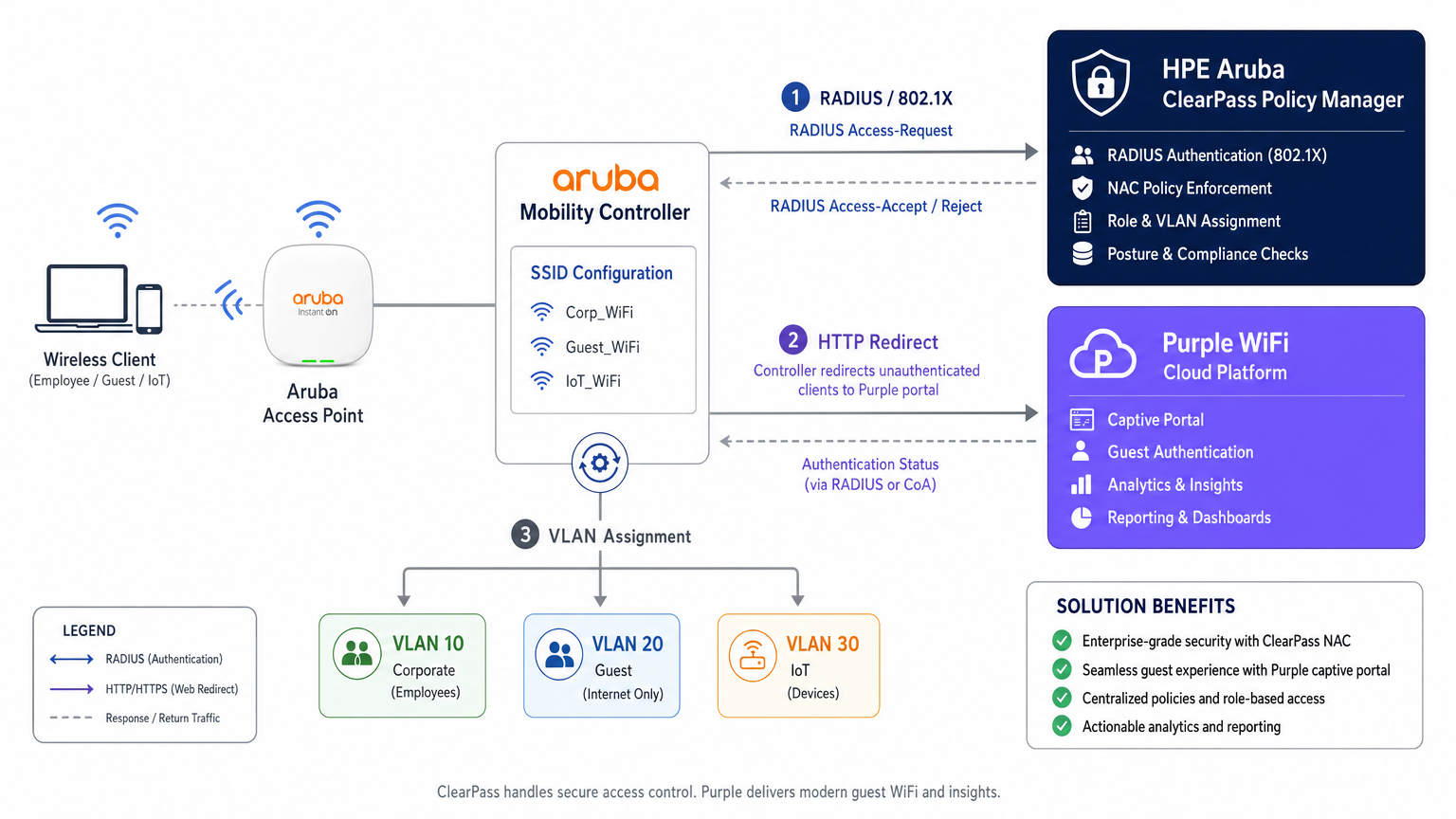
Diese Architektur bewahrt die Investition in ClearPass als zentralen Richtlinienentscheidungspunkt, während die Gast-Erlebnisschicht vollständig an Purple delegiert wird. Jedes Authentifizierungsereignis – ob für Unternehmen oder Gäste – wird im Access Tracker von ClearPass protokolliert und bietet einen einheitlichen Prüfpfad, der die Compliance-Anforderungen gemäß PCI DSS v4.0 und GDPR Artikel 30 (Verzeichnis der Verarbeitungstätigkeiten) erfüllt.
Authentifizierungsablauf: Schritt für Schritt
Das Verständnis der genauen Abfolge der Ereignisse ist sowohl für die Erstbereitstellung als auch für die spätere Fehlerbehebung unerlässlich. Der Ablauf für ein Gastgerät ist wie folgt.
| Schritt | Akteur | Aktion |
|---|---|---|
| 1 | Gastgerät | Verbindet sich mit offener Gast-SSID |
| 2 | Aruba Controller | Weist Pre-Auth-IP zu und platziert Gerät in Anmelderolle |
| 3 | Gastgerät | Sendet HTTP-Anfrage (z.B. http://example.com ) |
| 4 | Aruba Controller | Fängt ab und leitet per HTTP 302 zur Purple Portal-URL um |
| 5 | Gastgerät | Lädt Purple Captive Portal über Walled Garden |
| 6 | Gastnutzer | Authentifiziert sich (Social Login, Formular oder OpenRoaming) |
| 7 | Purple Plattform | Sendet RADIUS Access-Request an Aruba Controller |
| 8 | Aruba Controller | Leitet RADIUS-Anfrage an ClearPass weiter |
| 9 | ClearPass | Passt Gast-Service-Regel an, leitet an Purple RADIUS weiter |
| 10 | Purple RADIUS | Gibt Access-Accept zurück |
| 11 | ClearPass | Fügt Aruba VSAs (User-Role) an, leitet Accept weiter |
| 12 | Aruba Controller | Verschiebt Gerät in Post-Auth-Rolle, weist Gast-VLAN zu |
Das Verhalten des Captive Portal-Erkennungsmechanismus – insbesondere Apples Captive Network Assistant (CNA), Androids Konnektivitätsprüfung und Microsoft NCSI – hat direkten Einfluss darauf, ob das Portal korrekt geladen wird. Eine detaillierte Aufschlüsselung dieser OS-spezifischen Verhaltensweisen finden Sie unter Apple CNA, Android Konnektivitätsprüfung, Microsoft NCSI: Wie die Captive Portal-Erkennung tatsächlich funktioniert .
Dynamische VLAN-Zuweisung und ClearPass-Rollen-Zuordnung
Netzwerksegmentierung ist eine nicht verhandelbare Anforderung für die PCI DSS-Compliance und eine solide Sicherheitsarchitektur. ClearPass ermöglicht die dynamische VLAN-Zuweisung durch sein Framework für Rollen-Zuordnung und Enforcement Profile.
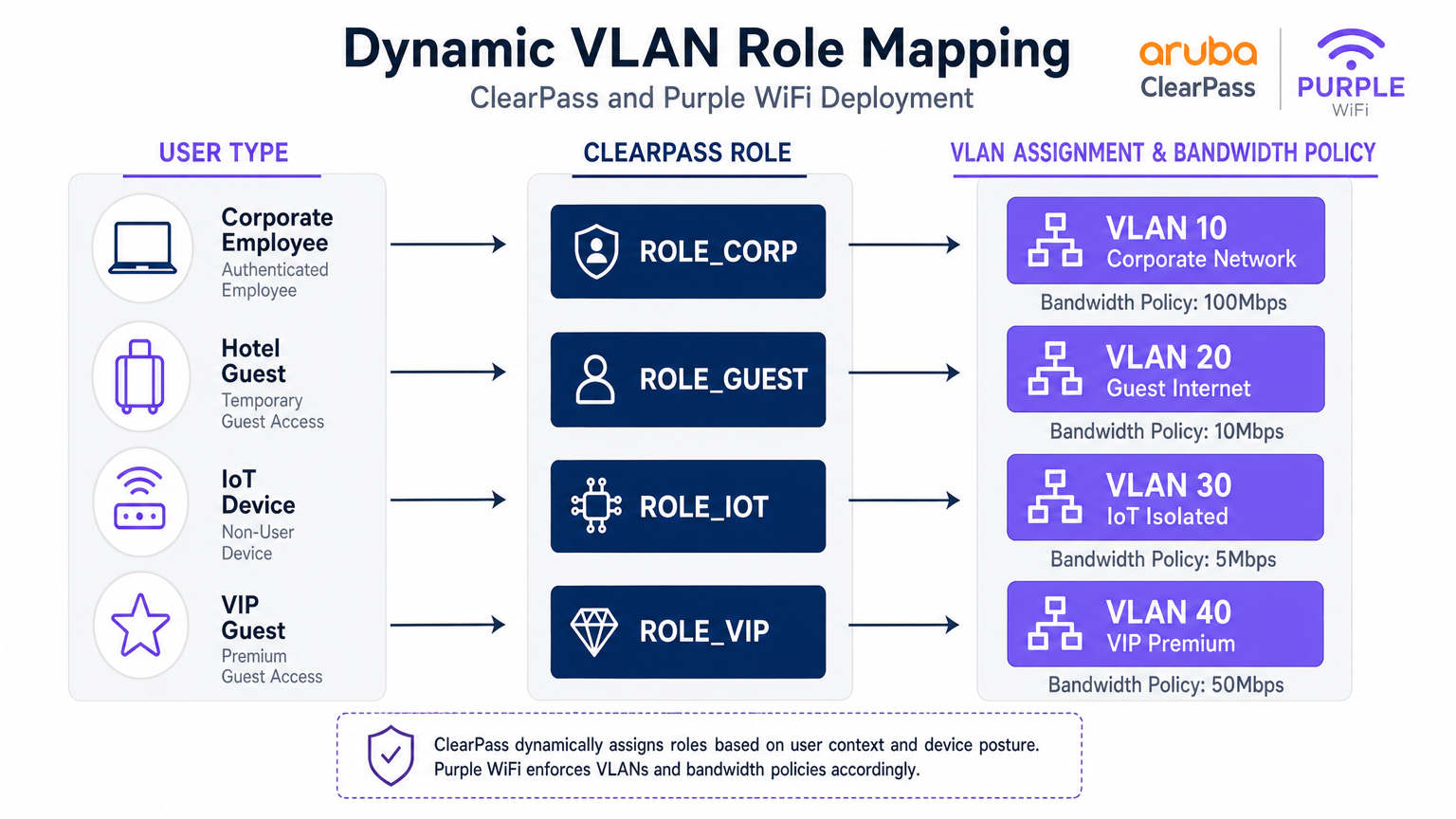
Wenn ClearPass eine Authentifizierungsanfrage verarbeitet, bewertet es kontextbezogene Attribute – Benutzeridentität, Gerätetyp (profiliert über DHCP-Fingerprinting oder HTTP User-Agent), Tageszeit und Verbindungsort – und weist eine Rolle zu. Diese Rolle wird dann einem Enforcement Profile zugeordnet, das spezifische RADIUS-Attribute an den Aruba Controller zurückgibt, am wichtigsten das Aruba-User-Role Vendor-Specific Attribute (VSA, Vendor ID 14823, Attribut 1).
Der Aruba Controller ordnet jede User-Role einem VLAN und einer Reihe von Stateful-Firewall-Richtlinien zu. Ein repräsentatives Segmentierungsmodell für einen großen Veranstaltungsort ist unten dargestellt.
| Benutzertyp | ClearPass Rolle | VLAN | Bandbreitenrichtlinie | Firewall-Richtlinie |
|---|---|---|---|---|
| Firmenmitarbeiter | ROLE_CORP | 10 | 100 Mbit/s | Voller interner Zugriff |
| Standardgast | ROLE_GUEST | 20 | 10 Mbit/s | Nur Internet |
| IoT-Gerät | ROLE_IOT | 30 | 5 Mbit/s | Nur lokal, kein Internet |
| VIP / Premium Gast | ROLE_VIP | 40 | 50 Mbit/s | Internet + ausgewählte Dienste |
| Auftragnehmer | ROLE_CONTRACTOR | 50 | 20 Mbit/s | Begrenzter interner Zugriff |
RADIUS-Proxy-Konfiguration in ClearPass
Die RADIUS-Proxy-Konfiguration im ClearPass Policy Manager erfordert drei Komponenten: ein RADIUS Proxy Target (das die RADIUS-Server-Endpunkte von Purple definiert), eine Service Routing Policy (die definiert, welche Anfragen weitergeleitet werden sollen) und ein Enforcement Profile (das "die VSAs, die an den Rückweg angehängt werden sollen).
Das Proxy-Ziel wird unter Administration > Externe Server > RADIUS-Server konfiguriert. Fügen Sie die RADIUS-IP-Adressen von Purple (verfügbar im Purple-Portal unter Hardware > RADIUS Settings), das Shared Secret sowie den Authentifizierungsport (UDP 1812) und den Accounting-Port (UDP 1813) hinzu.
Der Dienst wird unter Konfiguration > Dienste konfiguriert. Erstellen Sie einen neuen Dienst mit dem Typ RADIUS Proxy. Fügen Sie unter Dienstregeln eine Bedingung hinzu, die der Called-Station-ID (dem SSID-Namen) oder dem NAS-Identifier entspricht, um Gast-Traffic zu identifizieren. Wählen Sie unter Authentifizierung das oben erstellte RADIUS Proxy-Ziel aus.
Stellen Sie unbedingt sicher, dass RADIUS Accounting ebenfalls an Purple weitergeleitet wird. Purple verwendet Accounting-Daten (Acct-Start, Acct-Interim-Update, Acct-Stop), um Sitzungsdauer, Datenverbrauch und Echtzeit-Anwesenheitsdaten in seiner WiFi Analytics -Plattform zu erfassen. Das Weglassen von Accounting ist ein häufiger Bereitstellungsfehler, der zu unvollständigen Analyse-Dashboards führt.
Implementierungsleitfaden
Phase 1: Aruba Controller-Konfiguration
Schritt 1 — ClearPass als RADIUS-Server definieren. Navigieren Sie zu Konfiguration > Sicherheit > Authentifizierungsserver. Fügen Sie die primären und sekundären IP-Adressen von ClearPass hinzu. Legen Sie das Shared Secret, den Authentifizierungsport (1812) und den Accounting-Port (1813) fest. Konfigurieren Sie das Timeout auf 10 Sekunden und die Wiederholungsversuche auf 3, um den Proxy-Hop zur Cloud-Infrastruktur von Purple zu berücksichtigen.
Schritt 2 — Die Gast-SSID konfigurieren. Erstellen Sie ein neues SSID-Profil für den Gastzugang. Stellen Sie den Sicherheitsmodus auf Open oder WPA3-SAE ein (empfohlen für GDPR-Konformität). Legen Sie unter dem AAA-Profil die anfängliche Rolle auf eine vordefinierte Anmelderolle fest, die nur Walled-Garden-Zugriff hat.
Schritt 3 — Das Captive Portal-Profil konfigurieren. Erstellen Sie ein Captive Portal-Profil, das auf die Splash Page URL von Purple verweist. Diese URL erhalten Sie im Purple-Portal unter Standorte > [Ihr Standort] > Splash Page URL. Aktivieren Sie die Option zur Weiterleitung zur ursprünglichen URL nach der Authentifizierung.
Schritt 4 — Den Walled Garden konfigurieren. Dies ist der betrieblich sensibelste Schritt. Der Walled Garden muss die Portal-Domains von Purple, CDN-Endpunkte und alle Domains von Social-Login-Anbietern umfassen. Fügen Sie mindestens Folgendes hinzu:
*.purple.aiund*.purple-portal.com*.facebook.com,*.fbcdn.net(für Facebook-Login)*.google.com,*.googleapis.com(für Google-Login)- Apples CNA-Prüfendpunkt:
captive.apple.com - Microsoft NCSI:
www.msftconnecttest.com
Schritt 5 — Post-Auth-Rollen definieren. Erstellen Sie die Rollen, die ClearPass nach der Authentifizierung zuweisen wird (z. B. guest-authenticated). Jede Rolle wird einem VLAN und einer Firewall-Richtlinie zugeordnet, die nur Internetzugang erlaubt.
Phase 2: ClearPass Policy Manager-Konfiguration
Schritt 1 — Aruba Controller als Netzwerkgeräte hinzufügen. Fügen Sie unter Konfiguration > Netzwerk > Geräte jeden Aruba Controller mit seiner Management-IP, dem Shared Secret und dem Hersteller (Aruba Networks) hinzu.
Schritt 2 — Purple als RADIUS Proxy-Ziel hinzufügen. Fügen Sie unter Administration > Externe Server > RADIUS-Server die RADIUS-Endpunkte von Purple mit dem im Purple-Portal bereitgestellten Shared Secret hinzu.
Schritt 3 — Den Gast-Authentifizierungsdienst erstellen. Erstellen Sie unter Konfiguration > Dienste einen neuen Dienst. Legen Sie den Diensttyp auf RADIUS Proxy fest. Konfigurieren Sie Dienstregeln, um der Gast-SSID zu entsprechen (z. B. Called-Station-SSID EQUALS GuestWiFi). Wählen Sie unter Authentifizierung das Purple RADIUS Proxy-Ziel aus.
Schritt 4 — Das Enforcement-Profil erstellen. Erstellen Sie unter Konfiguration > Enforcement > Profile ein RADIUS-Enforcement-Profil. Fügen Sie das Attribut Aruba-User-Role mit dem Wert guest-authenticated hinzu. Dies weist den Aruba Controller an, den Benutzer in die Post-Auth-Gastrolle zu verschieben.
Schritt 5 — Accounting Proxy konfigurieren. Stellen Sie sicher, dass der Dienst auch so konfiguriert ist, dass er RADIUS Accounting an den Accounting-Server von Purple (UDP 1813) weiterleitet.
Phase 3: Purple Plattform-Konfiguration
Schritt 1 — Hardware registrieren. Navigieren Sie im Purple-Portal zu Standorte > Hardware. Fügen Sie die öffentliche IP-Adresse oder den NAS-Identifier des Aruba Controllers hinzu. Dies ermöglicht Purple, Authentifizierungsanfragen dem richtigen Standort zuzuordnen.
Schritt 2 — Die Splash Page konfigurieren. Gestalten Sie das Captive Portal-Erlebnis mit dem Portal-Builder von Purple. Konfigurieren Sie Authentifizierungsmethoden, Geschäftsbedingungen und Marketing-Opt-in-Felder in Übereinstimmung mit GDPR.
Schritt 3 — RADIUS-Anmeldeinformationen abrufen. Rufen Sie unter Standorte > [Standort] > RADIUS Settings die RADIUS-Server-IP-Adressen, das Shared Secret und die Ports ab. Verwenden Sie diese Werte in der ClearPass Proxy Target-Konfiguration.
Best Practices
Walled Garden-Wartung. Behandeln Sie den Walled Garden als eine lebendige Konfiguration. Anbieter von Social Logins aktualisieren regelmäßig ihre CDN-Domains und IP-Bereiche. Etablieren Sie einen vierteljährlichen Überprüfungsprozess und abonnieren Sie Änderungsbenachrichtigungen von großen Anbietern.
RADIUS-Redundanz. Konfigurieren Sie beide RADIUS-Server-IPs von Purple in ClearPass für Failover. Stellen Sie ClearPass ebenfalls in einem Subscriber/Publisher-Cluster bereit, um Single Points of Failure im Authentifizierungspfad zu eliminieren.
Accounting-Integrität. Überprüfen Sie, ob RADIUS Accounting Stop-Datensätze für jede Sitzung von Purple empfangen werden. Verwaiste Sitzungen (Start ohne Stop) weisen auf ein Netzwerkproblem hin und verfälschen die Analysedaten.
Zertifikatsverwaltung für 802.1X. Stellen Sie für Unternehmens-SSIDs, die EAP-TLS oder PEAP verwenden, sicher, dass Serverzertifikate lange vor ihrem Ablauf erneuert werden. Ein abgelaufenes Zertifikat sperrt alle Unternehmensgeräte gleichzeitig aus – ein Vorfall mit hoher Auswirkung.
IoT-Geräteprofilierung. Nutzen Sie ClearPass Device Insight oder die integrierte Profiling-Engine, um IoT-Geräte automatisch nach OUI und DHCP-Fingerprint zu klassifizieren. Dies ermöglicht eine automatisierte VLAN-Zuweisung ohne manuelle MAC-Adressverwaltung.
GDPR-Konformität. Purple erfasst persönliche Daten (E-Mail, Name, Social Profile) während der Gastauthentifizierung. Stellen Sie sicher, dass Ihre Purple Splash Page eine konforme Datenschutzerklärung enthäld, dass die Datenaufbewahrungsrichtlinien im Purple Portal mit den GDPR-Verpflichtungen Ihrer Organisation übereinstimmen.
Fehlerbehebung & Risikominderung
Captive Portal wird nicht angezeigt
Symptom: Der Client verbindet sich mit der Gast-SSID, aber es erscheint kein Portal; das Gerät zeigt "Verbunden, kein Internet" an.
Diagnose: Verwenden Sie eine Paketerfassung am Controller-Uplink, um zu überprüfen, ob DNS-Abfragen für die Portal-URL aufgelöst werden und ob HTTP-Verkehr abgefangen wird. Überprüfen Sie, ob die CNA/NCSI-Prüfendpunkte im Walled Garden enthalten sind.
Lösung: Fügen Sie fehlende Domänen zum Walled Garden hinzu. Überprüfen Sie, ob das Captive Portal-Profil korrekt mit dem Gast-SSID AAA-Profil verknüpft ist.
Stille Authentifizierungsfehler
Symptom: Der Benutzer füllt das Portalformular aus, aber der Netzwerkzugriff wird verweigert. Der ClearPass Access Tracker zeigt einen Access-Reject an.
Diagnose: Öffnen Sie den Access Tracker-Eintrag und untersuchen Sie den Grund für den Authentifizierungsfehler. Häufige Ursachen sind eine Nichtübereinstimmung des RADIUS Shared Secret, ein unerreichbarer Purple RADIUS-Server oder eine falsche Service Rule, die dem falschen Dienst zugeordnet ist.
Lösung: Überprüfen Sie die Shared Secrets sowohl auf der Aruba Controller-zu-ClearPass- als auch auf der ClearPass-zu-Purple-Strecke. Testen Sie die Erreichbarkeit des Purple RADIUS-Servers vom ClearPass-Server aus mit radtest.
Falsche VLAN-Zuweisung
Symptom: Der Gast authentifiziert sich erfolgreich, erhält aber eine IP-Adresse im Unternehmens-Subnetz (VLAN 10).
Lösung: Überprüfen Sie, ob der Wert Aruba-User-Role im ClearPass Enforcement Profile exakt (einschließlich Groß-/Kleinschreibung) mit dem auf dem Aruba Controller definierten Rollennamen übereinstimmt. Überprüfen Sie die Ausgabemerkmale des ClearPass Access Tracker, um zu bestätigen, dass der VSA gesendet wird.
RADIUS-Timeout-Fehler
Symptom: Die Authentifizierung schlägt zeitweise fehl, insbesondere unter Last. Der Access Tracker zeigt Timeout-Fehler an.
Lösung: Erhöhen Sie das RADIUS-Server-Timeout auf dem Aruba Controller auf 10 Sekunden. Überprüfen Sie, ob die UDP-Ports 1812 und 1813 offen sind und keiner Ratenbegrenzung auf der Firewall zwischen ClearPass und der Cloud-Infrastruktur von Purple unterliegen.
ROI & Geschäftlicher Nutzen
Der Einsatz dieser integrierten Architektur liefert messbare Ergebnisse in den Bereichen IT, Sicherheit und Vertrieb. Aus Sicherheits- und Compliance-Sicht bietet die Zentralisierung aller Authentifizierungsereignisse in ClearPass einen einheitlichen Audit-Trail, der die PCI DSS- und GDPR-Compliance-Berichterstattung vereinfacht. Die dynamische VLAN-Segmentierung eliminiert das Risiko, dass Gastverkehr die Unternehmensinfrastruktur durchläuft, und reduziert so direkt die Angriffsfläche.
Aus kommerzieller Sicht verwandelt die Guest WiFi -Plattform von Purple das Gastnetzwerk von einem Kostenfaktor in ein First-Party-Datenasset. Jede authentifizierte Gastsitzung generiert Opt-in-Marketingdaten – E-Mail-Adressen, Besuchshäufigkeit, Verweildauer und Gerätetyp – die direkt in CRM- und Marketing-Automatisierungsplattformen einfließen. Veranstaltungsorte, die Purple neben der bestehenden Aruba-Infrastruktur einsetzen, berichten durchweg über messbare Verbesserungen beim Wachstum der E-Mail-Listen, bei den Wiederbesuchsraten und bei der Kampagnenkonversion.
Die Integration eliminiert auch die Notwendigkeit, bestehende ClearPass-Lizenzen oder Aruba-Hardware zu ersetzen, was sie zu einer risikoarmen, ertragsstarken Ergänzung einer bestehenden Infrastrukturinvestition macht. Für Organisationen, die mehrere Standorte verwalten – eine Einzelhandelskette, eine Hotelgruppe oder einen Universitätscampus – bietet das zentralisierte Managementportal von Purple standortübergreifende Analysen, die ClearPass allein nicht liefern kann.
Für Umgebungen, in denen das Verständnis des physischen Besucherverhaltens ebenso wichtig ist wie die Netzwerksicherheit – wie große Einzelhandelsflächen oder Verkehrsknotenpunkte – integrieren sich die Analysen von Purple auf natürliche Weise mit Indoor Positioning System -Daten, um räumliche Intelligenz neben Konnektivitätsmetriken bereitzustellen.
Schlüsselbegriffe & Definitionen
RADIUS Proxy
A configuration where a RADIUS server (ClearPass) forwards authentication requests to another RADIUS server (Purple) based on specific matching criteria, such as the SSID name or NAS-Identifier.
Used when an organisation wants to maintain a single NAC solution internally while utilising a third-party cloud service for guest authentication. The proxy preserves the central audit log in ClearPass while delegating the authentication decision to Purple.
Change of Authorization (CoA)
A RADIUS extension defined in RFC 5176 that allows a RADIUS server to dynamically modify the session authorisation attributes of an active client connection without requiring the client to disconnect.
Critical for captive portal deployments. CoA allows Purple to signal the Aruba controller to transition a user from the pre-authentication logon role to the post-authentication guest role the moment the user completes the portal form.
Walled Garden
A pre-authentication access control list on the Aruba controller that permits unauthenticated devices to reach specific IP addresses and domains required for the captive portal to function.
If the device cannot reach the portal URL, social login provider endpoints, or OS-level captive portal detection URLs (Apple CNA, Microsoft NCSI), the portal will fail to load. This is the most common source of captive portal deployment failures.
Vendor-Specific Attribute (VSA)
Custom RADIUS attributes defined by network equipment vendors (Vendor ID 14823 for Aruba) to extend the standard RADIUS protocol with proprietary instructions.
The Aruba-User-Role VSA (Attribute 1) is the primary mechanism by which ClearPass instructs the Aruba controller which role to assign to an authenticated user. The value must exactly match a role defined on the controller.
Dynamic VLAN Assignment
The process of placing a user or device into a specific VLAN based on their authenticated identity or assigned role, rather than the physical port or SSID they connected to.
Enables venue operators to broadcast a single guest SSID while securely segmenting standard guests, VIP guests, IoT devices, and contractors onto separate, isolated network segments — a requirement for PCI DSS compliance.
Enforcement Profile
A ClearPass configuration object that defines the specific RADIUS attributes and values to return to the network device when a device successfully matches an authentication service.
This is where the business logic of 'if guest, then assign guest role' is translated into specific RADIUS VSAs sent to the Aruba controller. A misconfigured Enforcement Profile is a common cause of incorrect VLAN assignment.
Captive Network Assistant (CNA)
The mini-browser built into iOS, macOS, Android, and Windows that automatically detects a captive portal by making HTTP requests to known endpoints and prompts the user to authenticate.
Understanding CNA behaviour is essential for troubleshooting portal display issues on specific device types. The CNA endpoints (captive.apple.com, www.msftconnecttest.com) must be in the walled garden.
Access Tracker
The real-time diagnostic tool within ClearPass Policy Manager that logs every RADIUS authentication and accounting event, including the request attributes, matched service, applied enforcement profile, and result.
The first diagnostic tool to consult when troubleshooting authentication failures or incorrect role assignments. It provides a complete record of what ClearPass received, what decision it made, and what it returned to the network device.
RADIUS-as-a-Service (RaaS)
A cloud-delivered RADIUS authentication service where the RADIUS server infrastructure is managed and hosted by a third-party provider rather than on-premises.
Purple's RADIUS-as-a-Service eliminates the need for venues to deploy and manage their own RADIUS infrastructure for guest authentication, while integrating with existing on-premises NAC solutions like ClearPass via the proxy architecture described in this guide.
Fallstudien
A 500-room hotel group with Aruba controllers and ClearPass deployed centrally needs to provide secure 802.1X WiFi for staff, a branded captive portal for guests, and isolated connectivity for IoT devices (smart TVs, thermostats, door locks). How should they architect the authentication flow?
Deploy three SSIDs: Hotel_Corp (802.1X, WPA2-Enterprise), Hotel_Guest (open SSID with captive portal redirect), and Hotel_IoT (open SSID with MAC-based authentication). All three SSIDs point to ClearPass as the RADIUS server. In ClearPass, create three Services: Service 1 matches Hotel_Corp and authenticates against Active Directory via PEAP-MSCHAPv2, returning ROLE_CORP (VLAN 10, full internal access). Service 2 matches Hotel_Guest and uses a RADIUS Routing Policy to proxy requests to Purple's RADIUS servers; the Enforcement Profile returns Aruba-User-Role = guest-authenticated (VLAN 20, internet only, 10 Mbps). Service 3 matches Hotel_IoT and uses ClearPass Device Profiling to classify devices by OUI; the Enforcement Profile returns ROLE_IOT (VLAN 30, local only, no internet). The walled garden on the Aruba controller includes Purple's portal domains, Facebook, Google, and Apple's CNA endpoint.
A retail chain is rolling out Purple across 120 stores, all running Aruba Instant APs. Guest authentication latency is high and portal drop-offs are occurring. Preliminary investigation shows the RADIUS timeout is set to the default 3 seconds.
Increase the RADIUS server timeout on all Aruba Instant APs to 10 seconds and configure 3 retries. Deploy both of Purple's RADIUS server IPs as primary and secondary servers in the Instant AP configuration to provide failover. Review the walled garden configuration to ensure all social login provider domains are included, as incomplete walled gardens cause the portal page to load slowly or partially, increasing perceived latency. Enable RADIUS Accounting on the Instant APs to ensure Purple receives session data. Finally, review the Purple portal design to minimise the number of external resource calls (fonts, images) that must load before the authentication form is displayed.
Szenarioanalyse
Q1. Your deployment requires guests to authenticate via Facebook login. The Purple portal loads, but when users tap the Facebook button, the page times out and returns an error. Corporate 802.1X authentication is working correctly. What is the most likely cause and how do you resolve it?
💡 Hinweis:Consider what the device is permitted to access before it has completed authentication. The portal page loaded, so the portal domain is in the walled garden — but what about the resources the portal needs to call?
Empfohlenen Ansatz anzeigen
The walled garden configuration on the Aruba controller is missing the required Facebook authentication domains and CDN endpoints (*.facebook.com, *.fbcdn.net, *.facebook.net). Pre-authentication traffic to Facebook's OAuth servers is being blocked by the controller's default-deny policy. Resolution: add the missing Facebook domains to the walled garden. Also verify that Google's domains are included if Google login is also offered. Use a browser developer tools network trace from a test device to identify any additional blocked domains.
Q2. You want to use a single SSID ('VenueWiFi') for both corporate employees (802.1X) and guests (captive portal via Purple). How do you configure ClearPass to correctly differentiate and route the two authentication types?
💡 Hinweis:ClearPass Services are matched in priority order. Consider how 802.1X and MAC-Auth requests differ at the RADIUS protocol level, and how Service Rules can exploit this difference.
Empfohlenen Ansatz anzeigen
Create two ClearPass Services, both matching the SSID 'VenueWiFi'. Service 1 (higher priority) uses a Service Rule matching on the RADIUS attribute 'Service-Type EQUALS Framed-User' or the presence of EAP attributes, identifying 802.1X requests. It authenticates against Active Directory and returns ROLE_CORP. Service 2 (lower priority) matches MAC-Auth requests (Service-Type EQUALS Call-Check or Authenticate-Only). It uses a RADIUS Routing Policy to proxy the request to Purple. The Enforcement Profile for Service 2 returns the pre-auth logon role, triggering the captive portal. When Purple sends the post-authentication RADIUS request, it is matched by Service 2 and returns the guest-authenticated role.
Q3. Guest authentication is successful — the Purple dashboard shows the user as active and the ClearPass Access Tracker shows an Access-Accept. However, the user cannot access the internet and the Aruba controller shows the user is still in the 'logon' role. What are the two most likely causes?
💡 Hinweis:The authentication succeeded and ClearPass sent an Accept. The problem is therefore in what ClearPass sent back, or in how the Aruba controller interpreted it.
Empfohlenen Ansatz anzeigen
Cause 1: The ClearPass Enforcement Profile is not configured to return the Aruba-User-Role VSA, or is returning an empty value. Check the Enforcement Profile and verify the VSA is explicitly set. Cause 2: The Aruba-User-Role value returned by ClearPass does not exactly match (including capitalisation) a role defined on the Aruba controller. For example, ClearPass returns 'guest-authenticated' but the controller has 'Guest-Authenticated' defined. Resolution: Open the ClearPass Access Tracker entry, expand the Output Attributes section, and verify the Aruba-User-Role value. Then cross-reference this value against the role names defined on the Aruba controller under Configuration > Roles.
Q4. A stadium venue wants to offer tiered guest WiFi: a free tier with 5 Mbps and mandatory portal authentication, and a premium tier with 50 Mbps for ticket holders who have pre-registered. Both tiers use the same SSID. How would you architect this using ClearPass and Purple?
💡 Hinweis:Think about how ClearPass can differentiate between the two user types post-authentication, and how Purple can pass identity information to ClearPass to enable this differentiation.
Empfohlenen Ansatz anzeigen
Configure Purple to pass a user attribute (e.g., a custom RADIUS attribute or the Class attribute) indicating whether the user is a registered ticket holder. In ClearPass, create a Role Mapping Policy that checks this attribute: if present and valid, assign ROLE_VIP; otherwise assign ROLE_GUEST. Create two Enforcement Profiles: ROLE_GUEST returns Aruba-User-Role = guest-standard (VLAN 20, 5 Mbps bandwidth contract); ROLE_VIP returns Aruba-User-Role = guest-premium (VLAN 40, 50 Mbps). On the Aruba controller, define both roles with the appropriate VLAN and bandwidth contracts. This approach uses a single SSID and single Purple portal while delivering differentiated service levels based on user identity.




