

Aruba ClearPass और Purple WiFi: एकीकरण और परिनियोजन मार्गदर्शिका
यह मार्गदर्शिका HPE Aruba ClearPass Policy Manager को Purple WiFi प्लेटफॉर्म के साथ एकीकृत करने के लिए एक पूर्ण तकनीकी संदर्भ प्रदान करती है, जिसमें RADIUS प्रॉक्सी आर्किटेक्चर, captive portal कॉन्फ़िगरेशन और डायनामिक VLAN रोल मैपिंग शामिल है। यह Aruba-केंद्रित वातावरण में IT प्रबंधकों और नेटवर्क आर्किटेक्ट्स के लिए डिज़ाइन किया गया है, जिन्हें NAC के लिए ClearPass को बनाए रखने की आवश्यकता है, जबकि अतिथि प्रमाणीकरण और एनालिटिक्स के लिए Purple को तैनात करना है। इस एकीकरण को लागू करने से एक महत्वपूर्ण विक्रेता अंतर समाप्त होता है, जिससे Purple की बाज़ार-अग्रणी विज़िटर इंटेलिजेंस क्षमताओं के साथ एंटरप्राइज़-ग्रेड सुरक्षा और अनुपालन सक्षम होता है।
🎧 इस गाइड को सुनें
ट्रांसक्रिप्ट देखें
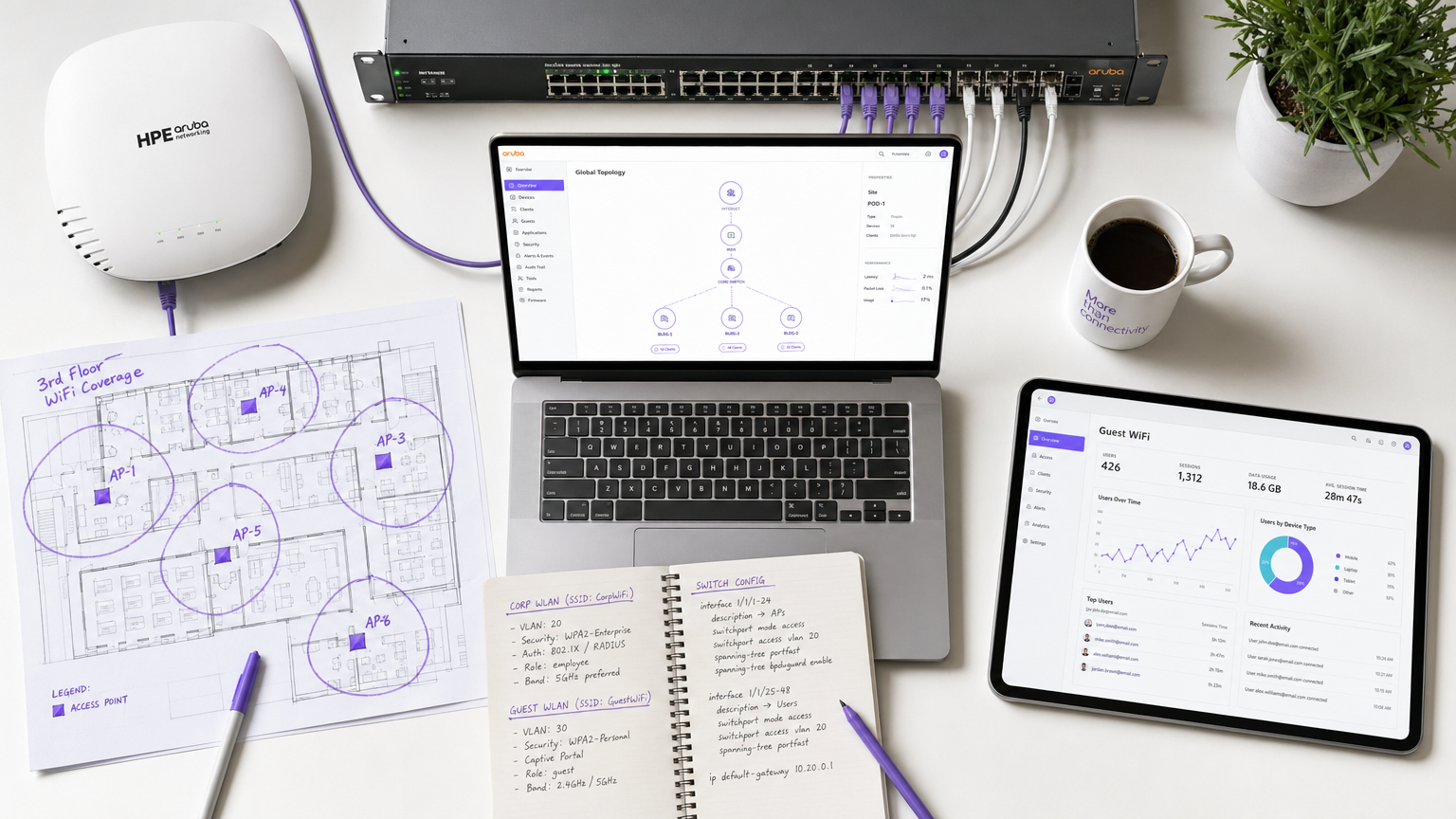
Executive Summary
HPE Aruba इंफ्रास्ट्रक्चर में भारी निवेश वाले एंटरप्राइज़ वातावरण के लिए, जटिल नेटवर्क एक्सेस नीतियों का प्रबंधन करते हुए एक सहज, डेटा-समृद्ध अतिथि WiFi अनुभव प्रदान करना एक महत्वपूर्ण वास्तुशिल्प चुनौती प्रस्तुत करता है। जबकि ClearPass Policy Manager कॉर्पोरेट उपकरणों के लिए नेटवर्क एक्सेस कंट्रोल (NAC) और IEEE 802.1X प्रमाणीकरण में उत्कृष्ट है, स्थल संचालकों को Purple WiFi द्वारा प्रदान की जाने वाली उन्नत captive portal, एनालिटिक्स और मार्केटिंग क्षमताओं की बढ़ती आवश्यकता है।
यह मार्गदर्शिका RADIUS प्रॉक्सी मॉडल का उपयोग करके Aruba ClearPass को Purple WiFi के साथ एकीकृत करने के लिए आर्किटेक्चर और परिनियोजन रणनीति का विवरण देती है। ClearPass को Purple के RADIUS-as-a-Service पर अतिथि प्रमाणीकरण अनुरोधों को प्रॉक्सी करने के लिए कॉन्फ़िगर करके, संगठन केंद्रीकृत सुरक्षा नीतियों को बनाए रख सकते हैं, डायनामिक रोल-आधारित VLAN असाइनमेंट लागू कर सकते हैं, और साथ ही Purple के मजबूत विज़िटर इनसाइट्स प्लेटफॉर्म का लाभ उठा सकते हैं। यह एकीकरण Retail , Hospitality , Healthcare , और Transport हब में बड़े पैमाने पर परिनियोजन के लिए महत्वपूर्ण है जहाँ अनुपालन, सुरक्षा और ग्राहक जुड़ाव को बिना किसी समझौते के सह-अस्तित्व में होना चाहिए। परिणाम एक ऐसा परिनियोजन है जहाँ ClearPass निर्णय लेता है, Purple संलग्न होता है, और Aruba लागू करता है।
Technical Deep-Dive
Architecture Overview
यह एकीकरण RFC 2865 (RADIUS) और RFC 5176 (Dynamic Authorisation Extensions) द्वारा समर्थित एक मानक RADIUS प्रॉक्सी आर्किटेक्चर पर निर्भर करता है। Aruba Mobility Controller या Instant AP क्लस्टर को सभी SSIDs के लिए ClearPass को अपने प्राथमिक RADIUS सर्वर के रूप में उपयोग करने के लिए कॉन्फ़िगर किया गया है। ClearPass कॉर्पोरेट 802.1X प्रमाणीकरण को Active Directory या एक आंतरिक प्रमाणपत्र प्राधिकरण के विरुद्ध स्थानीय रूप से संभालता है, लेकिन अतिथि प्रमाणीकरण अनुरोधों को Purple के क्लाउड RADIUS सर्वर पर अग्रेषित करने के लिए एक RADIUS Service Routing नीति के साथ कॉन्फ़िगर किया गया है।
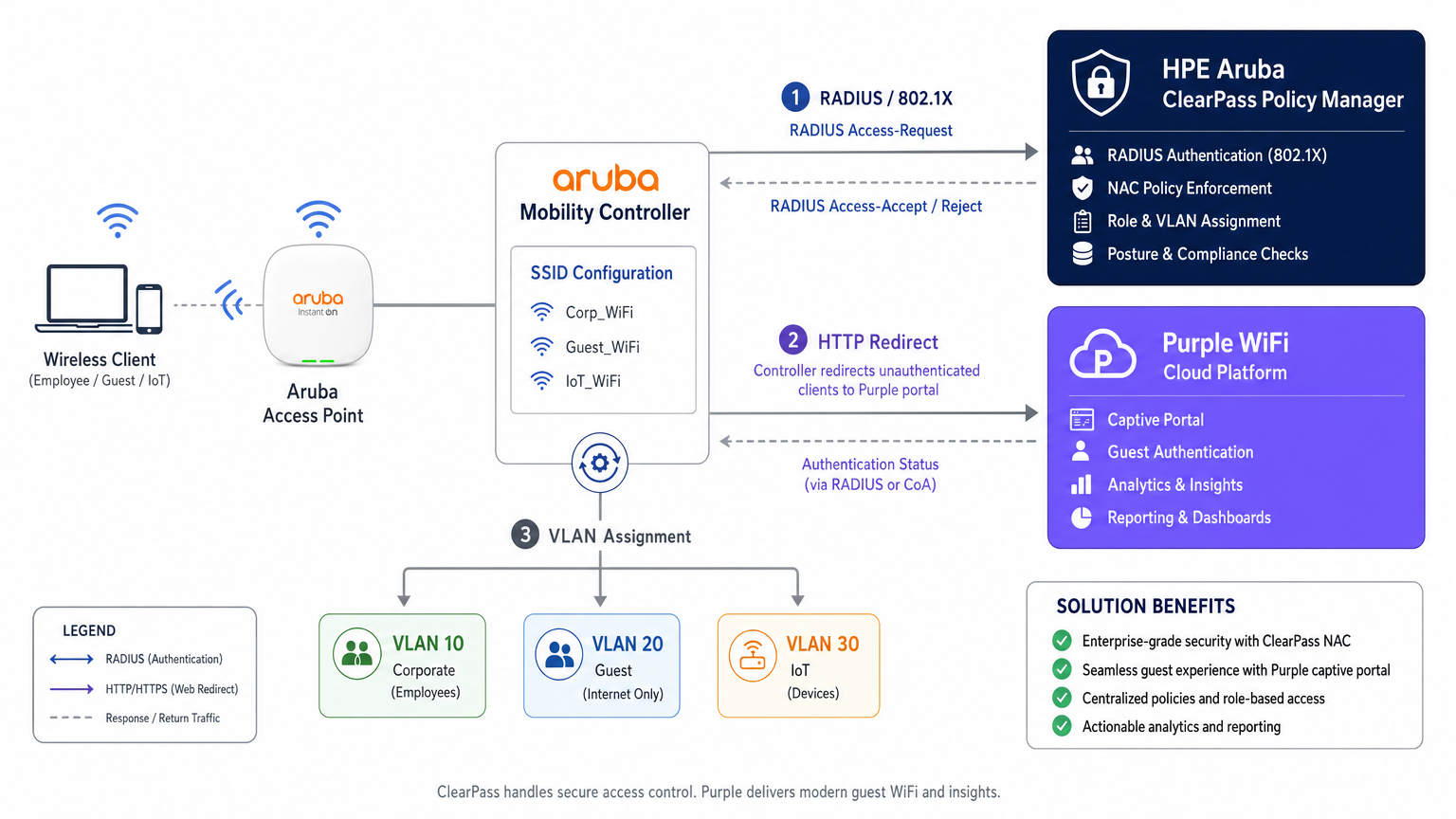
यह आर्किटेक्चर ClearPass में केंद्रीय नीति निर्णय बिंदु के रूप में निवेश को संरक्षित करता है, जबकि अतिथि अनुभव परत को पूरी तरह से Purple को सौंपता है। प्रत्येक प्रमाणीकरण घटना — कॉर्पोरेट या अतिथि — ClearPass के Access Tracker में लॉग की जाती है, जो एक एकीकृत ऑडिट ट्रेल प्रदान करती है जो PCI DSS v4.0 और GDPR Article 30 (Records of Processing Activities) के तहत अनुपालन आवश्यकताओं को पूरा करती है।
Authentication Flow: Step by Step
घटनाओं के सटीक अनुक्रम को समझना प्रारंभिक परिनियोजन और बाद के समस्या निवारण दोनों के लिए आवश्यक है। अतिथि डिवाइस के लिए प्रवाह इस प्रकार है।
| Step | Actor | Action |
|---|---|---|
| 1 | Guest Device | खुले Guest SSID से जुड़ता है |
| 2 | Aruba Controller | प्री-ऑथ IP असाइन करता है और डिवाइस को लॉगऑन रोल में रखता है |
| 3 | Guest Device | HTTP अनुरोध भेजता है (उदाहरण के लिए, http://example.com ) |
| 4 | Aruba Controller | इंटरसेप्ट करता है और HTTP 302 Purple पोर्टल URL पर रीडायरेक्ट करता है |
| 5 | Guest Device | walled garden के माध्यम से Purple captive portal लोड करता है |
| 6 | Guest User | प्रमाणित करता है (सोशल लॉगिन, फॉर्म, या OpenRoaming) |
| 7 | Purple Platform | Aruba Controller को RADIUS Access-Request भेजता है |
| 8 | Aruba Controller | RADIUS अनुरोध ClearPass को अग्रेषित करता है |
| 9 | ClearPass | अतिथि सेवा नियम से मेल खाता है, Purple RADIUS को प्रॉक्सी करता है |
| 10 | Purple RADIUS | Access-Accept लौटाता है |
| 11 | ClearPass | Aruba VSAs (User-Role) जोड़ता है, Accept अग्रेषित करता है |
| 12 | Aruba Controller | डिवाइस को पोस्ट-ऑथ रोल में ले जाता है, अतिथि VLAN असाइन करता है |
captive portal डिटेक्शन मैकेनिज्म का व्यवहार — विशेष रूप से Apple का Captive Network Assistant (CNA), Android का कनेक्टिविटी चेक, और Microsoft NCSI — इस बात पर सीधा असर डालता है कि पोर्टल सही ढंग से लोड होता है या नहीं। इन OS-स्तर के व्यवहारों के विस्तृत विवरण के लिए, Apple CNA, Android Connectivity Check, Microsoft NCSI: How Captive Portal Detection Actually Works देखें।
Dynamic VLAN Assignment and ClearPass Role Mapping
नेटवर्क सेगमेंटेशन PCI DSS अनुपालन और सुदृढ़ सुरक्षा आर्किटेक्चर के लिए एक गैर-परक्राम्य आवश्यकता है।
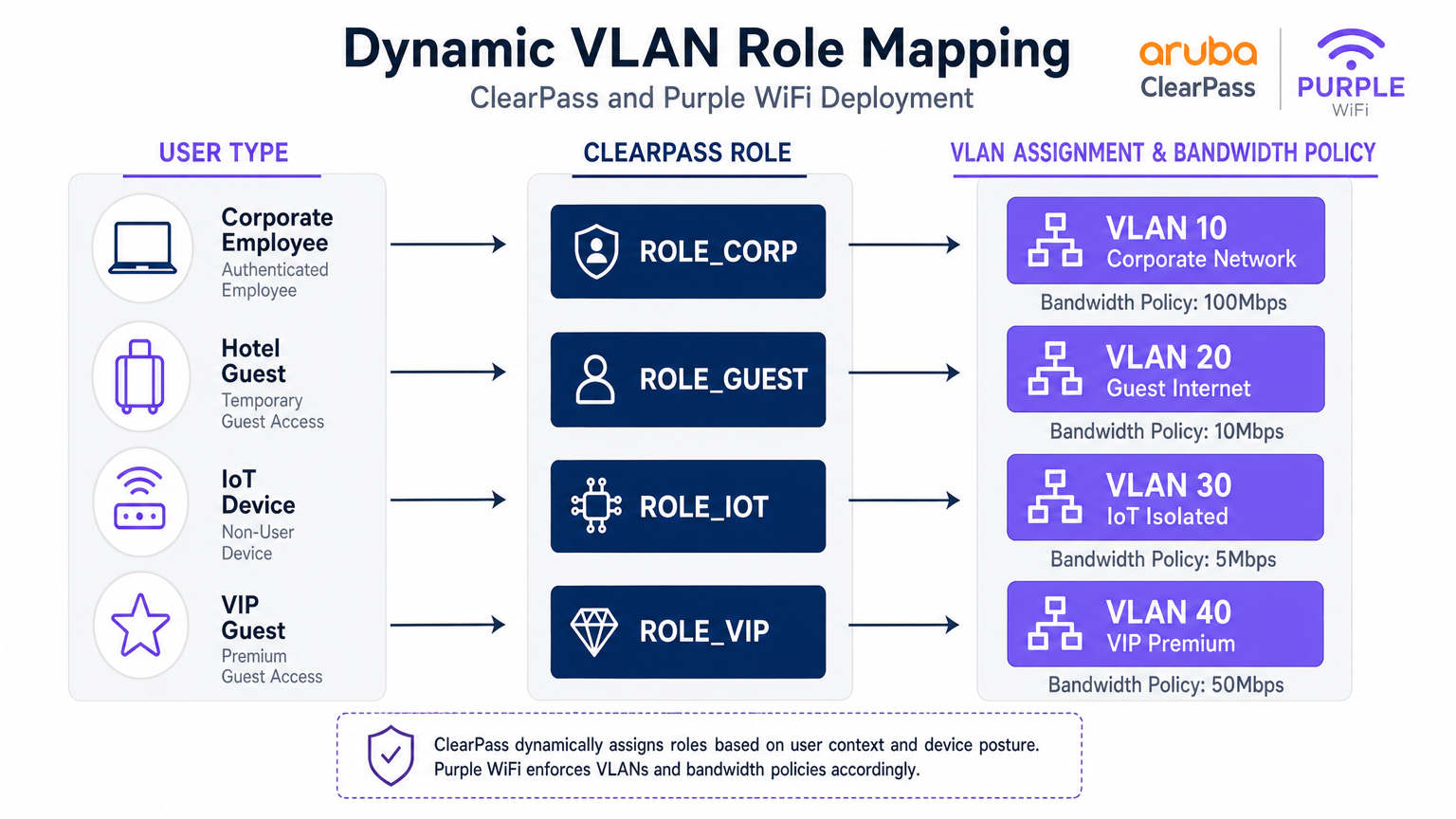
जब ClearPass एक प्रमाणीकरण अनुरोध को संसाधित करता है, तो यह प्रासंगिक विशेषताओं — उपयोगकर्ता पहचान, डिवाइस प्रकार (DHCP फ़िंगरप्रिंटिंग या HTTP User-Agent के माध्यम से प्रोफाइल किया गया), दिन का समय, और कनेक्शन स्थान — का मूल्यांकन करता है और एक Role असाइन करता है। यह Role तब एक Enforcement Profile से मैप किया जाता है जो Aruba कंट्रोलर को विशिष्ट RADIUS विशेषताएँ लौटाता है, सबसे महत्वपूर्ण रूप से Aruba-User-Role Vendor-Specific Attribute (VSA, Vendor ID 14823, Attribute 1)।
Aruba कंट्रोलर प्रत्येक User-Role को एक VLAN और स्टेटफुल फ़ायरवॉल नीतियों के एक सेट से मैप करता है। एक बड़े स्थल के लिए एक प्रतिनिधि सेगमेंटेशन मॉडल नीचे दिखाया गया है।
| User Type | ClearPass Role | VLAN | बैंडविड्थ नीति | फ़ायरवॉल नीति |
|---|---|---|---|---|
| Corporate Employee | ROLE_CORP | 10 | 100 Mbps | पूर्ण आंतरिक पहुँच |
| Standard Guest | ROLE_GUEST | 20 | 10 Mbps | केवल इंटरनेट |
| IoT Device | ROLE_IOT | 30 | 5 Mbps | केवल स्थानीय, कोई इंटरनेट नहीं |
| VIP / Premium Guest | ROLE_VIP | 40 | 50 Mbps | इंटरनेट + चुनिंदा सेवाएँ |
| Contractor | ROLE_CONTRACTOR | 50 | 20 Mbps | सीमित आंतरिक पहुँच |
RADIUS Proxy Configuration in ClearPass
ClearPass Policy Manager में RADIUS प्रॉक्सी कॉन्फ़िगरेशन के लिए तीन घटकों की आवश्यकता होती है: एक RADIUS Proxy Target (Purple के RADIUS सर्वर एंडपॉइंट्स को परिभाषित करना), एक Service Routing Policy (यह परिभाषित करना कि किन अनुरोधों को प्रॉक्सी करना है), और एक Enforcement Profile (यह परिभाषित करना कि वापसी पथ पर जोड़ने के लिए VSAs)।
प्रॉक्सी टारगेट को Administration > External Servers > RADIUS Servers के तहत कॉन्फ़िगर किया गया है। Purple के RADIUS IP पते (Purple पोर्टल पर Hardware > RADIUS Settings के तहत उपलब्ध), साझा रहस्य, और प्रमाणीकरण पोर्ट (UDP 1812) और अकाउंटिंग पोर्ट (UDP 1813) जोड़ें।
सेवा को Configuration > Services के तहत कॉन्फ़िगर किया गया है। RADIUS Proxy प्रकार के साथ एक नई सेवा बनाएँ। Service Rules के तहत, अतिथि ट्रैफ़िक की पहचान करने के लिए Called-Station-ID (SSID नाम) या NAS-Identifier से मेल खाने वाली एक शर्त जोड़ें। Authentication के तहत, ऊपर बनाए गए RADIUS Proxy Target का चयन करें।
महत्वपूर्ण रूप से, सुनिश्चित करें कि RADIUS Accounting भी Purple को प्रॉक्सी किया गया है। Purple अपने WiFi Analytics प्लेटफ़ॉर्म में सत्र की अवधि, डेटा खपत और वास्तविक समय की उपस्थिति डेटा को भरने के लिए अकाउंटिंग डेटा (Acct-Start, Acct-Interim-Update, Acct-Stop) का उपयोग करता है। अकाउंटिंग को छोड़ना एक सामान्य परिनियोजन त्रुटि है जिसके परिणामस्वरूप अपूर्ण एनालिटिक्स डैशबोर्ड होते हैं।
कार्यान्वयन मार्गदर्शिका
चरण 1: Aruba कंट्रोलर कॉन्फ़िगरेशन
चरण 1 — ClearPass को RADIUS सर्वर के रूप में परिभाषित करें। Configuration > Security > Authentication Servers पर नेविगेट करें। ClearPass के प्राथमिक और द्वितीयक IP पते जोड़ें। साझा रहस्य, प्रमाणीकरण पोर्ट (1812), और अकाउंटिंग पोर्ट (1813) सेट करें। Purple के क्लाउड इन्फ्रास्ट्रक्चर में प्रॉक्सी हॉप के लिए 10 सेकंड का टाइमआउट और 3 रिट्राई कॉन्फ़िगर करें।
चरण 2 — अतिथि SSID कॉन्फ़िगर करें। अतिथि पहुँच के लिए एक नया SSID प्रोफ़ाइल बनाएँ। सुरक्षा मोड को Open या WPA3-SAE पर सेट करें (GDPR अनुपालन के लिए अनुशंसित)। AAA प्रोफ़ाइल के तहत, प्रारंभिक भूमिका को एक पूर्व-परिभाषित लॉगऑन भूमिका पर सेट करें जिसमें केवल वॉल्ड गार्डन पहुँच हो।
चरण 3 — Captive Portal प्रोफ़ाइल कॉन्फ़िगर करें। Purple के स्प्लैश पेज URL की ओर इशारा करते हुए एक Captive Portal प्रोफ़ाइल बनाएँ। यह URL Purple पोर्टल पर Locations > [Your Venue] > Splash Page URL के तहत प्राप्त किया जाता है। प्रमाणीकरण के बाद मूल URL पर रीडायरेक्ट करने का विकल्प सक्षम करें।
चरण 4 — वॉल्ड गार्डन कॉन्फ़िगर करें। यह सबसे अधिक परिचालन संवेदनशील कदम है। वॉल्ड गार्डन में Purple के पोर्टल डोमेन, CDN एंडपॉइंट्स और सभी सोशल लॉगिन प्रदाता डोमेन शामिल होने चाहिए। न्यूनतम रूप से, शामिल करें:
*.purple.aiऔर*.purple-portal.com*.facebook.com,*.fbcdn.net(Facebook लॉगिन के लिए)*.google.com,*.googleapis.com(Google लॉगिन के लिए)- Apple का CNA चेक एंडपॉइंट:
captive.apple.com - Microsoft NCSI:
www.msftconnecttest.com
चरण 5 — पोस्ट-प्रमाणीकरण भूमिकाएँ परिभाषित करें। उन भूमिकाओं को बनाएँ जिन्हें ClearPass प्रमाणीकरण के बाद असाइन करेगा (उदाहरण के लिए, guest-authenticated)। प्रत्येक भूमिका एक VLAN और एक फ़ायरवॉल नीति से मैप होती है जो केवल इंटरनेट पहुँच की अनुमति देती है।
चरण 2: ClearPass पॉलिसी मैनेजर कॉन्फ़िगरेशन
चरण 1 — Aruba कंट्रोलर को नेटवर्क डिवाइस के रूप में जोड़ें। Configuration > Network > Devices के तहत, प्रत्येक Aruba कंट्रोलर को उसके प्रबंधन IP, साझा रहस्य और विक्रेता (Aruba Networks) के साथ जोड़ें।
चरण 2 — Purple को RADIUS प्रॉक्सी टारगेट के रूप में जोड़ें। Administration > External Servers > RADIUS Servers के तहत, Purple पोर्टल में प्रदान किए गए साझा रहस्य के साथ Purple के RADIUS एंडपॉइंट्स जोड़ें।
चरण 3 — अतिथि प्रमाणीकरण सेवा बनाएँ। Configuration > Services के तहत, एक नई सेवा बनाएँ। सेवा प्रकार को RADIUS Proxy पर सेट करें। अतिथि SSID से मेल खाने के लिए Service Rules कॉन्फ़िगर करें (उदाहरण के लिए, Called-Station-SSID EQUALS GuestWiFi)। Authentication के तहत, Purple RADIUS Proxy Target का चयन करें।
चरण 4 — प्रवर्तन प्रोफ़ाइल बनाएँ। Configuration > Enforcement > Profiles के तहत, एक RADIUS प्रवर्तन प्रोफ़ाइल बनाएँ। Aruba-User-Role विशेषता को guest-authenticated मान के साथ जोड़ें। यह Aruba कंट्रोलर को उपयोगकर्ता को पोस्ट-प्रमाणीकरण अतिथि भूमिका में ले जाने का निर्देश देता है।
चरण 5 — अकाउंटिंग प्रॉक्सी कॉन्फ़िगर करें। सुनिश्चित करें कि सेवा को Purple के अकाउंटिंग सर्वर (UDP 1813) पर RADIUS Accounting को प्रॉक्सी करने के लिए भी कॉन्फ़िगर किया गया है।
चरण 3: Purple प्लेटफ़ॉर्म कॉन्फ़िगरेशन
चरण 1 — हार्डवेयर पंजीकृत करें। Purple पोर्टल में, Locations > Hardware पर नेविगेट करें। Aruba कंट्रोलर का सार्वजनिक IP पता या NAS-Identifier जोड़ें। यह Purple को प्रमाणीकरण अनुरोधों को सही स्थान से जोड़ने की अनुमति देता है।
चरण 2 — स्प्लैश पेज कॉन्फ़िगर करें। Purple के पोर्टल बिल्डर का उपयोग करके Captive Portal अनुभव डिज़ाइन करें। GDPR के अनुपालन में प्रमाणीकरण विधियों, नियमों और शर्तों, और मार्केटिंग ऑप्ट-इन फ़ील्ड्स को कॉन्फ़िगर करें।
चरण 3 — RADIUS क्रेडेंशियल प्राप्त करें। Locations > [Venue] > RADIUS Settings के तहत, RADIUS सर्वर IP पते, साझा रहस्य और पोर्ट प्राप्त करें। इन मानों का उपयोग ClearPass Proxy Target कॉन्फ़िगरेशन में करें।
सर्वोत्तम अभ्यास
वॉल्ड गार्डन रखरखाव। वॉल्ड गार्डन को एक जीवंत कॉन्फ़िगरेशन के रूप में मानें। सोशल लॉगिन प्रदाता नियमित रूप से अपने CDN डोमेन और IP रेंज को अपडेट करते हैं। एक त्रैमासिक समीक्षा प्रक्रिया स्थापित करें और प्रमुख प्रदाताओं से परिवर्तन सूचनाओं की सदस्यता लें।
RADIUS अतिरेक। फेलओवर के लिए ClearPass में Purple के दोनों RADIUS सर्वर IP कॉन्फ़िगर करें। इसी तरह, प्रमाणीकरण पथ में विफलता के एकल बिंदुओं को खत्म करने के लिए ClearPass को एक सब्सक्राइबर/पब्लिशर क्लस्टर में तैनात करें।
अकाउंटिंग अखंडता। सत्यापित करें कि प्रत्येक सत्र के लिए Purple द्वारा RADIUS अकाउंटिंग स्टॉप रिकॉर्ड प्राप्त किए जा रहे हैं। अनाथ सत्र (स्टॉप के बिना स्टार्ट) एक नेटवर्क समस्या का संकेत देते हैं और एनालिटिक्स डेटा को विकृत करेंगे।
802.1X के लिए प्रमाणपत्र प्रबंधन। EAP-TLS या PEAP का उपयोग करने वाले कॉर्पोरेट SSIDs के लिए, सुनिश्चित करें कि सर्वर प्रमाणपत्र समाप्ति से काफी पहले नवीनीकृत किए गए हैं। एक समाप्त प्रमाणपत्र सभी कॉर्पोरेट उपकरणों को एक साथ लॉक कर देगा — एक उच्च-प्रभाव वाली घटना।
IoT डिवाइस प्रोफाइलिंग। OUI और DHCP फ़िंगरप्रिंट द्वारा IoT उपकरणों को स्वचालित रूप से वर्गीकृत करने के लिए ClearPass Device Insight या अंतर्निहित प्रोफाइलिंग इंजन का लाभ उठाएँ। यह मैन्युअल MAC पते प्रबंधन के बिना स्वचालित VLAN असाइनमेंट को सक्षम बनाता है।
GDPR अनुपालन। Purple अतिथि प्रमाणीकरण के दौरान व्यक्तिगत डेटा (ईमेल, नाम, सोशल प्रोफ़ाइल) कैप्चर करता है। सुनिश्चित करें कि आपके Purple स्प्लैश पेज में एक अनुपालन गोपनीयता सूचना औरकि Purple पोर्टल में डेटा प्रतिधारण नीतियां आपके संगठन के GDPR दायित्वों के अनुरूप हैं।
समस्या निवारण और जोखिम न्यूनीकरण
Captive Portal प्रदर्शित नहीं हो रहा है
लक्षण: क्लाइंट गेस्ट SSID से कनेक्ट होता है लेकिन कोई पोर्टल दिखाई नहीं देता; डिवाइस "कनेक्टेड, नो इंटरनेट" दिखाता है।
निदान: कंट्रोलर अपलिंक पर एक पैकेट कैप्चर का उपयोग करके सत्यापित करें कि पोर्टल URL के लिए DNS क्वेरीज़ हल हो रही हैं और HTTP ट्रैफ़िक को इंटरसेप्ट किया जा रहा है। जांचें कि CNA/NCSI चेक एंडपॉइंट्स वॉल्ड गार्डन में हैं।
समाधान: वॉल्ड गार्डन में छूटे हुए डोमेन जोड़ें। सत्यापित करें कि Captive Portal प्रोफ़ाइल गेस्ट SSID AAA प्रोफ़ाइल के साथ सही ढंग से संबद्ध है।
मौन प्रमाणीकरण विफलताएँ
लक्षण: उपयोगकर्ता पोर्टल फ़ॉर्म पूरा करता है, लेकिन नेटवर्क एक्सेस अस्वीकृत हो जाता है। ClearPass Access Tracker एक Access-Reject दिखाता है।
निदान: Access Tracker एंट्री खोलें और प्रमाणीकरण विफलता के कारण की जांच करें। सामान्य कारण RADIUS साझा रहस्य बेमेल, Purple RADIUS सर्वर का अगम्य होना, या गलत सेवा से मेल खाने वाला गलत Service Rule हैं।
समाधान: Aruba कंट्रोलर-से-ClearPass और ClearPass-से-Purple दोनों चरणों पर साझा रहस्यों को सत्यापित करें। radtest का उपयोग करके ClearPass सर्वर से Purple RADIUS की पहुंच का परीक्षण करें।
गलत VLAN असाइनमेंट
लक्षण: अतिथि सफलतापूर्वक प्रमाणित होता है लेकिन कॉर्पोरेट सबनेट (VLAN 10) में एक IP पता प्राप्त करता है।
समाधान: ClearPass Enforcement Profile में Aruba-User-Role मान Aruba कंट्रोलर पर परिभाषित भूमिका नाम से बिल्कुल मेल खाता है (केस सहित) सत्यापित करें। यह पुष्टि करने के लिए ClearPass Access Tracker आउटपुट विशेषताओं की जांच करें कि VSA भेजा जा रहा है।
RADIUS टाइमआउट त्रुटियाँ
लक्षण: प्रमाणीकरण रुक-रुक कर विफल होता है, खासकर लोड के तहत। Access Tracker टाइमआउट त्रुटियाँ दिखाता है।
समाधान: Aruba कंट्रोलर पर RADIUS सर्वर टाइमआउट को 10 सेकंड तक बढ़ाएँ। सत्यापित करें कि UDP पोर्ट 1812 और 1813 खुले हैं और ClearPass और Purple के क्लाउड इन्फ्रास्ट्रक्चर के बीच फ़ायरवॉल पर दर सीमितता के अधीन नहीं हैं।
ROI और व्यावसायिक प्रभाव
इस एकीकृत आर्किटेक्चर को तैनात करने से IT, सुरक्षा और वाणिज्यिक कार्यों में मापने योग्य प्रतिफल मिलते हैं। सुरक्षा और अनुपालन के दृष्टिकोण से, ClearPass में सभी प्रमाणीकरण घटनाओं को केंद्रीकृत करना एक एकीकृत ऑडिट ट्रेल प्रदान करता है जो PCI DSS और GDPR अनुपालन रिपोर्टिंग को सरल बनाता है। डायनामिक VLAN सेगमेंटेशन कॉर्पोरेट इन्फ्रास्ट्रक्चर से अतिथि ट्रैफ़िक के गुजरने के जोखिम को समाप्त करता है, जिससे हमले की सतह सीधे कम हो जाती है।
एक वाणिज्यिक दृष्टिकोण से, Purple का Guest WiFi प्लेटफ़ॉर्म गेस्ट नेटवर्क को एक लागत केंद्र से फर्स्ट-पार्टी डेटा एसेट में बदल देता है। प्रत्येक प्रमाणित अतिथि सत्र ऑप्ट-इन मार्केटिंग डेटा — ईमेल पते, विज़िट आवृत्ति, ठहरने का समय और डिवाइस प्रकार — उत्पन्न करता है जो सीधे CRM और मार्केटिंग ऑटोमेशन प्लेटफ़ॉर्म में फ़ीड होता है। मौजूदा Aruba इन्फ्रास्ट्रक्चर के साथ Purple को तैनात करने वाले स्थान लगातार ईमेल सूची वृद्धि, बार-बार विज़िट दरों और अभियान रूपांतरण में मापने योग्य सुधारों की रिपोर्ट करते हैं।
यह एकीकरण मौजूदा ClearPass लाइसेंस या Aruba हार्डवेयर को बदलने की आवश्यकता को भी समाप्त करता है, जिससे यह मौजूदा इन्फ्रास्ट्रक्चर निवेश के लिए एक कम जोखिम वाला, उच्च-प्रतिफल वाला अतिरिक्त बन जाता है। कई साइटों का प्रबंधन करने वाले संगठनों के लिए — एक खुदरा श्रृंखला, एक होटल समूह, या एक विश्वविद्यालय परिसर — Purple का केंद्रीकृत प्रबंधन पोर्टल क्रॉस-साइट एनालिटिक्स प्रदान करता है जो ClearPass अकेले प्रदान नहीं कर सकता।
उन वातावरणों के लिए जहाँ भौतिक आगंतुक व्यवहार को समझना नेटवर्क सुरक्षा जितना ही महत्वपूर्ण है — जैसे बड़े खुदरा फ़्लोर या परिवहन हब — Purple के एनालिटिक्स Indoor Positioning System डेटा के साथ स्वाभाविक रूप से एकीकृत होते हैं ताकि कनेक्टिविटी मेट्रिक्स के साथ स्थानिक बुद्धिमत्ता प्रदान की जा सके।
मुख्य शब्द और परिभाषाएं
RADIUS Proxy
A configuration where a RADIUS server (ClearPass) forwards authentication requests to another RADIUS server (Purple) based on specific matching criteria, such as the SSID name or NAS-Identifier.
Used when an organisation wants to maintain a single NAC solution internally while utilising a third-party cloud service for guest authentication. The proxy preserves the central audit log in ClearPass while delegating the authentication decision to Purple.
Change of Authorization (CoA)
A RADIUS extension defined in RFC 5176 that allows a RADIUS server to dynamically modify the session authorisation attributes of an active client connection without requiring the client to disconnect.
Critical for captive portal deployments. CoA allows Purple to signal the Aruba controller to transition a user from the pre-authentication logon role to the post-authentication guest role the moment the user completes the portal form.
Walled Garden
A pre-authentication access control list on the Aruba controller that permits unauthenticated devices to reach specific IP addresses and domains required for the captive portal to function.
If the device cannot reach the portal URL, social login provider endpoints, or OS-level captive portal detection URLs (Apple CNA, Microsoft NCSI), the portal will fail to load. This is the most common source of captive portal deployment failures.
Vendor-Specific Attribute (VSA)
Custom RADIUS attributes defined by network equipment vendors (Vendor ID 14823 for Aruba) to extend the standard RADIUS protocol with proprietary instructions.
The Aruba-User-Role VSA (Attribute 1) is the primary mechanism by which ClearPass instructs the Aruba controller which role to assign to an authenticated user. The value must exactly match a role defined on the controller.
Dynamic VLAN Assignment
The process of placing a user or device into a specific VLAN based on their authenticated identity or assigned role, rather than the physical port or SSID they connected to.
Enables venue operators to broadcast a single guest SSID while securely segmenting standard guests, VIP guests, IoT devices, and contractors onto separate, isolated network segments — a requirement for PCI DSS compliance.
Enforcement Profile
A ClearPass configuration object that defines the specific RADIUS attributes and values to return to the network device when a device successfully matches an authentication service.
This is where the business logic of 'if guest, then assign guest role' is translated into specific RADIUS VSAs sent to the Aruba controller. A misconfigured Enforcement Profile is a common cause of incorrect VLAN assignment.
Captive Network Assistant (CNA)
The mini-browser built into iOS, macOS, Android, and Windows that automatically detects a captive portal by making HTTP requests to known endpoints and prompts the user to authenticate.
Understanding CNA behaviour is essential for troubleshooting portal display issues on specific device types. The CNA endpoints (captive.apple.com, www.msftconnecttest.com) must be in the walled garden.
Access Tracker
The real-time diagnostic tool within ClearPass Policy Manager that logs every RADIUS authentication and accounting event, including the request attributes, matched service, applied enforcement profile, and result.
The first diagnostic tool to consult when troubleshooting authentication failures or incorrect role assignments. It provides a complete record of what ClearPass received, what decision it made, and what it returned to the network device.
RADIUS-as-a-Service (RaaS)
A cloud-delivered RADIUS authentication service where the RADIUS server infrastructure is managed and hosted by a third-party provider rather than on-premises.
Purple's RADIUS-as-a-Service eliminates the need for venues to deploy and manage their own RADIUS infrastructure for guest authentication, while integrating with existing on-premises NAC solutions like ClearPass via the proxy architecture described in this guide.
केस स्टडीज
A 500-room hotel group with Aruba controllers and ClearPass deployed centrally needs to provide secure 802.1X WiFi for staff, a branded captive portal for guests, and isolated connectivity for IoT devices (smart TVs, thermostats, door locks). How should they architect the authentication flow?
Deploy three SSIDs: Hotel_Corp (802.1X, WPA2-Enterprise), Hotel_Guest (open SSID with captive portal redirect), and Hotel_IoT (open SSID with MAC-based authentication). All three SSIDs point to ClearPass as the RADIUS server. In ClearPass, create three Services: Service 1 matches Hotel_Corp and authenticates against Active Directory via PEAP-MSCHAPv2, returning ROLE_CORP (VLAN 10, full internal access). Service 2 matches Hotel_Guest and uses a RADIUS Routing Policy to proxy requests to Purple's RADIUS servers; the Enforcement Profile returns Aruba-User-Role = guest-authenticated (VLAN 20, internet only, 10 Mbps). Service 3 matches Hotel_IoT and uses ClearPass Device Profiling to classify devices by OUI; the Enforcement Profile returns ROLE_IOT (VLAN 30, local only, no internet). The walled garden on the Aruba controller includes Purple's portal domains, Facebook, Google, and Apple's CNA endpoint.
A retail chain is rolling out Purple across 120 stores, all running Aruba Instant APs. Guest authentication latency is high and portal drop-offs are occurring. Preliminary investigation shows the RADIUS timeout is set to the default 3 seconds.
Increase the RADIUS server timeout on all Aruba Instant APs to 10 seconds and configure 3 retries. Deploy both of Purple's RADIUS server IPs as primary and secondary servers in the Instant AP configuration to provide failover. Review the walled garden configuration to ensure all social login provider domains are included, as incomplete walled gardens cause the portal page to load slowly or partially, increasing perceived latency. Enable RADIUS Accounting on the Instant APs to ensure Purple receives session data. Finally, review the Purple portal design to minimise the number of external resource calls (fonts, images) that must load before the authentication form is displayed.
परिदृश्य विश्लेषण
Q1. Your deployment requires guests to authenticate via Facebook login. The Purple portal loads, but when users tap the Facebook button, the page times out and returns an error. Corporate 802.1X authentication is working correctly. What is the most likely cause and how do you resolve it?
💡 संकेत:Consider what the device is permitted to access before it has completed authentication. The portal page loaded, so the portal domain is in the walled garden — but what about the resources the portal needs to call?
अनुशंसित दृष्टिकोण दिखाएं
The walled garden configuration on the Aruba controller is missing the required Facebook authentication domains and CDN endpoints (*.facebook.com, *.fbcdn.net, *.facebook.net). Pre-authentication traffic to Facebook's OAuth servers is being blocked by the controller's default-deny policy. Resolution: add the missing Facebook domains to the walled garden. Also verify that Google's domains are included if Google login is also offered. Use a browser developer tools network trace from a test device to identify any additional blocked domains.
Q2. You want to use a single SSID ('VenueWiFi') for both corporate employees (802.1X) and guests (captive portal via Purple). How do you configure ClearPass to correctly differentiate and route the two authentication types?
💡 संकेत:ClearPass Services are matched in priority order. Consider how 802.1X and MAC-Auth requests differ at the RADIUS protocol level, and how Service Rules can exploit this difference.
अनुशंसित दृष्टिकोण दिखाएं
Create two ClearPass Services, both matching the SSID 'VenueWiFi'. Service 1 (higher priority) uses a Service Rule matching on the RADIUS attribute 'Service-Type EQUALS Framed-User' or the presence of EAP attributes, identifying 802.1X requests. It authenticates against Active Directory and returns ROLE_CORP. Service 2 (lower priority) matches MAC-Auth requests (Service-Type EQUALS Call-Check or Authenticate-Only). It uses a RADIUS Routing Policy to proxy the request to Purple. The Enforcement Profile for Service 2 returns the pre-auth logon role, triggering the captive portal. When Purple sends the post-authentication RADIUS request, it is matched by Service 2 and returns the guest-authenticated role.
Q3. Guest authentication is successful — the Purple dashboard shows the user as active and the ClearPass Access Tracker shows an Access-Accept. However, the user cannot access the internet and the Aruba controller shows the user is still in the 'logon' role. What are the two most likely causes?
💡 संकेत:The authentication succeeded and ClearPass sent an Accept. The problem is therefore in what ClearPass sent back, or in how the Aruba controller interpreted it.
अनुशंसित दृष्टिकोण दिखाएं
Cause 1: The ClearPass Enforcement Profile is not configured to return the Aruba-User-Role VSA, or is returning an empty value. Check the Enforcement Profile and verify the VSA is explicitly set. Cause 2: The Aruba-User-Role value returned by ClearPass does not exactly match (including capitalisation) a role defined on the Aruba controller. For example, ClearPass returns 'guest-authenticated' but the controller has 'Guest-Authenticated' defined. Resolution: Open the ClearPass Access Tracker entry, expand the Output Attributes section, and verify the Aruba-User-Role value. Then cross-reference this value against the role names defined on the Aruba controller under Configuration > Roles.
Q4. A stadium venue wants to offer tiered guest WiFi: a free tier with 5 Mbps and mandatory portal authentication, and a premium tier with 50 Mbps for ticket holders who have pre-registered. Both tiers use the same SSID. How would you architect this using ClearPass and Purple?
💡 संकेत:Think about how ClearPass can differentiate between the two user types post-authentication, and how Purple can pass identity information to ClearPass to enable this differentiation.
अनुशंसित दृष्टिकोण दिखाएं
Configure Purple to pass a user attribute (e.g., a custom RADIUS attribute or the Class attribute) indicating whether the user is a registered ticket holder. In ClearPass, create a Role Mapping Policy that checks this attribute: if present and valid, assign ROLE_VIP; otherwise assign ROLE_GUEST. Create two Enforcement Profiles: ROLE_GUEST returns Aruba-User-Role = guest-standard (VLAN 20, 5 Mbps bandwidth contract); ROLE_VIP returns Aruba-User-Role = guest-premium (VLAN 40, 50 Mbps). On the Aruba controller, define both roles with the appropriate VLAN and bandwidth contracts. This approach uses a single SSID and single Purple portal while delivering differentiated service levels based on user identity.




