

Aruba ClearPass e Purple WiFi: Guida all'integrazione e alla distribuzione
Questa guida fornisce un riferimento tecnico completo per l'integrazione di HPE Aruba ClearPass Policy Manager con la piattaforma Purple WiFi, coprendo l'architettura proxy RADIUS, la configurazione del Captive Portal e la mappatura dinamica dei ruoli VLAN. È progettata per i responsabili IT e gli architetti di rete in ambienti fortemente basati su Aruba che necessitano di mantenere ClearPass per il NAC pur implementando Purple per l'autenticazione degli ospiti e l'analisi. L'implementazione di questa integrazione colma una lacuna critica tra i fornitori, consentendo sicurezza e conformità di livello aziendale insieme alle capacità di intelligence sui visitatori leader di mercato di Purple.
🎧 Ascolta questa guida
Visualizza trascrizione
Riepilogo Esecutivo
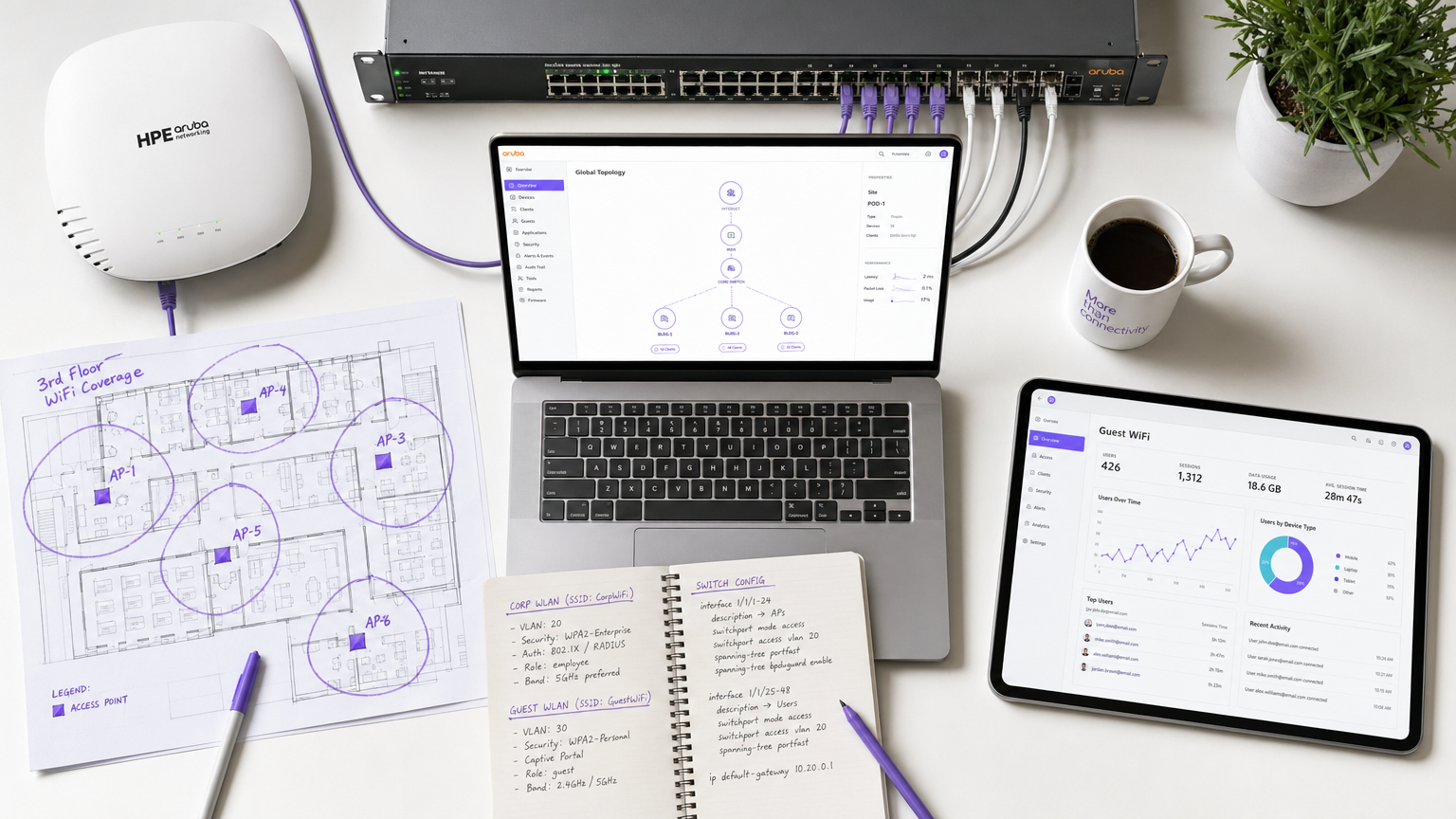
Per gli ambienti aziendali che hanno investito massicciamente nell'infrastruttura HPE Aruba, la gestione di complesse politiche di accesso alla rete, offrendo al contempo un'esperienza guest WiFi fluida e ricca di dati, presenta una sfida architettonica significativa. Mentre ClearPass Policy Manager eccelle nel Network Access Control (NAC) e nell'autenticazione IEEE 802.1X per i dispositivi aziendali, gli operatori di sedi richiedono sempre più le funzionalità avanzate di Captive Portal, analisi e marketing fornite da Purple WiFi.
Questa guida descrive in dettaglio l'architettura e la strategia di distribuzione per l'integrazione di Aruba ClearPass con Purple WiFi utilizzando un modello proxy RADIUS. Configurando ClearPass per fungere da proxy per le richieste di autenticazione degli ospiti verso il RADIUS-as-a-Service di Purple, le organizzazioni possono mantenere politiche di sicurezza centralizzate, applicare assegnazioni VLAN dinamiche basate sui ruoli e sfruttare contemporaneamente la robusta piattaforma di insight sui visitatori di Purple. Questa integrazione è fondamentale per implementazioni su larga scala in Retail , Hospitality , Healthcare e hub di Transport dove conformità, sicurezza e coinvolgimento del cliente devono coesistere senza compromessi. Il risultato è una distribuzione in cui ClearPass decide, Purple coinvolge e Aruba applica.
Approfondimento Tecnico
Panoramica dell'Architettura
L'integrazione si basa su un'architettura proxy RADIUS standard supportata da RFC 2865 (RADIUS) e RFC 5176 (Dynamic Authorisation Extensions). L'Aruba Mobility Controller o il cluster Instant AP è configurato per utilizzare ClearPass come server RADIUS primario per tutti gli SSID. ClearPass gestisce l'autenticazione aziendale 802.1X localmente rispetto ad Active Directory o a un'autorità di certificazione interna, ma è configurato con una politica di routing del servizio RADIUS per inoltrare le richieste di autenticazione degli ospiti ai server RADIUS cloud di Purple.
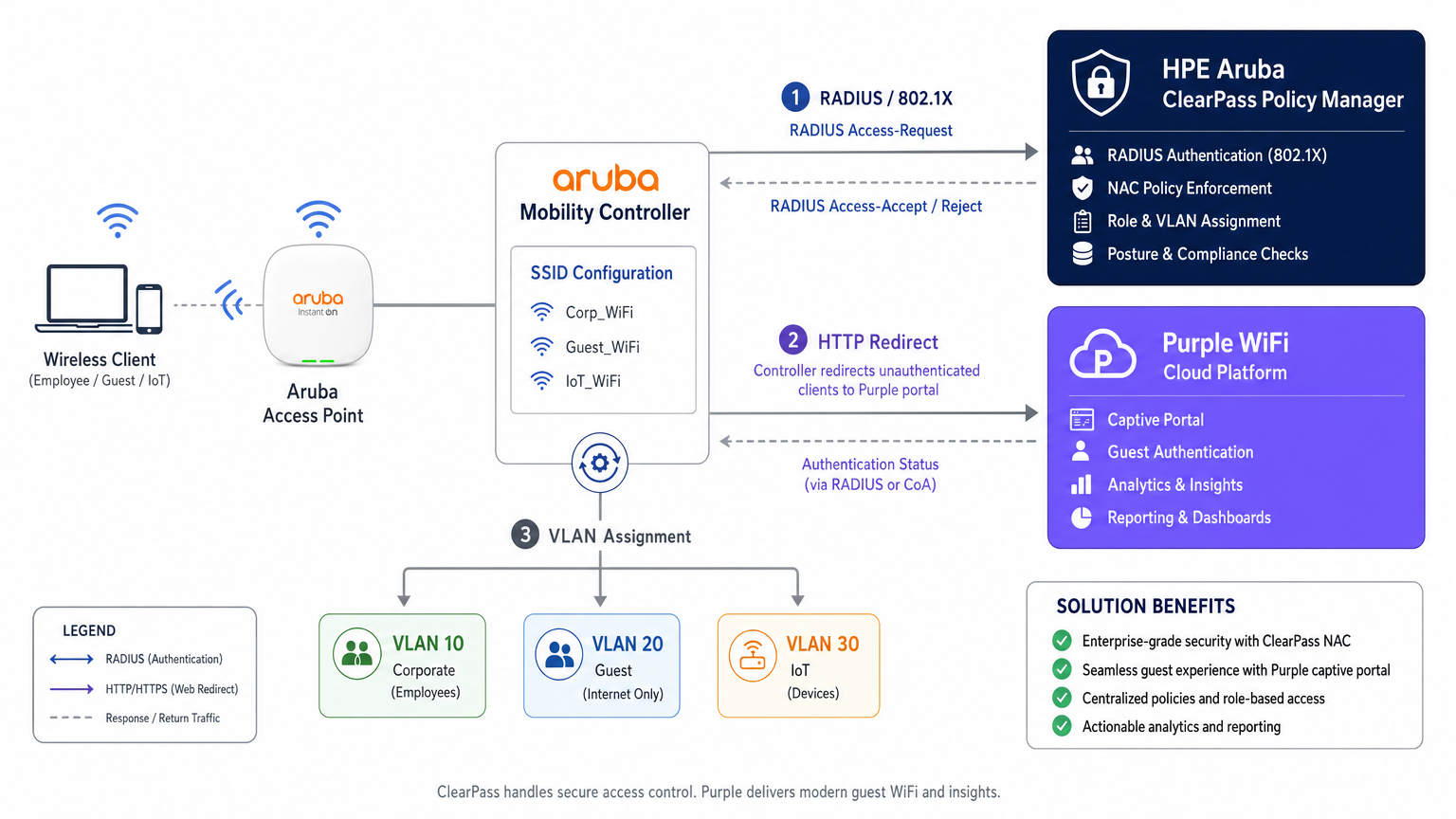
Questa architettura preserva l'investimento in ClearPass come punto decisionale centrale delle politiche, delegando l'intero livello dell'esperienza ospite a Purple. Ogni evento di autenticazione — aziendale o ospite — viene registrato nell'Access Tracker di ClearPass, fornendo una traccia di audit unificata che soddisfa i requisiti di conformità ai sensi del PCI DSS v4.0 e dell'Articolo 30 del GDPR (Registri delle attività di trattamento).
Flusso di Autenticazione: Passo dopo Passo
Comprendere la sequenza precisa degli eventi è essenziale sia per la distribuzione iniziale che per la successiva risoluzione dei problemi. Il flusso per un dispositivo ospite è il seguente.
| Passo | Attore | Azione |
|---|---|---|
| 1 | Dispositivo Ospite | Si associa all'SSID Ospite aperto |
| 2 | Controller Aruba | Assegna IP pre-autenticazione e posiziona il dispositivo nel ruolo di logon |
| 3 | Dispositivo Ospite | Invia richiesta HTTP (es. http://example.com ) |
| 4 | Controller Aruba | Intercetta e reindirizza HTTP 302 all'URL del portale Purple |
| 5 | Dispositivo Ospite | Carica il Captive Portal Purple tramite walled garden |
| 6 | Utente Ospite | Si autentica (login social, modulo o OpenRoaming) |
| 7 | Piattaforma Purple | Invia RADIUS Access-Request al Controller Aruba |
| 8 | Controller Aruba | Inoltra la richiesta RADIUS a ClearPass |
| 9 | ClearPass | Corrisponde alla Regola di Servizio ospite, funge da proxy per Purple RADIUS |
| 10 | Purple RADIUS | Restituisce Access-Accept |
| 11 | ClearPass | Aggiunge VSA Aruba (User-Role), inoltra Accept |
| 12 | Controller Aruba | Sposta il dispositivo al ruolo post-autenticazione, assegna VLAN ospite |
Il comportamento del meccanismo di rilevamento del Captive Portal — in particolare il Captive Network Assistant (CNA) di Apple, il controllo di connettività di Android e Microsoft NCSI — ha un'influenza diretta sul corretto caricamento del portale. Per una ripartizione dettagliata di questi comportamenti a livello di sistema operativo, fare riferimento a Apple CNA, Android Connectivity Check, Microsoft NCSI: Come funziona realmente il rilevamento del Captive Portal .
Assegnazione Dinamica VLAN e Mappatura Ruoli ClearPass
La segmentazione della rete è un requisito non negoziabile per la conformità PCI DSS e per una solida architettura di sicurezza. ClearPass consente l'assegnazione dinamica di VLAN tramite il suo framework di Mappatura Ruoli e Profili di Applicazione.
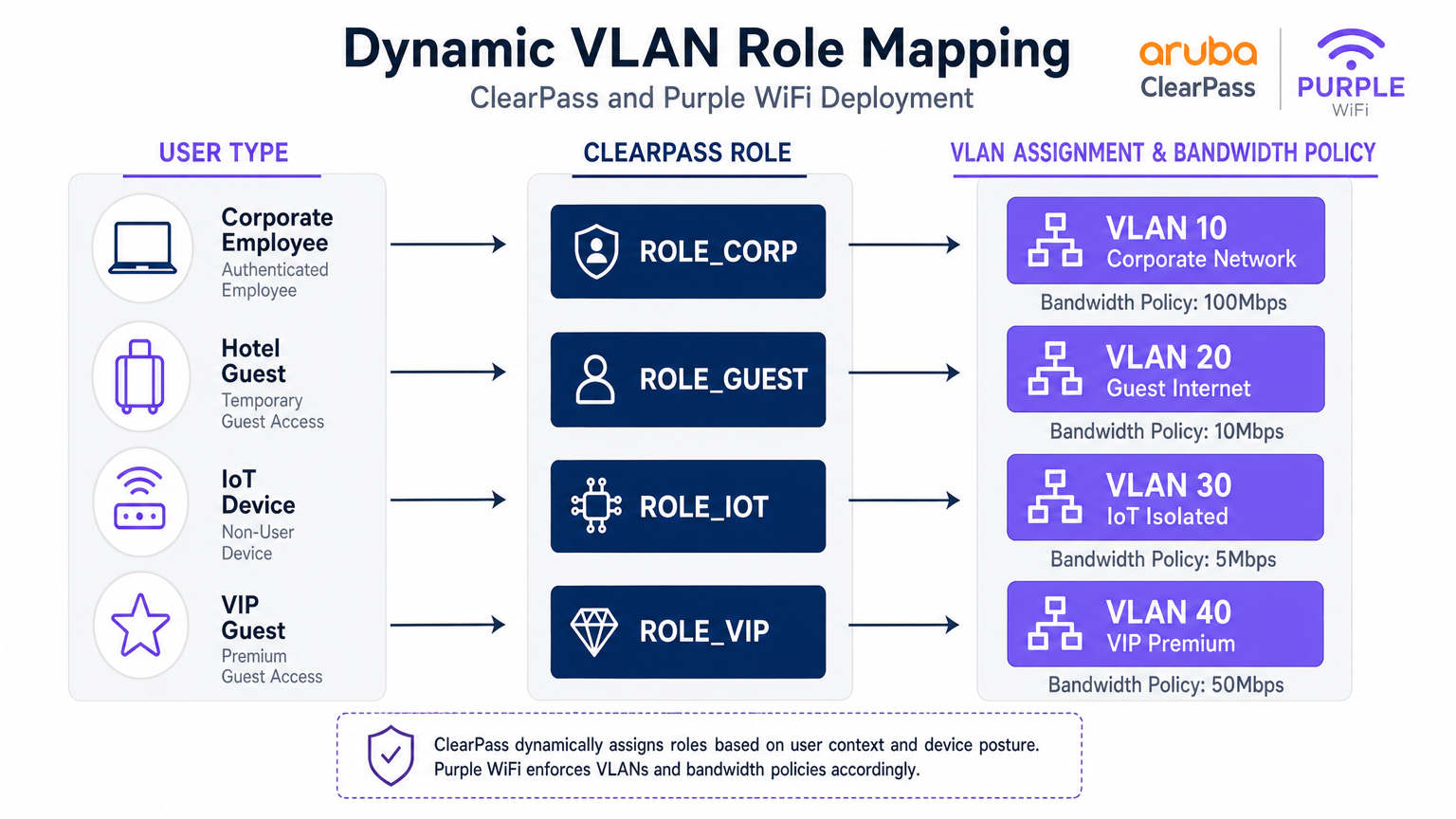
Quando ClearPass elabora una richiesta di autenticazione, valuta gli attributi contestuali — identità dell'utente, tipo di dispositivo (profilato tramite fingerprinting DHCP o HTTP User-Agent), ora del giorno e posizione della connessione — e assegna un Ruolo. Questo Ruolo viene quindi mappato a un Profilo di Applicazione che restituisce attributi RADIUS specifici al controller Aruba, in particolare l'Aruba-User-Role Vendor-Specific Attribute (VSA, ID Fornitore 14823, Attributo 1).
Il controller Aruba mappa ogni User-Role a una VLAN e a un set di politiche firewall stateful. Di seguito è mostrato un modello di segmentazione rappresentativo per una grande sede.
| Tipo Utente | Ruolo ClearPass | VLAN | Politica Larghezza di Banda | Politica Firewall |
|---|---|---|---|---|
| Dipendente Aziendale | ROLE_CORP | 10 | 100 Mbps | Accesso interno completo |
| Ospite Standard | ROLE_GUEST | 20 | 10 Mbps | Solo Internet |
| Dispositivo IoT | ROLE_IOT | 30 | 5 Mbps | Solo locale, no internet |
| Ospite VIP / Premium | ROLE_VIP | 40 | 50 Mbps | Internet + servizi selezionati |
| Appaltatore | ROLE_CONTRACTOR | 50 | 20 Mbps | Accesso interno limitato |
Configurazione Proxy RADIUS in ClearPass
La configurazione del proxy RADIUS in ClearPass Policy Manager richiede tre componenti: un RADIUS Proxy Target (che definisce gli endpoint del server RADIUS di Purple), una Service Routing Policy (che definisce quali richieste inoltrare tramite proxy) e un Enforcement Profile (che definisce i VSA da aggiungere al percorso di ritorno).
Il Proxy Target è configurato in Administration > External Servers > RADIUS Servers. Aggiungere gli indirizzi IP RADIUS di Purple (disponibili dal portale Purple in Hardware > RADIUS Settings), il segreto condiviso e la porta di autenticazione (UDP 1812) e la porta di accounting (UDP 1813).
Il Servizio è configurato in Configuration > Services. Creare un nuovo servizio con il tipo impostato su RADIUS Proxy. In Service Rules, aggiungere una condizione che corrisponda al Called-Station-ID (il nome dell'SSID) o al NAS-Identifier per identificare il traffico guest. In Authentication, selezionare il RADIUS Proxy Target creato sopra.
È fondamentale assicurarsi che il RADIUS Accounting sia anch'esso sottoposto a proxy verso Purple. Purple utilizza i dati di accounting (Acct-Start, Acct-Interim-Update, Acct-Stop) per popolare la durata della sessione, il consumo di dati e i dati di presenza in tempo reale nella sua piattaforma WiFi Analytics . L'omissione dell'accounting è un errore comune di implementazione che comporta dashboard di analisi incomplete.
Guida all'implementazione
Fase 1: Configurazione del controller Aruba
Passo 1 — Definire ClearPass come server RADIUS. Navigare in Configuration > Security > Authentication Servers. Aggiungere gli indirizzi IP primari e secondari di ClearPass. Impostare il segreto condiviso, la porta di autenticazione (1812) e la porta di accounting (1813). Configurare il timeout a 10 secondi e i tentativi a 3 per tenere conto del salto proxy all'infrastruttura cloud di Purple.
Passo 2 — Configurare l'SSID Guest. Creare un nuovo profilo SSID per l'accesso guest. Impostare la modalità di sicurezza su Open o WPA3-SAE (raccomandato per la conformità GDPR). Nel profilo AAA, impostare il ruolo iniziale su un ruolo di accesso predefinito che abbia solo accesso al walled garden.
Passo 3 — Configurare il profilo Captive Portal. Creare un profilo Captive Portal che punti all'URL della splash page di Purple. Questo URL si ottiene dal portale Purple in Locations > [Your Venue] > Splash Page URL. Abilitare l'opzione per reindirizzare all'URL originale dopo l'autenticazione.
Passo 4 — Configurare il Walled Garden. Questo è il passaggio più delicato dal punto di vista operativo. Il walled garden deve includere i domini del portale Purple, gli endpoint CDN e tutti i domini dei provider di social login. Al minimo, includere:
*.purple.aie*.purple-portal.com*.facebook.com,*.fbcdn.net(per il login Facebook)*.google.com,*.googleapis.com(per il login Google)- Endpoint di controllo CNA di Apple:
captive.apple.com - Microsoft NCSI:
www.msftconnecttest.com
Passo 5 — Definire i ruoli post-autenticazione. Creare i ruoli che ClearPass assegnerà dopo l'autenticazione (es. guest-authenticated). Ogni ruolo mappa a una VLAN e a una policy firewall che consente solo l'accesso a internet.
Fase 2: Configurazione di ClearPass Policy Manager
Passo 1 — Aggiungere i controller Aruba come dispositivi di rete. In Configuration > Network > Devices, aggiungere ogni controller Aruba con il suo IP di gestione, il segreto condiviso e il fornitore (Aruba Networks).
Passo 2 — Aggiungere Purple come RADIUS Proxy Target. In Administration > External Servers > RADIUS Servers, aggiungere gli endpoint RADIUS di Purple con il segreto condiviso fornito nel portale Purple.
Passo 3 — Creare il servizio di autenticazione Guest. In Configuration > Services, creare un nuovo servizio. Impostare il tipo di servizio su RADIUS Proxy. Configurare le Service Rules per corrispondere all'SSID guest (es. Called-Station-SSID EQUALS GuestWiFi). In Authentication, selezionare il Purple RADIUS Proxy Target.
Passo 4 — Creare il profilo di applicazione. In Configuration > Enforcement > Profiles, creare un profilo di applicazione RADIUS. Aggiungere l'attributo Aruba-User-Role con il valore guest-authenticated. Questo istruisce il controller Aruba a spostare l'utente nel ruolo guest post-autenticazione.
Passo 5 — Configurare il proxy di accounting. Assicurarsi che il servizio sia configurato anche per il proxy RADIUS Accounting al server di accounting di Purple (UDP 1813).
Fase 3: Configurazione della piattaforma Purple
Passo 1 — Registrare l'hardware. Nel portale Purple, navigare in Locations > Hardware. Aggiungere l'indirizzo IP pubblico del controller Aruba o il NAS-Identifier. Questo consente a Purple di associare le richieste di autenticazione alla sede corretta.
Passo 2 — Configurare la Splash Page. Progettare l'esperienza del Captive Portal utilizzando il costruttore di portali di Purple. Configurare i metodi di autenticazione, i termini e le condizioni e i campi di opt-in marketing in conformità con il GDPR.
Passo 3 — Recuperare le credenziali RADIUS. In Locations > [Venue] > RADIUS Settings, recuperare gli indirizzi IP del server RADIUS, il segreto condiviso e le porte. Utilizzare questi valori nella configurazione del ClearPass Proxy Target.
Best Practices
Manutenzione del Walled Garden. Trattare il walled garden come una configurazione dinamica. I provider di social login aggiornano regolarmente i loro domini CDN e gli intervalli IP. Stabilire un processo di revisione trimestrale e iscriversi alle notifiche di modifica dei principali provider.
Redundancy RADIUS. Configurare entrambi gli IP del server RADIUS di Purple in ClearPass per il failover. Allo stesso modo, implementare ClearPass in un cluster subscriber/publisher per eliminare i singoli punti di guasto nel percorso di autenticazione.
Integrità dell'Accounting. Verificare che i record RADIUS Accounting Stop siano ricevuti da Purple per ogni sessione. Le sessioni orfane (Start senza Stop) indicano un problema di rete e distorceranno i dati di analisi.
Gestione dei certificati per 802.1X. Per gli SSID aziendali che utilizzano EAP-TLS o PEAP, assicurarsi che i certificati del server siano rinnovati ben prima della scadenza. Un certificato scaduto bloccherà contemporaneamente tutti i dispositivi aziendali — un incidente ad alto impatto.
Profilazione dei dispositivi IoT. Sfruttare ClearPass Device Insight o il motore di profilazione integrato per classificare automaticamente i dispositivi IoT tramite OUI e impronta DHCP. Ciò consente l'assegnazione automatica delle VLAN senza la gestione manuale degli indirizzi MAC.
Conformità GDPR. Purple acquisisce dati personali (email, nome, profilo social) durante l'autenticazione guest. Assicurarsi che la splash page di Purple includa un'informativa sulla privacy conforme ee che le politiche di conservazione dei dati nel portale Purple siano allineate con gli obblighi GDPR della vostra organizzazione.
Risoluzione dei problemi e mitigazione del rischio
Captive Portal non visualizzato
Sintomo: Il client si connette alla SSID ospite ma non appare alcun portale; il dispositivo mostra "Connesso, nessuna internet."
Diagnosi: Utilizzare una cattura di pacchetti sull'uplink del controller per verificare che le query DNS per l'URL del portale vengano risolte e che il traffico HTTP venga intercettato. Verificare che gli endpoint di controllo CNA/NCSI siano nel walled garden.
Risoluzione: Aggiungere i domini mancanti al walled garden. Verificare che il profilo del Captive Portal sia correttamente associato al profilo AAA della SSID ospite.
Errori di autenticazione silenziosi
Sintomo: L'utente completa il modulo del portale, ma l'accesso alla rete viene negato. ClearPass Access Tracker mostra un Access-Reject.
Diagnosi: Aprire la voce di Access Tracker ed esaminare il motivo dell'errore di autenticazione. Le cause comuni sono la mancata corrispondenza del segreto condiviso RADIUS, il server RADIUS Purple irraggiungibile o una Service Rule errata che corrisponde al servizio sbagliato.
Risoluzione: Verificare i segreti condivisi sia sul tratto Aruba controller-to-ClearPass che ClearPass-to-Purple. Testare la raggiungibilità del RADIUS Purple dal server ClearPass utilizzando radtest.
Assegnazione VLAN errata
Sintomo: L'ospite si autentica con successo ma riceve un indirizzo IP nella sottorete aziendale (VLAN 10).
Risoluzione: Verificare che il valore Aruba-User-Role nel ClearPass Enforcement Profile corrisponda esattamente (inclusa la distinzione tra maiuscole e minuscole) al nome del ruolo definito sul controller Aruba. Controllare gli attributi di output di ClearPass Access Tracker per confermare che il VSA venga inviato.
Errori di timeout RADIUS
Sintomo: L'autenticazione fallisce a intermittenza, in particolare sotto carico. Access Tracker mostra errori di timeout.
Risoluzione: Aumentare il timeout del server RADIUS sul controller Aruba a 10 secondi. Verificare che le porte UDP 1812 e 1813 siano aperte e non soggette a limitazione di velocità sul firewall tra ClearPass e l'infrastruttura cloud di Purple.
ROI e impatto sul business
L'implementazione di questa architettura integrata offre ritorni misurabili su funzioni IT, di sicurezza e commerciali. Da una prospettiva di sicurezza e conformità, la centralizzazione di tutti gli eventi di autenticazione in ClearPass fornisce una traccia di audit unificata che semplifica la rendicontazione della conformità PCI DSS e GDPR. La segmentazione dinamica delle VLAN elimina il rischio che il traffico degli ospiti attraversi l'infrastruttura aziendale, riducendo direttamente la superficie di attacco.
Da una prospettiva commerciale, la piattaforma Guest WiFi di Purple trasforma la rete ospite da centro di costo a risorsa di dati di prima parte. Ogni sessione ospite autenticata genera dati di marketing opt-in — indirizzi email, frequenza delle visite, tempo di permanenza e tipo di dispositivo — che alimentano direttamente le piattaforme CRM e di automazione del marketing. Le sedi che implementano Purple insieme all'infrastruttura Aruba esistente riportano costantemente miglioramenti misurabili nella crescita delle liste email, nei tassi di visita ripetuta e nella conversione delle campagne.
L'integrazione elimina anche la necessità di sostituire le licenze ClearPass esistenti o l'hardware Aruba, rendendola un'aggiunta a basso rischio e ad alto rendimento a un investimento infrastrutturale esistente. Per le organizzazioni che gestiscono più siti — una catena di negozi, un gruppo alberghiero o un campus universitario — il portale di gestione centralizzato di Purple fornisce analisi cross-site che ClearPass da solo non può offrire.
Per ambienti in cui la comprensione del comportamento fisico dei visitatori è importante quanto la sicurezza della rete — come grandi superfici commerciali o hub di trasporto — le analisi di Purple si integrano naturalmente con i dati del Indoor Positioning System per fornire intelligenza spaziale insieme alle metriche di connettività.
Termini chiave e definizioni
RADIUS Proxy
A configuration where a RADIUS server (ClearPass) forwards authentication requests to another RADIUS server (Purple) based on specific matching criteria, such as the SSID name or NAS-Identifier.
Used when an organisation wants to maintain a single NAC solution internally while utilising a third-party cloud service for guest authentication. The proxy preserves the central audit log in ClearPass while delegating the authentication decision to Purple.
Change of Authorization (CoA)
A RADIUS extension defined in RFC 5176 that allows a RADIUS server to dynamically modify the session authorisation attributes of an active client connection without requiring the client to disconnect.
Critical for captive portal deployments. CoA allows Purple to signal the Aruba controller to transition a user from the pre-authentication logon role to the post-authentication guest role the moment the user completes the portal form.
Walled Garden
A pre-authentication access control list on the Aruba controller that permits unauthenticated devices to reach specific IP addresses and domains required for the captive portal to function.
If the device cannot reach the portal URL, social login provider endpoints, or OS-level captive portal detection URLs (Apple CNA, Microsoft NCSI), the portal will fail to load. This is the most common source of captive portal deployment failures.
Vendor-Specific Attribute (VSA)
Custom RADIUS attributes defined by network equipment vendors (Vendor ID 14823 for Aruba) to extend the standard RADIUS protocol with proprietary instructions.
The Aruba-User-Role VSA (Attribute 1) is the primary mechanism by which ClearPass instructs the Aruba controller which role to assign to an authenticated user. The value must exactly match a role defined on the controller.
Dynamic VLAN Assignment
The process of placing a user or device into a specific VLAN based on their authenticated identity or assigned role, rather than the physical port or SSID they connected to.
Enables venue operators to broadcast a single guest SSID while securely segmenting standard guests, VIP guests, IoT devices, and contractors onto separate, isolated network segments — a requirement for PCI DSS compliance.
Enforcement Profile
A ClearPass configuration object that defines the specific RADIUS attributes and values to return to the network device when a device successfully matches an authentication service.
This is where the business logic of 'if guest, then assign guest role' is translated into specific RADIUS VSAs sent to the Aruba controller. A misconfigured Enforcement Profile is a common cause of incorrect VLAN assignment.
Captive Network Assistant (CNA)
The mini-browser built into iOS, macOS, Android, and Windows that automatically detects a captive portal by making HTTP requests to known endpoints and prompts the user to authenticate.
Understanding CNA behaviour is essential for troubleshooting portal display issues on specific device types. The CNA endpoints (captive.apple.com, www.msftconnecttest.com) must be in the walled garden.
Access Tracker
The real-time diagnostic tool within ClearPass Policy Manager that logs every RADIUS authentication and accounting event, including the request attributes, matched service, applied enforcement profile, and result.
The first diagnostic tool to consult when troubleshooting authentication failures or incorrect role assignments. It provides a complete record of what ClearPass received, what decision it made, and what it returned to the network device.
RADIUS-as-a-Service (RaaS)
A cloud-delivered RADIUS authentication service where the RADIUS server infrastructure is managed and hosted by a third-party provider rather than on-premises.
Purple's RADIUS-as-a-Service eliminates the need for venues to deploy and manage their own RADIUS infrastructure for guest authentication, while integrating with existing on-premises NAC solutions like ClearPass via the proxy architecture described in this guide.
Casi di studio
A 500-room hotel group with Aruba controllers and ClearPass deployed centrally needs to provide secure 802.1X WiFi for staff, a branded captive portal for guests, and isolated connectivity for IoT devices (smart TVs, thermostats, door locks). How should they architect the authentication flow?
Deploy three SSIDs: Hotel_Corp (802.1X, WPA2-Enterprise), Hotel_Guest (open SSID with captive portal redirect), and Hotel_IoT (open SSID with MAC-based authentication). All three SSIDs point to ClearPass as the RADIUS server. In ClearPass, create three Services: Service 1 matches Hotel_Corp and authenticates against Active Directory via PEAP-MSCHAPv2, returning ROLE_CORP (VLAN 10, full internal access). Service 2 matches Hotel_Guest and uses a RADIUS Routing Policy to proxy requests to Purple's RADIUS servers; the Enforcement Profile returns Aruba-User-Role = guest-authenticated (VLAN 20, internet only, 10 Mbps). Service 3 matches Hotel_IoT and uses ClearPass Device Profiling to classify devices by OUI; the Enforcement Profile returns ROLE_IOT (VLAN 30, local only, no internet). The walled garden on the Aruba controller includes Purple's portal domains, Facebook, Google, and Apple's CNA endpoint.
A retail chain is rolling out Purple across 120 stores, all running Aruba Instant APs. Guest authentication latency is high and portal drop-offs are occurring. Preliminary investigation shows the RADIUS timeout is set to the default 3 seconds.
Increase the RADIUS server timeout on all Aruba Instant APs to 10 seconds and configure 3 retries. Deploy both of Purple's RADIUS server IPs as primary and secondary servers in the Instant AP configuration to provide failover. Review the walled garden configuration to ensure all social login provider domains are included, as incomplete walled gardens cause the portal page to load slowly or partially, increasing perceived latency. Enable RADIUS Accounting on the Instant APs to ensure Purple receives session data. Finally, review the Purple portal design to minimise the number of external resource calls (fonts, images) that must load before the authentication form is displayed.
Analisi degli scenari
Q1. Your deployment requires guests to authenticate via Facebook login. The Purple portal loads, but when users tap the Facebook button, the page times out and returns an error. Corporate 802.1X authentication is working correctly. What is the most likely cause and how do you resolve it?
💡 Suggerimento:Consider what the device is permitted to access before it has completed authentication. The portal page loaded, so the portal domain is in the walled garden — but what about the resources the portal needs to call?
Mostra l'approccio consigliato
The walled garden configuration on the Aruba controller is missing the required Facebook authentication domains and CDN endpoints (*.facebook.com, *.fbcdn.net, *.facebook.net). Pre-authentication traffic to Facebook's OAuth servers is being blocked by the controller's default-deny policy. Resolution: add the missing Facebook domains to the walled garden. Also verify that Google's domains are included if Google login is also offered. Use a browser developer tools network trace from a test device to identify any additional blocked domains.
Q2. You want to use a single SSID ('VenueWiFi') for both corporate employees (802.1X) and guests (captive portal via Purple). How do you configure ClearPass to correctly differentiate and route the two authentication types?
💡 Suggerimento:ClearPass Services are matched in priority order. Consider how 802.1X and MAC-Auth requests differ at the RADIUS protocol level, and how Service Rules can exploit this difference.
Mostra l'approccio consigliato
Create two ClearPass Services, both matching the SSID 'VenueWiFi'. Service 1 (higher priority) uses a Service Rule matching on the RADIUS attribute 'Service-Type EQUALS Framed-User' or the presence of EAP attributes, identifying 802.1X requests. It authenticates against Active Directory and returns ROLE_CORP. Service 2 (lower priority) matches MAC-Auth requests (Service-Type EQUALS Call-Check or Authenticate-Only). It uses a RADIUS Routing Policy to proxy the request to Purple. The Enforcement Profile for Service 2 returns the pre-auth logon role, triggering the captive portal. When Purple sends the post-authentication RADIUS request, it is matched by Service 2 and returns the guest-authenticated role.
Q3. Guest authentication is successful — the Purple dashboard shows the user as active and the ClearPass Access Tracker shows an Access-Accept. However, the user cannot access the internet and the Aruba controller shows the user is still in the 'logon' role. What are the two most likely causes?
💡 Suggerimento:The authentication succeeded and ClearPass sent an Accept. The problem is therefore in what ClearPass sent back, or in how the Aruba controller interpreted it.
Mostra l'approccio consigliato
Cause 1: The ClearPass Enforcement Profile is not configured to return the Aruba-User-Role VSA, or is returning an empty value. Check the Enforcement Profile and verify the VSA is explicitly set. Cause 2: The Aruba-User-Role value returned by ClearPass does not exactly match (including capitalisation) a role defined on the Aruba controller. For example, ClearPass returns 'guest-authenticated' but the controller has 'Guest-Authenticated' defined. Resolution: Open the ClearPass Access Tracker entry, expand the Output Attributes section, and verify the Aruba-User-Role value. Then cross-reference this value against the role names defined on the Aruba controller under Configuration > Roles.
Q4. A stadium venue wants to offer tiered guest WiFi: a free tier with 5 Mbps and mandatory portal authentication, and a premium tier with 50 Mbps for ticket holders who have pre-registered. Both tiers use the same SSID. How would you architect this using ClearPass and Purple?
💡 Suggerimento:Think about how ClearPass can differentiate between the two user types post-authentication, and how Purple can pass identity information to ClearPass to enable this differentiation.
Mostra l'approccio consigliato
Configure Purple to pass a user attribute (e.g., a custom RADIUS attribute or the Class attribute) indicating whether the user is a registered ticket holder. In ClearPass, create a Role Mapping Policy that checks this attribute: if present and valid, assign ROLE_VIP; otherwise assign ROLE_GUEST. Create two Enforcement Profiles: ROLE_GUEST returns Aruba-User-Role = guest-standard (VLAN 20, 5 Mbps bandwidth contract); ROLE_VIP returns Aruba-User-Role = guest-premium (VLAN 40, 50 Mbps). On the Aruba controller, define both roles with the appropriate VLAN and bandwidth contracts. This approach uses a single SSID and single Purple portal while delivering differentiated service levels based on user identity.




