

Aruba ClearPass and Purple WiFi: Integration and Deployment Guide
This guide provides a complete technical reference for integrating HPE Aruba ClearPass Policy Manager with the Purple WiFi platform, covering RADIUS proxy architecture, captive portal configuration, and dynamic VLAN role mapping. It is designed for IT managers and network architects in Aruba-heavy environments who need to retain ClearPass for NAC while deploying Purple for guest authentication and analytics. Implementing this integration closes a critical vendor gap, enabling enterprise-grade security and compliance alongside Purple's market-leading visitor intelligence capabilities.
🎧 Listen to this Guide
View Transcript
Executive Summary
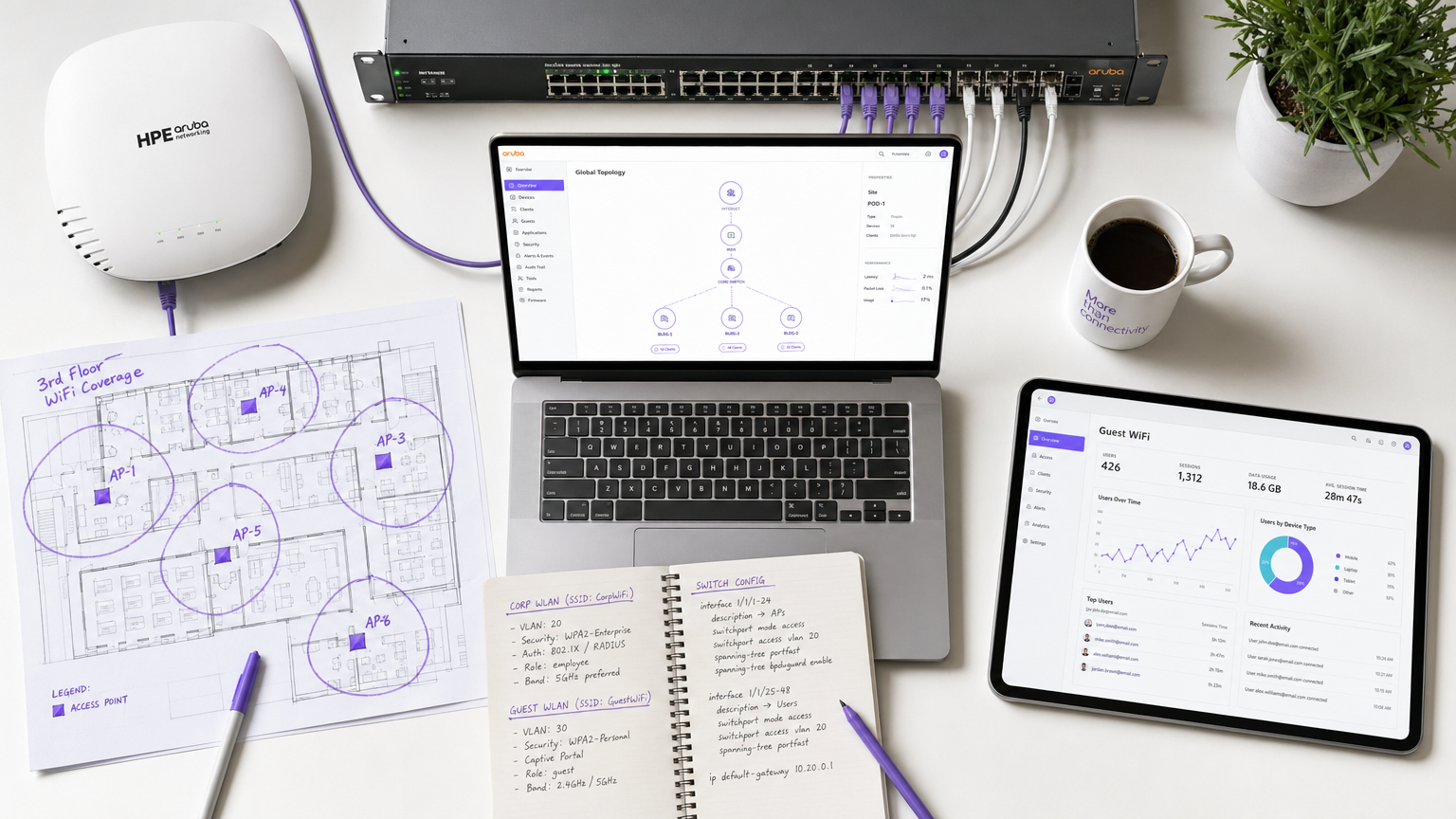
For enterprise environments heavily invested in HPE Aruba infrastructure, managing complex network access policies while delivering a seamless, data-rich guest WiFi experience presents a significant architectural challenge. While ClearPass Policy Manager excels at Network Access Control (NAC) and IEEE 802.1X authentication for corporate devices, venue operators increasingly require the advanced captive portal, analytics, and marketing capabilities provided by Purple WiFi.
This guide details the architecture and deployment strategy for integrating Aruba ClearPass with Purple WiFi using a RADIUS proxy model. By configuring ClearPass to proxy guest authentication requests to Purple's RADIUS-as-a-Service, organisations can maintain centralised security policies, enforce dynamic role-based VLAN assignments, and simultaneously leverage Purple's robust visitor insights platform. This integration is critical for large-scale deployments in Retail , Hospitality , Healthcare , and Transport hubs where compliance, security, and customer engagement must coexist without compromise. The result is a deployment where ClearPass decides, Purple engages, and Aruba enforces.
Technical Deep-Dive
Architecture Overview
The integration relies on a standard RADIUS proxy architecture underpinned by RFC 2865 (RADIUS) and RFC 5176 (Dynamic Authorisation Extensions). The Aruba Mobility Controller or Instant AP cluster is configured to use ClearPass as its primary RADIUS server for all SSIDs. ClearPass handles corporate 802.1X authentication locally against Active Directory or an internal certificate authority, but is configured with a RADIUS Service Routing policy to forward guest authentication requests to Purple's cloud RADIUS servers.
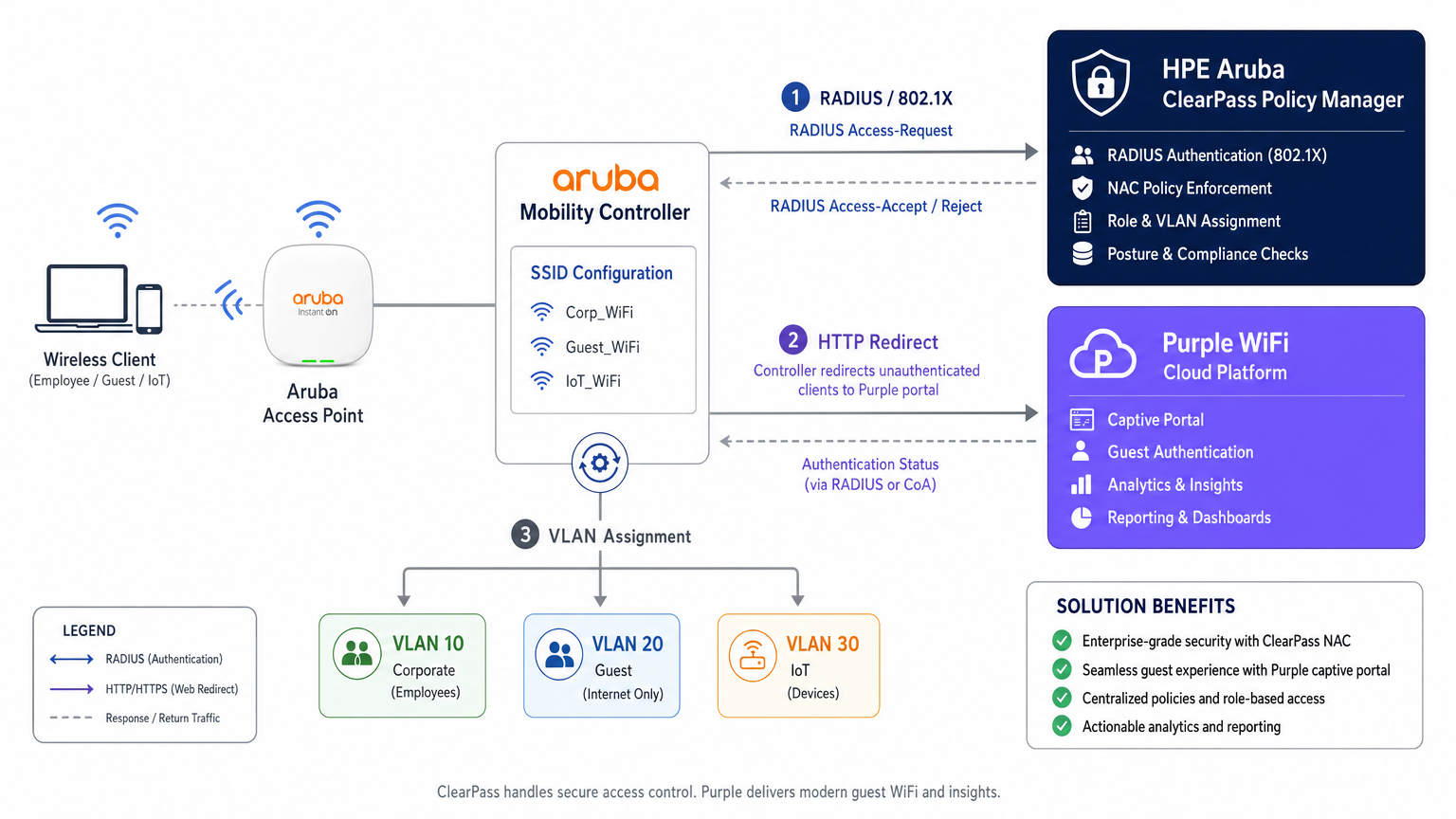
This architecture preserves the investment in ClearPass as the central policy decision point while delegating the guest experience layer entirely to Purple. Every authentication event — corporate or guest — is logged in ClearPass's Access Tracker, providing a unified audit trail that satisfies compliance requirements under PCI DSS v4.0 and GDPR Article 30 (Records of Processing Activities).
Authentication Flow: Step by Step
Understanding the precise sequence of events is essential for both initial deployment and subsequent troubleshooting. The flow for a guest device is as follows.
| Step | Actor | Action |
|---|---|---|
| 1 | Guest Device | Associates with open Guest SSID |
| 2 | Aruba Controller | Assigns pre-auth IP and places device in logon role |
| 3 | Guest Device | Sends HTTP request (e.g., http://example.com ) |
| 4 | Aruba Controller | Intercepts and HTTP 302 redirects to Purple portal URL |
| 5 | Guest Device | Loads Purple captive portal via walled garden |
| 6 | Guest User | Authenticates (social login, form, or OpenRoaming) |
| 7 | Purple Platform | Sends RADIUS Access-Request to Aruba Controller |
| 8 | Aruba Controller | Forwards RADIUS request to ClearPass |
| 9 | ClearPass | Matches guest Service Rule, proxies to Purple RADIUS |
| 10 | Purple RADIUS | Returns Access-Accept |
| 11 | ClearPass | Appends Aruba VSAs (User-Role), forwards Accept |
| 12 | Aruba Controller | Moves device to post-auth role, assigns guest VLAN |
The behaviour of the captive portal detection mechanism — specifically Apple's Captive Network Assistant (CNA), Android's connectivity check, and Microsoft NCSI — has a direct bearing on whether the portal loads correctly. For a detailed breakdown of these OS-level behaviours, refer to Apple CNA, Android Connectivity Check, Microsoft NCSI: How Captive Portal Detection Actually Works .
Dynamic VLAN Assignment and ClearPass Role Mapping
Network segmentation is a non-negotiable requirement for PCI DSS compliance and sound security architecture. ClearPass enables dynamic VLAN assignment through its Role Mapping and Enforcement Profile framework.
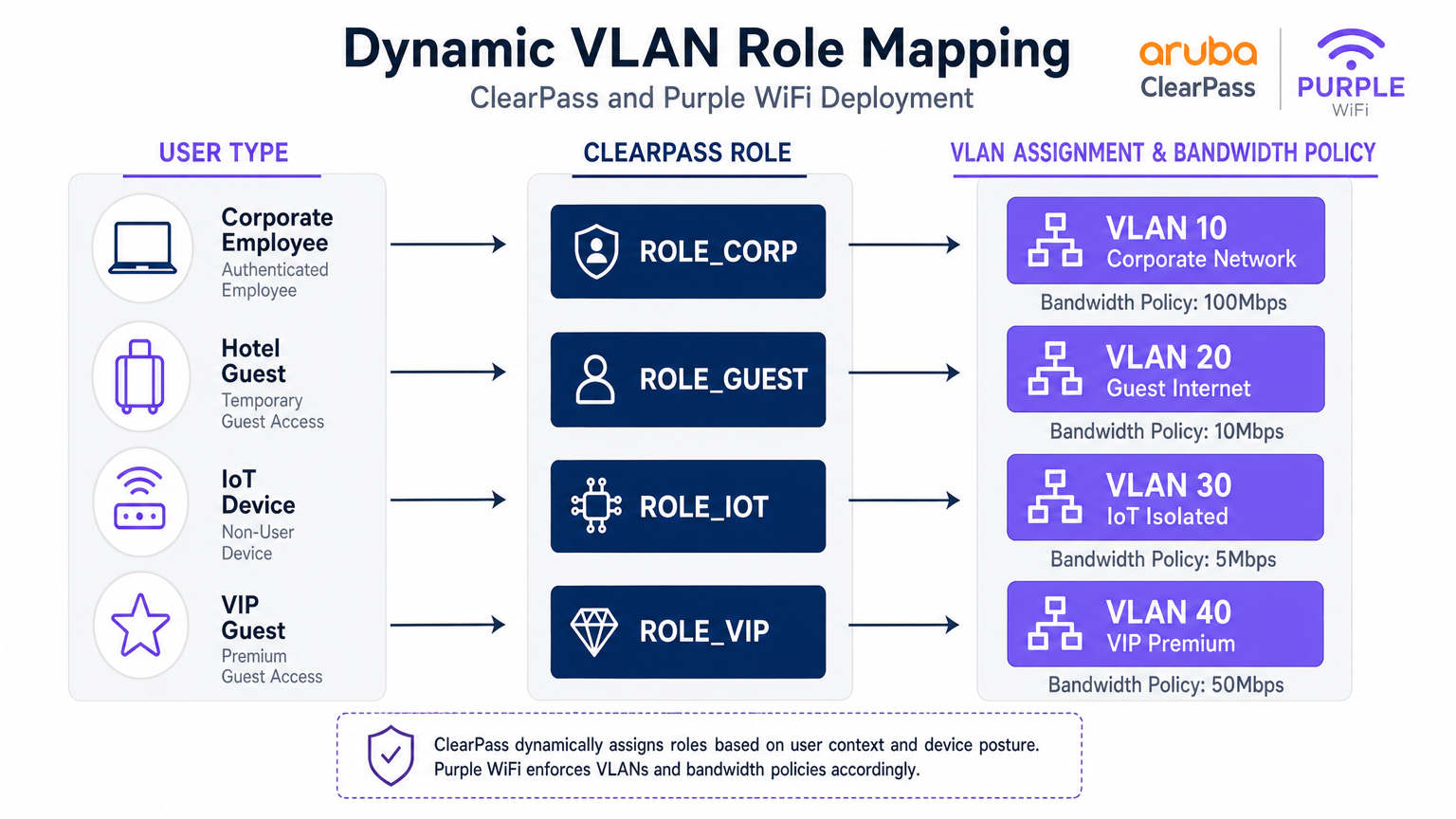
When ClearPass processes an authentication request, it evaluates contextual attributes — user identity, device type (profiled via DHCP fingerprinting or HTTP User-Agent), time of day, and connection location — and assigns a Role. This Role is then mapped to an Enforcement Profile that returns specific RADIUS attributes to the Aruba controller, most critically the Aruba-User-Role Vendor-Specific Attribute (VSA, Vendor ID 14823, Attribute 1).
The Aruba controller maps each User-Role to a VLAN and a set of stateful firewall policies. A representative segmentation model for a large venue is shown below.
| User Type | ClearPass Role | VLAN | Bandwidth Policy | Firewall Policy |
|---|---|---|---|---|
| Corporate Employee | ROLE_CORP | 10 | 100 Mbps | Full internal access |
| Standard Guest | ROLE_GUEST | 20 | 10 Mbps | Internet only |
| IoT Device | ROLE_IOT | 30 | 5 Mbps | Local only, no internet |
| VIP / Premium Guest | ROLE_VIP | 40 | 50 Mbps | Internet + select services |
| Contractor | ROLE_CONTRACTOR | 50 | 20 Mbps | Limited internal access |
RADIUS Proxy Configuration in ClearPass
The RADIUS proxy configuration in ClearPass Policy Manager requires three components: a RADIUS Proxy Target (defining Purple's RADIUS server endpoints), a Service Routing Policy (defining which requests to proxy), and an Enforcement Profile (defining the VSAs to append on the return path).
The Proxy Target is configured under Administration > External Servers > RADIUS Servers. Add Purple's RADIUS IP addresses (available from the Purple portal under Hardware > RADIUS Settings), the shared secret, and the authentication port (UDP 1812) and accounting port (UDP 1813).
The Service is configured under Configuration > Services. Create a new service with the type set to RADIUS Proxy. Under Service Rules, add a condition matching the Called-Station-ID (the SSID name) or NAS-Identifier to identify guest traffic. Under Authentication, select the RADIUS Proxy Target created above.
Critically, ensure that RADIUS Accounting is also proxied to Purple. Purple uses accounting data (Acct-Start, Acct-Interim-Update, Acct-Stop) to populate session duration, data consumption, and real-time presence data in its WiFi Analytics platform. Omitting accounting is a common deployment error that results in incomplete analytics dashboards.
Implementation Guide
Phase 1: Aruba Controller Configuration
Step 1 — Define ClearPass as RADIUS Server. Navigate to Configuration > Security > Authentication Servers. Add ClearPass's primary and secondary IP addresses. Set the shared secret, authentication port (1812), and accounting port (1813). Configure the timeout to 10 seconds and retries to 3 to account for the proxy hop to Purple's cloud infrastructure.
Step 2 — Configure the Guest SSID. Create a new SSID profile for guest access. Set the security mode to Open or WPA3-SAE (recommended for GDPR compliance). Under the AAA profile, set the initial role to a pre-defined logon role that has only walled garden access.
Step 3 — Configure the Captive Portal Profile. Create a captive portal profile pointing to Purple's splash page URL. This URL is obtained from the Purple portal under Locations > [Your Venue] > Splash Page URL. Enable the option to redirect to the original URL after authentication.
Step 4 — Configure the Walled Garden. This is the most operationally sensitive step. The walled garden must include Purple's portal domains, CDN endpoints, and all social login provider domains. At minimum, include:
*.purple.aiand*.purple-portal.com*.facebook.com,*.fbcdn.net(for Facebook login)*.google.com,*.googleapis.com(for Google login)- Apple's CNA check endpoint:
captive.apple.com - Microsoft NCSI:
www.msftconnecttest.com
Step 5 — Define Post-Auth Roles. Create the roles that ClearPass will assign post-authentication (e.g., guest-authenticated). Each role maps to a VLAN and a firewall policy permitting internet-only access.
Phase 2: ClearPass Policy Manager Configuration
Step 1 — Add Aruba Controllers as Network Devices. Under Configuration > Network > Devices, add each Aruba controller with its management IP, shared secret, and vendor (Aruba Networks).
Step 2 — Add Purple as a RADIUS Proxy Target. Under Administration > External Servers > RADIUS Servers, add Purple's RADIUS endpoints with the shared secret provided in the Purple portal.
Step 3 — Create the Guest Authentication Service. Under Configuration > Services, create a new service. Set the service type to RADIUS Proxy. Configure Service Rules to match the guest SSID (e.g., Called-Station-SSID EQUALS GuestWiFi). Under Authentication, select the Purple RADIUS Proxy Target.
Step 4 — Create the Enforcement Profile. Under Configuration > Enforcement > Profiles, create a RADIUS enforcement profile. Add the attribute Aruba-User-Role with the value guest-authenticated. This instructs the Aruba controller to move the user into the post-auth guest role.
Step 5 — Configure Accounting Proxy. Ensure the service is also configured to proxy RADIUS Accounting to Purple's accounting server (UDP 1813).
Phase 3: Purple Platform Configuration
Step 1 — Register Hardware. In the Purple portal, navigate to Locations > Hardware. Add the Aruba controller's public IP address or NAS-Identifier. This allows Purple to associate authentication requests with the correct venue.
Step 2 — Configure the Splash Page. Design the captive portal experience using Purple's portal builder. Configure authentication methods, terms and conditions, and marketing opt-in fields in compliance with GDPR.
Step 3 — Retrieve RADIUS Credentials. Under Locations > [Venue] > RADIUS Settings, retrieve the RADIUS server IP addresses, shared secret, and ports. Use these values in the ClearPass Proxy Target configuration.
Best Practices
Walled Garden Maintenance. Treat the walled garden as a living configuration. Social login providers regularly update their CDN domains and IP ranges. Establish a quarterly review process and subscribe to change notifications from major providers.
RADIUS Redundancy. Configure both of Purple's RADIUS server IPs in ClearPass for failover. Similarly, deploy ClearPass in a subscriber/publisher cluster to eliminate single points of failure in the authentication path.
Accounting Integrity. Verify that RADIUS Accounting Stop records are being received by Purple for every session. Orphaned sessions (Start without Stop) indicate a network issue and will skew analytics data.
Certificate Management for 802.1X. For corporate SSIDs using EAP-TLS or PEAP, ensure server certificates are renewed well before expiry. A lapsed certificate will lock out all corporate devices simultaneously — a high-impact incident.
IoT Device Profiling. Leverage ClearPass Device Insight or the built-in profiling engine to automatically classify IoT devices by OUI and DHCP fingerprint. This enables automated VLAN assignment without manual MAC address management.
GDPR Compliance. Purple captures personal data (email, name, social profile) during guest authentication. Ensure your Purple splash page includes a compliant privacy notice and that data retention policies in the Purple portal align with your organisation's GDPR obligations.
Troubleshooting & Risk Mitigation
Captive Portal Not Displaying
Symptom: Client connects to the guest SSID but no portal appears; device shows "Connected, no internet."
Diagnosis: Use a packet capture on the controller uplink to verify that DNS queries for the portal URL are resolving and that HTTP traffic is being intercepted. Check the CNA/NCSI check endpoints are in the walled garden.
Resolution: Add missing domains to the walled garden. Verify the captive portal profile is correctly associated with the guest SSID AAA profile.
Silent Authentication Failures
Symptom: User completes the portal form, but network access is denied. ClearPass Access Tracker shows an Access-Reject.
Diagnosis: Open the Access Tracker entry and examine the authentication failure reason. Common causes are RADIUS shared secret mismatch, Purple RADIUS server unreachable, or an incorrect Service Rule matching the wrong service.
Resolution: Verify shared secrets on both the Aruba controller-to-ClearPass and ClearPass-to-Purple legs. Test Purple RADIUS reachability from the ClearPass server using radtest.
Incorrect VLAN Assignment
Symptom: Guest authenticates successfully but receives an IP address in the corporate subnet (VLAN 10).
Resolution: Verify the Aruba-User-Role value in the ClearPass Enforcement Profile exactly matches (including case) the role name defined on the Aruba controller. Check the ClearPass Access Tracker output attributes to confirm the VSA is being sent.
RADIUS Timeout Errors
Symptom: Authentication fails intermittently, particularly under load. Access Tracker shows timeout errors.
Resolution: Increase the RADIUS server timeout on the Aruba controller to 10 seconds. Verify UDP ports 1812 and 1813 are open and not subject to rate limiting on the firewall between ClearPass and Purple's cloud infrastructure.
ROI & Business Impact
Deploying this integrated architecture delivers measurable returns across IT, security, and commercial functions. From a security and compliance perspective, centralising all authentication events in ClearPass provides a unified audit trail that simplifies PCI DSS and GDPR compliance reporting. Dynamic VLAN segmentation eliminates the risk of guest traffic traversing corporate infrastructure, directly reducing the attack surface.
From a commercial perspective, Purple's Guest WiFi platform transforms the guest network from a cost centre into a first-party data asset. Every authenticated guest session generates opt-in marketing data — email addresses, visit frequency, dwell time, and device type — that feeds directly into CRM and marketing automation platforms. Venues deploying Purple alongside existing Aruba infrastructure consistently report measurable improvements in email list growth, repeat visit rates, and campaign conversion.
The integration also eliminates the need to replace existing ClearPass licences or Aruba hardware, making it a low-risk, high-return addition to an existing infrastructure investment. For organisations managing multiple sites — a retail chain, a hotel group, or a university campus — Purple's centralised management portal provides cross-site analytics that ClearPass alone cannot deliver.
For environments where understanding physical visitor behaviour is as important as network security — such as large retail floors or transport hubs — Purple's analytics integrate naturally with Indoor Positioning System data to provide spatial intelligence alongside connectivity metrics.
Key Terms & Definitions
RADIUS Proxy
A configuration where a RADIUS server (ClearPass) forwards authentication requests to another RADIUS server (Purple) based on specific matching criteria, such as the SSID name or NAS-Identifier.
Used when an organisation wants to maintain a single NAC solution internally while utilising a third-party cloud service for guest authentication. The proxy preserves the central audit log in ClearPass while delegating the authentication decision to Purple.
Change of Authorization (CoA)
A RADIUS extension defined in RFC 5176 that allows a RADIUS server to dynamically modify the session authorisation attributes of an active client connection without requiring the client to disconnect.
Critical for captive portal deployments. CoA allows Purple to signal the Aruba controller to transition a user from the pre-authentication logon role to the post-authentication guest role the moment the user completes the portal form.
Walled Garden
A pre-authentication access control list on the Aruba controller that permits unauthenticated devices to reach specific IP addresses and domains required for the captive portal to function.
If the device cannot reach the portal URL, social login provider endpoints, or OS-level captive portal detection URLs (Apple CNA, Microsoft NCSI), the portal will fail to load. This is the most common source of captive portal deployment failures.
Vendor-Specific Attribute (VSA)
Custom RADIUS attributes defined by network equipment vendors (Vendor ID 14823 for Aruba) to extend the standard RADIUS protocol with proprietary instructions.
The Aruba-User-Role VSA (Attribute 1) is the primary mechanism by which ClearPass instructs the Aruba controller which role to assign to an authenticated user. The value must exactly match a role defined on the controller.
Dynamic VLAN Assignment
The process of placing a user or device into a specific VLAN based on their authenticated identity or assigned role, rather than the physical port or SSID they connected to.
Enables venue operators to broadcast a single guest SSID while securely segmenting standard guests, VIP guests, IoT devices, and contractors onto separate, isolated network segments — a requirement for PCI DSS compliance.
Enforcement Profile
A ClearPass configuration object that defines the specific RADIUS attributes and values to return to the network device when a device successfully matches an authentication service.
This is where the business logic of 'if guest, then assign guest role' is translated into specific RADIUS VSAs sent to the Aruba controller. A misconfigured Enforcement Profile is a common cause of incorrect VLAN assignment.
Captive Network Assistant (CNA)
The mini-browser built into iOS, macOS, Android, and Windows that automatically detects a captive portal by making HTTP requests to known endpoints and prompts the user to authenticate.
Understanding CNA behaviour is essential for troubleshooting portal display issues on specific device types. The CNA endpoints (captive.apple.com, www.msftconnecttest.com) must be in the walled garden.
Access Tracker
The real-time diagnostic tool within ClearPass Policy Manager that logs every RADIUS authentication and accounting event, including the request attributes, matched service, applied enforcement profile, and result.
The first diagnostic tool to consult when troubleshooting authentication failures or incorrect role assignments. It provides a complete record of what ClearPass received, what decision it made, and what it returned to the network device.
RADIUS-as-a-Service (RaaS)
A cloud-delivered RADIUS authentication service where the RADIUS server infrastructure is managed and hosted by a third-party provider rather than on-premises.
Purple's RADIUS-as-a-Service eliminates the need for venues to deploy and manage their own RADIUS infrastructure for guest authentication, while integrating with existing on-premises NAC solutions like ClearPass via the proxy architecture described in this guide.
Case Studies
A 500-room hotel group with Aruba controllers and ClearPass deployed centrally needs to provide secure 802.1X WiFi for staff, a branded captive portal for guests, and isolated connectivity for IoT devices (smart TVs, thermostats, door locks). How should they architect the authentication flow?
Deploy three SSIDs: Hotel_Corp (802.1X, WPA2-Enterprise), Hotel_Guest (open SSID with captive portal redirect), and Hotel_IoT (open SSID with MAC-based authentication). All three SSIDs point to ClearPass as the RADIUS server. In ClearPass, create three Services: Service 1 matches Hotel_Corp and authenticates against Active Directory via PEAP-MSCHAPv2, returning ROLE_CORP (VLAN 10, full internal access). Service 2 matches Hotel_Guest and uses a RADIUS Routing Policy to proxy requests to Purple's RADIUS servers; the Enforcement Profile returns Aruba-User-Role = guest-authenticated (VLAN 20, internet only, 10 Mbps). Service 3 matches Hotel_IoT and uses ClearPass Device Profiling to classify devices by OUI; the Enforcement Profile returns ROLE_IOT (VLAN 30, local only, no internet). The walled garden on the Aruba controller includes Purple's portal domains, Facebook, Google, and Apple's CNA endpoint.
A retail chain is rolling out Purple across 120 stores, all running Aruba Instant APs. Guest authentication latency is high and portal drop-offs are occurring. Preliminary investigation shows the RADIUS timeout is set to the default 3 seconds.
Increase the RADIUS server timeout on all Aruba Instant APs to 10 seconds and configure 3 retries. Deploy both of Purple's RADIUS server IPs as primary and secondary servers in the Instant AP configuration to provide failover. Review the walled garden configuration to ensure all social login provider domains are included, as incomplete walled gardens cause the portal page to load slowly or partially, increasing perceived latency. Enable RADIUS Accounting on the Instant APs to ensure Purple receives session data. Finally, review the Purple portal design to minimise the number of external resource calls (fonts, images) that must load before the authentication form is displayed.
Scenario Analysis
Q1. Your deployment requires guests to authenticate via Facebook login. The Purple portal loads, but when users tap the Facebook button, the page times out and returns an error. Corporate 802.1X authentication is working correctly. What is the most likely cause and how do you resolve it?
💡 Hint:Consider what the device is permitted to access before it has completed authentication. The portal page loaded, so the portal domain is in the walled garden — but what about the resources the portal needs to call?
Show Recommended Approach
The walled garden configuration on the Aruba controller is missing the required Facebook authentication domains and CDN endpoints (*.facebook.com, *.fbcdn.net, *.facebook.net). Pre-authentication traffic to Facebook's OAuth servers is being blocked by the controller's default-deny policy. Resolution: add the missing Facebook domains to the walled garden. Also verify that Google's domains are included if Google login is also offered. Use a browser developer tools network trace from a test device to identify any additional blocked domains.
Q2. You want to use a single SSID ('VenueWiFi') for both corporate employees (802.1X) and guests (captive portal via Purple). How do you configure ClearPass to correctly differentiate and route the two authentication types?
💡 Hint:ClearPass Services are matched in priority order. Consider how 802.1X and MAC-Auth requests differ at the RADIUS protocol level, and how Service Rules can exploit this difference.
Show Recommended Approach
Create two ClearPass Services, both matching the SSID 'VenueWiFi'. Service 1 (higher priority) uses a Service Rule matching on the RADIUS attribute 'Service-Type EQUALS Framed-User' or the presence of EAP attributes, identifying 802.1X requests. It authenticates against Active Directory and returns ROLE_CORP. Service 2 (lower priority) matches MAC-Auth requests (Service-Type EQUALS Call-Check or Authenticate-Only). It uses a RADIUS Routing Policy to proxy the request to Purple. The Enforcement Profile for Service 2 returns the pre-auth logon role, triggering the captive portal. When Purple sends the post-authentication RADIUS request, it is matched by Service 2 and returns the guest-authenticated role.
Q3. Guest authentication is successful — the Purple dashboard shows the user as active and the ClearPass Access Tracker shows an Access-Accept. However, the user cannot access the internet and the Aruba controller shows the user is still in the 'logon' role. What are the two most likely causes?
💡 Hint:The authentication succeeded and ClearPass sent an Accept. The problem is therefore in what ClearPass sent back, or in how the Aruba controller interpreted it.
Show Recommended Approach
Cause 1: The ClearPass Enforcement Profile is not configured to return the Aruba-User-Role VSA, or is returning an empty value. Check the Enforcement Profile and verify the VSA is explicitly set. Cause 2: The Aruba-User-Role value returned by ClearPass does not exactly match (including capitalisation) a role defined on the Aruba controller. For example, ClearPass returns 'guest-authenticated' but the controller has 'Guest-Authenticated' defined. Resolution: Open the ClearPass Access Tracker entry, expand the Output Attributes section, and verify the Aruba-User-Role value. Then cross-reference this value against the role names defined on the Aruba controller under Configuration > Roles.
Q4. A stadium venue wants to offer tiered guest WiFi: a free tier with 5 Mbps and mandatory portal authentication, and a premium tier with 50 Mbps for ticket holders who have pre-registered. Both tiers use the same SSID. How would you architect this using ClearPass and Purple?
💡 Hint:Think about how ClearPass can differentiate between the two user types post-authentication, and how Purple can pass identity information to ClearPass to enable this differentiation.
Show Recommended Approach
Configure Purple to pass a user attribute (e.g., a custom RADIUS attribute or the Class attribute) indicating whether the user is a registered ticket holder. In ClearPass, create a Role Mapping Policy that checks this attribute: if present and valid, assign ROLE_VIP; otherwise assign ROLE_GUEST. Create two Enforcement Profiles: ROLE_GUEST returns Aruba-User-Role = guest-standard (VLAN 20, 5 Mbps bandwidth contract); ROLE_VIP returns Aruba-User-Role = guest-premium (VLAN 40, 50 Mbps). On the Aruba controller, define both roles with the appropriate VLAN and bandwidth contracts. This approach uses a single SSID and single Purple portal while delivering differentiated service levels based on user identity.




