

WiFi Empresarial vs. WiFi de Consumo: ¿Cuál es la Diferencia?
Esta guía autorizada explora las distinciones técnicas críticas entre la infraestructura WiFi empresarial y de consumo. Proporciona a los gerentes de TI y operadores de recintos información práctica sobre las capacidades de hardware, los estándares de seguridad y la arquitectura de gestión necesarios para implementaciones comerciales.
🎧 Escucha esta guía
Ver transcripción
Resumen Ejecutivo
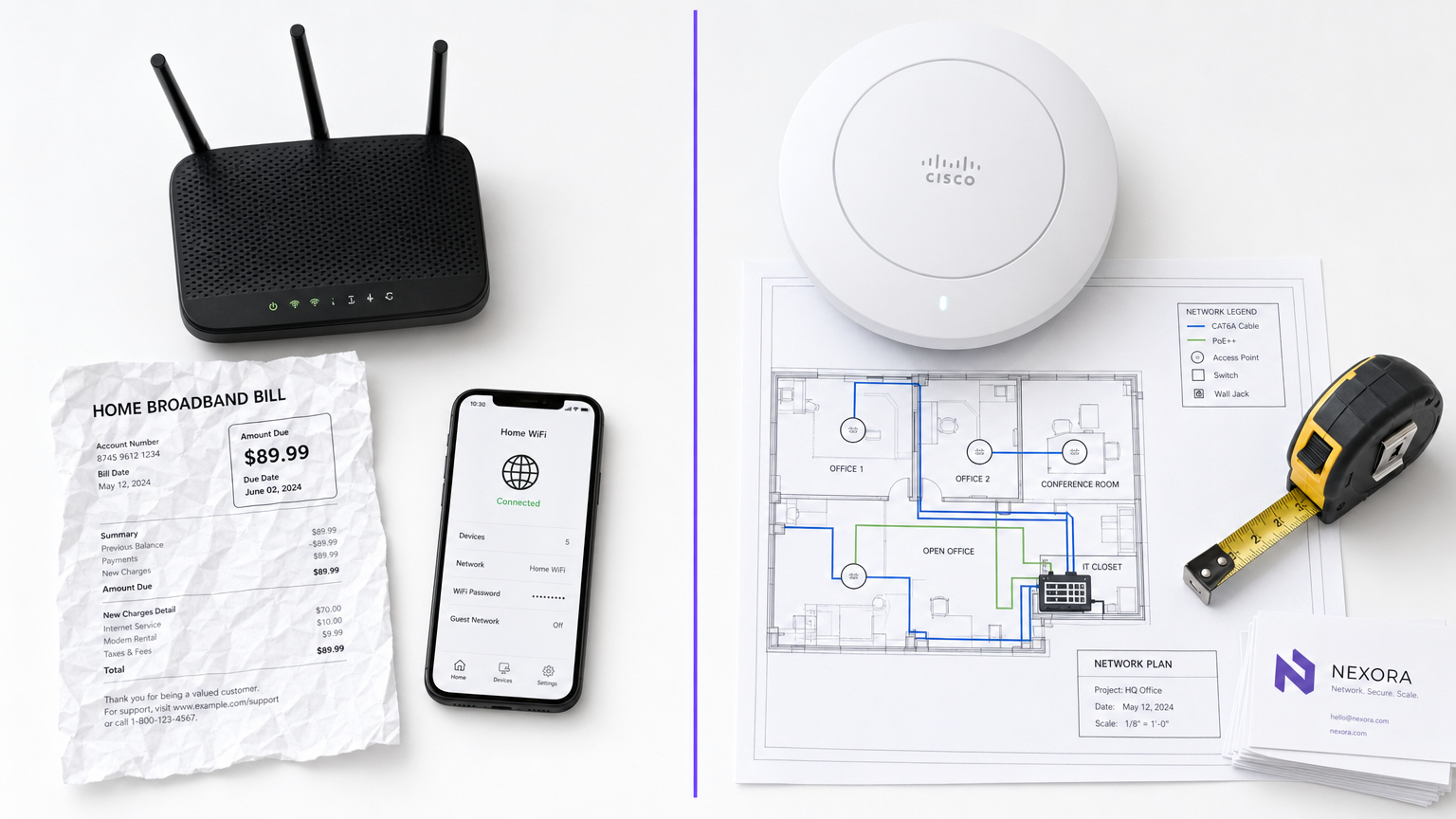
Para los gerentes de TI y operadores de recintos, la distinción entre el WiFi empresarial y el WiFi de consumo no es meramente una cuestión de presupuesto, es una diferencia fundamental en arquitectura, seguridad y escalabilidad. Mientras que los routers de grado de consumo están diseñados para el entorno predecible y de baja densidad de un solo hogar, la infraestructura de grado comercial está diseñada para manejar cientos de conexiones concurrentes, aplicar políticas de seguridad estrictas y proporcionar gestión centralizada en múltiples ubicaciones. La implementación de hardware de consumo en un entorno comercial conduce inevitablemente a la saturación de clientes, vulnerabilidades de seguridad y fallos de cumplimiento. Esta guía explora las diferencias técnicas fundamentales, las mejores prácticas de implementación y el significativo retorno de inversión (ROI) que las redes de grado empresarial ofrecen cuando se integran con plataformas como Guest WiFi y WiFi Analytics de Purple.
Análisis Técnico Detallado
Hardware y Saturación de Clientes
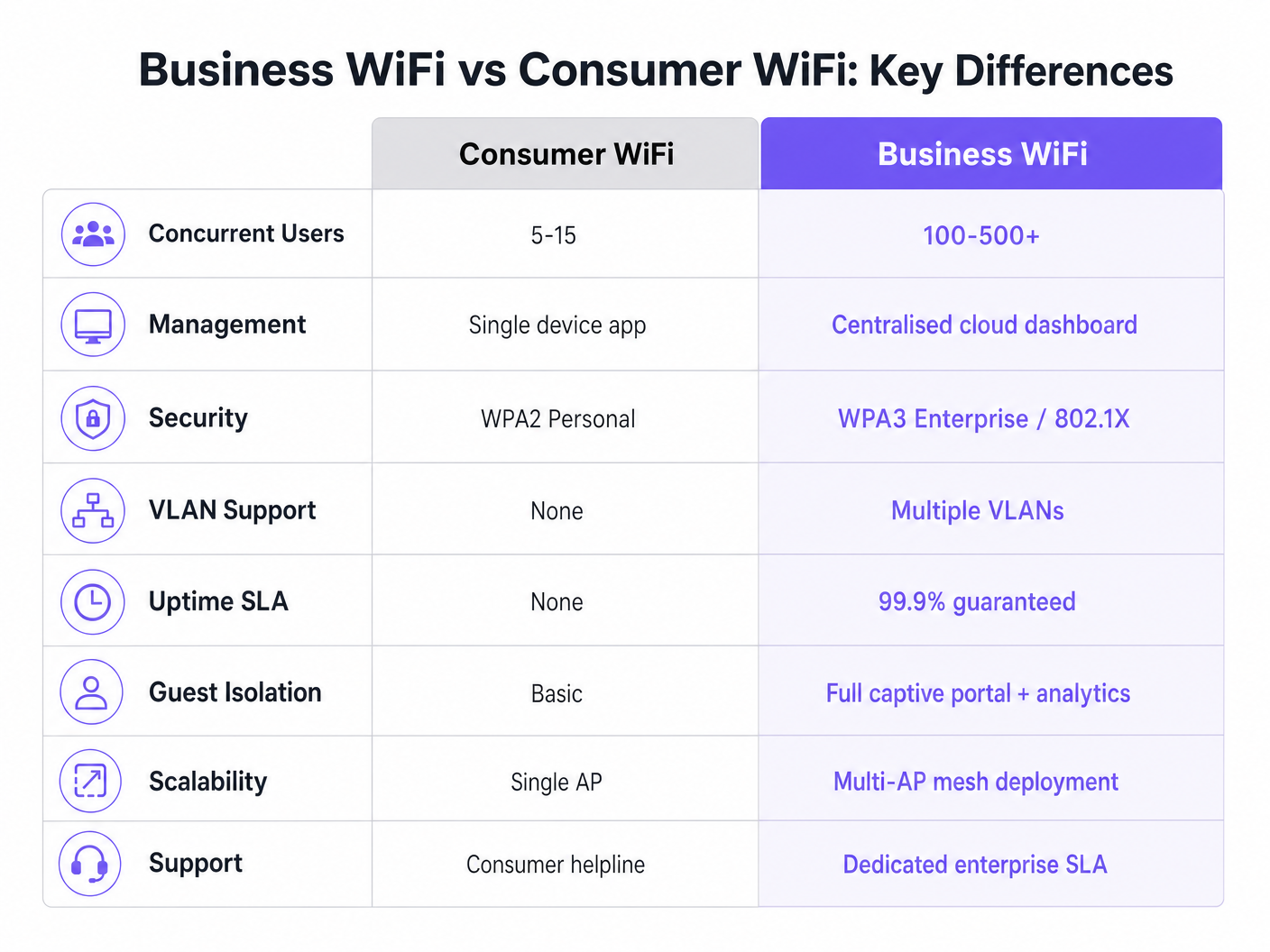
La diferencia más marcada radica en las capacidades del hardware. Un router de consumo estándar está diseñado para soportar de 5 a 15 dispositivos concurrentes utilizando una única banda de radio. Cuando se coloca en un entorno de alta densidad —como el vestíbulo de un hotel o un piso de ventas— el punto de acceso alcanza rápidamente la "saturación de clientes". La tabla de asociaciones se llena, la latencia se dispara y la experiencia del usuario se degrada rápidamente.
Por el contrario, los puntos de acceso (AP) de grado comercial de proveedores empresariales están diseñados para manejar de 100 a más de 500 asociaciones de clientes concurrentes por radio. Utilizan Multi-User Multiple Input Multiple Output (MU-MIMO) para servir a múltiples clientes simultáneamente. Además, características como BSS Colouring bajo el estándar Wi-Fi 6 reducen significativamente la interferencia en entornos densos. Estos dispositivos no son unidades autónomas; están diseñados para operar como parte de un sistema multi-AP coordinado.
Arquitectura de Gestión
Los routers de consumo se gestionan individualmente. Configurar diez ubicaciones significa iniciar sesión en diez interfaces web separadas. Este enfoque no es escalable y a menudo resulta en firmware obsoleto y políticas de seguridad inconsistentes.
Los sistemas de WiFi empresarial se basan en la gestión centralizada a través de un controlador WLAN local o una plataforma basada en la nube. Esto permite a los administradores de red definir una política una vez y propagarla a cientos de APs instantáneamente. Los paneles de estado en tiempo real, las alertas automatizadas para APs no autorizados y las actualizaciones masivas de firmware son requisitos operativos estándar para cualquier organización que gestione múltiples sitios.
Seguridad y Cumplimiento
La seguridad es, sin duda, el diferenciador más crítico. El WiFi de consumo se basa en WPA2 o WPA3 Personal, utilizando una clave precompartida (PSK). Si un dispositivo se ve comprometido, toda la red está en riesgo y no hay un registro de auditoría por usuario.
El WiFi comercial exige la autenticación IEEE 802.1X, el estándar empresarial para el control de acceso a la red basado en puertos. Los usuarios se autentican individualmente contra un servidor RADIUS (por ejemplo, utilizando EAP-TLS o PEAP). Esto asegura que cada sesión sea autenticada y registrada individualmente. Para organizaciones en Retail o Healthcare , 802.1X es esencial para el cumplimiento de PCI DSS, HIPAA y NHS Information Governance. Para más información sobre requisitos específicos de atención médica, consulte nuestra guía sobre WiFi en Hospitales: Una Guía para Redes Clínicas Seguras .
Segmentación de VLAN
La infraestructura empresarial soporta múltiples redes lógicas sobre el mismo hardware físico a través de Redes de Área Local Virtuales (VLANs). Una implementación comercial típica segmentará el tráfico en VLANs distintas para acceso de invitados, dispositivos del personal, hardware IoT y sistemas de Punto de Venta (POS). Esta estrategia de defensa en profundidad asegura que un dispositivo IoT comprometido no pueda acceder a la red del personal o al sistema POS.
Gestión de RF y Rendimiento
A diferencia de los routers de consumo que operan en canales fijos y potencia de transmisión, los APs comerciales emplean asignación dinámica de canales y control de potencia de transmisión (definidos en 802.11h y 802.11k). Esta optimización automática de RF permite que la red se adapte a condiciones cambiantes, como aumentar la potencia de transmisión si un AP vecino falla, o dirigir a los clientes a canales menos congestionados durante las horas pico.
Guía de Implementación
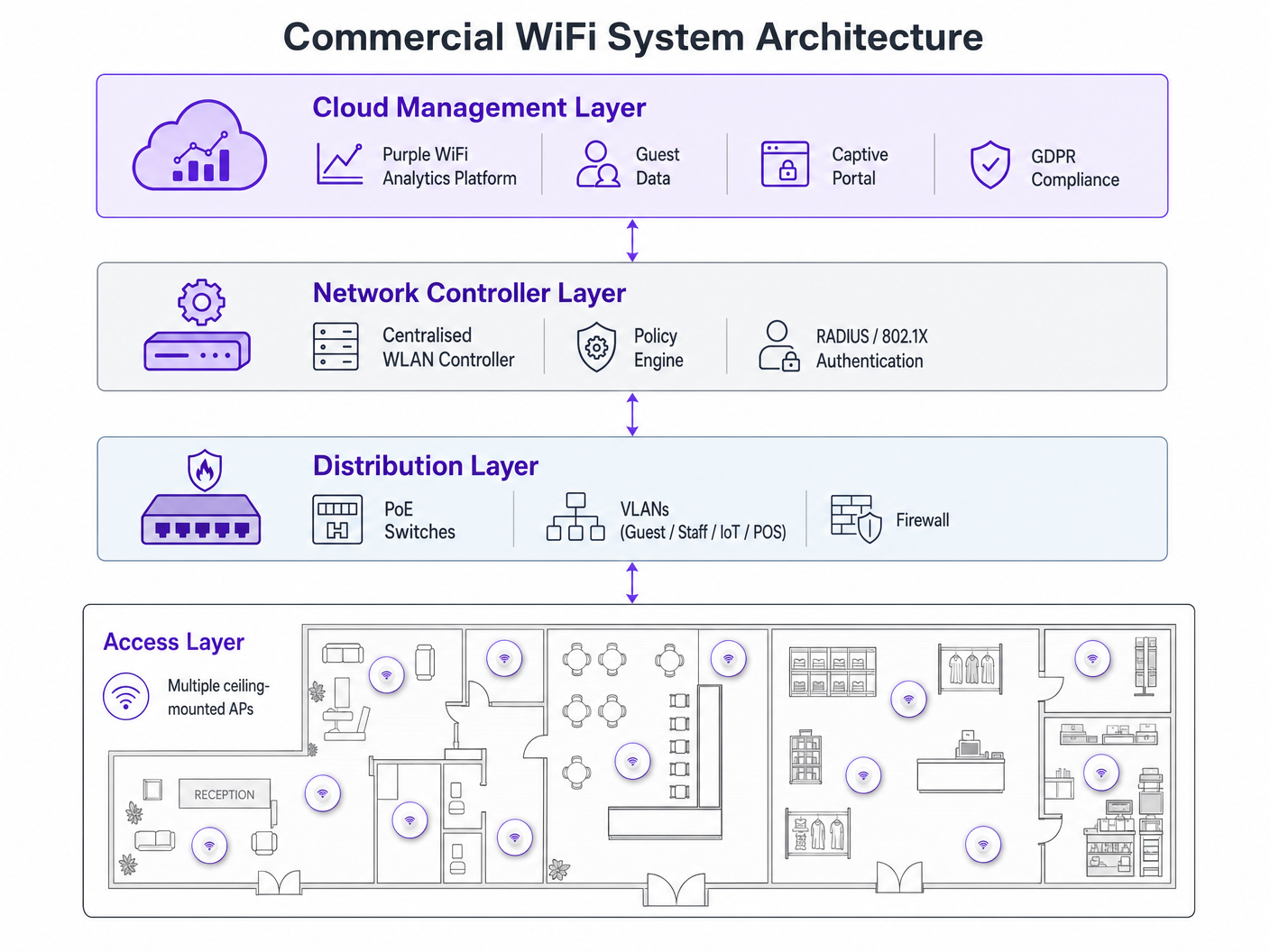
La implementación de una red WiFi comercial requiere una planificación meticulosa. Siga estas recomendaciones neutrales al proveedor:
- Planificación de Densidad de AP: El modo de fallo más común es la subaprovisionamiento. Para entornos de alta densidad, planifique un AP por cada 25-30 metros cuadrados, o un AP por cada 30-40 usuarios concurrentes. Siempre realice un estudio de sitio de RF profesional en lugar de depender únicamente del modelado predictivo.
- Infraestructura PoE: Asegúrese de que su infraestructura de conmutación sea compatible con Power over Ethernet. Los APs comerciales estándar requieren PoE+ (IEEE 802.3at), mientras que los modelos más nuevos de Wi-Fi 6E pueden requerir PoE++ (IEEE 802.3bt) para entregar hasta 60 vatios.
- Integración de Captive Portal: Al implementar redes de invitados, particularmente en Hospitality o Transport , asegúrese de que su Captive Portal cumpla con GDPR. Debe recopilar el consentimiento explícito y gestionar los registros de conexión de manera adecuada. Para conocer los pasos de implementación completos, consulte Cómo Configurar WiFi para su Negocio: Una Guía Completa .
Mejores Prácticas
- Nunca Mezcle Tiers de Hardware: Combinar hardware de consumo y comercial en una única implementación crea una sobrecarga inmanejable y un rendimiento inconsistente. Aislar dispositivos IoT: Siempre coloque los dispositivos IoT en una VLAN dedicada con acceso restringido a internet y capacidades de movimiento lateral nulas.
- Gestión continua del ciclo de vida: Trate su red WiFi como infraestructura dinámica. Las actualizaciones regulares de firmware, las renovaciones de certificados y las auditorías periódicas de RF son obligatorias.
Solución de problemas y mitigación de riesgos
Los modos de falla comunes a menudo se derivan de un diseño inicial deficiente. Los problemas de interferencia después de la implementación suelen indicar que se omitió un estudio de sitio de RF. Si los clientes experimentan desconexiones frecuentes, verifique la superposición de canales o un presupuesto PoE insuficiente a nivel del switch. Mitigue estos riesgos estableciendo alertas automatizadas para los umbrales de utilización de canales y las fallas de asociación de clientes dentro de su panel de administración centralizado.
ROI e impacto comercial
Actualizar a WiFi comercial trasciende la conectividad básica; es una inversión empresarial estratégica. Más allá de mitigar los riesgos de cumplimiento y prevenir costosos tiempos de inactividad, una red empresarial correctamente implementada permite la recopilación avanzada de datos. Al aprovechar la plataforma de análisis de Purple, los establecimientos pueden capturar datos de afluencia, medir el tiempo de permanencia y rastrear las tasas de visitantes recurrentes. Esta inteligencia informa directamente el gasto en marketing, la optimización del diseño de la tienda y los modelos de personal, transformando la infraestructura de red de un centro de costos en un activo generador de ingresos. Para casos de uso avanzados de seguimiento de ubicación, explore nuestra Guía del sistema de posicionamiento interior: UWB, BLE y WiFi .
Escuche el informe
Para una inmersión más profunda en estos conceptos, escuche nuestro podcast de informe técnico de 10 minutos:
Términos clave y definiciones
Client Saturation
The point at which an access point can no longer accept new device connections or process traffic efficiently due to hardware limitations.
Commonly occurs when consumer routers are placed in commercial settings like hotel lobbies or conference rooms.
MU-MIMO
Multi-User Multiple Input Multiple Output; a technology that allows an access point to communicate with multiple devices simultaneously.
Essential for maintaining throughput in high-density enterprise environments.
IEEE 802.1X
An IEEE standard for port-based network access control that provides an authentication mechanism to devices wishing to attach to a LAN or WLAN.
Required for enterprise security and compliance (PCI DSS, HIPAA) to ensure individual user authentication.
VLAN Segmentation
The practice of dividing a single physical network into multiple isolated logical networks.
Used to separate guest traffic, staff traffic, IoT devices, and sensitive systems like POS terminals.
Captive Portal
A web page that the user of a public-access network is obliged to view and interact with before access is granted.
Crucial for capturing guest consent for GDPR compliance and gathering analytics data.
Dynamic Channel Assignment
An automated feature of enterprise WLAN controllers that adjusts the operating channel of APs to minimise interference.
Prevents network degradation in environments with fluctuating RF interference.
BSS Colouring
A Wi-Fi 6 feature that identifies overlapping basic service sets (BSS) to improve spatial reuse and reduce interference.
Improves performance in stadiums and crowded retail spaces where multiple APs are in close proximity.
PoE+ / PoE++
Power over Ethernet standards (802.3at and 802.3bt) that deliver both data and electrical power over a single cable.
Required for powering commercial access points without needing local AC power outlets.
Casos de éxito
A 200-room hotel is experiencing severe guest complaints about WiFi dropping in the lobby during peak check-in times. They are currently using three high-end consumer mesh routers. How should this be resolved?
- Remove the consumer mesh routers entirely. 2. Conduct an RF site survey of the lobby to determine structural interference. 3. Deploy enterprise-grade APs supporting Wi-Fi 6 and MU-MIMO. 4. Configure the APs on a centralised WLAN controller to enable dynamic channel assignment. 5. Implement VLAN segmentation to separate guest traffic from the hotel's operational devices.
A national retail chain needs to roll out a new POS system and guest WiFi across 50 locations, ensuring PCI DSS compliance.
- Deploy commercial APs managed via a single cloud-based platform. 2. Create a dedicated, heavily restricted VLAN for the POS system. 3. Implement IEEE 802.1X authentication for all staff and corporate devices. 4. Deploy a separate guest VLAN with a GDPR-compliant captive portal. 5. Push uniform security policies to all 50 sites simultaneously via the cloud dashboard.
Análisis de escenarios
Q1. Your organisation is opening a new 5,000 sq ft open-plan office. The operations director suggests buying five high-end consumer 'gaming' routers to save budget. What is the primary technical argument against this approach?
💡 Sugerencia:Consider how the devices will be managed and how they handle interference.
Mostrar enfoque recomendado
The primary technical argument is the lack of centralised management and automated RF optimisation. Five consumer routers would require individual configuration, creating management overhead and inconsistent security policies. Furthermore, they lack dynamic channel assignment, meaning they will likely cause co-channel interference with each other, degrading overall network performance.
Q2. A hospital needs to deploy WiFi that supports both patient internet access and secure clinical devices (like mobile workstations). How should the network architecture be designed?
💡 Sugerencia:Think about network layer isolation and authentication standards.
Mostrar enfoque recomendado
The architecture must utilise VLAN segmentation. Patient internet access should be routed to a dedicated Guest VLAN with a captive portal and client isolation enabled. Clinical devices must be placed on a separate, secure VLAN requiring IEEE 802.1X authentication via a RADIUS server to ensure compliance with healthcare data regulations (e.g., NHS Information Governance/HIPAA).
Q3. During a network upgrade, the IT team plans to replace old 802.11n APs with new Wi-Fi 6E models, but they are keeping the existing network switches. What is the most likely point of failure?
💡 Sugerencia:Consider the physical requirements of the new hardware.
Mostrar enfoque recomendado
The most likely point of failure is the Power over Ethernet (PoE) budget. Older switches may only support basic PoE (802.3af, 15.4W) or PoE+ (802.3at, 30W). High-performance Wi-Fi 6E APs often require PoE++ (802.3bt) to deliver up to 60W. If the switches cannot provide sufficient power, the new APs may fail to boot or operate with disabled radios.




