

WiFi Empresarial vs. WiFi de Consumo: Qual é a Diferença?
Este guia abrangente explora as distinções técnicas cruciais entre a infraestrutura WiFi empresarial e de consumo. Fornece a gestores de TI e operadores de espaços informações acionáveis sobre capacidades de hardware, padrões de segurança e arquitetura de gestão necessários para implementações comerciais.
🎧 Ouça este Guia
Ver Transcrição
Resumo Executivo
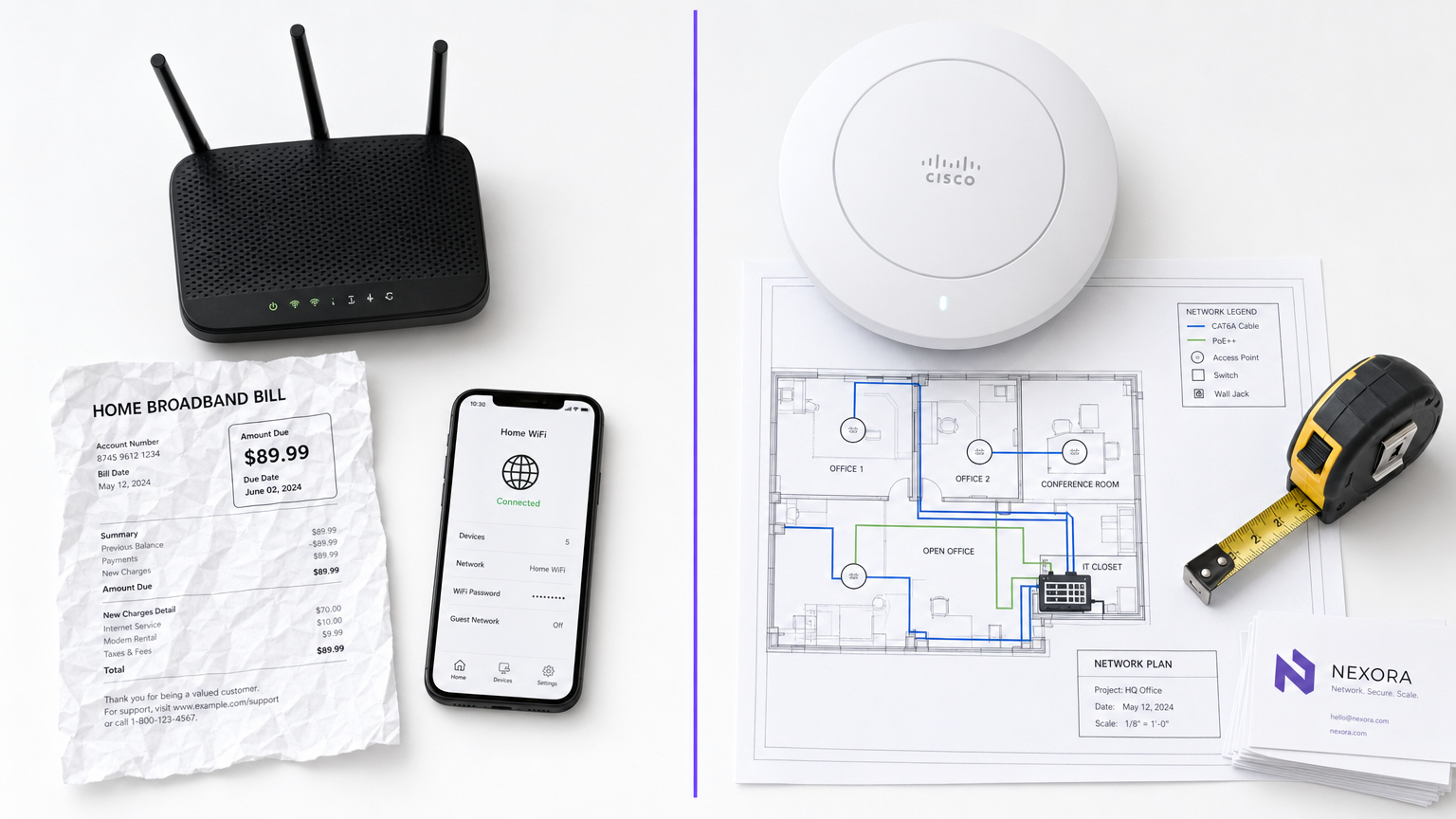
Para gestores de TI e operadores de espaços, a distinção entre WiFi empresarial e WiFi de consumo não é meramente uma questão de orçamento — é uma diferença fundamental na arquitetura, segurança e escalabilidade. Enquanto os routers de consumo são projetados para o ambiente previsível e de baixa densidade de um único agregado familiar, a infraestrutura de nível comercial é projetada para lidar com centenas de ligações simultâneas, impor políticas de segurança rigorosas e fornecer gestão centralizada em vários locais. A implementação de hardware de consumo num ambiente comercial leva inevitavelmente à saturação de clientes, vulnerabilidades de segurança e falhas de conformidade. Este guia explora as principais diferenças técnicas, as melhores práticas de implementação e o ROI significativo que as redes de nível empresarial proporcionam quando integradas com plataformas como o Guest WiFi e o WiFi Analytics da Purple.
Análise Técnica Detalhada
Hardware e Saturação de Clientes
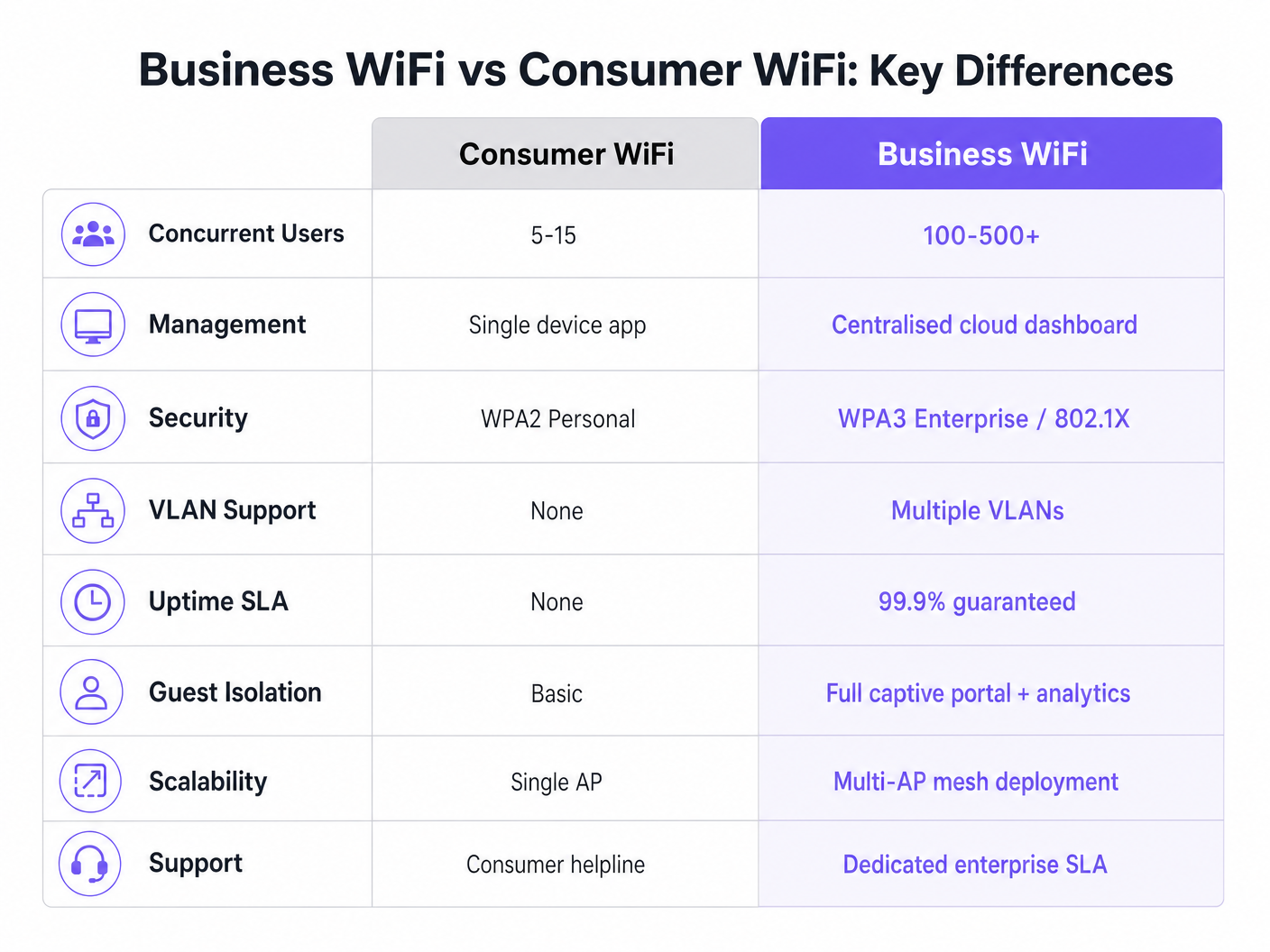
A diferença mais marcante reside nas capacidades do hardware. Um router de consumo padrão é construído para suportar 5 a 15 dispositivos simultâneos usando uma única banda de rádio. Quando colocado num ambiente de alta densidade — como um lobby de hotel ou um piso de retalho — o ponto de acesso atinge rapidamente a "saturação de clientes". A tabela de associações enche-se, a latência aumenta e a experiência do utilizador degrada-se rapidamente.
Pelo contrário, os pontos de acesso (APs) de nível comercial de fornecedores empresariais são projetados para lidar com 100 a 500+ associações de clientes simultâneas por rádio. Utilizam Multi-User Multiple Input Multiple Output (MU-MIMO) para servir múltiplos clientes simultaneamente. Além disso, funcionalidades como BSS Colouring sob o padrão Wi-Fi 6 reduzem significativamente a interferência em ambientes densos. Estes dispositivos não são unidades autónomas; são projetados para operar como parte de um sistema multi-AP coordenado.
Arquitetura de Gestão
Os routers de consumo são geridos individualmente. Configurar dez locais significa iniciar sessão em dez interfaces web separadas. Esta abordagem não é escalável e muitas vezes resulta em firmware desatualizado e políticas de segurança inconsistentes.
Os sistemas WiFi empresariais dependem de gestão centralizada através de um controlador WLAN no local ou de uma plataforma baseada na cloud. Isto permite que os administradores de rede definam uma política uma vez e a propaguem por centenas de APs instantaneamente. Dashboards de estado em tempo real, alertas automatizados para APs não autorizados e atualizações de firmware em massa são requisitos operacionais padrão para qualquer organização que gere múltiplos locais.
Segurança e Conformidade
A segurança é, sem dúvida, o diferenciador mais crítico. O WiFi de consumo depende de WPA2 ou WPA3 Personal, usando uma chave pré-partilhada (PSK). Se um dispositivo for comprometido, toda a rede está em risco e não há um registo de auditoria por utilizador.
O WiFi comercial exige autenticação IEEE 802.1X, o padrão empresarial para controlo de acesso à rede baseado em portas. Os utilizadores autenticam-se individualmente contra um servidor RADIUS (por exemplo, usando EAP-TLS ou PEAP). Isto garante que cada sessão é autenticada e registada individualmente. Para organizações em Retalho ou Saúde , o 802.1X é essencial para a conformidade com PCI DSS, HIPAA e NHS Information Governance. Para mais informações sobre requisitos específicos de saúde, consulte o nosso guia sobre WiFi em Hospitais: Um Guia para Redes Clínicas Seguras .
Segmentação de VLAN
A infraestrutura empresarial suporta múltiplas redes lógicas sobre o mesmo hardware físico através de Virtual LANs (VLANs). Uma implementação comercial típica segmentará o tráfego em VLANs distintas para acesso de convidados, dispositivos de funcionários, hardware IoT e sistemas de Ponto de Venda (POS). Esta estratégia de defesa em profundidade garante que um dispositivo IoT comprometido não pode aceder à rede de funcionários ou ao sistema POS.
Gestão de RF e Débito
Ao contrário dos routers de consumo que operam em canais fixos e potência de transmissão, os APs comerciais empregam atribuição dinâmica de canais e controlo de potência de transmissão (definidos em 802.11h e 802.11k). Esta otimização de RF automatizada permite que a rede se adapte a condições variáveis — como aumentar a potência de transmissão se um AP vizinho falhar, ou direcionar clientes para canais menos congestionados durante as horas de pico.
Guia de Implementação
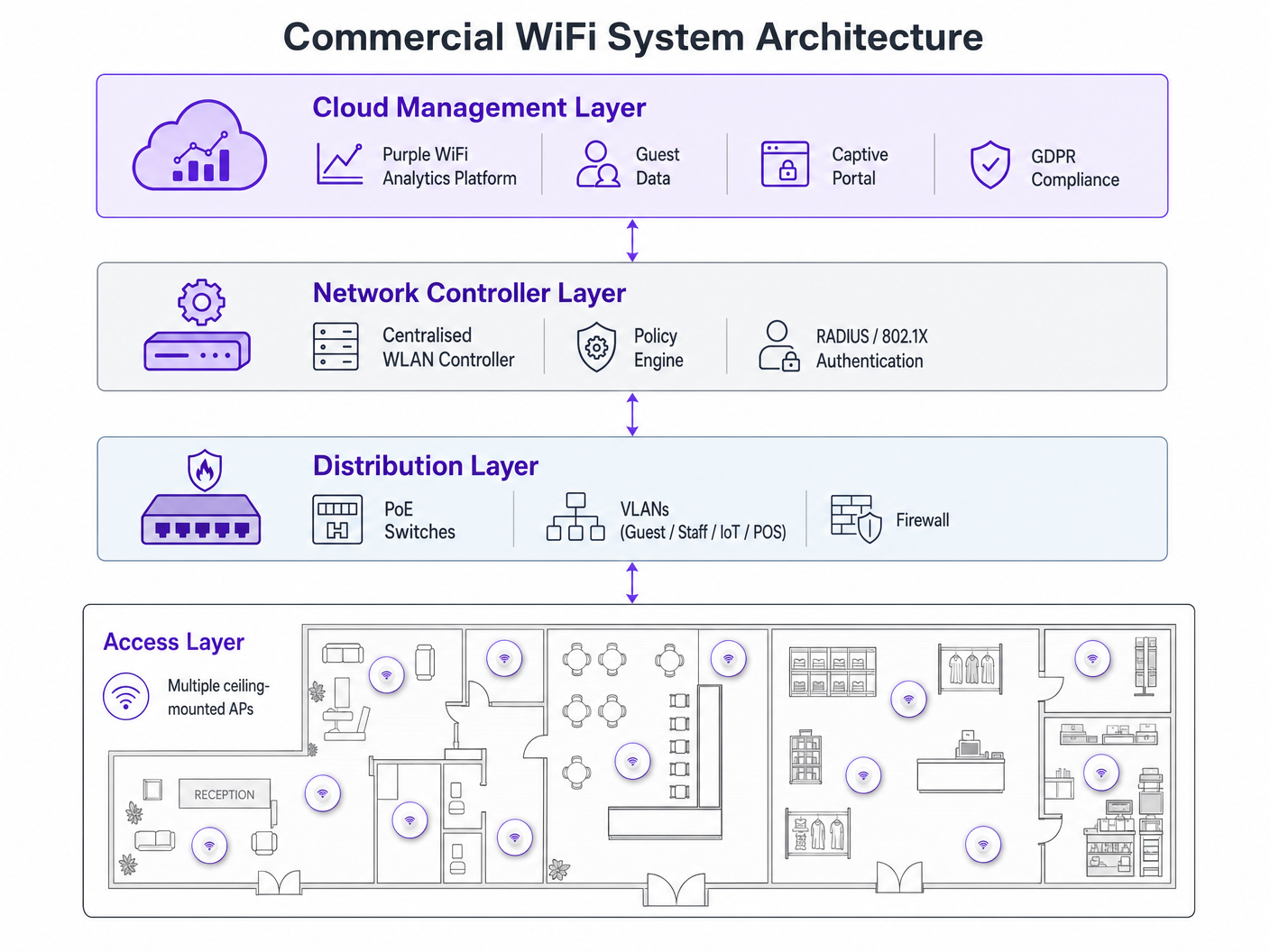
A implementação de uma rede WiFi comercial requer um planeamento meticuloso. Siga estas recomendações neutras em relação ao fornecedor:
- Planeamento da Densidade de AP: O modo de falha mais comum é o subdimensionamento. Para ambientes de alta densidade, planeie um AP por 25-30 metros quadrados, ou um AP por 30-40 utilizadores simultâneos. Realize sempre um levantamento profissional do local de RF em vez de depender apenas de modelagem preditiva.
- Infraestrutura PoE: Certifique-se de que a sua infraestrutura de switching suporta Power over Ethernet. Os APs comerciais padrão requerem PoE+ (IEEE 802.3at), enquanto os modelos mais recentes de Wi-Fi 6E podem exigir PoE++ (IEEE 802.3bt) para fornecer até 60 watts.
- Integração de Captive Portal: Ao implementar redes de convidados, particularmente em Hotelaria ou Transportes , certifique-se de que o seu Captive Portal está em conformidade com o GDPR. Deve recolher consentimento explícito e gerir os registos de ligação de forma adequada. Para passos de implementação abrangentes, consulte Como Configurar WiFi para o Seu Negócio: Um Guia Completo .
Melhores Práticas
- Nunca Misture Níveis de Hardware: Combinar hardware de consumo e comercial numa única implementação cria uma sobrecarga incontrolável e um desempenho inconsistente. Isolar Dispositivos IoT: Sempre coloque os dispositivos IoT numa VLAN dedicada com acesso restrito à internet e capacidades de movimento lateral nulo.
- Gestão Contínua do Ciclo de Vida: Trate a sua rede WiFi como infraestrutura dinâmica. Atualizações regulares de firmware, renovações de certificados e auditorias RF periódicas são obrigatórias.
Resolução de Problemas e Mitigação de Riscos
Modos de falha comuns resultam frequentemente de um design inicial deficiente. Problemas de interferência pós-implementação geralmente indicam que um levantamento de site RF foi ignorado. Se os clientes experienciarem desconexões frequentes, verifique a sobreposição de canais ou o orçamento PoE insuficiente ao nível do switch. Mitigue estes riscos estabelecendo alertas automáticos para limiares de utilização de canais e falhas de associação de clientes no seu painel de gestão centralizado.
ROI e Impacto nos Negócios
A atualização para WiFi comercial transcende a conectividade básica — é um investimento estratégico para o negócio. Além de mitigar riscos de conformidade e prevenir tempo de inatividade dispendioso, uma rede empresarial devidamente implementada permite a recolha avançada de dados. Ao alavancar a plataforma de análise da Purple, os locais podem capturar dados de fluxo de pessoas, medir o tempo de permanência e monitorizar as taxas de visitantes recorrentes. Esta inteligência informa diretamente o investimento em marketing, a otimização do layout da loja e os modelos de pessoal, transformando a infraestrutura de rede de um centro de custos num ativo gerador de receita. Para casos de uso avançados de rastreamento de localização, explore o nosso Sistema de Posicionamento Interior: Guia UWB, BLE e WiFi .
Ouça o Briefing
Para um aprofundamento nestes conceitos, ouça o nosso podcast de briefing técnico de 10 minutos:
Termos-Chave e Definições
Client Saturation
The point at which an access point can no longer accept new device connections or process traffic efficiently due to hardware limitations.
Commonly occurs when consumer routers are placed in commercial settings like hotel lobbies or conference rooms.
MU-MIMO
Multi-User Multiple Input Multiple Output; a technology that allows an access point to communicate with multiple devices simultaneously.
Essential for maintaining throughput in high-density enterprise environments.
IEEE 802.1X
An IEEE standard for port-based network access control that provides an authentication mechanism to devices wishing to attach to a LAN or WLAN.
Required for enterprise security and compliance (PCI DSS, HIPAA) to ensure individual user authentication.
VLAN Segmentation
The practice of dividing a single physical network into multiple isolated logical networks.
Used to separate guest traffic, staff traffic, IoT devices, and sensitive systems like POS terminals.
Captive Portal
A web page that the user of a public-access network is obliged to view and interact with before access is granted.
Crucial for capturing guest consent for GDPR compliance and gathering analytics data.
Dynamic Channel Assignment
An automated feature of enterprise WLAN controllers that adjusts the operating channel of APs to minimise interference.
Prevents network degradation in environments with fluctuating RF interference.
BSS Colouring
A Wi-Fi 6 feature that identifies overlapping basic service sets (BSS) to improve spatial reuse and reduce interference.
Improves performance in stadiums and crowded retail spaces where multiple APs are in close proximity.
PoE+ / PoE++
Power over Ethernet standards (802.3at and 802.3bt) that deliver both data and electrical power over a single cable.
Required for powering commercial access points without needing local AC power outlets.
Estudos de Caso
A 200-room hotel is experiencing severe guest complaints about WiFi dropping in the lobby during peak check-in times. They are currently using three high-end consumer mesh routers. How should this be resolved?
- Remove the consumer mesh routers entirely. 2. Conduct an RF site survey of the lobby to determine structural interference. 3. Deploy enterprise-grade APs supporting Wi-Fi 6 and MU-MIMO. 4. Configure the APs on a centralised WLAN controller to enable dynamic channel assignment. 5. Implement VLAN segmentation to separate guest traffic from the hotel's operational devices.
A national retail chain needs to roll out a new POS system and guest WiFi across 50 locations, ensuring PCI DSS compliance.
- Deploy commercial APs managed via a single cloud-based platform. 2. Create a dedicated, heavily restricted VLAN for the POS system. 3. Implement IEEE 802.1X authentication for all staff and corporate devices. 4. Deploy a separate guest VLAN with a GDPR-compliant captive portal. 5. Push uniform security policies to all 50 sites simultaneously via the cloud dashboard.
Análise de Cenários
Q1. Your organisation is opening a new 5,000 sq ft open-plan office. The operations director suggests buying five high-end consumer 'gaming' routers to save budget. What is the primary technical argument against this approach?
💡 Dica:Consider how the devices will be managed and how they handle interference.
Mostrar Abordagem Recomendada
The primary technical argument is the lack of centralised management and automated RF optimisation. Five consumer routers would require individual configuration, creating management overhead and inconsistent security policies. Furthermore, they lack dynamic channel assignment, meaning they will likely cause co-channel interference with each other, degrading overall network performance.
Q2. A hospital needs to deploy WiFi that supports both patient internet access and secure clinical devices (like mobile workstations). How should the network architecture be designed?
💡 Dica:Think about network layer isolation and authentication standards.
Mostrar Abordagem Recomendada
The architecture must utilise VLAN segmentation. Patient internet access should be routed to a dedicated Guest VLAN with a captive portal and client isolation enabled. Clinical devices must be placed on a separate, secure VLAN requiring IEEE 802.1X authentication via a RADIUS server to ensure compliance with healthcare data regulations (e.g., NHS Information Governance/HIPAA).
Q3. During a network upgrade, the IT team plans to replace old 802.11n APs with new Wi-Fi 6E models, but they are keeping the existing network switches. What is the most likely point of failure?
💡 Dica:Consider the physical requirements of the new hardware.
Mostrar Abordagem Recomendada
The most likely point of failure is the Power over Ethernet (PoE) budget. Older switches may only support basic PoE (802.3af, 15.4W) or PoE+ (802.3at, 30W). High-performance Wi-Fi 6E APs often require PoE++ (802.3bt) to deliver up to 60W. If the switches cannot provide sufficient power, the new APs may fail to boot or operate with disabled radios.




