

WiFi professionnel vs. WiFi grand public : Quelle est la différence ?
Ce guide de référence explore les distinctions techniques cruciales entre les infrastructures WiFi professionnelles et grand public. Il fournit aux responsables informatiques et aux opérateurs de sites des informations exploitables sur les capacités matérielles, les normes de sécurité et l'architecture de gestion nécessaires aux déploiements commerciaux.
🎧 Écouter ce guide
Voir la transcription
Résumé Exécutif
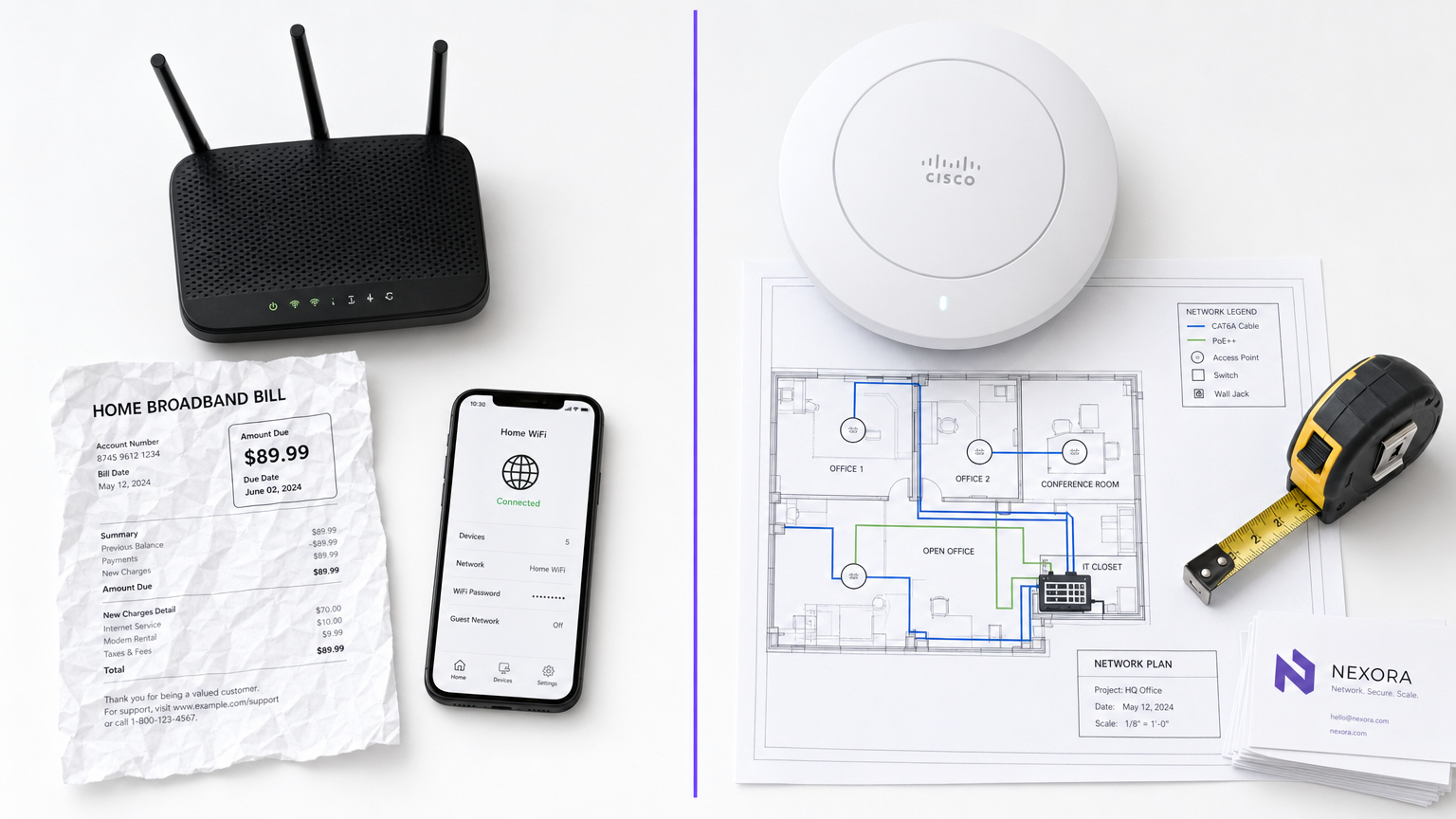
Pour les responsables informatiques et les opérateurs de sites, la distinction entre le WiFi professionnel et le WiFi grand public n'est pas seulement une question de budget, c'est une différence fondamentale en matière d'architecture, de sécurité et d'évolutivité. Alors que les routeurs grand public sont conçus pour l'environnement prévisible et à faible densité d'un foyer unique, l'infrastructure de qualité commerciale est conçue pour gérer des centaines de connexions simultanées, appliquer des politiques de sécurité strictes et fournir une gestion centralisée sur plusieurs sites. Le déploiement de matériel grand public dans un environnement commercial entraîne inévitablement une saturation des clients, des vulnérabilités de sécurité et des défaillances de conformité. Ce guide explore les principales différences techniques, les meilleures pratiques de mise en œuvre et le retour sur investissement significatif que les réseaux de qualité entreprise offrent lorsqu'ils sont intégrés à des plateformes comme Guest WiFi et WiFi Analytics de Purple.
Plongée Technique Approfondie
Matériel et Saturation des Clients
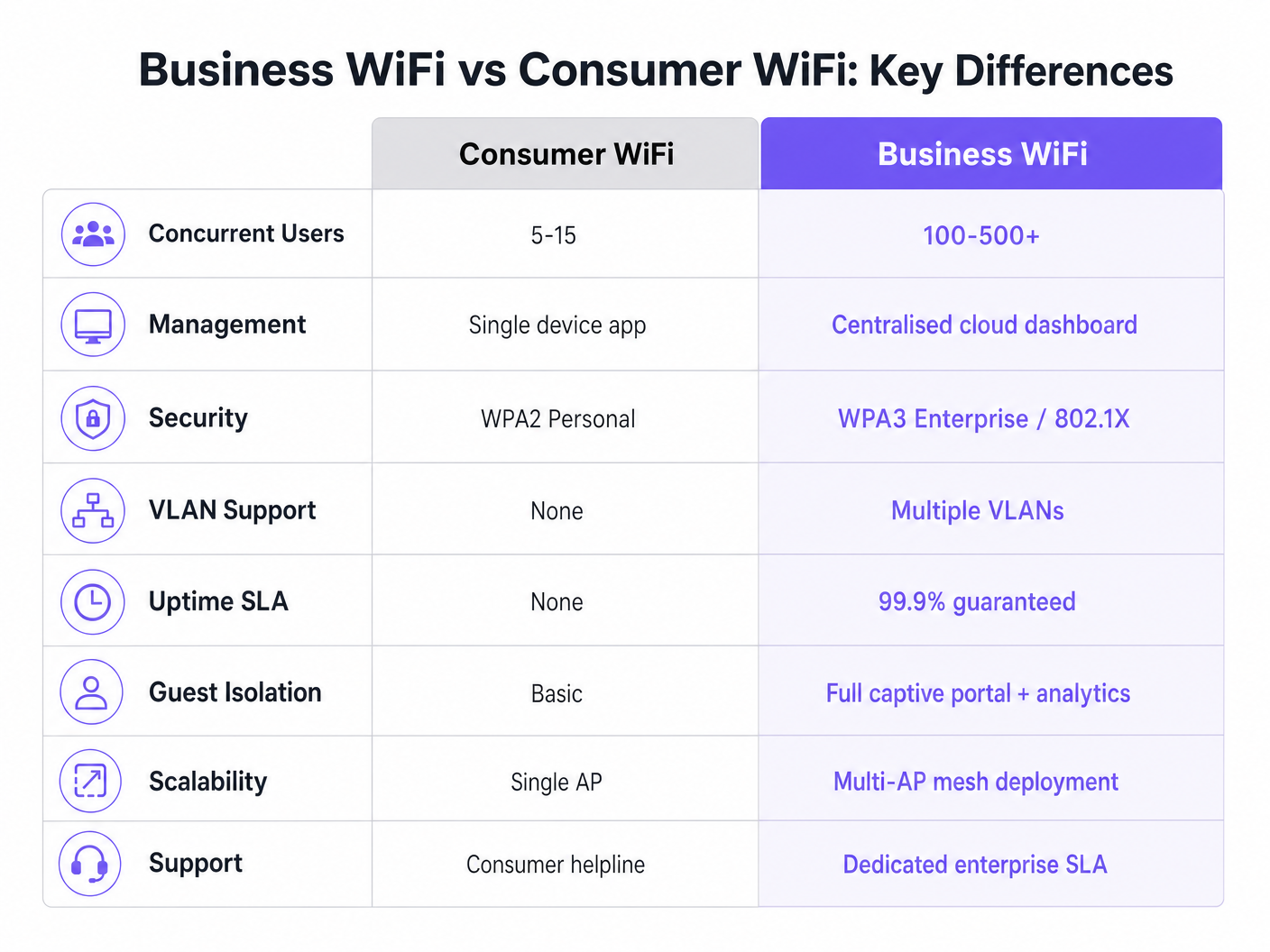
La différence la plus frappante réside dans les capacités matérielles. Un routeur grand public standard est conçu pour prendre en charge 5 à 15 appareils simultanés utilisant une seule bande radio. Lorsqu'il est placé dans un environnement à haute densité, tel qu'un hall d'hôtel ou un espace de vente au détail, le point d'accès atteint rapidement la « saturation des clients ». La table d'association se remplit, la latence augmente et l'expérience utilisateur se dégrade rapidement.
Inversement, les points d'accès (AP) de qualité commerciale des fournisseurs d'entreprise sont conçus pour gérer 100 à 500+ associations de clients simultanées par radio. Ils utilisent le Multi-User Multiple Input Multiple Output (MU-MIMO) pour servir plusieurs clients simultanément. De plus, des fonctionnalités comme le BSS Colouring de la norme Wi-Fi 6 réduisent considérablement les interférences dans les environnements denses. Ces appareils ne sont pas des unités autonomes ; ils sont conçus pour fonctionner dans le cadre d'un système multi-AP coordonné.
Architecture de Gestion
Les routeurs grand public sont gérés individuellement. Configurer dix emplacements signifie se connecter à dix interfaces web distinctes. Cette approche n'est pas évolutive et entraîne souvent des micrologiciels obsolètes et des politiques de sécurité incohérentes.
Les systèmes WiFi professionnels reposent sur une gestion centralisée via un contrôleur WLAN sur site ou une plateforme basée sur le cloud. Cela permet aux administrateurs réseau de définir une politique une seule fois et de la propager instantanément à des centaines d'AP. Les tableaux de bord d'état en temps réel, les alertes automatisées pour les AP non autorisés et les mises à jour de micrologiciels en masse sont des exigences opérationnelles standard pour toute organisation gérant plusieurs sites.
Sécurité et Conformité
La sécurité est sans doute le facteur de différenciation le plus critique. Le WiFi grand public repose sur le WPA2 ou WPA3 Personal, utilisant une clé pré-partagée (PSK). Si un appareil est compromis, l'ensemble du réseau est menacé, et il n'y a pas de piste d'audit par utilisateur.
Le WiFi commercial exige l'authentification IEEE 802.1X, la norme d'entreprise pour le contrôle d'accès réseau basé sur les ports. Les utilisateurs s'authentifient individuellement auprès d'un serveur RADIUS (par exemple, en utilisant EAP-TLS ou PEAP). Cela garantit que chaque session est authentifiée et enregistrée individuellement. Pour les organisations du Commerce de détail ou de la Santé , le 802.1X est essentiel pour la conformité PCI DSS, HIPAA et NHS Information Governance. Pour en savoir plus sur les exigences spécifiques au secteur de la santé, consultez notre guide sur WiFi in Hospitals: A Guide to Secure Clinical Networks .
Segmentation VLAN
L'infrastructure d'entreprise prend en charge plusieurs réseaux logiques sur le même matériel physique via des réseaux locaux virtuels (VLAN). Un déploiement commercial typique segmentera le trafic en VLAN distincts pour l'accès invité, les appareils du personnel, le matériel IoT et les systèmes de point de vente (POS). Cette stratégie de défense en profondeur garantit qu'un appareil IoT compromis ne peut pas pivoter vers le réseau du personnel ou le système POS.
Gestion RF et Débit
Contrairement aux routeurs grand public qui fonctionnent sur des canaux fixes et une puissance de transmission fixe, les AP commerciaux utilisent l'attribution dynamique des canaux et le contrôle de la puissance de transmission (définis dans 802.11h et 802.11k). Cette optimisation RF automatisée permet au réseau de s'adapter aux conditions changeantes, comme l'augmentation de la puissance de transmission si un AP voisin tombe en panne, ou l'orientation des clients vers des canaux moins encombrés pendant les heures de pointe.
Guide de Mise en Œuvre
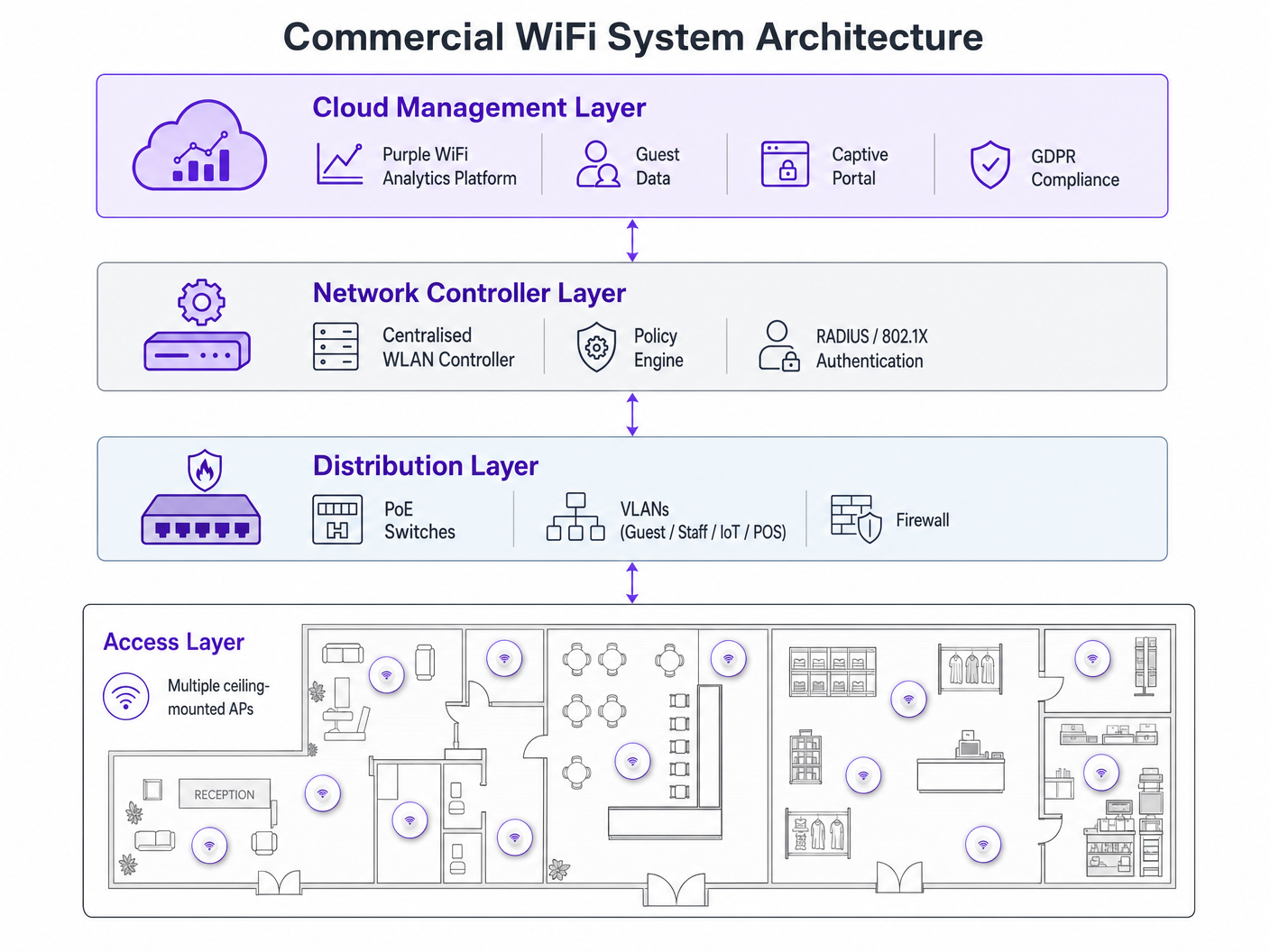
Le déploiement d'un réseau WiFi commercial exige une planification méticuleuse. Suivez ces recommandations indépendantes des fournisseurs :
- Planification de la densité des AP : Le mode de défaillance le plus courant est le sous-dimensionnement. Pour les environnements à haute densité, prévoyez un AP pour 25-30 mètres carrés, ou un AP pour 30-40 utilisateurs simultanés. Effectuez toujours une étude de site RF professionnelle plutôt que de vous fier uniquement à la modélisation prédictive.
- Infrastructure PoE : Assurez-vous que votre infrastructure de commutation prend en charge le Power over Ethernet. Les AP commerciaux standard nécessitent le PoE+ (IEEE 802.3at), tandis que les nouveaux modèles Wi-Fi 6E peuvent exiger le PoE++ (IEEE 802.3bt) pour fournir jusqu'à 60 watts.
- Intégration du Captive Portal : Lors du déploiement de réseaux invités, en particulier dans l' Hôtellerie ou le Transport , assurez-vous que votre Captive Portal est conforme au GDPR. Il doit recueillir un consentement explicite et gérer les journaux de connexion de manière appropriée. Pour des étapes de déploiement complètes, consultez How to Set Up WiFi for Your Business: A Complete Guide .
Bonnes Pratiques
- Ne jamais mélanger les niveaux de matériel : La combinaison de matériel grand public et commercial dans un seul déploiement crée une surcharge ingérable et des performances incohérentes. Isoler les appareils IoT : Placez toujours les appareils IoT sur un VLAN dédié avec un accès internet restreint et des capacités de mouvement latéral nulles.
- Gestion continue du cycle de vie : Traitez votre réseau WiFi comme une infrastructure dynamique. Les mises à jour régulières du micrologiciel, les renouvellements de certificats et les audits RF périodiques sont obligatoires.
Dépannage et atténuation des risques
Les modes de défaillance courants proviennent souvent d'une mauvaise conception initiale. Les problèmes d'interférence après le déploiement indiquent généralement qu'une étude de site RF a été ignorée. Si les clients subissent des déconnexions fréquentes, vérifiez le chevauchement des canaux ou un budget PoE insuffisant au niveau du commutateur. Atténuez ces risques en établissant des alertes automatisées pour les seuils d'utilisation des canaux et les échecs d'association des clients au sein de votre tableau de bord de gestion centralisé.
Retour sur investissement et impact commercial
La mise à niveau vers un WiFi commercial transcende la connectivité de base — c'est un investissement commercial stratégique. Au-delà de l'atténuation des risques de conformité et de la prévention des temps d'arrêt coûteux, un réseau d'entreprise correctement déployé permet une collecte de données avancée. En tirant parti de la plateforme d'analyse de Purple, les lieux peuvent capturer des données de fréquentation, mesurer le temps de présence et suivre les taux de visiteurs récurrents. Cette intelligence éclaire directement les dépenses marketing, l'optimisation de l'agencement des magasins et les modèles de personnel, transformant l'infrastructure réseau d'un centre de coûts en un actif générateur de revenus. Pour les cas d'utilisation avancés de suivi de localisation, explorez notre Guide du système de positionnement intérieur : UWB, BLE et WiFi .
Écoutez le briefing
Pour une exploration plus approfondie de ces concepts, écoutez notre podcast de briefing technique de 10 minutes :
Termes clés et définitions
Client Saturation
The point at which an access point can no longer accept new device connections or process traffic efficiently due to hardware limitations.
Commonly occurs when consumer routers are placed in commercial settings like hotel lobbies or conference rooms.
MU-MIMO
Multi-User Multiple Input Multiple Output; a technology that allows an access point to communicate with multiple devices simultaneously.
Essential for maintaining throughput in high-density enterprise environments.
IEEE 802.1X
An IEEE standard for port-based network access control that provides an authentication mechanism to devices wishing to attach to a LAN or WLAN.
Required for enterprise security and compliance (PCI DSS, HIPAA) to ensure individual user authentication.
VLAN Segmentation
The practice of dividing a single physical network into multiple isolated logical networks.
Used to separate guest traffic, staff traffic, IoT devices, and sensitive systems like POS terminals.
Captive Portal
A web page that the user of a public-access network is obliged to view and interact with before access is granted.
Crucial for capturing guest consent for GDPR compliance and gathering analytics data.
Dynamic Channel Assignment
An automated feature of enterprise WLAN controllers that adjusts the operating channel of APs to minimise interference.
Prevents network degradation in environments with fluctuating RF interference.
BSS Colouring
A Wi-Fi 6 feature that identifies overlapping basic service sets (BSS) to improve spatial reuse and reduce interference.
Improves performance in stadiums and crowded retail spaces where multiple APs are in close proximity.
PoE+ / PoE++
Power over Ethernet standards (802.3at and 802.3bt) that deliver both data and electrical power over a single cable.
Required for powering commercial access points without needing local AC power outlets.
Études de cas
A 200-room hotel is experiencing severe guest complaints about WiFi dropping in the lobby during peak check-in times. They are currently using three high-end consumer mesh routers. How should this be resolved?
- Remove the consumer mesh routers entirely. 2. Conduct an RF site survey of the lobby to determine structural interference. 3. Deploy enterprise-grade APs supporting Wi-Fi 6 and MU-MIMO. 4. Configure the APs on a centralised WLAN controller to enable dynamic channel assignment. 5. Implement VLAN segmentation to separate guest traffic from the hotel's operational devices.
A national retail chain needs to roll out a new POS system and guest WiFi across 50 locations, ensuring PCI DSS compliance.
- Deploy commercial APs managed via a single cloud-based platform. 2. Create a dedicated, heavily restricted VLAN for the POS system. 3. Implement IEEE 802.1X authentication for all staff and corporate devices. 4. Deploy a separate guest VLAN with a GDPR-compliant captive portal. 5. Push uniform security policies to all 50 sites simultaneously via the cloud dashboard.
Analyse de scénario
Q1. Your organisation is opening a new 5,000 sq ft open-plan office. The operations director suggests buying five high-end consumer 'gaming' routers to save budget. What is the primary technical argument against this approach?
💡 Astuce :Consider how the devices will be managed and how they handle interference.
Afficher l'approche recommandée
The primary technical argument is the lack of centralised management and automated RF optimisation. Five consumer routers would require individual configuration, creating management overhead and inconsistent security policies. Furthermore, they lack dynamic channel assignment, meaning they will likely cause co-channel interference with each other, degrading overall network performance.
Q2. A hospital needs to deploy WiFi that supports both patient internet access and secure clinical devices (like mobile workstations). How should the network architecture be designed?
💡 Astuce :Think about network layer isolation and authentication standards.
Afficher l'approche recommandée
The architecture must utilise VLAN segmentation. Patient internet access should be routed to a dedicated Guest VLAN with a captive portal and client isolation enabled. Clinical devices must be placed on a separate, secure VLAN requiring IEEE 802.1X authentication via a RADIUS server to ensure compliance with healthcare data regulations (e.g., NHS Information Governance/HIPAA).
Q3. During a network upgrade, the IT team plans to replace old 802.11n APs with new Wi-Fi 6E models, but they are keeping the existing network switches. What is the most likely point of failure?
💡 Astuce :Consider the physical requirements of the new hardware.
Afficher l'approche recommandée
The most likely point of failure is the Power over Ethernet (PoE) budget. Older switches may only support basic PoE (802.3af, 15.4W) or PoE+ (802.3at, 30W). High-performance Wi-Fi 6E APs often require PoE++ (802.3bt) to deliver up to 60W. If the switches cannot provide sufficient power, the new APs may fail to boot or operate with disabled radios.




