

WiFi aziendale vs. WiFi consumer: Qual è la differenza?
Questa guida autorevole esplora le distinzioni tecniche critiche tra l'infrastruttura WiFi aziendale e quella consumer. Fornisce a responsabili IT e operatori di sedi informazioni utili sulle capacità hardware, gli standard di sicurezza e l'architettura di gestione necessari per le implementazioni commerciali.
🎧 Ascolta questa guida
Visualizza trascrizione
Riepilogo Esecutivo
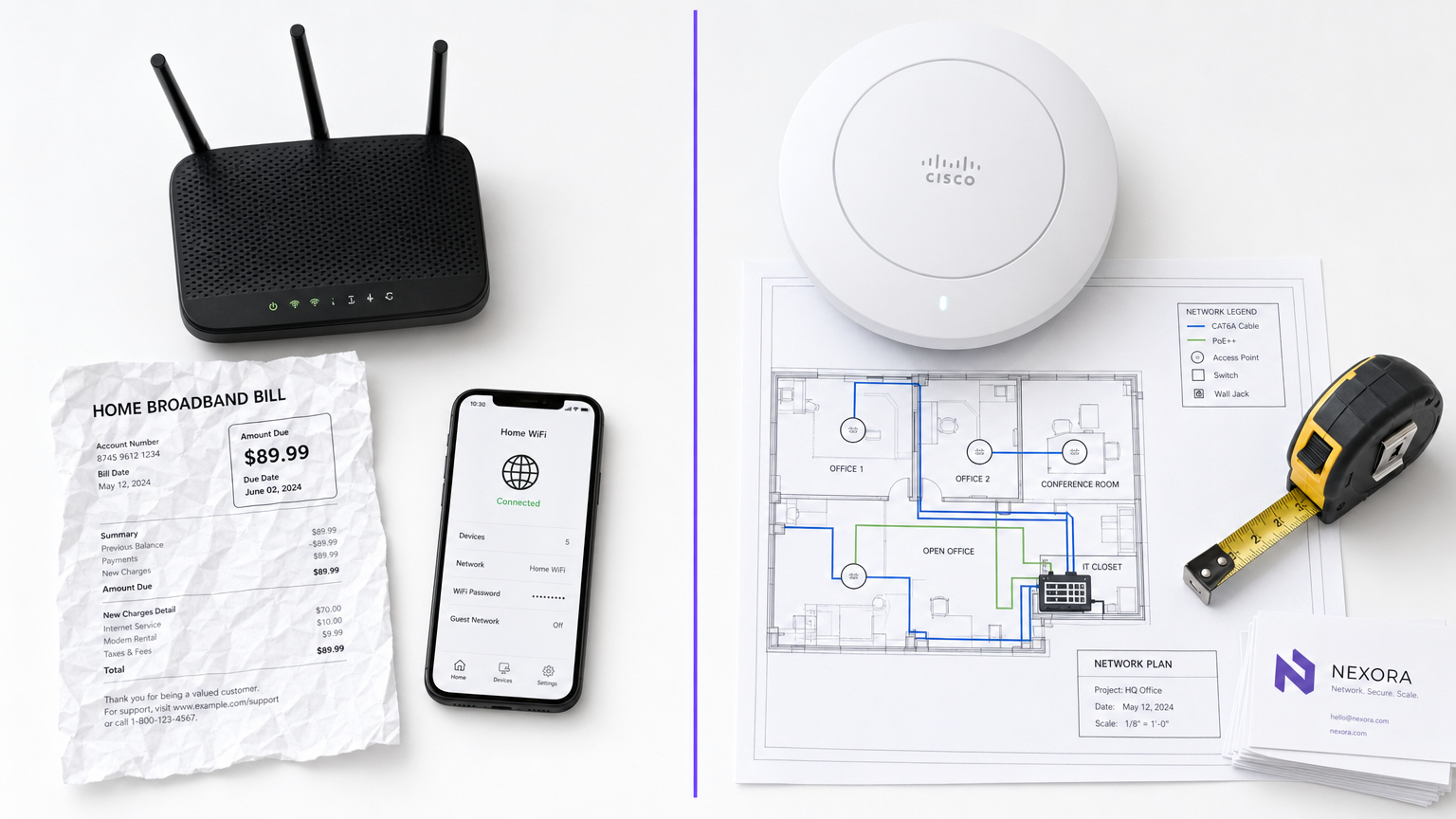
Per i responsabili IT e gli operatori di sedi, la distinzione tra WiFi aziendale e WiFi consumer non è solo una questione di budget, ma una differenza fondamentale in termini di architettura, sicurezza e scalabilità. Mentre i router di livello consumer sono progettati per l'ambiente prevedibile e a bassa densità di una singola abitazione, l'infrastruttura di livello commerciale è ingegnerizzata per gestire centinaia di connessioni simultanee, applicare rigorose politiche di sicurezza e fornire una gestione centralizzata su più sedi. L'implementazione di hardware consumer in un contesto commerciale porta inevitabilmente a saturazione dei client, vulnerabilità di sicurezza e fallimenti di conformità. Questa guida esplora le principali differenze tecniche, le migliori pratiche di implementazione e il significativo ROI che le reti di livello enterprise offrono quando integrate con piattaforme come Guest WiFi e WiFi Analytics di Purple.
Approfondimento Tecnico
Hardware e Saturazione dei Client
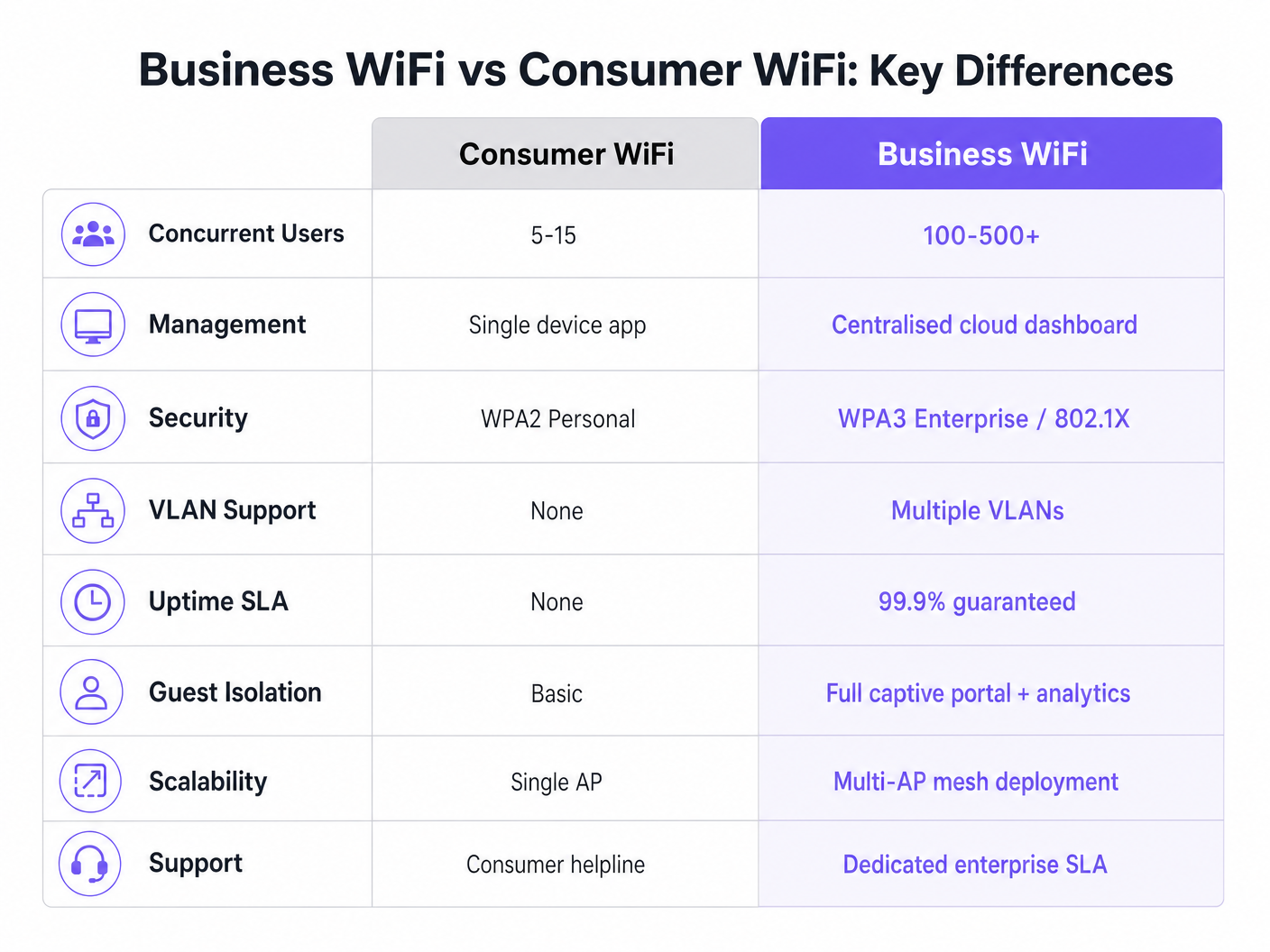
La differenza più marcata risiede nelle capacità hardware. Un router consumer standard è costruito per supportare da 5 a 15 dispositivi simultanei utilizzando una singola banda radio. Se posizionato in un ambiente ad alta densità, come una hall d'albergo o un'area di vendita al dettaglio, l'access point raggiunge rapidamente la "saturazione dei client". La tabella delle associazioni si riempie, la latenza aumenta e l'esperienza utente si degrada rapidamente.
Al contrario, gli access point (AP) di livello commerciale dei fornitori enterprise sono progettati per gestire da 100 a oltre 500 associazioni client simultanee per radio. Utilizzano il Multi-User Multiple Input Multiple Output (MU-MIMO) per servire più client contemporaneamente. Inoltre, funzionalità come il BSS Colouring nello standard Wi-Fi 6 riducono significativamente le interferenze in ambienti densi. Questi dispositivi non sono unità autonome; sono progettati per operare come parte di un sistema multi-AP coordinato.
Architettura di Gestione
I router consumer sono gestiti individualmente. Configurare dieci sedi significa accedere a dieci interfacce web separate. Questo approccio non è scalabile e spesso porta a firmware obsoleti e politiche di sicurezza incoerenti.
I sistemi WiFi aziendali si basano su una gestione centralizzata tramite un controller WLAN on-premises o una piattaforma basata su cloud. Ciò consente agli amministratori di rete di definire una politica una volta e propagarla istantaneamente su centinaia di AP. Dashboard di stato in tempo reale, avvisi automatici per AP non autorizzati e aggiornamenti firmware in blocco sono requisiti operativi standard per qualsiasi organizzazione che gestisce più siti.
Sicurezza e Conformità
La sicurezza è probabilmente il fattore di differenziazione più critico. Il WiFi consumer si basa su WPA2 o WPA3 Personal, utilizzando una chiave pre-condivisa (PSK). Se un dispositivo viene compromesso, l'intera rete è a rischio e non esiste una traccia di audit per utente.
Il WiFi commerciale impone l'autenticazione IEEE 802.1X, lo standard enterprise per il controllo dell'accesso alla rete basato su porta. Gli utenti si autenticano individualmente contro un server RADIUS (ad esempio, utilizzando EAP-TLS o PEAP). Ciò garantisce che ogni sessione sia autenticata e registrata individualmente. Per le organizzazioni nel Retail o nell' Healthcare , 802.1X è essenziale per la conformità a PCI DSS, HIPAA e NHS Information Governance. Per maggiori informazioni sui requisiti specifici per l'healthcare, consulta la nostra guida su WiFi negli Ospedali: Una Guida alle Reti Cliniche Sicure .
Segmentazione VLAN
L'infrastruttura enterprise supporta più reti logiche sullo stesso hardware fisico tramite Virtual LAN (VLAN). Un'implementazione commerciale tipica segmenterà il traffico in VLAN distinte per l'accesso degli ospiti, i dispositivi del personale, l'hardware IoT e i sistemi Point-of-Sale (POS). Questa strategia di difesa in profondità garantisce che un dispositivo IoT compromesso non possa passare alla rete del personale o al sistema POS.
Gestione RF e Throughput
A differenza dei router consumer che operano su canali fissi e potenza di trasmissione, gli AP commerciali impiegano l'assegnazione dinamica dei canali e il controllo della potenza di trasmissione (definiti in 802.11h e 802.11k). Questa ottimizzazione RF automatizzata consente alla rete di adattarsi alle condizioni mutevoli, come l'aumento della potenza di trasmissione se un AP vicino fallisce, o l'indirizzamento dei client verso canali meno congestionati durante le ore di punta.
Guida all'Implementazione
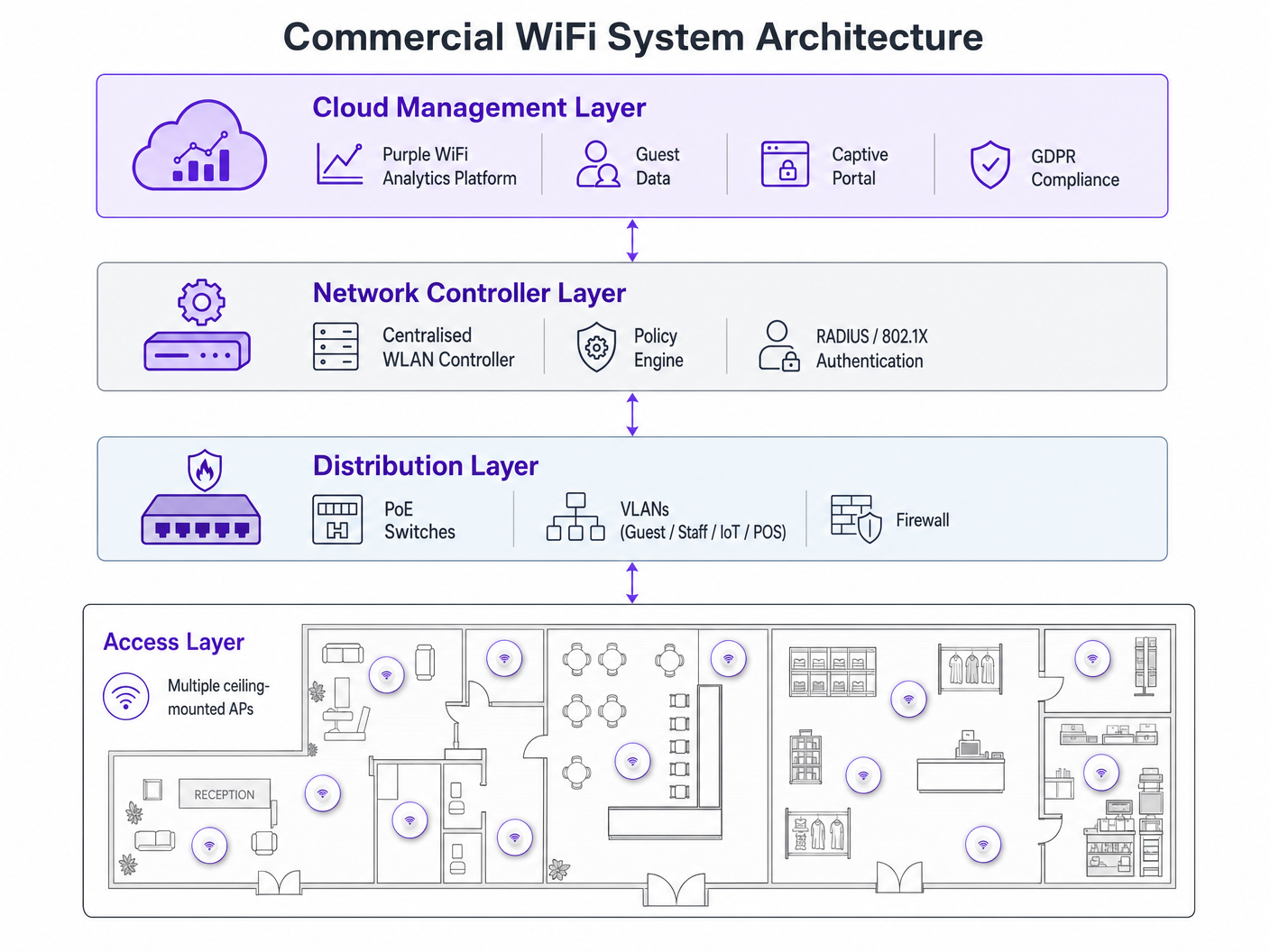
L'implementazione di una rete WiFi commerciale richiede una pianificazione meticolosa. Segui queste raccomandazioni indipendenti dal fornitore:
- Pianificazione della Densità degli AP: La modalità di errore più comune è il sottodimensionamento. Per ambienti ad alta densità, prevedi un AP ogni 25-30 metri quadrati, o un AP ogni 30-40 utenti simultanei. Conduci sempre un'indagine professionale sul sito RF piuttosto che affidarti esclusivamente alla modellazione predittiva.
- Infrastruttura PoE: Assicurati che la tua infrastruttura di switching supporti il Power over Ethernet. Gli AP commerciali standard richiedono PoE+ (IEEE 802.3at), mentre i modelli più recenti Wi-Fi 6E potrebbero richiedere PoE++ (IEEE 802.3bt) per erogare fino a 60 watt.
- Integrazione del Captive Portal: Quando si implementano reti ospiti, in particolare nel settore Hospitality o Transport , assicurati che il tuo Captive Portal sia conforme al GDPR. Deve raccogliere il consenso esplicito e gestire i log di connessione in modo appropriato. Per passaggi di implementazione completi, fai riferimento a Come Configurare il WiFi per la Tua Attività: Una Guida Completa .
Migliori Pratiche
- Non Mescolare Mai Livelli di Hardware: Combinare hardware consumer e commerciale in una singola implementazione crea un overhead ingestibile e prestazioni incoerenti. Isolare i dispositivi IoT: Collocare sempre i dispositivi IoT su una VLAN dedicata con accesso a internet limitato e capacità di movimento laterale nulle.
- Gestione continua del ciclo di vita: Trattare la rete WiFi come un'infrastruttura dinamica. Aggiornamenti regolari del firmware, rinnovi dei certificati e audit RF periodici sono obbligatori.
Risoluzione dei problemi e mitigazione del rischio
Le modalità di guasto comuni derivano spesso da una scarsa progettazione iniziale. I problemi di interferenza post-implementazione indicano solitamente un'indagine del sito RF non eseguita. Se i client riscontrano disconnessioni frequenti, verificare la sovrapposizione dei canali o un budget PoE insufficiente a livello di switch. Mitigare questi rischi stabilendo avvisi automatici per le soglie di utilizzo dei canali e i fallimenti di associazione dei client all'interno del dashboard di gestione centralizzato.
ROI e impatto sul business
L'aggiornamento a un WiFi commerciale trascende la connettività di base: è un investimento aziendale strategico. Oltre a mitigare i rischi di conformità e prevenire costosi tempi di inattività, una rete aziendale correttamente implementata consente la raccolta avanzata di dati. Sfruttando la piattaforma di analisi di Purple, le sedi possono acquisire dati sul traffico pedonale, misurare il tempo di permanenza e monitorare i tassi di visitatori abituali. Questa intelligenza informa direttamente la spesa di marketing, l'ottimizzazione del layout del negozio e i modelli di personale, trasformando l'infrastruttura di rete da un centro di costo in una risorsa generatrice di entrate. Per casi d'uso avanzati di tracciamento della posizione, esplora la nostra Guida al sistema di posizionamento indoor: UWB, BLE e WiFi .
Ascolta il Briefing
Per un approfondimento su questi concetti, ascolta il nostro podcast di briefing tecnico di 10 minuti:
Termini chiave e definizioni
Client Saturation
The point at which an access point can no longer accept new device connections or process traffic efficiently due to hardware limitations.
Commonly occurs when consumer routers are placed in commercial settings like hotel lobbies or conference rooms.
MU-MIMO
Multi-User Multiple Input Multiple Output; a technology that allows an access point to communicate with multiple devices simultaneously.
Essential for maintaining throughput in high-density enterprise environments.
IEEE 802.1X
An IEEE standard for port-based network access control that provides an authentication mechanism to devices wishing to attach to a LAN or WLAN.
Required for enterprise security and compliance (PCI DSS, HIPAA) to ensure individual user authentication.
VLAN Segmentation
The practice of dividing a single physical network into multiple isolated logical networks.
Used to separate guest traffic, staff traffic, IoT devices, and sensitive systems like POS terminals.
Captive Portal
A web page that the user of a public-access network is obliged to view and interact with before access is granted.
Crucial for capturing guest consent for GDPR compliance and gathering analytics data.
Dynamic Channel Assignment
An automated feature of enterprise WLAN controllers that adjusts the operating channel of APs to minimise interference.
Prevents network degradation in environments with fluctuating RF interference.
BSS Colouring
A Wi-Fi 6 feature that identifies overlapping basic service sets (BSS) to improve spatial reuse and reduce interference.
Improves performance in stadiums and crowded retail spaces where multiple APs are in close proximity.
PoE+ / PoE++
Power over Ethernet standards (802.3at and 802.3bt) that deliver both data and electrical power over a single cable.
Required for powering commercial access points without needing local AC power outlets.
Casi di studio
A 200-room hotel is experiencing severe guest complaints about WiFi dropping in the lobby during peak check-in times. They are currently using three high-end consumer mesh routers. How should this be resolved?
- Remove the consumer mesh routers entirely. 2. Conduct an RF site survey of the lobby to determine structural interference. 3. Deploy enterprise-grade APs supporting Wi-Fi 6 and MU-MIMO. 4. Configure the APs on a centralised WLAN controller to enable dynamic channel assignment. 5. Implement VLAN segmentation to separate guest traffic from the hotel's operational devices.
A national retail chain needs to roll out a new POS system and guest WiFi across 50 locations, ensuring PCI DSS compliance.
- Deploy commercial APs managed via a single cloud-based platform. 2. Create a dedicated, heavily restricted VLAN for the POS system. 3. Implement IEEE 802.1X authentication for all staff and corporate devices. 4. Deploy a separate guest VLAN with a GDPR-compliant captive portal. 5. Push uniform security policies to all 50 sites simultaneously via the cloud dashboard.
Analisi degli scenari
Q1. Your organisation is opening a new 5,000 sq ft open-plan office. The operations director suggests buying five high-end consumer 'gaming' routers to save budget. What is the primary technical argument against this approach?
💡 Suggerimento:Consider how the devices will be managed and how they handle interference.
Mostra l'approccio consigliato
The primary technical argument is the lack of centralised management and automated RF optimisation. Five consumer routers would require individual configuration, creating management overhead and inconsistent security policies. Furthermore, they lack dynamic channel assignment, meaning they will likely cause co-channel interference with each other, degrading overall network performance.
Q2. A hospital needs to deploy WiFi that supports both patient internet access and secure clinical devices (like mobile workstations). How should the network architecture be designed?
💡 Suggerimento:Think about network layer isolation and authentication standards.
Mostra l'approccio consigliato
The architecture must utilise VLAN segmentation. Patient internet access should be routed to a dedicated Guest VLAN with a captive portal and client isolation enabled. Clinical devices must be placed on a separate, secure VLAN requiring IEEE 802.1X authentication via a RADIUS server to ensure compliance with healthcare data regulations (e.g., NHS Information Governance/HIPAA).
Q3. During a network upgrade, the IT team plans to replace old 802.11n APs with new Wi-Fi 6E models, but they are keeping the existing network switches. What is the most likely point of failure?
💡 Suggerimento:Consider the physical requirements of the new hardware.
Mostra l'approccio consigliato
The most likely point of failure is the Power over Ethernet (PoE) budget. Older switches may only support basic PoE (802.3af, 15.4W) or PoE+ (802.3at, 30W). High-performance Wi-Fi 6E APs often require PoE++ (802.3bt) to deliver up to 60W. If the switches cannot provide sufficient power, the new APs may fail to boot or operate with disabled radios.




