

Business WiFi vs. Consumer WiFi: Was ist der Unterschied?
Dieser maßgebliche Leitfaden beleuchtet die entscheidenden technischen Unterschiede zwischen Business- und Consumer-WiFi-Infrastrukturen. Er bietet IT-Managern und Betreibern von Veranstaltungsorten umsetzbare Einblicke in Hardware-Fähigkeiten, Sicherheitsstandards und die Management-Architektur, die für kommerzielle Implementierungen erforderlich sind.
🎧 Diesen Leitfaden anhören
Transkript anzeigen
Zusammenfassung für Führungskräfte
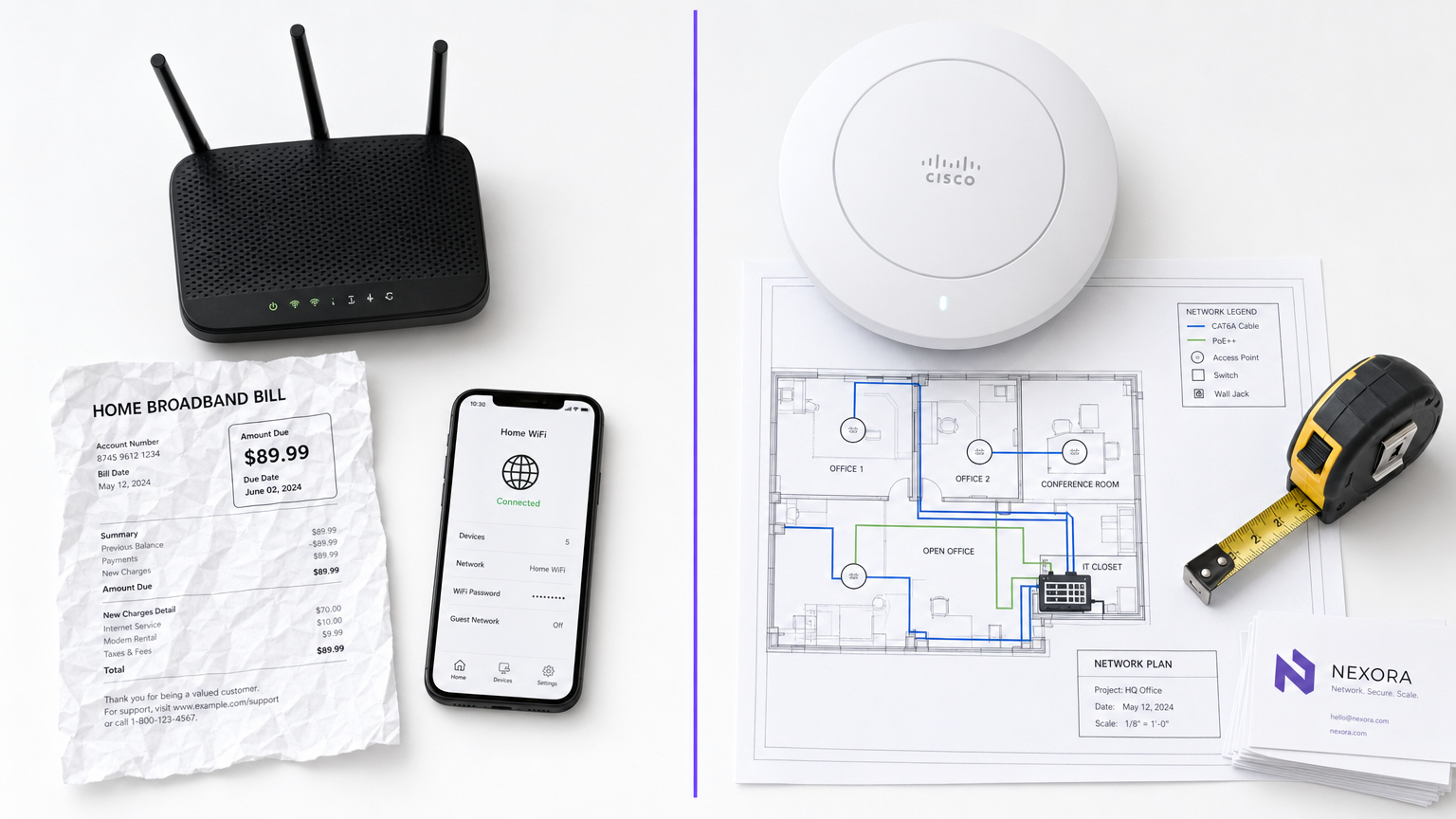
Für IT-Manager und Betreiber von Veranstaltungsorten ist die Unterscheidung zwischen Business WiFi und Consumer WiFi nicht nur eine Frage des Budgets – es ist ein grundlegender Unterschied in Architektur, Sicherheit und Skalierbarkeit. Während Consumer-Router für die vorhersehbare, geringe Dichte eines einzelnen Haushalts konzipiert sind, ist kommerzielle Infrastruktur darauf ausgelegt, Hunderte gleichzeitiger Verbindungen zu verwalten, strenge Sicherheitsrichtlinien durchzusetzen und eine zentralisierte Verwaltung über mehrere Standorte hinweg zu ermöglichen. Der Einsatz von Consumer-Hardware in einem kommerziellen Umfeld führt unweigerlich zu Client-Sättigung, Sicherheitslücken und Compliance-Verstößen. Dieser Leitfaden beleuchtet die technischen Kernunterschiede, bewährte Implementierungspraktiken und den erheblichen ROI, den Unternehmensnetzwerke liefern, wenn sie mit Plattformen wie Purple's Guest WiFi und WiFi Analytics integriert werden.
Technischer Tiefenblick
Hardware und Client-Sättigung
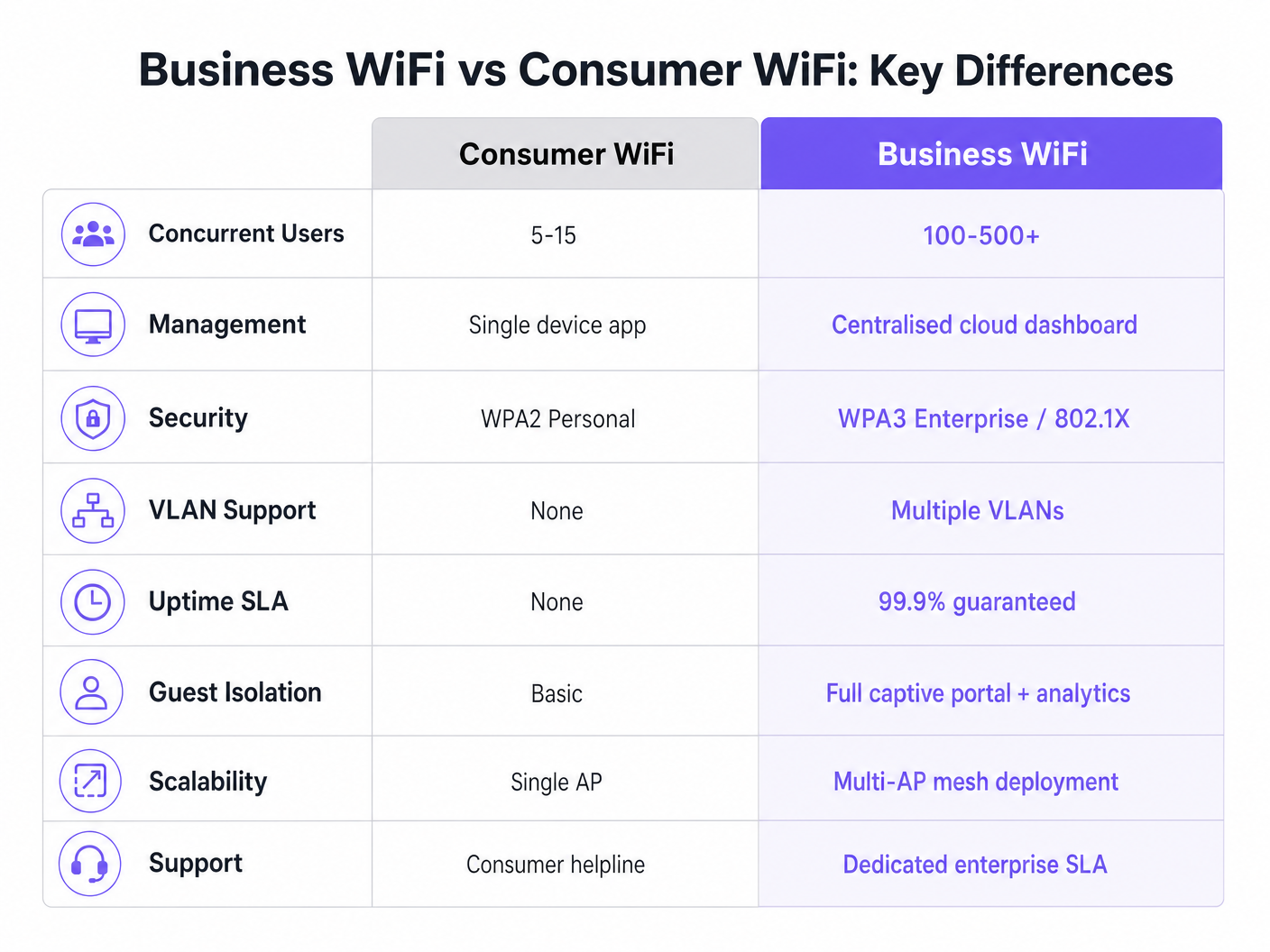
Der markanteste Unterschied liegt in den Hardware-Fähigkeiten. Ein Standard-Consumer-Router ist darauf ausgelegt, 5 bis 15 gleichzeitige Geräte über ein einziges Funkband zu unterstützen. In einer Umgebung mit hoher Dichte – wie einer Hotellobby oder einer Verkaufsfläche – erreicht der Access Point schnell die „Client-Sättigung“. Die Assoziationstabelle füllt sich, die Latenz steigt sprunghaft an und die Benutzererfahrung verschlechtert sich rapide.
Im Gegensatz dazu sind kommerzielle Access Points (APs) von Unternehmensanbietern darauf ausgelegt, 100 bis über 500 gleichzeitige Client-Assoziationen pro Funkgerät zu verwalten. Sie nutzen Multi-User Multiple Input Multiple Output (MU-MIMO), um mehrere Clients gleichzeitig zu bedienen. Darüber hinaus reduzieren Funktionen wie BSS Colouring unter dem Wi-Fi 6 Standard Störungen in dichten Umgebungen erheblich. Diese Geräte sind keine eigenständigen Einheiten; sie sind dafür konzipiert, als Teil eines koordinierten Multi-AP-Systems zu funktionieren.
Management-Architektur
Consumer-Router werden einzeln verwaltet. Die Konfiguration von zehn Standorten bedeutet, sich bei zehn separaten Weboberflächen anzumelden. Dieser Ansatz ist nicht skalierbar und führt oft zu veralteter Firmware und inkonsistenten Sicherheitsrichtlinien.
Business WiFi-Systeme setzen auf zentralisiertes Management über einen lokalen WLAN-Controller oder eine cloudbasierte Plattform. Dies ermöglicht es Netzwerkadministratoren, eine Richtlinie einmal zu definieren und diese sofort auf Hunderte von APs zu übertragen. Echtzeit-Status-Dashboards, automatisierte Warnmeldungen für nicht autorisierte APs und Firmware-Massen-Updates sind Standard-Betriebsanforderungen für jede Organisation, die mehrere Standorte verwaltet.
Sicherheit und Compliance
Sicherheit ist wohl das kritischste Unterscheidungsmerkmal. Consumer WiFi basiert auf WPA2 oder WPA3 Personal, unter Verwendung eines Pre-Shared Key (PSK). Wenn ein Gerät kompromittiert wird, ist das gesamte Netzwerk gefährdet, und es gibt keine Audit-Spur pro Benutzer.
Kommerzielles WiFi schreibt die IEEE 802.1X-Authentifizierung vor, den Unternehmensstandard für portbasierte Netzwerkzugriffskontrolle. Benutzer authentifizieren sich individuell gegenüber einem RADIUS-Server (z.B. mittels EAP-TLS oder PEAP). Dies stellt sicher, dass jede Sitzung individuell authentifiziert und protokolliert wird. Für Organisationen im Einzelhandel oder im Gesundheitswesen ist 802.1X unerlässlich für die Einhaltung von PCI DSS, HIPAA und NHS Information Governance. Weitere Informationen zu spezifischen Anforderungen im Gesundheitswesen finden Sie in unserem Leitfaden zu WiFi in Krankenhäusern: Ein Leitfaden für sichere klinische Netzwerke .
VLAN-Segmentierung
Unternehmensinfrastrukturen unterstützen mehrere logische Netzwerke über dieselbe physische Hardware mittels Virtual LANs (VLANs). Eine typische kommerzielle Implementierung segmentiert den Datenverkehr in separate VLANs für Gastzugang, Mitarbeitergeräte, IoT-Hardware und Point-of-Sale (POS)-Systeme. Diese Tiefenverteidigungsstrategie stellt sicher, dass ein kompromittiertes IoT-Gerät nicht auf das Mitarbeiternetzwerk oder das POS-System zugreifen kann.
RF-Management und Durchsatz
Im Gegensatz zu Consumer-Routern, die auf festen Kanälen und mit fester Sendeleistung arbeiten, nutzen kommerzielle APs dynamische Kanalzuweisung und Sendeleistungsregelung (definiert in 802.11h und 802.11k). Diese automatisierte RF-Optimierung ermöglicht es dem Netzwerk, sich an wechselnde Bedingungen anzupassen – wie die Erhöhung der Sendeleistung, wenn ein benachbarter AP ausfällt, oder die Lenkung von Clients auf weniger überlastete Kanäle während der Spitzenzeiten.
Implementierungsleitfaden
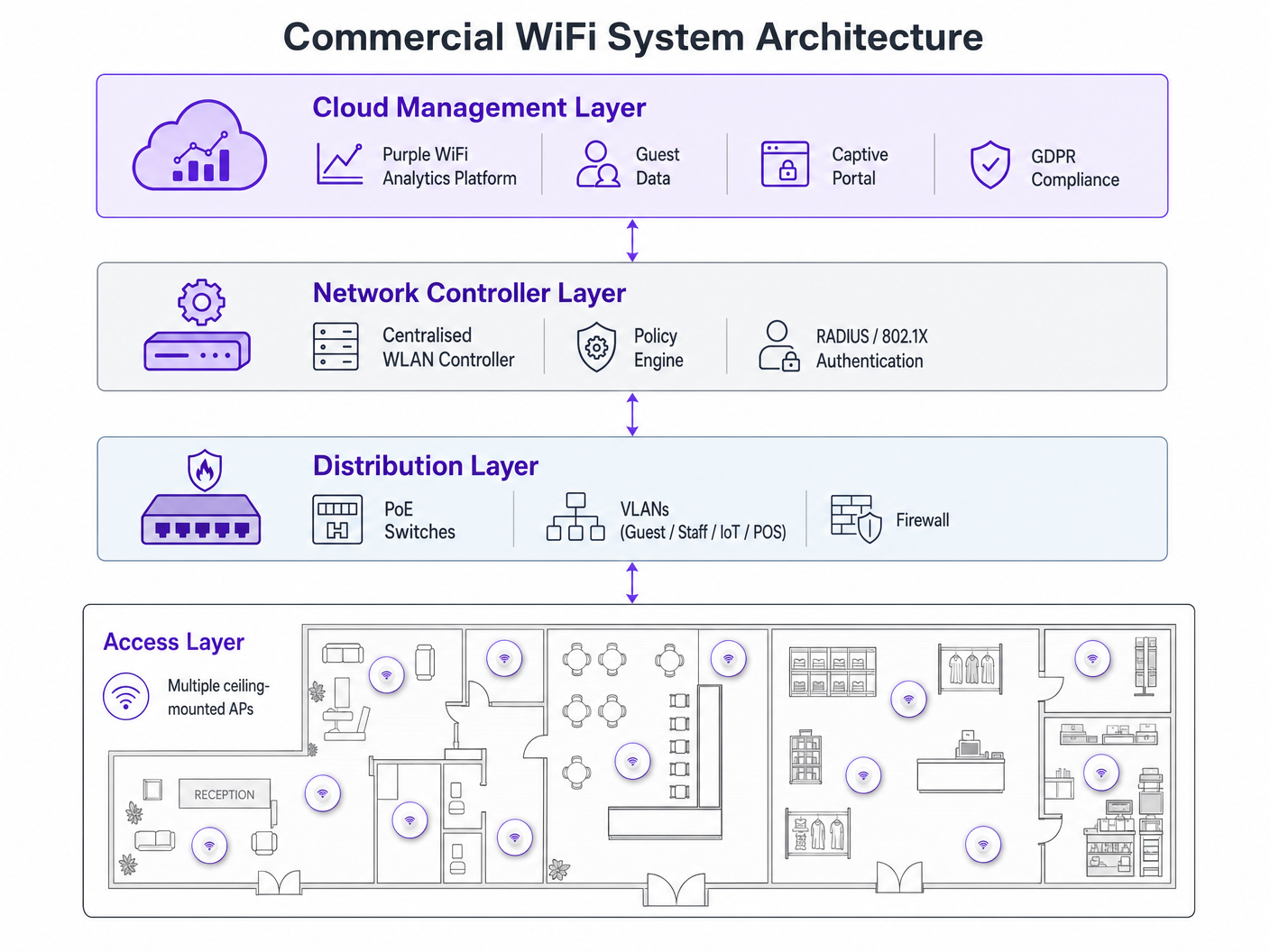
Die Bereitstellung eines kommerziellen WiFi-Netzwerks erfordert eine sorgfältige Planung. Befolgen Sie diese herstellerneutralen Empfehlungen:
- AP-Dichteplanung: Der häufigste Fehler ist die Unterdimensionierung. Planen Sie für Umgebungen mit hoher Dichte einen AP pro 25-30 Quadratmeter oder einen AP pro 30-40 gleichzeitige Benutzer. Führen Sie immer eine professionelle RF-Standortbegehung durch, anstatt sich ausschließlich auf prädiktive Modellierung zu verlassen.
- PoE-Infrastruktur: Stellen Sie sicher, dass Ihre Switching-Infrastruktur Power over Ethernet unterstützt. Standardmäßige kommerzielle APs benötigen PoE+ (IEEE 802.3at), während neuere Wi-Fi 6E-Modelle möglicherweise PoE++ (IEEE 802.3bt) erfordern, um bis zu 60 Watt zu liefern.
- Captive Portal-Integration: Stellen Sie bei der Bereitstellung von Gastnetzwerken, insbesondere im Gastgewerbe oder im Transportwesen , sicher, dass Ihr Captive Portal GDPR-konform ist. Es muss eine explizite Zustimmung einholen und Verbindungslogs angemessen verwalten. Umfassende Bereitstellungsschritte finden Sie unter So richten Sie WiFi für Ihr Unternehmen ein: Ein vollständiger Leitfaden .
Best Practices
- Niemals Hardware-Stufen mischen: Die Kombination von Consumer- und kommerzieller Hardware in einer einzigen Bereitstellung führt zu unüberschaubarem Overhead und inkonsistenter Leistung. IoT-Geräte isolieren: Platzieren Sie IoT-Geräte immer in einem dedizierten VLAN mit eingeschränktem Internetzugang und ohne laterale Bewegungsmöglichkeiten.
- Kontinuierliches Lifecycle Management: Betrachten Sie Ihr WiFi-Netzwerk als dynamische Infrastruktur. Regelmäßige Firmware-Updates, Zertifikatserneuerungen und periodische RF-Audits sind obligatorisch.
Fehlerbehebung & Risikominderung
Häufige Fehlerursachen resultieren oft aus einem mangelhaften Initialdesign. Interferenzprobleme nach der Bereitstellung deuten in der Regel auf eine ausgelassene RF-Standortuntersuchung hin. Wenn Clients häufige Verbindungsabbrüche erleben, prüfen Sie auf Kanalüberlappungen oder ein unzureichendes PoE-Budget auf Switch-Ebene. Mindern Sie diese Risiken, indem Sie automatisierte Warnmeldungen für Kanalnutzungsschwellenwerte und Client-Assoziationsfehler in Ihrem zentralen Management-Dashboard einrichten.
ROI & Geschäftsauswirkungen
Ein Upgrade auf kommerzielles WiFi geht über die grundlegende Konnektivität hinaus – es ist eine strategische Geschäftsinvestition. Neben der Minderung von Compliance-Risiken und der Vermeidung kostspieliger Ausfallzeiten ermöglicht ein ordnungsgemäß implementiertes Unternehmensnetzwerk eine erweiterte Datenerfassung. Durch die Nutzung der Analyseplattform von Purple können Veranstaltungsorte Besucherfrequenzdaten erfassen, die Verweildauer messen und die Wiederholungsbesuchsraten verfolgen. Diese Informationen fließen direkt in Marketingausgaben, die Optimierung des Ladenlayouts und Personalmodelle ein und verwandeln die Netzwerkinfrastruktur von einem Kostenfaktor in einen umsatzgenerierenden Vermögenswert. Für fortgeschrittene Anwendungsfälle der Standortverfolgung erkunden Sie unseren Indoor Positioning System: UWB, BLE, & WiFi Guide .
Hören Sie sich das Briefing an
Für einen tieferen Einblick in diese Konzepte hören Sie sich unseren 10-minütigen technischen Briefing-Podcast an:
Schlüsselbegriffe & Definitionen
Client Saturation
The point at which an access point can no longer accept new device connections or process traffic efficiently due to hardware limitations.
Commonly occurs when consumer routers are placed in commercial settings like hotel lobbies or conference rooms.
MU-MIMO
Multi-User Multiple Input Multiple Output; a technology that allows an access point to communicate with multiple devices simultaneously.
Essential for maintaining throughput in high-density enterprise environments.
IEEE 802.1X
An IEEE standard for port-based network access control that provides an authentication mechanism to devices wishing to attach to a LAN or WLAN.
Required for enterprise security and compliance (PCI DSS, HIPAA) to ensure individual user authentication.
VLAN Segmentation
The practice of dividing a single physical network into multiple isolated logical networks.
Used to separate guest traffic, staff traffic, IoT devices, and sensitive systems like POS terminals.
Captive Portal
A web page that the user of a public-access network is obliged to view and interact with before access is granted.
Crucial for capturing guest consent for GDPR compliance and gathering analytics data.
Dynamic Channel Assignment
An automated feature of enterprise WLAN controllers that adjusts the operating channel of APs to minimise interference.
Prevents network degradation in environments with fluctuating RF interference.
BSS Colouring
A Wi-Fi 6 feature that identifies overlapping basic service sets (BSS) to improve spatial reuse and reduce interference.
Improves performance in stadiums and crowded retail spaces where multiple APs are in close proximity.
PoE+ / PoE++
Power over Ethernet standards (802.3at and 802.3bt) that deliver both data and electrical power over a single cable.
Required for powering commercial access points without needing local AC power outlets.
Fallstudien
A 200-room hotel is experiencing severe guest complaints about WiFi dropping in the lobby during peak check-in times. They are currently using three high-end consumer mesh routers. How should this be resolved?
- Remove the consumer mesh routers entirely. 2. Conduct an RF site survey of the lobby to determine structural interference. 3. Deploy enterprise-grade APs supporting Wi-Fi 6 and MU-MIMO. 4. Configure the APs on a centralised WLAN controller to enable dynamic channel assignment. 5. Implement VLAN segmentation to separate guest traffic from the hotel's operational devices.
A national retail chain needs to roll out a new POS system and guest WiFi across 50 locations, ensuring PCI DSS compliance.
- Deploy commercial APs managed via a single cloud-based platform. 2. Create a dedicated, heavily restricted VLAN for the POS system. 3. Implement IEEE 802.1X authentication for all staff and corporate devices. 4. Deploy a separate guest VLAN with a GDPR-compliant captive portal. 5. Push uniform security policies to all 50 sites simultaneously via the cloud dashboard.
Szenarioanalyse
Q1. Your organisation is opening a new 5,000 sq ft open-plan office. The operations director suggests buying five high-end consumer 'gaming' routers to save budget. What is the primary technical argument against this approach?
💡 Hinweis:Consider how the devices will be managed and how they handle interference.
Empfohlenen Ansatz anzeigen
The primary technical argument is the lack of centralised management and automated RF optimisation. Five consumer routers would require individual configuration, creating management overhead and inconsistent security policies. Furthermore, they lack dynamic channel assignment, meaning they will likely cause co-channel interference with each other, degrading overall network performance.
Q2. A hospital needs to deploy WiFi that supports both patient internet access and secure clinical devices (like mobile workstations). How should the network architecture be designed?
💡 Hinweis:Think about network layer isolation and authentication standards.
Empfohlenen Ansatz anzeigen
The architecture must utilise VLAN segmentation. Patient internet access should be routed to a dedicated Guest VLAN with a captive portal and client isolation enabled. Clinical devices must be placed on a separate, secure VLAN requiring IEEE 802.1X authentication via a RADIUS server to ensure compliance with healthcare data regulations (e.g., NHS Information Governance/HIPAA).
Q3. During a network upgrade, the IT team plans to replace old 802.11n APs with new Wi-Fi 6E models, but they are keeping the existing network switches. What is the most likely point of failure?
💡 Hinweis:Consider the physical requirements of the new hardware.
Empfohlenen Ansatz anzeigen
The most likely point of failure is the Power over Ethernet (PoE) budget. Older switches may only support basic PoE (802.3af, 15.4W) or PoE+ (802.3at, 30W). High-performance Wi-Fi 6E APs often require PoE++ (802.3bt) to deliver up to 60W. If the switches cannot provide sufficient power, the new APs may fail to boot or operate with disabled radios.




