

Business WiFi vs. Consumer WiFi: What's the Difference?
This authoritative guide explores the critical technical distinctions between business and consumer WiFi infrastructure. It provides IT managers and venue operators with actionable insights on hardware capabilities, security standards, and management architecture necessary for commercial deployments.
🎧 Listen to this Guide
View Transcript
Executive Summary
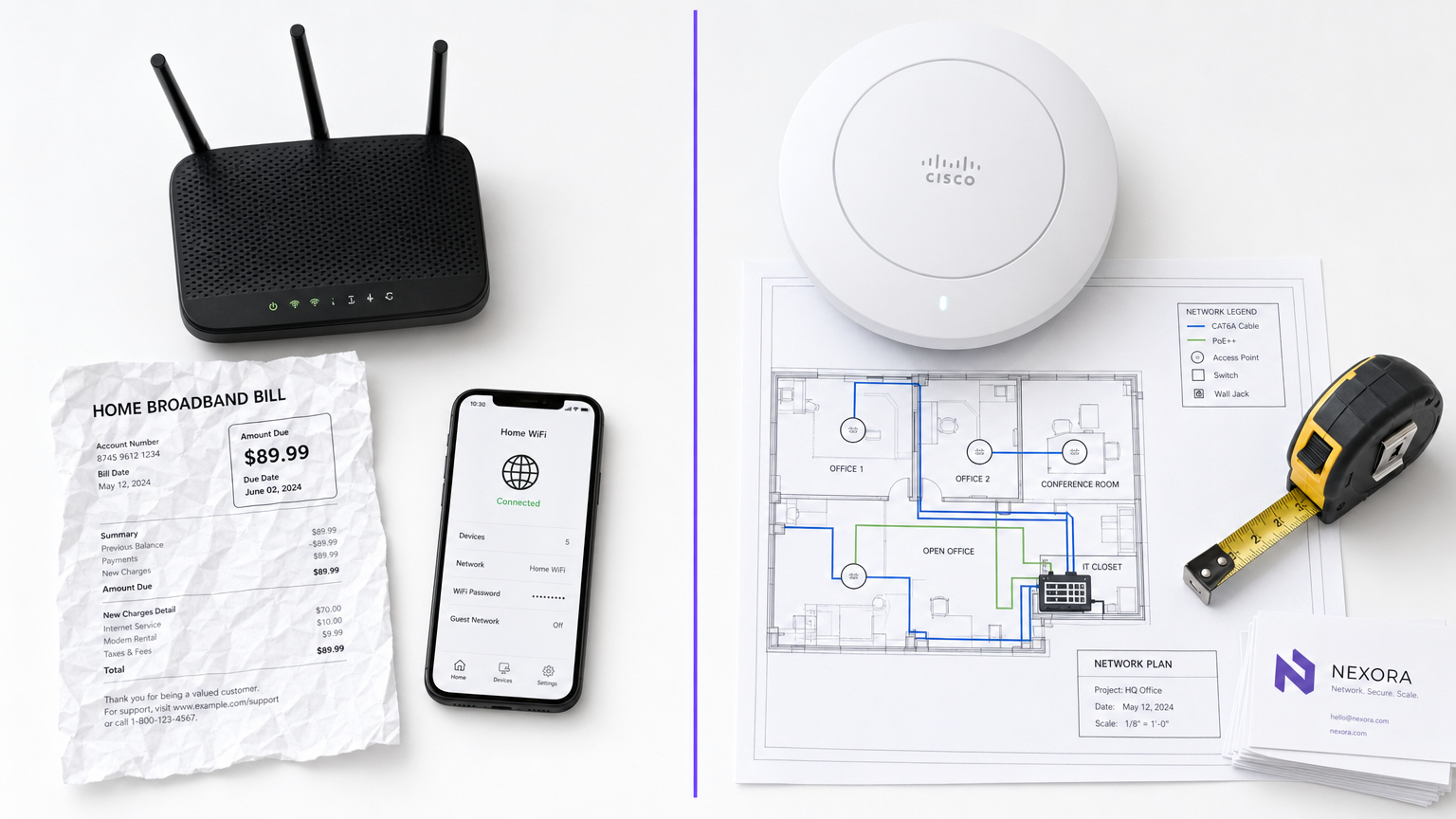
For IT managers and venue operators, the distinction between business WiFi and consumer WiFi is not merely a question of budget—it is a fundamental difference in architecture, security, and scalability. While consumer-grade routers are designed for the predictable, low-density environment of a single household, commercial-grade infrastructure is engineered to handle hundreds of concurrent connections, enforce strict security policies, and provide centralised management across multiple locations. Deploying consumer hardware in a commercial setting inevitably leads to client saturation, security vulnerabilities, and compliance failures. This guide explores the core technical differences, implementation best practices, and the significant ROI that enterprise-grade networks deliver when integrated with platforms like Purple's Guest WiFi and WiFi Analytics .
Technical Deep-Dive
Hardware and Client Saturation
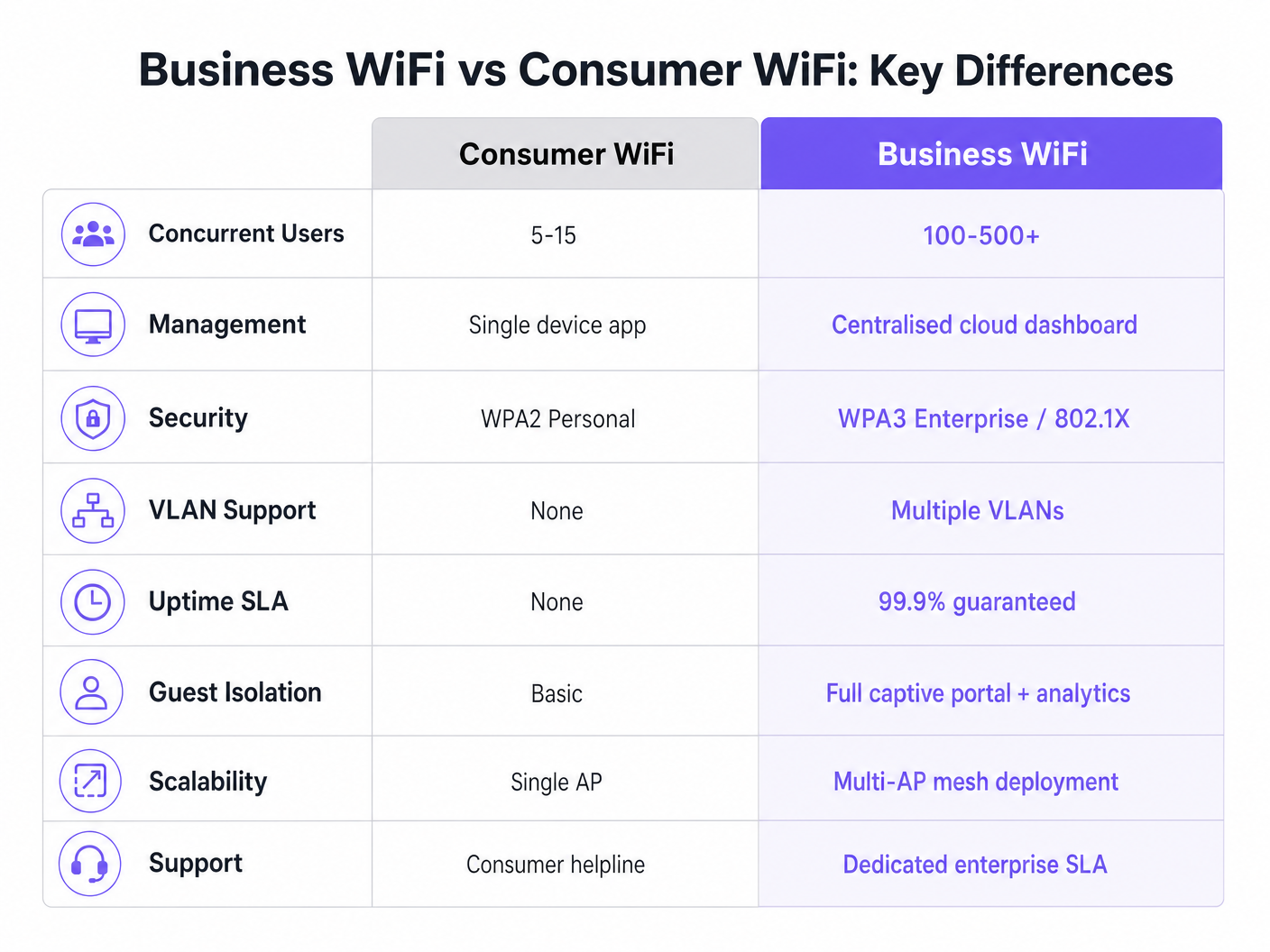
The most stark difference lies in hardware capabilities. A standard consumer router is built to support 5 to 15 concurrent devices using a single radio band. When placed in a high-density environment—such as a hotel lobby or a retail floor—the access point quickly reaches "client saturation." The association table fills up, latency spikes, and the user experience degrades rapidly.
Conversely, commercial-grade access points (APs) from enterprise vendors are designed to handle 100 to 500+ concurrent client associations per radio. They utilise Multi-User Multiple Input Multiple Output (MU-MIMO) to serve multiple clients simultaneously. Furthermore, features like BSS Colouring under the Wi-Fi 6 standard significantly reduce interference in dense environments. These devices are not standalone units; they are designed to operate as part of a coordinated multi-AP system.
Management Architecture
Consumer routers are managed individually. Configuring ten locations means logging into ten separate web interfaces. This approach is unscalable and often results in outdated firmware and inconsistent security policies.
Business WiFi systems rely on centralised management via an on-premises WLAN controller or a cloud-based platform. This allows network administrators to define a policy once and propagate it across hundreds of APs instantly. Real-time status dashboards, automated alerts for rogue APs, and bulk firmware updates are standard operational requirements for any organisation managing multiple sites.
Security and Compliance
Security is arguably the most critical differentiator. Consumer WiFi relies on WPA2 or WPA3 Personal, using a pre-shared key (PSK). If one device is compromised, the entire network is at risk, and there is no per-user audit trail.
Commercial WiFi mandates IEEE 802.1X authentication, the enterprise standard for port-based network access control. Users authenticate individually against a RADIUS server (e.g., using EAP-TLS or PEAP). This ensures every session is individually authenticated and logged. For organisations in Retail or Healthcare , 802.1X is essential for PCI DSS, HIPAA, and NHS Information Governance compliance. For more on healthcare specific requirements, see our guide on WiFi in Hospitals: A Guide to Secure Clinical Networks .
VLAN Segmentation
Enterprise infrastructure supports multiple logical networks over the same physical hardware via Virtual LANs (VLANs). A typical commercial deployment will segment traffic into distinct VLANs for guest access, staff devices, IoT hardware, and Point-of-Sale (POS) systems. This defence-in-depth strategy ensures that a compromised IoT device cannot pivot to the staff network or POS system.
RF Management and Throughput
Unlike consumer routers that operate on fixed channels and transmit power, commercial APs employ dynamic channel assignment and transmit power control (defined in 802.11h and 802.11k). This automated RF optimisation allows the network to adapt to changing conditions—such as increasing transmit power if a neighbouring AP fails, or steering clients to less congested channels during peak hours.
Implementation Guide
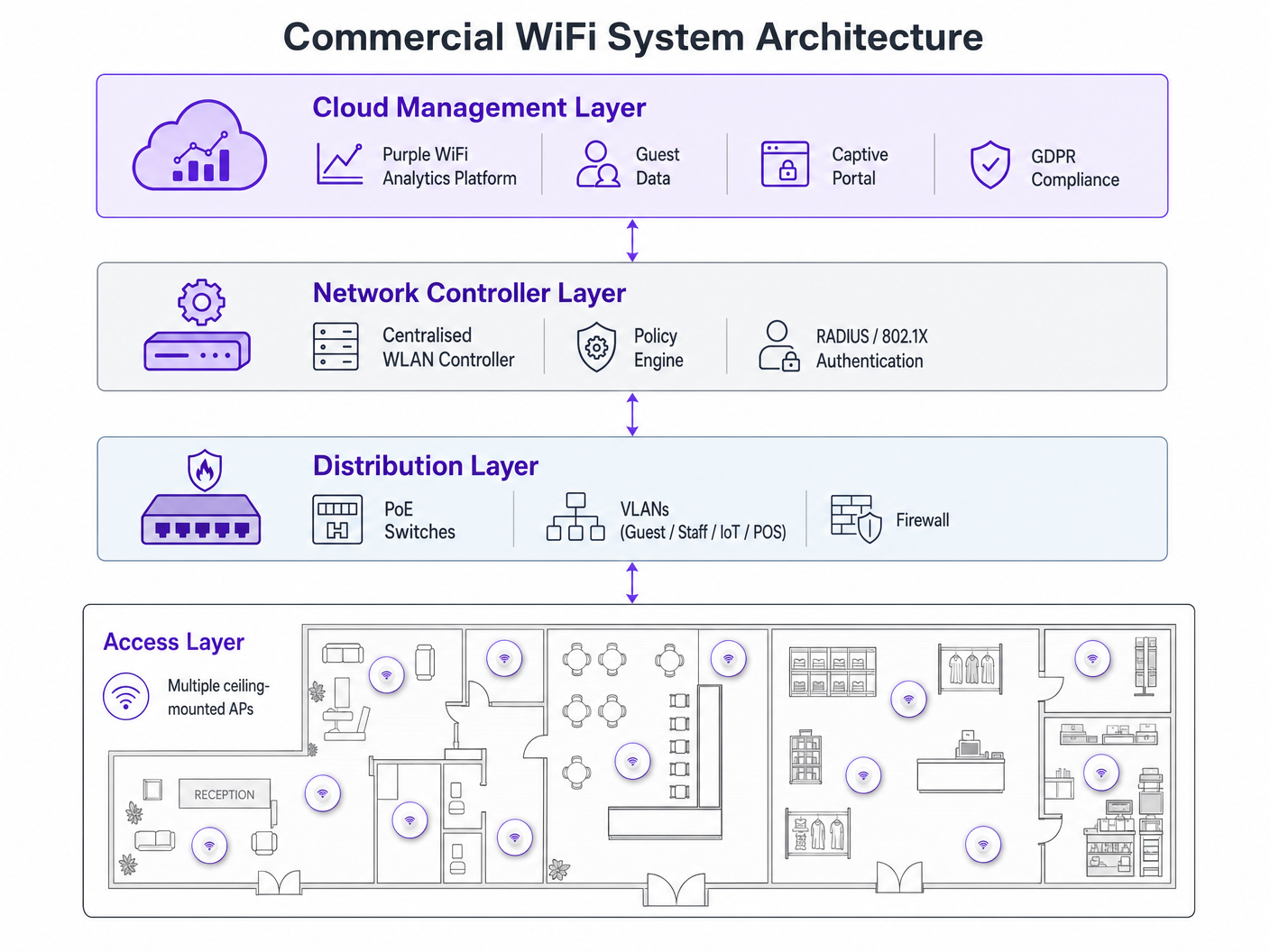
Deploying a commercial WiFi network requires meticulous planning. Follow these vendor-neutral recommendations:
- AP Density Planning: The most common failure mode is under-provisioning. For high-density environments, plan for one AP per 25-30 square metres, or one AP per 30-40 concurrent users. Always conduct a professional RF site survey rather than relying solely on predictive modelling.
- PoE Infrastructure: Ensure your switching infrastructure supports Power over Ethernet. Standard commercial APs require PoE+ (IEEE 802.3at), while newer Wi-Fi 6E models may demand PoE++ (IEEE 802.3bt) to deliver up to 60 watts.
- Captive Portal Integration: When deploying guest networks, particularly in Hospitality or Transport , ensure your captive portal is GDPR-compliant. It must collect explicit consent and manage connection logs appropriately. For comprehensive deployment steps, refer to How to Set Up WiFi for Your Business: A Complete Guide .
Best Practices
- Never Mix Hardware Tiers: Combining consumer and commercial hardware in a single deployment creates unmanageable overhead and inconsistent performance. Isolate IoT Devices: Always position IoT devices on a dedicated VLAN with restricted internet access and zero lateral movement capabilities.
- Continuous Lifecycle Management: Treat your WiFi network as dynamic infrastructure. Regular firmware updates, certificate renewals, and periodic RF audits are compulsory.
Troubleshooting & Risk Mitigation
Common failure modes often arise from poor initial design. Interference issues post-deployment usually indicate a missed RF site survey. If clients experience frequent disconnections, check for channel overlap or insufficient PoE budget at the switch level. Mitigate these risks by establishing automated alerts for channel utilisation thresholds and client association failures within your centralised management dashboard.
ROI & Business Impact
Upgrading to commercial WiFi transcends basic connectivity—it is a strategic business investment. Beyond mitigating compliance risks and preventing costly downtime, a properly deployed enterprise network enables advanced data collection. By leveraging Purple's analytics platform, venues can capture footfall data, measure dwell time, and track repeat visitor rates. This intelligence directly informs marketing spend, store layout optimisation, and staffing models, turning the network infrastructure from a cost centre into a revenue-generating asset. For advanced location tracking use cases, explore our Indoor Positioning System: UWB, BLE, & WiFi Guide .
Listen to the Briefing
For a deeper dive into these concepts, listen to our 10-minute technical briefing podcast:
Key Terms & Definitions
Client Saturation
The point at which an access point can no longer accept new device connections or process traffic efficiently due to hardware limitations.
Commonly occurs when consumer routers are placed in commercial settings like hotel lobbies or conference rooms.
MU-MIMO
Multi-User Multiple Input Multiple Output; a technology that allows an access point to communicate with multiple devices simultaneously.
Essential for maintaining throughput in high-density enterprise environments.
IEEE 802.1X
An IEEE standard for port-based network access control that provides an authentication mechanism to devices wishing to attach to a LAN or WLAN.
Required for enterprise security and compliance (PCI DSS, HIPAA) to ensure individual user authentication.
VLAN Segmentation
The practice of dividing a single physical network into multiple isolated logical networks.
Used to separate guest traffic, staff traffic, IoT devices, and sensitive systems like POS terminals.
Captive Portal
A web page that the user of a public-access network is obliged to view and interact with before access is granted.
Crucial for capturing guest consent for GDPR compliance and gathering analytics data.
Dynamic Channel Assignment
An automated feature of enterprise WLAN controllers that adjusts the operating channel of APs to minimise interference.
Prevents network degradation in environments with fluctuating RF interference.
BSS Colouring
A Wi-Fi 6 feature that identifies overlapping basic service sets (BSS) to improve spatial reuse and reduce interference.
Improves performance in stadiums and crowded retail spaces where multiple APs are in close proximity.
PoE+ / PoE++
Power over Ethernet standards (802.3at and 802.3bt) that deliver both data and electrical power over a single cable.
Required for powering commercial access points without needing local AC power outlets.
Case Studies
A 200-room hotel is experiencing severe guest complaints about WiFi dropping in the lobby during peak check-in times. They are currently using three high-end consumer mesh routers. How should this be resolved?
- Remove the consumer mesh routers entirely. 2. Conduct an RF site survey of the lobby to determine structural interference. 3. Deploy enterprise-grade APs supporting Wi-Fi 6 and MU-MIMO. 4. Configure the APs on a centralised WLAN controller to enable dynamic channel assignment. 5. Implement VLAN segmentation to separate guest traffic from the hotel's operational devices.
A national retail chain needs to roll out a new POS system and guest WiFi across 50 locations, ensuring PCI DSS compliance.
- Deploy commercial APs managed via a single cloud-based platform. 2. Create a dedicated, heavily restricted VLAN for the POS system. 3. Implement IEEE 802.1X authentication for all staff and corporate devices. 4. Deploy a separate guest VLAN with a GDPR-compliant captive portal. 5. Push uniform security policies to all 50 sites simultaneously via the cloud dashboard.
Scenario Analysis
Q1. Your organisation is opening a new 5,000 sq ft open-plan office. The operations director suggests buying five high-end consumer 'gaming' routers to save budget. What is the primary technical argument against this approach?
💡 Hint:Consider how the devices will be managed and how they handle interference.
Show Recommended Approach
The primary technical argument is the lack of centralised management and automated RF optimisation. Five consumer routers would require individual configuration, creating management overhead and inconsistent security policies. Furthermore, they lack dynamic channel assignment, meaning they will likely cause co-channel interference with each other, degrading overall network performance.
Q2. A hospital needs to deploy WiFi that supports both patient internet access and secure clinical devices (like mobile workstations). How should the network architecture be designed?
💡 Hint:Think about network layer isolation and authentication standards.
Show Recommended Approach
The architecture must utilise VLAN segmentation. Patient internet access should be routed to a dedicated Guest VLAN with a captive portal and client isolation enabled. Clinical devices must be placed on a separate, secure VLAN requiring IEEE 802.1X authentication via a RADIUS server to ensure compliance with healthcare data regulations (e.g., NHS Information Governance/HIPAA).
Q3. During a network upgrade, the IT team plans to replace old 802.11n APs with new Wi-Fi 6E models, but they are keeping the existing network switches. What is the most likely point of failure?
💡 Hint:Consider the physical requirements of the new hardware.
Show Recommended Approach
The most likely point of failure is the Power over Ethernet (PoE) budget. Older switches may only support basic PoE (802.3af, 15.4W) or PoE+ (802.3at, 30W). High-performance Wi-Fi 6E APs often require PoE++ (802.3bt) to deliver up to 60W. If the switches cannot provide sufficient power, the new APs may fail to boot or operate with disabled radios.




