

Business WiFi बनाम Consumer WiFi: क्या अंतर है?
यह आधिकारिक मार्गदर्शिका Business WiFi और Consumer WiFi इंफ्रास्ट्रक्चर के बीच महत्वपूर्ण तकनीकी अंतरों की पड़ताल करती है। यह IT प्रबंधकों और स्थल संचालकों को हार्डवेयर क्षमताओं, सुरक्षा मानकों और वाणिज्यिक परिनियोजन के लिए आवश्यक प्रबंधन वास्तुकला पर कार्रवाई योग्य जानकारी प्रदान करती है।
🎧 इस गाइड को सुनें
ट्रांसक्रिप्ट देखें
कार्यकारी सारांश
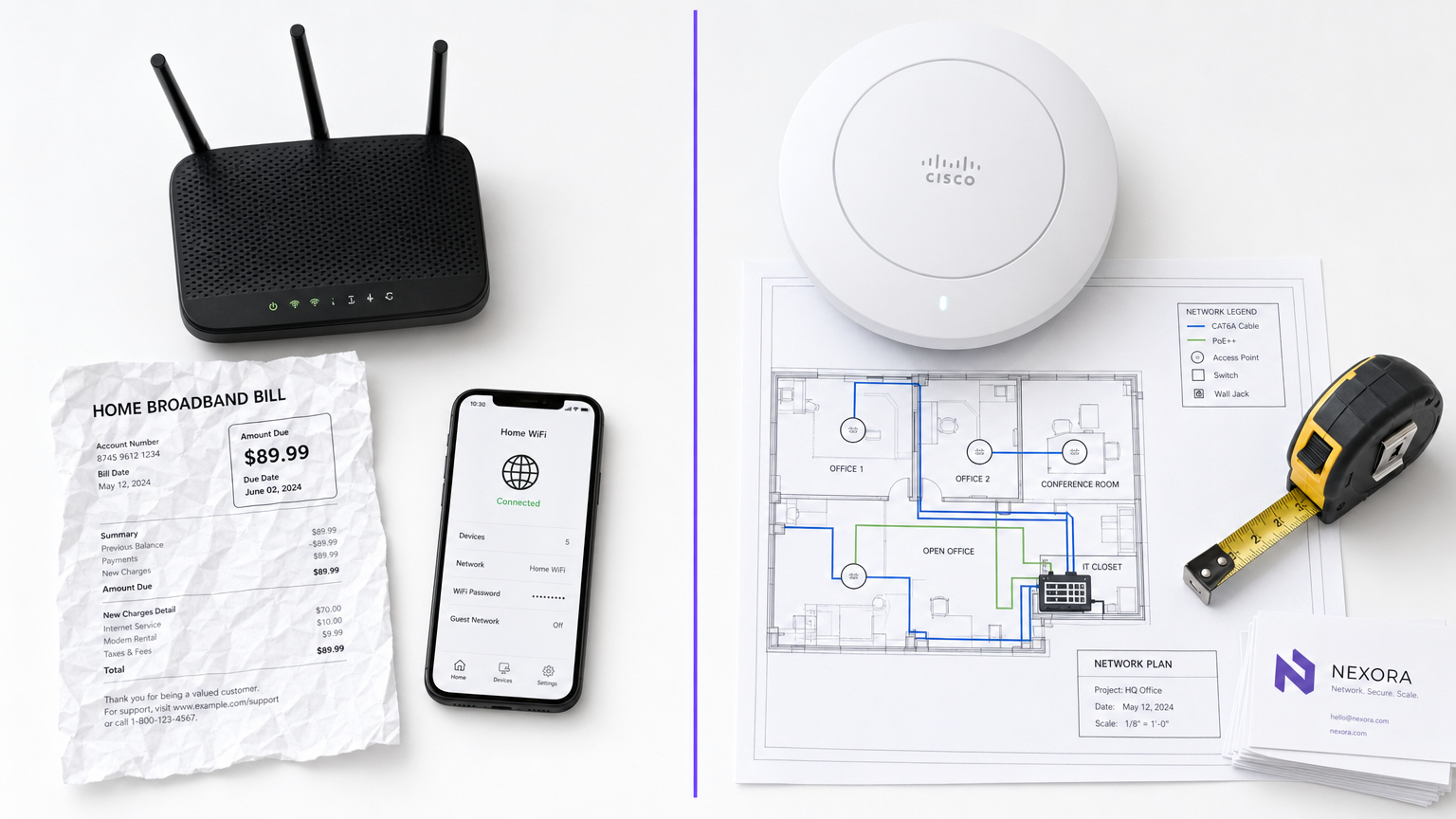
IT प्रबंधकों और स्थल संचालकों के लिए, Business WiFi और Consumer WiFi के बीच का अंतर केवल बजट का सवाल नहीं है—यह वास्तुकला, सुरक्षा और स्केलेबिलिटी में एक मौलिक अंतर है। जबकि Consumer-ग्रेड राउटर एक ही घर के अनुमानित, कम-घनत्व वाले वातावरण के लिए डिज़ाइन किए गए हैं, वाणिज्यिक-ग्रेड इंफ्रास्ट्रक्चर सैकड़ों समवर्ती कनेक्शनों को संभालने, सख्त सुरक्षा नीतियों को लागू करने और कई स्थानों पर केंद्रीकृत प्रबंधन प्रदान करने के लिए इंजीनियर किया गया है। वाणिज्यिक सेटिंग में Consumer हार्डवेयर को तैनात करने से अनिवार्य रूप से क्लाइंट संतृप्ति, सुरक्षा कमजोरियां और अनुपालन विफलताएं होती हैं। यह मार्गदर्शिका मुख्य तकनीकी अंतरों, कार्यान्वयन की सर्वोत्तम प्रथाओं और महत्वपूर्ण ROI की पड़ताल करती है जो एंटरप्राइज़-ग्रेड नेटवर्क Purple के Guest WiFi और WiFi Analytics जैसे प्लेटफार्मों के साथ एकीकृत होने पर प्रदान करते हैं।
तकनीकी गहन-विश्लेषण
हार्डवेयर और क्लाइंट संतृप्ति
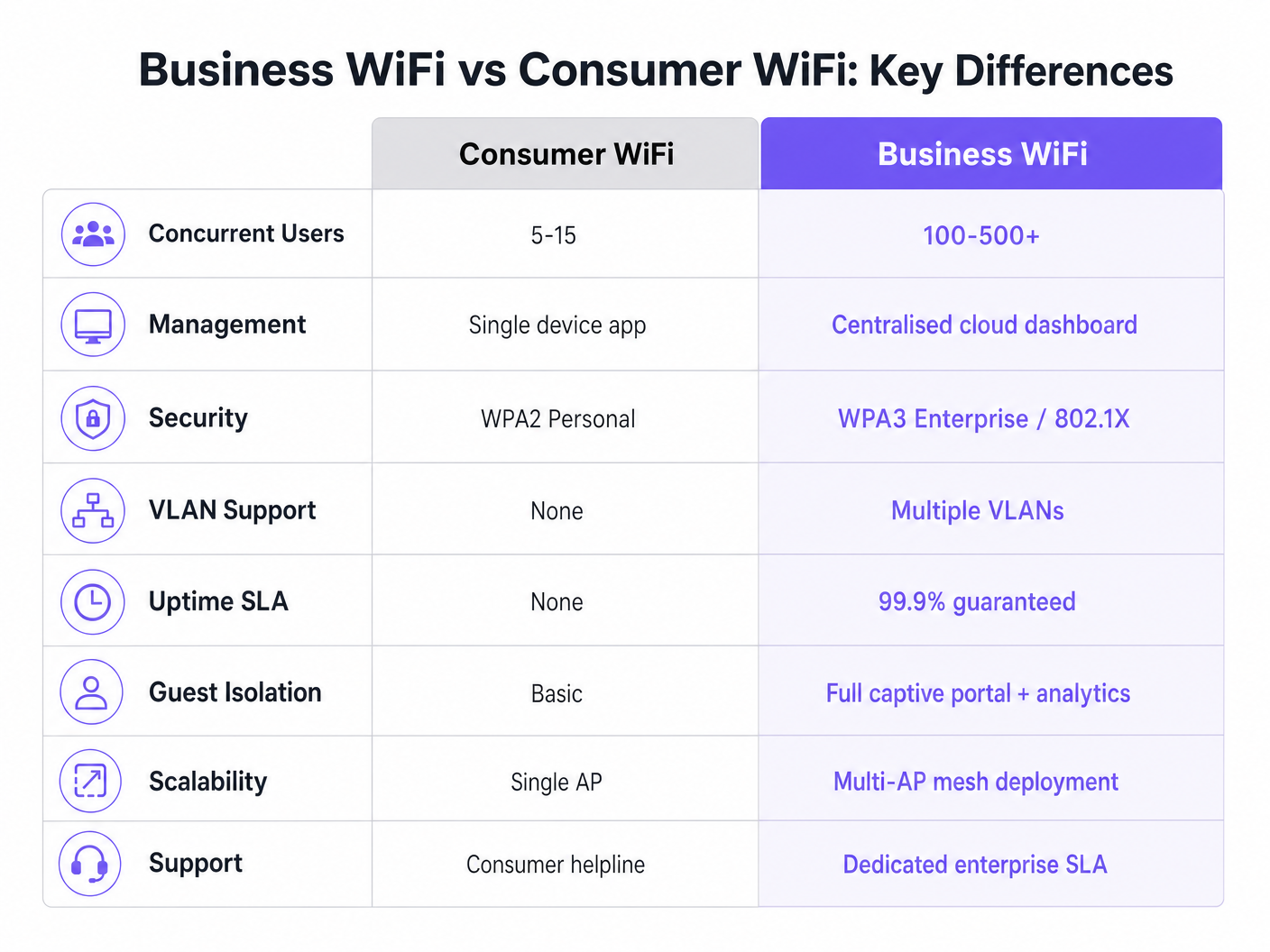
सबसे स्पष्ट अंतर हार्डवेयर क्षमताओं में निहित है। एक मानक Consumer राउटर एक एकल रेडियो बैंड का उपयोग करके 5 से 15 समवर्ती उपकरणों का समर्थन करने के लिए बनाया गया है। जब इसे उच्च-घनत्व वाले वातावरण—जैसे होटल लॉबी या खुदरा तल—में रखा जाता है, तो एक्सेस पॉइंट तेजी से "क्लाइंट संतृप्ति" तक पहुंच जाता है। एसोसिएशन तालिका भर जाती है, विलंबता बढ़ जाती है, और उपयोगकर्ता अनुभव तेजी से खराब हो जाता है।
इसके विपरीत, एंटरप्राइज़ विक्रेताओं के वाणिज्यिक-ग्रेड एक्सेस पॉइंट (APs) प्रति रेडियो 100 से 500+ समवर्ती क्लाइंट एसोसिएशन को संभालने के लिए डिज़ाइन किए गए हैं। वे एक साथ कई क्लाइंट्स को सेवा देने के लिए मल्टी-यूज़र मल्टीपल इनपुट मल्टीपल आउटपुट (MU-MIMO) का उपयोग करते हैं। इसके अलावा, Wi-Fi 6 मानक के तहत BSS Colouring जैसी सुविधाएँ घने वातावरण में हस्तक्षेप को काफी कम करती हैं। ये डिवाइस स्टैंडअलोन इकाइयाँ नहीं हैं; इन्हें एक समन्वित मल्टी-AP सिस्टम के हिस्से के रूप में संचालित करने के लिए डिज़ाइन किया गया है।
प्रबंधन वास्तुकला
Consumer राउटर व्यक्तिगत रूप से प्रबंधित किए जाते हैं। दस स्थानों को कॉन्फ़िगर करने का मतलब दस अलग-अलग वेब इंटरफेस में लॉग इन करना है। यह दृष्टिकोण अविकसित है और अक्सर पुराने फ़र्मवेयर और असंगत सुरक्षा नीतियों का परिणाम होता है।
Business WiFi सिस्टम ऑन-प्रिमाइसेस WLAN कंट्रोलर या क्लाउड-आधारित प्लेटफ़ॉर्म के माध्यम से केंद्रीकृत प्रबंधन पर निर्भर करते हैं। यह नेटवर्क प्रशासकों को एक बार नीति को परिभाषित करने और इसे सैकड़ों APs में तुरंत प्रसारित करने की अनुमति देता है। रीयल-टाइम स्टेटस डैशबोर्ड, दुष्ट APs के लिए स्वचालित अलर्ट और बल्क फ़र्मवेयर अपडेट कई साइटों का प्रबंधन करने वाले किसी भी संगठन के लिए मानक परिचालन आवश्यकताएं हैं।
सुरक्षा और अनुपालन
सुरक्षा यकीनन सबसे महत्वपूर्ण अंतर है। Consumer WiFi WPA2 या WPA3 Personal पर निर्भर करता है, जिसमें एक पूर्व-साझा कुंजी (PSK) का उपयोग किया जाता है। यदि एक डिवाइस से समझौता किया जाता है, तो पूरा नेटवर्क जोखिम में होता है, और प्रति-उपयोगकर्ता ऑडिट ट्रेल नहीं होता है।
Commercial WiFi IEEE 802.1X प्रमाणीकरण को अनिवार्य करता है, जो पोर्ट-आधारित नेटवर्क एक्सेस कंट्रोल के लिए एंटरप्राइज़ मानक है। उपयोगकर्ता एक RADIUS सर्वर के विरुद्ध व्यक्तिगत रूप से प्रमाणित होते हैं (उदाहरण के लिए, EAP-TLS या PEAP का उपयोग करके)। यह सुनिश्चित करता है कि प्रत्येक सत्र व्यक्तिगत रूप से प्रमाणित और लॉग किया गया है। Retail या Healthcare में संगठनों के लिए, PCI DSS, HIPAA और NHS Information Governance अनुपालन के लिए 802.1X आवश्यक है। स्वास्थ्य सेवा-विशिष्ट आवश्यकताओं पर अधिक जानकारी के लिए, WiFi in Hospitals: A Guide to Secure Clinical Networks पर हमारी मार्गदर्शिका देखें।
VLAN विभाजन
एंटरप्राइज़ इंफ्रास्ट्रक्चर वर्चुअल LANs (VLANs) के माध्यम से एक ही भौतिक हार्डवेयर पर कई तार्किक नेटवर्क का समर्थन करता है। एक विशिष्ट वाणिज्यिक परिनियोजन अतिथि पहुंच, स्टाफ उपकरणों, IoT हार्डवेयर और पॉइंट-ऑफ-सेल (POS) सिस्टम के लिए ट्रैफ़िक को अलग-अलग VLANs में विभाजित करेगा। यह गहन-रक्षा रणनीति सुनिश्चित करती है कि एक समझौता किया गया IoT डिवाइस स्टाफ नेटवर्क या POS सिस्टम में नहीं जा सकता है।
RF प्रबंधन और थ्रूपुट
Consumer राउटर के विपरीत जो निश्चित चैनलों और ट्रांसमिट पावर पर काम करते हैं, वाणिज्यिक APs डायनामिक चैनल असाइनमेंट और ट्रांसमिट पावर कंट्रोल (802.11h और 802.11k में परिभाषित) का उपयोग करते हैं। यह स्वचालित RF अनुकूलन नेटवर्क को बदलती परिस्थितियों के अनुकूल होने की अनुमति देता है—जैसे कि यदि कोई पड़ोसी AP विफल हो जाता है तो ट्रांसमिट पावर बढ़ाना, या पीक आवर्स के दौरान क्लाइंट्स को कम भीड़भाड़ वाले चैनलों पर निर्देशित करना।
कार्यान्वयन मार्गदर्शिका
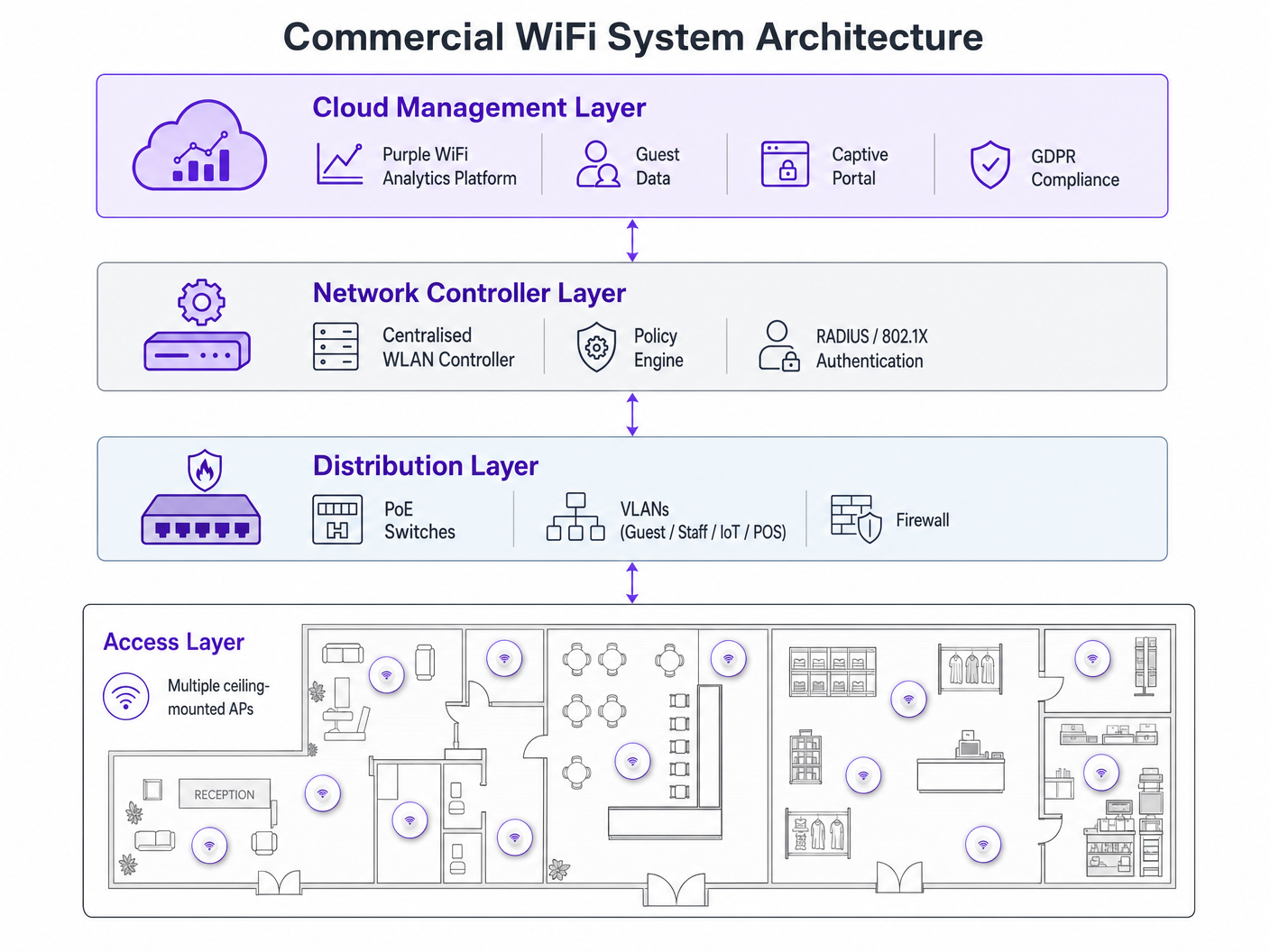
एक वाणिज्यिक WiFi नेटवर्क को तैनात करने के लिए सावधानीपूर्वक योजना की आवश्यकता होती है। इन विक्रेता-तटस्थ सिफारिशों का पालन करें:
- AP घनत्व योजना: सबसे आम विफलता मोड अंडर-प्रोविजनिंग है। उच्च-घनत्व वाले वातावरण के लिए, प्रति 25-30 वर्ग मीटर पर एक AP, या प्रति 30-40 समवर्ती उपयोगकर्ताओं पर एक AP की योजना बनाएं। केवल अनुमानित मॉडलिंग पर निर्भर रहने के बजाय हमेशा एक पेशेवर RF साइट सर्वेक्षण करें।
- PoE इंफ्रास्ट्रक्चर: सुनिश्चित करें कि आपका स्विचिंग इंफ्रास्ट्रक्चर पावर ओवर ईथरनेट का समर्थन करता है। मानक वाणिज्यिक APs को PoE+ (IEEE 802.3at) की आवश्यकता होती है, जबकि नए Wi-Fi 6E मॉडल 60 वाट तक बिजली प्रदान करने के लिए PoE++ (IEEE 802.3bt) की मांग कर सकते हैं।
- Captive Portal एकीकरण: अतिथि नेटवर्क तैनात करते समय, विशेष रूप से Hospitality या Transport में, सुनिश्चित करें कि आपका Captive Portal GDPR-अनुरूप है। इसे स्पष्ट सहमति एकत्र करनी चाहिए और कनेक्शन लॉग को उचित रूप से प्रबंधित करना चाहिए। व्यापक परिनियोजन चरणों के लिए, How to Set Up WiFi for Your Business: A Complete Guide देखें।
सर्वोत्तम प्रथाएँ
- हार्डवेयर टियर को कभी न मिलाएं: एक ही परिनियोजन में Consumer और वाणिज्यिक हार्डवेयर को मिलाने से अप्रबंधनीय ओवरहेड और असंगत प्रदर्शन होता है। IoT उपकरणों को अलग करें: IoT उपकरणों को हमेशा प्रतिबंधित इंटरनेट एक्सेस और शून्य पार्श्व गति क्षमताओं वाले एक समर्पित VLAN पर रखें।
- निरंतर जीवनचक्र प्रबंधन: अपने WiFi नेटवर्क को एक गतिशील बुनियादी ढांचे के रूप में मानें। नियमित फ़र्मवेयर अपडेट, प्रमाणपत्र नवीनीकरण और आवधिक RF ऑडिट अनिवार्य हैं।
समस्या निवारण और जोखिम शमन
सामान्य विफलता मोड अक्सर खराब प्रारंभिक डिज़ाइन से उत्पन्न होते हैं। परिनियोजन के बाद हस्तक्षेप के मुद्दे आमतौर पर छूटे हुए RF साइट सर्वेक्षण का संकेत देते हैं। यदि क्लाइंट को बार-बार डिस्कनेक्शन का अनुभव होता है, तो स्विच स्तर पर चैनल ओवरलैप या अपर्याप्त PoE बजट की जाँच करें। अपने केंद्रीकृत प्रबंधन डैशबोर्ड के भीतर चैनल उपयोग थ्रेशोल्ड और क्लाइंट एसोसिएशन विफलताओं के लिए स्वचालित अलर्ट स्थापित करके इन जोखिमों को कम करें।
ROI और व्यावसायिक प्रभाव
वाणिज्यिक WiFi में अपग्रेड करना बुनियादी कनेक्टिविटी से कहीं बढ़कर है—यह एक रणनीतिक व्यावसायिक निवेश है। अनुपालन जोखिमों को कम करने और महंगे डाउनटाइम को रोकने के अलावा, एक ठीक से तैनात एंटरप्राइज़ नेटवर्क उन्नत डेटा संग्रह को सक्षम बनाता है। Purple के एनालिटिक्स प्लेटफ़ॉर्म का लाभ उठाकर, स्थान फ़ुटफ़ॉल डेटा कैप्चर कर सकते हैं, ठहरने के समय को माप सकते हैं और बार-बार आने वाले आगंतुकों की दरों को ट्रैक कर सकते हैं। यह जानकारी सीधे मार्केटिंग खर्च, स्टोर लेआउट अनुकूलन और स्टाफिंग मॉडल को सूचित करती है, जिससे नेटवर्क इन्फ्रास्ट्रक्चर एक लागत केंद्र से राजस्व-उत्पादक संपत्ति में बदल जाता है। उन्नत स्थान ट्रैकिंग उपयोग के मामलों के लिए, हमारे इनडोर पोजिशनिंग सिस्टम: UWB, BLE, और WiFi गाइड का अन्वेषण करें।
ब्रीफिंग सुनें
इन अवधारणाओं में गहराई से जानने के लिए, हमारे 10 मिनट के तकनीकी ब्रीफिंग पॉडकास्ट को सुनें:
मुख्य शब्द और परिभाषाएं
Client Saturation
The point at which an access point can no longer accept new device connections or process traffic efficiently due to hardware limitations.
Commonly occurs when consumer routers are placed in commercial settings like hotel lobbies or conference rooms.
MU-MIMO
Multi-User Multiple Input Multiple Output; a technology that allows an access point to communicate with multiple devices simultaneously.
Essential for maintaining throughput in high-density enterprise environments.
IEEE 802.1X
An IEEE standard for port-based network access control that provides an authentication mechanism to devices wishing to attach to a LAN or WLAN.
Required for enterprise security and compliance (PCI DSS, HIPAA) to ensure individual user authentication.
VLAN Segmentation
The practice of dividing a single physical network into multiple isolated logical networks.
Used to separate guest traffic, staff traffic, IoT devices, and sensitive systems like POS terminals.
Captive Portal
A web page that the user of a public-access network is obliged to view and interact with before access is granted.
Crucial for capturing guest consent for GDPR compliance and gathering analytics data.
Dynamic Channel Assignment
An automated feature of enterprise WLAN controllers that adjusts the operating channel of APs to minimise interference.
Prevents network degradation in environments with fluctuating RF interference.
BSS Colouring
A Wi-Fi 6 feature that identifies overlapping basic service sets (BSS) to improve spatial reuse and reduce interference.
Improves performance in stadiums and crowded retail spaces where multiple APs are in close proximity.
PoE+ / PoE++
Power over Ethernet standards (802.3at and 802.3bt) that deliver both data and electrical power over a single cable.
Required for powering commercial access points without needing local AC power outlets.
केस स्टडीज
A 200-room hotel is experiencing severe guest complaints about WiFi dropping in the lobby during peak check-in times. They are currently using three high-end consumer mesh routers. How should this be resolved?
- Remove the consumer mesh routers entirely. 2. Conduct an RF site survey of the lobby to determine structural interference. 3. Deploy enterprise-grade APs supporting Wi-Fi 6 and MU-MIMO. 4. Configure the APs on a centralised WLAN controller to enable dynamic channel assignment. 5. Implement VLAN segmentation to separate guest traffic from the hotel's operational devices.
A national retail chain needs to roll out a new POS system and guest WiFi across 50 locations, ensuring PCI DSS compliance.
- Deploy commercial APs managed via a single cloud-based platform. 2. Create a dedicated, heavily restricted VLAN for the POS system. 3. Implement IEEE 802.1X authentication for all staff and corporate devices. 4. Deploy a separate guest VLAN with a GDPR-compliant captive portal. 5. Push uniform security policies to all 50 sites simultaneously via the cloud dashboard.
परिदृश्य विश्लेषण
Q1. Your organisation is opening a new 5,000 sq ft open-plan office. The operations director suggests buying five high-end consumer 'gaming' routers to save budget. What is the primary technical argument against this approach?
💡 संकेत:Consider how the devices will be managed and how they handle interference.
अनुशंसित दृष्टिकोण दिखाएं
The primary technical argument is the lack of centralised management and automated RF optimisation. Five consumer routers would require individual configuration, creating management overhead and inconsistent security policies. Furthermore, they lack dynamic channel assignment, meaning they will likely cause co-channel interference with each other, degrading overall network performance.
Q2. A hospital needs to deploy WiFi that supports both patient internet access and secure clinical devices (like mobile workstations). How should the network architecture be designed?
💡 संकेत:Think about network layer isolation and authentication standards.
अनुशंसित दृष्टिकोण दिखाएं
The architecture must utilise VLAN segmentation. Patient internet access should be routed to a dedicated Guest VLAN with a captive portal and client isolation enabled. Clinical devices must be placed on a separate, secure VLAN requiring IEEE 802.1X authentication via a RADIUS server to ensure compliance with healthcare data regulations (e.g., NHS Information Governance/HIPAA).
Q3. During a network upgrade, the IT team plans to replace old 802.11n APs with new Wi-Fi 6E models, but they are keeping the existing network switches. What is the most likely point of failure?
💡 संकेत:Consider the physical requirements of the new hardware.
अनुशंसित दृष्टिकोण दिखाएं
The most likely point of failure is the Power over Ethernet (PoE) budget. Older switches may only support basic PoE (802.3af, 15.4W) or PoE+ (802.3at, 30W). High-performance Wi-Fi 6E APs often require PoE++ (802.3bt) to deliver up to 60W. If the switches cannot provide sufficient power, the new APs may fail to boot or operate with disabled radios.




