
WiFi Marketing para restaurantes: cómo convertir el WiFi gratuito en clientes recurrentes
Esta guía de referencia técnica autorizada explora la arquitectura e implementación de WiFi Marketing para restaurantes, la práctica de utilizar el acceso a la red de invitados como un canal estructurado de adquisición de datos y automatización de marketing. Proporciona a los directores de TI, arquitectos de red y directores de operaciones de puntos de venta un plan táctico para desplegar Captive Portals, realizar la integración con plataformas CRM y activar campañas automatizadas que impulsen un retorno de negocios medible. Desde la captura de datos conforme a GDPR hasta flujos de trabajo de correo electrónico basados en eventos, esta guía cubre todo el ciclo de vida de la implementación con métricas de ROI concretas.
Escucha esta guía
Ver transcripción del podcast
Parte de nuestra serie principal: Guía de WiFi Marketing →

Resumen Ejecutivo
Para los gerentes de TI, arquitectos de red y CTOs que operan en los sectores de hotelería, retail y sector público, ofrecer acceso a la red de invitados ha evolucionado de ser un servicio básico a un canal crítico de adquisición de datos. Para obtener un retorno de inversión (ROI) de las inversiones en infraestructura de red, comprender qué es el marketing de WiFi para restaurantes es fundamental. Esta guía describe la arquitectura técnica, las estrategias de implementación y los protocolos de mitigación de riesgos necesarios para transformar un centro de costos - el WiFi de invitados gratuito - en un motor medible de clientes recurrentes y fidelización.
Implementar una solución de WiFi de invitados de clase empresarial requiere mucho más que simplemente transmitir un SSID. Exige una arquitectura sólida que se integre a la perfección con plataformas CRM, herramientas de automatización de marketing y motores de analítica, cumpliendo al mismo tiempo con estrictos estándares de cumplimiento que incluyen GDPR y PCI-DSS. Al implementar la captura de datos estructurados a través de Captive Portals, los establecimientos pueden segmentar a los usuarios, activar campañas de marketing automatizadas (correos electrónicos posteriores a la visita, ofertas de cumpleaños y promociones de eventos) y generar reseñas valiosas. Esta guía proporciona un plan táctico para configurar y optimizar los flujos de trabajo de marketing de WiFi con el fin de maximizar el rendimiento, garantizar la seguridad y generar un impacto comercial medible.
Análisis Técnico Detallado: Arquitectura y Estándares
La base de un marketing de WiFi de invitados eficaz radica en una arquitectura de red escalable y segura. En su núcleo, el sistema se basa en un mecanismo de Captive Portal que intercepta las solicitudes HTTP/HTTPS de dispositivos no autenticados y las redirige a una página de autenticación alojada. Este proceso normalmente utiliza RADIUS (Remote Authentication Dial-In User Service) para la autenticación, autorización y contabilidad (AAA) centralizadas.
Flujos de Trabajo de Autenticación y Captura de Datos
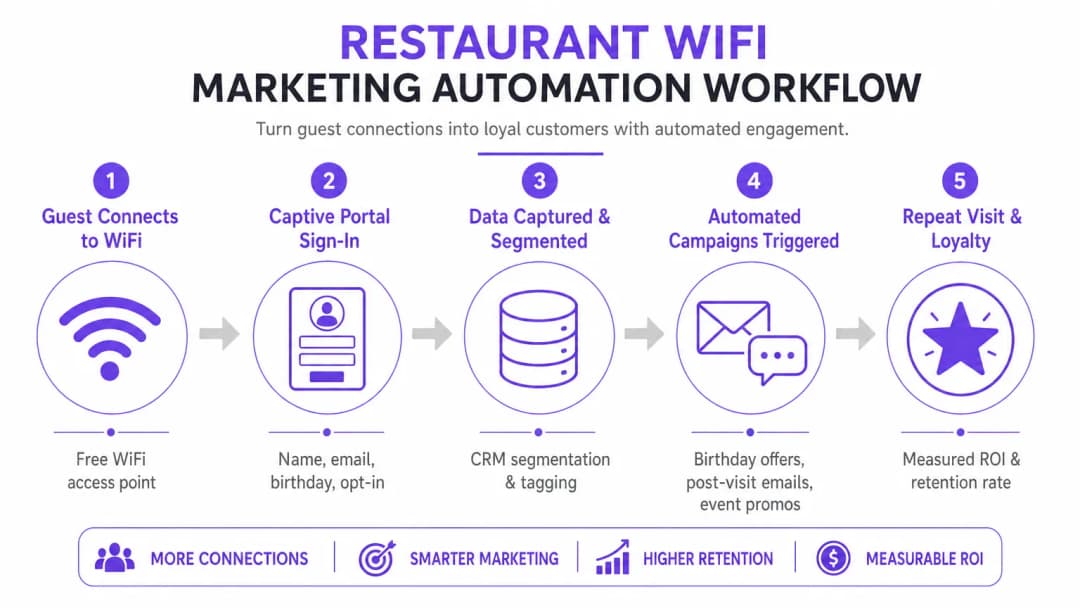
Cuando un dispositivo se conecta al SSID de invitados, el controlador de LAN inalámbrica (WLC) o el punto de acceso restringe el acceso a la red, colocando al dispositivo en un Walled Garden (entorno cerrado). Al usuario se le presenta un Captive Portal, que sirve como la interfaz principal de adquisición de datos. Para optimizar las tasas de conversión, el portal debe admitir múltiples métodos de autenticación:
| Método de Autenticación | Nivel de Fricción | Calidad de Datos | Complejidad de Implementación |
|---|---|---|---|
| Inicio de Sesión Social (OAuth 2.0) | Bajo | Alta (rica en demografía) | Media |
| Basado en Formulario (Email + Opt-in) | Medio | Controlada | Baja |
| Verificación por SMS | Medio-Alto | Alta (móvil verificado) | Media |
| Passpoint / Hotspot 2.0 | Muy Bajo | Media | Alta |
Social Login (OAuth 2.0) las integraciones con Google o Facebook brindan acceso de baja fricción al tiempo que recopilan datos demográficos enriquecidos. Este método se basa en un intercambio de tokens seguro, lo que elimina la necesidad de que los usuarios creen nuevas credenciales. La autenticación basada en formularios permite a los usuarios proporcionar su nombre, dirección de correo electrónico y, opcionalmente, fecha de nacimiento o número de teléfono. Estos datos se validan y se transmiten de forma segura a una base de datos centralizada. La reautenticación fluida (MAC Caching) almacena en caché la dirección MAC del dispositivo durante un periodo configurable (por ejemplo, 30 días), lo que permite un acceso sin fricciones en visitas posteriores y un seguimiento preciso de la frecuencia.
Protocolos de seguridad y cumplimiento
La implementación de WiFi para marketing requiere un cumplimiento estricto de los estándares de seguridad y privacidad. La arquitectura debe segregar el tráfico de invitados de la red corporativa utilizando VLAN para evitar el movimiento lateral. Las implementaciones deben cumplir con lo siguiente:
GDPR / CCPA: El Captive Portal debe integrar mecanismos de consentimiento claros y desagregados. Los usuarios deben optar activamente por las comunicaciones de marketing y la plataforma debe proporcionar capacidades sólidas de Solicitud de Acceso del Interesado (DSAR). El consentimiento de marketing no se puede agrupar con las condiciones de servicio de acceso a la red.
PCI-DSS: Si el establecimiento procesa pagos en la misma infraestructura física, la segmentación de la red y las reglas del firewall deben aislar el Entorno de Datos de Tarjetas de Pago (CDE) de la red de invitados.
WPA3-Enhanced Open (OWE): La transición a protocolos de incorporación seguros proporciona cifrado oportunista para el tráfico no autenticado, lo que mitiga los riesgos de espionaje en redes abiertas sin requerir credenciales de usuario.
Guía de implementación: Estrategias de despliegue
Un despliegue exitoso requiere un enfoque por fases, centrado en la integración y la automatización. El objetivo es establecer un flujo de datos continuo desde los puntos de acceso hasta la plataforma de automatización de marketing.
Paso 1: Evaluación y dimensionamiento de la infraestructura
Antes de implementar un Captive Portal, asegúrese de que la infraestructura de RF subyacente pueda manejar la densidad de clientes proyectada. Realice un estudio de cobertura predictivo y activo para identificar brechas de cobertura y optimizar la ubicación de los AP. Considere la utilización de canales, la interferencia de canales adyacentes y el rendimiento requerido por dispositivo. Para implementaciones empresariales, aprovechar una conexión a internet dedicada para negocios - como una línea arrendada - garantiza un ancho de banda garantizado y velocidades simétricas, evitando que el tráfico de invitados afecte a los sistemas operativos críticos.
Paso 2: Configuración del Captive Portal
Diseñe el Captive Portal con un enfoque en la optimización de la conversión. La UI debe ser adaptativa y cargarse rápidamente en dispositivos móviles, ya que la mayoría de las conexiones se originarán desde teléfonos inteligentes. Implemente el perfilado progresivo: solicite información básica (dirección de correo electrónico, consentimiento de marketing) durante la visita inicial, y pida datos complementarios (fecha de nacimiento, número de teléfono) en las conexiones posteriores. Esto minimiza la fricción al tiempo que enriquece el perfil del cliente con el paso del tiempo.
Paso 3: Integración con CRM y Automatización
El verdadero valor de una plataforma de WiFi Analytics se materializa a través de la integración. Configure webhooks de API o conectores nativos para sincronizar los datos capturados con el CRM del establecimiento (por ejemplo, Salesforce, HubSpot) y las herramientas de automatización de marketing. Establezca reglas claras de mapeo de datos para garantizar que campos como Last Visit Date y Total Visits se actualicen en tiempo real con cada evento de autenticación.
Paso 4: Configuración de Automatización de Campañas
Configure flujos de trabajo automatizados activados por eventos específicos de la red. Las tres campañas principales que deben incluirse en cada despliegue son:
- La Campaña de Bienvenida: Se activa inmediatamente después de la primera autenticación exitosa. Ofrece un mensaje de bienvenida y una oferta de baja barrera para fomentar una nueva visita dentro de un plazo definido.
- La Campaña Te Extrañamos: Se activa cuando no se ha detectado un dispositivo en la red durante un periodo específico (por ejemplo, 45 días). Ofrece un incentivo personalizado para volver a atraer a los clientes inactivos en el momento preciso.
- La Campaña de Generación de Reseñas: Se activa 2 horas después de que el usuario se desconecta de la red, aprovechando los eventos RADIUS Accounting-Stop o los webhooks de la API de ubicación. Solicita comentarios a través de TripAdvisor o Google My Business mientras la experiencia aún está fresca.
-
¿Tiene preguntas sobre su configuración específica?
Nuestro equipo trabaja con gestores de espacios, responsables de TI e ingenieros de redes en 80 000 establecimientos. Reserve una llamada de 20 minutos y le mostraremos cómo lo resolvieron otros profesionales como usted.
Mejores Prácticas para Establecimientos Corporativos
Para maximizar la eficacia de cómo mejorar la experiencia del cliente en un restaurante a través del marketing de WiFi, las siguientes mejores prácticas independientes del proveedor se aplican en entornos de hospitalidad, comercio minorista y transporte.
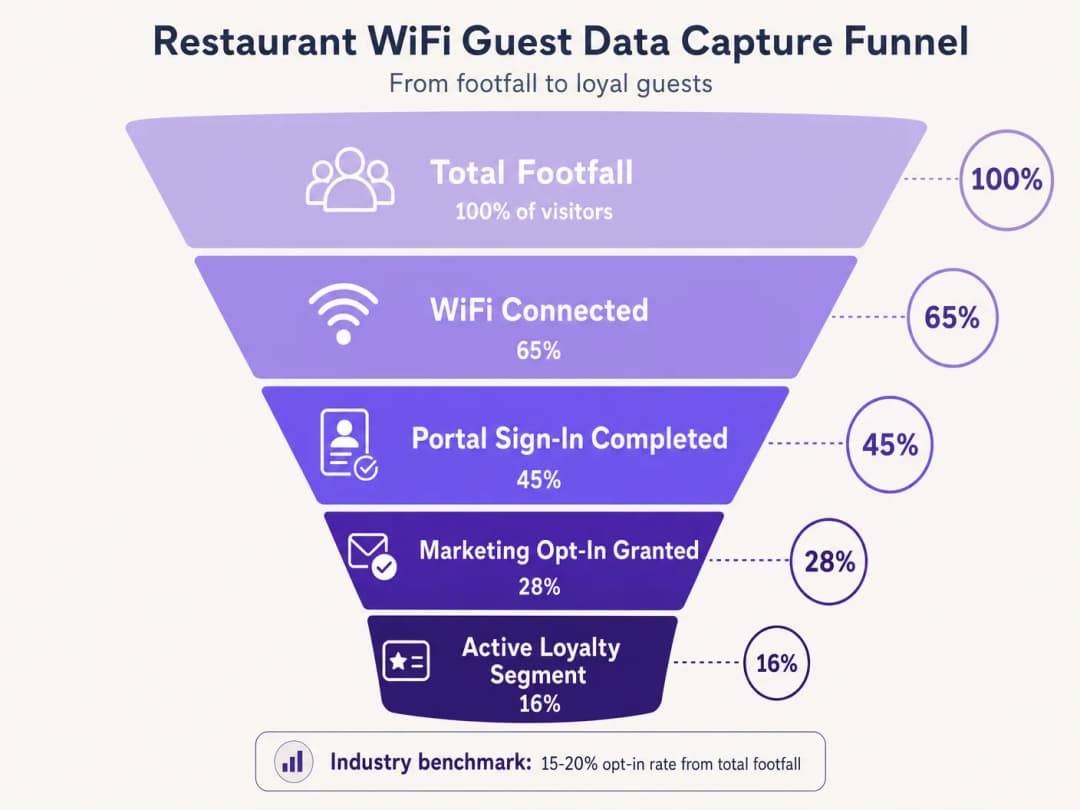
Priorice el consentimiento (opt-in). El objetivo principal del Captive Portal es asegurar el consentimiento de marketing. Asegúrese de que la propuesta de valor - por ejemplo, 'Únase a nuestro WiFi para recibir ofertas exclusivas y regalos de cumpleaños' - se muestre de manera destacada. Los puntos de referencia de la industria indican que se pueden lograr tasas de consentimiento del 15 al 20% del flujo total de visitantes con portales optimizados. Los establecimientos con portales mal diseñados a menudo registran tasas inferiores al 5%. Aproveche la analítica de ubicación. Utilice los servicios de ubicación de la infraestructura inalámbrica (triangulación RSSI) para comprender los tiempos de permanencia y los patrones de movimiento. Estos datos fundamentan las decisiones operativas - niveles de personal, optimización del diseño, gestión de horas pico - más allá de las aplicaciones de marketing puras. Una plataforma de WiFi Analytics proporciona el tablero y la capa de informes para esta inteligencia.
Implemente la limitación del ancho de banda. Evite que un número reducido de usuarios monopolice los recursos de la red aplicando límites de ancho de banda por dispositivo y tiempos de espera de sesión. Esto garantiza una Calidad de Experiencia (QoE) constante para todos los invitados y protege los sistemas operativos de la saturación del ancho de banda.
Aplicación en múltiples sectores. Los principios del marketing de WiFi se extienden directamente a sectores adyacentes. Para los operadores que gestionan locales con licencia, Bar and Pub WiFi: A Complete Setup and Marketing Guide proporciona una referencia táctica paralela. Para los despliegues en el sector salud y el sector público, los requisitos de cumplimiento son más estrictos, pero la arquitectura de captura de datos sigue siendo fundamentalmente idéntica.
Solución de problemas y mitigación de riesgos
El despliegue de WiFi para invitados introduce riesgos específicos que deben gestionarse activamente antes del lanzamiento.
Modos de falla comunes y resoluciones
| Modo de falla | Causa raíz | Resolución |
|---|---|---|
| El Captive Portal no aparece | Configuración errónea de Walled Garden, error de certificado SSL | Auditar dominios en lista blanca; implementar certificado SSL válido en el portal |
| El inicio de sesión social falla de forma silenciosa | Los dominios del proveedor OAuth no están en el Walled Garden | Agregar dominios de autenticación del proveedor al Walled Garden |
| Se solicita reautenticación a los invitados que regresan | Aleatorización de MAC (iOS 14+, Android 10+) | Implementar perfiles Passpoint o aplicación del establecimiento |
| Retrasos en la sincronización de datos de CRM | Límites de velocidad de la API o fallas en webhooks | Implementar retroceso exponencial, colas de mensajes no entregados |
| Baja tasa de aceptación (opt-in) | Exceso de campos de formulario, propuesta de valor deficiente | Restringir a correo electrónico + aceptación; mejorar el texto del portal |
La aleatorización de direcciones MAC requiere atención específica. Los sistemas operativos móviles modernos generan direcciones MAC aleatorias para mejorar la privacidad, lo que interrumpe directamente el almacenamiento en caché de MAC y el seguimiento de frecuencia. Los invitados que regresan pueden ser tratados como visitantes nuevos, lo que sesga la analítica y activa secuencias de campañas incorrectas. La mitigación a largo plazo es la transición a Passpoint (Hotspot 2.0), que utiliza perfiles de dispositivos persistentes independientes de las direcciones MAC. Como lo demuestra la estrategia de plataforma expansiva de Purple - que incluye los avances analizados en Purple signals Higher Education ambitions with appointment of VP Education Tim Peers - adaptarse a los estándares de privacidad en evolución es fundamental para una estrategia de datos sostenible en todos los sectores.
ROI e impacto empresarial
El objetivo final de implementar una solución de marketing de WiFi es generar un retorno de inversión (ROI) medible. El éxito debe medirse utilizando un conjunto definido de KPI rastreados desde el primer día.
| KPI | Definición | Referencia de la Industria |
|---|---|---|
| Tasa de Captura de Datos | % del flujo total de personas que se autentica | 40-65% |
| Tasa de Suscripción de Marketing | % de usuarios autenticados que dan su consentimiento | 15-28% |
| Tasa de Apertura de Campañas | % de correos electrónicos de campaña abiertos | 35-45% |
| Tasa de Conversión de Campañas | % de destinatarios que canjean ofertas | 8-15% |
| Incremento de Visitas Repetidas | Aumento en visitas de retorno en comparación con el grupo de control | 12-22% |
Al capturar datos de manera sistemática, segmentar audiencias y automatizar campañas dirigidas, los equipos de TI y marketing pueden transformar su infraestructura inalámbrica de un gasto necesario en un activo estratégico. Para obtener información sobre tendencias de conectividad más amplias que afectarán las operaciones de los recintos en 2026, incluida la convergencia de las estrategias de WiFi en vehículos y en recintos, consulte WiFi in Auto: The Complete 2026 Enterprise Guide.
Resumen en audio: Una sesión informativa de asesoramiento de 10 minutos sobre el diseño de WiFi para el ROI de marketing - que cubre la arquitectura, la integración, la mitigación de riesgos y una sección de preguntas y respuestas rápidas.
Definiciones clave
Captive Portal
Una página web que un usuario de una red de acceso público está obligado a ver e interactuar con ella antes de que se le conceda acceso total a internet. Sirve como la interfaz principal de adquisición de datos y consentimiento en una implementación de WiFi para invitados.
El Captive Portal es el componente más importante en una arquitectura de marketing por WiFi. Su diseño determina directamente las tasas de captura de datos y las tasas de suscripción de marketing.
Asociación de Direcciones MAC (MAC Caching)
El proceso de almacenar la dirección de Control de Acceso al Medio (MAC) de un dispositivo en una base de datos después de la autenticación inicial, lo que permite el acceso automático a la red en visitas posteriores sin tener que presentar de nuevo el Captive Portal.
Esencial para reducir la fricción de los clientes recurrentes y rastrear con precisión la frecuencia de las visitas. Cada vez más desafiado por la aleatorización de direcciones MAC en los sistemas operativos móviles modernos.
Walled Garden
Un entorno de red restringido que controla a qué direcciones IP o dominios puede acceder un dispositivo antes de completar la autenticación. En el WiFi para invitados, define los recursos accesibles antes de iniciar sesión en el Captive Portal.
Configuración crítica requerida para permitir que los dispositivos lleguen al Captive Portal, a los proveedores de inicio de sesión social y a los servicios backend necesarios antes de que se conceda el acceso total a internet. La configuración incorrecta es la causa principal de que no aparezca el portal.
Perfilado Progresivo (Progressive Profiling)
La técnica de recopilar gradualmente información del cliente a lo largo de múltiples interacciones o visitas, en lugar de solicitar todos los detalles a la vez durante la interacción inicial.
Se utiliza para maximizar las tasas de suscripción iniciales manteniendo breve la primera interacción con el Captive Portal (solo correo electrónico y consentimiento), mientras se construyen perfiles de clientes más completos en las visitas posteriores.
RADIUS (Remote Authentication Dial-In User Service)
Un protocolo de red que proporciona una gestión centralizada de Autenticación, Autorización y Contabilización (AAA) para los usuarios que se conectan a un servicio de red.
El protocolo subyacente utilizado por la mayoría de las infraestructuras de WLC empresariales para comunicarse con la base de datos central que gestiona el acceso de invitados. Los mensajes RADIUS Accounting-Stop se utilizan para detectar las salidas de los invitados para los activadores de campañas orientadas a eventos.
OAuth 2.0
Un protocolo de autorización estándar de la industria que permite a aplicaciones de terceros otorgar acceso limitado a un servicio HTTP a través del intercambio seguro de tokens, sin compartir las contraseñas de los usuarios.
El protocolo subyacente a las opciones de inicio de sesión social (Iniciar sesión con Google, Iniciar sesión con Facebook). Proporciona una autenticación de baja fricción para el Captive Portal al tiempo que captura datos demográficos verificados del proveedor de identidad.
Passpoint (Hotspot 2.0)
Un estándar de Wi-Fi Alliance que permite el descubrimiento y la conexión automática y segura a redes utilizando el cifrado de nivel empresarial WPA2/WPA3, sin requerir una interacción manual con el Captive Portal.
La alternativa estratégica a largo plazo a los Captive Portals abiertos, que proporciona una identificación persistente del dispositivo que no se ve afectada por la aleatorización de direcciones MAC. Presenta una mayor complejidad de implementación pero una experiencia de usuario y precisión de datos superiores.
MAC Address Randomization
Una función de privacidad en los sistemas operativos móviles modernos (iOS 14+, Android 10+) que genera una dirección MAC única y aleatoria para cada conexión de red, o la rota periódicamente.
Interrumpe directamente el almacenamiento en caché de MAC y el seguimiento de frecuencia en las implementaciones de marketing de WiFi. Los clientes recurrentes pueden ser tratados como nuevos visitantes, lo que distorsiona las analíticas y activa secuencias de campaña incorrectas. Requiere Passpoint o identificación basada en aplicaciones como estrategia de mitigación.
Ejemplos resueltos
Una cadena nacional de restaurantes con 150 ubicaciones experimenta tasas bajas de captura de datos (menos del 5 % de la afluencia total de personas) en su red de WiFi para invitados actual. La configuración actual requiere que los usuarios completen un formulario largo de 6 campos antes de concederles el acceso. Se le ha pedido al equipo de TI que mejore esto a una tasa de captura de al menos el 20 % sin reemplazar la infraestructura de WLC subyacente. ¿Cómo se debe reconfigurar la arquitectura?
La implementación requiere un cambio hacia perfiles progresivos y autenticación de baja fricción, lo cual se puede lograr sin reemplazar el hardware WLC. Paso 1: Reconfigurar la capa de aplicación del Captive Portal para presentar botones de inicio de sesión social OAuth 2.0 (Google, Facebook) como opción principal de autenticación. Esto requiere agregar los dominios de autenticación de los proveedores de OAuth a la lista blanca de walled garden en el WLC. Paso 2: Para los usuarios que prefieren la autenticación basada en formularios, reduzca el formulario inicial a solo dos campos: Dirección de correo electrónico y una casilla de verificación de consentimiento de marketing claramente etiquetada. Elimine todos los demás campos de la interacción inicial. Paso 3: Implementar el almacenamiento en caché de MAC con una expiración de 30 días en el backend del portal. Las direcciones MAC autenticadas se almacenan en la base de datos del portal; el WLC verifica esta lista antes de presentar el portal. Paso 4: Configurar el portal para presentar un aviso secundario de captura de datos (fecha de nacimiento, número de teléfono) en la segunda o tercera visita, una vez que se haya establecido la confianza. Paso 5: Integrar la base de datos del portal con el CRM central a través de webhooks de API REST, asegurando que el campo "Visit Count" se incremente en cada evento de autenticación para impulsar la lógica de perfiles progresivos.
Un gran centro de conferencias que alberga más de 200 eventos al año desea implementar una campaña automatizada de generación de reseñas. Necesitan que el sistema envíe un correo electrónico a los delegados exactamente 2 horas después de que abandonen el establecimiento, con el contenido del correo personalizado para el evento específico al que asistieron. ¿Qué componentes técnicos y configuraciones se requieren?
Esto requiere la integración entre el WLC, el motor de Location Analytics, el sistema de gestión de eventos y la plataforma de automatización de marketing. Paso 1: Configurar el WLC para generar mensajes RADIUS Accounting-Stop cuando un dispositivo cliente se desasocie. Alternativamente, configurar el motor de análisis de ubicación para activar un evento de "salida" cuando el RSSI de un dispositivo caiga por debajo del umbral de geocerca del recinto durante un período sostenido (por ejemplo, 5 minutos). Paso 2: Configurar un webhook en la plataforma de WiFi Analytics que se active al recibir el evento de salida. La carga útil del webhook debe incluir la dirección de correo electrónico del usuario, el ID de la zona del recinto y la marca de tiempo. Paso 3: En el sistema de gestión de eventos, mantener una tabla de búsqueda que asocie los ID de zona del recinto y las ventanas de tiempo con nombres de eventos específicos. La plataforma de automatización de marketing consulta esta tabla para enriquecer la carga útil del webhook con el nombre del evento. Paso 4: En la plataforma de automatización de marketing, crear un flujo de trabajo que reciba el webhook enriquecido, inicie un temporizador de retraso de 2 horas y luego envíe un correo electrónico de solicitud de reseña personalizado utilizando el nombre del evento como una variable de contenido dinámico. Paso 5: Configurar listas de supresión para evitar que el correo electrónico se envíe si el delegado ya ha presentado una reseña o si está marcado como un VIP que requiere un seguimiento personal.
Preguntas de práctica
Q1. Un establecimiento reporta que a los usuarios de iOS se les pide repetidamente que inicien sesión cada vez que lo visitan, a pesar de que el almacenamiento en caché de MAC está habilitado con un vencimiento de 30 días. Los usuarios de Android no experimentan este problema en la misma medida. Los registros de la WLC muestran nuevas direcciones MAC para cada conexión de iOS desde el mismo dispositivo físico. ¿Cuál es la causa raíz y cuáles son las estrategias de mitigación disponibles?
Sugerencia: Considere las funciones de privacidad introducidas en iOS 14 y versiones posteriores con respecto a los identificadores de hardware por cada red específica.
Ver respuesta modelo
La causa raíz es la MAC Address Randomization (función de dirección WiFi privada en iOS 14+). Los dispositivos iOS generan una dirección MAC única y aleatoria para cada SSID, y pueden rotarla periódicamente. Debido a que la dirección MAC almacenada en caché ya no coincide con la dirección aleatoria actual del dispositivo, la WLC trata cada conexión como un dispositivo nuevo y presenta el Captive Portal. Mitigación a corto plazo: indicar a los usuarios que desactiven la dirección WiFi privada para el SSID específico del establecimiento en sus ajustes de red de iOS. Mitigación a largo plazo: implementar perfiles Passpoint (Hotspot 2.0) que proporcionen una identificación de dispositivo persistente y basada en certificados, independiente de la dirección MAC, o desarrollar una aplicación móvil específica para el establecimiento que mantenga un identificador de sesión de usuario persistente.
Q2. Está diseñando la configuración del walled garden para una nueva implementación de Captive Portal que utiliza Facebook y Google para el inicio de sesión social, y aloja la interfaz de usuario del portal en una CDN. El portal también utiliza una biblioteca de fuentes externa. ¿Qué categorías específicas de recursos deben incluirse en la lista de permitidos para garantizar que el proceso de autenticación se complete con éxito?
Sugerencia: Trace la secuencia completa de solicitudes HTTP que realiza un dispositivo cliente desde el momento en que se conecta al SSID hasta el momento en que recibe el token de devolución de llamada de OAuth.
Ver respuesta modelo
El walled garden debe incluir en la lista de permitidos las siguientes categorías de recursos: 1. El rango de IP o dominio propio del servidor del Captive Portal. 2. Los dominios de la CDN que alojan los recursos HTML, CSS y JavaScript del portal. 3. El dominio de la biblioteca de fuentes externa (por ejemplo, fonts.googleapis.com). 4. Los dominios de autenticación OAuth para Facebook (por ejemplo, graph.facebook.com, www.facebook.com) y Google (por ejemplo, accounts.google.com, oauth2.googleapis.com). 5. Cualquier CDN de imágenes o recursos utilizada por los botones de inicio de sesión de los proveedores de OAuth. 6. Los endpoints de la Lista de Revocación de Certificados (CRL) o del OCSP para permitir que el dispositivo cliente valide el certificado SSL del portal. La falta de cualquiera de estas categorías provocará que el flujo de autenticación falle silenciosamente o presente una interfaz de usuario rota.
Q3. Un equipo de marketing quiere activar una campaña de SMS para los invitados exactamente cuando pasan junto a un mostrador de postres específico dentro del restaurante. La infraestructura actual utiliza puntos de acceso estándar 802.11ac con analítica de ubicación basada en RSSI. ¿Es esto factible con la precisión y latencia requeridas? ¿Qué cambios de infraestructura se requerirían, si es que se necesita alguno?
Sugerencia: Evalúe la resolución espacial y la latencia de actualización de la triangulación estándar basada en RSSI frente a la precisión requerida para un activador a nivel de mostrador.
Ver respuesta modelo
No, esto no es factible con la analítica de ubicación estándar basada en RSSI. La triangulación de RSSI normalmente proporciona una precisión posicional de 5 a 10 metros, lo cual es insuficiente para distinguir un mostrador específico dentro de un restaurante. Además, el intervalo de sondeo para las actualizaciones de RSSI introduce una latencia de varios segundos, lo que significa que el invitado podría haber pasado de largo del área objetivo antes de que se active el activador. Para lograr una precisión a nivel de mostrador con baja latencia, la infraestructura tendría que aumentarse con balizas BLE (Bluetooth de bajo consumo) colocadas en el mostrador de postres, o tecnología de banda ultraancha (UWB). La aplicación del lugar o un dispositivo con capacidad BLE detectaría la señal de proximidad de la baliza y activaría el SMS a través de la plataforma de automatización de marketing. Esto requiere una aplicación móvil específica del lugar y un sistema de gestión de balizas BLE, lo que representa un aumento significativo en la complejidad y el costo de implementación.
Continúe leyendo esta serie
Cómo conectar con los clientes: Estrategias digitales para empresas físicas
Esta guía de referencia técnica y autorizada detalla cómo las empresas con ubicaciones físicas - hoteles, cadenas de retail, estadios y espacios del sector público - pueden implementar la infraestructura de WiFi empresarial como un motor de captura de datos de primera mano y de engagement del cliente. Cubre la arquitectura completa, desde el diseño del Captive Portal y la autenticación fluida (IEEE 802.11u/Passpoint) hasta la integración con CRM, el cumplimiento de GDPR y el ROI medible. Los líderes de TI y los operadores de recintos encontrarán orientación de implementación práctica, casos de estudio del mundo real y un marco de mitigación de riesgos que prioriza el cumplimiento normativo.
Cómo utilizar datos de primera mano (First-Party Data) en campañas de marketing
Esta guía autorizada detalla cómo los equipos de TI y marketing empresarial pueden transformar su infraestructura de WiFi para invitados en un potente motor de datos de primera mano. Cubre la arquitectura técnica para la captura de datos, la gestión de consentimiento que cumple con el GDPR, estrategias de segmentación y la activación en el mundo real a través de correo electrónico, SMS, publicidad en redes sociales y visualización programática. Los operadores de recintos y los equipos de TI encontrarán orientación concreta para la implementación, ejemplos prácticos de hotelería y retail, y marcos de ROI medibles.
¿Por qué usar WiFi Marketing? El caso de negocio con datos reales
Esta guía de referencia técnica describe el caso de negocio basado en evidencia para el WiFi marketing. Proporciona a los líderes de TI y operadores de establecimientos datos prácticos sobre el ROI, el dwell time y las métricas de visitas recurrentes derivadas de implementaciones en el mundo real.
¿Tiene preguntas sobre su configuración específica?
Nuestro equipo trabaja con gestores de espacios, responsables de TI e ingenieros de redes en 80 000 establecimientos. Reserve una llamada de 20 minutos y le mostraremos cómo lo resolvieron otros profesionales como usted.