
WiFi Marketing para Restaurantes: Como Transformar WiFi Gratuito em Clientes Recorrentes
Este guia de referência técnica autoritativo explora a arquitetura e a implementação do WiFi marketing para restaurantes - a prática de usar o acesso à rede de convidados como um canal estruturado de aquisição de dados e automação de marketing. Ele fornece a gerentes de TI, arquitetos de rede e diretores de operações de estabelecimentos um roteiro tático para implantar Captive Portals, integrar com plataformas de CRM e disparar campanhas automatizadas que geram negócios recorrentes mensuráveis. Desde a captura de dados em conformidade com a GDPR até fluxos de trabalho de e-mail baseados em eventos, este guia cobre todo o ciclo de vida de implantação com métricas concretas de ROI.
Ouça este guia
Ver transcrição do podcast
Parte da nossa série principal: Guia de WiFi Marketing →

Resumo Executivo
Para gerentes de TI, arquitetos de rede e CTOs que operam nos setores de hospitalidade, varejo e serviços públicos, fornecer acesso à rede de convidados evoluiu de um serviço básico para um canal crítico de aquisição de dados. Para obter o ROI dos investimentos em infraestrutura de rede, entender o que é o marketing de WiFi para restaurantes é fundamental. Este guia descreve a arquitetura técnica, as estratégias de implantação e os protocolos de mitigação de riscos necessários para transformar um centro de custo - o WiFi gratuito para convidados - em um impulsionador mensurável de novos negócios e fidelização de clientes.
A implantação de uma solução de Guest WiFi de classe empresarial exige muito mais do que simplesmente transmitir um SSID. Exige uma arquitetura robusta que se integre perfeitamente a plataformas de CRM, ferramentas de automação de marketing e mecanismos de análise, ao mesmo tempo em que cumpre padrões rígidos de conformidade, incluindo GDPR e PCI-DSS. Ao implementar a captura de dados estruturada por meio de Captive Portals, os estabelecimentos podem segmentar usuários, disparar campanhas de marketing automatizadas (e-mails pós-visita, ofertas de aniversário e promoções de eventos) e gerar avaliações valiosas. Este guia fornece um modelo tático para configurar e otimizar fluxos de trabalho de marketing de WiFi para maximizar a capacidade de processamento de dados, garantir a segurança e gerar um impacto comercial mensurável.
Visão Técnica Detalhada: Arquitetura e Padrões
A base de um marketing de guest WiFi eficaz repousa sobre uma arquitetura de rede escalonável e segura. Em sua essência, o sistema depende de um mecanismo de Captive Portal que intercepta solicitações HTTP/HTTPS de dispositivos não autenticados e as redireciona para uma página de autenticação hospedada. Esse processo geralmente utiliza RADIUS (Remote Authentication Dial-In User Service) para autenticação, autorização e bilhetagem (AAA) centralizadas.
Fluxos de Trabalho de Autenticação e Captura de Dados
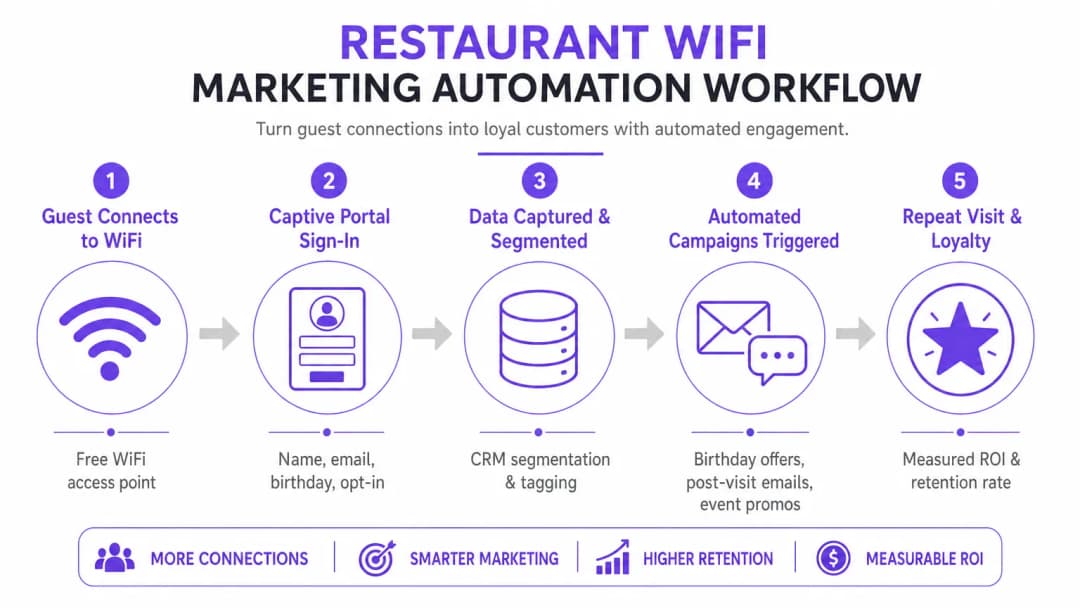
Quando um dispositivo se conecta ao SSID de convidados, o controlador de LAN sem fio (WLC) ou ponto de acesso restringe o acesso à rede, colocando o dispositivo em uma Walled Garden. O usuário é apresentado a um Captive Portal, que serve como a principal interface de aquisição de dados. Para otimizar as taxas de conversão, o portal deve suportar vários métodos de autenticação:
| Método de Autenticação | Nível de Fricção | Qualidade dos Dados | Complexidade de Implantação |
|---|---|---|---|
| Login Social (OAuth 2.0) | Baixo | Alta (demográficos ricos) | Média |
| Baseado em Formulário (E-mail + Opt-in) | Médio | Controlada | Baixa |
| Verificação por SMS | Médio-Alto | Alta (celular verificado) | Média |
| Passpoint / Hotspot 2.0 | Muito Baixo | Média | Alta |
Social Login (OAuth 2.0) integrações com Google ou Facebook oferecem acesso de baixa fricção enquanto capturam dados demográficos ricos. Este método se baseia em troca de token segura, eliminando a necessidade de os usuários criarem novas credenciais. A autenticação baseada em formulário permite que os usuários forneçam seu nome, endereço de e-mail e, opcionalmente, data de nascimento ou número de telefone. Esses dados são validados e transmitidos com segurança para um banco de dados centralizado. A reautenticação contínua (MAC Caching) armazena em cache o endereço MAC do dispositivo por um período configurável (por exemplo, 30 dias), permitindo acesso sem fricção em visitas subsequentes e rastreamento preciso de frequência.
Protocolos de Segurança e Conformidade
A implantação de WiFi para marketing exige adesão estrita aos padrões de segurança e privacidade. A arquitetura deve segregar o tráfego de convidados da rede corporativa usando VLANs para evitar movimentação lateral. As implementações devem estar em conformidade com o seguinte:
GDPR / CCPA: O Captive Portal deve integrar mecanismos de consentimento claros e desvinculados. Os usuários devem optar ativamente por comunicações de marketing, e a plataforma deve fornecer recursos robustos de Solicitação de Acesso do Titular dos Dados (DSAR). O consentimento de marketing não pode ser vinculado aos termos de serviço de acesso à rede.
PCI-DSS: Se o estabelecimento processar pagamentos na mesma infraestrutura física, a segmentação de rede e as regras de firewall devem isolar o Ambiente de Dados do Portador do Cartão (CDE) da rede de convidados.
WPA3-Enhanced Open (OWE): A transição para protocolos de integração seguros fornece criptografia oportunista para tráfego não autenticado, mitigando os riscos de escuta em redes abertas sem exigir credenciais do usuário.
Guia de Implementação: Estratégias de Implantação
Uma implantação bem-sucedida requer uma abordagem em fases, com foco na integração e na automação. O objetivo é estabelecer um fluxo de dados contínuo dos pontos de acesso para a plataforma de automação de marketing.
Passo 1: Avaliação e Dimensionamento da Infraestrutura
Antes de implantar um Captive Portal, certifique-se de que a infraestrutura de RF subjacente possa lidar com a densidade de clientes projetada. Realize uma pesquisa de site preditiva e ativa para identificar lacunas de cobertura e otimizar o posicionamento dos APs. Considere a utilização do canal, interferência de canal compartilhado e a taxa de transferência necessária por dispositivo. Para implantações corporativas, aproveitar uma conexão de internet empresarial dedicada - como uma leased line - garante largura de banda garantida e velocidades simétricas, evitando que o tráfego de convidados afete os sistemas operacionais críticos.
Passo 2: Configuração do Captive Portal
Crie o Captive Portal com foco na otimização de conversão. A interface do usuário deve ser responsiva e carregar rapidamente em dispositivos móveis, pois a maioria das conexões virá de smartphones. Implemente o perfilamento progressivo: solicite informações básicas (endereço de e-mail, consentimento) durante a visita inicial e peça dados complementares (aniversário, número de telefone) nas conexões subsequentes. Isso minimiza o atrito enquanto enriquece o perfil do cliente ao longo do tempo.
Passo 3: Integração com CRM e Automação
O verdadeiro valor de uma plataforma de WiFi Analytics é alcançado por meio da integração. Configure webhooks de API ou conectores nativos para sincronizar os dados capturados com o CRM do estabelecimento (por exemplo, Salesforce, HubSpot) e ferramentas de automação de marketing. Estabeleça regras claras de mapeamento de dados para garantir que campos como Data da Última Visita e Total de Visitas sejam atualizados em tempo real a cada evento de autenticação.
Passo 4: Configuração de Automação de Campanhas
Configure fluxos de trabalho automatizados acionados por eventos específicos de rede. As três campanhas principais que devem ser incluídas em cada implantação são:
- A Campanha de Boas-Vindas: Ativada imediatamente após a primeira autenticação bem-sucedida. Envia uma mensagem de boas-vindas e uma oferta de fácil conversão para incentivar uma nova visita dentro de um período definido.
- A Campanha Sentimos Sua Falta: Ativada quando um dispositivo não é detectado na rede por um período especificado (por exemplo, 45 dias). Oferece um incentivo direcionado para engajar novamente clientes ausentes no momento exato.
- A Campanha de Geração de Avaliações: Ativada 2 horas após o usuário se desconectar da rede, aproveitando eventos de RADIUS Accounting-Stop ou webhooks de API de localização. Solicita feedback via TripAdvisor ou Google Meu Negócio enquanto a experiência ainda está recente.
Tem dúvidas sobre a sua configuração específica?
A nossa equipa trabalha com operadores de espaços, gestores de TI e engenheiros de rede em 80.000 locais. Agende uma chamada de 20 minutos e mostraremos como outros profissionais na sua situação o resolveram.
Melhores Práticas para Estabelecimentos Corporativos
Para maximizar a eficácia de como melhorar a experiência do cliente em um restaurante através do marketing de WiFi, as seguintes melhores práticas independentes de fornecedor se aplicam aos setores de hotelaria, varejo e transporte.
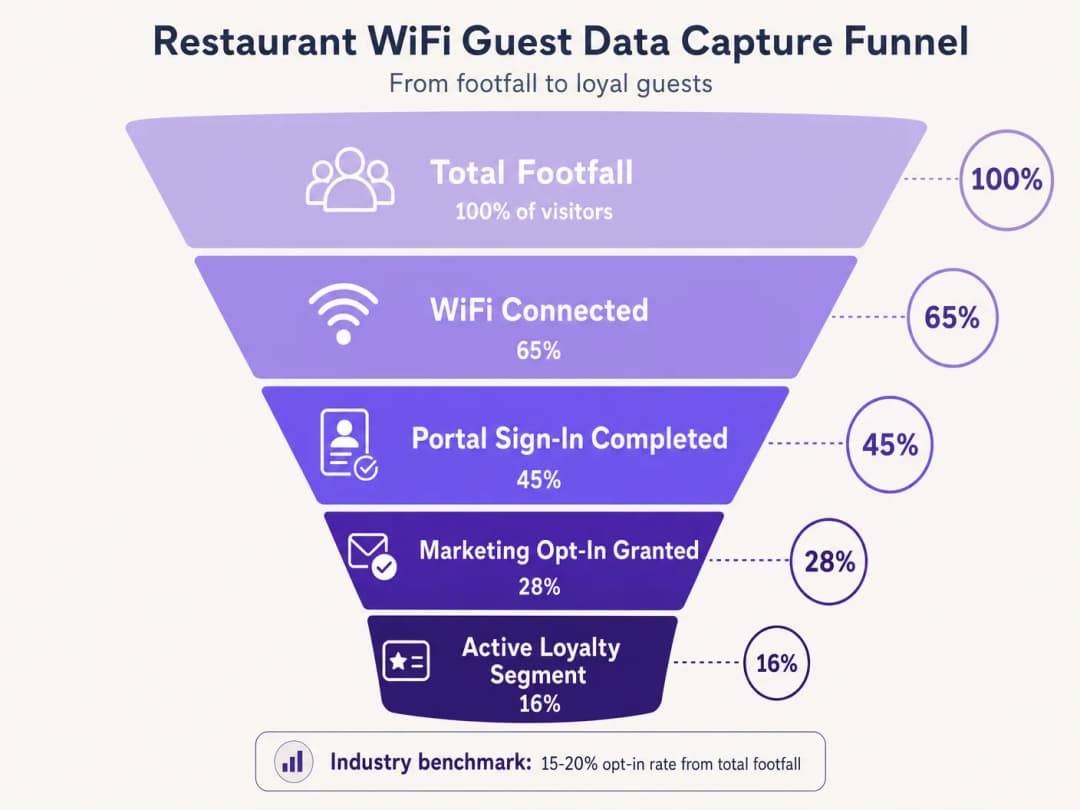
Priorize o opt-in. O objetivo principal do Captive Portal é garantir o consentimento de marketing. Certifique-se de que a proposta de valor - por exemplo, 'Conecte-se ao nosso WiFi para receber ofertas exclusivas e brindes de aniversário' - seja exibida em destaque. Os benchmarks do setor indicam que taxas de opt-in de 15 a 20% do fluxo total de pessoas podem ser alcançadas com portais otimizados. Estabelecimentos com portais mal projetados frequentemente registram taxas abaixo de 5%.
Aproveite a análise de localização. Utilize os serviços de localização da infraestrutura sem fio (triangulação RSSI) para entender os tempos de permanência e os padrões de movimento. Esses dados informam decisões operacionais - níveis de pessoal, otimização de layout, gerenciamento de horários de pico - além das aplicações puras de marketing. Uma plataforma de WiFi Analytics fornece o painel e a camada de relatórios para essa inteligência.
Implemente a limitação de largura de banda. Evite que um pequeno número de usuários monopolize os recursos de rede, aplicando limites de largura de banda por dispositivo e limites de tempo de sessão. Isso garante uma Qualidade de Experiência (QoE) consistente para todos os convidados e protege os sistemas operacionais contra a saturação de largura de banda.
Aplicação em múltiplos setores. Os princípios do marketing de WiFi se estendem diretamente a setores adjacentes. Para operadores que gerenciam estabelecimentos licenciados, o guia Bar and Pub WiFi: A Complete Setup and Marketing Guide fornece uma referência tática paralela. Para implantações na saúde e no setor público, os requisitos de conformidade são mais rigorosos, mas a arquitetura de captura de dados permanece fundamentalmente idêntica.
Solução de Problemas e Mitigação de Riscos
A implantação de WiFi para convidados introduz riscos específicos que devem ser gerenciados ativamente antes do go-live.
Modos de Falha Comuns e Resoluções
| Modo de Falha | Causa Raiz | Resolução |
|---|---|---|
| Captive Portal não aparece | Incorreta configuração do Walled Garden, erro de certificado SSL | Auditar domínios permitidos; implantar certificado SSL válido no portal |
| Login social falha silenciosamente | Domínios do provedor OAuth não estão no Walled Garden | Adicionar domínios de autenticação do provedor ao Walled Garden |
| Convidados recorrentes solicitados a se autenticar novamente | Randomização de MAC (iOS 14+, Android 10+) | Implementar perfis Passpoint ou aplicativo do local |
| Atrasos na sincronização de dados do CRM | Limites de taxa de API ou falhas de webhook | Implementar backoff exponencial, filas de mensagens não entregues |
| Baixa taxa de adesão | Excesso de campos de formulário, proposta de valor fraca | Restringir a e-mail + consentimento; melhorar o texto do portal |
A Randomização de Endereço MAC requer atenção específica. Os sistemas operacionais móveis modernos geram endereços MAC aleatórios para aumentar a privacidade, o que prejudica diretamente o cache de MAC e o rastreamento de frequência. Convidados que retornam podem ser tratados como novos visitantes, distorcendo as análises e acionando sequências de campanha incorretas. A mitigação a longo prazo é a transição para o Passpoint (Hotspot 2.0), que utiliza perfis de dispositivos persistentes independentes de endereços MAC. Como demonstrado pela estratégia de plataforma expansionista da Purple - incluindo avanços discutidos em Purple signals Higher Education ambitions with appointment of VP Education Tim Peers - a adaptação aos padrões de privacidade em evolução é fundamental para uma estratégia de dados sustentável em todos os setores.
Retorno sobre o Investimento (ROI) e Impacto no Negócio
O objetivo final da implantação de uma solução de marketing WiFi é gerar um retorno sobre o investimento (ROI) mensurável. O sucesso deve ser medido usando um conjunto definido de KPIs monitorados desde o primeiro dia.
| KPI | Definição | Benchmark do Setor |
|---|---|---|
| Taxa de Captura de Dados | % do fluxo total de visitantes que se autentica | 40-65% |
| Taxa de Opt-in de Marketing | % de usuários autenticados que consentem | 15-28% |
| Taxa de Abertura de Campanha | % de e-mails de campanha abertos | 35-45% |
| Taxa de Conversão de Campanha | % de destinatários que resgatam ofertas | 8-15% |
| Aumento de Visitas Recorrentes | Aumento em visitas de retorno em comparação ao grupo de controle | 12-22% |
Ao capturar dados de forma sistemática, segmentar públicos e automatizar campanhas direcionadas, as equipes de TI e marketing podem transformar sua infraestrutura sem fio de uma despesa necessária em um ativo estratégico. Para obter insights sobre tendências mais amplas de conectividade que impactam as operações dos locais em 2026, incluindo a convergência de estratégias de WiFi em veículos e locais, consulte WiFi in Auto: The Complete 2026 Enterprise Guide.
Briefing de Áudio: Um briefing informativo de 10 minutos sobre a arquitetura de WiFi para ROI de marketing - cobrindo arquitetura, integração, mitigação de riscos e perguntas e respostas rápidas.
Definições principais
Captive Portal
Uma página web que o usuário de uma rede de acesso público é obrigado a visualizar e com a qual deve interagir antes que o acesso total à internet seja concedido. Ela serve como a principal interface de aquisição de dados e consentimento em uma implantação de WiFi para convidados.
O Captive Portal é o componente mais importante em uma arquitetura de marketing de WiFi. Seu design determina diretamente as taxas de captura de dados e as taxas de aceitação de marketing.
MAC Caching
O processo de armazenar o endereço Media Access Control (MAC) de um dispositivo em um banco de dados após a autenticação inicial, permitindo o acesso automático à rede em visitas subsequentes sem a necessidade de apresentar o Captive Portal novamente.
Essencial para reduzir o atrito para clientes recorrentes e rastrear com precisão a frequência das visitas. Cada vez mais desafiado pela randomização de endereços MAC em sistemas operacionais móveis modernos.
Walled Garden
Um ambiente de rede restrito que controla quais endereços IP ou domínios um dispositivo pode acessar antes de concluir a autenticação. No WiFi para convidados, ele define os recursos acessíveis antes do login no Captive Portal.
Configuração crítica necessária para permitir que os dispositivos alcancem o Captive Portal, provedores de login social e os serviços de backend necessários antes que o acesso total à internet seja concedido. A configuração incorreta é a principal causa da não exibição do portal.
Progressive Profiling
A técnica de coletar gradualmente informações do cliente ao longo de múltiplas interações ou visitas, em vez de solicitar todos os detalhes de uma só vez durante a interação inicial.
Usado para maximizar as taxas iniciais de aceitação, mantendo a primeira interação com o Captive Portal breve (apenas e-mail + aceitação), enquanto constrói perfis de clientes mais ricos ao longo das visitas subsequentes.
RADIUS (Remote Authentication Dial-In User Service)
Um protocolo de rede que fornece gerenciamento centralizado de Autenticação, Autorização e Contabilização (AAA) para usuários que se conectam a um serviço de rede.
O protocolo subjacente usado pela maioria das infraestruturas de WLC corporativas para se comunicar com o banco de dados central que gerencia o acesso de convidados. As mensagens RADIUS Accounting-Stop são usadas para detectar as partidas dos convidados para gatilhos de campanhas baseadas em eventos.
OAuth 2.0
Um protocolo de autorização padrão do setor que permite a aplicativos de terceiros conceder acesso limitado a um serviço HTTP por meio de troca de token segura, sem compartilhar as senhas dos usuários.
O protocolo subjacente às opções de Login Social (Entrar com o Google, Entrar com o Facebook). Fornece autenticação de baixo atrito para Captive Portals enquanto captura dados demográficos verificados do provedor de identidade.
Passpoint (Hotspot 2.0)
Um padrão da Wi-Fi Alliance que permite a descoberta e conexão de rede automática e segura usando criptografia de nível empresarial WPA2/WPA3, sem exigir interação manual com o Captive Portal.
A alternativa estratégica de longo prazo aos Captive Portals abertos, fornecendo identificação persistente de dispositivos que não é afetada pela randomização de endereços MAC. Maior complexidade de implementação, mas experiência do usuário e precisão de dados superiores.
MAC Address Randomization
Um recurso de privacidade em sistemas operacionais móveis modernos (iOS 14+, Android 10+) que gera um endereço MAC exclusivo e randomizado para cada conexão de rede, ou o rotaciona periodicamente.
Prejudica diretamente o cache de MAC e o rastreamento de frequência em implantações de marketing de WiFi. Visitantes recorrentes podem ser tratados como novos visitantes, distorcendo as métricas e acionando sequências de campanha incorretas. Exige Passpoint ou identificação baseada em aplicativo como estratégia de mitigação.
Exemplos práticos
Uma rede nacional de restaurantes com 150 locais está apresentando baixas taxas de captura de dados - abaixo de 5% do tráfego total de pessoas - em sua rede WiFi de convidados existente. A configuração atual exige que os usuários preencham um formulário longo de 6 campos antes de conceder o acesso. A equipe de TI foi solicitada a melhorar isso para uma taxa de captura de pelo menos 20% sem substituir a infraestrutura de WLC subjacente. Como a arquitetura deve ser reconfigurada?
A implementação exige uma mudança para perfil progressivo e autenticação de baixa fricção, realizável sem a substituição do hardware da WLC. Passo 1: Reconfigurar a camada de aplicação do Captive Portal para apresentar botões de login social OAuth 2.0 (Google, Facebook) como a opção de autenticação primária. Isso requer a adição dos domínios de autenticação do provedor OAuth à lista de permissões do walled garden na WLC. Passo 2: Para usuários que preferem autenticação baseada em formulário, reduza o formulário inicial para apenas dois campos: Endereço de E-mail e uma caixa de seleção de Aceite de Marketing claramente rotulada. Remova todos os outros campos da interação inicial. Passo 3: Implementar o cache de MAC com expiração de 30 dias no backend do portal. Os endereços MAC autenticados são armazenados no banco de dados do portal; a WLC verifica essa lista antes de apresentar o portal. Passo 4: Configurar o portal para apresentar uma solicitação secundária de captura de dados (aniversário, número de telefone) na segunda ou terceira visita, após o estabelecimento da confiança. Passo 5: Integrar o banco de dados do portal com o CRM central via webhooks de API REST, garantindo que o campo 'Contagem de Visitas' seja incrementado a cada evento de autenticação para impulsionar a lógica de perfil progressivo.
Um grande centro de conferências que sedia mais de 200 eventos por ano deseja implementar uma campanha automatizada de Geração de Avaliações. Eles precisam que o sistema envie um e-mail para os participantes exatamente 2 horas após eles deixarem o local, com o conteúdo do e-mail personalizado para o evento específico que compareceram. Quais componentes técnicos e configurações são necessários?
Isso requer a integração entre o WLC, o mecanismo de Location Analytics, o sistema de gerenciamento de eventos e a plataforma de automação de marketing. Passo 1: Configure o WLC para gerar mensagens RADIUS Accounting-Stop quando um dispositivo cliente se desconectar. Como alternativa, configure o mecanismo de location analytics para acionar um evento de "partida" quando o RSSI de um dispositivo cair abaixo do limite de geofence do local por um período contínuo (por exemplo, 5 minutos). Passo 2: Configure um webhook na plataforma de WiFi Analytics que seja acionado ao receber o evento de partida. O payload do webhook deve incluir o endereço de e-mail do usuário, o ID da zona do local e o carimbo de data/hora. Passo 3: No sistema de gerenciamento de eventos, mantenha uma tabela de consulta mapeando os IDs de zona do local e as janelas de tempo para nomes de eventos específicos. A plataforma de automação de marketing consulta essa tabela para enriquecer o payload do webhook com o nome do evento. Passo 4: Na plataforma de automação de marketing, crie um fluxo de trabalho que receba o webhook enriquecido, inicie um temporizador de atraso de 2 horas e, em seguida, envie um e-mail personalizado de solicitação de avaliação usando o nome do evento como uma variável de conteúdo dinâmico. Passo 5: Configure listas de supressão para evitar o envio do e-mail se o participante já tiver enviado uma avaliação ou se estiver marcado como um VIP que exige um acompanhamento pessoal.
Questões práticas
Q1. Um local relata que os usuários de iOS são solicitados repetidamente a fazer login sempre que visitam o local, apesar de o cache de MAC estar ativado com expiração de 30 dias. Os usuários de Android não estão enfrentando esse problema na mesma proporção. Os logs do WLC mostram novos endereços MAC para cada conexão iOS a partir do mesmo dispositivo físico. Qual é a causa raiz e quais são as estratégias de mitigação disponíveis?
Dica: Considere os recursos de privacidade introduzidos no iOS 14 e posterior em relação aos identificadores de hardware por rede.
Ver resposta modelo
A causa raiz é a MAC Address Randomization (recurso de Endereço WiFi Privado no iOS 14+). Os dispositivos iOS geram um endereço MAC exclusivo e randomizado para cada SSID, e podem rotacioná-lo periodicamente. Como o endereço MAC em cache não corresponde mais ao endereço randomizado atual do dispositivo, o WLC trata cada conexão como um novo dispositivo e apresenta o Captive Portal. Mitigação de curto prazo: instruir os usuários a desativar o Endereço WiFi Privado para o SSID específico do local em suas configurações de rede do iOS. Mitigação de longo prazo: implantar perfis Passpoint (Hotspot 2.0) que fornecem identificação de dispositivo persistente e baseada em certificados, independente do endereço MAC, ou desenvolver um aplicativo móvel específico para o local que mantenha um identificador de sessão de usuário persistente.
Q2. Você está projetando a configuração do jardim murado para uma nova implantação de Captive Portal que utiliza o Facebook e o Google para login social, e hospeda a interface do portal em uma CDN. O portal também usa uma biblioteca de fontes externa. Quais categorias específicas de recursos devem ser incluídas na lista de permissões para garantir que o processo de autenticação seja concluído com êxito?
Dica: Mapeie a sequência completa de requisições HTTP que um dispositivo cliente faz desde o momento em que se conecta ao SSID até o momento em que recebe o token de retorno de chamada do OAuth.
Ver resposta modelo
O jardim murado deve incluir na lista de permissões as seguintes categorias de recursos: 1. A faixa de IPs ou domínio do próprio servidor do Captive Portal. 2. Os domínios da CDN que hospedam os recursos de HTML, CSS e JavaScript do portal. 3. O domínio da biblioteca de fontes externa (por exemplo, fonts.googleapis.com). 4. Os domínios de autenticação OAuth para o Facebook (por exemplo, graph.facebook.com, www.facebook.com) e Google (por exemplo, accounts.google.com, oauth2.googleapis.com). 5. Quaisquer CDNs de imagem ou de recursos usadas pelos botões de login dos provedores de OAuth. 6. Endpoints de Lista de Revogação de Certificados (CRL) ou OCSP para permitir que o dispositivo cliente valide o certificado SSL do portal. A ausência de qualquer uma dessas categorias fará com que o fluxo de autenticação falhe silenciosamente ou apresente uma interface corrompida.
Q3. Uma equipe de marketing deseja disparar uma campanha de SMS para clientes exatamente quando eles passarem por um balcão de sobremesas específico dentro do restaurante. A infraestrutura atual utiliza pontos de acesso padrão 802.11ac com análise de localização baseada em RSSI. Isso é viável com a precisão e latência necessárias? Quais mudanças de infraestrutura, se houver, seriam necessárias?
Dica: Avalie a resolução espacial e a latência de atualização da triangulação padrão baseada em RSSI em comparação com a precisão necessária para um gatilho ao nível do balcão.
Ver resposta modelo
Não, isso não é viável com a análise de localização padrão baseada em RSSI. A triangulação de RSSI geralmente fornece uma precisão posicional de 5 a 10 metros, o que é insuficiente para distinguir um balcão específico dentro de um restaurante. Além disso, o intervalo de sondagem para atualizações de RSSI introduz uma latência de vários segundos, o que significa que o cliente já pode ter passado da área-alvo antes que o gatilho seja acionado. Para obter precisão no nível do balcão com baixa latência, a infraestrutura precisaria ser complementada com beacons BLE (Bluetooth Low Energy) instalados no balcão de sobremesas, ou tecnologia de banda ultralarga (UWB). O aplicativo do local ou um dispositivo habilitado para BLE detectaria o sinal de proximidade do beacon e dispararia o SMS por meio da plataforma de automação de marketing. Isso requer um aplicativo móvel específico para o local e um sistema de gerenciamento de beacons BLE, representando um aumento significativo na complexidade e no custo de implantação.
Continue a ler esta série
Como se Conectar com os Clientes: Estratégias Digitais para Negócios Físicos
Este guia de referência técnica detalhado descreve como empresas com locais físicos - hotéis, redes de varejo, estádios e locais do setor público - podem implantar uma infraestrutura de WiFi corporativa como um mecanismo de captura de dados primários e engajamento do cliente. Ele abrange toda a arquitetura, desde o design do Captive Portal e autenticação contínua (IEEE 802.11u/Passpoint) até a integração de CRM, conformidade com GDPR e ROI mensurável. Líderes de TI e operadores de locais encontrarão orientações práticas de implantação, estudos de caso do mundo real e uma estrutura de mitigação de riscos baseada em conformidade.
Como usar dados primários (First-Party Data) em campanhas de marketing
Este guia definitivo detalha como as equipes de TI e marketing de grandes empresas podem transformar sua infraestrutura de WiFi para convidados em um poderoso mecanismo de dados primários. O material aborda a arquitetura técnica para captura de dados, gestão de consentimento em conformidade com a GDPR, estratégias de segmentação e ativação prática em canais como e-mail, SMS, anúncios em redes sociais e mídia programática. Operadores de estabelecimentos e equipes de TI encontrarão orientações concretas de implementação, exemplos práticos dos setores de hotelaria e varejo, além de frameworks para mensuração de ROI.
Social WiFi: O que é e como impulsiona o engajamento do cliente
Este guia de referência técnica definitivo aborda a arquitetura, a implantação e o valor comercial do Social WiFi - a prática de autenticar usuários de redes de convidados via login social OAuth 2.0 em um Captive Portal. Ele fornece a gerentes de TI, arquitetos de rede e diretores de operações de estabelecimentos orientações práticas sobre implementação técnica, conformidade com a GDPR e o aproveitamento de dados primários capturados para um engajamento direcionado do cliente. Operadores de estabelecimentos nos setores de hotelaria, varejo e eventos encontrarão estruturas de implantação concretas e cenários do mundo real que demonstram um ROI mensurável.
Tem dúvidas sobre a sua configuração específica?
A nossa equipa trabalha com operadores de espaços, gestores de TI e engenheiros de rede em 80.000 locais. Agende uma chamada de 20 minutos e mostraremos como outros profissionais na sua situação o resolveram.