La plupart des organisations ne démarrent pas avec une stratégie de sécurité sans fil délibérée. Elles en héritent d'une. Un SSID pour le personnel a été configuré il y a des années, quelqu'un a partagé le mot de passe lors de l'intégration, la même clé s'est retrouvée sur des téléphones personnels, des tablettes, des imprimantes, des écrans de salle de réunion et le cas d'un ordinateur portable de prestataire, et maintenant personne ne veut y toucher parce que le modifier casserait tout.
Cette configuration semble normale jusqu'à ce que vous posiez quelques questions directes. Qui connaît actuellement le mot de passe ? Quels appareils l'utilisent ? Que se passe-t-il lorsqu'un employé part en mauvais termes ? Pouvez-vous révoquer un seul appareil sans ressaisir la clé sur tout le site ? Dans de nombreux environnements, la réponse à ces quatre questions est une variante de "pas proprement".
C'est la lacune au cœur de la sécurité du WiFi d'entreprise. Le problème n'est pas seulement le chiffrement. C'est l'identité, le contrôle et la capacité de prendre des décisions d'accès par utilisateur, par appareil et par session. Un réseau sans fil moderne devrait se comporter moins comme une clé de porte d'entrée partagée et plus comme un système d'accès avec des badges nominatifs, des politiques, des journaux et une révocation instantanée.
Aller au-delà du mot de passe partagé
La version familière ressemble à ceci. Le bureau dispose d'un réseau "Personnel" protégé par une seule phrase secrète. Le service informatique la donne aux nouveaux arrivants, les équipes des services généraux l'utilisent pour les téléviseurs intelligents et les imprimantes, et les prestataires à long terme la conservent sur leurs propres appareils parce que c'est pratique. Quand quelqu'un s'en va, le mot de passe reste souvent le même parce que le renouveler implique d'intervenir sur chaque appareil et chaque site.
Ce modèle a toujours été faible. Il est désormais opérationnellement dangereux.
Au Royaume-Uni, 50 % des entreprises ont subi une violation ou une attaque de cybersécurité en 2024, ce chiffre grimpant à 74 % pour les grandes entreprises, selon les conseils cités dans le résumé des meilleures pratiques de sécurité WiFi d'entreprise. Le contrôle d'accès sans fil se situe directement au cœur de ce risque car un mot de passe partagé ne vous offre presque aucune précision. Vous pouvez laisser entrer tout le monde, ou bloquer tout le monde. Il n'y a pas grand-chose entre les deux.
Pourquoi les secrets partagés échouent en pratique
Une phrase secrète partagée crée quatre problèmes récurrents :
- Aucune responsabilité individuelle. Vous savez que le SSID a été utilisé, mais pas quelle personne ou quel appareil géré aurait dû y avoir accès à ce moment-là.
- Un départ de collaborateur difficile. Si une personne ou un appareil devient un risque, la solution propre consiste à changer le mot de passe pour tout le monde.
- La propagation du mot de passe. Le personnel le réutilise, l'enregistre sur des appareils non gérés et le transmet parfois de manière informelle.
- Une confiance à plat. Une fois connectés, trop d'utilisateurs et d'appareils se retrouvent sur le même réseau global.
Règle pratique : si la suppression d'un seul utilisateur nécessite un changement de mot de passe à l'échelle du site, la conception du réseau sans fil est déjà en retard par rapport au profil de risque de l'organisation.
Le passage à un autre modèle ne vise pas seulement à rendre le réseau plus difficile à pirater. Il s'agit de remplacer un secret par une identité. C'est pourquoi de plus en plus d'équipes se tournent vers un accès WiFi sans mot de passe pour le personnel et les invités. Le principal gain n'est pas la nouveauté. C'est le contrôle. Vous pouvez approuver un appareil, révoquer un certificat, lier la politique au statut de l'annuaire et cesser de traiter chaque utilisateur comme s'il partageait la même clé pour la même porte.
À quoi ressemble une bonne sécurité aujourd'hui
Une base plus solide commence par une authentification individuelle pour chaque utilisateur ou appareil. À partir de là, vous pouvez attribuer des accès différents au personnel, aux prestataires, aux invités et aux technologies opérationnelles. Vous pouvez également cesser de prétendre qu'une imprimante et l'ordinateur portable du service financier ont le même niveau de confiance simplement parce qu'ils se connectent via le même espace hertzien.
En pratique, la sécurité WiFi d'entreprise est devenue autant un projet d'identité qu'un projet radio. Les points d'accès comptent toujours. Le contrôleur compte toujours. Mais la différence clé vient du fait que la décision d'admission n'est plus écrite sur un post-it, mais intégrée dans une politique.
Comprendre les risques actuels liés à la sécurité WiFi
Le risque sans fil n'est pas un problème unique. C'est un ensemble de points de défaillance qui s'accumulent lorsque les organisations utilisent une authentification faible, un accès trop large et une mauvaise visibilité.
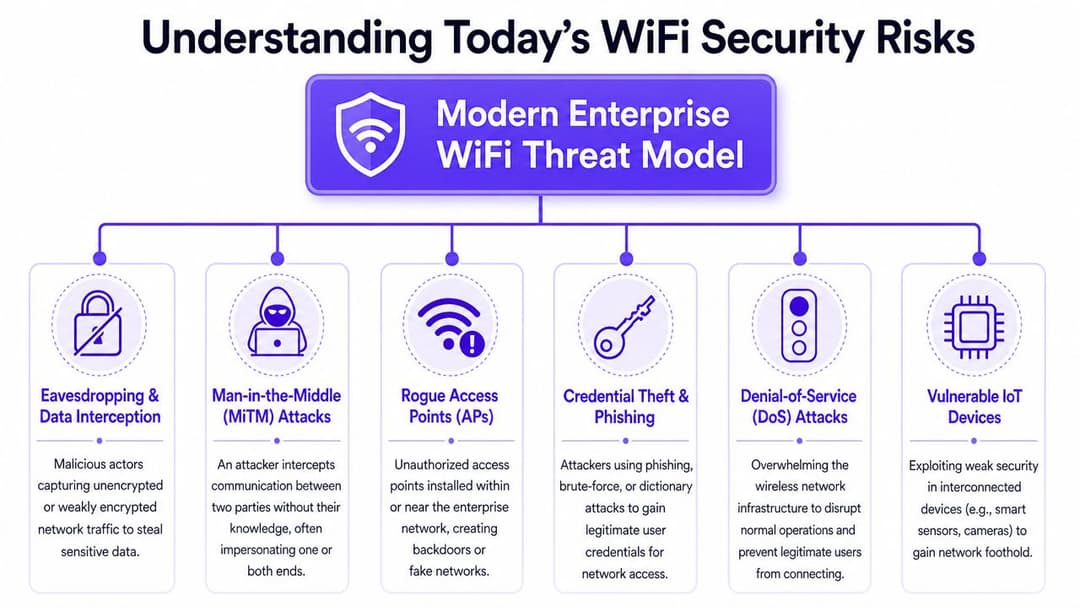
La surface d'attaque est également plus vaste que ce que beaucoup d'équipes imaginent. Le rapport annuel d'Internet de Cisco prévoyait que d'ici 2023, il y aurait 3,6 appareils connectés par personne au Royaume-Uni et 5,5 milliards d'appareils connectés au total dans le pays, une échelle mise en évidence dans cette discussion sur les bonnes pratiques en matière de contrôle d'accès au réseau. Cela compte car chaque appareil connecté au WiFi est un point d'entrée potentiel, une mauvaise configuration ou un chemin de déplacement latéral.
Les menaces les plus fréquentes
Certaines attaques sans fil sont directes. D'autres reposent sur le fait que les utilisateurs fassent un seul mauvais choix de connexion.
| Risque | Comment ça fonctionne | Pourquoi c'est important |
|---|---|---|
| Points d'accès malveillants | Quelqu'un installe un point d'accès non autorisé ou crée un SSID factice qui semble légitime | Les utilisateurs se connectent au mauvais réseau et transmettent leur trafic à un attaquant |
| Vol d'identifiants | Les utilisateurs saisissent des identifiants d'entreprise sur des portails faibles ou des pages de phishing | Les identifiants volés peuvent déverrouiller bien plus que le WiFi |
| Attaques de type Man-in-the-middle | Un attaquant se positionne entre le client et le service | Les sessions peuvent être interceptées, modifiées ou surveillées |
| Mouvement latéral | Un point de terminaison compromis accède à d'autres systèmes sur le même segment large | Une compromission mineure se transforme en un incident plus large |
| Faible posture IoT | Des appareils dotés d'une sécurité insuffisante se connectent aux côtés des systèmes de l'entreprise | Les attaquants ciblent l'appareil le plus facile d'accès, et non le plus important |
L'attaque par "jumeau malveillant" en est un exemple simple. Un attaquant configure un réseau sans fil avec un nom familier à proximité de votre site. Les utilisateurs s'y connectent car le SSID semble correct ou parce que leur appareil s'y associe automatiquement. Si votre environnement repose sur le jugement des utilisateurs et sur des mots de passe, ce faux réseau a des chances de réussir. Si l'environnement utilise une authentification mutuelle forte basée sur des certificats, cette attaque est beaucoup plus difficile à réaliser car le client vérifie également le côté réseau de la conversation.
Les réseaux plats rendent les petites erreurs coûteuses
Les dommages surviennent souvent après la connexion. Si les appareils du personnel, les appareils non gérés et les points de terminaison opérationnels partagent un accès réseau large, un seul point d'ancrage peut aller beaucoup plus loin qu'il ne le devrait.
C'est pourquoi la sécurité sans fil doit être liée à la segmentation et à l'application des politiques, et pas seulement au chiffrement des données en transit. Les équipes qui travaillent sur la gestion plus large des menaces cybernétiques pour les entreprises découvrent généralement que le WiFi ne peut pas rester en dehors du modèle de risque principal. Il fait partie de la même stratégie d'identité, de surveillance et de confinement que le reste du réseau.
Un SSID sécurisé qui place chaque appareil authentifié dans le même segment sans restriction n'offre pas une sécurité WiFi d'entreprise significative. Il ne fait que déplacer le problème à l'étape suivante.
Le cœur de l'authentification WiFi moderne
Le changement technique est simple une fois que l'on fait abstraction des acronymes. WPA-Personal utilise une clé partagée unique. WPA2-Enterprise et WPA3-Enterprise utilisent 802.1X pour authentifier chaque utilisateur ou appareil individuellement. Ce seul changement modifie l'ensemble du modèle de fonctionnement.
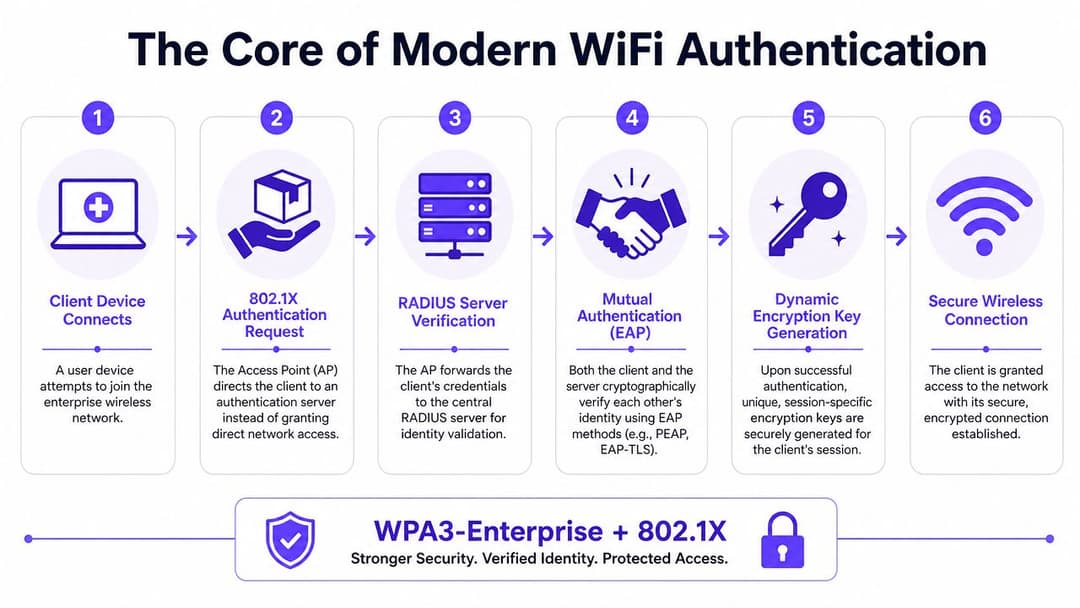
Pour les entreprises britanniques, la base de référence la plus solide est le WPA2-Enterprise ou WPA3-Enterprise avec 802.1X, car il authentifie chaque utilisateur ou appareil individuellement et permet une révocation instantanée, comme le décrit cet aperçu de la sécurité des réseaux WiFi d'entreprise.
Clé partagée contre badge nominatif
L'analogie la plus simple est l'accès à un bâtiment.
Un mot de passe WiFi partagé est comme une clé copiée pour tout le monde dans le bâtiment. Si une copie est perdue, vous devez remplacer chaque serrure ou accepter le risque.
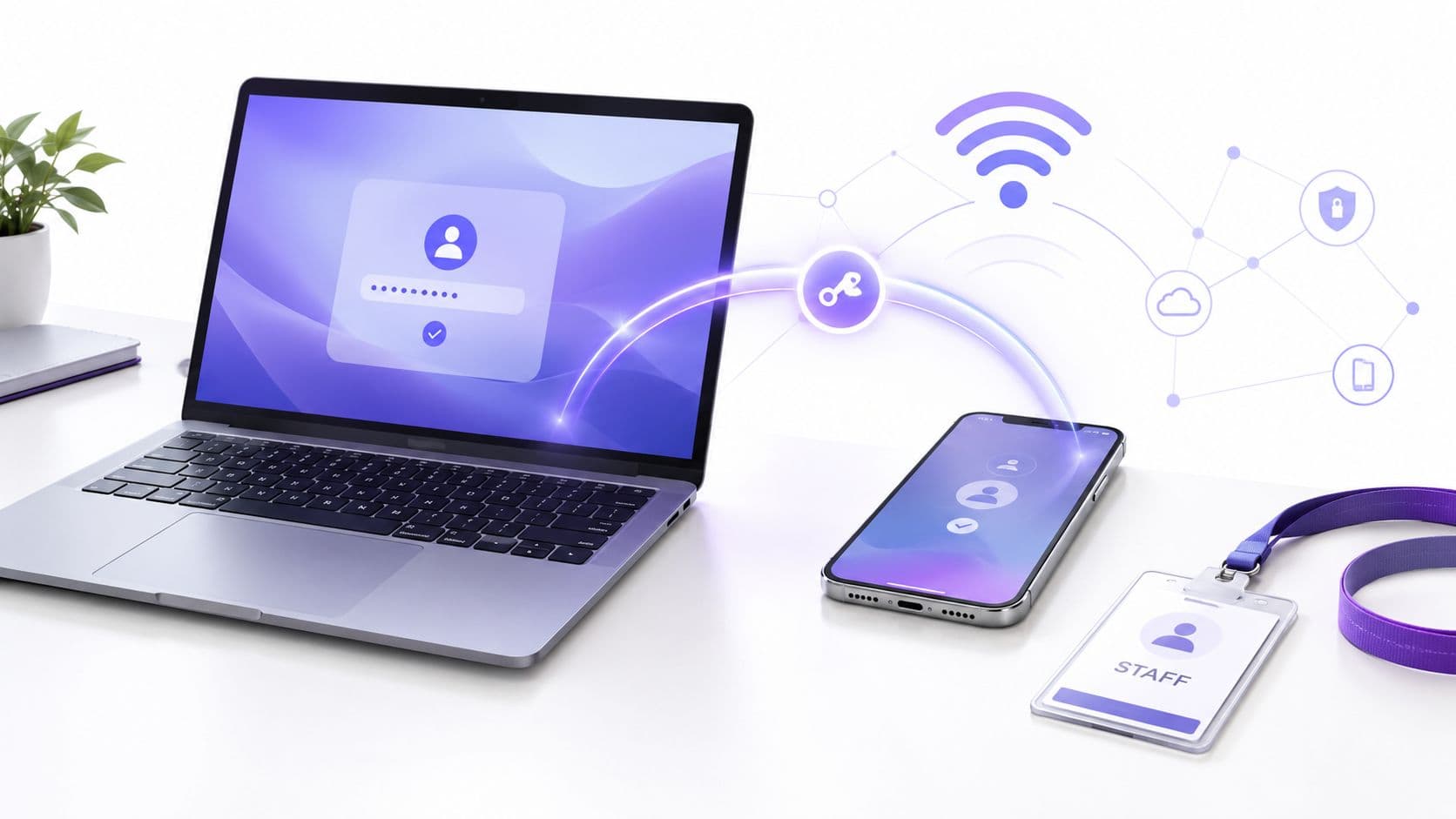
Le 802.1X est un système de badges. Chaque personne ou appareil présente sa propre identité. Le réseau vérifie cette identité auprès d'un moteur de politique central, généralement un service RADIUS, puis décide de ce qu'il autorise. Un badge peut être désactivé sans modifier l'expérience de tous les autres.
C'est la raison pratique pour laquelle les équipes d'entreprise l'adoptent. Non pas parce que l'acronyme semble plus avancé, mais parce qu'il leur donne un contrôle opérationnel qu'elles peuvent réellement utiliser.
Ce que fait le 802.1X
Au moment de la connexion, le point d'accès n'accepte pas automatiquement le client sur le réseau. Il agit comme un point de contrôle et transmet la conversation d'authentification à un serveur de politique backend. Ce processus vous permet de décider :
- Qui se connecte. Membre du personnel, prestataire, appareil géré, appareil BYOD, imprimante.
- Comment l'identité a été prouvée. Nom d'utilisateur et mot de passe, certificat, ou une autre méthode EAP approuvée.
- Ce qui se passe ensuite. Attribution de VLAN, application d'ACL, mappage de rôles, ou refus.
L'authentification ne se limite plus à une simple vérification oui ou non par rapport à un mot de passe unique. Elle devient une décision de politique liée à l'identité et au contexte.
Pourquoi le WPA3 est important
Le WPA3-Enterprise élève le niveau de sécurité et améliore la posture cryptographique de la session sans fil. Cependant, dans les décisions d'architecture quotidiennes, il est important de ne pas traiter le WPA3 comme une solution miracle. Si vous déployez le WPA3 tout en vous appuyant sur une gestion d'identité faible, des identifiants partagés pour les solutions de secours, ou une mauvaise segmentation, vous n'avez pas résolu le problème de fond.
Une approche logique est simple :
- Passez d'abord au mode entreprise. L'authentification individuelle modifie immédiatement votre modèle de contrôle.
- Utilisez le WPA3-Enterprise lorsque les clients le prennent en charge. Gardez à l'esprit l'interopérabilité pendant la migration.
- Considérez la conception de la politique comme équivalente à la sécurité radio. Le chiffrement le plus fort ne résoudra pas une confiance trop large.
Pourquoi l'EAP-TLS est la référence absolue
Parmi les méthodes d'authentification 802.1X, EAP-TLS est celle à laquelle la plupart des architectes font confiance pour les déploiements à haute sécurité, car elle remplace les mots de passe par des certificats.
Cela a des conséquences concrètes :
- Résistance au phishing. Il n'y a pas de mot de passe WiFi à saisir par un utilisateur sur une fausse page.
- Pas de problème de réutilisation de mot de passe. Le chemin d'authentification ne dépend pas d'un secret géré par l'humain.
- Révocation plus propre. Vous pouvez révoquer un certificat ou une identité d'appareil sans modifier l'ensemble du parc.
- Authentification mutuelle. Le client peut vérifier le côté serveur, ce qui aide à lutter contre les attaques par fausse infrastructure.
Principe de conception : si un utilisateur peut être incité à saisir un identifiant WiFi, le chemin de connexion sans fil fait toujours partie de votre exposition au phishing.
Le déploiement de certificats demande du travail. Vous avez besoin d'une gestion du cycle de vie, de flux d'enrôlement, de choix de PKI et de la prise en charge de types d'appareils mixtes. Mais une fois cela en place, la sécurité du WiFi d'entreprise devient beaucoup plus prévisible. Vous n'espérez plus que les utilisateurs protègent un mot de passe. Vous imposez l'identité via des identifiants gérés qui s'intègrent dans un modèle de type zero-trust.
Adopter l'accès sans mot de passe et fédéré
Les environnements sans fil les plus robustes sont généralement les plus simples à utiliser, et non les plus complexes. Cela surprend les équipes qui associent encore la sécurité à davantage d'invites, de mots de passe et de frictions d'intégration.
En pratique, l'accès sans mot de passe et l'accès fédéré améliorent à la fois le contrôle et l'expérience utilisateur. Le personnel cesse de traiter le WiFi comme un îlot de connexion distinct. Les invités cessent d'être confrontés à des flux de portail complexes qui brisent la confiance avant même d'accéder à Internet.
L'accès du personnel doit suivre l'identité de l'entreprise
Pour les employés, le WiFi ne devrait pas nécessiter un stockage d'identifiants distinct si l'entreprise utilise déjà un fournisseur d'identité tel que Entra ID, Okta ou Google Workspace. Le réseau sans fil doit consommer la même source d'identité qui régit l'enrôlement des appareils, l'accès aux applications et le départ des collaborateurs.
Cela vous offre un modèle opérationnel plus propre :
- Les nouveaux arrivants accèdent au réseau via les flux d'identité existants.
- Les collaborateurs qui changent de poste héritent de nouveaux accès en fonction de l'évolution de leur rôle.
- Les personnes qui quittent l'entreprise perdent leur accès dès que leur statut change dans l'annuaire.
- Le BYOD peut être géré avec une intégration contrôlée plutôt qu'avec une confiance aveugle.
Le SSO est crucial ici car il réduit le nombre de systèmes autonomes qui se désynchronisent. La valeur opérationnelle de cette approche est bien expliquée dans cette analyse des avantages du single sign-on. L'élément clé pour le sans-fil est simple : moins les utilisateurs manipulent de secrets manuellement, moins ils ont d'occasions de les divulguer, de les réutiliser ou de faire des erreurs de saisie.
Le sans mot de passe est un contrôle de sécurité, pas seulement une fonction de confort
Lorsque les équipes entendent parler de "WiFi sans mot de passe", elles pensent parfois d'abord au confort. La raison la plus importante est la réduction de l'exposition. Supprimer les mots de passe du parcours sans fil élimine une grande catégorie d'appels au support et une grande catégorie de risques évitables.
Une conception sans mot de passe comprend souvent :
- Un enregistrement basé sur des certificats pour les appareils gérés du personnel.
- Une politique basée sur l'annuaire pour que l'accès suive le statut de l'identité.
- Une reconnexion silencieuse après la première inscription, garantissant une expérience utilisateur ininterrompue.
- Une révocation immédiate lorsqu'un appareil ou un utilisateur ne doit plus être approuvé.
C'est également à ce stade que le choix de la plateforme importe. Certaines organisations s'appuient sur leur infrastructure NAC existante et leurs outils d'identité cloud. D'autres utilisent des services de réseau managés basés sur l'identité. Par exemple, Purple prend en charge le WiFi du personnel avec 802.1X, l'enregistrement basé sur des certificats et des intégrations SSO avec Entra ID, Google Workspace et Okta. La question de conception pertinente n'est pas une préférence de marque. Il s'agit de savoir si la plateforme s'intègre à votre architecture d'identité, votre modèle de révocation et votre capacité d'assistance.
L'accès des invités et des visiteurs peut être sécurisé sans être fastidieux
Le WiFi invité est souvent en retard sur la sécurité du personnel car les équipes supposent qu'il existe un compromis entre simplicité et protection. Ce n'est pas une fatalité.
L'accès invité moderne peut utiliser des technologies telles que Passpoint et OpenRoaming pour créer des connexions chiffrées et automatiques sans dépendre d'un mot de passe partagé ou d'un rituel répétitif de page de connexion. L'expérience utilisateur s'améliore car l'appareil reconnaît un cadre d'accès approuvé. La sécurité s'améliore car la connexion commence par une identité et un comportement de chiffrement plus forts qu'un SSID ouvert ou qu'un simple Captive Portal.
Les utilisateurs ne s'opposent pas à un WiFi sécurisé. Ils s'opposent à un WiFi qui est à la fois peu sécurisé et contraignant.
C'est l'objectif pratique. Un modèle d'identité pour le personnel, un parcours contrôlé pour le BYOD, et un accès invité qui n'habitue pas les gens à cliquer sur des pages de portail vagues et à faire confiance à n'importe quel réseau qui apparaît en premier.
Concevoir une architecture sans fil Zero Trust
Le Zero Trust sur le WiFi signifie une chose avant tout. Connexion n'est pas synonyme de confiance. Le fait qu'un appareil soit à portée radio, connaisse un SSID ou ait franchi une étape d'authentification de base ne doit pas lui accorder un accès large aux ressources internes.
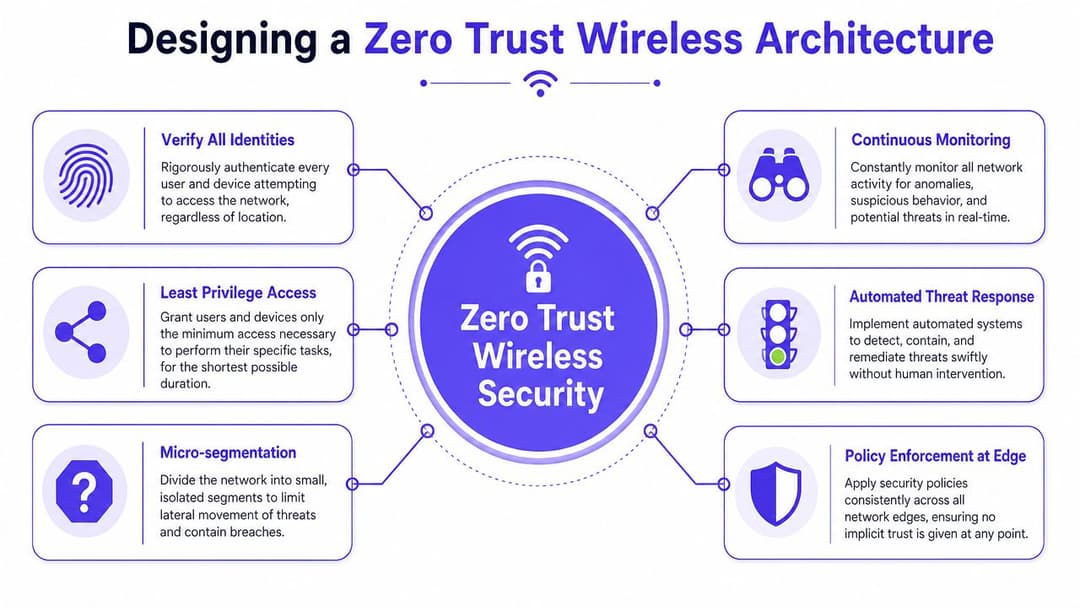
Une conception WiFi sans confiance (zero-trust) exploitable commence par l'identité et se termine par le confinement. Il s'agit moins d'acheter un produit étiqueté « zero-trust » que de s'assurer que chaque décision d'accès est étroite, explicite et réversible. Le cadre plus large du zero trust network access s'aligne bien avec le sans-fil, car le WiFi est l'un des endroits les plus faciles pour les organisations de faire un excès de confiance par défaut.
Commencez par la politique, pas par les SSIDs
Une erreur fréquente consiste à créer un grand nombre de SSIDs pour représenter différents groupes. Cela semble organisé, mais devient souvent vite désordonné. Un meilleur modèle consiste à utiliser moins de SSIDs, une authentification plus forte et une attribution basée sur des politiques en coulisses.
Par exemple, le même SSID d'entreprise peut orienter les utilisateurs différemment en fonction de leur identité et de l'état de leur appareil :
| Type d'identité ou d'appareil | Traitement typique |
|---|---|
| Ordinateur portable professionnel géré | Segment d'entreprise avec accès basé sur les rôles |
| Appareil de prestataire | Segment restreint pour des outils spécifiques uniquement |
| Appareil mobile de direction | Accès géré avec des contrôles de politique plus stricts |
| Imprimante ou scanner | Segment opérationnel isolé avec un accès est-ouest limité |
| Téléphone invité | Accès Internet uniquement, séparé des systèmes internes |
L'attribution dynamique de VLAN et les politiques basées sur les rôles deviennent particulièrement utiles. Le réseau ne se soucie pas du bureau dans lequel une personne est entrée. Il évalue qui elle est, quel appareil elle utilise et quel accès elle doit obtenir.
Appliquez le moindre privilège dès le premier paquet
Le moindre privilège sur le WiFi n'est pas un principe abstrait. C'est une séquence de décisions concrètes :
- Authentifier l'identité avec 802.1X ou une alternative approuvée.
- Classifier le terminal comme géré, non géré, invité ou opérationnel.
- Attribuer le rôle réseau en fonction des attributs de l'annuaire et de la politique.
- Restreindre les déplacements est-ouest afin qu'un terminal ne puisse pas naviguer librement sur le reste du parc informatique.
- Surveiller le comportement de la session pour détecter les anomalies et révoquer l'accès rapidement si nécessaire.
Cette conception limite la zone d'impact. Si un appareil est compromis, l'attaquant ne bénéficie pas automatiquement d'une large visibilité interne.
Évitez le faux confort de l'« interne »
De nombreuses violations prennent de l'ampleur parce que le réseau considère comme fiable tout ce qui a réussi à se connecter au WLAN interne. Cette hypothèse est difficile à justifier aujourd'hui. Les ordinateurs portables d'entreprise sont victimes de phishing. Des appareils mobiles sont perdus. Les matériels IoT sont livrés avec des configurations par défaut vulnérables. Les prestataires se connectent à partir d'environnements mixtes.
Le « WiFi interne » n'est pas une frontière de sécurité. Ce n'est qu'un moyen de transport jusqu'à ce que la politique en décide autrement.
Une sécurité WiFi d'entreprise solide traite chaque session sans fil comme non fiable jusqu'à ce qu'elle soit prouvée et limitée. C'est ce qui transforme le concept de zero trust d'un simple terme de présentation en une architecture opérationnelle.
Sécuriser les appareils hérités et IoT
Toute architecture sans fil propre finit par se heurter à la même objection. « C'est parfait pour les ordinateurs portables et les téléphones, mais qu'en est-il des appareils qui ne prennent pas en charge la norme 802.1X ? » C'est une question légitime. Les imprimantes, les scanners, les dispositifs médicaux, les systèmes de gestion technique de bâtiment, les caméras et les anciens équipements spécialisés ne peuvent souvent pas exécuter correctement les supplicants modernes.
La mauvaise réponse consiste à créer un SSID de secours avec un seul mot de passe WPA2-Personal partagé et à l'appeler le « réseau IoT ». Cela annule une grande partie du modèle de sécurité que vous venez de mettre en place. Le mot de passe se propage. Personne ne sait quel appareil l'utilise. La révocation d'un seul point de terminaison redevient fastidieuse.
Pourquoi un SSID de secours partagé est un mauvais compromis
Un mot de passe unique pour les appareils hérités pose les mêmes problèmes que ceux évoqués précédemment, mais avec encore moins de visibilité. Nombre de ces points de terminaison sont non gérés ou peu gérés. Certains sont difficiles à corriger. D'autres sont installés et oubliés.
Cela rend un réseau à clé partagée dangereux pour trois raisons :
- L'attribution est médiocre. Vous savez qu'un appareil s'est connecté, mais pas s'il s'agit de celui que vous avez approuvé.
- La rotation est perturbante. Changer la clé peut nécessiter d'intervenir sur les appareils un par un.
- La segmentation devient négligée. Les équipes regroupent souvent les appareils hérités en espérant que les règles de pare-feu suffiront.
Utiliser des identifiants par appareil lorsque le 802.1X complet n'est pas possible
Un meilleur compromis est l'utilisation de l'iPSK ou du PPSK. Les différents fournisseurs les nomment différemment, mais le principe reste le même. Chaque appareil reçoit sa propre clé pré-partagée unique, même si le SSID est partagé.
Cela vous donne un contrôle pratique sans nécessiter un supplicant 802.1X complet :
- Un appareil, une clé. Si une imprimante est remplacée ou si une caméra est compromise, vous révoquez uniquement cette clé.
- Une meilleure association des politiques. Vous pouvez associer une clé spécifique à un VLAN, un rôle ou une politique réseau restreinte.
- Une visibilité accrue. Les équipes d'assistance peuvent identifier le point de terminaison qui doit se trouver sur le réseau.
Cela n'équivaut pas à une authentification EAP-TLS basée sur des certificats. Il s'agit d'une stratégie de confinement pragmatique pour le matériel qui ne peut pas faire mieux.
Traiter l'IoT comme une classe de risque, pas comme une classe de commodité
La philosophie de conception est essentielle. Les appareils hérités et IoT ne doivent pas être « les éléments qui vont sur le réseau facile ». Ils doivent être traités comme une catégorie de risque distincte avec des chemins de communication étroitement définis.
Un modèle judicieux consiste à les isoler des réseaux d'utilisateurs, à n'autoriser que les protocoles et les destinations dont ils ont besoin, et à documenter clairement qui en est responsable. Si aucune équipe ne gère le cycle de vie des appareils, la politique sans fil seule ne vous sauvera pas. Mais en combinant des identifiants par appareil avec une segmentation stricte, vous pouvez empêcher les exceptions héritées de fragiliser le reste de l'architecture sans fil.
Surveillance de la conformité et réponse aux incidents
Un déploiement sécurisé ne s'arrête pas lorsque les utilisateurs se connectent avec succès. Les opérations du quotidien importent plus que le jour du lancement. Si vous ne pouvez pas voir qui s'est authentifié, quelle méthode a été utilisée, quel rôle a été attribué et ce qui a changé avant un incident, votre environnement sans fil sera difficile à défendre et encore plus difficile à analyser.
Ce qu'il faut surveiller chaque jour
Au minimum, les équipes de sécurité et de réseau doivent surveiller ces points de données dans leurs journaux sans fil et RADIUS :
- Les échecs d'authentification qui peuvent indiquer des tentatives de force brute, des problèmes de certificat ou des clients mal configurés
- Les problèmes d'intégration répétés qui révèlent souvent une politique défaillante ou des types d'appareils non pris en charge
- Les changements de rôle inattendus tels qu'un appareil se retrouvant dans le mauvais segment
- Les nouveaux modèles de terminaux qui suggèrent des appareils non autorisés ou une croissance non gérée
- Les alertes de point d'accès non autorisé et de SSID usurpé provenant des outils de surveillance du WiFi
Ces journaux facilitent également le travail de conformité. Le UK GDPR et la loi sur la protection des données de 2018 (Data Protection Act 2018) exigent des mesures techniques et organisationnelles appropriées pour protéger les données personnelles. Sur un réseau sans fil, cette attente se traduit par un contrôle d'accès robuste, une segmentation logique et des points de décision auditables. Le WiFi basé sur l'identité est utile car il vous fournit des événements d'accès nominatifs plutôt qu'une utilisation anonyme d'une clé partagée.
Les environnements de haute sécurité nécessitent des choix plus stricts
Pour les environnements nécessitant un niveau d'assurance plus élevé, comme le gouvernement ou la défense, le mode WPA3-Enterprise 192 bits est l'option la plus robuste présentée ici, et repose toujours sur 802.1X et EAP-TLS pour les vérifications d'identité par session, comme résumé dans ce guide de sécurité WiFi. Cela ne supprime pas le besoin de surveillance. Cela renforce l'exigence que la politique, la gestion des certificats et le traitement des incidents soient tout aussi rigoureux.
Créer un plan de réponse aux incidents sans fil
Lorsqu'un incident sans fil est suspecté, la rapidité l'emporte sur la perfection. La première réponse doit être structurée :
- Identifier la portée. Quels SSID, sites, identités et appareils sont concernés ?
- Contenir l'accès. Révoquez les certificats, désactivez les comptes ou mettez en quarantaine le rôle concerné.
- Préserver les journaux. Conservez les enregistrements d'authentification, les événements du contrôleur et les modifications d'identité associées.
- Vérifiez le mouvement latéral. Confirmez si l'appareil a atteint des systèmes au-delà de son segment prévu.
- Corrigez et renforcez. Corrigez la faille de politique, la mauvaise configuration ou la faiblesse d'enrôlement qui a rendu l'incident possible.
Les meilleurs plans de réponse aux incidents WiFi ne commencent pas par des captures de paquets. Ils commencent par savoir exactement quelle identité s'est connectée, quelle politique a été appliquée et comment la révoquer immédiatement.
Votre liste de contrôle de sécurité pour le WiFi d'entreprise
Un bon programme de sécurité sans fil ne commence pas par le remplacement de chaque point d'accès. Il commence par le remplacement des hypothèses de confiance fragiles. Utilisez cette liste de contrôle pour évaluer la situation de votre environnement et décider de ce qu'il faut changer en premier.
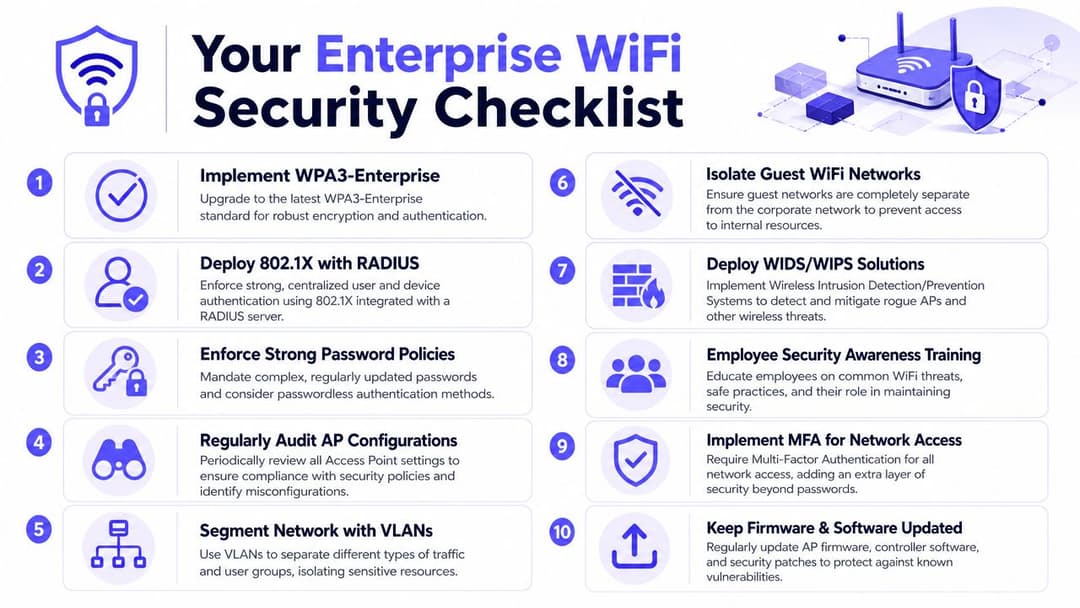
Évaluer l'état actuel
- Recherchez les secrets partagés. Listez chaque SSID qui utilise encore un mot de passe commun et identifiez qui le connaît.
- Cartographiez les classes d'appareils. Séparez les appareils du personnel, des invités, le BYOD, les prestataires, l'IoT et les appareils opérationnels.
- Examinez les limites de confiance. Vérifiez si un accès interne étendu est accordé uniquement parce qu'un appareil s'est connecté au WiFi.
Prioriser les changements de contrôle
- Passez le personnel à l'authentification 802.1X. Commencez par les appareils managés et faites de l'authentification individuelle l'option par défaut.
- Privilégiez l'accès basé sur les certificats. Utilisez EAP-TLS lorsque le cycle de vie des appareils et les processus PKI peuvent le prendre en charge.
- Associez le WiFi aux systèmes d'identité. Les départs de l'entreprise et les changements de rôle doivent affecter l'accès au réseau de manière automatique.
- Utilisez la segmentation de manière agressive. Placez les utilisateurs et les appareils dans des rôles, et pas seulement dans des SSIDs.
- Gérez correctement les exceptions. Utilisez des clés par appareil pour le matériel obsolète au lieu d'un mot de passe de secours partagé.
Renforcer les opérations
- Surveillez les événements d'authentification. Les échecs de connexion, les schémas d'appareils inhabituels et les attributions de rôles incorrectes doivent être visibles.
- Recherchez les infrastructures malveillantes. Surveillez les AP non autorisés et les noms de réseau usurpés.
- Testez la révocation. Prouvez que vous pouvez supprimer un utilisateur ou un appareil instantanément sans perturber tous les autres.
- Documentez la responsabilité. Chaque classe d'appareil doit avoir un responsable métier et un responsable de politique.
La sécurité du WiFi d'entreprise s'améliore rapidement lorsque l'identité, la segmentation et la surveillance progressent ensemble. Si vous ne corrigez qu'un seul de ces aspects, les deux autres deviennent généralement votre prochain point faible.
Si vous modernisez l'accès sans fil et souhaitez une approche plateforme plutôt que d'assembler plusieurs outils, Purple est une option à évaluer. Elle se concentre sur le WiFi basé sur l'identité pour les invités, le personnel et les environnements multi-locataires, incluant l'accès invité sans mot de passe, les intégrations SSO et les contrôles pour l'intégration des appareils hérités, ce qui la rend pertinente pour les équipes qui abandonnent les mots de passe partagés au profit d'un modèle sans fil zero-trust.